
This release is a pre-release and may not be stable for production use.

Langfun



Installation | Getting started | Tutorial | Discord community
Introduction
Langfun is a PyGlove powered library that aims to make language models (LM) fun to work with. Its central principle is to enable seamless integration between natural language and programming by treating language as functions. Through the introduction of Object-Oriented Prompting, Langfun empowers users to prompt LLMs using objects and types, offering enhanced control and simplifying agent development.
To unlock the magic of Langfun, you can start with Langfun 101. Notably, Langfun is compatible with popular LLMs such as Gemini, GPT, Claude, all without the need for additional fine-tuning.
Why Langfun?
Langfun is powerful and scalable:
- Seamless integration between natural language and computer programs.
- Modular prompts, which allows a natural blend of texts and modalities;
- Efficient for both request-based workflows and batch jobs;
- A powerful eval framework that thrives dimension explosions.
Langfun is simple and elegant:
- An intuitive programming model, graspable in 5 minutes;
- Plug-and-play into any Python codebase, making an immediate difference;
- Comprehensive LLMs under a unified API: Gemini, GPT, Claude, Llama3, and more.
- Designed for agile developement: offering intellisense, easy debugging, with minimal overhead;
Hello, Langfun
import langfun as lf
import pyglove as pg

from IPython import display

class Item(pg.Object):
  name: str
  color: str

class ImageDescription(pg.Object):
  items: list[Item]

image = lf.Image.from_uri('https://upload.wikimedia.org/wikipedia/commons/thumb/8/83/Solar_system.jpg/1646px-Solar_system.jpg')
display.display(image)

desc = lf.query(
    'Describe objects in {{my_image}} from top to bottom.',
    ImageDescription,
    lm=lf.llms.Gpt4o(api_key='<your-openai-api-key>'),
    my_image=image,
)
print(desc)
Output:
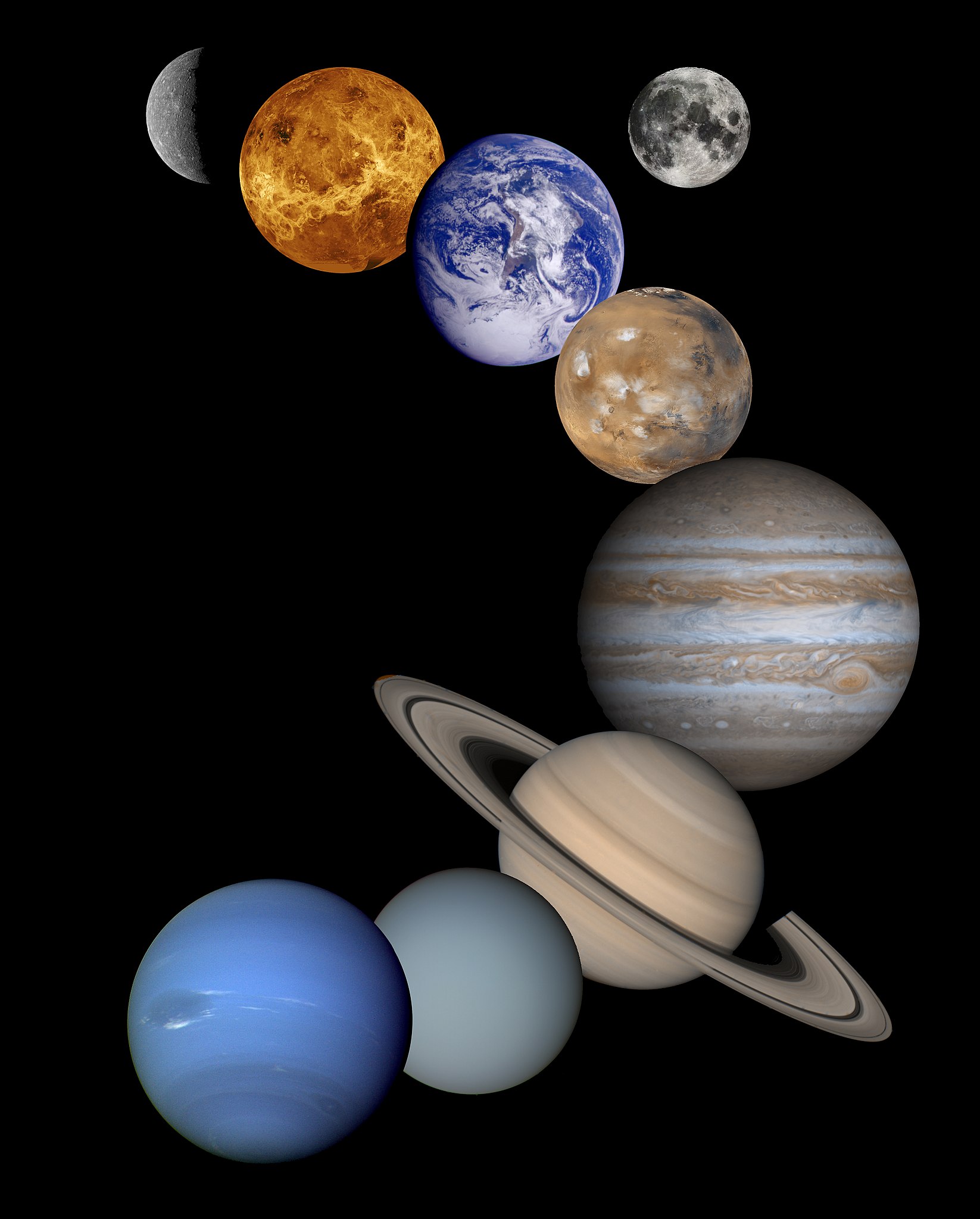
ImageDescription(
  items = [
    0 : Item(
      name = 'Mercury',
      color = 'Gray'
    ),
    1 : Item(
      name = 'Venus',
      color = 'Yellow'
    ),
    2 : Item(
      name = 'Earth',
      color = 'Blue and white'
    ),
    3 : Item(
      name = 'Moon',
      color = 'Gray'
    ),
    4 : Item(
      name = 'Mars',
      color = 'Red'
    ),
    5 : Item(
      name = 'Jupiter',
      color = 'Brown and white'
    ),
    6 : Item(
      name = 'Saturn',
      color = 'Yellowish-brown with rings'
    ),
    7 : Item(
      name = 'Uranus',
      color = 'Light blue'
    ),
    8 : Item(
      name = 'Neptune',
      color = 'Dark blue'
    )
  ]
)
See Langfun 101 for more examples.
Install
Langfun offers a range of features through Extras, allowing users to install only what they need. The minimal installation of Langfun requires only PyGlove, Jinja2, and requests. To install Langfun with its minimal dependencies, use:
pip install langfun
For a complete installation with all dependencies, use:
pip install langfun[all]
To install a nightly build, include the --pre flag, like this:
pip install langfun[all] --pre
If you want to customize your installation, you can select specific features
using package names like langfun[X1, X2, ..., Xn], where Xi corresponds to
a tag from the list below:
| Tag | Description |
|---|---|
| all | All Langfun features. |
| vertexai | VertexAI access. |
| mime | All MIME supports. |
| mime-pil | Image support for PIL. |
| ui | UI enhancements |
For example, to install a nightly build that includes VertexAI access, full modality support, and UI enhancements, use:
pip install langfun[vertexai,mime,ui] --pre
Disclaimer: this is not an officially supported Google product.
1 maintainer

Release files for langfun 0.1.2.dev202607150847
For a detailed explanation of source distributions (sdists) and built distributions (wheels), please see the package formats documentation.
Source distribution (sdist)
| File | Size | Uploaded | |
|---|---|---|---|
| langfun-0.1.2.dev202607150847.tar.gz | 447.0 kB | Details |
Built distribution (wheel)
| File | Interpreter | ABI | Platform | Reset |
|---|---|---|---|---|
| langfun-0.1.2.dev202607150847-py3-none-any.whl | Python 3 | none | any | Details |
Total release size: 1.1 MB
Release files / langfun-0.1.2.dev202607150847.tar.gz
| Download URL | langfun-0.1.2.dev202607150847.tar.gz |
|---|---|
| Size | 447.0 kB |
| Tags | Source |
|
SHA-256 checksum How to use checksums |
d8f9b35420767739dbe257d0a74daad99406269843b882384b47818050b05509
|
|
BLAKE2b-256 checksum How to use checksums |
9d8df3c688324d531ec7364a49e9f48b89dddc412a5da58e8a146a499fcaeb6b
|
| Upload date | |
|
Uploaded using Trusted Publishing? What is trusted publishing? |
No |
| Uploaded via |
twine/6.2.0 CPython/3.14.6
|
Release files / langfun-0.1.2.dev202607150847-py3-none-any.whl
| Download URL | langfun-0.1.2.dev202607150847-py3-none-any.whl |
|---|---|
| Size | 617.4 kB |
| Tags | Python 3 |
|
SHA-256 checksum How to use checksums |
d2763dda7f524c5db218e4510dd89ec44eb3a6937db70cddfa14193c436e4972
|
|
BLAKE2b-256 checksum How to use checksums |
af31358904d0a4e6771de7a06bae585e173360387f59fbf89482861a7cd255c1
|
| Upload date | |
|
Uploaded using Trusted Publishing? What is trusted publishing? |
No |
| Uploaded via |
twine/6.2.0 CPython/3.14.6
|














