
Full toolkit for running an AI agent service built with LangGraph, FastAPI and Streamlit

Project description
🧰 LangGraph Agent Toolkit
| CI/Testing |    |
| Package |    |
| Meta |   |
📋 Introduction
A comprehensive toolkit for building, deploying, and managing AI agents using LangGraph, FastAPI, and Streamlit. It provides a production-ready framework for creating conversational AI agents with features like multi-provider LLM support, streaming responses, observability, memory and prompt management.
What is langGraph-agent-toolkit?
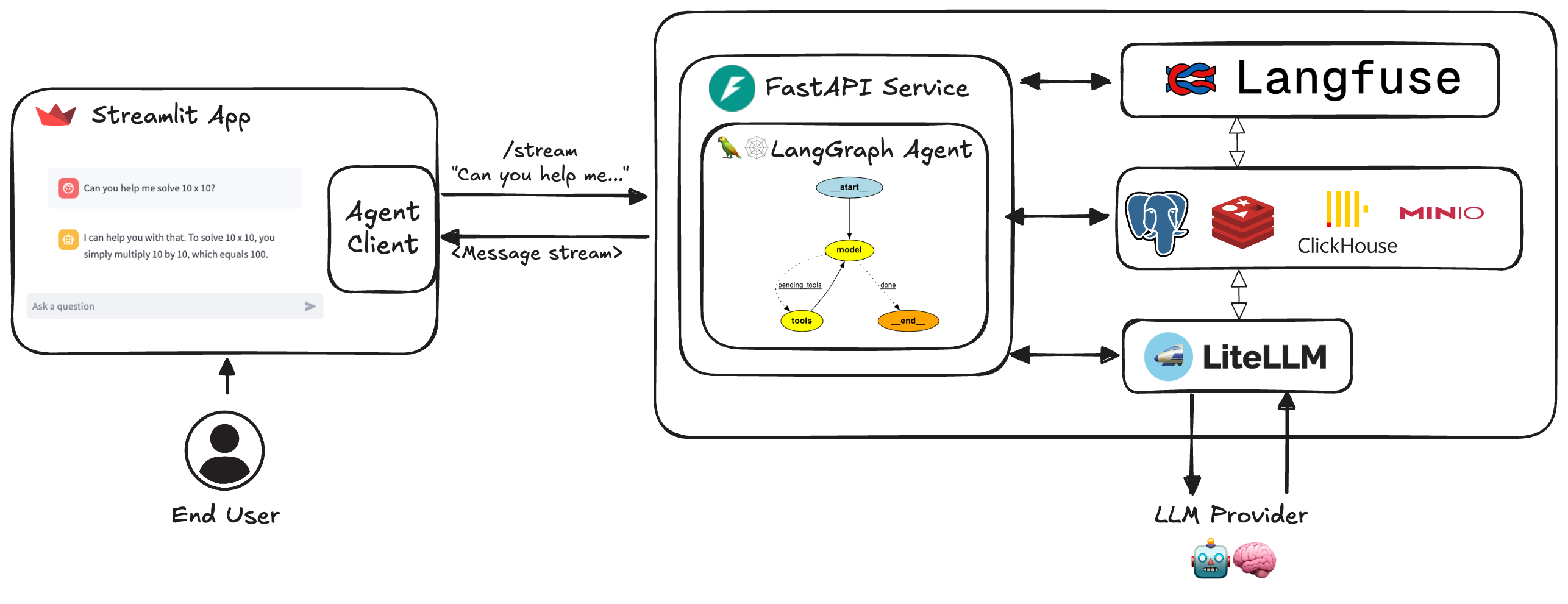
The langgraph-agent-toolkit is a full-featured framework for developing and deploying AI agent services. Built on the foundation of:
- LangGraph for agent creation with advanced flows and human-in-the-loop capabilities
- FastAPI for robust, high-performance API services with streaming support
- Streamlit for intuitive user interfaces
Key components include:
- Data structures and settings built with Pydantic
- LiteLLM proxy for universal multi-provider LLM support
- Comprehensive memory management and persistence using PostgreSQL/SQLite
- Advanced observability tooling via Langfuse and Langsmith
- Modular architecture allowing customization while maintaining a consistent application structure
Whether you're building a simple chatbot or complex multi-agent system, this toolkit provides the infrastructure to develop, test, and deploy your LangGraph-based agents with confidence.
You can use DeepWiki to learn more about this repository.
📑 Contents
- Introduction
- Quickstart
- Installation Options
- Architecture
- Key Features
- Environment Setup
- Project Structure
- Setup and Usage
- Documentation
- Useful Resources
- Development and Contributing
- License
🚀 Quickstart
-
Create a
.envfile based on.env.example -
Option 1: Run with Python from source
# Install dependencies
pip install uv
uv sync --frozen
source .venv/bin/activate

# Start the service
python langgraph_agent_toolkit/run_api.py

# In another terminal
source .venv/bin/activate
streamlit run langgraph_agent_toolkit/run_app.py
-
Option 2: Run with Python from PyPi repository
pip install langgraph-agent-toolkit
ℹ️ For more details on installation options, see the Installation Documentation.
-
Option 3: Run with Docker
docker compose watch
📦 Installation Options
The toolkit supports multiple installation options using "extras" to include just the dependencies you need.
For detailed installation instructions and available extras, see the Installation Documentation.
🏗️ Architecture
✨ Key Features
-
LangGraph Integration
- Latest LangGraph v1.x features
- Human-in-the-loop with
interrupt() - Flow control with
Commandandlanggraph-supervisor
-
API Service
- FastAPI with streaming and non-streaming endpoints
- Streaming over Server-Sent Events (SSE) or JSON Lines (NDJSON)
- Multimodal input (images, files/PDF, audio, video) via LangChain content blocks
- Support for both token-based and message-based streaming
- Multiple agent support with URL path routing
- Available agents and models listed at
/infoendpoint - Supports different runners (unicorn, gunicorn, mangum, azure functions)
-
Developer Experience
- Asynchronous design with async/await
- Docker configuration with live reloading
- Comprehensive testing suite
-
Enterprise Components
- Configurable PostgreSQL/SQLite connection pools
- Observability via Langfuse and Langsmith
- User feedback system
- Prompt management system
- LiteLLM proxy integration
For more details on features, see the Usage Documentation.
⚙️ Environment Setup
For detailed environment setup instructions, including creating your .env file
and configuring LiteLLM, see the
Environment Setup Documentation.
📂 Project Structure
The repository contains:
langgraph_agent_toolkit/agents/blueprints/: Agent definitionslanggraph_agent_toolkit/agents/agent_executor.py: Agent execution controllanggraph_agent_toolkit/schema/: Protocol schema definitionslanggraph_agent_toolkit/core/: Core modules (LLM, memory, settings)langgraph_agent_toolkit/service/service.py: FastAPI servicelanggraph_agent_toolkit/client/client.py: Service clientlanggraph_agent_toolkit/run_app.py: Chat interfacedocker/: Docker configurationstests/: Test suite
🛠️ Setup and Usage
For detailed setup and usage instructions, including building your own agent, Docker setup, using the AgentClient, and local development, see the Usage Documentation.
📚 Documentation
Full documentation is available at GitHub repository and includes:
📚 Useful Resources
- LangGraph documentation
- LangGraph Memory Concept
- LangGraph Memory Persistence
- LangGraph Memory Template
- LangGraph Human in the Loop
- LangGraph 101 - blueprints
- LangGraph - Examples
- Complex data extraction with function calling
- How to edit graph state
- Memory in the background
- Building an agent with LangGraph
- How to create tools in Langchain
- Simple Serverless FastAPI with AWS Lambda
- LangGraph Middleware
👥 Development and Contributing
Thank you for considering contributing to Langgraph Agent Toolkit! We
encourage the community to post Issues and Pull Requests.
Before you get started, please see our Contribution Guide.
📄 License
This project is licensed under the MIT License - see the LICENSE file for details.
Project details
Release history Release notifications | RSS feed


Download files
Download the file for your platform. If you're not sure which to choose, learn more about installing packages.
Source Distribution
Built Distribution
Filter files by name, interpreter, ABI, and platform.
If you're not sure about the file name format, learn more about wheel file names.
Copy a direct link to the current filters
File details
Details for the file langgraph_agent_toolkit-0.9.2.tar.gz.
File metadata
- Download URL: langgraph_agent_toolkit-0.9.2.tar.gz
- Upload date:
- Size: 1.6 MB
- Tags: Source
- Uploaded using Trusted Publishing? No
- Uploaded via: twine/6.2.0 CPython/3.13.13
File hashes
| Algorithm | Hash digest | |
|---|---|---|
| SHA256 |
0ccf74521a4a5a3c305e796720ae5f23e027a3bbdfb209eb836a91e2b09138b5
|
|
| MD5 |
7953771a488da73ecf0b31e29474d9f5
|
|
| BLAKE2b-256 |
548c06ecc5b848619f209a7473e266866242901dbda085824eea5ffd17e0ebdf
|
File details
Details for the file langgraph_agent_toolkit-0.9.2-py3-none-any.whl.
File metadata
- Download URL: langgraph_agent_toolkit-0.9.2-py3-none-any.whl
- Upload date:
- Size: 129.9 kB
- Tags: Python 3
- Uploaded using Trusted Publishing? No
- Uploaded via: twine/6.2.0 CPython/3.13.13
File hashes
| Algorithm | Hash digest | |
|---|---|---|
| SHA256 |
c937ed1c55d6fbc53c8efa794b0b1caf3cd34bc17a88b8770d1e413b8c1cbd84
|
|
| MD5 |
f0272e5270c2ff8f6e006e47095bad91
|
|
| BLAKE2b-256 |
5163d6ddd595fceee7b7b21cb38573e083e369373e02891871c7182e2d6ad27d
|






