
langgraph-dbos


Durable LangGraph agents on your own Postgres. Wrap any compiled LangGraph graph, call it from a DBOS workflow, and it survives crashes, restarts and deploys:
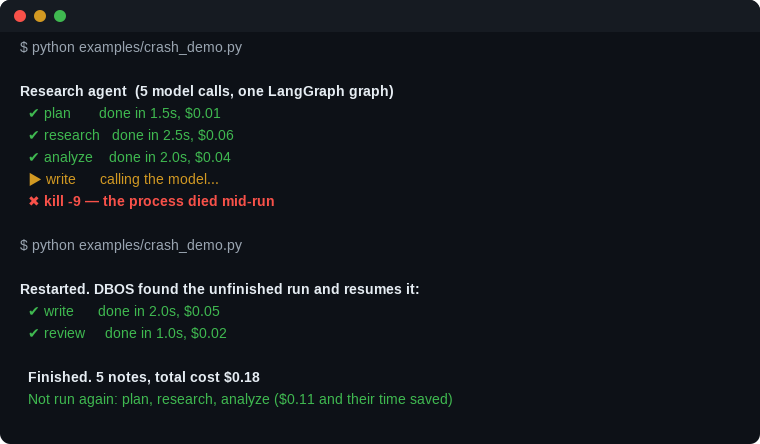
- Crash recovery that resumes, not restarts. Kill the process mid-run; on restart DBOS finds the unfinished run and continues from the node that was running. Nodes that already finished, and the LLM calls inside them, are not run or paid for again.
- Human-in-the-loop that waits for days. A node calls LangGraph's
interrupt(); the workflow waits in the database, not in memory, across any number of restarts. Answer from a web handler or another service. Late, stale or double-clicked answers are never applied to the wrong question. - Queues and rate limits for agents. Run many graph runs through a DBOS queue with concurrency and per-second limits to stay under LLM API quotas.
- Retries that resume. A segment that fails with a transient error is retried from the latest checkpoint, so only the failed node runs again.
- Streaming that outlives the request. Stream graph events into a DBOS stream and read them from any process, while the run is going or after.
- No rewrite. Your graph stays a normal LangGraph graph:
StateGraph, the Functional API, subgraphs,Send, reducers, callbacks. No nodes to re-register.
No extra server to run: DBOS is a library, and its state lives in the same Postgres (or SQLite) database as your LangGraph checkpoints.
Install
pip install "langgraph-dbos[postgres]"   # PostgresSaver + psycopg
pip install "langgraph-dbos[sqlite]"     # SqliteSaver, for local development
Needs Python 3.10+, dbos>=3.0 and langgraph>=1.0.
Quickstart
import psycopg
from dbos import DBOS
from langgraph.checkpoint.postgres import PostgresSaver
from langgraph.graph import START, StateGraph
from psycopg.rows import dict_row
from typing_extensions import TypedDict

from langgraph_dbos import DBOSGraph

DATABASE_URL = "postgresql://postgres:dbos@localhost:5433/langgraph_dbos"


class State(TypedDict, total=False):
    question: str
    research: str
    answer: str


def research(state: State) -> State:
    return {"research": f"notes about {state['question']}"}  # an LLM call


def write(state: State) -> State:
    return {"answer": f"answer from {state['research']}"}  # another LLM call


builder = StateGraph(State)
builder.add_node("research", research)
builder.add_node("write", write)
builder.add_edge(START, "research")
builder.add_edge("research", "write")

conn = psycopg.connect(DATABASE_URL, autocommit=True, prepare_threshold=0, row_factory=dict_row)
checkpointer = PostgresSaver(conn)
checkpointer.setup()

agent = DBOSGraph(builder.compile(checkpointer=checkpointer))

DBOS(config={"name": "research-agent", "system_database_url": DATABASE_URL})


@DBOS.workflow()
def answer_question(question: str) -> str:
    return agent.invoke({"question": question})["answer"]


if __name__ == "__main__":
    DBOS.launch()  # also recovers runs that a crash left unfinished
    print(answer_question("What is durable execution?"))
DBOSGraph.invoke takes the same input and config as graph.invoke and
returns the same output. It must be called from a @DBOS.workflow(). From an
async workflow, use await agent.ainvoke(...) with an async checkpointer
such as AsyncPostgresSaver.
Start a local Postgres with docker compose up -d (compose.yaml) or:
docker run -d --name langgraph-dbos-pg -e POSTGRES_PASSWORD=dbos -e POSTGRES_DB=langgraph_dbos -p 5433:5432 postgres:17
See it survive a crash
python examples/crash_demo.py   # 5 "LLM" nodes; the process is killed with SIGKILL during "write"
python examples/crash_demo.py   # restart: resumes at "write", the first 3 nodes are not called again
Human-in-the-loop
Use LangGraph's own interrupt() in a node. invoke waits durably for the
answer and then continues the graph:
from langgraph.types import interrupt


def approve(state: State) -> State:
    decision = interrupt({"draft": state["draft"], "ask": "Send this reply?"})
    return {"decision": decision}


@DBOS.workflow()
def reply_to_ticket(question: str) -> State:
    return agent.invoke({"question": question})
From anywhere else (a FastAPI route, a Slack handler, a CLI):
from dbos import DBOSClient
from langgraph_dbos import get_pending_input, send_input

client = DBOSClient(system_database_url=DATABASE_URL)  # or leave out client= inside a DBOS app

pending = get_pending_input(workflow_id, client=client)
# {"token": "...", "thread_id": "...", "interrupts": [{"id": "...", "value": {"draft": ..., "ask": ...}}]}

send_input(workflow_id, "ship it", token=pending["token"], client=client)
- The answer becomes the return value of
interrupt(), exactly as withCommand(resume=...). - Pass the
tokenyou showed the human. A reply with an old token is ignored, and a second reply with the same token is not delivered (DBOS idempotency). - Several nodes interrupted at once: send a dict that maps each interrupt
idto its answer. invoke(..., input_timeout=3600)stops waiting after an hour and returns the interrupted output (with"__interrupt__").wait_for_input=Falsereturns at the first interrupt.
Try it: examples/human_approval.py. Kill the worker while it waits, start it again, then answer from another terminal.
Many agents, with limits
@DBOS.workflow()
def weather(city: str) -> str:
    return agent.invoke({"city": city})["summary"]


DBOS.launch()
agents = DBOS.register_queue("agents", global_concurrency=3, limiter={"limit": 10, "period": 1})
handles = [agents.enqueue(weather, city) for city in cities]
See examples/queue_many_agents.py.
Streaming
@DBOS.workflow()
def run(question: str) -> State:
    return agent.invoke({"question": question}, stream_mode=["updates", "custom"])


for mode, chunk in DBOS.read_stream(workflow_id, "langgraph.stream"):
    ...
Chunks have the same shape as graph.stream(...) with the same stream_mode.
Change the key with stream_key=, and use a different key for each
streaming invoke in one workflow (or pass close_stream=False to keep
writing to one stream). The stream is closed when invoke returns, so
readers stop. Delivery is at-least-once: after a crash or retry, chunks from
the node that was running are written again.
Retries
agent = DBOSGraph(
    graph, step_options={"retries_allowed": True, "max_attempts": 5, "backoff_rate": 2}
)
Each retry resumes from the latest checkpoint, so nodes that finished before the failure are not run again.
How it works
@DBOS.workflow
 ├─ step  <name>.start   records the thread id and the checkpoint the run starts from
 ├─ step  <name>.run     graph.invoke(...) until it finishes or hits interrupt()
 ├─ set_event            "waiting for input" + token
 ├─ recv                 the human's reply (durable wait)
 ├─ step  <name>.run     graph.invoke(Command(resume=reply))
 └─ ...
- A run is split into segments: one
graph.invokeuntil the graph ends or interrupts. Each segment is one DBOS step, so the workflow's recorded history is the same on every replay. - Inside a segment, LangGraph's checkpointer saves every super-step
(
durability="sync"by default). - If the process dies mid-segment, DBOS reruns that step on recovery. The step
compares the thread's latest checkpoint and its pending writes with what was
recorded when the segment began. Unchanged: it applies the input. Changed: a
previous attempt made progress, so it resumes with
invoke(None), never applying the input twice and never letting a saved answer reach a later question. @DBOS.step()functions called inside nodes run inline as part of the segment, so existing DBOS tools can be reused in nodes.
More detail, and the designs that were rejected: docs/design.md.
Guarantees and limits
- A node that was running when the process died runs again. Finished nodes do not. Make side effects in nodes idempotent (an idempotency key on the payment, upsert instead of insert), as with any at-least-once system.
- Use a persistent checkpointer. With
InMemorySaver, a recovered run cannot resume and raisesCheckpointLostError(you get a warning when you create theDBOSGraph). - An answer is never applied to a question it was not given for. In one narrow crash window (after LangGraph saved the answer, before the node read it) the question is asked again instead of guessing; the human answers twice, but no answer lands on the wrong question.
- Graph output and interrupt values must be serializable by DBOS (pickle by default), because DBOS records each segment's output. LangChain messages are. This package's own records are plain dicts.
- Only this run writes to its thread. Two workflows on the same
thread_idat once are not supported (with a queue, partition by thread). Do not callgraph.update_state(...)on a thread while its workflow waits for input: the next reply is then treated as stale and the question is asked again. Put edits in the reply instead. - Call
invoke/ainvokeone after another in a workflow, not withasyncio.gather. For parallel graph runs, start child workflows. - Use
interrupt(), not staticinterrupt_before/interrupt_afterbreakpoints. After a crash, a run paused at a static breakpoint could continue past it. - Forking (
DBOS.fork_workflow) works from the<name>.startstep or earlier: the fork gets its own fresh graph run. Forking into the middle of a run raisesForkNotSupportedErrorinstead of sharing the original's thread. - Python 3.10 and async nodes: LangGraph's
interrupt()does not work inasyncnodes on Python 3.10 (a LangGraph limitation). Sync nodes are fine. - Code changes: as with any DBOS workflow, a pending run must be recovered
by compatible code. Keep
DBOSGraph(name=...)stable.
Compared with
| Checkpointer only | langgraph-dbos | |
|---|---|---|
| State saved after each super-step | yes | yes (same checkpointer) |
| Unfinished runs restarted after a crash | no: you find and re-invoke them | yes, on DBOS.launch() |
| Waiting for a human across restarts | thread stays paused; you build the resume plumbing | built in, with stale and duplicate protection |
| Queues, concurrency and rate limits | no | DBOS queues |
| Run history, cancel, resume, fork | no | DBOS workflow management |
SamuelXing/dbos-langgraph
takes a different route: it runs each node as its own DBOS child workflow with
no LangGraph checkpointer, and nodes are registered through its plugin. This
package keeps LangGraph's checkpointer and runs your compiled graph as it is,
which is what lets interrupt(), subgraphs and streaming work unchanged.
Development
uv sync
uv run pytest                       # SQLite
LANGGRAPH_DBOS_TEST_POSTGRES=postgresql://postgres:dbos@localhost:5433/langgraph_dbos uv run pytest
uv run ruff check . && uv run mypy
The recovery tests start a real process, kill it with SIGKILL in the middle
of a run, restart it, and count how many times each node body ran.
License
MIT
1 maintainer

Metadata
1 maintainer
Release files for langgraph-dbos 0.1.0
For a detailed explanation of source distributions (sdists) and built distributions (wheels), please see the package formats documentation.
Source distribution (sdist)
| File | Size | Uploaded | Provenance | Actions |
|---|---|---|---|---|
| langgraph_dbos-0.1.0.tar.gz | 30.4 kB | With provenance | Details for langgraph_dbos-0.1.0.tar.gz |
Built distribution (wheel)
| File | Interpreter | ABI | Platform | Actions Reset |
|---|---|---|---|---|
| langgraph_dbos-0.1.0-py3-none-any.whl | Python 3 | none | any | Details for langgraph_dbos-0.1.0-py3-none-any.whl |
Total release size: 46.6 kB
Release files / langgraph_dbos-0.1.0.tar.gz
| Download URL | langgraph_dbos-0.1.0.tar.gz |
|---|---|
| Size | 30.4 kB |
| Tags | Source |
|
SHA-256 checksum How to use checksums |
74b39bf6b081ba6b9e9688a5880366e05ba72e31ebaf87023e98253aa0143efa
|
|
BLAKE2b-256 checksum How to use checksums |
c1979a81cb04f74754508acb03d91d3d9a5c0d944fcf680cd59535ce4c118e7c
|
| Upload date | |
|
Uploaded using Trusted Publishing? What is trusted publishing? |
Yes |
| Uploaded via |
twine/7.0.0 CPython/3.13.16
|
Provenance
Provenance describes where a file came from. On PyPI, provenance is shared via attestations, which provide a verifiable record of the build or publishing details. View details, limitations and caveats.


PyPI Publish Attestation
PyPI verified that this artifact, at this checksum, originated from the publisher listed below.
Signed by GitHub Actions, verified by PyPI on Nov 20, 2026.
Transparency logRelease files / langgraph_dbos-0.1.0-py3-none-any.whl
| Download URL | langgraph_dbos-0.1.0-py3-none-any.whl |
|---|---|
| Size | 16.2 kB |
| Tags | Python 3 |
|
SHA-256 checksum How to use checksums |
0926604655e5a2775d7fee9304306f5274c2c900e79eaa42ce993081d77fcc67
|
|
BLAKE2b-256 checksum How to use checksums |
556a99703b30f37c56d67451c10493ebe9bb541e346b0db764e8061eb4955ed2
|
| Upload date | |
|
Uploaded using Trusted Publishing? What is trusted publishing? |
Yes |
| Uploaded via |
twine/7.0.0 CPython/3.13.16
|
Provenance
Provenance describes where a file came from. On PyPI, provenance is shared via attestations, which provide a verifiable record of the build or publishing details. View details, limitations and caveats.
PyPI Publish Attestation
PyPI verified that this artifact, at this checksum, originated from the publisher listed below.
Signed by GitHub Actions, verified by PyPI on Nov 20, 2026.
Transparency logSecurity for langgraph-dbos 0.1.0
Provenance
Provenance describes where a file came from. On PyPI, provenance is shared via attestations, which provide a verifiable record of the build or publishing details. View details, limitations and caveats.
Full provenance
Both files in this release have been uploaded with provenance metadata.
Attestation for langgraph_dbos-0.1.0.tar.gz
PyPI Publish Attestation
PyPI verified that this artifact, at this checksum, originated from the publisher listed below.
Signed by GitHub Actions, verified by PyPI on Nov 20, 2026.
Transparency logA note on package security
PyPI is a repository for distributing packages, not a service for auditing them. While third-party security researchers and our staff do their best to detect and remove malicious packages, PyPI cannot guarantee the quality, security or suitability of any given package.
To learn more about protecting yourself from malicious actors, visit our package security documentation.













