
langgraph-checkpoint-cosmosdb
A LangGraph checkpointer for Azure Cosmos DB with two things a plain checkpointer does not have: bounded message history and a long-term memory hook, both inside the save path, with no change to your graph.
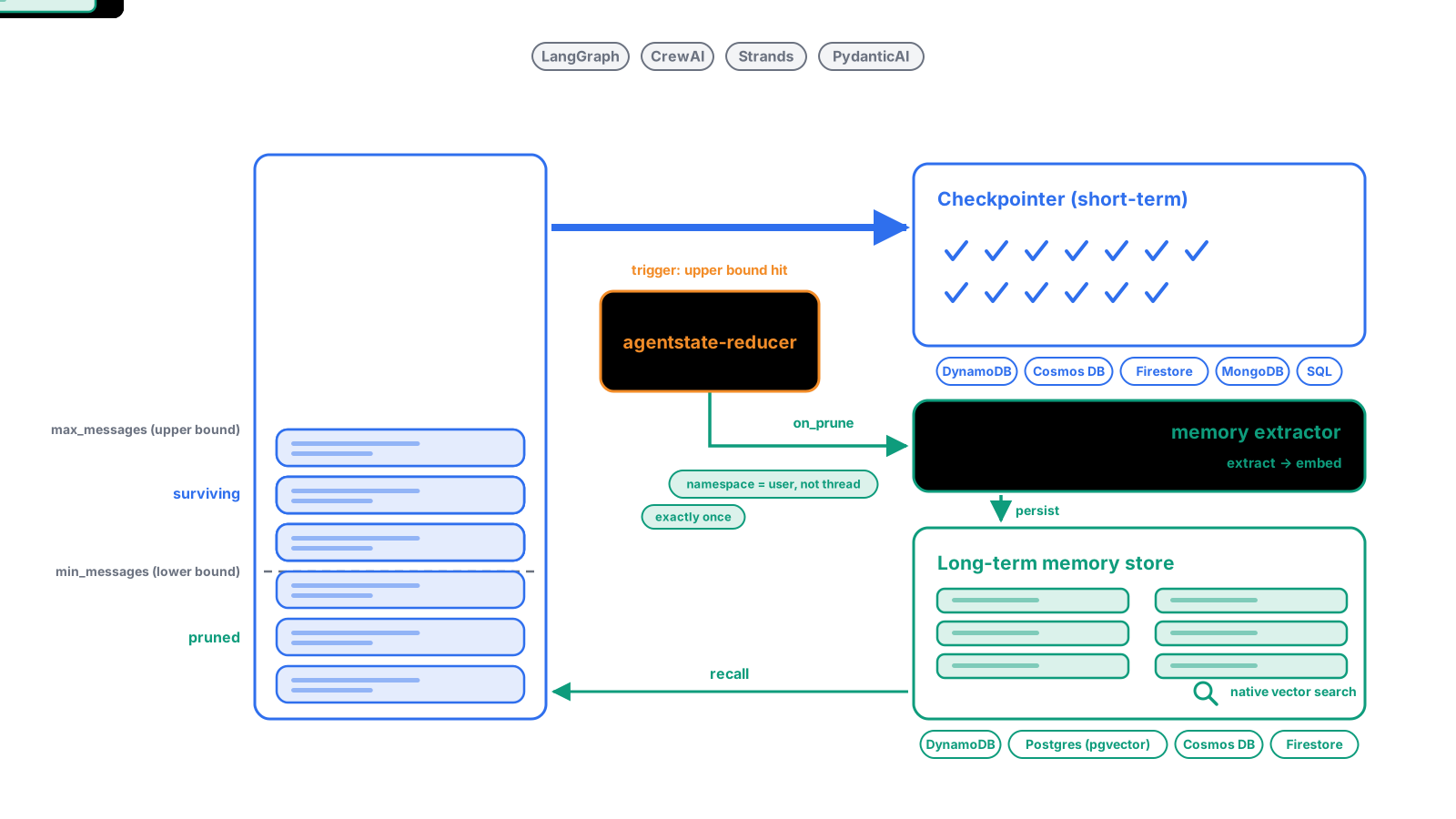
- Bounded history. Every thread's message list is pruned before each checkpoint is written, by message count or token budget, whole messages only, tool-call pairs kept intact. The sawtooth above is the checkpoint size over time. Without a reducer it is a straight line up.
- Long-term memory. The turns that leave the window are handed to the reducer's
on_prunehook, once each, together with thememory_namespaceyour app put in the run config. Wire that hook to any store or extraction engine;langgraph-memoryis the ready-made one. - One line of config.
from agentstate_reducer import MessageReducer, ReducerConfig, Background
from langgraph_checkpoint_cosmosdb import CosmosDBSaver

reducer = MessageReducer(config=ReducerConfig(max_messages=20))            # add on_prune=[Background(engine.on_prune)] for memory
saver = CosmosDBSaver("mydb", "checkpoints", reducer=reducer)
graph = builder.compile(checkpointer=saver)

graph.invoke(input, config={"configurable": {"thread_id": thread_id, "memory_namespace": ("memories", user_id)}})
Details: Built-in Message Pruning below, and the full story with every framework and store at https://skamalj.github.io/agentstate-reducer/.
Installation
pip install "langgraph-checkpoint-cosmosdb[reducer]"
pip install langgraph-checkpoint-cosmosdb # checkpointer only; history is unbounded
Without reducer=, the saver logs one INFO line per process saying so, with the link above. Set AGENTSTATE_QUIET=1 to silence it.
Requires Python 3.10+. Key or RBAC / Managed Identity auth, auto-created database and container, sync and async, subgraphs. Conformance-tested with langgraph-checkpoint-conformance (full base suite).
Database and Container Setup
| Auth mode | Database | Container | Partition key |
|---|---|---|---|
Key-based (COSMOSDB_KEY set) |
Created automatically if absent | Created automatically if absent | /partition_key (set by saver) |
| RBAC / Managed Identity (no key) | Must pre-exist | Must pre-exist | /partition_key (must be pre-configured) |
Key-based is the easiest way to get started — just point the saver at an existing CosmosDB account and it will provision everything.
RBAC is recommended for production. Because the saver only calls get_database_client / get_container_client (no write permissions needed at setup time), the database and container must already be provisioned before the saver is initialised. Create them via the Azure portal, Terraform, Bicep, or the Azure CLI:
az cosmosdb sql database create --account-name <account> --name <db>
az cosmosdb sql container create \
  --account-name <account> --database-name <db> --name <container> \
  --partition-key-path "/partition_key"
Important: The partition key path must be
/partition_keyregardless of how the container is created.
Authentication
Key-based (development / admin access)
export COSMOSDB_ENDPOINT="https://<account>.documents.azure.com:443/"
export COSMOSDB_KEY="<your-key>"
Azure RBAC / Managed Identity (production)
Set only the endpoint — no key. The saver uses DefaultAzureCredential, which resolves in this order: environment service principal → managed identity → az login.
export COSMOSDB_ENDPOINT="https://<account>.documents.azure.com:443/"
# COSMOSDB_KEY not set → DefaultAzureCredential is used
For user-assigned managed identity:
export AZURE_CLIENT_ID="<managed-identity-client-id>"
For service principal:
export AZURE_TENANT_ID="<tenant-id>"
export AZURE_CLIENT_ID="<client-id>"
export AZURE_CLIENT_SECRET="<client-secret>"
Quick Start
from langgraph.graph import StateGraph, MessagesState, START
from langchain_openai import ChatOpenAI
from langgraph_checkpoint_cosmosdb import CosmosDBSaver

model = ChatOpenAI(model="gpt-4o-mini")

def call_model(state: MessagesState):
    return {"messages": model.invoke(state["messages"])}

builder = StateGraph(MessagesState)
builder.add_node("call_model", call_model)
builder.add_edge(START, "call_model")

checkpointer = CosmosDBSaver(database_name="mydb", container_name="checkpoints")
graph = builder.compile(checkpointer=checkpointer)

config = {"configurable": {"thread_id": "user-123"}}

# First run — state is saved to CosmosDB
graph.invoke({"messages": [{"role": "user", "content": "Hi, I'm Kamal"}]}, config)

# Second run — picks up where it left off
graph.invoke({"messages": [{"role": "user", "content": "What's my name?"}]}, config)
API Reference
CosmosDBSaver(database_name, container_name, reducer=None, messages_key="messages")
| Parameter | Type | Default | Description |
|---|---|---|---|
database_name |
str |
required | CosmosDB database name |
container_name |
str |
required | CosmosDB container name |
reducer |
MessageReducer |
None |
Optional pruner — see Message Pruning |
messages_key |
str |
"messages" |
State channel name that holds the message list |
Sync methods
| Method | Description |
|---|---|
put(config, checkpoint, metadata, new_versions) |
Save a checkpoint |
put_writes(config, writes, task_id) |
Save pending writes for a checkpoint |
get_tuple(config) |
Retrieve the latest (or a specific) checkpoint |
list(config, *, before, limit) |
Iterate checkpoints for a thread |
Async methods
All sync methods have async counterparts: aput, aput_writes, aget_tuple, alist, and adelete.
# Async usage
checkpoint = await saver.aget_tuple(config)
await saver.adelete(thread_id="user-123", checkpoint_namespace="", checkpoint_id="<id>")
list usage
# List all checkpoints for a thread (newest first)
for cp in saver.list(config={"configurable": {"thread_id": "user-123"}}):
    print(cp.checkpoint["id"], cp.metadata)

# Limit results
for cp in saver.list(config, limit=5):
    print(cp)
Limitation:
listonly supports filtering bythread_id. Thefilterparameter (filtering by metadata) is not yet implemented.
Subgraph Support
Works transparently with LangGraph subgraphs — parent and subgraph checkpoints are stored under the same container using namespaced partition keys:
from langgraph.graph import StateGraph, START
from langgraph_checkpoint_cosmosdb import CosmosDBSaver
from typing import TypedDict

class SubState(TypedDict):
    foo: str
    bar: str

class State(TypedDict):
    foo: str

# ... build parent + subgraph as normal ...
checkpointer = CosmosDBSaver(database_name="mydb", container_name="checkpoints")
graph = parent_builder.compile(checkpointer=checkpointer)

for _, chunk in graph.stream({"foo": "hello"}, config, subgraphs=True):
    print(chunk)
Built-in Message Pruning
Long-running agents accumulate message history with every turn. Left unchecked this inflates checkpoint size, increases CosmosDB storage costs, and eventually blows past LLM context limits.
This checkpointer solves that at the persistence layer: pass a MessageReducer and it automatically prunes the message list inside put() before the checkpoint is serialised and written to CosmosDB. Your graph code, state definition, and node logic stay untouched.
This is an alternative to — or complement of — the LangGraph Annotated[list, reducer_fn] pattern. Use the checkpoint-layer approach when:
- You don't own the graph or state definition (e.g. using a pre-built LangGraph agent)
- You want pruning to happen unconditionally at every save, regardless of which node triggered it
- You want to keep all in-memory state intact and only prune what gets persisted
Install with reducer support
pip install "langgraph-checkpoint-cosmosdb[reducer]"
Usage
from agentstate_reducer import MessageReducer
from langgraph_checkpoint_cosmosdb import CosmosDBSaver

reducer = MessageReducer(min_messages=10, max_messages=20)

checkpointer = CosmosDBSaver(
    database_name="mydb",
    container_name="checkpoints",
    reducer=reducer,        # prune before each checkpoint save
    messages_key="messages" # state channel holding the message list (default)
)
When len(messages) > max_messages, the oldest human/ai messages are removed until min_messages remain. The following are never pruned:
- Index 0 (typically the system prompt) — controlled by
preserve_first=True systemandfunctionmessagestoolmessages — unless their parentaimessage is pruned (cascade behaviour, configurable)
See agentstate-reducer on PyPI for full configuration: preserve_first, cascade_tool_messages, summarize_fn, and role alias support (user/assistant/agent).
Usage — long-term memory via on_prune (agentstate-reducer >= 0.4.0)
Messages pruned from the checkpoint are exactly the ones leaving the model's view. The saver forwards a memory namespace to the reducer, and any on_prune hook receives (pruned_messages, namespace) — so pruned turns can flow straight into a LangGraph BaseStore (or LangMem, or any memory engine) with no extra node and no package coupling:
from uuid import uuid4
from agentstate_reducer import MessageReducer, ReducerConfig, Background
from langgraph_checkpoint_cosmosdb import CosmosDBSaver

store = ...  # any langgraph BaseStore

def remember(pruned, namespace):
    for m in pruned:
        store.put(tuple(namespace), key=str(uuid4()), value={"role": m.type, "content": m.content})

reducer = MessageReducer(config=ReducerConfig(max_messages=20, on_prune=[remember]))
# on_prune=[Background(remember)] runs a slow hook (e.g. LLM extraction) off the request path
saver = CosmosDBSaver(database_name="mydb", container_name="checkpoints", reducer=reducer)
graph = builder.compile(checkpointer=saver, store=store)

graph.invoke(input, config={"configurable": {
    "thread_id": uuid4().hex,                    # short-term scope (this checkpoint)
    "memory_namespace": ("memories", user_id),   # long-term scope (the store)
}})
The saver reads memory_namespace (or whatever ReducerConfig.namespace_key names) from config["configurable"] on every put() and passes it through untouched. If the app never sets it, the namespace falls back to ("memories", thread_id). Each pruned message reaches the hooks once, even though LangGraph writes several checkpoints per turn.
Data Model
Checkpoints and writes are stored as separate items in the same CosmosDB container, differentiated by a key prefix and partition key:
| Item type | Partition key format | Item id format |
|---|---|---|
| Checkpoint | checkpoint$<thread_id>$<ns>$ |
checkpoint$<thread_id>$<ns>$<checkpoint_id> |
| Pending write | writes$<thread_id>$<ns>$<checkpoint_id>$ |
writes$<thread_id>$<ns>$<checkpoint_id>$<task_id>$<idx> |
The container requires a partition key path of /partition_key.
License
MIT
1 maintainer

Metadata
1 maintainer
Release files for langgraph_checkpoint_cosmosdb 0.3.3
For a detailed explanation of source distributions (sdists) and built distributions (wheels), please see the package formats documentation.
Source distribution (sdist)
| File | Size | Uploaded | |
|---|---|---|---|
| langgraph_checkpoint_cosmosdb-0.3.3.tar.gz | 187.6 kB | Details |
Built distribution (wheel)
| File | Interpreter | ABI | Platform | Reset |
|---|---|---|---|---|
| langgraph_checkpoint_cosmosdb-0.3.3-py3-none-any.whl | Python 3 | none | any | Details |
Total release size: 200.7 kB
Release files / langgraph_checkpoint_cosmosdb-0.3.3.tar.gz
| Download URL | langgraph_checkpoint_cosmosdb-0.3.3.tar.gz |
|---|---|
| Size | 187.6 kB |
| Tags | Source |
|
SHA-256 checksum How to use checksums |
67d3fa41132c61f6e0b91f7a84833b74b1491bda1c010f9c8aa3c27d32219161
|
|
BLAKE2b-256 checksum How to use checksums |
c3116e7f36ccd9956dd1a4e4ceafd913a8dc4259ff71289541b283f4f4333df3
|
| Upload date | |
|
Uploaded using Trusted Publishing? What is trusted publishing? |
No |
| Uploaded via |
uv/0.11.23 {"installer":{"name":"uv","version":"0.11.23","subcommand":["publish"]},"python":null,"implementation":{"name":null,"version":null},"distro":{"name":"Ubuntu","version":"24.04","id":"noble","libc":null},"system":{"name":null,"release":null},"cpu":null,"openssl_version":null,"setuptools_version":null,"rustc_version":null,"ci":null}
|
Release files / langgraph_checkpoint_cosmosdb-0.3.3-py3-none-any.whl
| Download URL | langgraph_checkpoint_cosmosdb-0.3.3-py3-none-any.whl |
|---|---|
| Size | 13.1 kB |
| Tags | Python 3 |
|
SHA-256 checksum How to use checksums |
4251f8e5584faedcab7489e4b3779eee6746e14e6a686d036a61efc6a9e28e06
|
|
BLAKE2b-256 checksum How to use checksums |
524182a432519e3fb25c2cdb9a13e9179631b547c3aabdb14adad3c6add87157
|
| Upload date | |
|
Uploaded using Trusted Publishing? What is trusted publishing? |
No |
| Uploaded via |
uv/0.11.23 {"installer":{"name":"uv","version":"0.11.23","subcommand":["publish"]},"python":null,"implementation":{"name":null,"version":null},"distro":{"name":"Ubuntu","version":"24.04","id":"noble","libc":null},"system":{"name":null,"release":null},"cpu":null,"openssl_version":null,"setuptools_version":null,"rustc_version":null,"ci":null}
|














