
LangProtect Python SDK
Every model call is scanned by Armor for threats and PII, routed to the right provider, and linked to the LangProtect dashboard, all with a single import change.
⚡ Powered by LangProtect: the Trace · Armor · Evaluate platform for production LLM apps. Start free →
Overview
Building an LLM feature is easy: a few lines and you're calling the model. Running it safely and reliably in production is the hard part: users paste in personal data, bad actors try to jailbreak your prompts, costs creep up, and every so often the model just… makes things up.
The LangProtect SDK handles all of it from a single import swap. Keep your existing chat.completions.create(...) calls exactly as they are, and every request is automatically:
- 🔍 Traced: prompt, response, tokens, latency, and cost recorded to your dashboard
- 🛡️ Scanned by Armor: PII and prompt-injection caught on input and output, then sanitized or blocked
- 📊 Evaluated: automatic quality checks so bad answers surface before your users hit them
It's a drop-in wrapper for the OpenAI client, change the import, keep your code, and get security, observability, and quality out of the box. See Why LangProtect? below for the full picture.
Install
pip install langprotect-armor
Upgrading from 0.2.0
Breaking: every armour spelling is now armor. The old names were
removed and no aliases are kept, so these must be updated before upgrading:
| 0.2.0 | 0.3.0 |
|---|---|
init(armour_api_key=...) |
init(armor_api_key=...) |
from langprotect.armour import ... |
from langprotect.armor import ... |
call_armour_scan(...) |
call_armor_scan(...) |
ARMOUR_API_KEY |
ARMOR_API_KEY |
ARMOUR_SECURITY_ON |
ARMOR_SECURITY_ON |
ARMOUR_TRACE_ONLY |
ARMOR_TRACE_ONLY |
ARMOUR_SCAN_TIMEOUT |
ARMOR_SCAN_TIMEOUT |
Rename the environment variables in every deployment, not only in code. An
ARMOUR_API_KEY left in place is simply not read, and the SDK falls back to
its defaults, meaning no API key and security off.
Import paths are otherwise unchanged. The examples below use a single
langprotect.* root, from langprotect import openai, set_security,
score, call_armor_scan, and the Prompt Registry functions. The longer
import paths used in earlier versions resolve to exactly the same objects and
are not deprecated.
One documented behaviour was corrected. The SDK itself is unchanged here;
the previous documentation was wrong. Scan modes described
security_on=False as disabling scanning entirely. It never did: scans still
run, and an unsafe verdict still blocks. security_on only controls whether a
sanitized substitution is attempted before falling back to a block, so
setting it to False makes blocking more likely, not less. If you set
security_on=False expecting scanning to be off, re-check against the
corrected table, trace_only=True is the only setting that never blocks.
Quick Start
import langprotect

langprotect.init(
    openai_api_key   = "sk-...",
    langprotect_host = "https://langprotect-xxx.run.app",
    armor_api_key    = "your-armor-key",
    security_on      = True,
)

from langprotect import openai

response = openai.chat.completions.create(
    model    = "gpt-4o-mini",
    messages = [{"role": "user", "content": "Hello!"}],
    session_id = "sess_001",
    user_id    = "user_42",
)

print(response.choices[0].message.content)
Configuration
All configuration is passed to langprotect.init(), no .env file required.
import langprotect

langprotect.init(
    # LLM provider
    openai_api_key   = "sk-...",

    # LangProtect backend, single host for Armor scanning, the Prompt
    # Registry, and score()
    langprotect_host = "https://langprotect-xxx.run.app",

    # Armor security scanning. Scans always run when armor_api_key and
    # langprotect_host are set, these two flags control what happens with
    # the verdict, not whether the scan call happens. See "Scan modes"
    # below; trace_only=True is the only combination that never blocks.
    armor_api_key    = "your-armor-key",
    security_on      = False,   # True  → substitute a sanitized version when
                                #         one is available, else block
                                # False → no substitution, any unsafe verdict
                                #         blocks outright
    trace_only       = False,   # True  → log only, always proceed, overrides security_on
    scan_timeout     = 60,      # Armor HTTP timeout in seconds

    # LiteLLM proxy (optional, enables non-OpenAI models)
    litellm_host     = "",      # e.g. "http://localhost:4000"
)
| Parameter | Default | Description |
|---|---|---|
openai_api_key |
"" |
OpenAI API key |
langprotect_host |
http://localhost:8000 |
Backend URL, single host for Armor scanning, the Prompt Registry, and score() |
armor_api_key |
"" |
Armor X-API-Key header |
security_on |
False |
Substitute a sanitized version when available; otherwise any unsafe verdict blocks either way, see Scan modes |
trace_only |
False |
Log only, always proceed, overrides security_on when True |
scan_timeout |
60 |
Armor HTTP timeout (seconds) |
litellm_host |
"" |
LiteLLM proxy URL for non-OpenAI models |
init()must be called beforefrom langprotect import openai.
Usage
Framework-independent decorator
Use @langprotect.protect when your application calls a model through
LangChain, LangGraph, CrewAI, or another framework instead of the OpenAI SDK:
import langprotect

langprotect.init(
    langprotect_host="http://localhost:8000",
    armor_api_key="your-armor-key",
    security_on=True,
)

@langprotect.protect(agent="claims_advisor", model="gpt-4o")
def run_agent(prompt: str, session_id: str = "", user_id: str = ""):
    return crew_or_chain.invoke(prompt)
The decorator automatically detects the user input from arguments named
messages, message, prompt, input, user_input, query, or text,
checked in that order, so a function declaring both prompt and query scans
prompt. It picks up context from arguments named session_id, user_id,
trace_id, role, and metadata when your function declares them. For a custom framework
state argument, specify it explicitly:
@langprotect.protect(agent="risk_assessor", input_arg="state")
async def run_graph(state: dict):
    return await graph.ainvoke(state)
It scans before the function executes, scans the completed return value, and links both scans with one trace ID. Both synchronous and asynchronous functions are supported. Streaming generator functions must instead be wrapped after the stream has been fully consumed.
Use model= when the protected framework performs the model call internally;
the value is recorded in the evaluation trace shown on the dashboard.
Decorator options
| Option | Default | Description |
|---|---|---|
agent |
function name | Agent label stored in evaluation metadata |
input_arg |
auto-detected | Argument holding the user input. Set this when your input argument has a non-standard name |
session_id_arg |
"session_id" |
Argument holding the conversation/session ID |
user_id_arg |
"user_id" |
Argument holding the end-user ID |
trace_id_arg |
"trace_id" |
Argument holding a caller-provided trace ID. Falls back to get_trace_id() when the argument is absent or empty |
role_arg |
"role" |
Argument holding the caller's role. When it resolves to a non-empty value, the scan runs the Role Scope Check |
metadata |
None |
Static metadata merged with a runtime metadata argument |
model |
"" |
Model name recorded in the evaluation trace, for frameworks whose model call the SDK cannot inspect |
evaluate |
True |
Include the completed call as an evaluation candidate. Set False for internal routing or preprocessing steps |
Each *_arg option renames which argument the decorator reads, the values
themselves always come from the arguments your caller passes:
@langprotect.protect(agent="claims_advisor", role_arg="caller_role")
def run_agent(prompt: str, session_id: str = "", caller_role: str = ""):
    return crew_or_chain.invoke(prompt)

run_agent("Can I expense this?", session_id="sess_123", caller_role="sales")
Resolve the role from your authenticated session (a JWT claim or server-side session record), never from the request body or the prompt text, a role the caller can set themselves defeats the purpose of the Role Scope Check.
Chat completions
from langprotect import openai

response = openai.chat.completions.create(
    model      = "gpt-4o",
    messages   = [{"role": "user", "content": "Explain async/await"}],
    session_id = "sess_123",
    user_id    = "u_42",
    metadata   = {"turn_number": 1},
)

print(response.choices[0].message.content)
Handling blocked responses
When security_on=True and Armor hard-blocks a request, a BlockedResponse is returned instead of a normal completion. Check for it before reading .choices:
if getattr(response, "blocked", False):
    print(response.content)  # "This response has been blocked by security policy."
else:
    print(response.choices[0].message.content)
response.detections and response.applied_scanners reveal which scanner(s) caused the block, so you can render a reason-specific message instead of the generic one:
if getattr(response, "blocked", False):
    role_check = (response.detections or {}).get("Role Scope Check")
    if role_check and role_check.get("valid") is False:
        print("That's outside what I can help with.")
    else:
        print(response.content)
BlockedResponse attributes
| Attribute | Type | Description |
|---|---|---|
blocked |
bool |
Always True, use it to distinguish a block from a completion |
content |
str |
The message to show the user |
model |
str |
The model that was requested |
usage |
dict |
Zero token counts, no model call was made |
detections |
dict | None |
Per-scanner results from the scan that blocked, e.g. {"Role Scope Check": {...}} |
applied_scanners |
list | None |
Names of the scanners the backend ran |
agent |
str |
Agent label, set by @protect only, absent on create() blocks |
trace_id |
str |
Trace ID correlating the block with its scan, set by @protect only |
Keeping your own message history
When Armor sanitizes a prompt, the text sent to the model differs from what the user typed. If you persist conversation history yourself, store the provider-safe text rather than the raw input, so redacted PII is never written to your database and never replayed into a later turn:
history += [
    {"role": "user",      "content": response._langprotect_safe_input},   # "[PERSON_13], hello!"
    {"role": "assistant", "content": response._langprotect_safe_output},
]
Both fields are set by openai.chat.completions.create(), on a normal
completion, and on an input block, where they hold "[BLOCKED_INPUT]" and the
block message. The @protect decorator does not attach them, so read them
defensively when a code path can produce either kind of response:
safe_input = getattr(response, "_langprotect_safe_input", "[BLOCKED_INPUT]")
Toggling security at runtime
from langprotect import set_security

set_security(True)   # Armor ON
set_security(False)  # Armor OFF
Feedback scoring
from langprotect import score

score(trace_id="abc123", value=1,  comment="Correct and concise")
score(trace_id="abc123", value=-1)
value is 1 (positive) or -1 (negative). Scores are posted to {langprotect_host}/api/feedback.
Supported call parameters
These are stripped before the OpenAI call and used for metadata only:
| Parameter | Type | Description |
|---|---|---|
session_id |
str |
Groups all turns of a conversation |
user_id |
str |
Identifies the end user |
role |
str |
Caller's role, enables the Role Scope Check |
name |
str |
Trace label |
metadata |
dict |
Any JSON key-value context |
trace_id |
str |
Override the auto-generated/shared trace_id |
tags |
list |
Labels for filtering |
trace_id is optional, get_trace_id() returns (and caches) the current request's trace_id automatically, so every create() call in the same request/task correlates under one ID without you generating or passing anything:
from langprotect import get_trace_id, reset_trace_id

trace_id = get_trace_id()  # shared by every SDK call in this request

# If you're processing independent units of work on a reused thread pool
# (e.g. concurrent.futures.ThreadPoolExecutor, not asyncio) call this instead,
# once per unit of work, so trace_ids don't leak between unrelated tasks:
trace_id = reset_trace_id()
Security Scanning
The SDK calls the Armor /v1/scan endpoint on every input and output.
Scan modes
trace_only |
security_on |
Behaviour |
|---|---|---|
True |
any | Log the scan result, always proceed |
False |
False |
Block if input is not safe, no sanitization |
False |
True |
Sanitize if possible, block otherwise |
There is no flag combination that skips the /v1/scan call itself, every
row above still scans. security_on only controls whether an unsafe verdict
can be substituted with a sanitized version instead of blocking; it does not
gate whether scanning happens, and False does not mean "no calls." The two
ways to get zero scan calls are: don't configure armor_api_key /
langprotect_host at all, or simply don't call a protected surface
(openai.chat.completions.create() / @protect) for that code path.
Anonymization
When Armor returns a sanitized_prompt (PII replaced with tokens like [PERSON_1], [EMAIL_ADDRESS_1]), the SDK:
- Replaces the user message with the sanitized version
- Injects a system prompt hint so the LLM treats tokens as real values
- On the output scan, restores the original values via
sanitized_outputtransparently
The caller always receives the deanonymized response. If you persist conversation history yourself, store the provider-safe text instead, see Keeping your own message history.
Role scope check
Pass a role (e.g. "sales") and the backend additionally runs a Role Scope Check scanner that verifies the request falls within that role's allowed scope:
response = openai.chat.completions.create(
    model      = "gpt-4o",
    messages   = [{"role": "user", "content": "Pull salary bands for the sales team"}],
    role       = "sales",
    session_id = "sess_123",
    user_id    = "u_42",
)
An out-of-scope question is treated like any other unsafe verdict: if the scan returns a non-safe status with no sanitized_prompt, a BlockedResponse is returned. The @protect decorator resolves role from the argument named role (configurable via role_arg).
Scanning directly
call_armor_scan() is the low-level call underneath the wrapper and the
decorator. Use it to scan text that never reaches a model, a form field, a
document upload, a tool argument, or to enforce policy in a framework the other
two entry points don't fit:
from langprotect import call_armor_scan

result = call_armor_scan(
    "Pull salary bands for the sales team",
    "sess_123",           # session_id
    "u_42",               # user_id
    scan_type = "input",  # or "output", passing ai_response= instead
    trace_id  = get_trace_id(),
    role      = "sales",
)

if result.get("status") != "safe":
    handle_block(result.get("detections"))
It returns the raw scan dict, status, sanitized_prompt/sanitized_output,
detections, applied_scanners, risk_score, request_id, and applies no
enforcement of its own, so acting on the verdict is up to you. On a transport
failure (Armor unreachable, timeout) it fails closed (status="error")
when security_on=True and trace_only=False, and fails open
(status="safe") otherwise, i.e. when trace_only=True or
security_on=False. This is about the scan call itself failing, not about a
completed scan's unsafe verdict, see Scan modes for that.
risk_score and request_id are only available this way. openai.chat.completions.create()
and @protect both call this internally but don't attach either field to
what they return to you, they use them only to build the trace sent to your
dashboard. If your application needs risk_score or request_id in code
(showing it in your own UI, correlating with your own logs), call
call_armor_scan() yourself before the model call; be aware that means a
second, separate scan of the same input.
Prompt Registry
Fetch an agent's active system prompt and model from the LangProtect Prompt Registry, authenticated with the same armor_api_key used for scanning, no separate integration ID needed.
from langprotect import (
    fetch_agent_system_prompt,
    fetch_agent_model,
    get_agent_name,
    AgentNotFoundError,
)

system_prompt = fetch_agent_system_prompt("recommender")
model         = fetch_agent_model("recommender") or "gpt-4o-mini"

# Validate hardcoded agent names at startup so misconfiguration fails fast
try:
    get_agent_name("recommender")
except AgentNotFoundError:
    ...  # no active version for this agent, for the integration tied to this API key
| Function | Returns |
|---|---|
fetch_agent_system_prompt(name) |
The agent's active system prompt text (str) |
fetch_agent_model(name) |
The model configured for the agent's active version, or None |
get_agent_name(name) |
The same name back, after validating an active version exists |
fetch_agent_system_prompt() and fetch_agent_model() each make their own
HTTP call, there's no single call that returns both. If you resolve an
agent's prompt and model on every request, cache both rather than calling
this on every turn.
All three raise AgentNotFoundError if the agent has no active version for the integration tied to the configured armor_api_key, and RuntimeError if the registry is unreachable or misconfigured. get_system_prompt() and get_agent_model() are deprecated aliases for the first two, kept for backward compatibility.
Model Routing
The SDK detects the provider from the model name and routes accordingly:
| Model prefix | Provider | Route |
|---|---|---|
gpt-, o1, o3, text-davinci, text-embedding |
OpenAI | Direct to OpenAI API |
claude, anthropic |
Anthropic | Via LiteLLM proxy |
gemini, palm |
Via LiteLLM proxy | |
llama, mistral, mixtral, codellama, phi, qwen |
Ollama | Via LiteLLM proxy |
| anything else | LiteLLM | Via LiteLLM proxy |
Non-OpenAI models require litellm_host to be set.
Starting LiteLLM
litellm --model claude-3-5-sonnet-20241022 --port 4000
Then in init():
langprotect.init(
    ...
    litellm_host = "http://localhost:4000",
)
Adding a new model via config
# litellm_config.yaml
- model_name: phi3
  litellm_params:
    model: ollama/phi3
    api_base: http://localhost:11434
ollama pull phi3
litellm --config litellm_config.yaml --port 4000
Data Flow
Your App
  openai.chat.completions.create(model="gpt-4o", messages=[...])
        │
        ▼
langprotect SDK
  1. Armor input scan  →  sanitize / block / log
  2. LLM call          →  OpenAI direct or LiteLLM proxy
  3. Armor output scan →  deanonymize + eval trigger
        │
        ▼
  Response returned to caller
  (eval runs as background task on LangProtect backend)
Troubleshooting
ModuleNotFoundError: langprotect
Ensure the SDK is installed in your active virtualenv and init() is called before importing submodules.
Response not deanonymized
Check that security_on=True and LANGPROTECT_HOST / ARMOR_API_KEY are set correctly. The Armor output scan must return sanitized_output.
Non-OpenAI model fails
Set litellm_host in init() and ensure the LiteLLM proxy is running with the model configured.
Armor scan times out
Increase scan_timeout in init() (default 60 s). Check that langprotect_host is reachable from your environment.
Why LangProtect?
Anyone can call an LLM. Running one in production (knowing what it did, stopping what it shouldn't, and proving it works) is the hard part. If you're building a chatbot or any LLM feature, LangProtect gives you all three from the one-line integration you're already using.
🔍 Trace (know exactly what your chatbot did)
Every message your app sends to the model is captured automatically, the full prompt, the reply, which model answered, how many tokens it used, how long it took, and what it cost. Turns are grouped into conversations by session and attributed to a user, so you can replay any chat from start to finish.
- Debug real conversations: when a user reports a bad answer, open the exact trace instead of guessing what went wrong.
- Watch cost & latency: see spend and response time per user, per session, or per model, and catch slow or expensive calls before they hurt the experience.
- Your context, your filters: attach your own metadata and tags (feature, tenant, prompt version) and slice the data however you need.
🛡️ Armor (protect your users and your app in real time)
Before a prompt reaches the model, Armor scans it for personal data (names, emails, phone numbers) and prompt-injection attempts; after the model replies, it scans the output too. You decide how strict to be:
- Sanitize: sensitive values are swapped for placeholders like
[PERSON_1]before they ever reach the LLM, then restored in the reply your user sees, so private data never leaves your control. - Block: hard-stop unsafe or malicious requests and return a safe fallback message instead.
- Log-only: watch what would be flagged while you tune your policies, with zero impact on live traffic.
- Fail-closed enforcement: a scan call that fails to reach Armor blocks the protected call when
security_on=Trueandtrace_only=False; withtrace_only=Trueorsecurity_on=False, that same failure fails open instead.
📊 Evaluate (prove your chatbot is actually good)
Every traced call can be scored automatically, so quality problems show up on your dashboard instead of in customer complaints. Two layers of checks run out of the box:
- Rule-based checks (fast, deterministic): latency, cost, token efficiency, failure rate, refusals, and output schema.
- LLM-judge checks: hallucination, relevance, helpfulness, completeness, coherence, and overall response quality.
- Human feedback: capture a thumbs-up / thumbs-down from your users with a single
score()call and see it next to the automated scores.
Track pass rates and quality trends over time, and catch regressions the moment a prompt or model change ships, before your users notice.
Evaluation results are read back through the LangProtect dashboard, not through this SDK, there's currently no
armor_api_key-authenticated call that returns a trace's evaluator scores. If you're scripting a regression check (e.g. a batch run in CI), your run can confirm what Armor did on each case, but reading evaluator verdicts back programmatically today still needs a dashboard session.
See it in action
A quick tour of what you get in the LangProtect dashboard once the SDK is wired in.
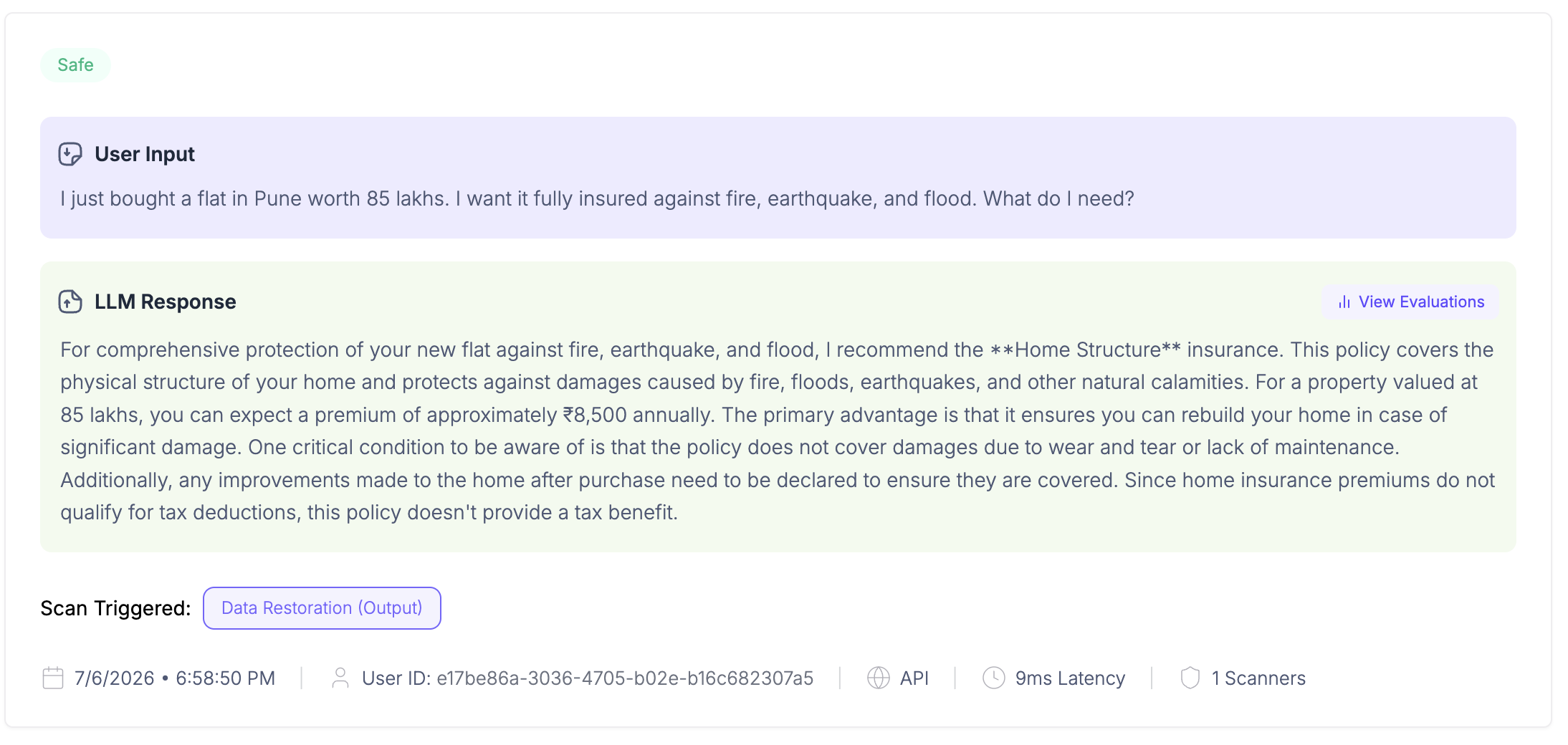
🛡️ Every request scanned & traced
Each call is captured and checked end to end, the user's input, the model's reply, the scanners that ran, and the response latency. Armor catches PII and unsafe content in real time, and the full request is recorded automatically so you can audit and debug exactly what happened in production.
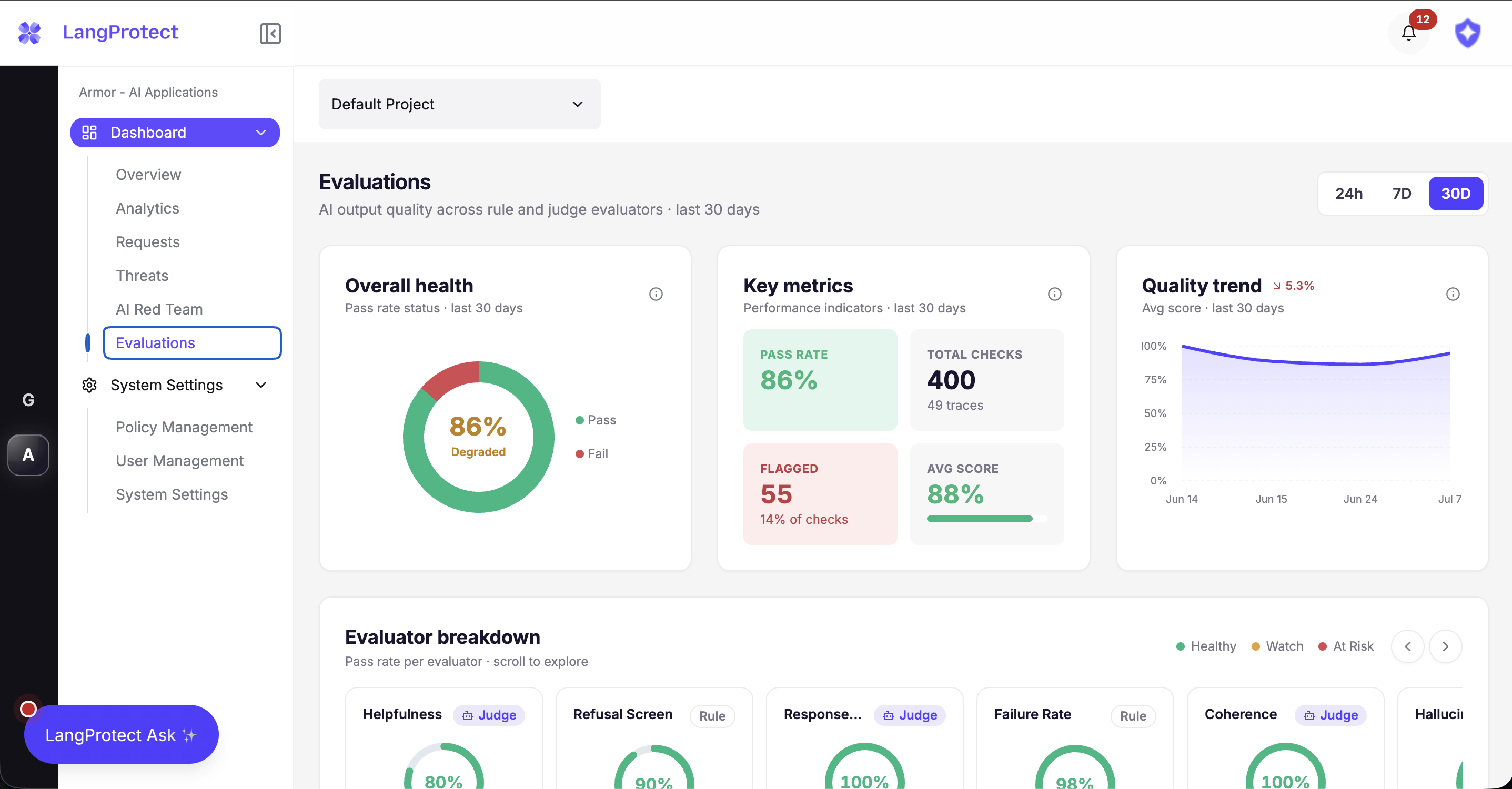
📊 Quality at a glance
The Evaluate dashboard shows the health of your LLM app on one screen: overall pass rate, total checks run, how many were flagged, your average quality score, and the trend over time, so quality drift surfaces long before your users feel it.
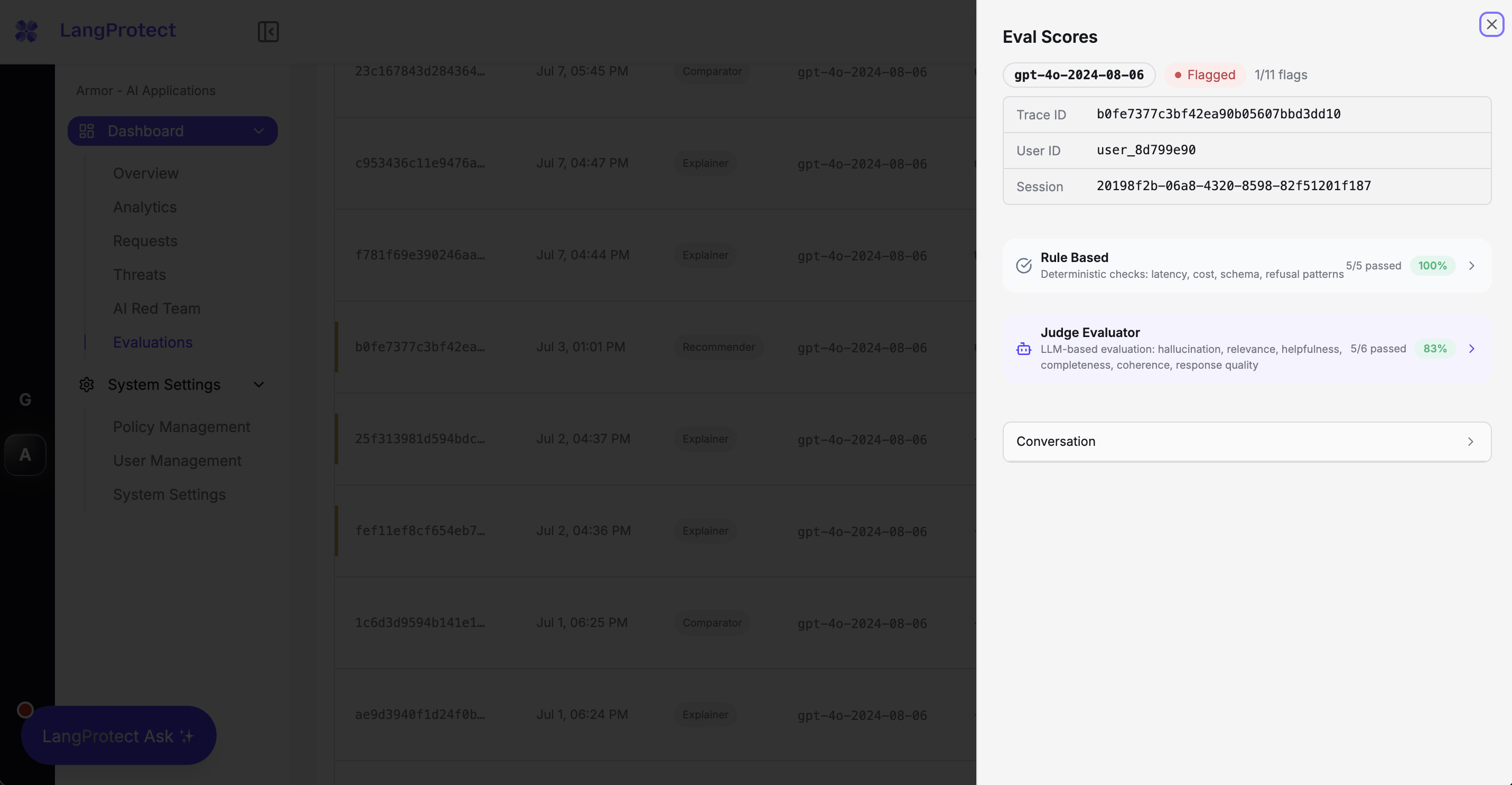
🔍 Per-trace eval scores
Open any single trace to see its full scorecard, deterministic rule-based checks (latency, cost, schema, refusals) next to LLM-judge scores (hallucination, relevance, helpfulness, completeness, and more), each with a clear pass or fail.
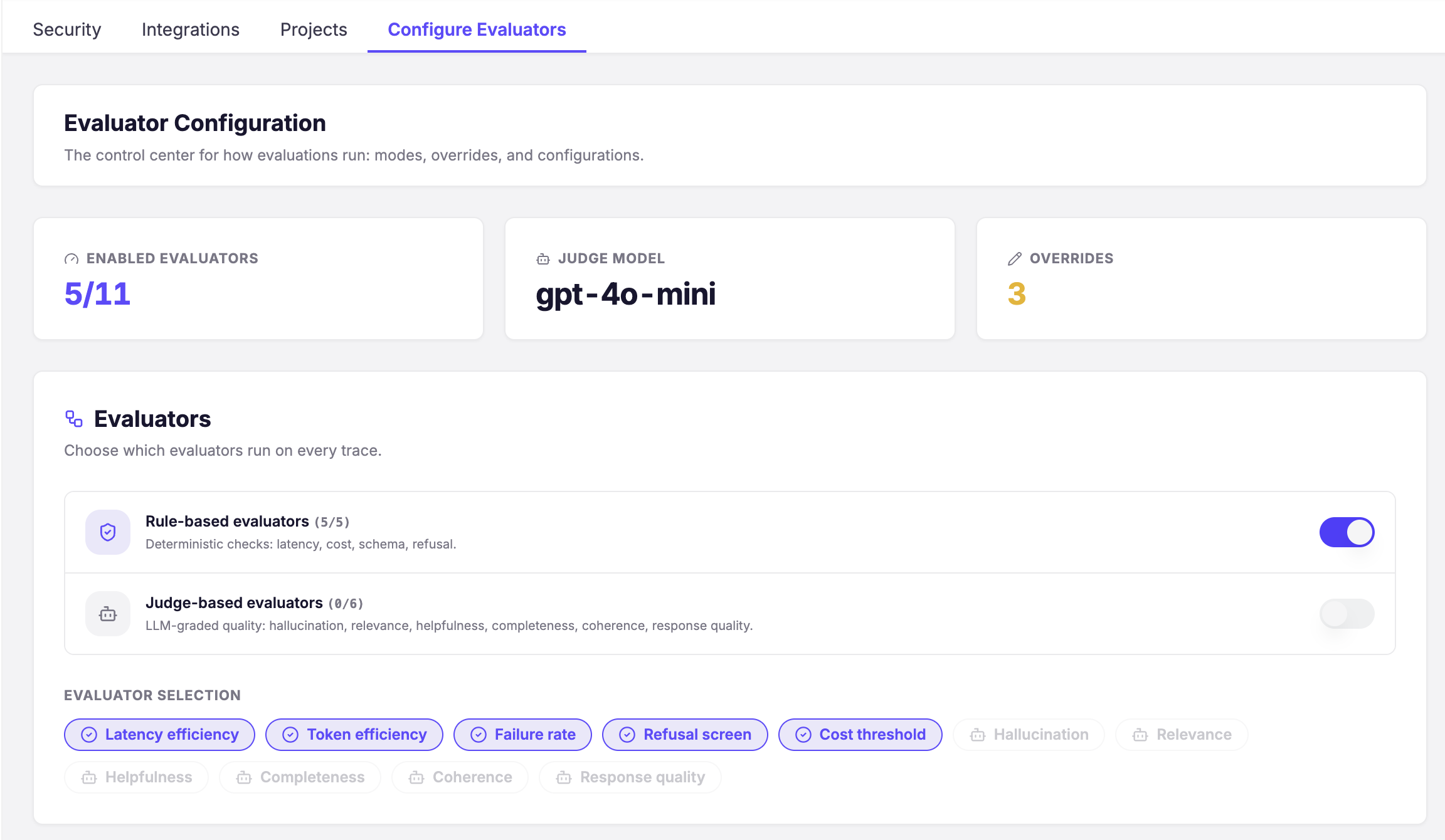
⚙️ Configure what runs
You stay in control of evaluation: switch rule-based and LLM-judge evaluators on or off, choose the judge model, and set overrides, deciding exactly which checks run on every trace.
Start free
Bring Trace, Armor, and Evaluate to your own traffic in minutes.
1 maintainer

Metadata
1 maintainer
Release files for langprotect-armor 0.3.0
For a detailed explanation of source distributions (sdists) and built distributions (wheels), please see the package formats documentation.
Source distribution (sdist)
| File | Size | Uploaded | Provenance | |
|---|---|---|---|---|
| langprotect_armor-0.3.0.tar.gz | 39.4 kB | Without provenance | Details |
Built distribution (wheel)
| File | Interpreter | ABI | Platform | Reset |
|---|---|---|---|---|
| langprotect_armor-0.3.0-py3-none-any.whl | Python 3 | none | any | Details |
Total release size: 71.2 kB
Release files / langprotect_armor-0.3.0.tar.gz
| Download URL | langprotect_armor-0.3.0.tar.gz |
|---|---|
| Size | 39.4 kB |
| Tags | Source |
|
SHA-256 checksum How to use checksums |
a5560bb47975f99f01a7932b3067eef79bf6ab691291ef1b5aba44519f30e67a
|
|
BLAKE2b-256 checksum How to use checksums |
f3c904eaecca439f5eb294ec3ffb66ccfc1fd7826c62093b1892edf05f540369
|
| Upload date | |
|
Uploaded using Trusted Publishing? What is trusted publishing? |
No |
| Uploaded via |
twine/6.2.0 CPython/3.14.6
|
Release files / langprotect_armor-0.3.0-py3-none-any.whl
| Download URL | langprotect_armor-0.3.0-py3-none-any.whl |
|---|---|
| Size | 31.8 kB |
| Tags | Python 3 |
|
SHA-256 checksum How to use checksums |
f72b18fb462f756c52dc1501e4dfc31b16ee6d9bf0fdd2a72f48e067ee3e2c9a
|
|
BLAKE2b-256 checksum How to use checksums |
a21975efad57dd1d4415ef80428c88058c1229323dfba7157cfa13af1e47a228
|
| Upload date | |
|
Uploaded using Trusted Publishing? What is trusted publishing? |
No |
| Uploaded via |
twine/6.2.0 CPython/3.14.6
|
Security for langprotect-armor 0.3.0
Provenance
Provenance describes where a file came from. On PyPI, provenance is shared via attestations, which provide a verifiable record of the build or publishing details. View details, limitations and caveats.
No provenance found
None of the files in this release were uploaded with provenance metadata.
A note on package security
PyPI is a repository for distributing packages, not a service for auditing them. While third-party security researchers and our staff do their best to detect and remove malicious packages, PyPI cannot guarantee the quality, security or suitability of any given package.
To learn more about protecting yourself from malicious actors, visit our package security documentation.














