
X-ray vision into your LangGraph agents

Project description
LangRay
X-ray vision into your LangGraph agents.
LangRay is a real-time debugging and visualization tool for LangGraph. See exactly what your agent is doing as it executes—inspect state, track tokens, replay runs, and debug with confidence.
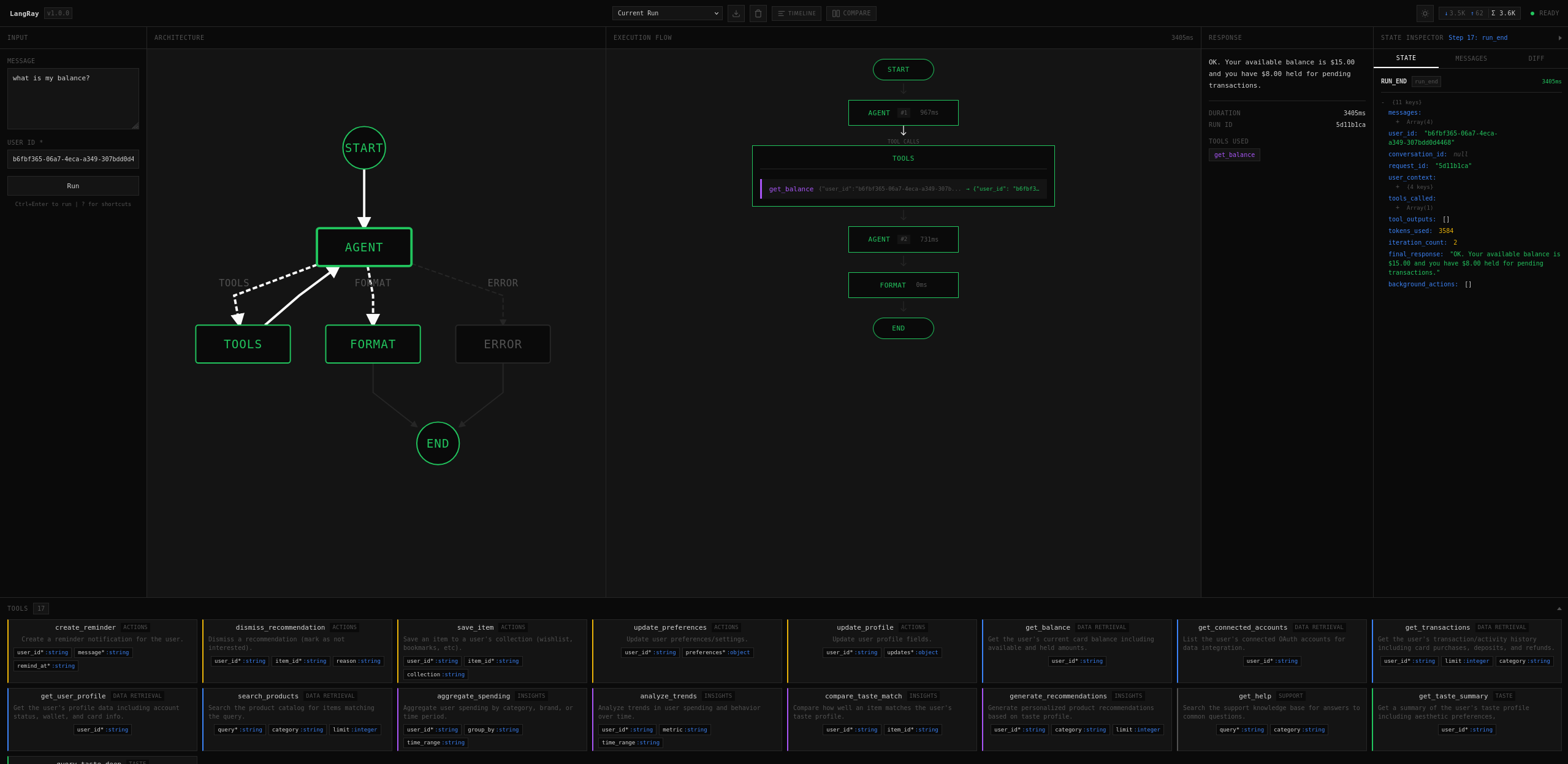
Features
- One-line integration — Wrap your graph with
visualize()and you're done - Real-time execution flow — Watch nodes light up as your agent thinks
- State inspector — Click any node to see its full state, messages, and diffs
- Run history — Automatically saves last 50 runs, replay anytime
- Token tracking — Monitor LLM input/output tokens per run
- Export runs — Download execution traces as JSON for debugging or sharing
- Keyboard-first — Vim-style shortcuts for power users
- Zero config — Works out of the box with any LangGraph agent
- Dark theme — Easy on the eyes during those late-night debug sessions
Installation
pip install langray
Or install from source:
git clone https://github.com/vascogaspar/langray.git
cd langray
pip install -e .
Quick Start
from langray import visualize
from my_agent import graph  # Your compiled LangGraph

# Wrap your graph — that's it!
viz_graph = visualize(graph)

# Use exactly like before
result = viz_graph.invoke({"messages": [HumanMessage(content="Hello!")]})
Your browser opens automatically to http://localhost:8080 showing real-time execution.
Async Support
# Works with async too
result = await viz_graph.ainvoke({"messages": [...]})

# And streaming
async for chunk in viz_graph.astream({"messages": [...]}):
    print(chunk)
Configuration
viz_graph = visualize(
    graph,
    port=8080,           # Port for the UI (default: 8080)
    host="127.0.0.1",    # Host to bind (default: 127.0.0.1)
    open_browser=True,   # Auto-open browser (default: True)
)
UI Overview
┌────────────┬──────────────────┬─────────────────┬──────────────────┐
│   INPUT    │   ARCHITECTURE   │  EXECUTION FLOW │  STATE INSPECTOR │
│            │                  │                 │                  │
│  Message   │    ┌───────┐     │     START       │  Step 5: agent   │
│  User ID   │    │ agent │     │       │         │  ┌────┬────┬────┐│
│            │    └───┬───┘     │     AGENT #1    │  │State│Msgs│Diff││
│  [Run]     │        │         │       │         │  └────┴────┴────┘│
│            │    ┌───┴───┐     │     TOOLS       │  messages: [     │
│            │    │ tools │     │   get_balance   │    HumanMessage  │
│            │    └───┬───┘     │       │         │    AIMessage     │
│            │        │         │     AGENT #2    │  ]               │
│            │    ┌───┴───┐     │       │         │  user_id: "123"  │
│            │    │format │     │     FORMAT      │                  │
│            │    └───────┘     │       │         │                  │
│            │                  │      END        │                  │
├────────────┴──────────────────┴─────────────────┴──────────────────┤
│                              TOOLS (17)                            │
│  get_balance │ get_transactions │ create_reminder │ analyze_trends │
└────────────────────────────────────────────────────────────────────┘
Panels
| Panel | Description |
|---|---|
| Input | Enter messages and parameters, run your agent |
| Architecture | Static graph structure with zoom/pan |
| Execution Flow | Live execution trace with timing |
| State Inspector | Deep dive into state at any step |
| Tools | All available tools with their schemas |
State Inspector Tabs
- State — Collapsible tree view of the full state object
- Messages — Pretty-printed conversation with role icons
- Diff — Side-by-side comparison of state changes between steps
Keyboard Shortcuts
| Key | Action |
|---|---|
/ |
Focus message input |
r |
Run agent |
Ctrl+Enter |
Run (when in input) |
Esc |
Clear input / close dialogs |
i |
Toggle inspector panel |
h |
Focus history dropdown |
t |
Toggle tools footer |
↑ ↓ |
Navigate flow nodes |
[ ] |
Navigate state snapshots |
? |
Show all shortcuts |
Run History
LangRay automatically persists your last 50 runs in the browser's IndexedDB:
- Replay — Select any past run from the dropdown to replay it
- Compare — Switch between runs to compare behavior
- Export — Download any run as JSON for sharing or analysis
- Clear — Wipe history with the trash button
Runs persist across browser refreshes and include full state snapshots.
Token Tracking
The header displays token usage during and after execution:
↓ 3.5K ↑ 62 Σ 3.6K
↓Input tokens sent to the LLM↑Output tokens receivedΣTotal tokens for the run
Exported Run Format
{
  "run_id": "abc-123",
  "timestamp": 1706284800000,
  "message": "What's my balance?",
  "duration_ms": 3243,
  "status": "completed",
  "tools_called": ["get_balance"],
  "steps": [
    {
      "type": "node_start",
      "node": "agent",
      "timestamp": 1706284800100,
      "state": { "messages": [...], "user_id": "..." }
    }
  ],
  "response": "Your balance is $15.00"
}
API Reference
visualize(graph, **options) -> VisualizedGraph
Wrap a LangGraph for visualization.
Arguments:
graph— A compiled LangGraphStateGraphport— Port for UI server (default:8080)host— Host to bind (default:"127.0.0.1")open_browser— Auto-open browser (default:True)
Returns: VisualizedGraph wrapper
VisualizedGraph
Drop-in replacement for your graph with identical API:
# All standard methods work
result = viz_graph.invoke(input)
result = await viz_graph.ainvoke(input)

for chunk in viz_graph.stream(input):
    ...

async for chunk in viz_graph.astream(input):
    ...

# Additional properties
viz_graph.url          # Server URL
viz_graph.graph        # Underlying graph
viz_graph.get_graph_structure()  # Introspected structure
Introspection Utilities
from langray import introspect_graph, graph_to_mermaid

# Get graph structure as dict
structure = introspect_graph(graph)

# Generate Mermaid diagram
mermaid = graph_to_mermaid(graph)
print(mermaid)
# graph TD
#     __start__ --> agent
#     agent --> tools
#     tools --> agent
#     agent --> __end__
Event Types
Events streamed via Server-Sent Events (SSE):
| Event | Description | Data |
|---|---|---|
run_start |
Execution began | run_id, initial state |
node_start |
Node began executing | node, step, state snapshot |
node_end |
Node finished | node, duration_ms, state snapshot |
tool_start |
Tool invocation began | tool, inputs |
tool_end |
Tool completed | tool, output |
llm_usage |
Token usage update | input_tokens, output_tokens |
run_end |
Execution completed | duration_ms, final state |
error |
Error occurred | message, traceback |
Requirements
- Python 3.10+
- LangGraph 0.2+
- Modern browser (Chrome, Firefox, Safari, Edge)
Development
# Clone the repo
git clone https://github.com/vascogaspar/langray.git
cd langray

# Install in dev mode
pip install -e ".[dev]"

# Run example
python examples/tool_agent.py
Project Structure
langray/
├── __init__.py      # Public API
├── callback.py      # LangGraph callback handler
├── introspect.py    # Graph structure extraction
├── server.py        # FastAPI + SSE server
├── static/
│   ├── index.html   # Main page
│   ├── styles.css   # VOID dark theme
│   ├── app.js       # Core application
│   ├── graph.js     # D3 + Dagre rendering
│   ├── flow.js      # Execution flow
│   ├── inspector.js # State inspector
│   └── history.js   # IndexedDB persistence
└── examples/
    ├── simple_chain.py
    └── tool_agent.py
Tech Stack
- Backend: FastAPI, Server-Sent Events
- Frontend: Vanilla JS, D3.js, Dagre
- Storage: IndexedDB (browser-side)
- Styling: Custom CSS (VOID dark theme)
Troubleshooting
Port already in use
viz_graph = visualize(graph, port=8081) # Use different port
Browser doesn't open
viz_graph = visualize(graph, open_browser=False)
print(f"Open {viz_graph.url} manually")
State not showing in inspector
Ensure your graph nodes return state updates. LangRay captures state from LangGraph's built-in checkpointing.
Old runs not loading properly
Runs saved before certain updates may have incomplete data. Run a new query to save with the latest format.
Contributing
Contributions welcome! Please read our contributing guidelines before submitting PRs.
- Fork the repo
- Create a feature branch (
git checkout -b feature/amazing) - Commit changes (
git commit -m 'Add amazing feature') - Push to branch (
git push origin feature/amazing) - Open a Pull Request
License
MIT License — see LICENSE for details.
Acknowledgments
- LangGraph — The amazing agent framework this tool visualizes
- D3.js — Powerful visualization library
- Dagre — Graph layout algorithm
LangRay — See what your agents are thinking
Release history Release notifications | RSS feed


Download files
Download the file for your platform. If you're not sure which to choose, learn more about installing packages.
Source Distribution
Built Distribution
Filter files by name, interpreter, ABI, and platform.
If you're not sure about the file name format, learn more about wheel file names.
Copy a direct link to the current filters
File details
Details for the file langray-1.0.1.tar.gz.
File metadata
- Download URL: langray-1.0.1.tar.gz
- Upload date:
- Size: 49.0 kB
- Tags: Source
- Uploaded using Trusted Publishing? No
- Uploaded via: twine/6.2.0 CPython/3.10.12
File hashes
| Algorithm | Hash digest | |
|---|---|---|
| SHA256 |
df1ad23c56a47f8feec8986755105aee1fba3f647bb209f9e64312416164d58f
|
|
| MD5 |
99a6c7e939f3cc1cb60f475afd8cd2ac
|
|
| BLAKE2b-256 |
7ddcdb199d7d76412ef21c9317de42a10c055bc0ff32b5c494f95a950885c914
|
File details
Details for the file langray-1.0.1-py3-none-any.whl.
File metadata
- Download URL: langray-1.0.1-py3-none-any.whl
- Upload date:
- Size: 54.5 kB
- Tags: Python 3
- Uploaded using Trusted Publishing? No
- Uploaded via: twine/6.2.0 CPython/3.10.12
File hashes
| Algorithm | Hash digest | |
|---|---|---|
| SHA256 |
8e152804107e8c127e3b4c09b26c5a83c02eaf9d41f29c26b5a63f22f61b4b13
|
|
| MD5 |
c53fcc5d879aac42485087a3ba2ecbab
|
|
| BLAKE2b-256 |
66122c5df6e30bd1f2fae11cd8c89b0ec2210cb8e1206a676e21354a20a943c1
|






