
Remote sensing image segmentation using LangSAM

Project description
LangRS



A python package that omptimizes zero-shot segmentation of aerial image based with GroundingDINO and Segment Anything Model (SAM)
Introduction
LangRS is a Python package for remote sensing image segmentation, it is built on top of the Segment-Geospatial package. It combines advanced techniques like bounding box detection, semantic segmentation, and outlier rejection to deliver precise and reliable segmentation of geospatial images.
Citation
@article{DIAB2025100105,
title = {Optimizing zero-shot text-based segmentation of remote sensing imagery using SAM and Grounding DINO},
journal = {Artificial Intelligence in Geosciences},
volume = {6},
number = {1},
pages = {100105},
year = {2025},
issn = {2666-5441},
doi = {https://doi.org/10.1016/j.aiig.2025.100105},
url = {https://www.sciencedirect.com/science/article/pii/S2666544125000012},
author = {Mohanad Diab and Polychronis Kolokoussis and Maria Antonia Brovelli},
keywords = {Foundation models, Multi-modal models, Vision language models, Semantic segmentation, Segment anything model, Earth observation, Remote sensing},
}
How it works

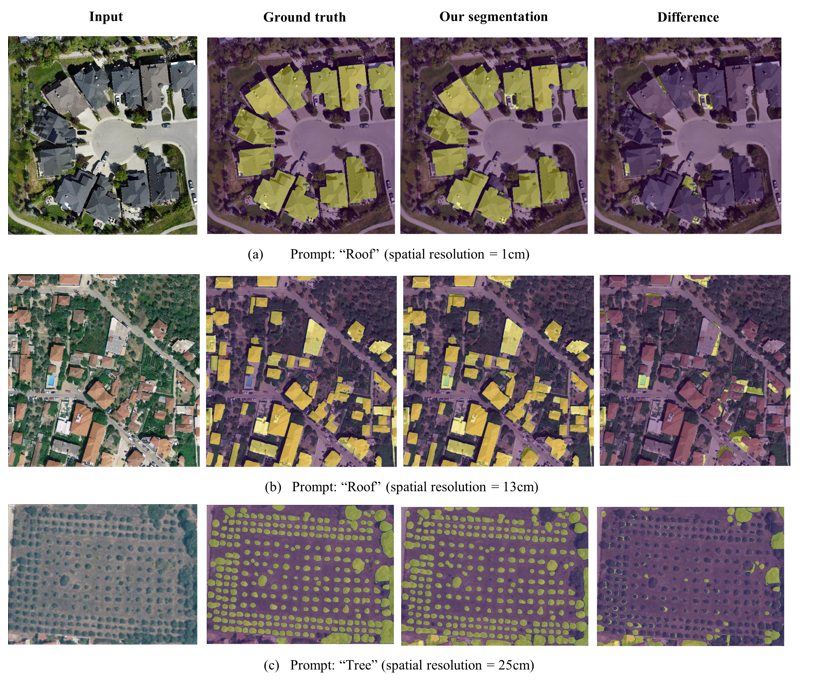
📊 Package Performance vs Ground Truth
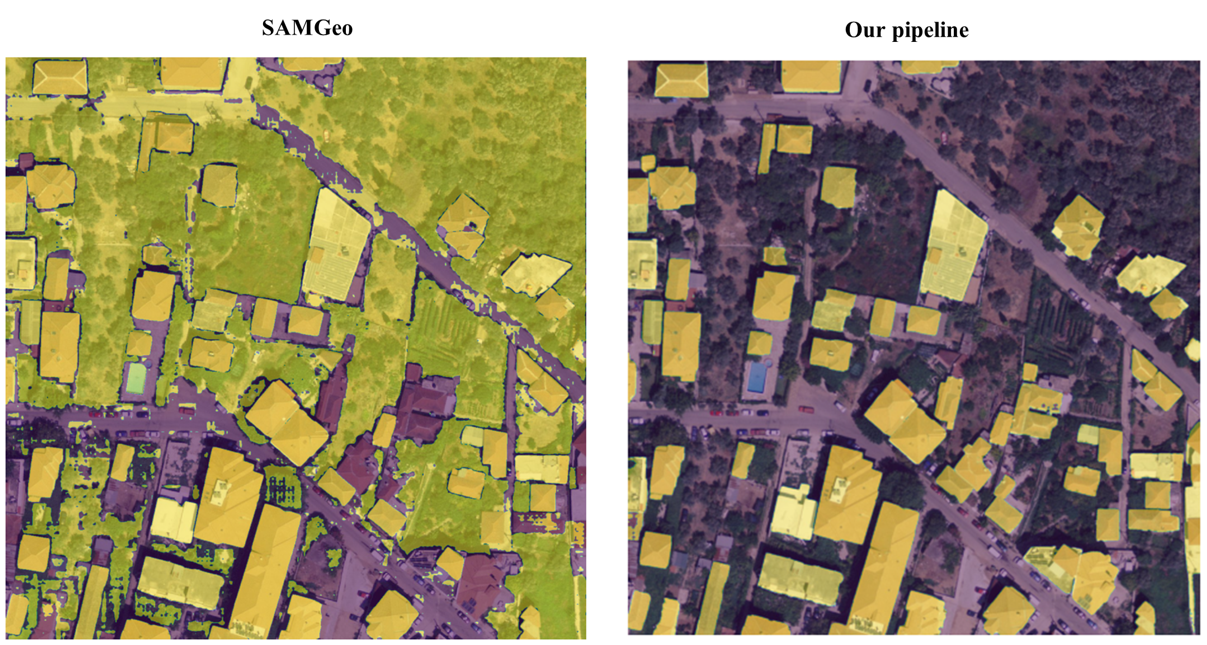
🔄 Direct Comparison with SAMGEO Package
Features
- Bounding Box Detection: Locate objects in remote sensing images with a sliding window approach.
- Outlier Detection: Apply various statistical and machine learning methods to filter out anomalies in the detected objects based on the area of the detected bounding boxes.
- Non-Max Suppression Applies NMS to the input bounding boxes, can reduce accuracy slightly, but greatly increases inference speed and lowers memory usage.
- Area Calculation: Compute and rank bounding boxes by their areas.
- Image Segmentation: Detect and extract objects based on text prompts using LangSAM.
Installation
Install LangRS with pip
pip install langrs
Usage
Here is an example of how to use the LangRS class for remote sensing image segmentation:
from langrs import LangRS

# The class accepts tif/ RGB images
text_input = "object.tif"

# Path to the input remote sensing image
image_input = "path_to_your_tif_file"

# Initialize LangRS with the input image, text prompt, and output directory
langrs = LangRS(image_input, text_input, "output_folder")

# Detect bounding boxes using the sliding window approach with example parameters
bounding_boxes = langrs.generate_boxes(window_size=600, overlap=300, box_threshold=0.25, text_threshold=0.25)

# Apply outlier rejection to filter anomalous bounding boxes
# This will return a dict with the follwing keys:
# ['zscore', 'iqr', 'svm', 'svm_sgd', 'robust_covariance', 'lof', 'isolation_forest']
# The value of each key represent the boudning boxes from the previous step with the
# outlier rejection method of the key's name applied to them
bboxes_filtered = langrs.outlier_rejection()

# Retreive certain bounding boxes
bboxes_zscore = bboxes_filtered['zscore']

# Generate segmentation masks for the filtered bounding boxes of the provided key
masks = langrs.generate_masks(boxes=bounding_boxes)
# Or
masks = langrs.generate_masks(boxes=bboxes_zscore)
Input Parameters for LangRS Methods
LangRS Initialization:
image: Path to the input image.prompt: Text prompt for object detection.output_path: Directory to save output files.
generate_boxes:
window_size(int): Size of each chunk for processing. Default is500.overlap(int): Overlap size between chunks. Default is200.box_threshold(float): Confidence threshold for box detection. Default is0.5.text_threshold(float): Confidence threshold for text detection. Default is0.5.
outlier_rejection:
Applies multiple outlier detection methods (e.g., Z-Score, IQR, SVM, LOF) to filter bounding boxes.
generate_masks:
boxes(list[torch.tensor]): The input boxes, the model will segment what is inside these boxes only.
Output
When the code runs, it generates the following outputs:
- Original Image with Bounding Boxes: Shows the detected bounding boxes.
- Filtered Bounding Boxes: Bounding boxes after applying outlier rejection.
- Segmentation Masks: Overlays segmentation masks on the original image.
- Area Plot: A scatter plot of bounding box areas to visualize distributions.
The results are saved in the specified output directory, organized with a timestamp to separate runs.
Contributing
We welcome contributions! If you'd like to add features or fix bugs:
- Fork the repository.
- Create a feature branch.
- Submit a pull request.
License
This project is licensed under the MIT License. See the LICENSE file for details.
Support
For any questions or issues, please open an issue on GitHub or contact the project maintainers.
Release history Release notifications | RSS feed


Download files
Download the file for your platform. If you're not sure which to choose, learn more about installing packages.
Source Distribution
Built Distribution
Filter files by name, interpreter, ABI, and platform.
If you're not sure about the file name format, learn more about wheel file names.
Copy a direct link to the current filters
File details
Details for the file langrs-1.1.0.tar.gz.
File metadata
- Download URL: langrs-1.1.0.tar.gz
- Upload date:
- Size: 13.6 kB
- Tags: Source
- Uploaded using Trusted Publishing? No
- Uploaded via: twine/6.0.1 CPython/3.12.3
File hashes
| Algorithm | Hash digest | |
|---|---|---|
| SHA256 |
44223c7b8cff29b6439f84b859d7e05608266588f7be91c686ab40072aba8ea5
|
|
| MD5 |
a2da980f1244544474b52b37151ba280
|
|
| BLAKE2b-256 |
9c33270cee7c61762291deab69fcc2772fa687be7c0b262c35bef0dddc23da24
|
File details
Details for the file langrs-1.1.0-py3-none-any.whl.
File metadata
- Download URL: langrs-1.1.0-py3-none-any.whl
- Upload date:
- Size: 12.4 kB
- Tags: Python 3
- Uploaded using Trusted Publishing? No
- Uploaded via: twine/6.0.1 CPython/3.12.3
File hashes
| Algorithm | Hash digest | |
|---|---|---|
| SHA256 |
fdf3d5beeab071e91f81094a3e6f74d352809444278b5d6b8b81ba988f90052b
|
|
| MD5 |
c3402afac119d12d411d40a98158492b
|
|
| BLAKE2b-256 |
6e32ab253dea57cbe59cd8abaff51085d2433f880cd47b642dc45e5f74bcac6b
|






