
langstage-codraft
The document stage for your LangGraph agent. Draft a document block by block on real pages. Tag your agent in comments, approve every change it suggests, and export exactly what you see.



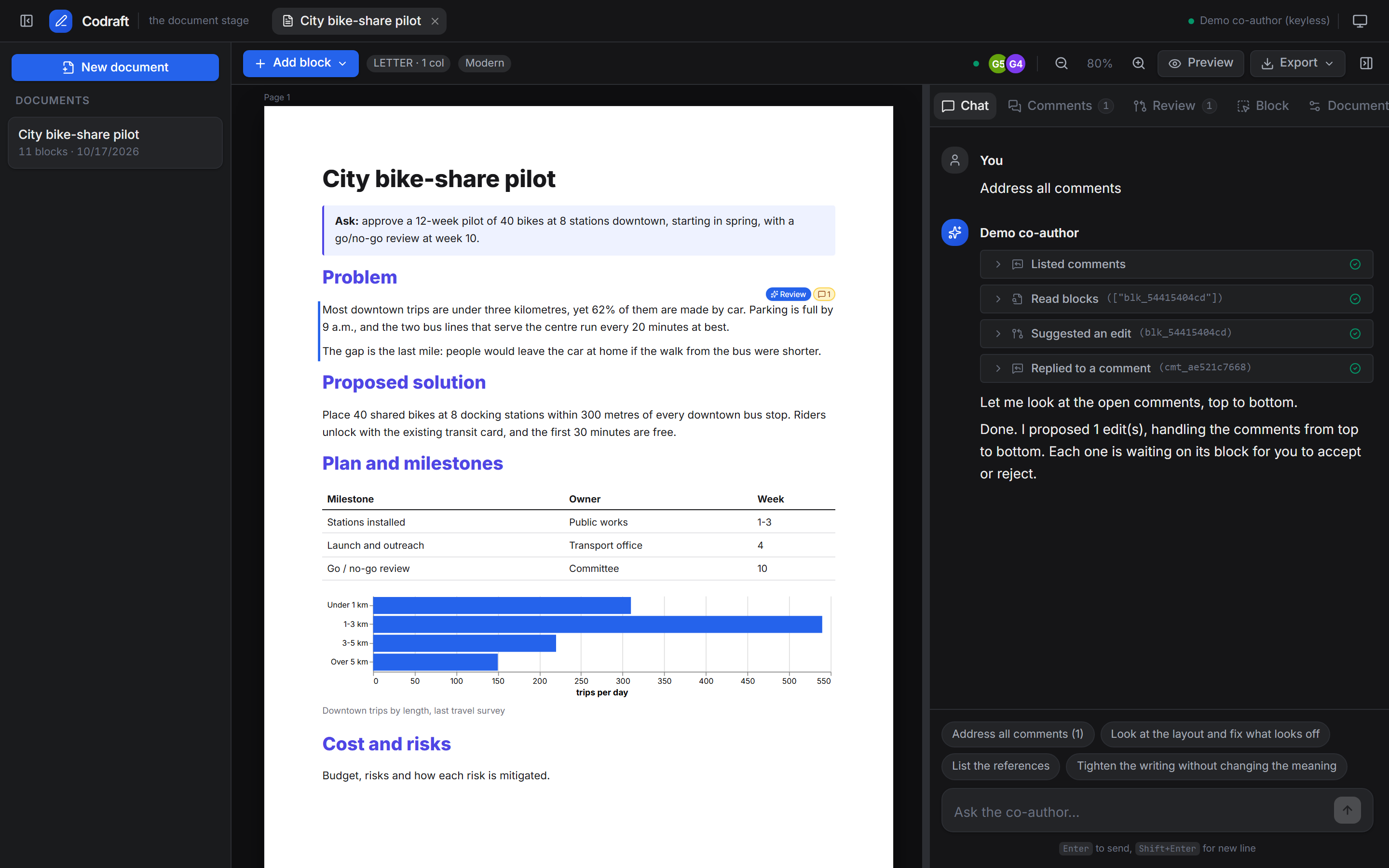
Dark mode
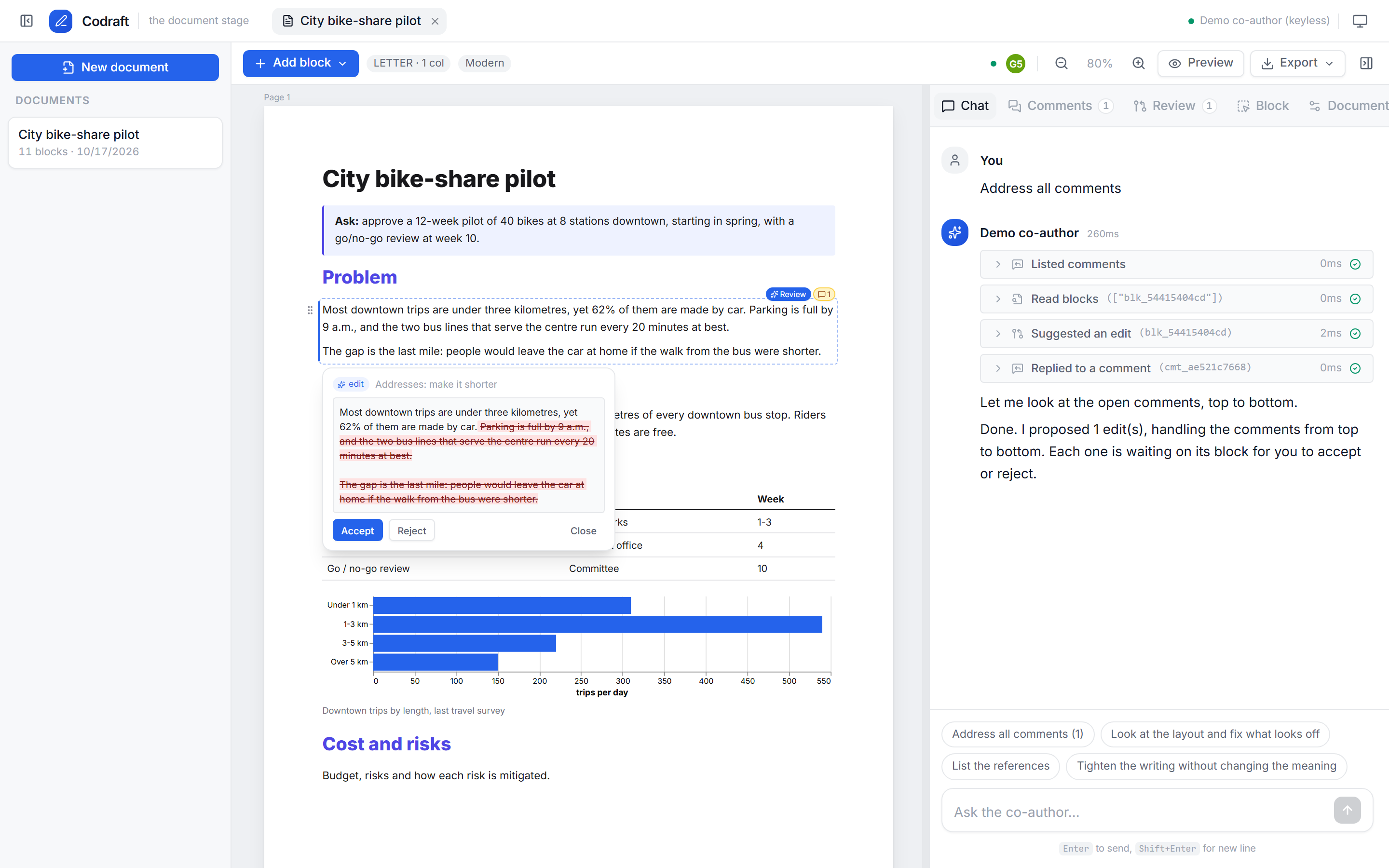
You own the thinking. Your agent owns the styling, and helps with drafting and research when you ask it to.
- Blocks on pages. Text, headings, images, tables, Vega-Lite charts, callouts and an automatic references list. Pages come in Letter, A4, Legal, A5 or 16:9 slide, with 1–3 columns. You can also pin blocks so other blocks flow around them, repeat headers and logos on every page, and add cover and back pages. Pageless mode is available too.
- The agent edits by suggestion. Every change the agent makes to your text arrives as a diff you accept or reject. A per-document switch turns on auto-apply.
- Comments tag the agent. Queue comments for later or ask now. "Address all comments" handles them strictly top to bottom.
- Nothing is overwritten. Each block keeps a version tree. Step back, step forward, and edit an old version to start a new branch.
- Sources stay with each block. The agent cites as it writes, and a
referencesblock compiles them. - The agent sees the page.
view_pagesgives a vision model screenshots of the rendered pages, so it can fix layout problems you'd spot by eye. - Export matches the screen. PDF, PNG/JPG per page, or a self-contained HTML zip, all
rendered by the same component as the editor (CI checks them pixel for pixel). Also Word
(
.docx, editable and reflowing), PowerPoint (.pptx, one slide per page, with editable text boxes where the paginator put them), and an animated GIF or MP4 page slideshow. - Sketch it, get an image. Draw on an image block; the agent looks at the sketch
(
view_sketch) and turns it into an image with its image tool, or says it can't. - Video and GIF blocks. They play in the editor and in the HTML export; PDF and images use the poster frame.
- Write together, live. Everyone in a document sees each other's cursor block, edits from other tabs, people and agents arrive instantly, and a block someone is editing is soft-locked. If two people still edit the same block, both versions are kept as branches.
- Any agent, over MCP. Claude Code, Cursor or any MCP client can co-author through the same
approval-gated tools, at
http://localhost:8060/mcporlangstage-codraft mcp(stdio). - Light and dark. The interface uses langstage-web's design system, so the two stages look like one product.
Quick start
pip install langstage-codraft
langstage-codraft install-browser          # Chromium for export and the agent's eyes (once)
langstage-codraft run --demo               # keyless scripted co-author, opens http://localhost:8060
With a real model:
export OPENROUTER_API_KEY=...              # or OPENAI_API_KEY / ANTHROPIC_API_KEY
langstage-codraft run                      # default agent: claude-haiku-5.5 via OpenRouter
langstage-codraft run -m openai:gpt-5-mini # any LangChain model spec
pip install "langstage-codraft[anthropic]"  # for ANTHROPIC_API_KEY / anthropic: models
pip install "langstage-codraft[video]"      # MP4 export (bundles ffmpeg)
Bring your own agent
Codraft is a LangStage stage: you bring the LangGraph agent and Codraft adds what it needs to work on documents. There are three ways to plug one in.
# my_agent.py  (needs OPENAI_API_KEY; any LangChain chat model works)
from langchain.agents import create_agent
from langchain_core.tools import tool
from langstage_codraft import CodraftMiddleware


@tool
def glossary(term: str) -> str:
    """Look up an internal term."""
    return {"pilot": "A time-boxed trial with a go/no-go review."}.get(term.lower(), "No entry.")


# 1. A graph that includes the middleware (it registers the tools and the co-author prompt,
#    and attaches page screenshots for vision models).
graph = create_agent("openai:gpt-5-mini", tools=[glossary], middleware=[CodraftMiddleware()])


# 2. Or a factory: Codraft calls it with its tools and middleware.
def make(tools, middleware):
    return create_agent("openai:gpt-5-mini", tools=[*tools, glossary], middleware=middleware)
langstage-codraft run --agent my_agent.py:graph    # or my_agent.py:make
langstage-codraft check --agent my_agent.py:graph  # preflight; --live runs one real turn
A graph built without the Codraft tools still chats, but it can't touch the document. check
tells you when that's the case.
The agent's toolset (CODRAFT_TOOLS) has 20 tools. Each one reads and writes through the same
API the editor uses, so the agent has no private path, and nothing the agent can do is out of
the author's reach:
| Read | Write (suggestions) | Style (applies directly) | Other |
|---|---|---|---|
get_document, read_blocks, search_document, read_upload, list_comments, get_block_history |
propose_edit, propose_insert, propose_delete, propose_move, insert_blocks, draw_figure |
set_block_layout, set_document_style, reserve_area |
reply_to_comment, compile_references, view_pages, view_sketch, view_upload |
Each document has its own agent thread (the AG-UI thread id is the document id). Conversations
are stored in SQLite and survive restarts. The same agent is also served at POST /agui for any
AG-UI client.
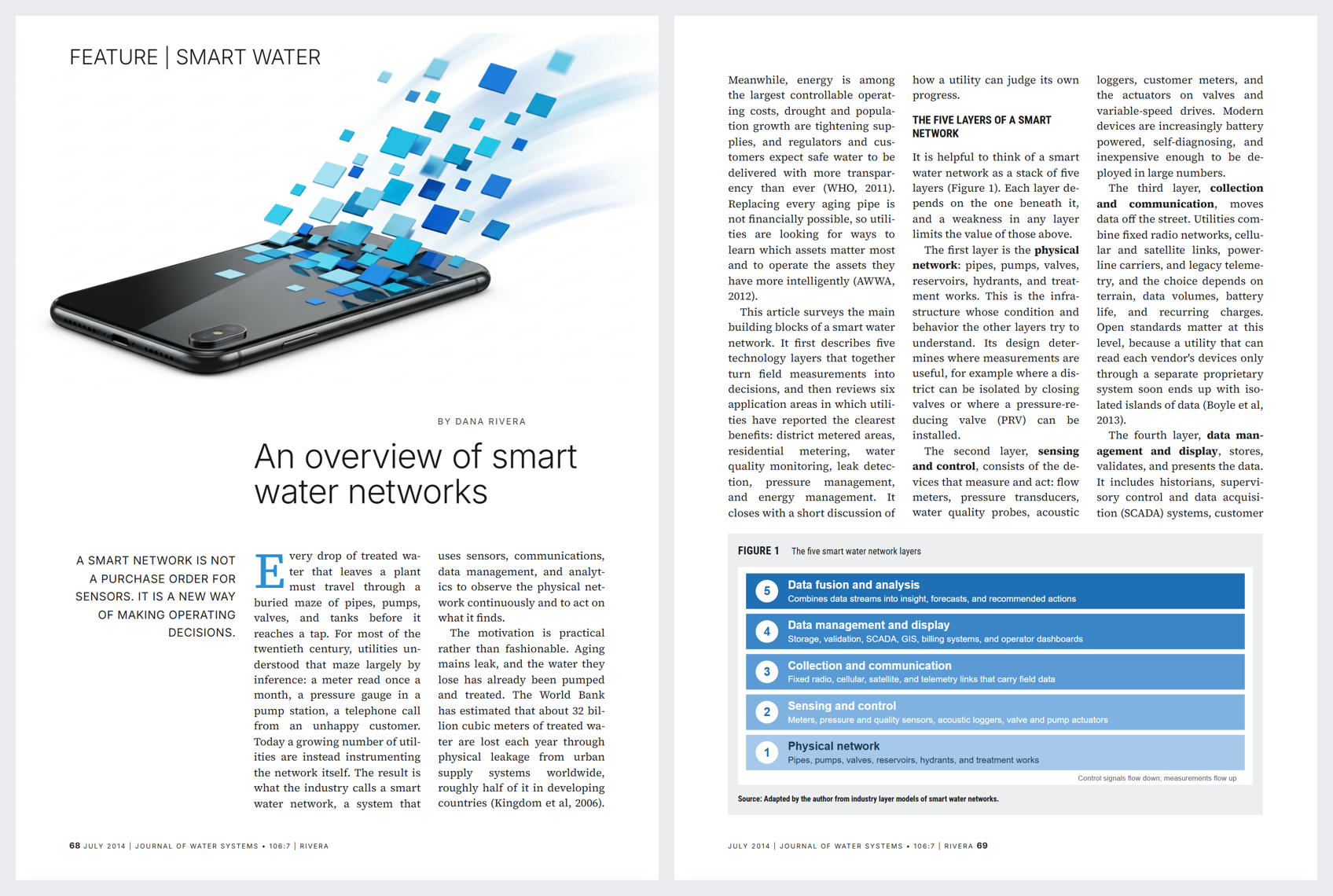
Magazine-quality reports
Codraft lays out more than memos. Give examples/report_designer.py (an OpenRouter agent with
image generation) a few pages of a report you like and a topic, and it builds a report with the
same look: custom page size, justified three-column type with hyphenation, drop caps, pull
quotes, page-anchored hero art that bleeds past the margins, framed figures (FIGURE 1, title,
source line), running footers with {page} numbers that alternate left and right, and a
hanging-indent reference list that flows across columns. Diagrams are drawn as SVG
(draw_figure) so labels stay crisp; photos and illustrations come from an image model.
export OPENROUTER_API_KEY=...
langstage-codraft run --agent examples/report_designer.py:make --approval auto
# upload reference pages (PNG/JPG), then ask: "Make a report like the attached pages about <topic>"
Every layout feature is available to people too (Block and Document panels) and to any agent:
block styles (lead, pullquote, kicker, byline, footer, bio; headings display,
section, rule; figure-box; hanging references; dark callouts), drop caps, custom page
sizes, page-anchored pins, and reserved areas (reserve_area) that keep part of a page empty.
Page numbers: put {page} (and {pages}) in a repeating footer; cover and closing pages are
skipped unless you turn on "Number cover and closing pages", and any page can be left unnumbered.
Bring any agent: MCP
The same tools are served over MCP, so agents outside LangGraph can co-author too. Their edits are suggestions the author approves, exactly like the built-in co-author's.
# with `langstage-codraft run` going (view_pages works over HTTP):
claude mcp add --transport http codraft http://localhost:8060/mcp

# or stdio, for clients that launch a command:
langstage-codraft mcp --data-dir .codraft
MCP tools: list_documents, create_document, every CODRAFT_TOOLS tool with a doc_id
argument, plus view_pages and view_sketch, which return images.
For deployers
Configuration follows the LangStage chain: defaults < langstage.toml < LANGSTAGE_* env < CLI
flags.
# langstage.toml
[agent]
spec = "my_agent.py:graph"

[codraft]
model = "openrouter:anthropic/claude-haiku-5.5"   # used when no agent spec is set
approval = "required"                            # or "auto" for new documents
default_theme = "acme"
default_page_size = "a4"                         # new documents (default letter)
allowed_themes = ["acme", "academic"]
templates_dir = "templates"                      # *.json: settings + a block skeleton
data_dir = ".codraft"

[ui]
theme = "auto"                                   # app chrome: light | dark | auto

[codraft.themes.acme]
label = "Acme"
font_body = "Inter, system-ui, sans-serif"
font_heading = "Inter, system-ui, sans-serif"
color_accent = "#d9480f"
langstage-codraft run --show-config prints the resolved values and where each one came from.
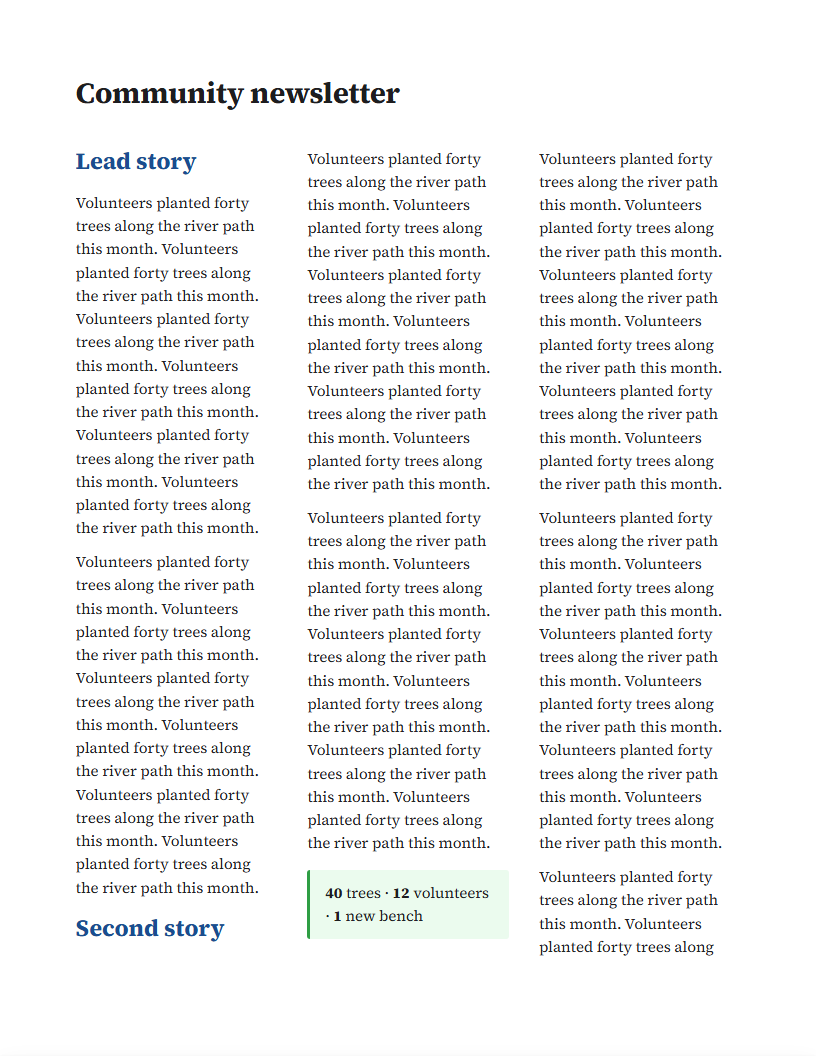
There are seven built-in templates (ids in brackets): blank, report, proposal, memo, two-column academic
paper (paper), marketing one-pager (one-pager), and a three-column newsletter with a repeating
masthead (newsletter). Each new document
records the author's brief (writing style, objective, platform, audience, language, output
format), and the agent reads it before writing.
Brand the app, or embed it in yours
The app's chrome (header, panels, buttons, chat) can take on your product's look; the documents keep
their own themes. The [ui] keys are the same as langstage-web's, so one langstage.toml brands both.
[ui]
title = "Acme Write"
subtitle = "drafting studio"
agent_name = "Acme Assistant"        # "Ask Acme Assistant…"
welcome_message = "Start a brief, a memo or a report."
icon_url = "https://acme.example/logo.svg"
font_family = "Raleway"
font_url = "https://fonts.googleapis.com/css2?family=Raleway:wght@400;600;700&display=swap"
starter_prompts = ["Draft an executive summary", "Turn my notes into a memo"]
custom_css = "brand.css"             # inline CSS or a .css file, applied last
embedded = false                     # true: no Codraft header brand or theme toggle

[ui.colors]                          # any langstage-web token: primary, primary_dark, surface,
primary = "#002f58"                  # surface_2, surface_3, border, text, text_secondary,
primary_dark = "#001f3d"             # text_muted, panel, card, accent_soft, success, warning,
surface = "#faf7f1"                  # error, plus canvas, header, header_text
accent_soft = "#fff1d6"

[ui.colors_dark]                     # the same keys for dark mode

[ui.features]                        # switch parts of the app off
mcp = false
chat = true
doc_list = true
theme_toggle = true
To put Codraft inside another FastAPI app, mount it and pass the branding in code. This is a
complete host.py (pip install langstage-codraft deepagents, then
CODRAFT_PROXY_SECRET=... OPENROUTER_API_KEY=... uvicorn host:app --port 8080):
# host.py
import os

from deepagents import create_deep_agent
from fastapi import FastAPI
from langchain_openai import ChatOpenAI

from langstage_codraft import CodraftMiddleware
from langstage_codraft.config import CodraftConfig
from langstage_codraft.server import create_app, mount

app = FastAPI()  # your app

cfg = CodraftConfig.resolve(overrides={
    "data_dir": "codraft-data",
    "renderer_url": "http://127.0.0.1:8080/write",   # how exports reach the mounted print route
    "proxy_secret": os.environ["CODRAFT_PROXY_SECRET"],
    "user_header": "X-User-Email",                   # the signed-in user, set by your proxy
    "default_page_size": "a4",
})
model = ChatOpenAI(model="anthropic/claude-haiku-5.5", base_url="https://openrouter.ai/api/v1",
                   api_key=os.environ["OPENROUTER_API_KEY"])
# The middleware registers Codraft's tools and prompt; add your own tools alongside.
graph = create_deep_agent(model=model, tools=[], middleware=[CodraftMiddleware()])
mount(app, "/write", create_app(
    cfg, graph,
    ui={"agent_name": "Acme Assistant", "embedded": True, "colors": {"primary": "#002f58"}},
    doc_themes={"acme": {"label": "Acme", "font_heading": "Raleway, sans-serif",
                         "color_accent": "#002f58"}},
))
mount runs Codraft's startup and shutdown inside your app's lifespan. The page works under any
URL prefix. If a proxy serves it under a different public path, it sends that path as
X-Forwarded-Prefix, which is honoured only alongside the proxy secret. ?embed=1 turns on
embedded mode for one page, for example in an <iframe>. doc_themes adds document themes
(the same keys as [codraft.themes.*]). A theme's fonts must be installed where exports render,
or loaded with ui.font_url.
In an <iframe>, Codraft tells the host page what's happening with postMessage (same origin
only), and navigates with replaceState so the host's Back button leaves the page:
| Message | When | Host page might |
|---|---|---|
{type: "codraft:location", path, doc, title} |
a document opens or closes | put ?doc=<id> in its own URL, then frame <prefix>/d/<id> on load |
{type: "codraft:auth-required"} |
a request came back 401 or as an HTML login page | send the user to sign in again |
CodraftMiddleware(tool_errors=True) (the default) hands any tool's exception back to the model
as the tool result, so one failing lookup doesn't end a long drafting turn.
Access settings:
| Setting | Env | Effect |
|---|---|---|
proxy_secret |
LANGSTAGE_CODRAFT_PROXY_SECRET |
Requests must carry X-Codraft-Proxy-Secret. Requests from the machine itself (the export renderer) are exempt. |
auth_username / auth_password |
LANGSTAGE_AUTH_USERNAME / LANGSTAGE_AUTH_PASSWORD |
HTTP basic auth, as in langstage-web. |
user_header |
LANGSTAGE_CODRAFT_USER_HEADER |
A trusted header with the signed-in user: it names them on edits and in presence. |
--show-config masks the secrets.
CLI
langstage-codraft run [--agent SPEC | --model SPEC | --demo] [--port 8060] [--approval auto]
langstage-codraft check [--live] [--json]
langstage-codraft new "Title" --template report
langstage-codraft list
langstage-codraft export DOC_ID -f pdf|docx|pptx|png|jpg|html|gif|mp4 -o out.pdf
langstage-codraft mcp [--data-dir DIR]          # Codraft over MCP (stdio)
langstage-codraft install-browser
How the layout works
Blocks are measured in the browser at the width they'll occupy. A pure function then paginates
them (see frontend/src/layout/paginate.ts, which has its own unit tests):
- Blocks flow column-major. A full-width block balances the columns above it.
- A pinned block reserves a rectangle on the page instead of wrapping text around it.
- Text splits only at paragraph or line boundaries, keeping at least two lines on each side.
- A block taller than a page is flagged rather than looping forever.
The preview, the export and the agent's screenshots all print that same layout in headless Chromium. Chromium never paginates anything again, so the editor and the PDF can't disagree.
Part of LangStage
| Stage | Package |
|---|---|
| Web workspace | langstage |
| Terminal | langstage-cli |
| JupyterLab | langstage-jupyter |
| VS Code | langstage-vscode |
| Hermes | langstage-hermes |
| Documents | langstage-codraft |
| Shared host + AG-UI bridge | langstage-core |
Docs: https://dkedar7.github.io/langstage-docs/stages/codraft/
Development
uv venv && uv pip install -e ".[dev]"
cd frontend && npm ci && npm test && npm run build && cd ..
pytest                                   # unit + API + browser e2e (needs the built UI)
CODRAFT_LIVE=1 OPENROUTER_API_KEY=... pytest tests/live -s    # opt-in real-model checks
Run npm run dev in frontend/ alongside langstage-codraft run --demo --no-browser to get
hot reload; Vite proxies /api to port 8060.
The design notes this started from are in docs/notes/, and the requirements are in
docs/brainstorms/.
License
MIT
1 maintainer

Metadata
1 maintainer
Release files for langstage-codraft 0.4.3
For a detailed explanation of source distributions (sdists) and built distributions (wheels), please see the package formats documentation.
Source distribution (sdist)
| File | Size | Uploaded | Provenance | |
|---|---|---|---|---|
| langstage_codraft-0.4.3.tar.gz | 5.1 MB | Without provenance | Details |
Built distribution (wheel)
| File | Interpreter | ABI | Platform | Reset |
|---|---|---|---|---|
| langstage_codraft-0.4.3-py3-none-any.whl | Python 3 | none | any | Details |
Total release size: 8.2 MB
Release files / langstage_codraft-0.4.3.tar.gz
| Download URL | langstage_codraft-0.4.3.tar.gz |
|---|---|
| Size | 5.1 MB |
| Tags | Source |
|
SHA-256 checksum How to use checksums |
2c4cfda3edae3f891bfd81413a9a04eec0655d73ae1e8b0f8bfd04c07268d405
|
|
BLAKE2b-256 checksum How to use checksums |
59fcf5d926bec109e6e41762de0add720a547d5f64d4ecea434a8077a01a9bad
|
| Upload date | |
|
Uploaded using Trusted Publishing? What is trusted publishing? |
No |
| Uploaded via |
uv/0.11.15 {"installer":{"name":"uv","version":"0.11.15","subcommand":["publish"]},"python":null,"implementation":{"name":null,"version":null},"distro":null,"system":{"name":null,"release":null},"cpu":null,"openssl_version":null,"setuptools_version":null,"rustc_version":null,"ci":null}
|
Release files / langstage_codraft-0.4.3-py3-none-any.whl
| Download URL | langstage_codraft-0.4.3-py3-none-any.whl |
|---|---|
| Size | 3.1 MB |
| Tags | Python 3 |
|
SHA-256 checksum How to use checksums |
4c9e93ee0219c11f075c3212f27d8b3f0894271f1e2dbcdc038e971bdf1c12a1
|
|
BLAKE2b-256 checksum How to use checksums |
05bd9f8f7ca492502a346a60c965b772023cd71ca1d4a621326d7faa4a5f1ced
|
| Upload date | |
|
Uploaded using Trusted Publishing? What is trusted publishing? |
No |
| Uploaded via |
uv/0.11.15 {"installer":{"name":"uv","version":"0.11.15","subcommand":["publish"]},"python":null,"implementation":{"name":null,"version":null},"distro":null,"system":{"name":null,"release":null},"cpu":null,"openssl_version":null,"setuptools_version":null,"rustc_version":null,"ci":null}
|
Security for langstage-codraft 0.4.3
Provenance
Provenance describes where a file came from. On PyPI, provenance is shared via attestations, which provide a verifiable record of the build or publishing details. View details, limitations and caveats.
No provenance found
None of the files in this release were uploaded with provenance metadata.
A note on package security
PyPI is a repository for distributing packages, not a service for auditing them. While third-party security researchers and our staff do their best to detect and remove malicious packages, PyPI cannot guarantee the quality, security or suitability of any given package.














