
A self-hosted, real-time voice AI language tutor with a 3D talking avatar, built on the Gemini Live API.
Verified details
These details have been verified by PyPIProject links
GitHub Statistics
Maintainers

Project description
LanguLearn
A self-hosted Speech 2 Speech AI language tutor — with 3D interactive avatars.
What is this?
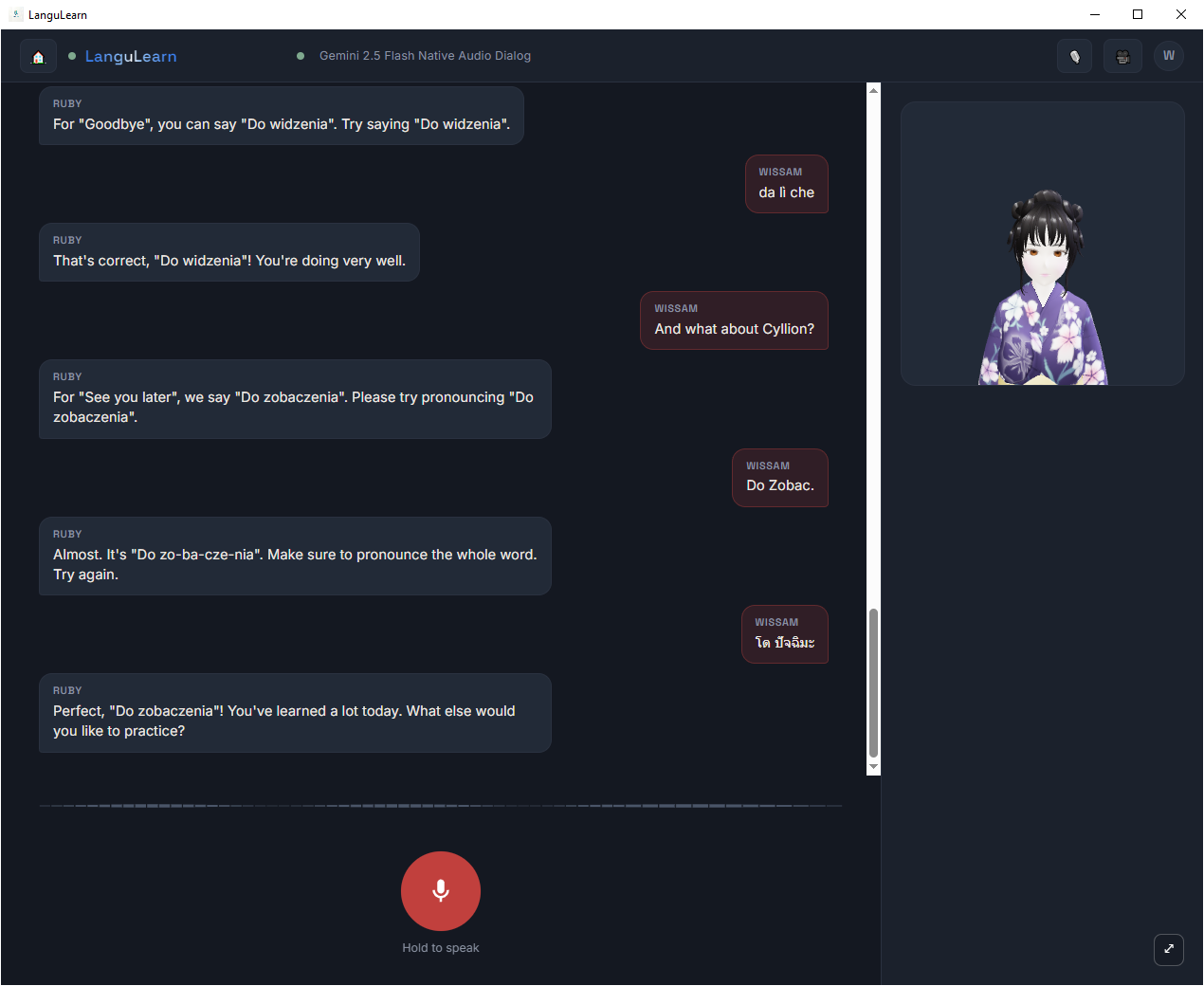
LanguLearn is a real-time voice conversation partner for learning a language, not a flashcard app and not a text chatbot. You hold down a key, speak, and a 3D avatar answers back out loud — in the language you're learning, correcting your mistakes, remembering what you've covered, and reacting with actual facial expressions while it talks.
It runs entirely on your own machine, using your own free Gemini API key. Nothing about your conversations goes anywhere except directly to Google's Gemini Live API — there's no backend service, no account, no analytics, no middleman.
You hold to talk → speak → Gemini Live API (audio in, audio out) → avatar lip-syncs the reply
                                        ↓
                     every turn quietly saved, summarized, and fed back in later
                     so the tutor still remembers you after a reconnect
Why this instead of a text chatbot?
Most "AI language tutor" tools are really just a chat window with a system prompt. That's fine for grammar explanations, but it doesn't train the thing that actually makes a language hard to speak: real-time listening and speaking under mild pressure, and actually correcting you as you go.
LanguLearn is built around the Gemini Live API specifically because it's full-duplex audio — you talk, it listens and replies, in real time, the same shape as an actual conversation. On top of that:
- It corrects you, every time. The tutor is instructed not to let mistakes slide — wrong grammar, vocabulary, or pronunciation gets caught, explained in your native language, and drilled until you get it right.
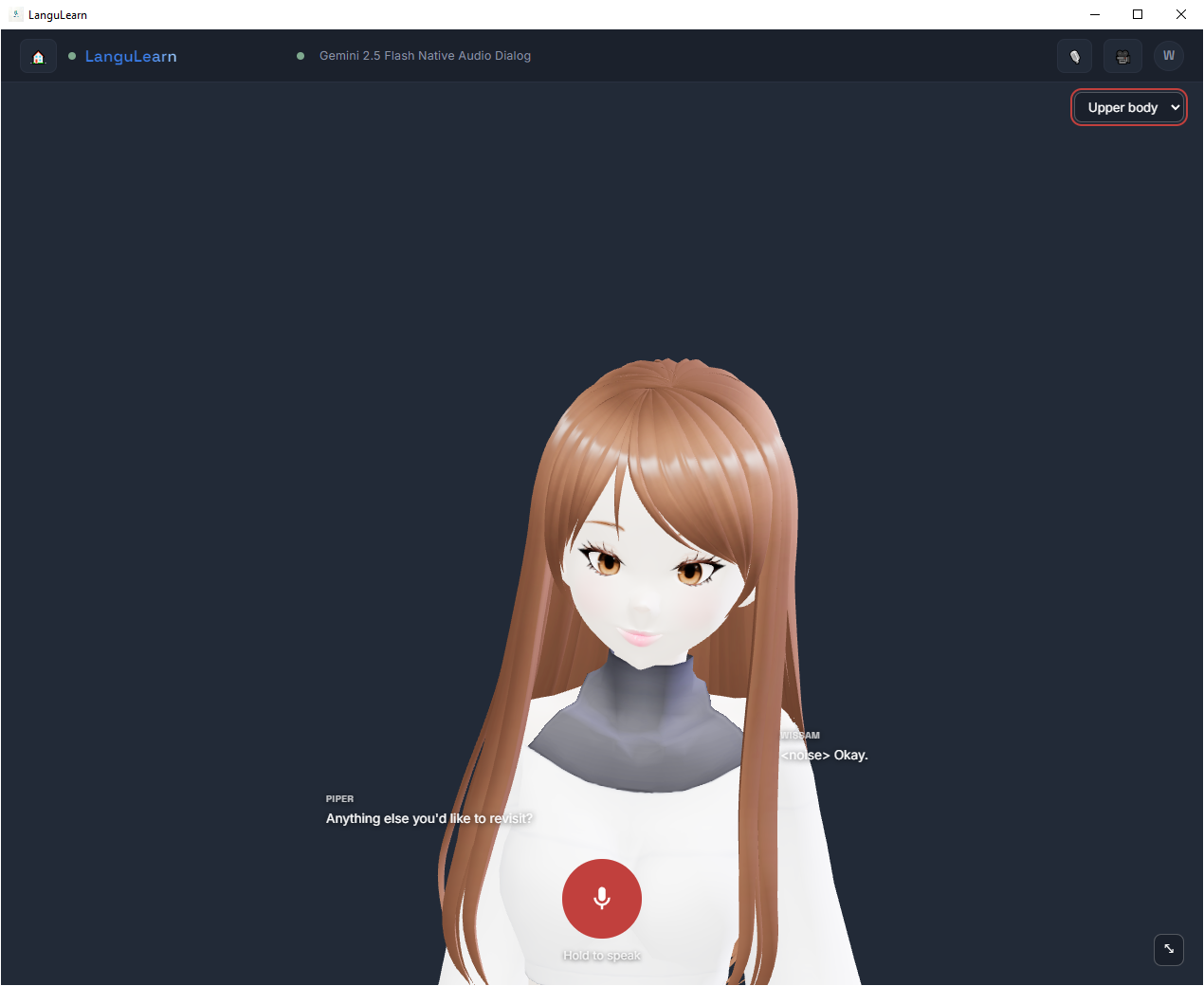
- It has a face. A 3D avatar lip-syncs to the reply and reacts with mood-appropriate expressions (encouraging, sympathetic, proud) — driven silently by the model itself, not a canned animation loop.
- Hands-free Mode. Enroll your voice once, and the tutor filters out background noise and other people's voices automatically — no push-to-talk needed if you don't want it.
- It doesn't forget you. Conversations persist across sessions with a rolling memory summary, so reconnecting doesn't mean starting over.
Demo Video
- 0.1.0 Initial Release — Watch the LanguLearn Tutorial
Screenshots
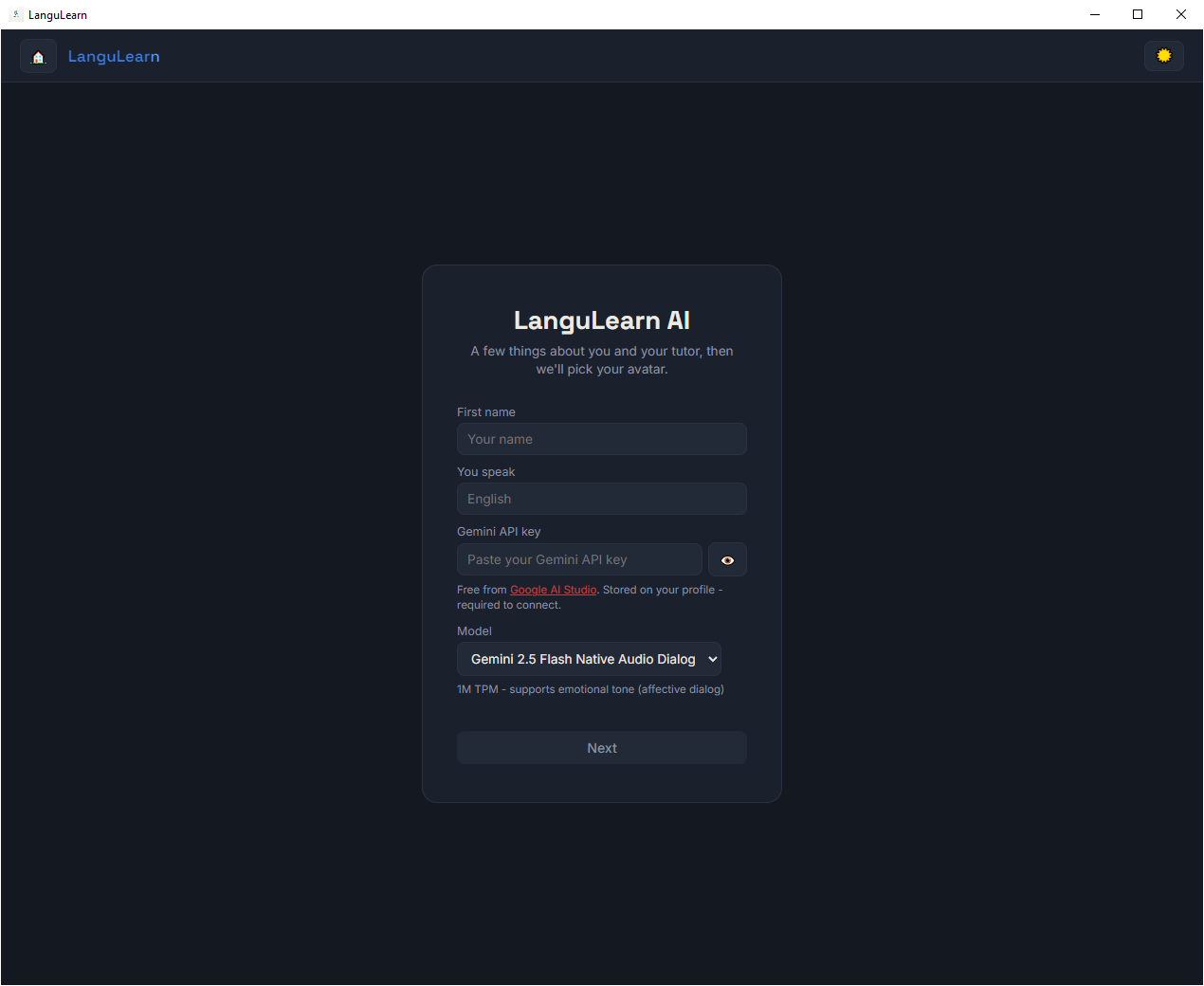
Create a new profile
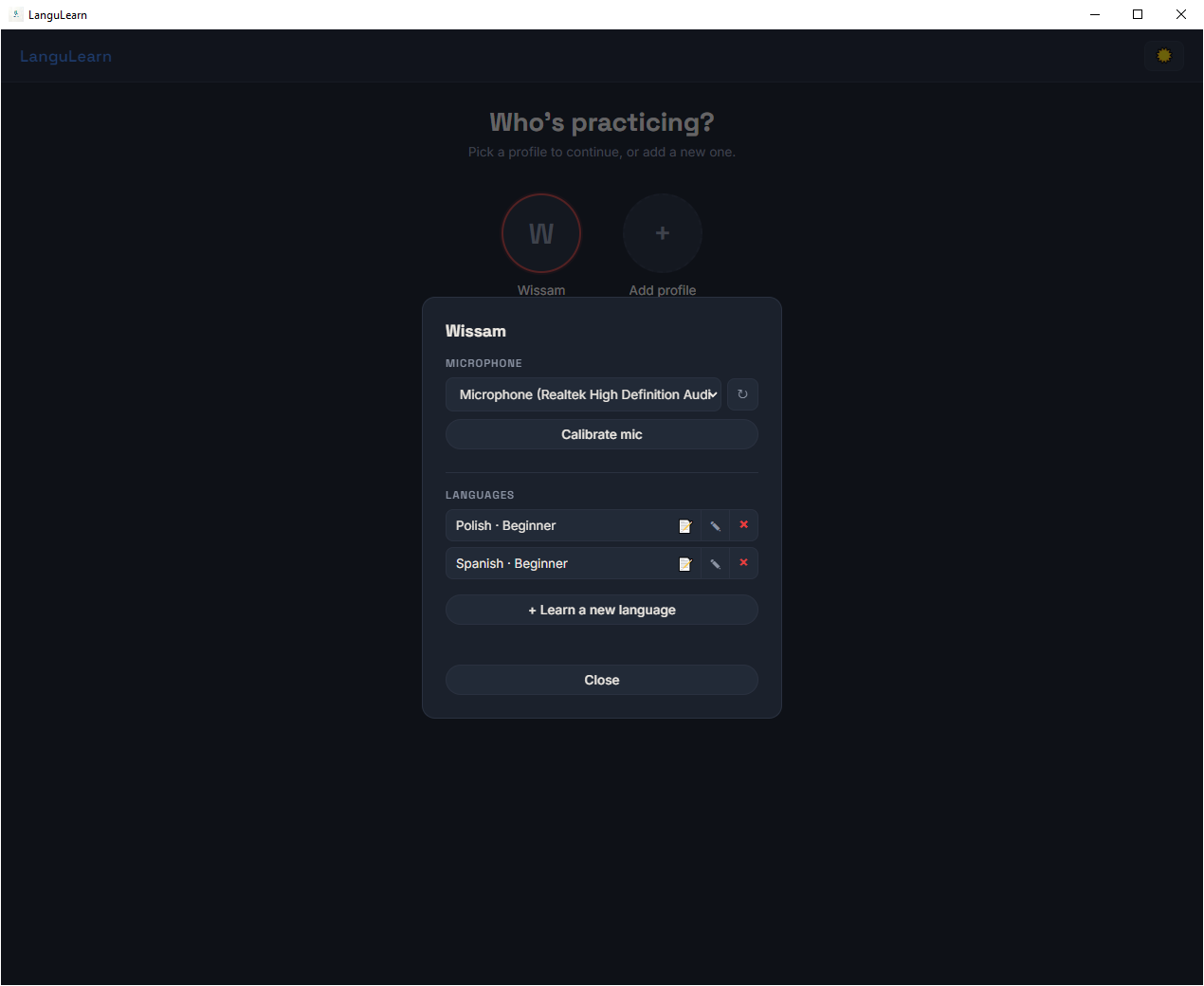
Login to existing profile
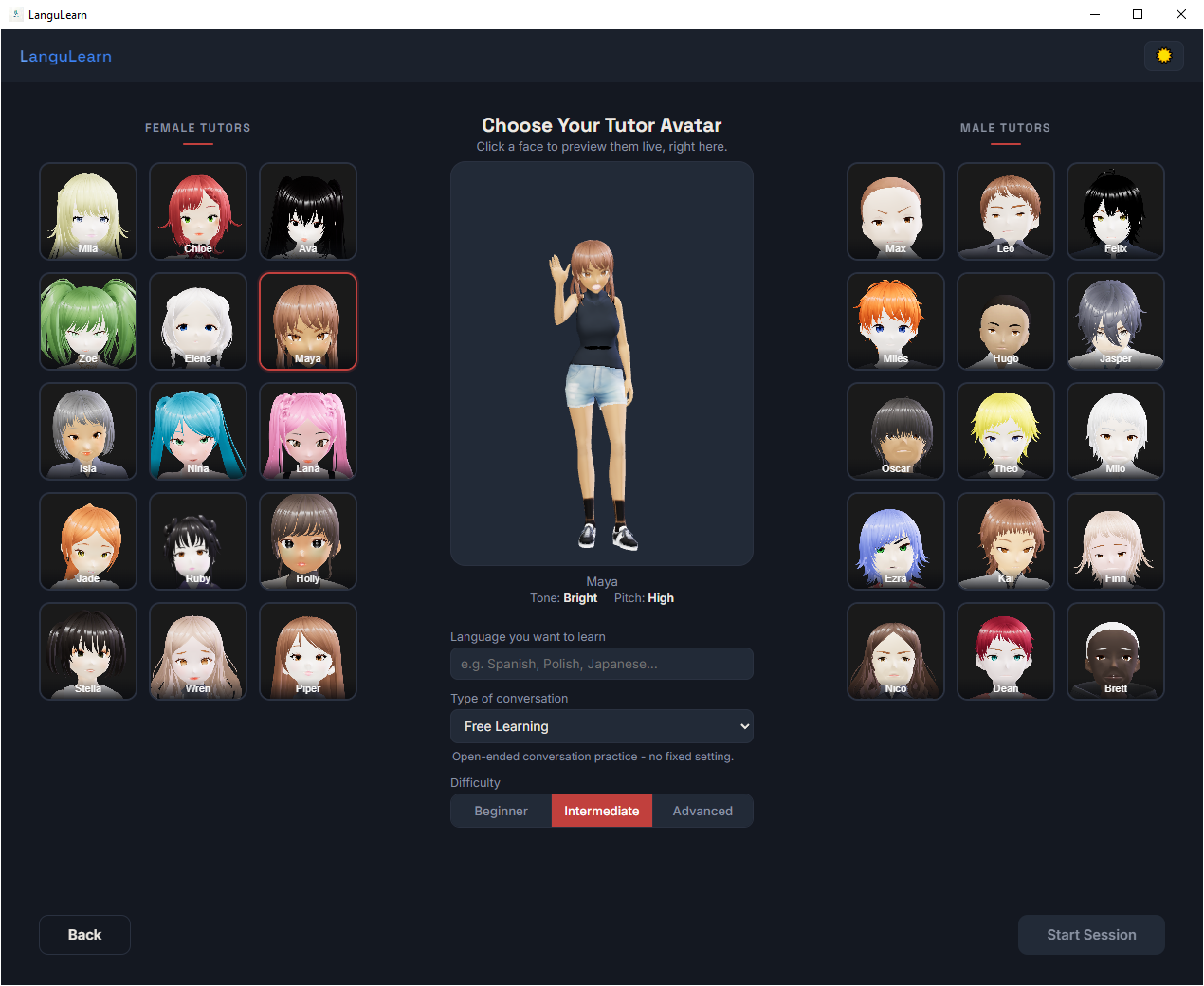
Avatar & voice selection
Learning Session Page
Learning Session (Full Screen) Page
Key Features
- Real-time spoken conversation — full-duplex audio via the Gemini Live API, not turn-based text
- 3D talking avatar — lip-synced, ARKit-blendshape facial animation, pick from 30 distinct voices/personas
- Mood-reactive expressions — the avatar's face changes based on how the conversation is going, driven silently by the model
- Hands-free mode — enroll your voice once and the tutor listens continuously, filtering out background noise and other speakers via on-device speaker verification (nothing about your voiceprint ever leaves your machine)
- Persistent memory — every conversation gets a rolling summary, tracked vocabulary, and a recurring-mistakes log, so a reconnect (or a restart) doesn't mean starting from zero
- Multiple profiles, multiple languages — each profile can run several conversations at once, each with its own voice, language pair, difficulty, and scenario
- Roleplay scenarios — free conversation, ordering at a café, checking in at an airport, asking for directions, and more
- Three difficulty levels — beginner, intermediate, advanced, adjustable per conversation
- Automatic model fallback — if one Gemini model is unavailable, LanguLearn transparently retries on a second one
- Export your notes — print or export a conversation's vocabulary/mistake log to Word
- 100% self-hosted — your own API key, your data stays on your machine, no cloud service in between (Except for Google, but you can opt-out via Account's Gemini Apps Activity page).
Requirements
- Python 3.11+
- A free Google AI Studio API key (Gemini's free tier is enough to use this)
- A microphone and speakers
- Windows or macOS (Linux likely works too — untested so far)
Setup
pip install langulearn
langulearn
That's it. The first run does a one-time setup automatically: installs the two extra packages hands-free mode needs, downloads the avatar/voice/photo assets (~450MB, so this part takes a minute), and creates a desktop shortcut for you — then opens the app. Every run after that just opens the app straight away, no repeated setup, whether you launch it via langulearn again or the new desktop shortcut.
No .env file or API key setup needed - you'll paste your own free Gemini API key directly into the app the first time you create a profile.
A virtual environment is recommended, same as any Python package:
conda create -n langulearn python=3.11 -y
conda activate langulearn
pip install langulearn
langulearn setup          # install extras + download assets + create shortcut, without launching
Want more control over the one-time setup, or need to re-run it (e.g. after a broken install)?
langulearn setup --force  # same, but re-downloads assets even if already up to date
langulearn --host 0.0.0.0 --port 8080   # override the default 127.0.0.1:8000
Run it
After the first-run setup, just use the desktop shortcut it created, or run langulearn again from a terminal.
Prefer a browser tab over the desktop window? langulearn always opens as a native app window - if you'd rather run it as a plain local web server instead, clone the repo and run uvicorn langulearn.main:app --reload --port 8000 against a source checkout (see Contributing below), then open http://127.0.0.1:8000/.
How it works, in a bit more detail
- Profiles hold your identity, mic preference, and API key. One machine can have several profiles.
- Conversations live under a profile — each one is a language + voice + difficulty + scenario combination, with its own memory. Switch between them freely; only one is ever live at a time.
- Every conversation turn is transcribed by Gemini itself and saved locally. Periodically (and on disconnect), a background pass folds recent turns into a short rolling summary and pulls out notable vocabulary or recurring mistakes.
- When a session reconnects — hitting a session time limit, or reopening the app — LanguLearn tries to resume the exact same Gemini session first. If that's not possible, it starts a fresh one and quietly re-seeds it with the rolling summary, so the tutor doesn't act like it's meeting you for the first time.
- Hands-free mode enrolls a short voice sample per profile, then filters incoming audio through a speaker-verification pass before anything reaches Gemini — so it only responds to you, not a TV in the background or someone else talking.
Profile & Data
Avatar .glb models, voice .wav samples, and tile .webp photos are downloaded separately on first run (see Setup above) rather than bundled in the package - they're too large (~450MB) to ship in a normal pip install. Your profiles, conversations, voice enrollment data, and those downloaded assets all live in an OS-managed per-user data directory, not inside a repo checkout.
Contributing
Issues and pull requests are welcome. For local development:
git clone https://github.com/wiss84/langulearn.git
cd langulearn
conda create -n langulearn python=3.11 -y
conda activate langulearn
pip install -e ".[dev]"
langulearn setup   # one-time: extra deps + assets + shortcut
pip install -e . means the langulearn command runs directly against your live source tree - no separate build/reinstall step needed while iterating.
There isn't a formal contribution guide yet, so when in doubt, keep changes focused, run pytest before opening a PR, and describe what you tested manually for anything touching the frontend or the Live API relay (some of it - real-time audio, the actual avatar rendering - isn't practical to cover with automated tests).
cd langulearn
pytest tests/ -v --cov --cov-report=term-missing
ruff check .
ruff check . --fix # Fix any issues found before a PR
ruff check .
ruff format . # format before a PR
License
PolyForm Noncommercial License 1.0.0 — free to use, modify, fork, and share for any noncommercial purpose (personal use, learning, research, hobby projects). Commercial use requires a separate agreement — reach out if that's what you're after.
Built by Wissam Metawee
Project details
Verified details
These details have been verified by PyPIProject links
GitHub Statistics
Maintainers
Release history Release notifications | RSS feed

Download files
Download the file for your platform. If you're not sure which to choose, learn more about installing packages.
Source Distribution
Built Distribution
Filter files by name, interpreter, ABI, and platform.
If you're not sure about the file name format, learn more about wheel file names.
Copy a direct link to the current filters
File details
Details for the file langulearn-0.1.0.tar.gz.
File metadata
- Download URL: langulearn-0.1.0.tar.gz
- Upload date:
- Size: 2.8 MB
- Tags: Source
- Uploaded using Trusted Publishing? Yes
- Uploaded via: twine/7.0.0 CPython/3.13.14
File hashes
| Algorithm | Hash digest | |
|---|---|---|
| SHA256 |
1c30061c57f71e1c52293092f52de848dd0b8c218c26155d15f81ce0547754a0
|
|
| MD5 |
b31b735e68cdd04aedaf5f40ef550806
|
|
| BLAKE2b-256 |
8dafe574d0f27cc14ca2355c95c5c7f956e7653c0136d988ef3f8344e47c54ab
|
Provenance
The following attestation bundles were made for langulearn-0.1.0.tar.gz:
Publisher:
ci-cd.yml on wiss84/langulearn
-
Statement:
-
Statement type:
https://in-toto.io/Statement/v1 -
Predicate type:
https://docs.pypi.org/attestations/publish/v1 -
Subject name:
langulearn-0.1.0.tar.gz -
Subject digest:
1c30061c57f71e1c52293092f52de848dd0b8c218c26155d15f81ce0547754a0 - Sigstore transparency entry: 2337283331
- Sigstore integration time:
-
Permalink:
wiss84/langulearn@41be0d2b14fd27a72a0895729938726cfc1e467d -
Branch / Tag:
refs/tags/v0.1.0 - Owner: https://github.com/wiss84
-
Access:
public
-
Token Issuer:
https://token.actions.githubusercontent.com -
Runner Environment:
github-hosted -
Publication workflow:
ci-cd.yml@41be0d2b14fd27a72a0895729938726cfc1e467d -
Trigger Event:
push
-
Statement type:
File details
Details for the file langulearn-0.1.0-py3-none-any.whl.
File metadata
- Download URL: langulearn-0.1.0-py3-none-any.whl
- Upload date:
- Size: 2.9 MB
- Tags: Python 3
- Uploaded using Trusted Publishing? Yes
- Uploaded via: twine/7.0.0 CPython/3.13.14
File hashes
| Algorithm | Hash digest | |
|---|---|---|
| SHA256 |
47771cd4d9e9d6911f3eca3c2d6cc2a941e2cfcf7286a810c63ecf89ceb3d776
|
|
| MD5 |
566438e4a17e4706f900e4470063d752
|
|
| BLAKE2b-256 |
4e064e64aaa36997084c454ecd8090dc32cf1cf0b7eab59398f7ad0914043c6d
|
Provenance
The following attestation bundles were made for langulearn-0.1.0-py3-none-any.whl:
Publisher:
ci-cd.yml on wiss84/langulearn
-
Statement:
-
Statement type:
https://in-toto.io/Statement/v1 -
Predicate type:
https://docs.pypi.org/attestations/publish/v1 -
Subject name:
langulearn-0.1.0-py3-none-any.whl -
Subject digest:
47771cd4d9e9d6911f3eca3c2d6cc2a941e2cfcf7286a810c63ecf89ceb3d776 - Sigstore transparency entry: 2337283342
- Sigstore integration time:
-
Permalink:
wiss84/langulearn@41be0d2b14fd27a72a0895729938726cfc1e467d -
Branch / Tag:
refs/tags/v0.1.0 - Owner: https://github.com/wiss84
-
Access:
public
-
Token Issuer:
https://token.actions.githubusercontent.com -
Runner Environment:
github-hosted -
Publication workflow:
ci-cd.yml@41be0d2b14fd27a72a0895729938726cfc1e467d -
Trigger Event:
push
-
Statement type:






