

Lannotex
Fast, offline-first image annotation for bounding boxes, polygons, and image classes.
Free and MIT-licensed. LabelMe-compatible. Your images never leave your machine.





Documentation · Quick start · Coming from LabelMe · Releases
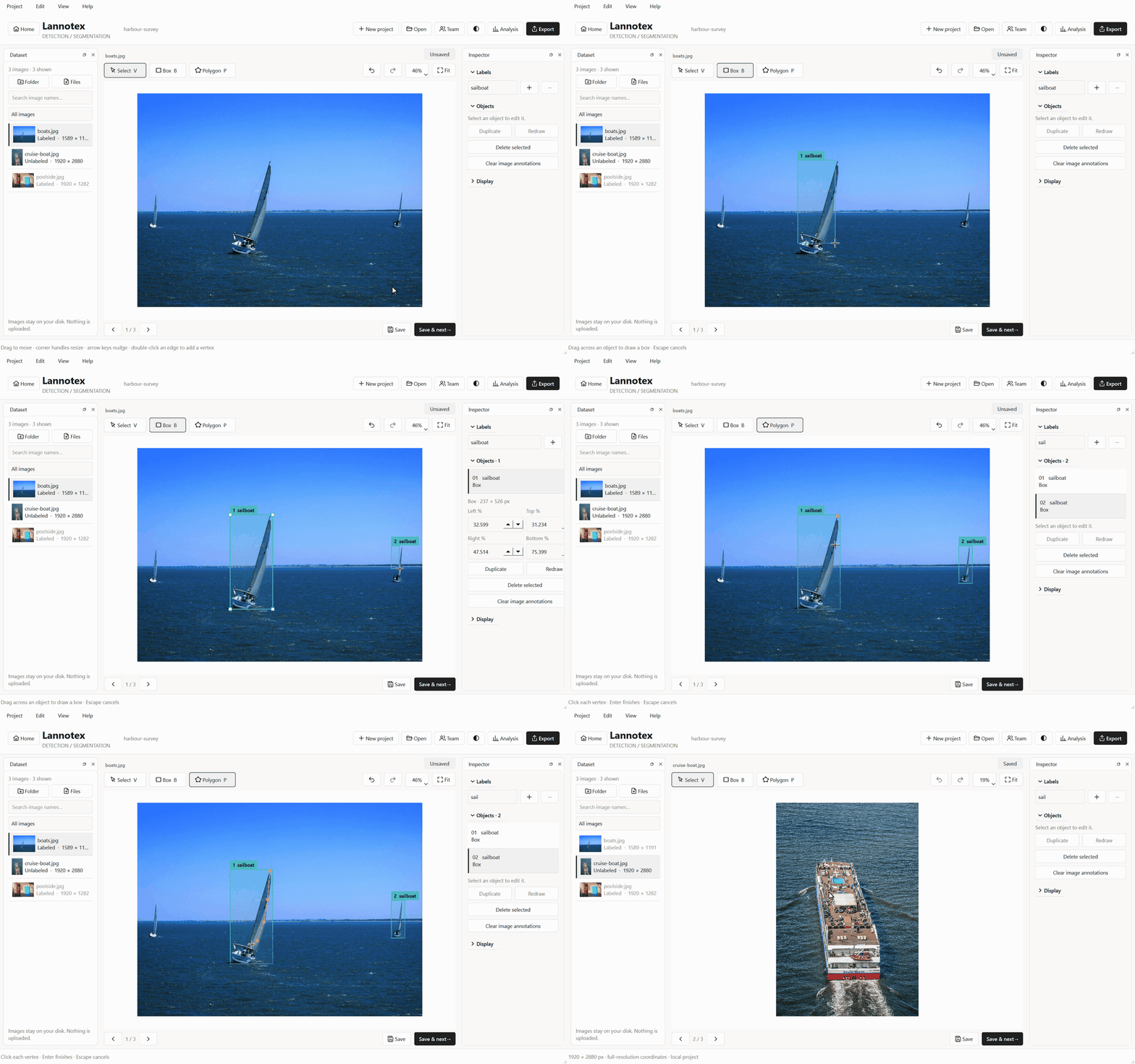
Why Lannotex?
- Everything you need is free. YOLO, COCO, Labelme and CSV export, standalone desktop builds, and team review are all free and open source. No license keys, no Pro tier.
- Built for real datasets. A project is one SQLite file instead of thousands of JSON files. The image list is virtualized, so its memory use stays flat; it was benchmarked at 100,000 records. Your source images are never moved or modified.
- You can't lose work. Every edit is written to a recovery draft, saves are transactional, and broken geometry (self-intersecting polygons, zero-size boxes) is rejected before it reaches your dataset.
- Private by default. No account, no telemetry, no cloud. The app makes network requests only if you choose to host or join a team on your own network.
Install
uv tool install lannotex   # recommended, isolated install
lannotex
pip, pipx, standalone builds, and source
pipx install lannotex
# or, inside a virtual environment
python -m pip install lannotex
Standalone builds for Windows, macOS, and Linux are attached to every release. They bundle Python and Qt, so nothing else is needed.
From source:
git clone https://github.com/Lourdhu02/Lannotex.git && cd Lannotex
uv venv && uv pip install -e ".[dev]"
lannotex
Lannotex supports Python 3.11–3.14 on Windows, macOS, and Linux. See the installation guide for details.
Your first dataset in 60 seconds
- Create a project and pick a pipeline: Classification, Object detection, Segmentation, or Combined. Each one shows only the tools it needs.
- Import a folder (
Ctrl+I). JPEG, PNG and WebP files are checked and referenced in place, not copied. - Add labels, then draw:
Bfor boxes,Pfor polygons (Enterfinishes),Vto select and edit. - Save & next with
Ctrl+Enter. Autosave and recovery drafts run in the background anyway. - Export to the format your training code expects.
Every shortcut can be remapped. See the annotating guide for the full list.
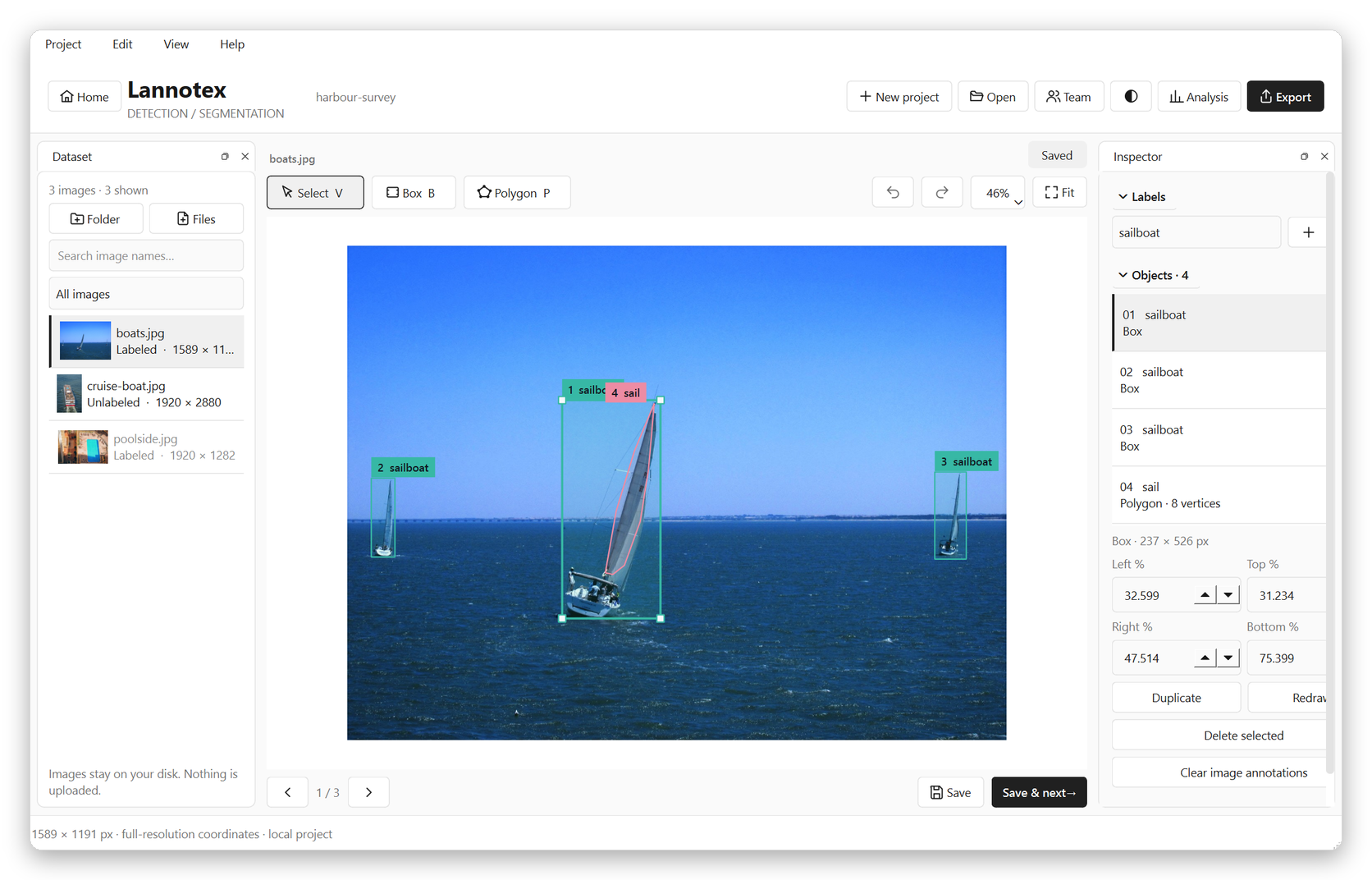 |
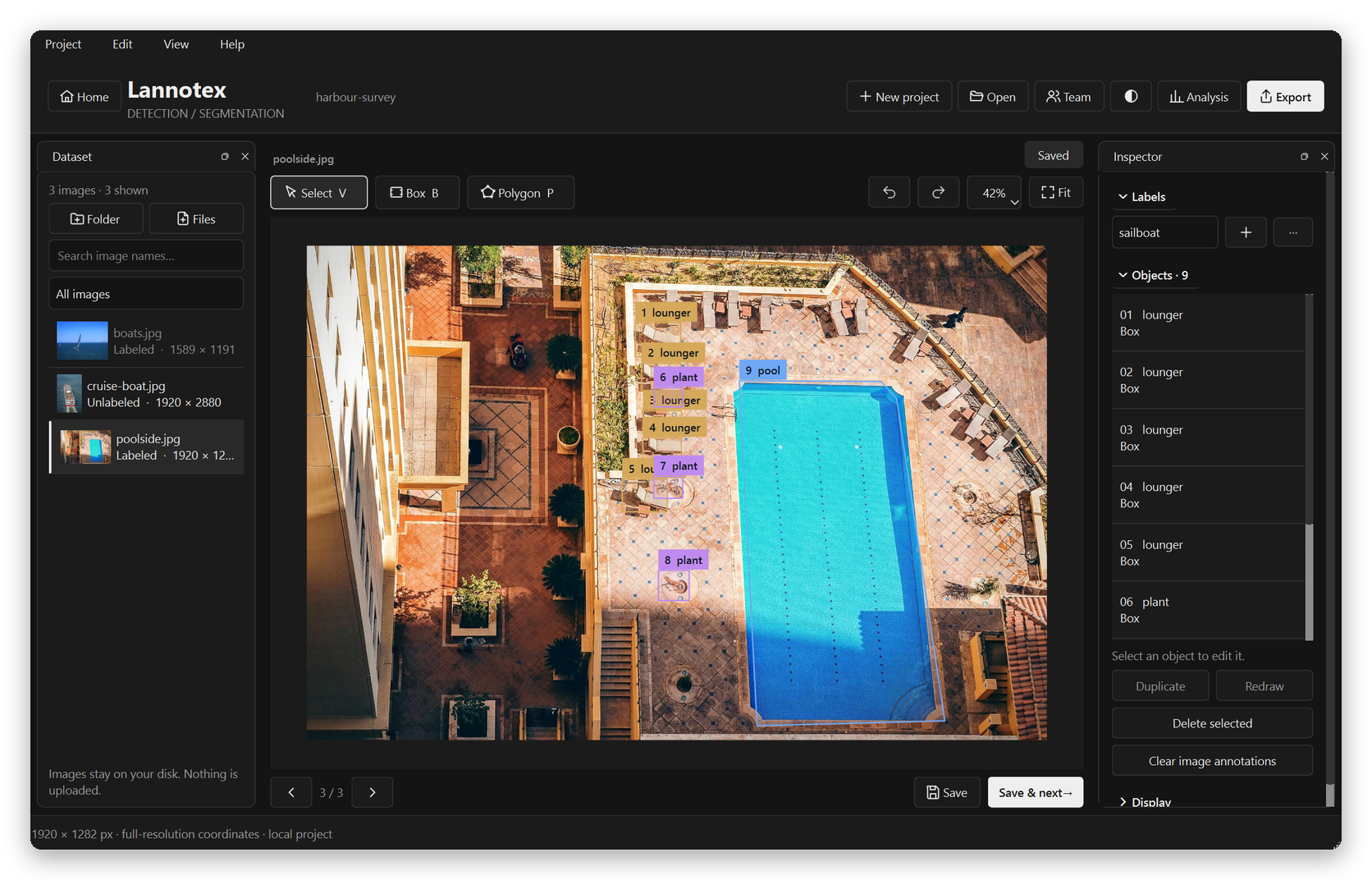 |
| Light theme · polygon vertex editing | Dark theme · object detection |
Features
| Annotate | Bounding boxes · polygons with vertex drag, insert, and delete · multi-label image classes · "no target" negatives · 100-step undo/redo · zoom under the pointer, pan, arrow-key nudging · focus mode · light and dark themes |
| View | Sharp full-resolution zoom up to 6400% · next/previous images decoded ahead · minimap · pixel grid · brightness, contrast and gamma · thumbnails · dockable panels you can float onto a second monitor, with saved layouts · Ctrl+K command palette |
| Stay safe | SQLite projects with versioned migrations · recovery drafts and 700 ms autosave · transactional saves · geometry validation · backup and restore · relinking for moved images · EXIF orientation handled |
| Scale | Virtualized image list (at most 1,024 records in memory) · background import and decoding · 96 MB preview cache · coordinates normalized to the original resolution |
| Export | Labelme JSON · ready-to-train YOLO (images/, labels/, data.yaml) · COCO JSON · classification CSV · lossless native JSONL · each export reports anything it skipped |
| Automate | lannotex export and lannotex analyze run headless in CI, with no display needed |
| Collaborate | Optional LAN host with per-reviewer tokens, background sync, revision conflicts you resolve explicitly, revocation, and an audit history |
Lannotex vs. LabelMe
LabelMe is a great tool and Lannotex reads and writes its JSON format, so you can switch without converting anything.
| Lannotex | LabelMe | |
|---|---|---|
| License | MIT | GPL-3.0 |
| Standalone desktop app | Free | Paid license |
| YOLO export | ✅ Free | Pro tier |
| COCO export | ✅ | ✅ |
| One database per dataset | ✅ | One JSON per image |
| Crash recovery and transactional saves | ✅ | Optional autosave |
| Team review with conflict handling | ✅ | — |
| Headless export and validation CLI | ✅ | Example scripts |
| AI-assisted annotation (SAM) | Not yet | ✅ |
| Circles, lines, points, rotated boxes | Not yet | ✅ |
Based on LabelMe's published features and pricing as of October 2026. The full comparison and migration guide covers which LabelMe shapes import today.
Command line
lannotex new ./dataset                                  # create a project
lannotex analyze ./dataset                              # JSON health report: counts, problems, drafts
lannotex export ./dataset ./out --format "COCO JSON"    # Labelme JSON | YOLO boxes | COCO JSON | Classification CSV | Native JSONL
lannotex invite ./dataset "Alice"                       # print a one-time reviewer token
lannotex host ./dataset --bind 0.0.0.0 --port 8765      # share a project on your LAN (TLS via --cert/--key)
analyze writes clean JSON to stdout, so it can gate a training pipeline. See the
CLI reference.
Privacy
Solo projects make no network requests. Team mode connects only to the host address you enter, reviewer tokens are kept in memory on clients, and the host stores only token hashes. There is no telemetry, no external AI service, and no automatic upload. Read the team guide for LAN and TLS setup.
Roadmap
Next up: point, line, rotated-box, keypoint and brush-mask tools, per-object attributes, and VOC, YOLO-seg and YOLO-OBB export. See the roadmap and the measured performance.
Contributing
Bug reports, ideas, and pull requests are welcome. Start with CONTRIBUTING.md, and please follow the Code of Conduct. Report security issues privately, as described in SECURITY.md.
If Lannotex saves you time, a ⭐ helps other people find it.
License
MIT © 2026 Lourdhu Raju. Third-party licenses are listed in THIRD_PARTY_NOTICES.md. Demo images are public-domain and CC0 samples from scikit-image.
1 maintainer

Metadata
1 maintainer
Release files for lannotex 0.2.0
For a detailed explanation of source distributions (sdists) and built distributions (wheels), please see the package formats documentation.
Source distribution (sdist)
| File | Size | Uploaded | Provenance | |
|---|---|---|---|---|
| lannotex-0.2.0.tar.gz | 109.3 kB | With provenance | Details |
Built distribution (wheel)
| File | Interpreter | ABI | Platform | Reset |
|---|---|---|---|---|
| lannotex-0.2.0-py3-none-any.whl | Python 3 | none | any | Details |
Total release size: 173.3 kB
Release files / lannotex-0.2.0.tar.gz
| Download URL | lannotex-0.2.0.tar.gz |
|---|---|
| Size | 109.3 kB |
| Tags | Source |
|
SHA-256 checksum How to use checksums |
dbf65608bfacae1ad88126b0f2fb4462c9230e7652f260478d82d0f3b6576341
|
|
BLAKE2b-256 checksum How to use checksums |
d285ee618faa85f3976c950d0c76e683ee4f17bca4d40fe2ad812f7a19b5fd77
|
| Upload date | |
|
Uploaded using Trusted Publishing? What is trusted publishing? |
Yes |
| Uploaded via |
twine/7.0.0 CPython/3.13.14
|
Provenance
Provenance describes where a file came from. On PyPI, provenance is shared via attestations, which provide a verifiable record of the build or publishing details. View details, limitations and caveats.


PyPI Publish Attestation
PyPI verified that this artifact, at this checksum, originated from the publisher listed below.
Signed by GitHub Actions, verified by PyPI on Oct 14, 2026.
Transparency logRelease files / lannotex-0.2.0-py3-none-any.whl
| Download URL | lannotex-0.2.0-py3-none-any.whl |
|---|---|
| Size | 63.9 kB |
| Tags | Python 3 |
|
SHA-256 checksum How to use checksums |
8f2df2a544a056a53e80217c09539b8c3644c6fa86bec514074b765333609059
|
|
BLAKE2b-256 checksum How to use checksums |
12ec89488bc9d51e277860529a16df2773bccbfcd341870c832eb87732343e7a
|
| Upload date | |
|
Uploaded using Trusted Publishing? What is trusted publishing? |
Yes |
| Uploaded via |
twine/7.0.0 CPython/3.13.14
|
Provenance
Provenance describes where a file came from. On PyPI, provenance is shared via attestations, which provide a verifiable record of the build or publishing details. View details, limitations and caveats.
PyPI Publish Attestation
PyPI verified that this artifact, at this checksum, originated from the publisher listed below.
Signed by GitHub Actions, verified by PyPI on Oct 14, 2026.
Transparency logSecurity for lannotex 0.2.0
Provenance
Provenance describes where a file came from. On PyPI, provenance is shared via attestations, which provide a verifiable record of the build or publishing details. View details, limitations and caveats.
Full provenance
All 2 files in this release have been uploaded with provenance metadata.
Attestation for lannotex-0.2.0.tar.gz
PyPI Publish Attestation
PyPI verified that this artifact, at this checksum, originated from the publisher listed below.
Signed by GitHub Actions, verified by PyPI on Oct 14, 2026.
Transparency logA note on package security
PyPI is a repository for distributing packages, not a service for auditing them. While third-party security researchers and our staff do their best to detect and remove malicious packages, PyPI cannot guarantee the quality, security or suitability of any given package.
To learn more about protecting yourself from malicious actors, visit our package security documentation.














