








Secure device pairing and messaging for the local network, in a few lines of Python.
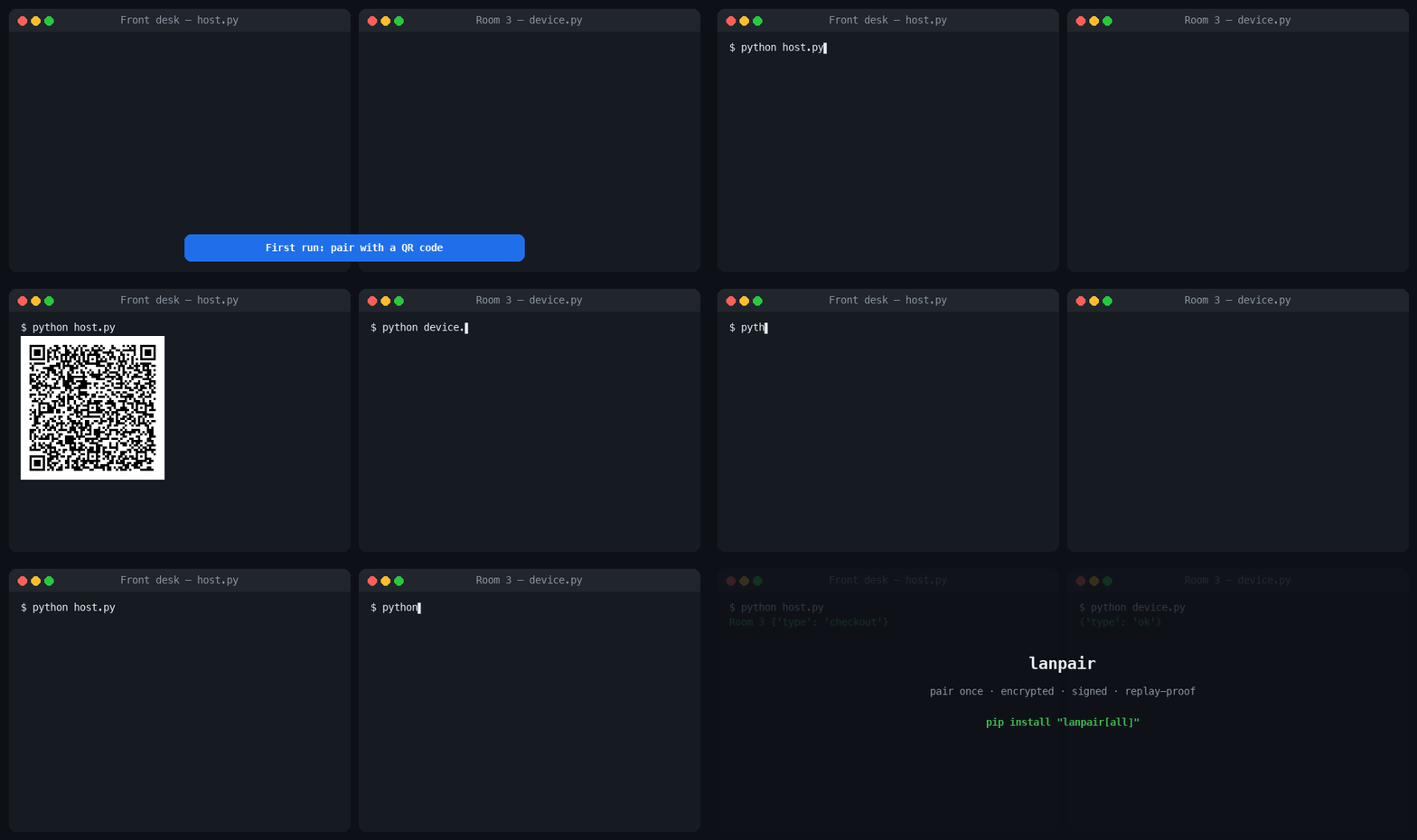
You have a desk PC and ten room PCs. Or a Raspberry Pi and a phone. Or a game host and its controllers. They sit on the same Wi-Fi, and you want one to send commands to the other.
The usual answer is an HTTP endpoint or a UDP broadcast with no authentication at all: anyone on the network can read the traffic, send "unlock" themselves, or record a command and play it back tomorrow. Doing it properly means TLS certificates, key exchange, nonce handling and replay windows: a week of security work for a side feature.
lanpair is that week of work, packaged. Devices pair once, then every message is encrypted to its recipient, signed by its sender and checked for replay before your code ever sees it.
Status: 1.x, stable API under semantic versioning. Tested on Linux, macOS and Windows, property-tested and fuzzed. 6-digit code pairing is still to come. There has been no external security review yet.
Contents
- Quick look
- What you get
- How it works
- Where it's going
- Compared with alternatives
- Install
- Contributing
Quick look
pip install "lanpair[all]"
# host.py: a front desk, a hub
from lanpair import Host

with Host("Front desk") as host:
    if not host.devices:  # first run: show a QR code and wait for a device
        host.pairing_offer().print_qr()
        host.wait_for_pairing(timeout=300)
    for msg in host.messages():  # every message is already verified
        print(msg.sender.name, msg.body)
        host.send(msg.sender.device_id, {"type": "ok"})
# device.py: a room PC, a Raspberry Pi
from lanpair import Device

with Device("Room 3") as dev:
    if dev.host is None:  # first run: pair with the scanned QR code
        dev.pair(input("Scanned code: "))
    dev.send({"type": "checkout"})
    for msg in dev.messages():
        print(msg.body)
That is the whole setup: pairing happens once, and both sides remember each other across restarts. Behind it:
- Pairing by QR code. The code carries the host's keys and a one-time secret. The device proves it scanned the code; nobody on the network can join or impersonate the host. One device per code, 5 minutes, 5 tries.
- Keys in the OS key store, peers and replay counters on disk, so pairing survives restarts and old messages stay rejected.
- Discovery with mDNS, so changing IP addresses don't matter.
- Any size up to 1 MiB: small messages go by UDP, larger ones over TCP, automatically.
- Every message encrypted, signed, bound to its recipient and replay-checked before
messages()hands it to you.
Lower level: bring your own transport
The building blocks under Host and Device. You choose the transport (TCP, WebSocket,
anything that carries bytes); lanpair makes the bytes safe.
from lanpair import Identity, JsonFileSeqStore, Opener, Sealer

desk, room3 = Identity.generate(), Identity.generate()  # one per device, keep the seed

# Pairing: each side stores the other's public identity (64 bytes, fits in a QR code).
# The store remembers what was already received, so replays fail even after a restart.
inbox = Opener(room3, store=JsonFileSeqStore("room3-seqs.json"))
inbox.add_peer(desk.public)

# The desk sends...
wire = Sealer(desk).seal(room3.public, {"type": "close", "reason": "checkout"})

# ...and room 3 receives. Anything forged, tampered, replayed, stale or meant for
# another device raises EnvelopeError instead.
peer, body = inbox.open(wire)
assert peer == desk.public and body["type"] == "close"
Without a store, Opener keeps its memory in RAM and, to stay replay-safe, refuses
messages for the first 30 seconds after it starts.
To keep a device's keys across restarts, store them in the operating system's key store (macOS Keychain, Windows Credential Manager, Secret Service on Linux) instead of a file:
# pip install "lanpair[keyring]"
from lanpair import load_or_create_identity

me = load_or_create_identity()  # generated on first run, the same one afterwards
Find paired devices on the network by id, so changing IP addresses don't matter:
# pip install "lanpair[discovery]"
from lanpair.discovery import Announcer, find

with Announcer(me.public, "Room 3", port=8765):  # on the device
    ...

room3 = find(room3_id)  # on the desk: FoundDevice(..., address="192.168.1.23:8765") or None
Discovery is only a hint about addresses; it never decides who is trusted.
What an eavesdropper sees on the network: who is talking to whom and how much, nothing more.
{"ct":"m1Zq…","eph":"ZJ8v…","from":"4f1c0a9e7b2d1c33","seq":1763683200123456,
 "sig":"Gx0k…","to":"a87e5512c0de9b41","ts":1763683200.12,"v":2}
What you get
| Attack from someone on your LAN | What lanpair does |
|---|---|
| Reads your messages | Bodies are encrypted to the recipient (X25519 + ChaCha20-Poly1305) |
| Sends fake commands | Every message is signed (Ed25519); unknown or unpaired senders are dropped |
| Changes a message in flight | Signature and AEAD tag both fail |
| Redirects a message to another device | The recipient is signed in, and only it holds the decryption key |
| Records a message and replays it | Increasing sequence numbers, checked per peer |
| Replays after you restart the app | Sequence numbers survive restarts (time-based sender, persistent or start-window receiver) |
| Replays an old message much later | Timestamps outside ±30 s are refused |
| Sends junk to crash your parser | Strict validation; everything becomes EnvelopeError |
| Sends huge or deeply nested packets | Size limit (1 MiB by default) and nesting checks before any parsing work |
Also: fully typed (mypy strict), one required dependency
(cryptography), tested on Linux, macOS and Windows with
Python 3.10 to 3.13, property-tested with Hypothesis, and fuzzed with Atheris on every
change. Releases are also checked in a simulated LAN (e2e/) with an attacker
node that sniffs, replays, tampers, redirects and forges traffic.
How it works
sequenceDiagram
    participant D as Desk (sender)
    participant N as LAN (untrusted)
    participant R as Room 3 (receiver)
    Note over D,R: Once: pair, each side stores the other's public keys
    D->>D: fresh X25519 key, encrypt body to Room 3, sign header + ciphertext
    D->>N: envelope (v, from, to, ts, seq, eph, ct, sig)
    N->>R: maybe tampered, replayed, delayed, or for someone else
    R->>R: known sender? signature? for me? fresh? new seq? decrypts?
    R-->>R: only then: (peer, body) to your code
One 32-byte seed per device gives both its Ed25519 signing key and its X25519 encryption key. The full threat model, the reasoning behind each layer, and the known limits are in docs/design.md.
Where it's going
| Piece | State |
|---|---|
| Identity, signed + encrypted envelopes | ✅ 1.0 |
| Replay protection across restarts | ✅ 1.0 |
| Keys in the OS key store (Keychain, Credential Manager, Secret Service) | ✅ 1.0 |
| mDNS / zeroconf discovery | ✅ 1.0 |
| QR code pairing | ✅ 1.1 |
Host / Device API |
✅ 1.1 |
| 6-digit code pairing with a PAKE | 🔜 next |
| TCP for large messages (up to 1 MiB) | ✅ 1.2 |
Want to help with one of these? See the open issues.
Compared with alternatives
| lanpair | Plain HTTP / UDP | Self-managed TLS | Noise / libsodium directly | |
|---|---|---|---|---|
| Authenticated messages | ✅ | ❌ | ✅ | ✅ |
| Encrypted | ✅ | ❌ | ✅ | ✅ |
| Replay protection | ✅ built in | ❌ | per connection | you build it |
| Pairing flow (QR code) | ✅ built in | ❌ | you build a CA | you build it |
| Lines of code for you | a few | a few | many | many |
Install
pip install lanpair                        # core: identities and secure envelopes
pip install "lanpair[keyring]"             # + keys in the OS key store
pip install "lanpair[discovery]"           # + mDNS discovery
pip install "lanpair[qr]"                  # + QR codes for pairing
pip install "lanpair[all]"                 # everything
Python 3.10 or newer. lanpair follows semantic versioning: no breaking changes within 1.x.
Contributing
Bug reports, ideas and pull requests are welcome. Start with CONTRIBUTING.md. Found a security issue? Please report it privately as described in SECURITY.md, not in a public issue.
git clone https://github.com/TonyD365/lanpair && cd lanpair
pip install -e ".[dev]"
pytest && ruff check . && ruff format --check . && mypy src
License
1 maintainer

Metadata
1 maintainer
Release files for lanpair 1.2.0
For a detailed explanation of source distributions (sdists) and built distributions (wheels), please see the package formats documentation.
Source distribution (sdist)
| File | Size | Uploaded | Provenance | Actions |
|---|---|---|---|---|
| lanpair-1.2.0.tar.gz | 294.3 kB | With provenance | Details for lanpair-1.2.0.tar.gz |
Built distribution (wheel)
| File | Interpreter | ABI | Platform | Actions Reset |
|---|---|---|---|---|
| lanpair-1.2.0-py3-none-any.whl | Python 3 | none | any | Details for lanpair-1.2.0-py3-none-any.whl |
Total release size: 320.5 kB
Release files / lanpair-1.2.0.tar.gz
| Download URL | lanpair-1.2.0.tar.gz |
|---|---|
| Size | 294.3 kB |
| Tags | Source |
|
SHA-256 checksum How to use checksums |
f54f1bfa13a186be116506d66055fa116a0513504ee3952ba3454286e1a0c19a
|
|
BLAKE2b-256 checksum How to use checksums |
1cfbc9250f682d2b5d6f8b0e21ab729b83d38abe2222dd88b6f42f575f62cf7d
|
| Upload date | |
|
Uploaded using Trusted Publishing? What is trusted publishing? |
Yes |
| Uploaded via |
twine/7.0.0 CPython/3.13.16
|
Provenance
Provenance describes where a file came from. On PyPI, provenance is shared via attestations, which provide a verifiable record of the build or publishing details. View details, limitations and caveats.


PyPI Publish Attestation
PyPI verified that this artifact, at this checksum, originated from the publisher listed below.
Signed by GitHub Actions, verified by PyPI on Nov 21, 2026.
Transparency logRelease files / lanpair-1.2.0-py3-none-any.whl
| Download URL | lanpair-1.2.0-py3-none-any.whl |
|---|---|
| Size | 26.3 kB |
| Tags | Python 3 |
|
SHA-256 checksum How to use checksums |
ceb6eb816e5a94df7088655a313a977696e86131ee037bcee4b2bea4aab5b0a9
|
|
BLAKE2b-256 checksum How to use checksums |
20313349b237f268ff52f9b70bb75b36dbd102ceef5b63fdfa81247d67d1a3a3
|
| Upload date | |
|
Uploaded using Trusted Publishing? What is trusted publishing? |
Yes |
| Uploaded via |
twine/7.0.0 CPython/3.13.16
|
Provenance
Provenance describes where a file came from. On PyPI, provenance is shared via attestations, which provide a verifiable record of the build or publishing details. View details, limitations and caveats.
PyPI Publish Attestation
PyPI verified that this artifact, at this checksum, originated from the publisher listed below.
Signed by GitHub Actions, verified by PyPI on Nov 21, 2026.
Transparency logSecurity for lanpair 1.2.0
Provenance
Provenance describes where a file came from. On PyPI, provenance is shared via attestations, which provide a verifiable record of the build or publishing details. View details, limitations and caveats.
Full provenance
Both files in this release have been uploaded with provenance metadata.
Attestation for lanpair-1.2.0.tar.gz
PyPI Publish Attestation
PyPI verified that this artifact, at this checksum, originated from the publisher listed below.
Signed by GitHub Actions, verified by PyPI on Nov 21, 2026.
Transparency logA note on package security
PyPI is a repository for distributing packages, not a service for auditing them. While third-party security researchers and our staff do their best to detect and remove malicious packages, PyPI cannot guarantee the quality, security or suitability of any given package.
To learn more about protecting yourself from malicious actors, visit our package security documentation.














