
 LANspector






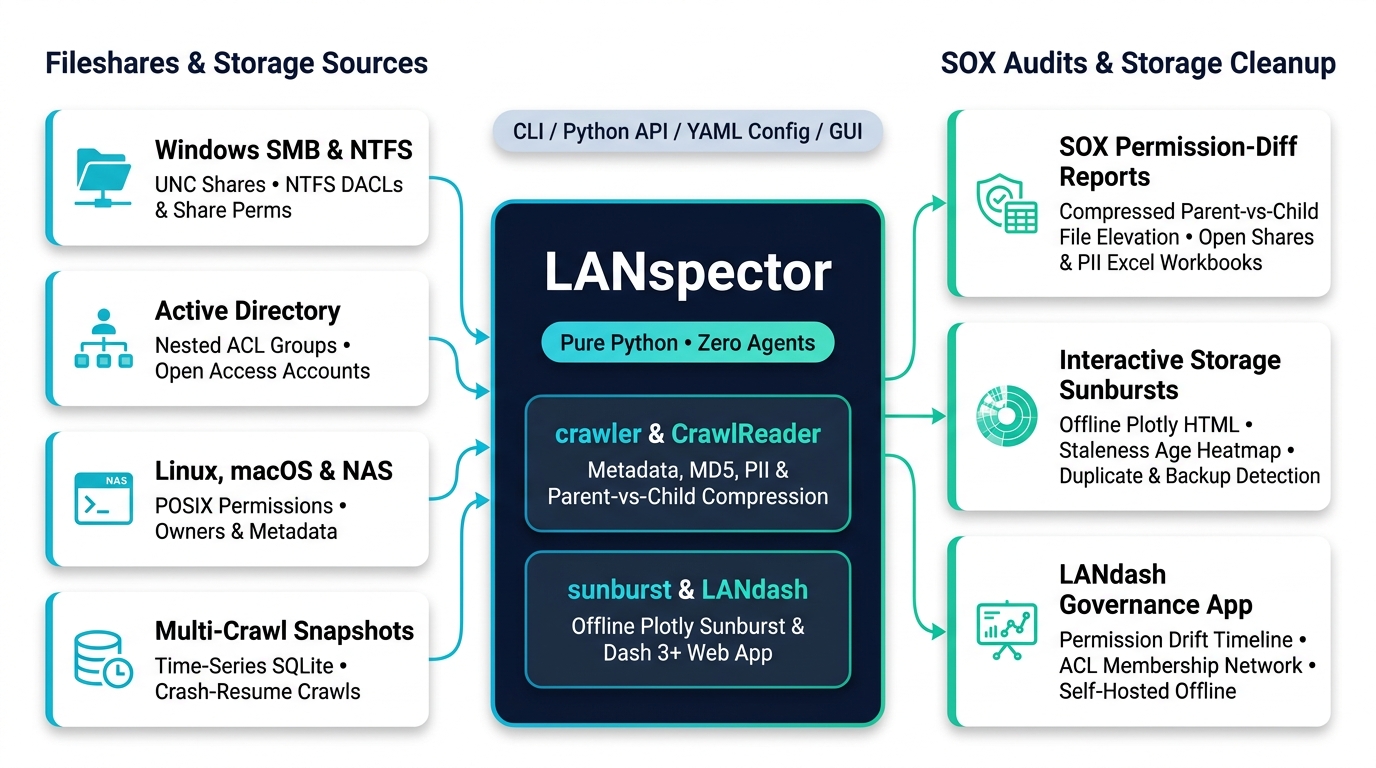
Cross-platform LAN & Windows fileshare auditor (lanspector) — harvest directory/file metadata (atime/ctime/mtime, owner, size, MD5, PII indicators) and NTFS/POSIX ACLs into timestamped SQLite databases, generate losslessly compressed parent-vs-child SOX permission-diff Excel reports, and explore storage hotspots with interactive Plotly sunburst charts and an optional Dash web dashboard (lanspector[dashboard]).
Why LANspector?
Auditing unstructured network fileshares for SOX, SOC 2, ISO 27001, or storage cleanup typically forces teams to choose between raw dumps (such as DumpSec) or seven-figure commercial governance suites (such as Varonis). LANspector provides a fast, open-source Python alternative:
| Capability | LANspector | DumpSec | Commercial Governance Suites |
|---|---|---|---|
| Cost & Footprint | Free, open-source (MIT), zero agents | Free Windows utility | Expensive enterprise licensing & agents |
| Folder and File-Level ACL Harvesting | Yes (catches files with broader access than parent folders) | Folders only (skips hidden objects) | Yes |
| Lossless Parent-vs-Child Permission Compression | Yes (100k+ folders compressed to only permission boundaries) | Raw dump only | Proprietary web console |
| Multi-Crawl Drift & Access Comparison | Yes (SQLite time-series snapshots) | Manual diffing | Yes |
| Interactive Storage Sunburst & Stale Data Heatmap | Yes (standalone offline Plotly HTML + optional Dash app) | No | Proprietary UI |
| Cross-Platform (Windows NTFS/AD + Linux/macOS POSIX) | Yes | Windows only | Windows / NAS appliances |
How Parent-vs-Child Compression Works
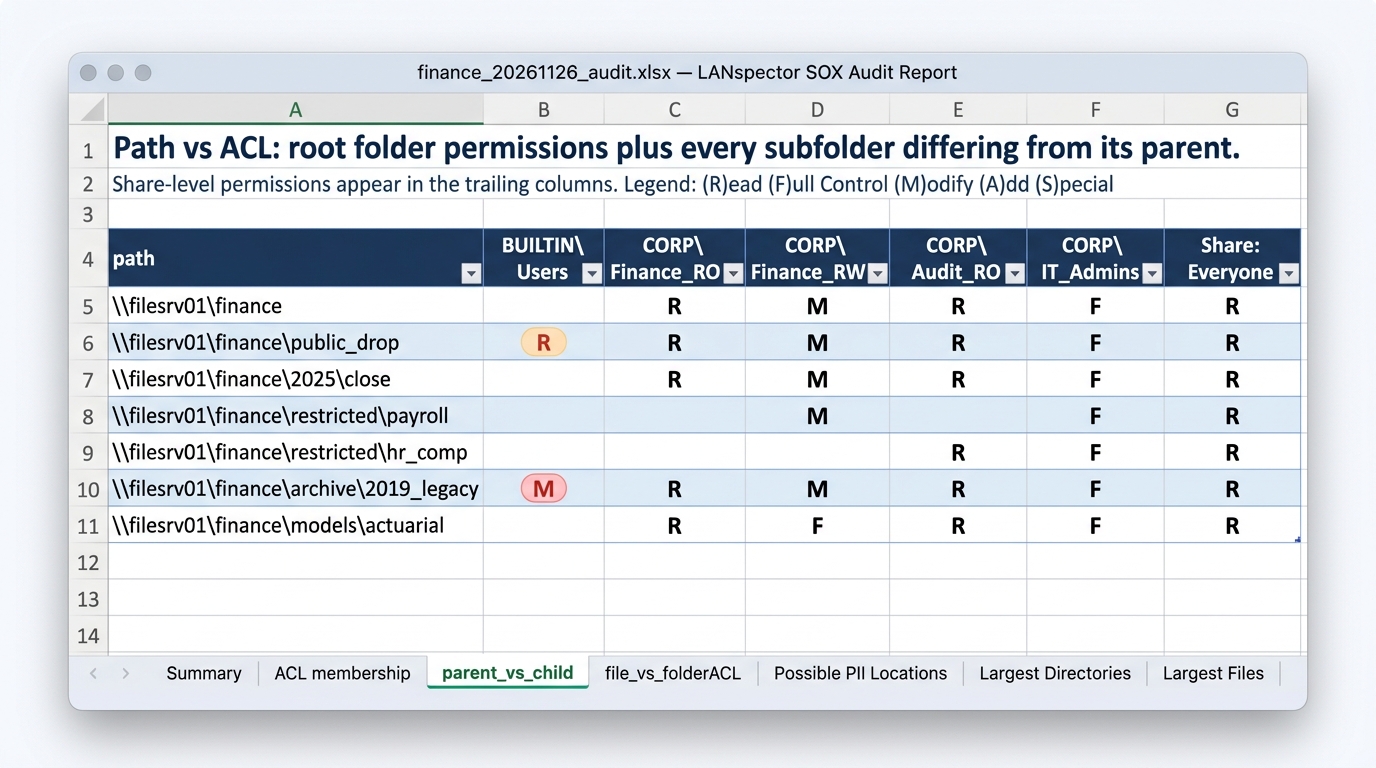
Instead of dumping 200,000 repetitive rows, parent_vs_child_report outputs the root folder with its full ACLs and then only subfolders whose effective permissions differ from their immediate parent:
| path | ACL1 | ACL2 |
|---|---|---|
/share/finance |
R |
|
/share/finance/q1/archive/2025 |
R |
M |
Reading this is lossless: /share/finance/q1 and /share/finance/q1/archive are omitted because their permissions match /share/finance, while 2025 appears because ACL2 gained (M)odify access there. The companion file_vs_folderACL sheet flags individual files granting more permissions than their containing directory.
Sample Reports
Compressed SOX Permission-Diff Excel Workbook (lanspector report)
Every audit workbook includes executive Summary KPIs, ACL membership, compressed parent_vs_child permission boundaries, file_vs_folderACL elevation checks, Possible PII Locations, Largest Directories, and Largest Files:
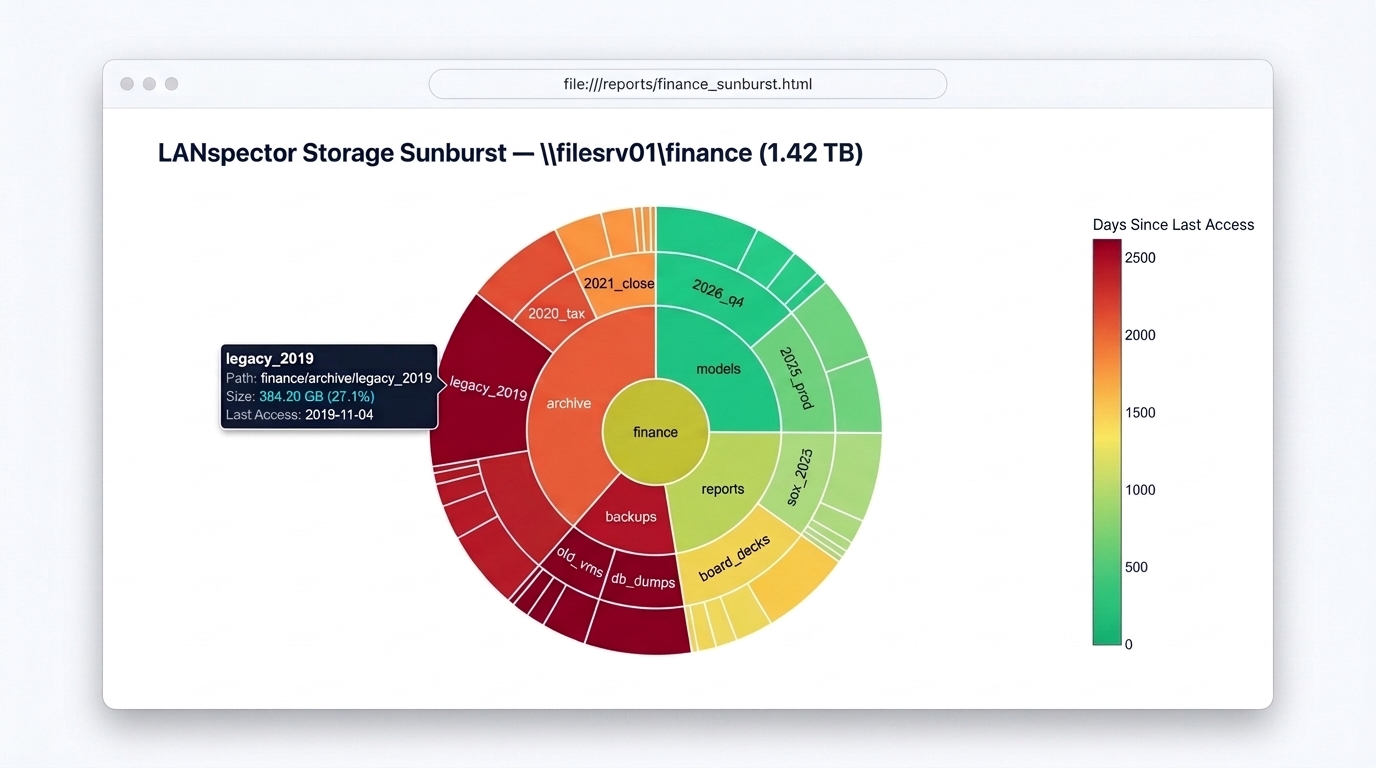
Offline Interactive Plotly Storage Sunburst (lanspector sunburst)
Generate self-contained HTML sunburst charts (--include_plotlyjs inline) colored by last-access staleness with auto-scaled TB/GB/MB/KB hover tooltips—click any ring to drill into large, stale folders ready for cleanup:
Installation
Install from PyPI:
pip install lanspector
# or with uv
uv add lanspector
Optional extras:
pip install "lanspector[dashboard]"  # Modern Dash 3+ LANdash web app (offline-ready)
pip install "lanspector[pii]"        # Optional NLTK proper-noun NER for PII scanning
pip install "lanspector[docs]"       # Sphinx + PyData theme documentation dependencies
pip install "lanspector[all]"        # Dashboard + PII extras
For local development using uv:
uv sync --all-groups
Quick Start
Command-Line Interface (lanspector)
All CLI subcommands are powered by jsonargparse from typed dataclasses in lanspector.settings, supporting both CLI flags and YAML/JSON configuration files (--config):
# 1. Quickest crawl: --path is the only required argument!
#    Defaults to ./<target>.db in the current directory and automatically writes
#    a multi-sheet Excel audit summary alongside it (paths are logged at INFO level).
lanspector crawl --path /srv/shares/finance

# 2. Explicit database, Excel summary, and standalone Plotly sunburst HTML
lanspector crawl --path /srv/shares/finance --fout finance.db --summarize true --sunburst_html finance_sunburst.html

#    Resume an interrupted crawl (picks up incomplete scan_end IS NULL table and skips completed paths)
lanspector crawl --path /srv/shares/finance --fout finance.db --resume true

# 3. Generate a full multi-sheet SOX & storage-cleanup Excel audit workbook from existing DB(s)
lanspector report --databases '[finance.db]' --output finance_audit.xlsx --use_permission_hierarchy true

# 4. Export a standalone offline Plotly storage sunburst chart colored by last-access age
lanspector sunburst --database finance.db --output finance_sunburst.html --color_by age

# 5. Compare two crawl snapshots in the same database for permission & file drift
lanspector compare --database finance.db --output drift_report.xlsx

# 6. Prepare & serve the optional LANdash multi-share web app (requires lanspector[dashboard])
lanspector dashboard-prep --databases '[finance.db]' --dashboard_db landash.sqlite
lanspector dashboard --dashboard_db landash.sqlite --port 8050

# 7. Launch the optional Tkinter desktop GUI
lanspector gui --database finance.db
Configuration Files (--config & --print_config)
Every subcommand accepts a YAML or JSON configuration file via --config (and CLI flags override values from the file). Ready-to-use samples are included in examples/:
examples/crawl_config.yaml— Full single-share crawl configurationexamples/report_config.yaml— Multi-database Excel SOX report configurationexamples/driver_shares.txt— Batch multi-share / server / domain driver file
# Run with a sample YAML config file (and optionally override individual flags)
lanspector crawl --config examples/crawl_config.yaml --path /srv/shares/finance

# Generate a starter YAML template for any subcommand with all defaults
lanspector crawl --print_config > my_crawl.yaml
lanspector report --print_config > my_report.yaml
Python API
from lanspector import (
    CrawlReader,
    crawl,
    export_sunburst_html,
    generate_fileshare_report,
)

# 1. Harvest metadata and NTFS/POSIX ACLs into SQLite
result = crawl(
    r"\\fileserver\finance",  # or any local Linux/macOS/Windows path
    fout="finance.db",
    scantype="fd",
    permissions=True,
    max_md5=10 * 2**20,
    detect_pii_content=True,
)

# 2. Query SOX permission differences and storage hotspots
with CrawlReader("finance.db") as db:
    pvc = db.parent_vs_child_report(use_permission_hierarchy=True)
    print(pvc.dirs_df)

    # Export multi-sheet Excel audit workbook
    generate_fileshare_report(db, "finance_audit.xlsx")

    # Export standalone interactive Plotly sunburst HTML
    export_sunburst_html(db, "finance_sunburst.html", color_by="age")
Excel Audit Workbook Sheets
generate_fileshare_report automatically omits empty sheets and writes formatted Excel tables across:
Summary: Executive rollup (paths, crawl timestamps, LANspector version, object counts, scaled storage, ACLs found, owners found).No Access to Crawl: Folders inaccessible due to permission errors or path limits.ACL membership: Active Directory group membership for discovered ACLs (Windows).parent_vs_child: Compressed folder permission boundary matrix (R,A,M,S,F) plus share-level columns.file_vs_folderACL: Individual files granting broader entitlements than their parent folder.Possible PII Locations: Combined filename-keyword and file-content (.txt,.csv,.xlsx) PII hits.Largest Directories/Largest Files/Largest Users: Storage-cleanup targets by path, file, and owner.Duplicate Files: Exact duplicate files/directories matched by MD5 digest.Access Time Distribution/Oldest Objects: Retention & staleness analysis byatime/mtime/ctime.Backup Files/Backup Paths: Heuristic detection of.bak,_vN, and date-stamped copies.Objects Owned by User: Directories with direct individual user ACL grants instead of security groups.
Development & Verification
make bootstrap      # Create .venv and install dependencies via uv
make static-check   # ruff format/check + ty static type checking
make dynamic-check  # pytest with coverage + Sphinx HTML docs build
make build          # Build Sphinx docs + sdist/wheel packages
make ci             # Run the complete pipeline
License
MIT License — Copyright (c) 2026 Aaron Berndsen. See LICENSE.
1 maintainer

Metadata
1 maintainer
Release files for lanspector 1.2.0
For a detailed explanation of source distributions (sdists) and built distributions (wheels), please see the package formats documentation.
Source distribution (sdist)
| File | Size | Uploaded | Provenance | Actions |
|---|---|---|---|---|
| lanspector-1.2.0.tar.gz | 2.0 MB | With provenance | Details for lanspector-1.2.0.tar.gz |
Built distribution (wheel)
| File | Interpreter | ABI | Platform | Actions Reset |
|---|---|---|---|---|
| lanspector-1.2.0-py3-none-any.whl | Python 3 | none | any | Details for lanspector-1.2.0-py3-none-any.whl |
Total release size: 2.1 MB
Release files / lanspector-1.2.0.tar.gz
| Download URL | lanspector-1.2.0.tar.gz |
|---|---|
| Size | 2.0 MB |
| Tags | Source |
|
SHA-256 checksum How to use checksums |
2134b8d57845ae79513493327c1278c61551a43c7265a259d7d5dc6e9978f3ae
|
|
BLAKE2b-256 checksum How to use checksums |
f2df69e8f5f77a77697c1512b6c35db9c72c15302391ddc70a3f8ef269cc721c
|
| Upload date | |
|
Uploaded using Trusted Publishing? What is trusted publishing? |
Yes |
| Uploaded via |
twine/7.0.0 CPython/3.13.16
|
Provenance
Provenance describes where a file came from. On PyPI, provenance is shared via attestations, which provide a verifiable record of the build or publishing details. View details, limitations and caveats.


PyPI Publish Attestation
PyPI verified that this artifact, at this checksum, originated from the publisher listed below.
Signed by GitHub Actions, verified by PyPI on Nov 27, 2026.
Transparency logRelease files / lanspector-1.2.0-py3-none-any.whl
| Download URL | lanspector-1.2.0-py3-none-any.whl |
|---|---|
| Size | 91.0 kB |
| Tags | Python 3 |
|
SHA-256 checksum How to use checksums |
e2bde4c3ab01f5ff28e9f701e9612f5baeb5e4638d22a31362c1b03fee842222
|
|
BLAKE2b-256 checksum How to use checksums |
fc398473222cd68ca50440a3ab273c744f7940fe267dd4b5ad4e3c660273ba7c
|
| Upload date | |
|
Uploaded using Trusted Publishing? What is trusted publishing? |
Yes |
| Uploaded via |
twine/7.0.0 CPython/3.13.16
|
Provenance
Provenance describes where a file came from. On PyPI, provenance is shared via attestations, which provide a verifiable record of the build or publishing details. View details, limitations and caveats.
PyPI Publish Attestation
PyPI verified that this artifact, at this checksum, originated from the publisher listed below.
Signed by GitHub Actions, verified by PyPI on Nov 27, 2026.
Transparency logSecurity for lanspector 1.2.0
Provenance
Provenance describes where a file came from. On PyPI, provenance is shared via attestations, which provide a verifiable record of the build or publishing details. View details, limitations and caveats.
Full provenance
Both files in this release have been uploaded with provenance metadata.
Attestation for lanspector-1.2.0.tar.gz
PyPI Publish Attestation
PyPI verified that this artifact, at this checksum, originated from the publisher listed below.
Signed by GitHub Actions, verified by PyPI on Nov 27, 2026.
Transparency logA note on package security
PyPI is a repository for distributing packages, not a service for auditing them. While third-party security researchers and our staff do their best to detect and remove malicious packages, PyPI cannot guarantee the quality, security or suitability of any given package.
To learn more about protecting yourself from malicious actors, visit our package security documentation.














