
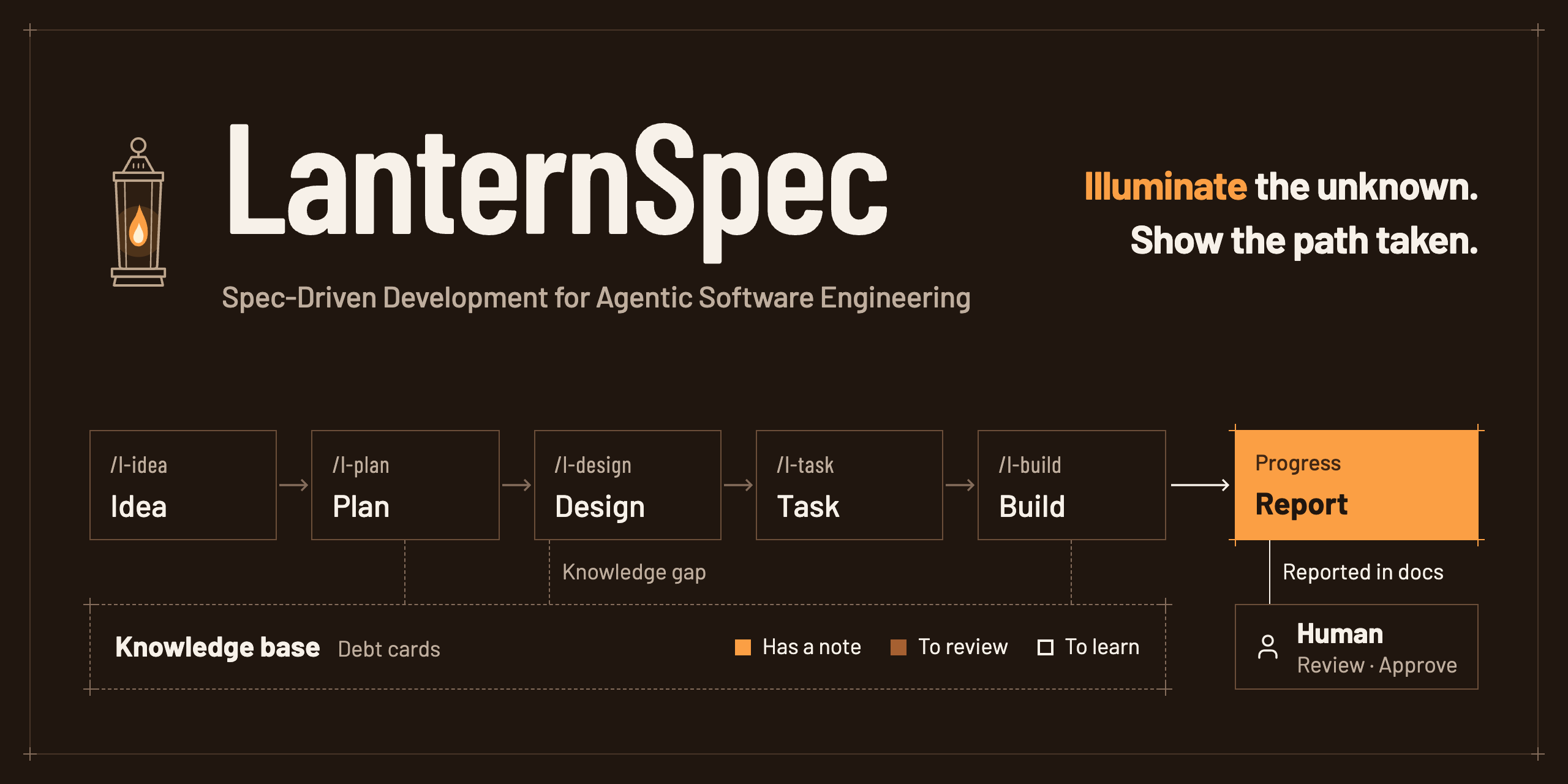


Hand the work to an AI agent and still be able to follow what was built, why, and how — all the way through.
- 📄 Leaves familiar documents — idea → plan → design → tasks → code, in the document formats teams already know
- 🏮 Illuminates the unknown — compares the technologies the AI used with your own knowledge base and tells you what to review and what to learn
- 📈 Shows the path taken — kanban, timeline and understanding-debt views, all readable in Obsidian
Language note: the documents, skills and CLI messages LanternSpec produces are currently in Korean.
Compared with other SDD tools
| Spec Kit | OpenSpec | 🏮 LanternSpec | |
|---|---|---|---|
| Flow | constitution → specify → plan → tasks → implement → converge | explore → propose → apply → archive | idea → plan → design → tasks → build (+ learn · report) |
| Documents | spec · plan · tasks per feature | proposal · requirements · design · tasks folder per change | 24 familiar document templates (plan, design, tasks, log …) |
| When done | repeat implementation until converged | merge requirements into specs and archive | merge into the "current state" docs after approval, then archive |
| Strengths | swap processes via extensions, presets and workflows; bug-fix and idea-assessment extensions | lightweight, no enforced phases, brownfield-first, cross-repo planning (beta) | compares unfamiliar tech with your knowledge base (understanding debt), progress reports, picks design principles for you |
| AI tools | many coding agents | 30+ | Claude Code · Codex · Antigravity |
| Install | Python 3.11+ · uv | single binary · npm · Homebrew | Python 3.12+ · uv |
| Document language | English (README in several languages) | English | Korean |
Install
Requirements: Python 3.12+ · git · uv
uv tool install lanternspec      # installs the lantern command
cd my-project
lantern install                  # installs skills, rules and hooks into this project (Claude Code by default)
Then call /l-init inside your AI tool ($l-init in Codex).
- Using several AI tools:
lantern install --tools claude,codex,antigravity - Skills live in your project: they are written straight into the project, not installed as a plugin. So they are called without a prefix (
/l-init) and shared with your team through git. - When a new version comes out:
uv tool upgrade lanternspec→lantern upgrade
Quick start
/l-init                       answer 7 questions → lantern.yaml · docs/ · draft project definition · design principles
/l-idea dark mode support     record an idea right away → 1. 아이디어/IDEA-001
/l-plan IDEA-001              what and why, with acceptance criteria → 2. 작업/W-001 …/기획.md
/l-design W-001               how — only the structure, screens and data that change; a person approves
/l-task W-001                 an ordered task list
/l-build W-001                implement → test → one commit per task, report with evidence → merge into the current state
/l-report                     kanban · timeline · debt · a three-line status report
lantern numbers every document in order.
| ID | Meaning |
|---|---|
IDEA-001 |
idea #1 |
W-001 |
work item #1 (one bundle from plan to build) |
W-001-T02 |
the 2nd task of work item #1 |
D-001 · ADR-001 |
debt card · decision record |
Commands for checking where you are
| Command | When to use it |
|---|---|
lantern status |
when you pick the work back up — shows the work in progress, the next task and open questions in three lines |
lantern doctor |
right after installing, or when something feels off — checks that install, settings and folders match lantern.yaml |
lantern --help |
when you forget a command — options per command with lantern <command> --help |
Flow and skills
flowchart LR
  S["⚙️ /l-init"] --> I
  subgraph W["🛠 Work flow"]
    I["💡 /l-idea"] --> P["📋 /l-plan"] --> D["📐 /l-design"] --> T["✅ /l-task"] --> B["🔨 /l-build"]
  end
  P & D & B -.unfamiliar tech.-> L["🧭 /l-learn"]
  B -->|merge when done| C["📘 3. Current state"]
  W & L --> R["📊 /l-report"]
| Skill | What it does | What it leaves |
|---|---|---|
/l-init |
sets up the document structure and design principles from 7 questions (new or existing · team size · screens · server · knowledge base · design tool · project kind) | lantern.yaml, docs/, project definition, MOC, design principles |
/l-idea |
records a thought from the conversation, as said and as summarised | 1. 아이디어/IDEA-001 … |
/l-plan |
what and why — a work folder and acceptance criteria | 2. 작업/W-001 …/기획.md |
/l-design |
how — only the structure, screens and data (DBML) that change, behind an approval gate | 설계.md, 화면/, ADR |
/l-task |
an ordered task list (size · acceptance criteria · dependencies) | 할 일.md |
/l-build |
implement → test → one commit per task, report with evidence, merge into the current state when done | code, 기록.md |
/l-learn |
compares unfamiliar tech with your knowledge base → 🟢 · 🟡 · 🔴, debt cards and draft study notes | 📒 부채/카드/D-001 … |
/l-report |
kanban · timeline · domain · traceability · debt · docs-vs-code status + a three-line report | 4. 운영 기록/보고/현황.md |
/l-template |
create, refine and migrate templates (without losing content) | 0. 템플릿/… |
/l-check |
format check (required sections · values · links · versions · IDs · length) | — |
/l-sync |
finds where documents and code disagree and brings them back in line | — |
/l-map |
updates the MOC (document map) | 개발문서 MOC.md |
/l-adr |
records decisions that are hard to reverse | 규칙 · 결정 기록/ADR-001 … |
How it works
- Scripts handle the format, the AI writes the content. Numbering, files, folders, checks and status changes all go through the
lanterncommand; the AI only writes content. - Every document starts from a template. The AI fills in the template's
{{blanks}}; changing the section structure is flagged immediately. - Every skill ends the same way. A skill that changed documents runs
lantern close <skill>: check → update the map → log the run. - Show before writing. Designs and changes to the current state are summarised and approved first (
/l-ideais the only exception). - Your knowledge base is read-only. Notes are written only after you approve.
Document structure
Documents are stored in one folder per work item, and the MOC (document map) collects them by stage. Folder and file names are Korean.
docs/
├─ 개발문서 MOC.md        document map + view by stage (lantern map rewrites the marked part)
├─ 0. 템플릿/              templates you refine over time · _meta/enums.yaml (the single source of status and kind names)
├─ 1. 아이디어/            ideas
├─ 2. 작업/W-001 …/        plan · design · tasks · log — the only place edited while working
│   └─ 보관/              archive
├─ 3. 현재 상태/           what the system looks like now — updated only when work is done, after approval
├─ 4. 운영 기록/           reports · session logs · (teams of 2+) meeting notes
├─ 5. 기존 문서/           (existing projects) original documents, kept unchanged
└─ 📒 부채/               understanding debt — one card per debt
Which documents you get depends on your /l-init answers (lantern.yaml; check with lantern profile docs).
- A mobile app adds deployment and platform-integration documents.
- A team of two or more adds collaboration rules and meeting notes.
If you don't want documents on the remote, use lantern docs-mode local. Documents then live only on a docs-local branch in the same repository, and pushing that branch is blocked.
Supported AI tools
| Tool | Skills | Rules | Agent hooks | MCP (--mcp) |
|---|---|---|---|---|
| Claude Code | .claude/skills |
CLAUDE.md → @AGENTS.md |
.claude/settings.json |
.mcp.json |
| Codex | .agents/skills ($l-…) |
AGENTS.md |
.codex/hooks.json |
.codex/config.toml |
Antigravity CLI (agy) |
.agents/skills |
AGENTS.md |
.agents/hooks.json (no save-before-compaction — there is no compaction hook) |
.agents/plugins/lanternspec/ |
- Rules live in
AGENTS.md. LanternSpec manages only the<!-- lanternspec:start -->block inside it and leaves everything outside the block alone. - Codex and Antigravity share the skills folder. When you use both, skill bodies say
/l-build, andAGENTS.mdtells Codex to use$instead.
Keeping documents and code in line
git and AI tools already have hooks: they run a script at set moments (just before a commit, right after a file is written, and so on).
LanternSpec connects its checks to those hooks, so lantern checks at every stage that documents and code still match. The checks are done by a script, not by the AI, so they always apply the same rules.
| Stage | What it does | Example |
|---|---|---|
| While talking to the AI | shows where things stand when a session starts, and checks the format as soon as the AI writes a document | warns right away when the AI deletes a required section of a plan |
| Just before a commit | looks at what the commit contains and checks that the records that should go with it are there | warns when the database structure changed but the work log doesn't mention it |
| After the commit message | checks that the message says which task the commit belongs to | warns when the message has no task ID (e.g. [W-001-T02] = the 2nd task of work item #1) |
| Just before a push | checks that nothing that must stay local is being pushed | blocks pushing the documents branch you chose to keep off the remote |
| After pushing to GitHub | runs the same checks again on GitHub, whoever pushed (CI) | marks the run failed if document format, lint, type checks or tests break |
| On demand | scans past commits and lists where documents and code drifted apart (lantern scan) |
documents not reviewed for a while although their code changed |
- Warnings by default. Work is never blocked. To make the commit checks blocking, set
git.hookstoblockinlantern.yaml. - Hard-to-undo mistakes are always blocked. For example, pushing documents you chose to keep off the remote is blocked regardless of settings.
lantern hooks install            # turns on the commit and push checks (/l-init asks before installing)
lantern install --ci             # also checks on GitHub (turn off with --no-ci)
Managing unfamiliar tech — knowledge base and understanding debt
When the AI uses a technology you don't know, LanternSpec compares it with the notes in your knowledge base and sorts it into three groups.
- 🟢 you have a note → links the note
- 🟡 you have a note but asked again → tells you what to review
- 🔴 no note yet → suggests a draft study note
Anything you don't understand yet is kept as a debt card, and every time you ask about it again the count goes up.
Knowledge base (knowledge.type) |
How | Writing |
|---|---|---|
obsidian · folder |
reads Markdown files directly | creates notes after approval (drafts only with propose_only) |
notion |
planned | — |
Every knowledge base supports the same four actions: search · read · propose · write. The CLI (lantern knowledge …) and the MCP server (lantern mcp) use the same functions.
There are three kinds of debt.
| Kind | Meaning |
|---|---|
| 🧠 Understanding | you follow it when it's explained, but it isn't yours yet. Reopened if you ask again after resolving it |
| 🛠 Competency | you understand it but haven't done it yourself. Practised with exercises (lantern debt promote) |
| 🧱 Technical | debt left in the code (technical debt) |
Design principles and ways of working
Design principles and code conventions
Picks design principles and code conventions from a table, based on the project kind chosen in /l-init and the measured size (lines of code · team size).
- Languages: Python · TypeScript · Swift · Rust · Go
- The essentials go into
AGENTS.md; the full explanation goes into개발 원칙.md(design principles). - In existing projects, lint and format settings already in use are recorded, never changed.
- When the code grows past a size boundary,
lantern doctorasks whether to raise the principles one level. - See the result with
lantern principles show; run lint and type checks withlantern lint
How the AI works
lantern harness suggest looks at code size, work in progress, whether tests exist and past runs, and recommends one of three modes.
- Harness: small loops inside one task. The default for small projects
- Loop: reruns the whole work item until the acceptance tests pass
- Graph: splits independent work items into worktrees so several agents work at the same time
Evaluation
lantern eval uses the run log to compare cost (time · tool calls) and results (format errors at wrap-up) per skill, model and setting.
Design tools
Claude Design, Figma and Canva through each tool's MCP.
Import mockups with lantern screen import; lantern screen compare finds where the built screen differs from the mockup.
CLI at a glance
setup      install [--tools] [--mcp] [--ci|--no-ci] · upgrade · doctor · harness suggest
profile    profile show|docs|write|set · principles show|detect · enums list|rename
documents  scaffold init [--plan] | work | doc | idea | adr | meeting | custom · new-id · map · meta get|set
checks     check [--changed] [--epic W-012] · lint · check-dbml · dbml render|from-sql|diff
work       task next [--all]|start|done|ac|list|estimate · task add [--parallel] · pack · screen import|compare
           work branch|start|list|finish|archive|stage · design approve · unit-log add · idea find|status
learning   knowledge search|read|propose|write|areas · debt find|new|ask|resolve|promote|practice|known|status|list · mcp
reports    report [--views] [--summary] · status · scan [--tests] · sync adopt · eval
templates  template list|lint|level|bump|outdated|diff|usage|new|migrate · legacy adopt|todos
git        hooks install|uninstall|status · docs-mode local|shared
wrap-up    close <skill>
License
1 maintainer

Metadata
1 maintainer
Release files for lanternspec 0.1.0
For a detailed explanation of source distributions (sdists) and built distributions (wheels), please see the package formats documentation.
Source distribution (sdist)
| File | Size | Uploaded | Provenance | |
|---|---|---|---|---|
| lanternspec-0.1.0.tar.gz | 231.6 kB | Without provenance | Details |
Built distribution (wheel)
| File | Interpreter | ABI | Platform | Reset |
|---|---|---|---|---|
| lanternspec-0.1.0-py3-none-any.whl | Python 3 | none | any | Details |
Total release size: 489.4 kB
Release files / lanternspec-0.1.0.tar.gz
| Download URL | lanternspec-0.1.0.tar.gz |
|---|---|
| Size | 231.6 kB |
| Tags | Source |
|
SHA-256 checksum How to use checksums |
d70c5121633d1e8c750108252c8ffd1ed195d949d78f41279f74c0aa87e3189a
|
|
BLAKE2b-256 checksum How to use checksums |
a63f9d71a3cf37a6acb067aae16d4404a61f16d16716d274676dab6d3f7c83d7
|
| Upload date | |
|
Uploaded using Trusted Publishing? What is trusted publishing? |
No |
| Uploaded via |
uv/0.13.5 {"installer":{"name":"uv","version":"0.13.5","subcommand":["publish"]},"python":null,"implementation":{"name":null,"version":null},"distro":{"name":"macOS","version":null,"id":null,"libc":null},"system":{"name":null,"release":null},"cpu":null,"openssl_version":null,"setuptools_version":null,"rustc_version":null,"ci":null}
|
Release files / lanternspec-0.1.0-py3-none-any.whl
| Download URL | lanternspec-0.1.0-py3-none-any.whl |
|---|---|
| Size | 257.7 kB |
| Tags | Python 3 |
|
SHA-256 checksum How to use checksums |
ae22dfb0d80a937feb06096bec34936908f239f7a76acb5df55b0a456c36e6b8
|
|
BLAKE2b-256 checksum How to use checksums |
c9827cf3fb7ad5965144059ea2d43ffa311f9fe99b9d7cfd2f688068a6f4bf6a
|
| Upload date | |
|
Uploaded using Trusted Publishing? What is trusted publishing? |
No |
| Uploaded via |
uv/0.13.5 {"installer":{"name":"uv","version":"0.13.5","subcommand":["publish"]},"python":null,"implementation":{"name":null,"version":null},"distro":{"name":"macOS","version":null,"id":null,"libc":null},"system":{"name":null,"release":null},"cpu":null,"openssl_version":null,"setuptools_version":null,"rustc_version":null,"ci":null}
|
Security for lanternspec 0.1.0
Provenance
Provenance describes where a file came from. On PyPI, provenance is shared via attestations, which provide a verifiable record of the build or publishing details. View details, limitations and caveats.
No provenance found
None of the files in this release were uploaded with provenance metadata.
A note on package security
PyPI is a repository for distributing packages, not a service for auditing them. While third-party security researchers and our staff do their best to detect and remove malicious packages, PyPI cannot guarantee the quality, security or suitability of any given package.
To learn more about protecting yourself from malicious actors, visit our package security documentation.














