
Test your RAG components against a real stack, not a toy baseline. Then give that stack to your agent.
Code for Retrieval Augmented Generation Compositionality
Ido Levy1,2 · Segev Shlomov1 · Leshem Choshen1,2
1IBM · 2Weizmann Institute of Science




Quickstart · Compare a component · Give your agent RAG · Guide · The paper
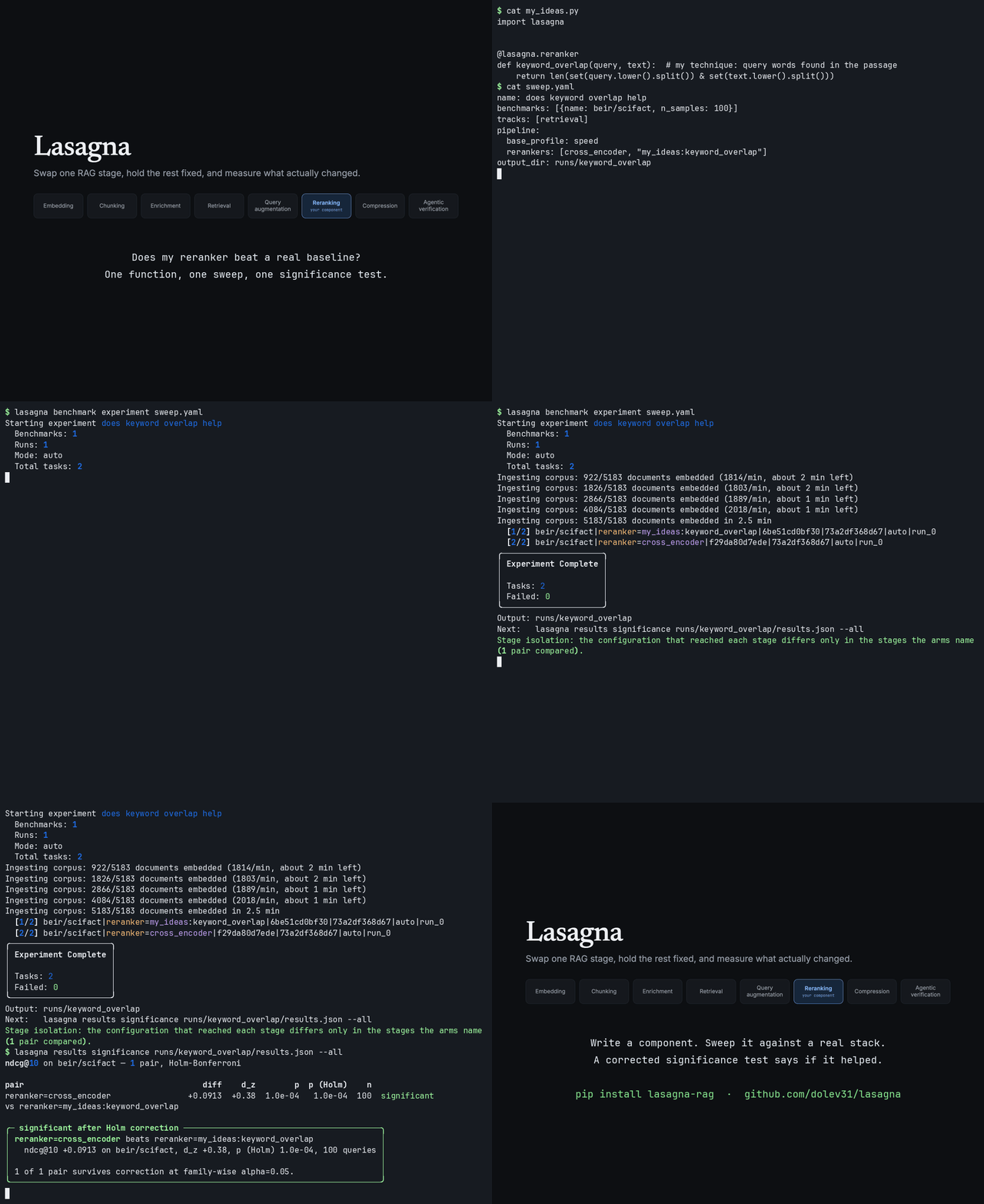
A real run with the idle waits cut: write a reranker, sweep it against a built-in, and get a Holm-corrected verdict.
| You want to | Start here |
|---|---|
| Show that your component helps, with a significance test and no API key | Compare a component |
| Give an agent search over your own documents (MCP, REST, Docker) | Give your agent RAG |
| Pick a vector backend and retrieval strategy without building a harness | Quickstart, then What's inside |
| Read what the paper found | The paper |
The problem
Most RAG results are reported one component at a time. A new reranker is measured against a baseline with no query augmentation, no agentic loop, and an old chunker, because building the rest of the stack just to run the comparison is more work than the contribution itself.
That makes published gains hard to add up. If a reranker claims +4 NDCG and a query expander claims +3, you cannot tell from the papers whether stacking them gives you +7, +4, or -1. Lasagna exists to make that question answerable.
                    ┌─────────── your component drops in here ───────────┐
                    ▼                                                     ▼
 ingest → chunk → embed → retrieve → rerank → augment → agentic loop → generate
                    ▲                                                     ▲
                    └──── everything else stays fixed, so the delta ──────┘
                              is attributable to what you changed
All eight stages take effect. Five at query time (reranker,
query_enhancer, embedder, retriever, agentic_pipeline), two at ingest
(chunker and document_processor), and generator, which writes the answer
from what retrieval returned. In a sweep, every stage but the document
processor swaps with a single config key; a chunker or embedder arm gets a
corpus of its own, chunked or embedded by its component. Settings
(chunk_size, embedding_model and so on) swap the same way. Benchmark
corpora are loaded as text, so a document processor is checked on your own
files instead. A swapped stage replaces the built-in rather than layering on
top of it, so the component being measured is the component that ran.
How Lasagna compares
Lasagna is not an alternative to LangChain, LlamaIndex or RAGAS: LangChain and LangGraph are core dependencies, and RAGAS computes the judged generation metrics. It is a layer for measuring which change moved a number.
| Lasagna | LlamaIndex | LangChain | |
|---|---|---|---|
| The job it is for | Knowing which change moved the number | Turning messy documents into a usable index | Providers, agents, shipping to production |
| Reach for it when | You must defend a result in a paper or review | Your hard problem is PDFs, OCR, tables | Your hard problem is integrations and agents |
| Don't, when | You need breadth, stability or a small install | You need statistical rigor about why | You want an opinionated, attributable experiment |
What it adds is the measurement apparatus: a paired sign-flip test with t
intervals, Holm-Bonferroni correction across a sweep (with adjusted p-values),
a 2x2 interaction test with a t interval, per-sample scores joined by sample
identity, comparability keys that record what was held fixed, a check from
what actually ran that two arms differ only in the stages they name, and
integrity-checked result bundles. Significance testing itself is not new
(PyTerrier and ranx have it for IR runs, UltraRAG has a paired permutation
test); what we did not find elsewhere is the combination inside a RAG pipeline
framework, from one sweep file. Typed swap points are not new either (LlamaIndex has
BaseNodePostprocessor, LangChain has BaseDocumentCompressor); Lasagna's are
reachable from a plain function with one decorator, and
lasagna.from_langchain and lasagna.from_llamaindex wrap components you
already have.
Against research RAG tools, as of October 2026. "Not found" means we found it in neither the docs nor a code search, not that it is proven absent.
| Lasagna | FlashRAG | BERGEN | UltraRAG | AutoRAG | PyTerrier / ranx | |
|---|---|---|---|---|---|---|
| Significance tests | Paired sign-flip test, Holm, power | Not found | Not found | Paired permutation, no correction | Not found | Yes, IR runs only |
| Interaction between components | 2×2 test with CI | Not found | Not found | Not found | Greedy search assumes none | Not found |
| Result provenance | Bundles with a validator | Saved configs and scores | Experiment folders | Not found | Trial folders | Not found |
| Published methods | 30 of 55 components cite the paper they implement | 23 methods | 20+ retrievers, 4 rerankers | Several baselines | Many modules | IR pipelines |
| Ready corpora and indexes | Benchmark loaders, no prebuilt index | Wikipedia + prebuilt index | KILT + prebuilt index | Not found | Not found | Via ir_datasets |
| License | Apache-2.0 | MIT | CC BY-NC-SA 4.0 | Apache-2.0 | MIT (badge) | MPL-2.0 / MIT |
Where the others win. FlashRAG and BERGEN ship prebuilt indexes and result tables for many published methods, so a baseline costs little to reproduce; Lasagna ships no prebuilt index and none of its own paper's per-query results yet. AutoRAG has a hosted demo, and FlashRAG, UltraRAG and XRAG have visual UIs. LangChain and LlamaIndex have thousands of integrations and years of production use; this is a first release. Install weight: torch and sentence-transformers are core dependencies, about 1.3 GB installed on macOS arm64, and on Linux x86_64 the default PyPI torch pulls CUDA wheels, about 3.2 GB of downloads. Document parsing: LlamaParse handles formats the built-in pypdf and pdfplumber extraction does not. Observability: LangSmith traces every agent step; Lasagna has Prometheus metrics and JSON logs, and nothing like it.
It reproduces published numbers
Before you trust a harness with your component, check it on methods whose numbers are already known. On the full SciFact and NFCorpus test sets, Lasagna's built-in components land within 0.002 NDCG@10 of MTEB for the dense models, and within 0.004 of the BEIR paper for BM25 followed by a MiniLM cross-encoder. BM25 is 0.001 and 0.008 below the BEIR paper, which indexed the title and the text as separate fields. Lasagna's BM25 is its own, rank_bm25's Okapi BM25 over one field holding both; like for like, against Anserini's BM25 over one such field, it is 0.015 (SciFact) and 0.005 (NFCorpus) below (how the two differ). Nothing was tuned: BM25 uses BEIR's k1 and b, and every model is its published checkpoint.
| Method | SciFact published | SciFact Lasagna | NFCorpus published | NFCorpus Lasagna |
|---|---|---|---|---|
| BM25 (k1 0.9, b 0.4) | 0.665 | 0.664 | 0.325 | 0.317 |
| all-MiniLM-L6-v2 | 0.645 | 0.645 | 0.316 | 0.317 |
| bge-small-en-v1.5 | 0.713 | 0.713 | 0.343 | 0.344 |
| BM25 + MiniLM-L6 cross-encoder | 0.688 | 0.685 | 0.350 | 0.351 |
NDCG@10. Published: BEIR (Thakur et al., NeurIPS 2021, Table 2) and the MTEB
results repository. It reruns in about half an hour on a laptop, with no API key:
lasagna benchmark experiment examples/reproduction/beir_tier1.yaml. Sources,
setup, recall@100 and the remaining BM25 gap are in
examples/reproduction.
Quickstart
pip install lasagna-rag
Start with the speed profile: a 92 MB embedding model, no LLM and no API key.
import asyncio
from lasagna.sdk import KnowledgeClient, config_for_speed

async def main():
    # The same session on every run, on the speed profile.
    client = KnowledgeClient(session_id="quickstart", config=config_for_speed())
    doc = await client.upload("paper.pdf")
    await client.documents.wait_for_processing(doc.document_id)  # upload returns once queued

    results = await client.search_documents("What did the ablation show?")
    for r in results.results:
        print(f"[{r.score:.2f}] {r.chunk.content[:120]}")

    await client.close()

asyncio.run(main())
Or from the shell (lasagna init asks the same questions interactively):
lasagna configure --profile speed  # the speed profile for the default session
lasagna upload paper.pdf
lasagna search "what did the ablation show?"
lasagna serve                      # REST API and configuration page on 127.0.0.1:8000
What the first run takes. On an Apple M1 Max (10 cores, 64 GB), the script above printed its first result 30 to 35 seconds after it started with an empty model cache (the 92 MB download included), and 8 seconds with the model cached. A search after that took 15 ms (the median of ten, on one document; release-gate runs measured a 32 ms median over 18,442 chunks on Milvus Lite). In the shell, each command loads the model and opens the store again, so a
lasagna searchtook about 10 seconds; whilelasagna serveruns, the CLI asks the server instead.The default profile is the quality option. A session with no profile uses it (leave out
config=and--profile): BGE-M3 embeddings and the mxbai reranker, about 3.2 GB downloaded on the first upload and the first search that reranks (BGE-M3, 2.3 GB, and the reranker, 881 MB), and 2.3 GB more with theflag-embeddingextra (which[all]includes), since FlagEmbedding fetches BGE-M3's whole repository, ONNX export included. On release-gate runs its first search result took 2–40 minutes on a cold cache; the spread is the connection. Warm, a search took 117 ms (median) on the same M1 Max using its GPU, and 3.1 seconds on two CPU threads. The default,standard,balancedandmax_qualityprofiles send queries they judge complex to an agentic loop, which calls an LLM; without an API key those queries run the profile's standard pipeline, and the result'sdegraded_stagesnamesagentic. From a source checkout,python -m e2e.runmeasures the cold start on your own machine (thee2epackage is not in the wheel); with pip,lasagna doctorchecks what is installed and cached.Settings belong to a session. A client's settings are saved as its session's, and a client without
config=reads the session's saved settings, so the CLI, REST API, MCP server and a rerun of this script search that corpus with the same model. Each session has its own embedding model: two clients in one process on different sessions can use different models. Configuration explains profiles, which setting wins when several places set it, and where data is kept (~/.lasagna).
upload() returns as soon as the document is queued; processing is
asynchronous, so await client.documents.wait_for_processing(...) before
searching or reading the final chunk count. It raises
DocumentProcessingError, with the reason and the fix, if the document could
not be indexed. Rerunning the script uploads nothing new: a file the session
already holds comes back as that document, with duplicate_of set
(allow_duplicates=True, or lasagna upload --force, indexes it again).
The smallest first run. In the component comparison
below, python my_ideas.py downloads nothing, and the sweep downloads 183 MB
once: the speed profile's embedder and the cross-encoder it is compared
against, 92 MB each. Neither needs a dataset or an API key. It is the fastest
way to see what this library is for.
Give your agent RAG: MCP, REST, Docker
The MCP server and the REST API run the same retrieval pipeline, profiles and settings that the benchmarks measure, so a profile or setting that won your comparison is what your agent searches with.
MCP: a search tool for Claude Code, Claude Desktop and Cursor
pip install lasagna-rag
lasagna configure --profile speed -s my-corpus   # 92 MB model, no API key
lasagna upload ./docs/*.md -s my-corpus           # several files, one model load
Then register the server. Claude Code: .mcp.json in your project.
Claude Desktop: the same block inside claude_desktop_config.json.
{
  "mcpServers": {
    "lasagna": {
      "command": "lasagna-mcp",
      "env": { "RAG_SESSION_ID": "my-corpus" }
    }
  }
}
lasagna-mcp speaks stdio, which is how these clients launch a server; if it
is not on the client's PATH, give the absolute path inside your virtualenv.
The server has 29 tools (search, upload, document lifecycle, profiles and
configuration). By default it serves the safe set, 22 tools: it leaves out
the seven that delete documents, profiles or collections, reset a session's
configuration or change the server-wide retention policy; --tools all serves
all 29. A tool acts on the session RAG_SESSION_ID names unless its
session_id argument names another. --transport sse serves a port for
several clients at once. The
MCP guide
lists every tool.
REST API
lasagna serve # http://127.0.0.1:8000, loopback only
curl -X POST http://127.0.0.1:8000/api/v1/search \
  -H "X-Session-ID: my-corpus" -H "Content-Type: application/json" \
  -d '{"query": "what did the ablation show?", "top_k": 5}'
The OpenAPI reference is at /docs, and every endpoint is listed in
endpoints.md.
lasagna serve binds to loopback and is unauthenticated; for anything shared,
use the Compose stack.
A local store opens in one process at a time. While lasagna serve runs,
lasagna status, search, upload and configure go through it, and lasagna-mcp cannot
open the store. To give an agent the same store, start the server with the MCP
endpoint and register it by URL instead of the command:
lasagna serve --mcp -s my-corpus # REST API, and MCP over SSE at /mcp/sse
-s names the session that MCP tool calls and REST requests use when they
name none; without it, MCP tools must pass session_id.
{ "mcpServers": { "lasagna": { "type": "sse", "url": "http://127.0.0.1:8000/mcp/sse" } } }
Docker Compose
src/lasagna/deploy/
runs Lasagna as a service with make up: the API behind Gunicorn, signed
session tokens issued against API keys, PostgreSQL for metadata, Redis, Celery
workers for ingestion, the MCP server, Prometheus metrics and a readiness
check. A Milvus server is the default vector store, and each of the six
backends has a compose fragment (make up VECTOR_BACKEND=pgvector). Request
sizes and search time are bounded, and uploads are shared between the API, the
worker and the MCP server.
Skills, so the agent stops guessing
lasagna skills install        # writes .claude/skills/
lasagna doctor                # what is wrong with this install, and how to fix it
lasagna doctor --issue        # a redacted block to paste into a bug report
Four skills: using retrieval, building a component, running an evaluation, and filing a useful bug report. They encode what an agent otherwise gets wrong: which mode a benchmark must run in, why the first search is slow, and which config applies.
Compare a component
Run it on a real benchmark:
One notebook writes a reranker as a single function, sweeps it against a built-in cross-encoder on 100 SciFact queries over the full corpus, and ends with a paired significance test, the stage isolation check and a validated results bundle. No API key. It is stored without outputs: run it on Colab, or locally with Jupyter, to see them.
Adding a technique is one decorator on a plain function. The function becomes
a component of its stage, interchangeable with every built-in, and runs inside
the complete pipeline. Save this as my_ideas.py; python my_ideas.py runs as
is, with no model download and no corpus:
# my_ideas.py
import lasagna


@lasagna.reranker(paper="Doe et al. 2026", claims={"beir/scifact": {"ndcg@10": 0.456}})
def keyword_overlap(query, text):  # your technique: score one passage
    return len(set(query.lower().split()) & set(text.lower().split()))


if __name__ == "__main__":  # try it on three passages
    from lasagna.core.base_components import ScoredDocument
    from lasagna.core.registry import registry

    candidates = [
        ScoredDocument(content="short", score=0.9, document_id="d1", chunk_id="c1"),
        ScoredDocument(content="a considerably longer passage of text", score=0.5,
                       document_id="d2", chunk_id="c2"),
        ScoredDocument(content="middling length here", score=0.7,
                       document_id="d3", chunk_id="c3"),
    ]

    mine = registry.get("reranker", "keyword_overlap").rerank("length of a passage", candidates)
    entry = next(e for e in registry.list_rerankers() if e["name"] == "keyword_overlap")
    print("retrieval order:", [d.document_id for d in candidates])
    print("my reranker:    ", [d.document_id for d in mine])
    print("claims recorded:", entry["claims"])
    print("interchangeable:", entry["implements_contract"])
retrieval order: ['d1', 'd2', 'd3']
my reranker:     ['d2', 'd3', 'd1']
claims recorded: {'beir/scifact': {'ndcg@10': 0.456}}
interchangeable: True
paper and claims travel with the component and come back out of the
registry. A claim names the benchmark the paper measured it on (and its split,
as "split": "test", if the paper gives one). A run records them (components
in its metadata and its bundle), and on a run of that benchmark the leaderboard
benchmark experiment prints, results leaderboard (markdown and LaTeX) and
results view put the claimed number and its paper beside the one you
reproduced. The smoke sweep below shows no claim, since the paper did not
measure smoke. Every stage but the agentic pipeline takes a function the same way:
@lasagna.query_enhancer (query -> [str]), @lasagna.chunker (text -> [str]),
@lasagna.embedder (texts -> vectors), @lasagna.generator
(query, contexts -> answer), @lasagna.retriever and
@lasagna.document_processor. A reranker can also order the whole list
(query, documents, top_k). The function is handed copies, so it cannot change
what another stage sees. When a technique needs state or a model, or is an
agentic loop, subclass the stage's interface (BaseReranker,
BaseAgenticPipeline and so on) and register the class with
@registry.register instead.
Then measure it. A sweep names the function by its import path,
my_ideas:keyword_overlap, with no registration call and no package:
# sweep.yaml, next to my_ideas.py
name: does keyword_overlap help
benchmarks: [{name: smoke}]
tracks: [retrieval]
pipeline:
  base_profile: speed
  rerankers: [cross_encoder, "my_ideas:keyword_overlap"]
n_runs: 1     # retrieval does not sample; repeat runs when an LLM stage is in the loop
lasagna benchmark experiment sweep.yaml   # downloads 183 MB of models the first time
lasagna results significance "<output>/results.json" -m ndcg@10 --all
Before any corpus is ingested, the run checks that each named component
implements its stage and passes its behavioral contract (return types, top_k,
empty input, no mutation of its input). It then runs both arms on the same
queries and ends by confirming that the configuration reaching each stage
differed only at the reranker, and that the reranker arm's ranked lists moved:
an arm whose lists never moved is flagged inert, and so is a reranker that hands
back its candidates in retrieval order on every query, with no reranker-free arm
needed to compare against (on fewer than ten queries it says there were too few
to tell). Every listed built-in implements its stage's
interface, so any of them is a like-for-like control:
from lasagna.core.registry import registry

[r["name"] for r in registry.list_rerankers() if r["implements_contract"]]
# ['cross_encoder', 'combined', 'ensemble', 'mmr', 'colbert', 'llm_listwise',
#  'monot5', 'llm_pointwise', 'flashrank', 'cohere']
The guide
covers the 31 benchmarks, your own data, baseline arms (closed_book,
long_context, no_rag: true), --dry-run with a cost estimate, the LLM
response cache, and how to read, view and publish a result.
Why the stages stay isolated
A comparison is attributable only if the arms differ in the stage under test and nowhere else. Lasagna checks that rather than assuming it.
- A fixed interface per stage. Components exchange only their stage's
declared types, and function components get copies of what they are handed.
A conformance suite checks that every registered component subclasses its
stage's contract, does not mutate its input, and does not hand out chunks that
share one metadata dict. From a source checkout (the tests are not in the
wheel), run
pytest tests/test_abc_conformance.py tests/test_stage_isolation_behavioural.py. - A stage manifest per task. Each run records what reached each of the eight stages: every setting, from the configuration the search actually resolved, and the component in the slot.
- A check across arms. If two arms differ at a stage neither of them names,
the run says so, the bundle is marked
UNDECLARED_STAGE_CHANGE, andlasagna results validaterefuses it, naming the stage and the settings that moved. An arm whose named change never reached its stage is flagged as inert, since its number is the control's under another name.
Do two techniques compose, or do they overlap?
The question two papers cannot answer between them. Hybrid search is published against a dense baseline; reranking is published against a baseline. Whether hybrid search still helps once a reranker is on does not follow from those two numbers: both may fix the same queries. Answering it needs all four cells measured on the same queries. Declare the 2×2 and the harness builds them:
# compose.yaml
name: hybrid search with reranking
benchmarks:
  - name: beir/scifact
    n_samples: 100
tracks: [retrieval]
pipeline:
  base_profile: speed
  factorial:
    factor_a: enable_hybrid_search
    factor_b: enable_reranking
lasagna benchmark experiment compose.yaml
lasagna results interaction "<output>/results.json" --metric ndcg@10
This one is keyless: speed embeds with all-MiniLM-L6-v2, BM25 needs no
model, and reranking turned on uses the 92 MB MiniLM cross-encoder. A real run
on 100 SciFact queries printed:
Cells 'reranking' and 'hybrid_search+reranking' returned identical ranked lists on all 100 shared
queries. If the factor that separates them acts on retrieval, it did nothing in that cell, and the
interaction below reflects that rather than an overlap between the techniques.

  expected if additive : -0.0081
  actually observed    : -0.0062
  interaction          : +0.0019  95% CI [-0.0318, +0.0355]  p=0.9141
  composition efficiency: not reported because the interaction is not significant (p=0.9141), so the ratio would describe noise

  additive (no detectable interaction)
On this corpus neither technique helped the dense baseline, and once the
reranker was on, hybrid search changed none of the top ten. It was not skipped:
it reordered the candidates, and that is all it could do here. Each cell asks
for 40 chunks (ten documents, over-fetched four times), and
enable_hybrid_search fuses the dense and BM25 lists by weighted rank, with
hybrid_alpha 0.7 and rrf_k 60. A chunk only BM25 finds scores at most
0.3/60 = 0.0050, below the 40th dense chunk's 0.7/99 = 0.0071, so the fused 40
are the dense 40 in another order; on all 100 queries the reranker was handed
the same 40 chunks in both cells. The cross-encoder scores each chunk on its
own, so it returned the same top ten. For BM25 to bring in chunks of its own at
this depth, hybrid_alpha must be below 0.62, or sweep the hybrid_rrf
retriever, which fuses each list's top hybrid_fusion_depth (1,000) unweighted.
The harness says so instead of reporting a 2×2 that only looks complete. The statistic is
(AB − neither) − (A − neither) − (B − neither), tested by sign-flipping each
query's interaction contrast (all four cells of a query move together), with a
t interval. Positive means the techniques compound; negative means they
overlap. Factors are boolean settings, not component names: a component slot
has no off level for the neither cell, and a factorial over anything else
is refused before the first corpus is ingested.
What's inside
Pluggable RAG pipeline stages
| Stage | Registered | Notes |
|---|---|---|
retriever |
5 | dense, BM25, SPLADE, hybrid RRF, hybrid convex (normalized score fusion) |
reranker |
10 | cross-encoder (any Hugging Face reranker, e.g. bge-reranker-v2-m3), ColBERT, monoT5, RankGPT listwise, LLM pointwise, FlashRank, Cohere Rerank, MMR, ensemble, combined |
query_enhancer |
8 | HyDE, Query2doc, step-back, Rewrite-Retrieve-Read, RAG-Fusion multi-query, expansion, least-to-most decomposition, combined |
agentic_pipeline |
7 | default graph (CRAG grading, Self-RAG-style gates, multi-hop planning), Self-Ask, IRCoT, FLARE, Adaptive-RAG, Self-RAG, legacy ReAct |
generator |
6 | concise, cited (ALCE), chain-of-thought, chain-of-note, closed-book, long-context |
chunker |
9 | fixed (characters, words or tokens), recursive, sentence window, Markdown header, semantic (Kamradt breakpoints), hierarchical, structure-aware, propositions (Dense X), contextual (Contextual Retrieval) |
embedder |
6 | any sentence-transformers model with its model card's prefixes, BGE-M3, OpenAI, Cohere, Voyage, and the configured default |
document_processor |
4 | built-in (pypdf, pdfplumber, OCR), Docling, MarkItDown, PyMuPDF4LLM |
lasagna component list prints them with each one's paper. Matryoshka
truncation, late chunking, lost-in-the-middle reordering, context compression
and speculative RAG are settings, and sweep the same way.
Vector databases: six backends, one interface
Milvus · pgvector · Qdrant · Weaviate · Pinecone · OpenSearch, behind one interface with a shared conformance suite asserting the same behavior against each. CI runs it on every pull request against Milvus Lite and Qdrant's local mode, which run in-process; the others need their service running (details). Each embedding model gets a vector collection of its own, so sessions on different profiles never mix vectors.
RAG evaluation: 31 benchmarks, retrieval and generation metrics
31 benchmark entries over about 22 datasets (BEIR, RAGBench and KILT subsets
count separately; lasagna benchmark list also shows smoke, a 24-document
wiring check that is not counted, and any benchmark a plugin adds): BEIR (NFCorpus, FiQA, SciFact, ArguAna, HotpotQA), HotpotQA,
SQuAD v2, MuSiQue, TriviaQA, Natural Questions, MS MARCO, FEVER, PopQA,
Bamboogle, MultiHop-RAG, RAGBench, KILT, 2WikiMultihop. Your own JSONL, CSV or
BEIR folder runs with no adapter
(own data).
| Family | Metrics |
|---|---|
| Retrieval | NDCG@k, precision@k, recall@k, F1@k, hit rate (success)@k, MAP, MRR, R-precision, complete (all-gold) recall@k for multi-hop questions |
| Generation, no judge | exact match and token F1 (SQuAD-normalized; SQuAD v2 scored answerable and unanswerable separately), ROUGE-L, answer containment, answer similarity (embedding), abstention rate |
| Generation, judged | faithfulness, context precision, context recall, factual correctness (RAGAS); citation recall and precision (ALCE) when answers cite; opt-in: answer relevancy, noise sensitivity, context relevance |
| Operational | p50/p95/p99 latency (retrieval and generation, end to end), input and output tokens and LLM calls per query, with the judge's spend reported separately |
Plus multi-objective tradeoff analysis, paired significance testing, and t confidence intervals.
Interfaces and profiles
Python SDK · REST API · MCP server · CLI · schema-driven configuration page.
Five profiles: default (the settings file) and four presets, from speed
(dense vector search only, keyless) through standard and balanced to
max_quality (every retrieval feature on; the paper calls it Max-Reliable).
speed turns off reranking, hybrid search, MMR, HyDE and the agentic loop.
Configuration
lists what each one runs and downloads.
Install
pip install lasagna-rag                    # core: ingest, embed, search, serve
python -m nltk.downloader punkt_tab        # once: nltk's sentence tokenizer data
Lasagna supports Python 3.10 to 3.13. To reproduce a result exactly, install the versions the release was tested with. That constraints file was resolved on Python 3.12 and needs 3.12 or later (its numpy does not install on 3.10 or 3.11):
pip install "lasagna-rag[eval]==0.1.0" -c https://raw.githubusercontent.com/dolev31/lasagna/v0.1.0/constraints/0.1.0.txt
eval adds the RAGAS metrics, benchmark loaders and statistics; the other
extras (vector backends, document processors, LLM providers, the production
stack) and the platform notes (CPU-only torch on Linux, Apple Silicon) are in
the guide.
pip install lasagna installs a different project; this one is lasagna-rag.
Lasagna collects no usage telemetry, and turns off the usage events ragas would
otherwise send (RAGAS_DO_NOT_TRACK=true, unless you set it yourself).
Model licenses
Lasagna ships no model weights. They download from their upstream host on
first use, each under its own license. Four selectable models are not
licensed for commercial use (or state no license), including
naver/splade-cocondenser-ensembledistil, the default SPLADE sparse encoder,
and castorini/monot5-base-msmarco-10k, the default monoT5 reranker; selecting
one logs a warning naming the license.
Before taking a configuration into a commercial product, read
docs/model-licenses.md.
from lasagna.core.model_licenses import is_commercial_use_restricted
is_commercial_use_restricted("naver/splade-cocondenser-ensembledistil")  # True
Benchmark corpora are never redistributed: they are fetched from their
official sources and carry their own terms (lasagna benchmark licenses).
Testing
pytest tests/ --ignore=tests/live --ignore=tests/stress
Hermetic by default: no network, no external services, and the suite runs in a
throwaway home directory, so it never touches your real ~/.lasagna store.
CI enforces it: sockets are blocked except loopback, and test order is shuffled
on every run (pytest-randomly prints the seed). tests/live/ needs a running
stack; tests/stress/ is long-running. Coverage is measured with branches on
and floored in CI.
Documentation
Start here: Working with Lasagna: install, write a component, compare it against a baseline, measure it on a benchmark, and publish the result. Every Python example in it is executed by the release gate on each run.
| I want to... | Read |
|---|---|
| Measure a component, or run a sweep | Guide |
| Run on my own questions or documents | Your own data |
| Contribute a component | Contributing components |
| Know which settings apply, and where data lives | Configuration |
| Look up a setting | Settings reference |
| Give an agent retrieval | MCP server |
| Deploy the stack | Deployment |
| Call it over HTTP | REST endpoints |
| Use the Python SDK in an application | SDK user guide |
| Run a different vector database | Vector backends |
| Add a whole component type | Extending |
| Understand the retrieval internals | Architecture |
| Read the metric definitions | Benchmarks · Metrics |
Project: Changelog · Contributing · Security · Governance · Code of conduct · Model licenses · Dataset licenses · Citation
Each package directory has a short README for contributors, next to the code it
describes. The guide, this README and CONTRIBUTING.md have their examples
executed by the release gate; report anything elsewhere that does not work.
The paper
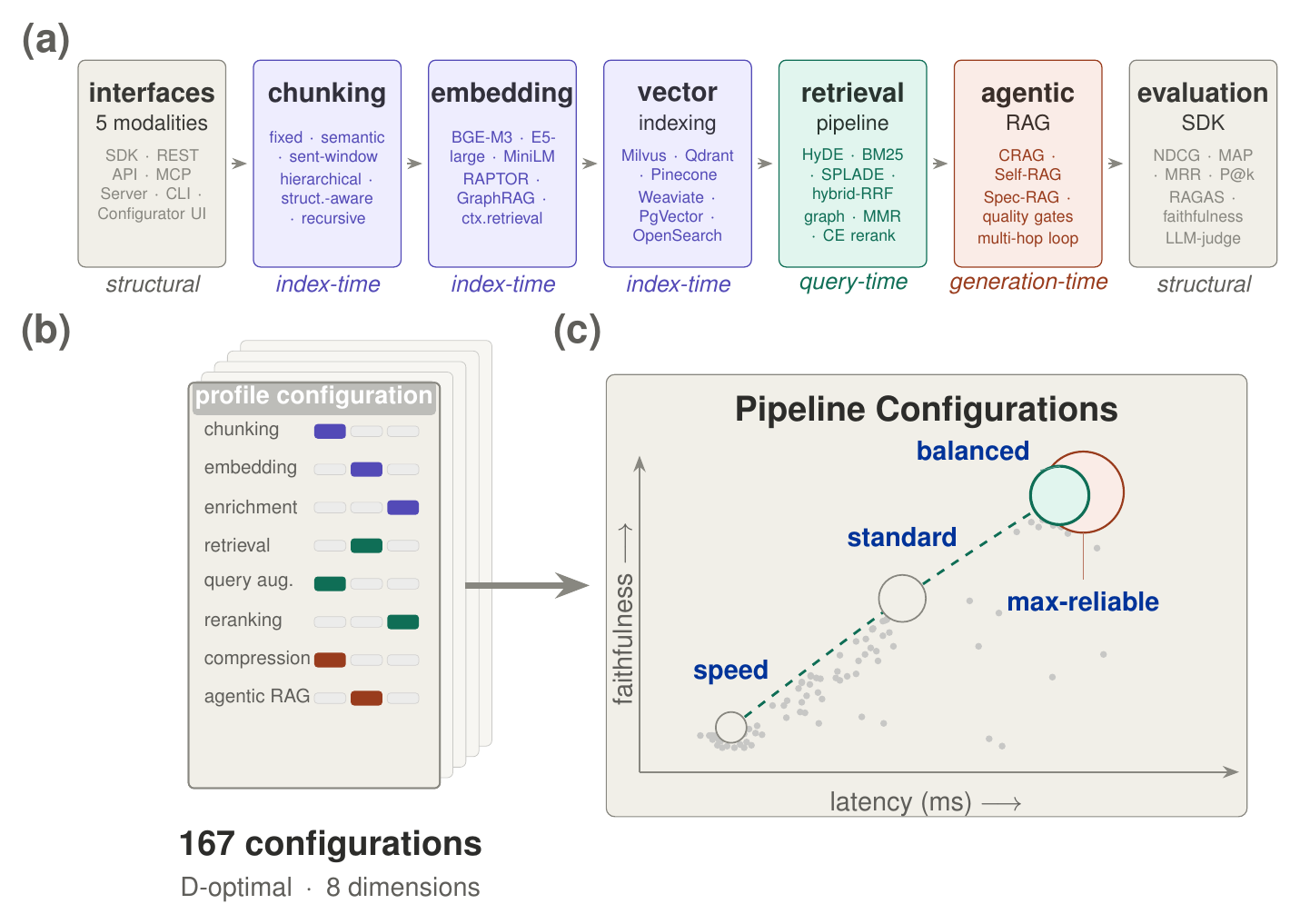
Lasagna is the framework behind Retrieval Augmented Generation Compositionality (Ido Levy, Segev Shlomov, Leshem Choshen, 2026). The study tests 450 configurations across eight benchmarks and corpora from 5K to 200K documents, and asks whether gains measured one component at a time survive when the components are combined.
| What the study found | Predicted | Realized |
|---|---|---|
| Retrieval gains do not add up: the three strongest single techniques, combined (NDCG@10) | +47% | +17% |
| Faithfulness gains do carry over: one factor at a time versus the best full pipeline | +28% | +32% |
The best pipeline also changes with corpus size. At 200K documents, the design that leads at small corpora trails by 13.7% NDCG@10, with the rank flip visible from 25K.
Project page · Explainer video · Pre-registration
Citing Lasagna
If you publish work that uses Lasagna, please cite it: see CITATION.cff, which GitHub renders as a ready-made BibTeX entry. To cite the paper:
@misc{levy2026retrieval,
  title  = {Retrieval Augmented Generation Compositionality},
  author = {Levy, Ido and Shlomov, Segev and Choshen, Leshem},
  year   = {2026},
  note   = {Preprint},
  url    = {https://dolev31.github.io/lasagna/}
}
If you also report a number from the evaluation harness, publish the results bundle with it:
lasagna results bundle <results.json> -o run.json
It carries the library versions, hardware, resolved sweep, corpus fingerprint
and comparability key: what a reader needs to decide whether your number and
theirs measure the same thing. lasagna results validate recomputes the key,
the run id and every aggregate from its per-query scores, so a number edited
after the run no longer matches its bundle. That is an integrity check against
mistakes and naive edits, not a signature: anyone who edits a number can
recompute the id, which is why the hub's trust model calls results
self-reported. hub/ has what
is needed to run a public leaderboard for bundles: a generated JSON Schema, a
pull-request validation workflow, and that trust model.
License
Apache 2.0: see LICENSE and NOTICE. Lasagna vendors no third-party source code.
1 maintainer

Metadata
1 maintainer
Release files for lasagna-rag 0.1.0
For a detailed explanation of source distributions (sdists) and built distributions (wheels), please see the package formats documentation.
Source distribution (sdist)
| File | Size | Uploaded | Provenance | |
|---|---|---|---|---|
| lasagna_rag-0.1.0.tar.gz | 1.5 MB | With provenance | Details |
Built distribution (wheel)
| File | Interpreter | ABI | Platform | Reset |
|---|---|---|---|---|
| lasagna_rag-0.1.0-py3-none-any.whl | Python 3 | none | any | Details |
Total release size: 3.1 MB
Release files / lasagna_rag-0.1.0.tar.gz
| Download URL | lasagna_rag-0.1.0.tar.gz |
|---|---|
| Size | 1.5 MB |
| Tags | Source |
|
SHA-256 checksum How to use checksums |
72414a13690505fbb5695fa46c658fa386ce1b10d0ad1ec07fec6b69a1889255
|
|
BLAKE2b-256 checksum How to use checksums |
843b2c3c9d115d6d78c84fb53710da0ebde1d906ff1dac5d1db0d341820d3764
|
| Upload date | |
|
Uploaded using Trusted Publishing? What is trusted publishing? |
Yes |
| Uploaded via |
twine/7.0.0 CPython/3.13.14
|
Provenance
Provenance describes where a file came from. On PyPI, provenance is shared via attestations, which provide a verifiable record of the build or publishing details. View details, limitations and caveats.


PyPI Publish Attestation
PyPI verified that this artifact, at this checksum, originated from the publisher listed below.
Signed by GitHub Actions, verified by PyPI on Oct 21, 2026.
Transparency logRelease files / lasagna_rag-0.1.0-py3-none-any.whl
| Download URL | lasagna_rag-0.1.0-py3-none-any.whl |
|---|---|
| Size | 1.6 MB |
| Tags | Python 3 |
|
SHA-256 checksum How to use checksums |
45a6f59a141f5163aa78fcd71dc4a790d95129422a798dae2a8e7908bfe6b7a6
|
|
BLAKE2b-256 checksum How to use checksums |
124b2d3866a4c90413b2d1a2b2ab7097bf781bc3adaa39984aa3346feff06db8
|
| Upload date | |
|
Uploaded using Trusted Publishing? What is trusted publishing? |
Yes |
| Uploaded via |
twine/7.0.0 CPython/3.13.14
|
Provenance
Provenance describes where a file came from. On PyPI, provenance is shared via attestations, which provide a verifiable record of the build or publishing details. View details, limitations and caveats.
PyPI Publish Attestation
PyPI verified that this artifact, at this checksum, originated from the publisher listed below.
Signed by GitHub Actions, verified by PyPI on Oct 21, 2026.
Transparency logSecurity for lasagna-rag 0.1.0
Provenance
Provenance describes where a file came from. On PyPI, provenance is shared via attestations, which provide a verifiable record of the build or publishing details. View details, limitations and caveats.
Full provenance
All 2 files in this release have been uploaded with provenance metadata.
Attestation for lasagna_rag-0.1.0.tar.gz
PyPI Publish Attestation
PyPI verified that this artifact, at this checksum, originated from the publisher listed below.
Signed by GitHub Actions, verified by PyPI on Oct 21, 2026.
Transparency logA note on package security
PyPI is a repository for distributing packages, not a service for auditing them. While third-party security researchers and our staff do their best to detect and remove malicious packages, PyPI cannot guarantee the quality, security or suitability of any given package.













