
Last Bell
A self-hosted ParentVUE + Canvas grade & assignment monitor. It watches your own students' gradebooks in ParentVUE and their coursework in Canvas (the LMS where assignments, due dates, and "missing" flags appear first), and pushes alerts — missing assignments, new or changed grades, long-term work that's still ungraded or coming due — to any number of watchers (guardians and the students themselves), on whatever device they already use.
Not affiliated with Edupoint (ParentVUE / Synergy) or Instructure (Canvas). It uses your credentials to read your students' data, and everything runs on hardware you control. Before anything else, read what it asks of the portal, what it reads from Canvas, and where your credentials and your students' data go — every sentence there is backed by linked code.
Why it's shaped this way. The people being watched are on the watcher list. Students subscribe to their own missing work and deadlines; grades go to the guardians. That one decision drives the rest: alerts carry initials so a lock screen can show them, the dashboard with full names stays on the machine, and the poller checks the district about as often as a parent would. The rest of this README is the data path and how to run it.
Status: all roadmap phases complete. lastbell run sweeps every class per
student (via each class row's own data-focus payload, the same drill-down
the portal UI performs), persists a snapshot keyed on the Edupoint assignment
GUID, diffs against the previous run, and alerts on score changes,
missing-flags, work still ungraded past its due date, deadlines entering the
look-ahead window, and course grades dropping past a threshold — plus a
one-shot final-grades summary when a marking period closes (the persisted
per-student term is the dedup; the closing term's last-seen marks are its
finals, the new term starts as a quiet fresh baseline, and the dashboard and
daily summaries scope themselves to the current term). Delivery is
per-watcher: subscriptions filtered by alert type over channels
(email/SMS-gateway, ntfy, Telegram, Pushover), each optionally batched into a
daily digest, held during quiet hours, or replaced by a generated
daily summary — plus a web dashboard to look things up on demand. Data
path verified live against MCPS (md-mcps-psv.edupoint.com, 2026-08-31), and
since 0.2.0 a Canvas layer feeds the day-to-day cards from the LMS where
assignments and missing flags appear first — see
Canvas: the leading source.
What it looks like
Every screenshot is from lastbell seed-demo — a fabricated family at
end-of-quarter volume, no real students.
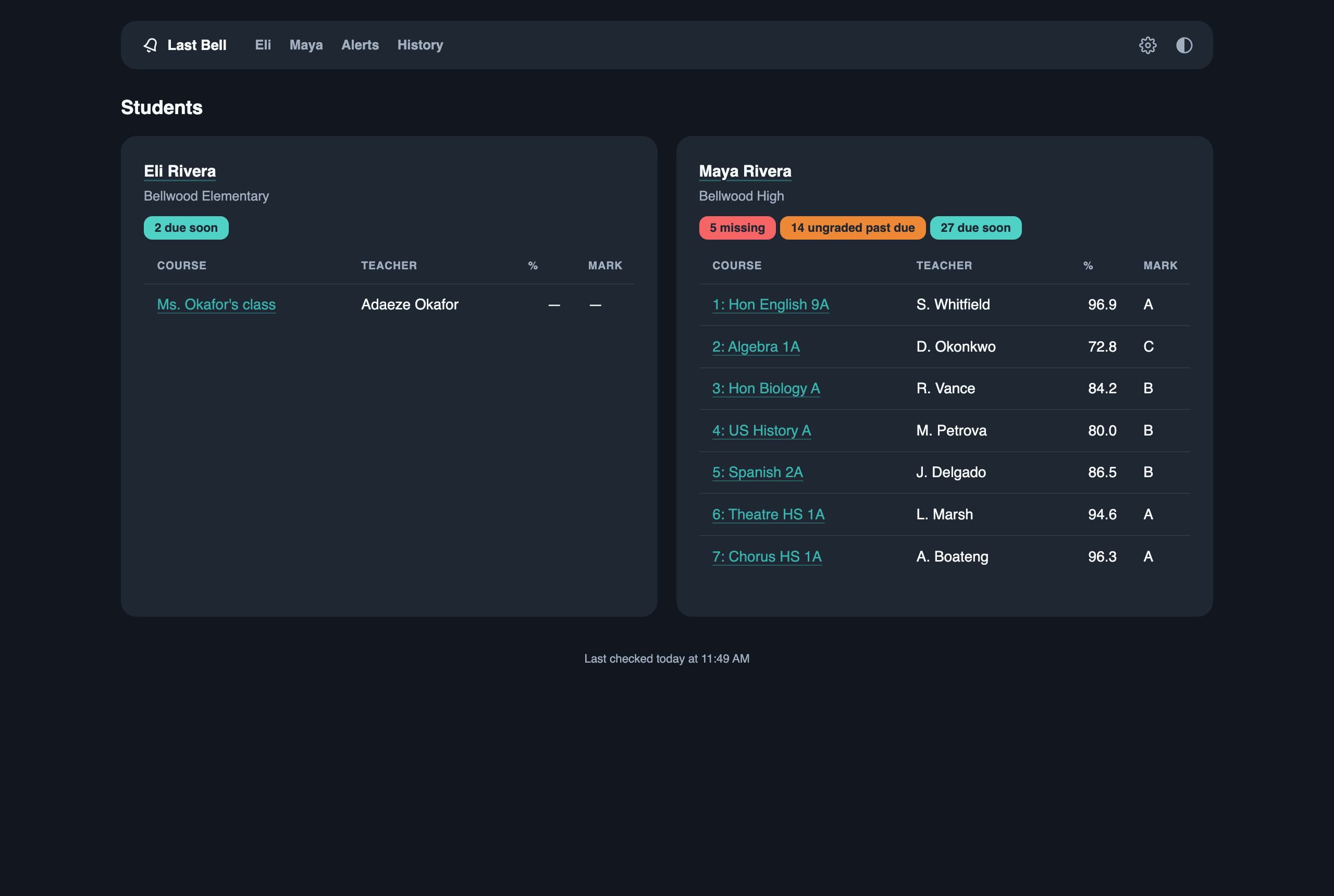
Home — every student at a glance: each course with its current grade, and the open-item badges that matter today.
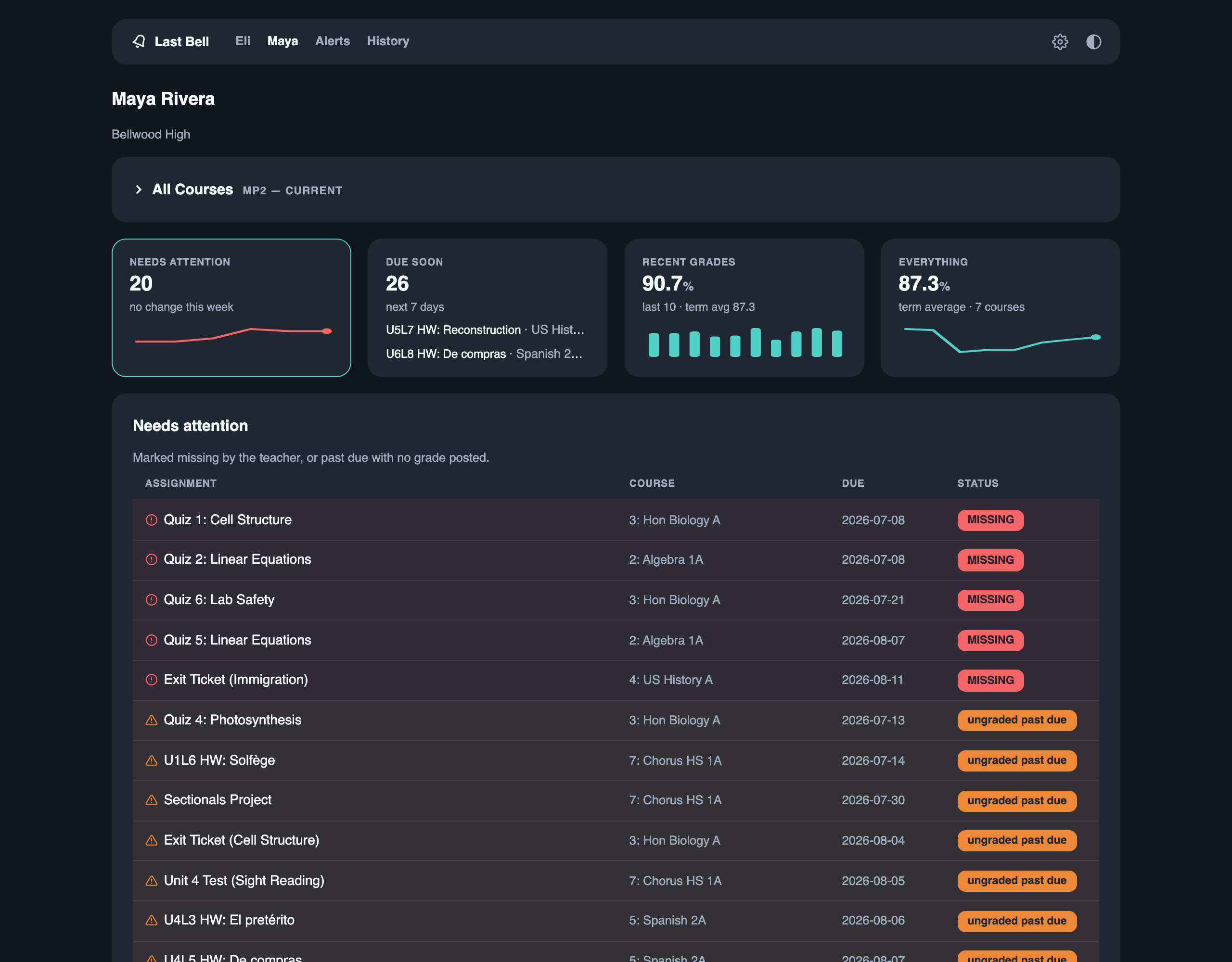
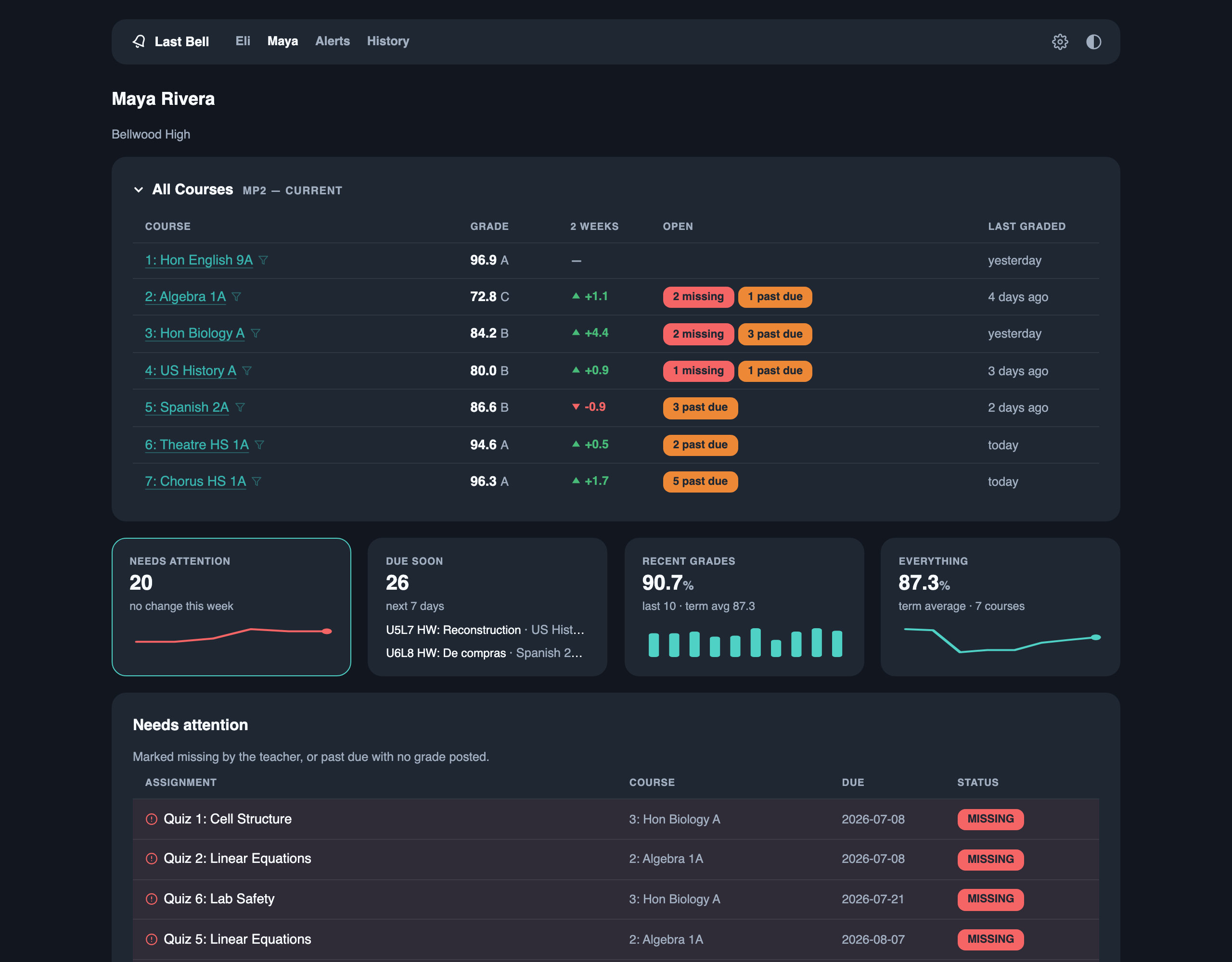
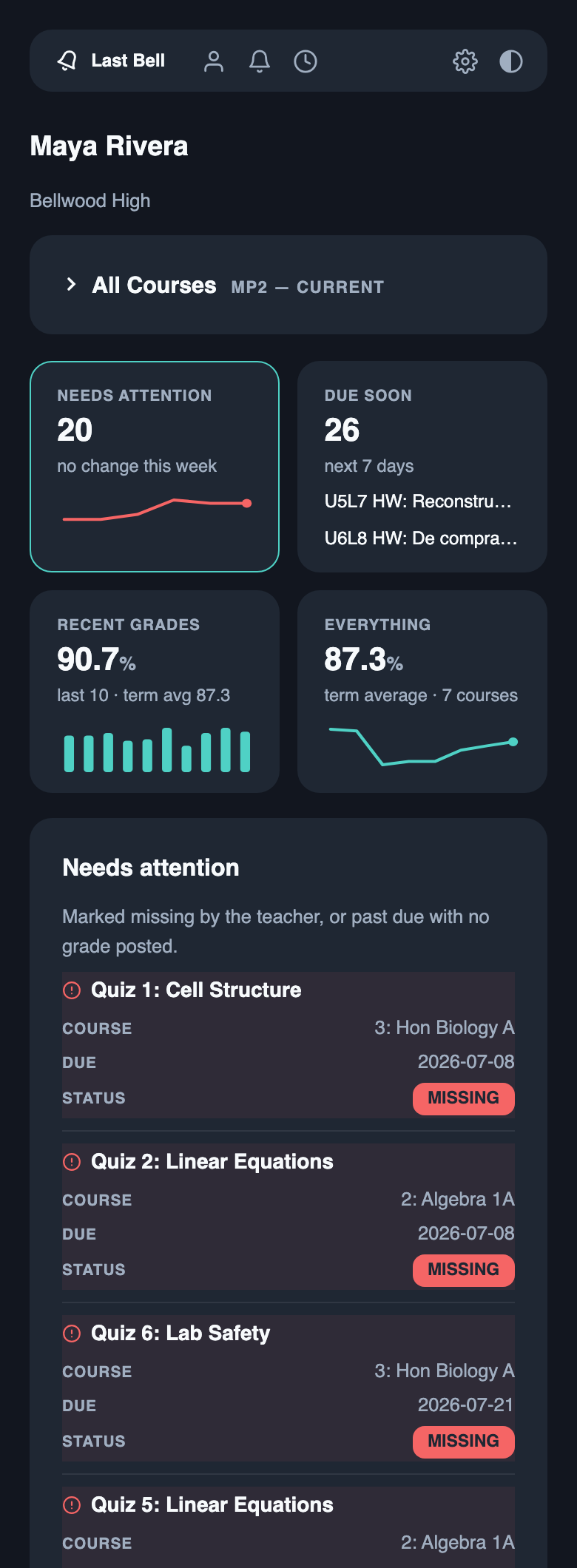
The four tracking cards — a student's page is a set of views, and the cards are both the summary and the switch. Each carries its own data story:

- Needs attention — work the teacher marked missing, plus anything past due with no grade posted. The count, this week's change, and a six-week trend line, so a bad week and a slow slide look different.
- Due soon — what's coming in the next 7 days (
LASTBELL_LOOKAHEAD_DAYS), with the next two named right on the card. - Recent grades — the average of the last ten scores, shown as bars against the term average: the fastest read on how things are going right now, before it moves the course grade.
- Everything — the term average across all courses and its trend, and the door into the full archive: every class, every assignment, closed terms folded to their finals.
A student's page — the All Courses strip collapsed (the default; the cards are the front door) and expanded (grade, two-week movement, open items, last graded — each course name filters the view below to that class):
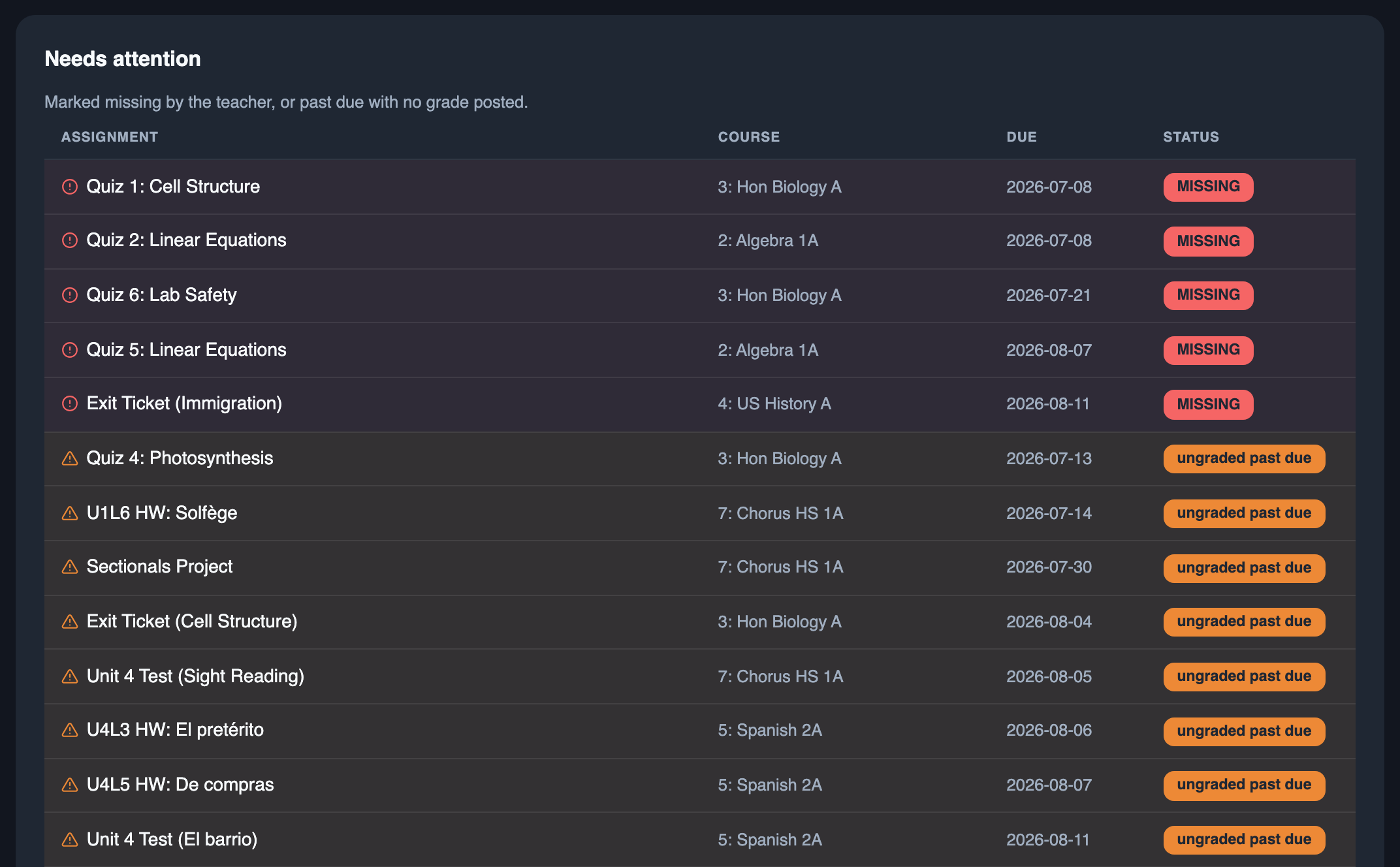
Needs attention — the default view: missing work first, then ungraded past-due, each row tinted and iconed so the list scans by color before it's read.
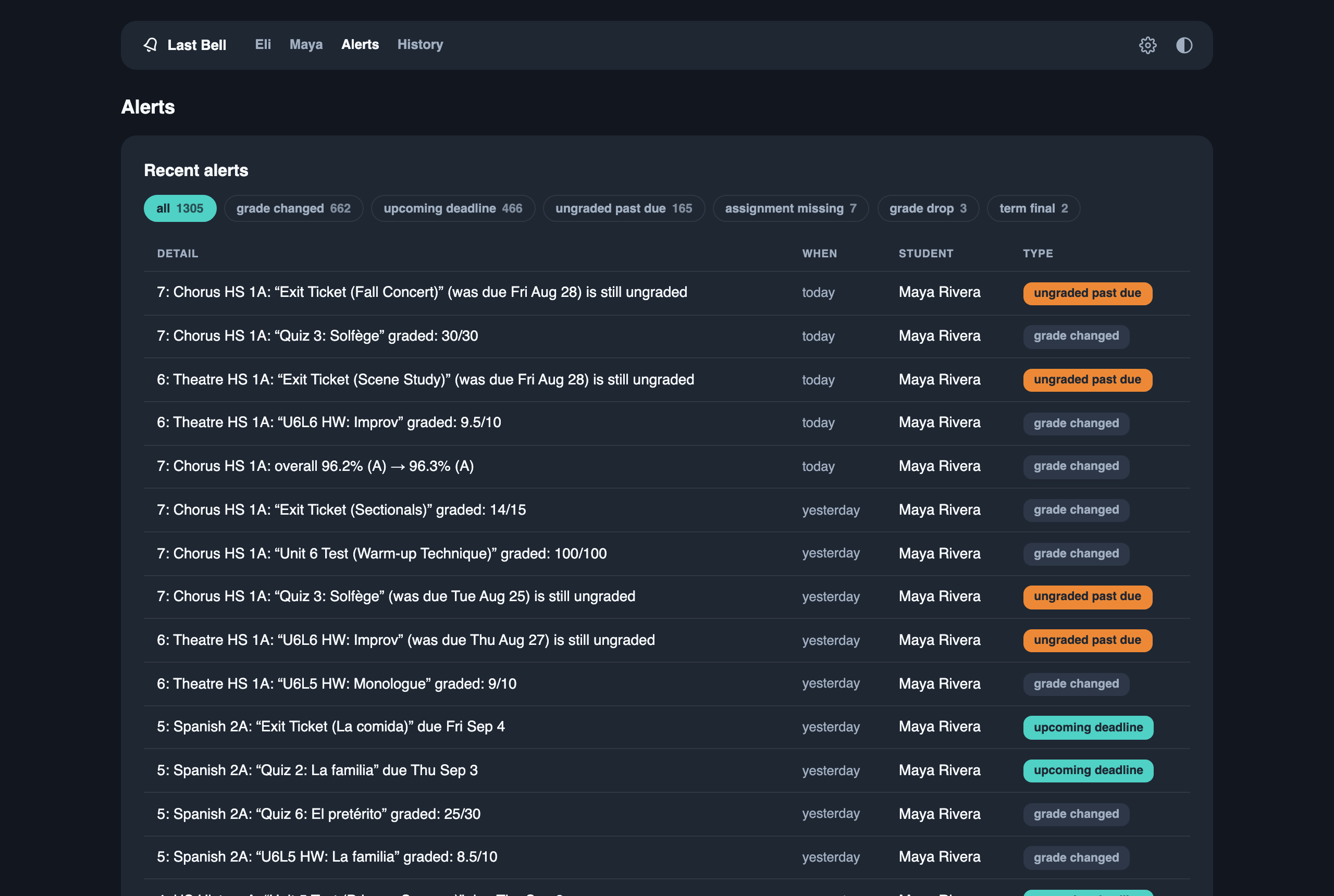
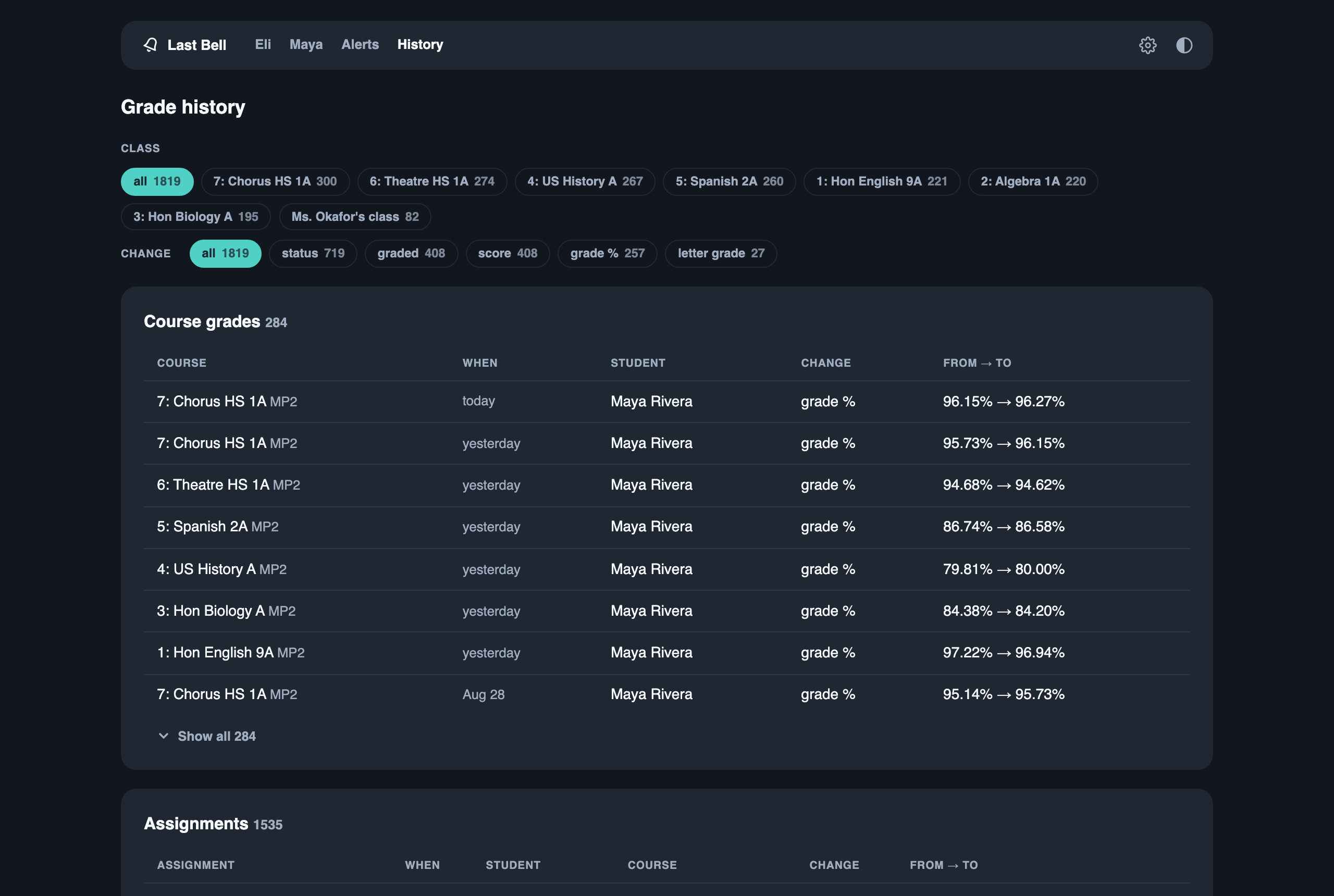
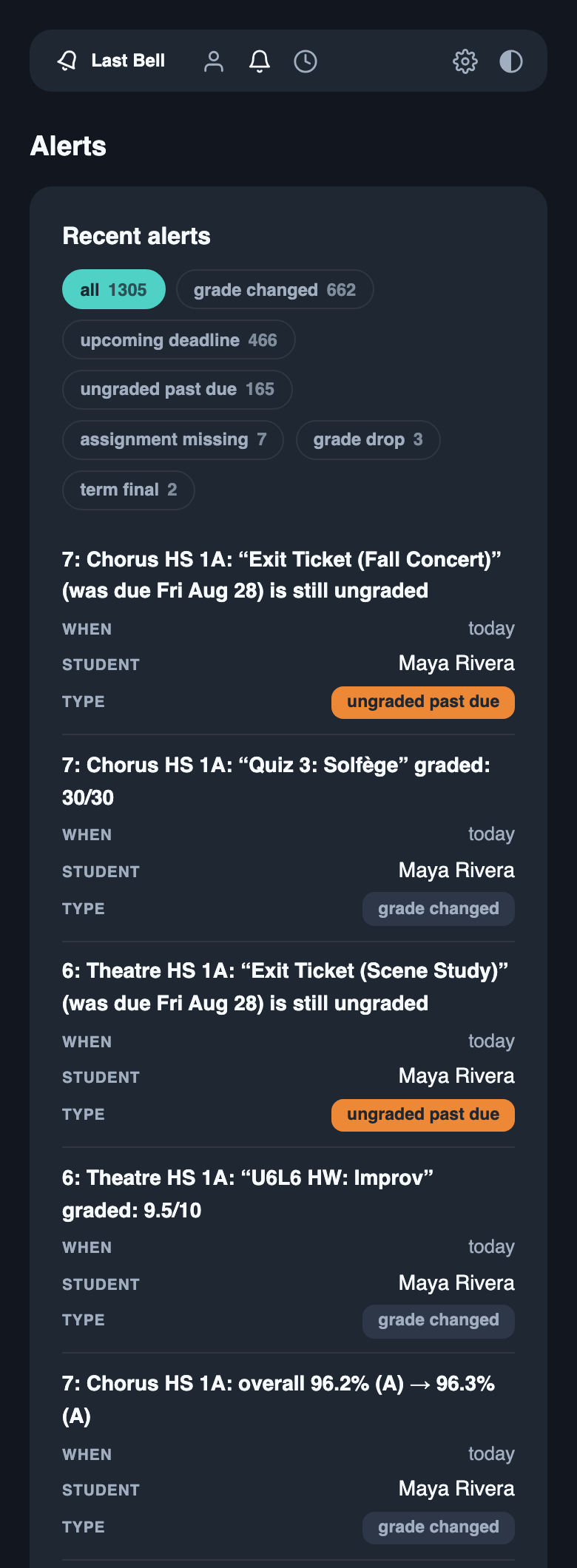
Alerts and history — Alerts is everything a watcher was told about, grouped by type and paged; History is every grade and status change ever seen, filterable by class and by kind of change.
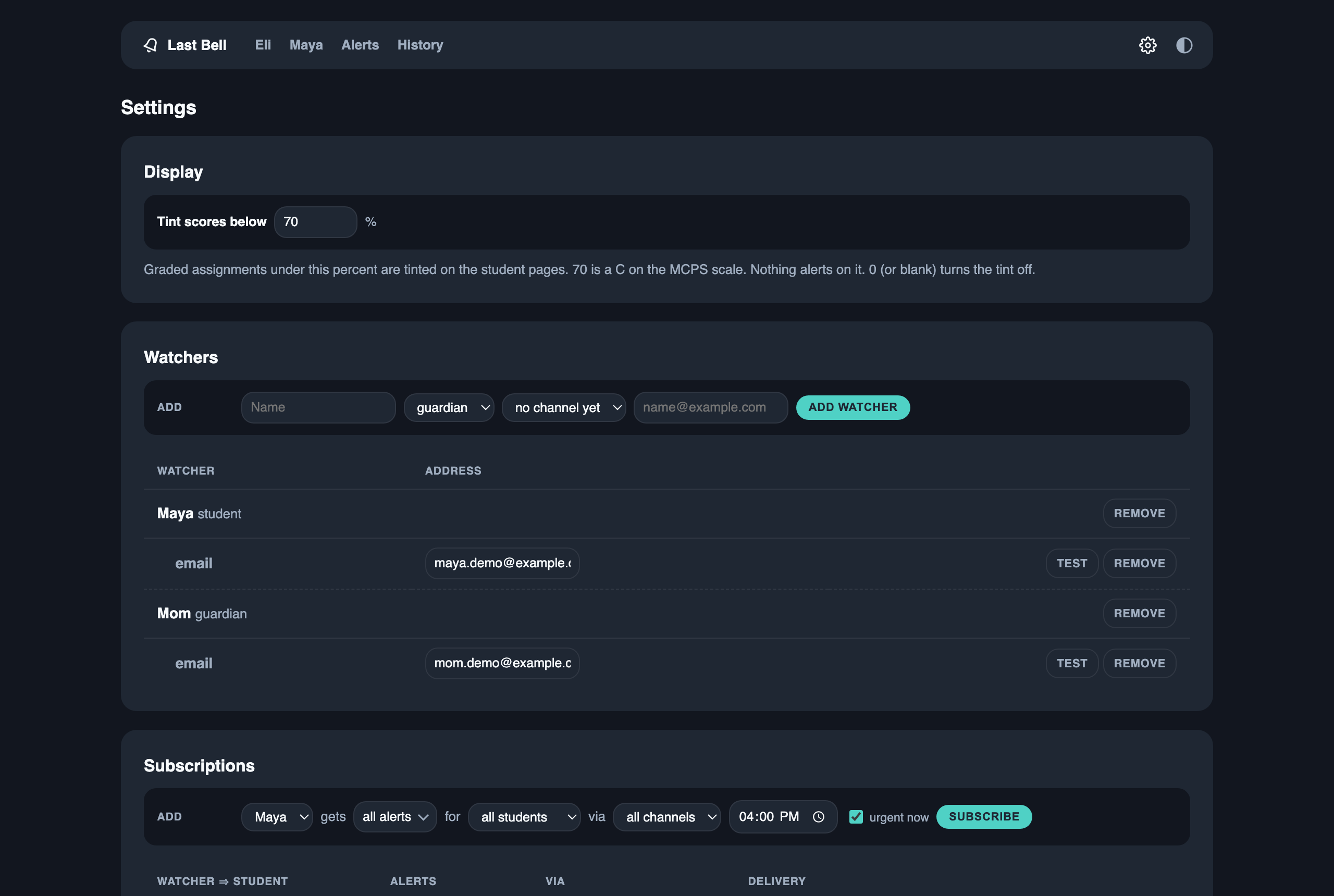
Settings — watchers (guardians and students) with their channels, and subscriptions: who hears about which student, over which channel, immediately or in a daily digest, with the urgent types allowed through right away.
On a phone — the same pages, no separate app: tables restack into cards and the nav collapses to icons.
Being a good neighbor to the portal
Last Bell's traffic is built to look like what it is: one parent, checking the gradebook a few times a day — never a crawler.
- Eight polls a day by default — one every 3 hours
(
LASTBELL_POLL_MINUTES=180), and the interval is clamped to a 15-minute floor in code (config.py), so no misconfiguration can hammer anyone's servers. - A poll is small, sequential, and identical to human use: one login, one
home page, then per student the gradebook page, the class list, and one
fragment per class — the very
LoadControlcalls the portal's own UI issues when you click through your classes, with a polite pause between them (collector.py). A two-student, seven-class household is ~21 requests per poll (~170/day) — fewer than a single manual portal visit loads in page assets alone. - Zero portal traffic between polls. Digests, summaries, and the dashboard run entirely off the local database.
- A failed poll just waits for the next cycle (
cli.py) — no retry storms. - It identifies itself honestly: the User-Agent is
lastbell/<version>(client.py), not a spoofed browser.
Portal terms vary by district and vendor and are yours to judge — but the list above is the entire footprint, so you can judge it accurately.
Credentials & student data: the actual guarantees
Your password touches exactly two things: your OS keyring and your
district's servers. lastbell set-password stores it in the macOS
Keychain / Windows Credential Manager / Linux Secret Service
(secrets.py); it never appears in .env, the
database, logs, or the source tree. (Docker installs inject it via
LASTBELL_PASSWORD from a secret store instead. The one exception is an
always-on box with no usable keyring — a headless Pi, or a boot-time service
that can't unlock the desktop keyring: there lastbell setup offers to keep
it in the owner-only settings file, tells you that trade-off out loud, and
does nothing until you say yes.) At runtime it is held in
memory and sent to one destination — your district's own login form, over
HTTPS enforced in config.py — the same request your
browser makes (client.py).
Student data lives on your machine, full stop. Snapshots, history, and
alerts sit in a local SQLite file in your user data dir (in a checkout,
data/ — git-ignored, as is .env).
There is no telemetry, no analytics, no phone-home: the only outbound HTTP in
the codebase is the portal client (client.py), the
district preflight (preflight.py), the alert
channels you configure (notify/), and one
public PyPI page fetched when — and only when — you click Check for
updates in the dashboard's footer (updates.py).
What leaves is only what you route — and it's low-PII by design. Alert
payloads carry initials + course + assignment, never a child's full name
(router.py) — safe for a lock-screen preview. Know
your transports: email rides your own SMTP account; ntfy posts to the
public ntfy.sh unless you self-host, and the topic name is the only
secret there — make it long and random; telegram and pushover go
through those services' APIs.
The dashboard shows full names, so it binds to 127.0.0.1 only unless
you deliberately widen it — the bind address is the access control
(config.py, dashboard.py).
If the code ever stops backing one of these sentences, that's a bug — file it.
Canvas: the leading source
ParentVUE is the gradebook of record, but it is the trailing one. Teachers post assignments, collect work, and set the "missing" flag in Canvas (myMCPS Classroom at MCPS); the Synergy gradebook sees any of it only when the teacher syncs — days later, and never before an item is graded. So the two cards a parent acts on, Needs attention and Due soon, are fed from Canvas first, and ParentVUE keeps the course grades and the finals.
How it gets in. With nothing configured (LASTBELL_CANVAS=auto), the
poll follows the Canvas tile on the portal's own home page. That link is a
SAML entry, and Synergy is the identity provider: the ParentVUE session you
already hold is the only credential — there is no second password anywhere
(canvas.py,
client.py).
If your district lets observers mint a personal access token (Canvas →
Account → Settings → New Access Token), lastbell set-canvas-token plus
LASTBELL_CANVAS_HOST skips the hop. lastbell canvas shows which path
connected, which Canvas student is which portal student, and what each course
would contribute — read-only, initials only. LASTBELL_CANVAS=off never
touches Canvas.
What it reads — the Canvas REST API, not pages. Per poll: the observer's linked students, the course list, and per course the assignments with your student's submission plus the category names — the documented, observer-scoped endpoints the official Canvas Parent app uses, with the same polite pause between calls as the gradebook sweep. A two-student household adds roughly two calls per course per poll. Instructure's Acceptable Use Policy permits its "publicly supported interfaces" and forbids sharing credentials or tokens with third parties; both hold here — a token is yours, held in your keyring, sent only to your district's Canvas. Its API Policy throttles per token and revokes chronic over-users; eight polls a day is nowhere near that.
How it merges. A Canvas course is matched to the ParentVUE course with
the same title (period prefixes and the -Teacher-S1-2027 suffix stripped)
and its work attaches to that course, keyed canvas:<id>; a Canvas course
that matches nothing gets its own row, with no course grade, only when it
looks like a class — it carries real work, it isn't in Canvas's built-in
Default Term (where the password-reset and training shells live), and it
sits in the same Canvas term as the classes that did match. Name fragments
in LASTBELL_CANVAS_SKIP silence anything else. Only published work with a due date or points is kept — the undated
"read this page" items a course shell accumulates aren't actionable. Canvas's
own words are trusted: missing is MISSING, a posted score is
graded, a submission is turned in (a status only Canvas can supply),
and everything else is due for the time rules to judge. Once the same
piece of work reaches the gradebook under the same name, the gradebook row
is the record: the Canvas twin leaves the counts, lists, and alerts but is
kept and updated, and when the two disagree — Canvas has 9/10 where the
gradebook shows a 0, a different score, or a missing flag — the gradebook
row shows Canvas says 9/10 and one alert asks you to check with the
teacher. A gradebook row that is merely ungraded while Canvas has a score
is ordinary sync lag: hinted, not alerted
(store.py,
differ.py).
Alert lines from Canvas end in [Canvas], so a lock-screen preview says
which app to open. Canvas rows wear a small Canvas mark on the dashboard.
What it can't do. Teachers use Canvas unevenly; a course whose teacher posts nothing contributes nothing, and that's visible — its Canvas twin shows no work. Canvas course grades are deliberately ignored (ParentVUE is the record), and the Canvas layer is additive: if Canvas is unreachable, the poll logs one warning and checks the gradebook as before.
Why scraping (and not the SOAP API)
The legacy Edupoint SOAP mobile API is disabled on a growing number of districts
(MCPS returns UPD5304-00, Loudoun D5517). Last Bell talks to the PXP2 web
portal instead: an ASP.NET form login, then the PXP2_Gradebook.aspx/LoadControl
page method the gradebook UI itself calls. Run lastbell preflight to see what
your district allows.
Quickstart
Three commands, no files to edit. First get pipx
(macOS: brew install pipx, Windows: py -m pip install --user pipx, Debian/Ubuntu:
sudo apt install pipx), then:
pipx install lastbell
lastbell setup
lastbell run --loop
lastbell setup is an interactive wizard: it confirms your district's portal
(MCPS offered as the default) before asking anything personal, puts your
password straight into the OS keyring, verifies login + data path + parsers
with the preflight, walks you through one notification channel (email; ntfy
push for the terminal-minded) ending in a live test message, offers to run
the first
collection, and offers to install itself as a background service so the
third command above becomes optional. Re-run it any time — it remembers your
answers. Settings land in your user config dir, data in your user data dir
(both printed at the end).
Keeping it running. Alerts only happen while lastbell run --loop is
running, so on the machine that will do the watching (a Raspberry Pi, an old
laptop, the Mac that never sleeps):
lastbell install-service
Linux gets a user systemd unit (no sudo) enabled at boot with login
lingering, so it runs with nobody logged in; macOS gets a launchd agent that
starts at login and restarts if it stops; Windows is shown the Task Scheduler
command to paste. --print shows exactly what would be written and run
without touching anything, --uninstall reverses it. On a Pi that boots
without a desktop session, say yes when lastbell setup asks whether Last
Bell will run as a background service — that moves the password from the
keyring (which a boot-time service can't unlock) into the owner-only settings
file, and the wizard says so before doing it. The installer also warns if the
box's clock is on UTC: digests and quiet hours follow the local clock.
Upgrading. The dashboard footer's Check for updates link tells you when a newer release exists. Then, on the machine running it:
pipx upgrade lastbell
and restart the running copy so it picks up the new code: on Linux
systemctl --user restart lastbell (plus lastbell-dashboard if you set that
up); on macOS run lastbell install-service again, which reloads the agent.
Running from a source checkout instead
python3 -m venv .venv && source .venv/bin/activate
pip install -e .

cp .env.example .env          # then edit: district + username (NOT the password)
lastbell set-password       # stores the password in your OS keyring
lastbell preflight          # district go/no-go check (values redacted)

lastbell run                # one pass: snapshot, diff, alert (first run = baseline)
lastbell run --loop         # keep polling every LASTBELL_POLL_MINUTES
lastbell collect            # read-only JSON dump of what a run would persist
A checkout's .env (in the working directory) takes precedence over the
installed settings file, and typically pins LASTBELL_DB_PATH=data/lastbell.db
to keep state inside the repo tree.
Everything after that happens in the dashboard. lastbell dashboard serves
it at http://127.0.0.1:8321: students, assignments, grade history, the alert
log, and a Settings page where you add the people who should hear about
each student, give each an email address, pick which alert types they get,
and set quiet hours. Every address row has a test button
that sends the same one-line message the wizard did, so "does this actually
reach Grandma's phone?" is one click. The footer shows the version you're
running and a Check for updates link that asks PyPI, on that click only,
whether a newer release exists. You start with one watcher automatically:
the first run creates a guardian named after the credential holder, subscribed
to every student, on the considerate default — one daily digest at 4pm, with
urgent alert types (missing assignment, upcoming deadline, grade drop) sent
immediately. Rename or remove it freely.
Want to see it populated before pointing it at your own kids? lastbell seed-demo fabricates a fake family at end-of-quarter volume (two marking
periods, hundreds of assignments, months of history — no real student data)
and lastbell dashboard --db <path it prints> serves it.
Doing it from the terminal instead
Everything the Settings page does has a command, plus three channels the dashboard doesn't offer (ntfy push, Telegram, Pushover — see the channel table below):
lastbell watcher add Mom --kind guardian --channel email=mom@example.com
lastbell watcher add Jasper --kind student --channel ntfy=some-long-secret-topic
lastbell subscribe Mom jasper                 # all alert types, all her channels
lastbell subscribe Jasper jasper \
    --types assignment_missing,upcoming_deadline    # students see nudges, not grades
lastbell subscribe Mom jasper --at 17:00      # batch her alerts into a 5pm digest
lastbell subscribe Mom jasper --types daily_summary --at 07:00   # morning report
lastbell watcher quiet-hours Jasper 21:00-07:00   # held overnight, never dropped
lastbell watcher test Mom                     # send a test to each of her channels
lastbell subscriptions                        # who gets what
lastbell alerts                               # the alert log
lastbell flush                                # send due digests/summaries now
Students are referenced by AGU or any unique name/initials prefix; watchers by the name you gave them. The default watcher is only re-created if the watcher list is ever empty again.
In run --loop, the portal is polled every POLL_MINUTES but the outbox and
summaries are checked every minute, so a 17:00 digest goes out at 17:00 —
not at the next three-hour poll. Time-based deliveries use the host's local
clock. An event subscribed both immediately and in a digest is sent once,
immediately. A summary reports standing state (overall marks, missing work,
what's due soon, the week's recent alerts); a digest batches the events that
fired.
Configuration & secrets
All non-secret settings live in one env file, written for you by lastbell setup (in your user config dir; a checkout's git-ignored .env takes
precedence, with .env.example as its template). Passwords never go in that
file, the database, or the source tree — only a reference to where the
secret lives:
| Install | Secret store |
|---|---|
| Bare-metal | OS keyring — macOS Keychain / Windows Credential Manager / Secret Service (lastbell set-password) |
| Always-on box (headless Pi, Linux boot-time service) | LASTBELL_SECRET_BACKEND=env + LASTBELL_PASSWORD in the settings file, mode 0600. Trade-off: the password is on disk in plain text, readable by your user (and root). lastbell setup offers this only when there is no usable keyring or you say the service runs unattended, and states the trade-off first. |
| Docker / CI | LASTBELL_PASSWORD, injected from Docker secrets or a CI secret store |
Cross-platform by construction: plain Python (Windows/macOS/Linux), no OS-native
hooks. SQLite by default; ship it as a container to run identically on a Pi, NAS,
or VPS. It needs an always-on host to poll and push — lastbell install-service makes one out of a Pi or a Mac (see Quickstart).
How alerts reach people
Push-out, not pull-in: nobody signs into Last Bell to receive an alert. A watcher is just a name plus addresses; subscriptions say which student's events reach them, over which channels, filtered by alert type. One poll, one message per watcher-channel — a watcher subscribed to three alert types gets a single message listing everything.
Email carries an HTML version next to the plain text — updates grouped by
what they mean (Needs attention, Slipping, Coming up, Grades posted), the
course above the assignment, a Canvas pill where the work came from
Canvas — and the daily summary gets an Overall table
(notify/render.py).
Subjects count by kind: [Last Bell] J.P.H.: 1 missing, 2 due soon. Push
channels get the same grouping as text. lastbell watcher test NAME --sample
sends a realistic sample with made-up courses.
| Channel | Where it goes | Setup |
|---|---|---|
email |
any inbox | LASTBELL_SMTP_*: any email account you own; lastbell setup asks |
ntfy |
the free ntfy app (terminal-only) | none (public ntfy.sh) or NTFY_SERVER/TOKEN |
telegram |
a Telegram chat (terminal-only) | LASTBELL_TELEGRAM_TOKEN (@BotFather bot) |
pushover |
the Pushover app (terminal-only) | LASTBELL_PUSHOVER_TOKEN (app token) |
console |
the run's stdout | none |
The wizard and the dashboard offer email; the other three stay available
from lastbell watcher. No text messages, on purpose: the carriers'
free email-to-text gateways are gone or going (T-Mobile's shut down in
December 2024, AT&T's in June 2025, Verizon's is being retired by March 2027
and already drops messages silently), and a channel that reaches some
people and never reaches others is worse than none. A gateway address is
refused at entry with that explanation.
The web dashboard (lastbell dashboard) is for looking things up on
demand — students, assignments, alert log, grade history, watcher routing —
never required to get a notification. It's stdlib-only and binds 127.0.0.1
unless you deliberately widen it; unlike alert payloads it shows full names,
so the bind address is the access control. Every page is a read; the only
writes are the watcher/subscription forms on /settings — household
bookkeeping, never grade data. Alert payloads stay low-PII (initials + course +
score, never a child's full name — safe for an SMS preview on a lock
screen).
Will it work for my district?
Probably, if your district runs the Synergy PXP2 web portal — and the
preflight (Phase 5) answers definitively, without installing anything else
or touching a .env:
# Anonymous: public endpoints only, no credentials sent anywhere
lastbell preflight --district your-host.example --report

# Full: login + data path + this repo's actual parsers against your fragments
lastbell preflight --district your-host.example --username you --report
It checks, in order: the PXP2 login form exists → the legacy SOAP API's status
(the deprecation code your district returns is kept verbatim — useful
cross-district data) → web login → students on the credential → the
LoadControl data path → and finally whether the parsers understand your
district's fragments, which is the question that actually decides
compatibility. Verdicts: go, partial (data path answers but a parser
needs a tweak — the most fixable kind of report), no-go, anonymous-ok.
Exit codes match (0 go, 1 not yet, 2 couldn't run) so it scripts cleanly.
--report prints Markdown that is redacted by construction — no student
names, grades, or usernames can appear in it — ready to paste into a
district report issue. --json
is for scripts; --show-values reveals names locally only, and is never
included in exported output; --dump saves raw fragments to debug/ in your
data dir (personal data — stays local, never committed) for parser
development. It also installs standalone as parentvue-preflight.
The Phase 0 gate — PASSED
The data path was reverse-engineered from the portal's own JavaScript and then
verified end-to-end against MCPS: POST service/PXP2Communication.asmx/LoadControl
with the page's verbatim PXP.GBCurrentFocus FocusArgs (and an AGU header)
returns server-rendered fragments; assignments arrive as a DevExpress grid
dataSource JSON array (Date, GBAssignment, GBScore, GBPoints, … with
LinkColumn cells wrapping display text and a ready-made
Gradebook_AssignmentDetails drill-down focus). The parsers in
lastbell/gradebook.py are wired against
real captured fragments from both school types.
lastbell preflight --dump   # go/no-go check; saves raw fragments locally
lastbell collect            # normalized JSON for every student and class
Phase 1 built the watch loop on top of that path: each class row's data-focus
attribute carries the ready-made {LoadParams, FocusArgs} the portal's own
GB.LoadControl click handler sends, so run sweeps every class exactly the
way a human clicking through them would (with a polite delay between calls,
and duplicate screen/print row variants fetched once).
Roadmap
| Phase | What ships |
|---|---|
| 0 | ✅ Pass the gate; harden the connector into normalized courses + assignments |
| 1 | ✅ All-class sweep, persisted snapshots (keyed on the Edupoint assignment GUID), diff + first alert (run / run --loop) |
| 2 | ✅ Missing, ungraded-past-due, future-deadline look-ahead, score changes (LOOKAHEAD_DAYS / UNGRADED_GRACE_DAYS) |
| 3 | ✅ Watcher accounts (guardians & students), subscriptions, dashboard, channels |
| 4 | ✅ Daily student summaries, digests, quiet hours, grade-drop thresholds |
| 5 | ✅ Publish the preflight as a redacted, general district tool |
Credits
The dashboard's visual design (colors, type, card and badge styling in
lastbell/style.css) is derived from
Purity UI Dashboard
— Copyright (c) 2021 Creative Tim, released under the MIT license; its
copyright and permission notice applies to those derived styles.
The web-portal approach (ASP.NET form login, embedded child-list JSON) was first demonstrated by dmc5179/ParentVUE (GPLv3), which served as prior art and reference during this project's district recon. Last Bell's code is written independently against the portal itself, but that repo deserves the credit for proving the post-SOAP path first. Community documentation of the (now largely deprecated) SOAP API lives at StudentVue/docs.
License
MIT — see LICENSE. Because the connector is original code (not a fork), the license is a free choice; MIT is the permissive default for maximum forkability.
1 maintainer

Download files
Download the file for your platform. If you're not sure which to choose, learn more about installing packages.
Source Distribution
Built Distribution
Filter files by name, interpreter, ABI, and platform.
If you're not sure about the file name format, learn more about wheel file names.
Copy a direct link to the current filters
File details
Details for the file lastbell-0.2.2.tar.gz.
File metadata
- Download URL: lastbell-0.2.2.tar.gz
- Upload date:
- Size: 232.5 kB
- Tags: Source
- Uploaded using Trusted Publishing? Yes
- Uploaded via:
twine/7.0.0 CPython/3.13.14
File hashes
| Algorithm | Hash digest | |
|---|---|---|
| SHA256 |
771479cc4d704c915f7a8256f0eb36cc154b1d3e4b0cfc2b09ea050b3eb79132
|
|
| MD5 |
5faa19fd3dc8392246608be7777e300d
|
|
| BLAKE2b-256 |
edc51ce853d84f30e81fca700343eb15507e8f2a0914651b651a94174bfc0c8c
|
Provenance
The following attestation bundles were made for lastbell-0.2.2.tar.gz:
Publisher:
release.yml on noestudios/lastbell
-
Statement:
-
Statement type:
https://in-toto.io/Statement/v1 -
Predicate type:
https://docs.pypi.org/attestations/publish/v1 -
Subject name:
lastbell-0.2.2.tar.gz -
Subject digest:
771479cc4d704c915f7a8256f0eb36cc154b1d3e4b0cfc2b09ea050b3eb79132 - Sigstore transparency entry: 2704874488
- Sigstore integration time:
-
Permalink:
noestudios/lastbell@799777be9760ed88448ee892e22dd1f1deb914a0 -
Branch / Tag:
refs/tags/v0.2.2 - Owner: https://github.com/noestudios
-
Access:
public
-
Token Issuer:
https://token.actions.githubusercontent.com -
Runner Environment:
github-hosted -
Publication workflow:
release.yml@799777be9760ed88448ee892e22dd1f1deb914a0 -
Trigger Event:
push
-
Statement type:
File details
Details for the file lastbell-0.2.2-py3-none-any.whl.
File metadata
- Download URL: lastbell-0.2.2-py3-none-any.whl
- Upload date:
- Size: 174.5 kB
- Tags: Python 3
- Uploaded using Trusted Publishing? Yes
- Uploaded via:
twine/7.0.0 CPython/3.13.14
File hashes
| Algorithm | Hash digest | |
|---|---|---|
| SHA256 |
a71b7b2722f9bc6d7ebc0670580c3575354fc623c7586118cf81042ff3abf498
|
|
| MD5 |
e7e36f35c8ba9a7c5fd26ea0f29ff505
|
|
| BLAKE2b-256 |
e906eae8265790f5da88e540b81c6e2fc06c78cea7cd08b5f18c2e1ccc2e2a25
|
Provenance
The following attestation bundles were made for lastbell-0.2.2-py3-none-any.whl:
Publisher:
release.yml on noestudios/lastbell
-
Statement:
-
Statement type:
https://in-toto.io/Statement/v1 -
Predicate type:
https://docs.pypi.org/attestations/publish/v1 -
Subject name:
lastbell-0.2.2-py3-none-any.whl -
Subject digest:
a71b7b2722f9bc6d7ebc0670580c3575354fc623c7586118cf81042ff3abf498 - Sigstore transparency entry: 2704874599
- Sigstore integration time:
-
Permalink:
noestudios/lastbell@799777be9760ed88448ee892e22dd1f1deb914a0 -
Branch / Tag:
refs/tags/v0.2.2 - Owner: https://github.com/noestudios
-
Access:
public
-
Token Issuer:
https://token.actions.githubusercontent.com -
Runner Environment:
github-hosted -
Publication workflow:
release.yml@799777be9760ed88448ee892e22dd1f1deb914a0 -
Trigger Event:
push
-
Statement type:














