
LATED photometric emission-line recovery: transparent continuum + line fits through real filter curves, with a web application
Verified details
These details have been verified by PyPIProject links
GitHub Statistics
Maintainers

Project description
LATED
Measure emission lines you can't spectroscopically resolve, straight from photometry.




You have JWST (or Roman) photometry of a galaxy, and one of the bands looks
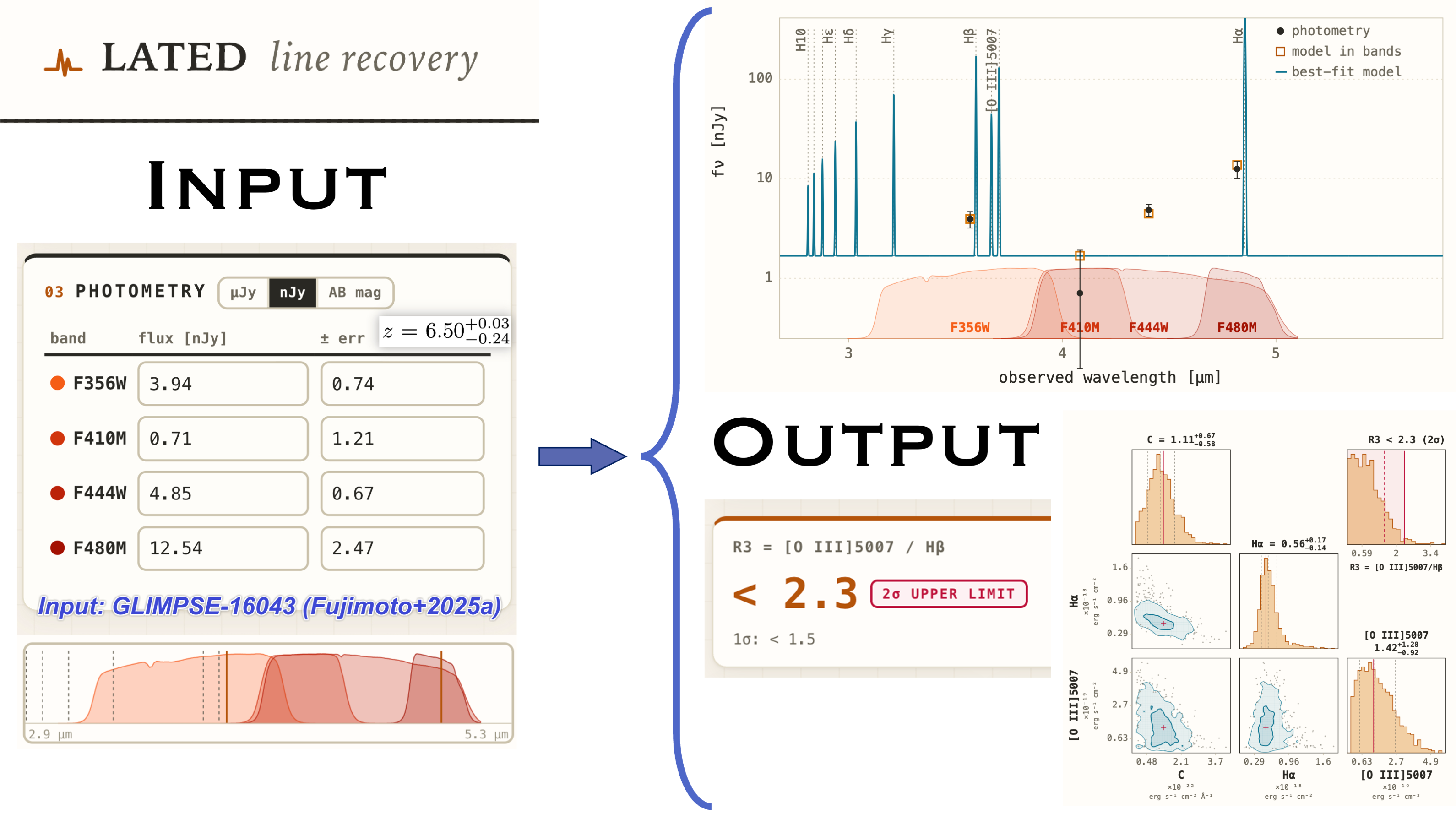
too bright: an emission line is boosting it. lated turns that excess into a
number. It fits a simple continuum + emission-line model through the real
filter curves and reports the line fluxes, rest-frame equivalent widths and
line ratios (for example [O III] 5007 / Hβ) that the photometry implies.
When a line is genuinely there, you get a measurement with uncertainties. When it isn't, you get an honest upper limit, not a fabricated value. That distinction is the whole point of the tool.
Use it two ways: a point-and-click web app (no coding), or a small Python API for scripting and batch work.
Install
pip install lated
That is everything: the Python library, the command line, and the web app. Python 3.9+ (depends only on NumPy, SciPy, pydantic and FastAPI).
The web app
lated serve # open http://127.0.0.1:8321
Pick a redshift, tick the bands you have, paste your fluxes, and press run. You get a verdict card (measurement or limit), an SED figure and a corner plot, all exportable to PDF. Start from one of the built-in literature examples to see the whole workflow in a single click. Everything on the board is editable: the line list, which lines are free / tied / off, the nebular conditions that set the Balmer ratios (Osterbrock & Ferland 2006 Case A/B by temperature and density), the continuum slope, dust, and the error budget.
From Python
from lated import FitConfig, fit

photometry = {"F200W": (0.0136, 0.0019),   # {band: (flux, error)} in microJansky
              "F277W": (0.0249, 0.0016),
              "F356W": (0.0040, 0.0014)}

res = fit(photometry, FitConfig.three_band(z=3.193))
print(res.ratios[0].status)                # 'upper_limit', 'measured', ...
That is the whole idea. The example notebook walks through reading the results, plotting the SED and corner, editing line roles, choosing nebular conditions, and the posterior error budget.
What you get back
Every line ratio carries a status, so a number is never mistaken for a measurement it isn't:
| status | meaning | quote |
|---|---|---|
measured |
both lines detected | the value with 16/50/84 percentiles |
upper_limit |
numerator consistent with zero | < p97.5 (2σ) |
lower_limit |
denominator consistent with zero | > p2.5 |
unconstrained |
no band covers the line | nothing usable |
Each line also reports the faintest flux your photometry could have detected, so every non-detection comes with its depth.
How it works
Per band, the predicted flux is the photon-weighted mean of
f_λ(λ) = C (λ/λ0)^β + Σ_l F_l · δ(λ − λ_l (1+z))
integrated through the real transmission curve and compared to your photometry with a Gaussian likelihood; amplitudes are solved by error-weighted non-negative least squares over a grid of slopes. Every parameter has an explicit role (free, fixed, or tied) that you can change, and invalid setups (unknown bands, tie cycles, non-positive errors, under-constrained fits) are raised as errors rather than silently ignored.
Command line
lated serve                 # run the web app
lated fit input.json        # fit from a JSON file
lated bands                 # list the bundled filter curves
lated lines                 # show the default line registry
The web app also exposes a small REST API (/api/meta,
/api/filters/{name}, /api/fit) with interactive docs at /docs.
Citing
If lated contributes to your research, please cite Li et al. (2026, LATED
Paper I).
Development
git clone https://github.com/lmytime/lated
cd lated
pip install -e ".[test]"
PYTEST_DISABLE_PLUGIN_AUTOLOAD=1 pytest tests/ -q
Issues and contributions are welcome at github.com/lmytime/lated. Released under the MIT License.
Project details
Verified details
These details have been verified by PyPIProject links
GitHub Statistics
Maintainers
Release history Release notifications | RSS feed


Download files
Download the file for your platform. If you're not sure which to choose, learn more about installing packages.
Source Distribution
Built Distribution
Filter files by name, interpreter, ABI, and platform.
If you're not sure about the file name format, learn more about wheel file names.
Copy a direct link to the current filters
File details
Details for the file lated-0.1.0.tar.gz.
File metadata
- Download URL: lated-0.1.0.tar.gz
- Upload date:
- Size: 267.2 kB
- Tags: Source
- Uploaded using Trusted Publishing? Yes
- Uploaded via: twine/6.1.0 CPython/3.13.12
File hashes
| Algorithm | Hash digest | |
|---|---|---|
| SHA256 |
e67802d098eaa0285e15fc4a58ddcdbb13813ddcdf17c3587ec11d7d2699196c
|
|
| MD5 |
c038eebeed69808b89dc6569774eae55
|
|
| BLAKE2b-256 |
ef9b0b093a6b174be11cb874ff37ab2f6bb4a19af73dc45e47a5a0b10e986139
|
Provenance
The following attestation bundles were made for lated-0.1.0.tar.gz:
Publisher:
publish.yml on lmytime/lated
-
Statement:
-
Statement type:
https://in-toto.io/Statement/v1 -
Predicate type:
https://docs.pypi.org/attestations/publish/v1 -
Subject name:
lated-0.1.0.tar.gz -
Subject digest:
e67802d098eaa0285e15fc4a58ddcdbb13813ddcdf17c3587ec11d7d2699196c - Sigstore transparency entry: 2121552096
- Sigstore integration time:
-
Permalink:
lmytime/lated@50f837ca28787e3f637d75fdda557d7ceb022d2c -
Branch / Tag:
refs/tags/v0.1.0 - Owner: https://github.com/lmytime
-
Access:
public
-
Token Issuer:
https://token.actions.githubusercontent.com -
Runner Environment:
github-hosted -
Publication workflow:
publish.yml@50f837ca28787e3f637d75fdda557d7ceb022d2c -
Trigger Event:
release
-
Statement type:
File details
Details for the file lated-0.1.0-py3-none-any.whl.
File metadata
- Download URL: lated-0.1.0-py3-none-any.whl
- Upload date:
- Size: 193.5 kB
- Tags: Python 3
- Uploaded using Trusted Publishing? Yes
- Uploaded via: twine/6.1.0 CPython/3.13.12
File hashes
| Algorithm | Hash digest | |
|---|---|---|
| SHA256 |
69a2e865b00cdf7585d609f65a61141044db7911244a29ce876c63aa9ffd6251
|
|
| MD5 |
01c0e64c53cbbdf5b67926b7755767d8
|
|
| BLAKE2b-256 |
2f140332779c96483130884914e81b683e614d81912573aa0ac6b541dfb02e69
|
Provenance
The following attestation bundles were made for lated-0.1.0-py3-none-any.whl:
Publisher:
publish.yml on lmytime/lated
-
Statement:
-
Statement type:
https://in-toto.io/Statement/v1 -
Predicate type:
https://docs.pypi.org/attestations/publish/v1 -
Subject name:
lated-0.1.0-py3-none-any.whl -
Subject digest:
69a2e865b00cdf7585d609f65a61141044db7911244a29ce876c63aa9ffd6251 - Sigstore transparency entry: 2121552155
- Sigstore integration time:
-
Permalink:
lmytime/lated@50f837ca28787e3f637d75fdda557d7ceb022d2c -
Branch / Tag:
refs/tags/v0.1.0 - Owner: https://github.com/lmytime
-
Access:
public
-
Token Issuer:
https://token.actions.githubusercontent.com -
Runner Environment:
github-hosted -
Publication workflow:
publish.yml@50f837ca28787e3f637d75fdda557d7ceb022d2c -
Trigger Event:
release
-
Statement type:






