
Quickly embed, project, cluster and explore a dataset.

Project description
Latent Scope


Quickly embed, project, cluster and explore a dataset with open models locally or via API. This project is a new kind of workflow + tool for visualizing and exploring datasets through the lens of latent spaces.
 |
 |
 |
 |
|---|---|---|---|
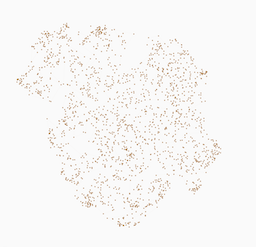
| Fineweb EDU | Dad Jokes | Common Corpus | Data is Plural |
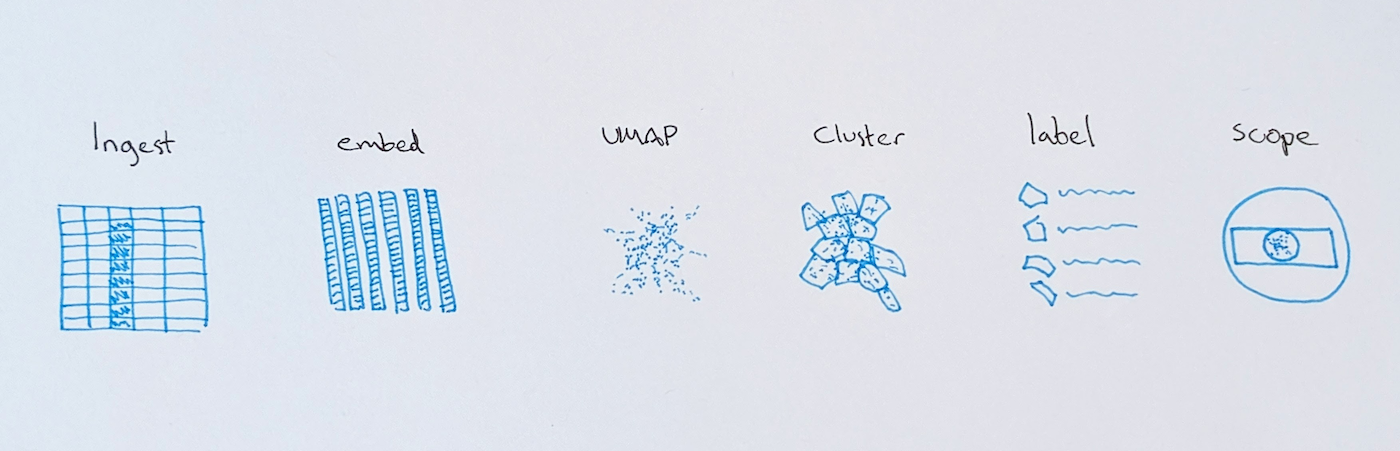
Latent Scope encodes a process that is increasingly common in AI and data science workflows: Embed unstructured data into high-dimensional vectors, reduce the dimensionality of those vectors, cluster the resulting points, label the clusters with an LLM and then explore the annotated data.
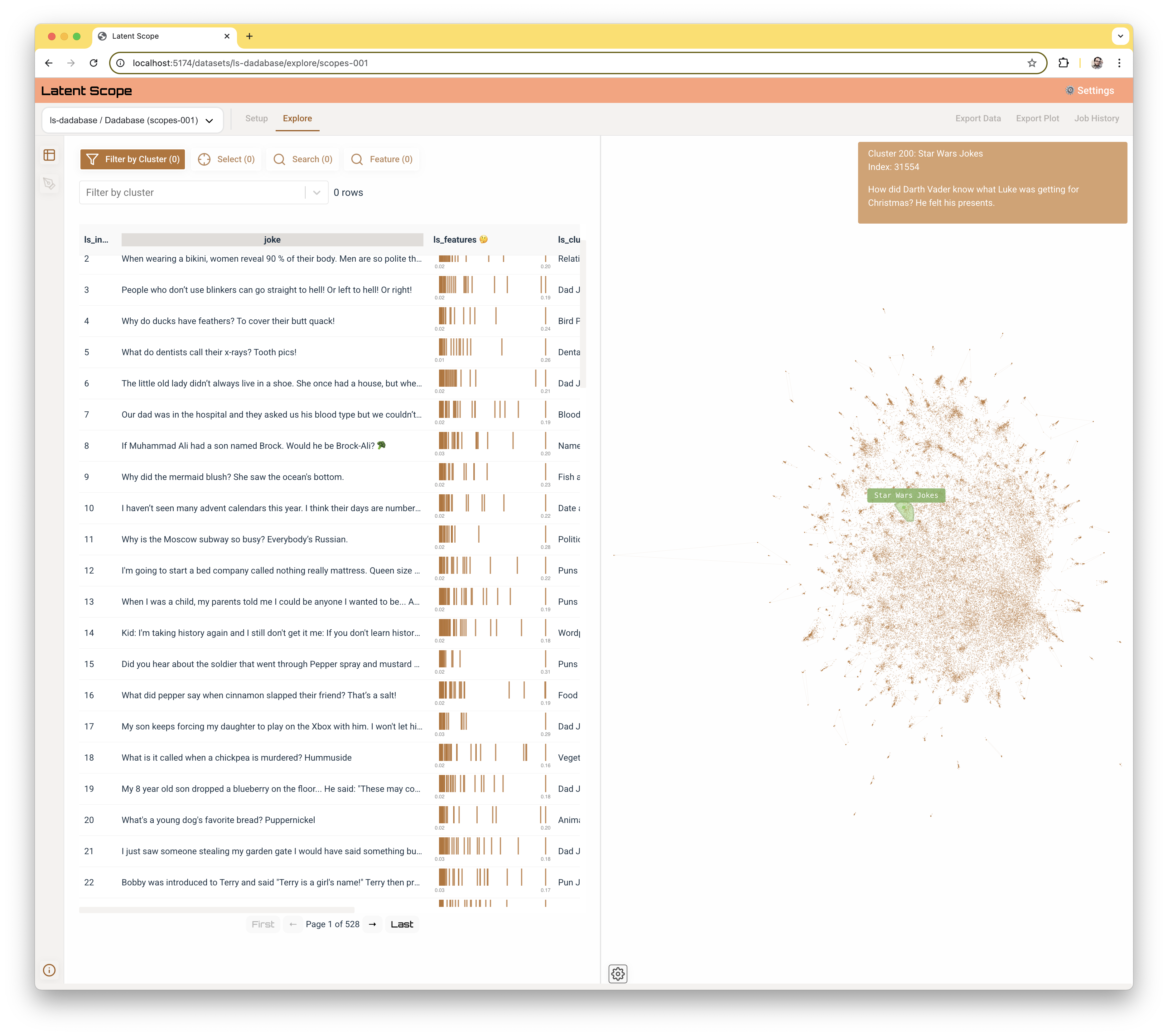
In addition to making this process easier by providing a web interface for each step, Latent Scope provides an intuitive way to explore the resulting annotated data via an interactive visualization tightly coupled with the input data.
Capabilities
Latent Scope works with text and image datasets and supports:
- Dense embeddings from sentence-transformers/HuggingFace, OpenAI, Cohere, Voyage, Mistral, Together, and any OpenAI-compatible endpoint.
- ColBERT late-interaction (multi-vector) embeddings with MaxSim similarity search — see
examples/colbert_quickstart/. - Image embeddings (CLIP-style) with an interactive image map: a zoomable representative-image sprite atlas that takes over from the heatmap as you zoom in.
- LanceDB vector storage, UMAP projection, and LLM cluster labeling.
- Multiple clustering methods — EVoC, HDBSCAN, KMeans, and Gaussian Mixture — with a choice of clustering on the 2D UMAP or the high-dimensional embedding (
ls-cluster --method, see docs/clustering.md). - GPU acceleration (optional): cuML-accelerated UMAP, HDBSCAN, and KMeans on NVIDIA GPUs, with automatic CPU fallback — controlled by
LATENT_SCOPE_DEVICE(see docs/gpu-acceleration.md). - Named experiments + gallery: give UMAP and cluster runs human-friendly names/descriptions and browse them as a thumbnail gallery instead of a bare
umap-001id list. - Color-by + Compare: color the Explore and Compare maps by any numeric or categorical column, and share a lasso/brush selection across both Compare panes (see docs/exploring.md).
Curation (deleting rows, tagging during Setup, reassigning clusters) is not part of 1.0 — it is planned as a post-1.0 (1.1) initiative. See docs/exploring.md.
See docs/data-importing.md for the full set of input formats and import options (including images, ColBERT, and data-size guidance), and CLAUDE.md for an agent-friendly quickstart.
Getting started
Follow the documentation guides to get started:
Using with AI coding agents
Latent Scope ships a cross-provider agent skill so tools like Claude Code,
Codex, and Cursor can drive the pipeline on your behalf. The runbook is
AGENTS.md (Claude Code also auto-loads it via
.claude/skills/latent-scope/); CLAUDE.md covers the codebase.
Point your agent at the repo and ask it to "map my data" and it should know the
whole flow.
Example Analysis
What can you do with Latent Scope? The following examples demonstrate the kinds of perspective and insights you can gain from your unstructured text data.
- Explore free-responses from surveys in this datavis survey analysis
- Cluster thousands of GitHub issues and PRs
- Explore 50,000 US Federal laws spanning two hundred years.
Quick Start
Latent Scope works on Mac, Linux and Windows. Python 3.12 is the recommended python version.
To get started, install the latent-scope python module and run the server via the Command Line:
python -m venv venv
source venv/bin/activate
pip install latentscope
ls-init ~/latent-scope-data --openai_key=XXX --mistral_key=YYY # optional api keys to enable API models
ls-serve
Then open your browser to http://localhost:5001 and start processing your first dataset!
See the Your First Scope guide for a detailed walk-through of the process.
Python interface
You can also ingest data from a Pandas dataframe using the Python interface:
import latentscope as ls
df = pd.read_parquet("...")
ls.init("~/latent-scope-data") # you can also pass in openai_key="XXX", mistral_key="XXX" etc.)
ls.ingest("dadabase", df, text_column="joke")
ls.serve()
See these notebooks for detailed examples of using the Python interface to prepare and load data.
- dvs-survey - A small test dataset of 700 rows to quickly illustrate the process. This notebook shows how you can do every step of the process with the Python interface.
- dadabase - A more interesting (and funny) dataset of 50k rows. This notebook shows how you can preprocess a dataset, ingest it into latentscope and then use the web interface to complete the process.
- dolly15k - Grab data from HuggingFace datasets and ingest into the process.
- emotion - 400k rows of emotional tweets.
Command line quick start
When latent-scope is installed, it creates a suite of command line scripts that can be used to setup the scopes for exploring in the web application. The output of each step in the process is flat files stored in the data directory specified at init. These files are in standard formats that were designed to be ported into other pipelines or interfaces.
# like above, we make sure to install latent-scope
python -m venv venv
source venv/bin/activate
pip install latent-scope

# prepare some data
wget "https://storage.googleapis.com/fun-data/latent-scope/examples/dvs-survey/datavis-misunderstood.csv" > ~/Downloads/datavis-misunderstood.csv

ls-init "~/latent-scope-data"
# ls-ingest dataset_id --path <file> (csv/parquet/json/jsonl/xlsx)
ls-ingest "datavis-misunderstood" --path "~/Downloads/datavis-misunderstood.csv"
# get a list of model ids available (lists both embedding and chat models available)
ls-list-models
# ls-embed dataset_id text_column model_id [--prefix ...]
ls-embed datavis-misunderstood "answer" transformers-intfloat___e5-small-v2
# ls-umap dataset_id embedding_id n_neighbors min_dist
ls-umap datavis-misunderstood embedding-001 25 .1
# ls-cluster dataset_id umap_id samples min_samples cluster_selection_epsilon [--method]
# default --method is evoc (clusters the high-dim embedding); see docs/clustering.md
ls-cluster datavis-misunderstood umap-001 5 5 0.0 --method hdbscan
# ls-label dataset_id text_column cluster_id model_id samples context
ls-label datavis-misunderstood "answer" cluster-001 transformers-HuggingFaceH4___zephyr-7b-beta 0 ""
# ls-scope  dataset_id embedding_id umap_id cluster_id cluster_labels_id label description
ls-scope datavis-misunderstood embedding-001 umap-001 cluster-001 cluster-001-labels-001 "E5 demo" "E5 embeddings summarized by Zephyr 7B"
# start the server to explore your scope
ls-serve
Repository overview
This repository is currently meant to run locally, with a React frontend that communicates with a python server backend. We support several popular open source embedding models that can run locally as well as proprietary API embedding services. Adding new models and services should be quick and easy.
To learn more about contributing and the project roadmap see CONTRIBUTION.md, for technical details see DEVELOPMENT.md.
Design principles
This tool is meant to be a part of a larger process. Something that hopefully helps you see things in your data that you wouldn't otherwise have. That means it needs to be easy to get data in, and easily get useful data out.
- Flat files
- All of the data that drives the app is stored in flat files. This is so that both final and intermediate outputs can easily be exported for other uses. It also makes it easy to see the status of any part of the process.
- Remember everything
- This tool is intended to aid in research, the purpose is experimentation and exploration. I developed it because far too often I try a lot of things and then I forget what parameters lead me down a promising path in the first place. All choices you make in the process are recorded in metadata files along with the output of the process.
- It's all about the indices
- We consider an input dataset the source of truth, a list of rows that can be indexed into. So all downstream operations, whether its embeddings, pointing to nearest neighbors or assigning data points to clusters, all use indices into the input dataset.
Command Line Scripts: Detailed description
If you want to use the CLI instead of the web UI you can use the following scripts.
The scripts should be run in order once you have an input.csv file in your folder. Alternatively the Setup page in the web UI will run these scripts via API calls to the server for you.
These scripts expect at the least a LATENT_SCOPE_DATA environment variable with a path to where you want to store your data. If you run ls-serve it will set the variable and put it in a .env file. You can add API keys to the .env file to enable usage of the various API services, see .env.example for the structure.
0. ingest
This script turns the input.csv into input.parquet and sets up the directories and meta.json which run the app.
# ls-ingest <dataset_name>
ls-ingest database-curated
1. embed
Take the text from the input and embed it. Default is to use BAAI/bge-small-en-v1.5 locally via HuggingFace transformers. API services are supported as well, see latentscope/models/embedding_models.json for model ids.
# you can get a list of models available with:
ls-list-models
# ls-embed <dataset_name> <text_column> <model_id>
ls-embed dadabase joke transformers-intfloat___e5-small-v2
2. umap
Map the embeddings from high-dimensional space to 2D with UMAP. Will generate a thumbnail of the scatterplot.
# ls-umap <dataset_name> <embedding_id> <neighbors> <min_dist>
ls-umap dadabase embedding-001 50 0.1
3. cluster
Cluster the points and label each point with a cluster id. Choose a method with
--method {evoc,hdbscan,kmeans,gmm} (default evoc) and, optionally, which
space to cluster on with --cluster_on {umap,embedding} (default per method:
evoc→embedding, the others→umap). For kmeans/gmm the samples
positional is the number of clusters. See
docs/clustering.md for details and GPU notes.
# ls-cluster <dataset_name> <umap_id> <samples> <min_samples> <cluster_selection_epsilon> [--method] [--cluster_on] [--name] [--description]
ls-cluster dadabase umap-001 5 3 0.0 --method hdbscan
# kmeans/gmm: `samples` is the number of clusters (min_samples/epsilon are ignored but still positional)
ls-cluster dadabase umap-001 20 3 0.0 --method kmeans
You can attach a human-friendly --name / --description to any umap or cluster
run so it shows up titled in the Setup gallery (editable there later too).
4. label
We support auto-labeling clusters by summarizing them with an LLM. Supported models and APIs are listed in latentscope/models/chat_models.json. You can pass context that will be injected into the system prompt for your dataset.
# ls-label <dataset_id> <text_column> <cluster_id> <chat_model_id> <samples> <context>
ls-label dadabase "joke" cluster-001 openai-gpt-3.5-turbo 0 ""
5. scope
The scope command ties together each step of the process to create an explorable configuration. You can have several scopes to view different choices, for example using different embeddings or even different parameters for UMAP and clustering. Switching between scopes in the UI is instant.
# ls-scope  <dataset_id> <embedding_id> <umap_id> <cluster_id> <cluster_labels_id> <label> <description>
ls-scope datavis-misunderstood embedding-001 umap-001 cluster-001 cluster-001-labels-001 "E5 demo" "E5 embeddings summarized by GPT3.5-Turbo"
6. serve
To start the web UI we run a small server. This also enables nearest neighbor similarity search and interactively querying subsets of the input data while exploring the scopes.
ls-serve ~/latent-scope-data
Dataset directory structure
Each dataset will have its own directory in data/ created when you ingest your CSV. All subsequent steps of setting up a dataset write their data and metadata to this directory. There are no databases in this tool, just flat files that are easy to copy and edit.
├── data/
|   ├── dataset1/
|   |   ├── input.parquet                           # from ingest.py, the dataset
|   |   ├── meta.json                               # from ingest.py, metadata for dataset, #rows, columns, text_column
|   |   ├── embeddings/
|   |   |   ├── embedding-001.h5                    # from embed.py, embedding vectors
|   |   |   ├── embedding-001.json                  # from embed.py, parameters used to embed
|   |   |   ├── embedding-002...
|   |   ├── umaps/
|   |   |   ├── umap-001.parquet                    # from umap.py, x,y coordinates
|   |   |   ├── umap-001.json                       # from umap.py, params used
|   |   |   ├── umap-001.png                        # from umap.py, thumbnail of plot
|   |   |   ├── umap-002....
|   |   ├── clusters/
|   |   |   ├── clusters-001.parquet                # from cluster.py, cluster indices
|   |   |   ├── clusters-001-labels-default.parquet # from cluster.py, default labels
|   |   |   ├── clusters-001-labels-001.parquet     # from label_clusters.py, LLM generated labels
|   |   |   ├── clusters-001.json                   # from cluster.py, params used
|   |   |   ├── clusters-001.png                    # from cluster.py, thumbnail of plot
|   |   |   ├── clusters-002...
|   |   ├── scopes/
|   |   |   ├── scopes-001.json                     # from scope.py, combination of embed, umap, clusters and label choice
|   |   |   ├── scopes-...
|   |   ├── tags/
|   |   |   ├── ❤️.indices                           # tagged by UI, powered by tags.py
|   |   |   ├── ...                                 # can have arbitrary named tags
|   |   ├── jobs/
|   |   |   ├──  8980️-12345...json                  # created when job is run via web UI
Release history Release notifications | RSS feed


Download files
Download the file for your platform. If you're not sure which to choose, learn more about installing packages.
Source Distribution
Built Distribution
Filter files by name, interpreter, ABI, and platform.
If you're not sure about the file name format, learn more about wheel file names.
Copy a direct link to the current filters
File details
Details for the file latentscope-1.0.0.tar.gz.
File metadata
- Download URL: latentscope-1.0.0.tar.gz
- Upload date:
- Size: 917.4 kB
- Tags: Source
- Uploaded using Trusted Publishing? No
- Uploaded via: uv/0.6.4
File hashes
| Algorithm | Hash digest | |
|---|---|---|
| SHA256 |
60985db45f41c636bceb828ec9cf25e47a197359b2c3aa272306071b0ab9dad7
|
|
| MD5 |
211c6b85109cad0f1e7e309381d90a4c
|
|
| BLAKE2b-256 |
a18ec516a3d1c398311b816619e956f088465e6735caac382ed8693a44c9f647
|
File details
Details for the file latentscope-1.0.0-py3-none-any.whl.
File metadata
- Download URL: latentscope-1.0.0-py3-none-any.whl
- Upload date:
- Size: 783.7 kB
- Tags: Python 3
- Uploaded using Trusted Publishing? No
- Uploaded via: uv/0.6.4
File hashes
| Algorithm | Hash digest | |
|---|---|---|
| SHA256 |
c716f5e894e37dfd8c70cc75371b146f4760cd965b08998008ac7aeb45e8d413
|
|
| MD5 |
4a4df11e0d1bcba3ad0e35f65ed5a893
|
|
| BLAKE2b-256 |
6b926345aa331599ba084ea5b4f3f90ca057f411a43a2615c59632a96377adf7
|






