
latex-figures




Make a matplotlib figure look like it belongs to the LaTeX document it goes into: drawn at its final size in centimetres, its text typeset by LaTeX with the document's preamble, a decimal comma if you write one, and no white margin around it.
The goal
A plot saved with matplotlib's defaults and dropped into a LaTeX document rarely
matches it. The figure is drawn 6.4 × 4.8 inches wide, then shrunk by
\includegraphics[width=…]: its 10 pt labels end up at 6 pt, its lines too thin. Its
text is in DejaVu Sans, not in the document's font, and \qty{3}{\m\per\s} cannot
appear in a label. In French, German or most of Europe, the axes read 0.5 where the
text says 0,5. And bbox_inches="tight" still leaves a white band that shifts the
figure off the caption.
latex-figures sets matplotlib up once so that every figure comes out right:
import matplotlib.pyplot as plt
import numpy as np

from latex_figures import add_inset, apply_style, save_figure, style_axes

apply_style(8, 6)  # 8 cm × 6 cm, LaTeX text, before creating the figure
x = np.linspace(-4, 4, 500)
fig, ax = plt.subplots()
ax.plot(x, np.sinc(x) ** 2)
ax.set_title("Diffraction by a slit")
ax.set_xlabel(r"$x=\frac{a\sin\theta}{\lambda}$")
ax.set_ylabel(r"$I/I_0$")
style_axes(ax)  # grey spines, outward ticks, decimal comma
inset = add_inset(ax, [0.65, 0.5, 0.3, 0.4])
inset.plot(x, 100 * np.sinc(x) ** 2)
inset.set_xlim(1, 3)
inset.set_ylim(0, 6)
style_axes(inset)
path = save_figure(fig, "slit.pdf")  # saved, then cropped to the ink by pdfcrop
print(path.name)
slit.pdf
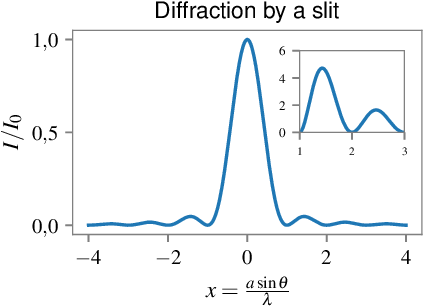
The output is an ordinary PDF (or PNG, or EPS) file. Include it at its natural size,
\includegraphics{slit.pdf}, and its text has the size of the document's.
What goes on the axes, and where the file goes, stays yours: the package only sets
matplotlib up and saves.
The means
- Sizes in centimetres. The width and height you give become
figure.figsize, so the figure is drawn at the size it will be printed, with 11 pt labels and 10 pt ticks; the height defaults to the golden ratio of the width. - LaTeX renders the text, with a preamble.
text.usetexis on andtext.latex.preambleloads amsmath and siunitx by default, or your own packages: labels are typeset by TeX, like the document, and its macros work in them. - The decimal comma comes from a tick formatter,
DecimalCommaFormatter, not fromlocale.setlocale, which would change number formatting in the whole program and fails where no French locale is installed. It writes1{,}5, so math mode adds no space after the comma. - Each axis gets its own formatter. A formatter shared by both axes keeps a single common factor: the ×10⁵ of one axis would give way to the other's.
- Cropping to the ink by an external tool. pdfcrop, ImageMagick or epstool
trims what
bbox_inches="tight"leaves; it runs without a shell, on a temporary copy that is deleted afterwards.
Installation
pip install latex-figures
Python 3.11 or later. The one dependency is matplotlib 3.8 or later, which draws the figures. Outside Python, depending on what you use:
| Program | Needed for | Install |
|---|---|---|
a TeX distribution with latex, dvipng, amsmath, siunitx |
apply_style() with usetex=True, the default |
TeX Live, MiKTeX or MacTeX; Debian/Ubuntu: apt install texlive-latex-extra texlive-science dvipng cm-super |
| pdfcrop | cropping a PDF | comes with TeX Live (texlive-extra-utils on Debian/Ubuntu) |
ImageMagick (magick or convert) |
cropping a PNG | brew install imagemagick, apt install imagemagick, winget install ImageMagick.ImageMagick |
| epstool | cropping an EPS | apt install epstool |
Without TeX, pass usetex=False: matplotlib's mathtext renders the labels, without
siunitx. Without the cropping tool, save_figure saves the figure uncropped and warns.
Usage
Sizing every figure of a script
apply_style changes matplotlib.rcParams for every figure created afterwards;
restore_style gives back the settings from before.
import matplotlib as mpl
import matplotlib.pyplot as plt

from latex_figures import apply_style, restore_style

apply_style(12, ratio=0.5, family="serif")
fig, ax = plt.subplots()
print(fig.get_size_inches() * 2.54, mpl.rcParams["font.family"])
restore_style()
print(mpl.rcParams["font.family"])
[12.  6.] ['serif']
['sans-serif']
| Parameter | Default | Meaning |
|---|---|---|
width |
16 | width in cm |
height |
ratio × width |
height in cm, at most 22 (warning beyond) |
ratio |
0.618 | height / width, when height is not given |
usetex |
True |
LaTeX renders the text |
family |
"sans-serif" |
or "serif" |
preamble |
PREAMBLE |
LaTeX preamble, a string or a list of lines; "" for none |
Sizing one figure only
style_params takes the same parameters and returns the settings without applying
them, for plt.rc_context; the other figures keep theirs.
import matplotlib.pyplot as plt

from latex_figures import style_params

with plt.rc_context(style_params(8, 6, usetex=False)):
    fig, ax = plt.subplots()
print(fig.get_size_inches() * 2.54)
[8. 6.]
Your preamble
Give the packages and settings your document uses, so that its macros work in the
labels. Here a French document, where siunitx writes 1,5:
import matplotlib.pyplot as plt

from latex_figures import apply_style, save_figure, style_axes

apply_style(
    8, 5,
    preamble=[
        r"\usepackage[french]{babel}",
        r"\usepackage{siunitx}",
        r"\sisetup{locale = FR}",
    ],
)
fig, ax = plt.subplots()
ax.plot([0, 2, 4], [0, 3, 6])
ax.set_xlabel(r"Temps : $t$ (\unit{\s})")
ax.set_ylabel(r"Distance : $d$ (\unit{\m})")
ax.set_title(r"Vitesse : \qty{1.5}{\m\per\s}")
style_axes(ax)
print(save_figure(fig, "speed.pdf").name)
speed.pdf
Axes and the decimal comma
style_axes(ax) draws thin grey spines and outward ticks, gives each linear axis a
DecimalCommaFormatter, and calls tight_layout. decimal_comma=False keeps a
decimal point; format_ticks=False keeps the formatters you set. The formatter also
works alone:
import matplotlib.pyplot as plt

from latex_figures import DecimalCommaFormatter, style_axes

fig, ax = plt.subplots()
ax.plot([0, 3e5], [0, 2.5e-3])
style_axes(ax)
fig.canvas.draw()
print(ax.yaxis.get_major_formatter().get_offset())

formatter = DecimalCommaFormatter()
ax.set_ylim(0, 2)
ax.yaxis.set_major_formatter(formatter)
fig.canvas.draw()
print(formatter(1.5))
$\times\mathdefault{10^{−3}}\mathdefault{}$
$\mathdefault{1{,}50}$
add_inset(ax, [x0, y0, width, height]) places inset axes, in fractions of ax, with
tick labels shrunk to suit their size, as in the figure above; call style_axes on the
inset too.
Saving
save_figure(fig, path) takes the format from the extension (pdf, png, eps) or
from fmt=, adds the extension when missing, saves at 300 dpi, crops, and returns the
absolute path. crop=False skips the cropping; a missing tool gives a warning.
import warnings

import matplotlib.pyplot as plt

from latex_figures import save_figure

fig, ax = plt.subplots()
ax.plot([0, 1], [0, 1])
print(save_figure(fig, "figure", fmt="png").name)
print(save_figure(fig, "raw.pdf", crop=False).name)
with warnings.catch_warnings(record=True) as caught:
    warnings.simplefilter("always")
    save_figure(fig, "figure.eps")
print(caught[0].message if caught else "cropped")
figure.png
raw.pdf
epstool not found: figure not cropped.
The last line reads cropped where epstool is installed.
The full reference, with every parameter and error, is in docs/DOC.md.
Limits
apply_stylechanges matplotlib's global settings; figures created before it keep theirs. Usestyle_paramsinplt.rc_contextto leave them alone.- The preamble is compiled by
latex(DVI, through dvipng), not by LuaLaTeX or XeLaTeX: packages that need those engines, such as fontspec, are not available. - The text font is one matplotlib knows how to load in LaTeX: Helvetica for
"sans-serif", Times for"serif". Math is in Computer Modern with Helvetica, in Times with Times. - The decimal comma covers the tick labels of linear axes. Numbers you write in labels,
legends or annotations are yours to write with a comma (
{,}in math mode, or siunitx). - Cropping removes the white margin, so the file is a little smaller than the size asked for. The text keeps its size as long as the figure is included without scaling.
Development
uv sync --group dev
uv run ruff format src tests examples
uv run ruff check src tests examples
uv run mypy
uv run pytest
The tests marked latex compile with LaTeX or run pdfcrop; they are skipped when the
program is missing, and pytest -m "not latex" leaves them out.
License
MIT, see LICENSE.
1 maintainer

Metadata
1 maintainer
Release files for latex-figures 0.2.0
For a detailed explanation of source distributions (sdists) and built distributions (wheels), please see the package formats documentation.
Source distribution (sdist)
| File | Size | Uploaded | Provenance | |
|---|---|---|---|---|
| latex_figures-0.2.0.tar.gz | 22.8 kB | With provenance | Details |
Built distribution (wheel)
| File | Interpreter | ABI | Platform | Reset |
|---|---|---|---|---|
| latex_figures-0.2.0-py3-none-any.whl | Python 3 | none | any | Details |
Total release size: 34.7 kB
Release files / latex_figures-0.2.0.tar.gz
| Download URL | latex_figures-0.2.0.tar.gz |
|---|---|
| Size | 22.8 kB |
| Tags | Source |
|
SHA-256 checksum How to use checksums |
1bf06895d99945b8babfc04974ccd856c932add6ee03f989c15aa996a1f5d747
|
|
BLAKE2b-256 checksum How to use checksums |
bf945bd08bbf0e40ba96d6c31f874b64c590442edef3dd60b9150ff4575288d5
|
| Upload date | |
|
Uploaded using Trusted Publishing? What is trusted publishing? |
Yes |
| Uploaded via |
twine/7.0.0 CPython/3.13.14
|
Provenance
Provenance describes where a file came from. On PyPI, provenance is shared via attestations, which provide a verifiable record of the build or publishing details. View details, limitations and caveats.


PyPI Publish Attestation
PyPI verified that this artifact, at this checksum, originated from the publisher listed below.
Signed by GitHub Actions, verified by PyPI on Oct 18, 2026.
Transparency logRelease files / latex_figures-0.2.0-py3-none-any.whl
| Download URL | latex_figures-0.2.0-py3-none-any.whl |
|---|---|
| Size | 12.0 kB |
| Tags | Python 3 |
|
SHA-256 checksum How to use checksums |
811003c76ed14750b44a35c78ce2361cfee2994936edff6759b90025e247afb9
|
|
BLAKE2b-256 checksum How to use checksums |
61239156952814ced00203bd590f25ac067a1f9757b31ee0151b41db3bb6da3c
|
| Upload date | |
|
Uploaded using Trusted Publishing? What is trusted publishing? |
Yes |
| Uploaded via |
twine/7.0.0 CPython/3.13.14
|
Provenance
Provenance describes where a file came from. On PyPI, provenance is shared via attestations, which provide a verifiable record of the build or publishing details. View details, limitations and caveats.
PyPI Publish Attestation
PyPI verified that this artifact, at this checksum, originated from the publisher listed below.
Signed by GitHub Actions, verified by PyPI on Oct 18, 2026.
Transparency logSecurity for latex-figures 0.2.0
Provenance
Provenance describes where a file came from. On PyPI, provenance is shared via attestations, which provide a verifiable record of the build or publishing details. View details, limitations and caveats.
Full provenance
All 2 files in this release have been uploaded with provenance metadata.
Attestation for latex_figures-0.2.0.tar.gz
PyPI Publish Attestation
PyPI verified that this artifact, at this checksum, originated from the publisher listed below.
Signed by GitHub Actions, verified by PyPI on Oct 18, 2026.
Transparency logA note on package security
PyPI is a repository for distributing packages, not a service for auditing them. While third-party security researchers and our staff do their best to detect and remove malicious packages, PyPI cannot guarantee the quality, security or suitability of any given package.
To learn more about protecting yourself from malicious actors, visit our package security documentation.














