
Lattice subtraction for cryo-EM micrographs - removes periodic crystal signals to reveal non-periodic features

Project description
Lattice Subtraction for Cryo-EM
.__          __    __  .__                                   ___.
|  | _____ _/  |__/  |_|__| ____  ____             ________ _\_ |__
|  | \__  \\   __\   __\  |/ ___\/ __ \   ______  /  ___/  |  \ __ \
|  |__/ __ \|  |  |  | |  \  \__\  ___/  /_____/  \___ \|  |  / \_\ \
|____(____  /__|  |__| |__|\___  >___  >         /____  >____/|___  /
          \/                   \/    \/               \/          \/


Remove periodic lattice patterns from cryo-EM micrographs to reveal non-periodic features.
Installation
pip install lattice-sub
That's it! GPU acceleration works automatically if you have an NVIDIA GPU.
Note: Requires Python 3.11+ and an NVIDIA GPU (RTX 20/30/40 series, A100, etc.) for best performance. CPU fallback is available but slower.
Quick Start
Process a Single Image
lattice-sub process your_image.mrc -o output.mrc --pixel-size 0.56
Pixel size: Use your detector's actual pixel size (e.g., K3=0.56Å, Falcon=1.14Å, K2=1.32Å)
Process a Folder of Images
lattice-sub batch input_folder/ output_folder/ --pixel-size 0.56
Generate Comparison Images
lattice-sub batch input_folder/ output_folder/ --pixel-size 0.56 --vis comparisons/
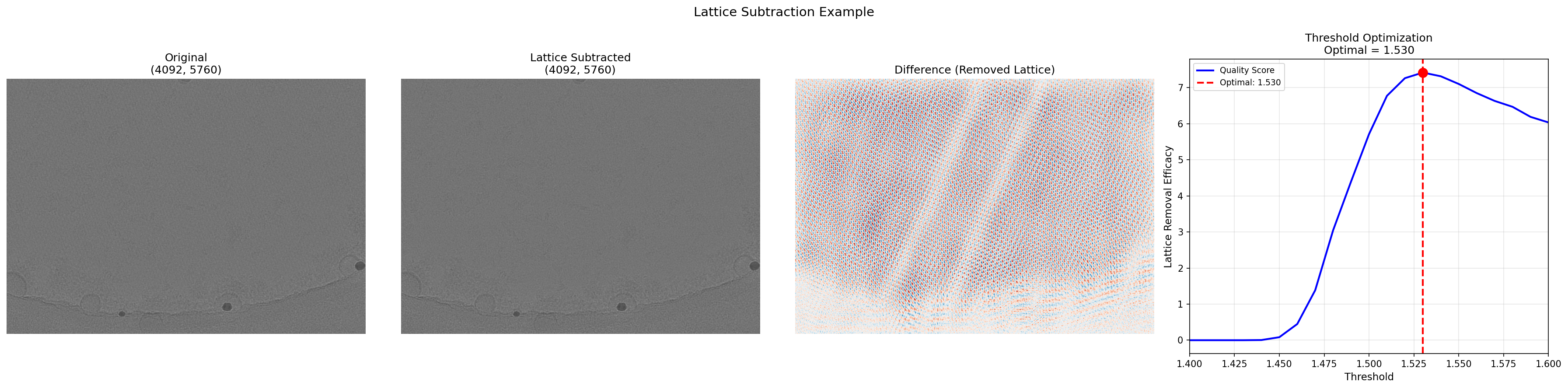
This creates 4-panel PNG comparison images for each micrograph showing:
- Original - Input micrograph
- Subtracted - Lattice-removed result
- Difference - What was removed (5x amplified)
- Threshold Curve - Threshold vs lattice removal efficacy
Limit the number of visualizations:
# Generate visualizations for first 10 images only
lattice-sub batch input_folder/ output_folder/ -p 0.56 --vis comparisons/ -n 10
Common Options
| Option | Description |
|---|---|
-p, --pixel-size |
Required. Pixel size in Ångstroms |
-o, --output |
Output file path (default: sub_<input>) |
-t, --threshold |
Peak detection sensitivity (default: auto - optimized per image) |
--vis DIR |
Generate 4-panel comparison PNGs in DIR |
-n, --num-vis N |
Limit visualizations to first N images |
--cpu |
Force CPU processing (GPU is used by default) |
-q, --quiet |
Hide the banner and progress messages |
-v, --verbose |
Show detailed processing information |
Example with Options
# Process with auto-optimized threshold (default - recommended)
lattice-sub process image.mrc -o cleaned.mrc -p 0.56 -v

# Override with a specific threshold if needed
lattice-sub process image.mrc -o cleaned.mrc -p 0.56 -t 1.5 -v

# Batch process, force CPU with 8 parallel workers
lattice-sub batch raw/ processed/ -p 0.56 --cpu -j 8
Using a Config File (Optional)
For most users, the defaults work great — just use -p for pixel size:
lattice-sub batch input/ output/ -p 0.56
Config files are useful for reproducibility or non-standard samples:
# params.yaml - only include what you want to override
pixel_ang: 0.56
unit_cell_ang: 120      # Default: 116 (nucleosome). Change for other crystals.
inside_radius_ang: 80   # Default: 90. Protect different resolution range.
# threshold: 1.45       # Uncomment to override auto-optimization
Then use it:
lattice-sub process image.mrc -o output.mrc --config params.yaml
Create a starter config file:
lattice-sub init-config params.yaml --pixel-size 0.56
GPU Troubleshooting
GPU should work automatically. If it doesn't:
# Check GPU status
lattice-sub setup-gpu

# Or verify manually
python -c "import torch; print(torch.cuda.get_device_name(0) if torch.cuda.is_available() else 'No GPU')"
Requirements: NVIDIA GPU with driver 525+ (RTX 20/30/40 series, A100, etc.)
Multi-GPU Support
When processing batches on systems with multiple GPUs, files are automatically distributed across all available GPUs for faster processing. No extra flags needed!
# Automatically uses all available GPUs
lattice-sub batch input_folder/ output_folder/ -p 0.56
Example with 2 GPUs and 100 images:
- GPU 0: processes images 1-50
- GPU 1: processes images 51-100
- Single progress bar shows combined progress
This provides near-linear speedup with additional GPUs.
HPC Example (CU Boulder Alpine)
Using Open OnDemand Core Desktop with 2× RTX 8000 GPUs:
# Create environment
module load anaconda
conda create -n lattice_test python=3.11 -y
conda activate lattice_test
pip install lattice-sub

# Process 100 micrographs
lattice-sub batch input/ output/ -p 0.56
Output:
Phase-preserving FFT inpainting for cryo-EM  |  v1.3.0

  Configuration
  -------------
    Pixel size:  0.56 A
    Threshold:   auto
    Backend:     Auto → GPU (Quadro RTX 8000)

  Batch Processing
  ----------------
    Files:    100
    Output:   /projects/user/output
    Workers:  1

✓ Using 2 GPUs: GPU 0, GPU 1

  ✓ GPU 0: Quadro RTX 8000
  ✓ GPU 1: Quadro RTX 8000

  Processing: 100%|█████████████████████████| 100/100 [05:12<00:00,  3.13s/file]

  [OK] Batch complete (312.9s)
100 images processed in ~5 minutes with automatic multi-GPU distribution.
For compute-focused workloads, use Alpine's GPU partitions (A100, L40, MI100):
# Request 3 GPUs for 1 hour
sinteractive --partition=aa100 --gres=gpu:3 --ntasks=16 --nodes=1 --time=01:00:00 --qos=normal
Python API
from lattice_subtraction import LatticeSubtractor, Config

# Configure and process
config = Config(pixel_ang=0.56)
subtractor = LatticeSubtractor(config)

result = subtractor.process("input.mrc")
result.save("output.mrc")
Batch Processing
from lattice_subtraction import BatchProcessor, Config

config = Config(pixel_ang=0.56)
processor = BatchProcessor(config)

stats = processor.process_directory("raw/", "processed/")
print(f"Processed {stats.successful}/{stats.total} files")
What It Does
This tool removes the periodic "lattice" pattern from 2D crystal cryo-EM images:
- Finds lattice peaks in the Fourier transform (the repeating pattern)
- Replaces them with averaged local values (inpainting)
- Preserves phase so the image stays accurate
- Returns the cleaned image with non-periodic features visible
Key Parameters Explained
| Parameter | What it controls |
|---|---|
pixel_ang |
Your detector's pixel size (check your microscope settings) |
threshold |
How aggressively to detect peaks. Higher = fewer peaks removed |
inside_radius_ang |
Protect low-resolution features (default 90Å is good for nucleosomes) |
unit_cell_ang |
Crystal repeat distance (116Å for nucleosome arrays) |
Need Help?
# See all commands
lattice-sub --help

# See options for a specific command
lattice-sub process --help
lattice-sub batch --help
Citation
@software{lattice_sub,
  title = {Lattice Subtraction for Cryo-EM Micrographs},
  author = {Stephenson, George and Kasinath, Vignesh},
  year = {2026},
  url = {https://github.com/gsstephenson/cryoem-lattice-subtraction}
}
Original MATLAB algorithm: Vignesh Kasinath
Python package: George Stephenson
Kasinath Lab (Dept of Biochemistry) & BioFrontiers Institute, University of Colorado Boulder
License
MIT License - see LICENSE for details.
📚 Advanced Topics (click to expand)
v1.1.0 Optimizations
Version 1.1.0 introduces two major optimizations that make the tool both faster and smarter:
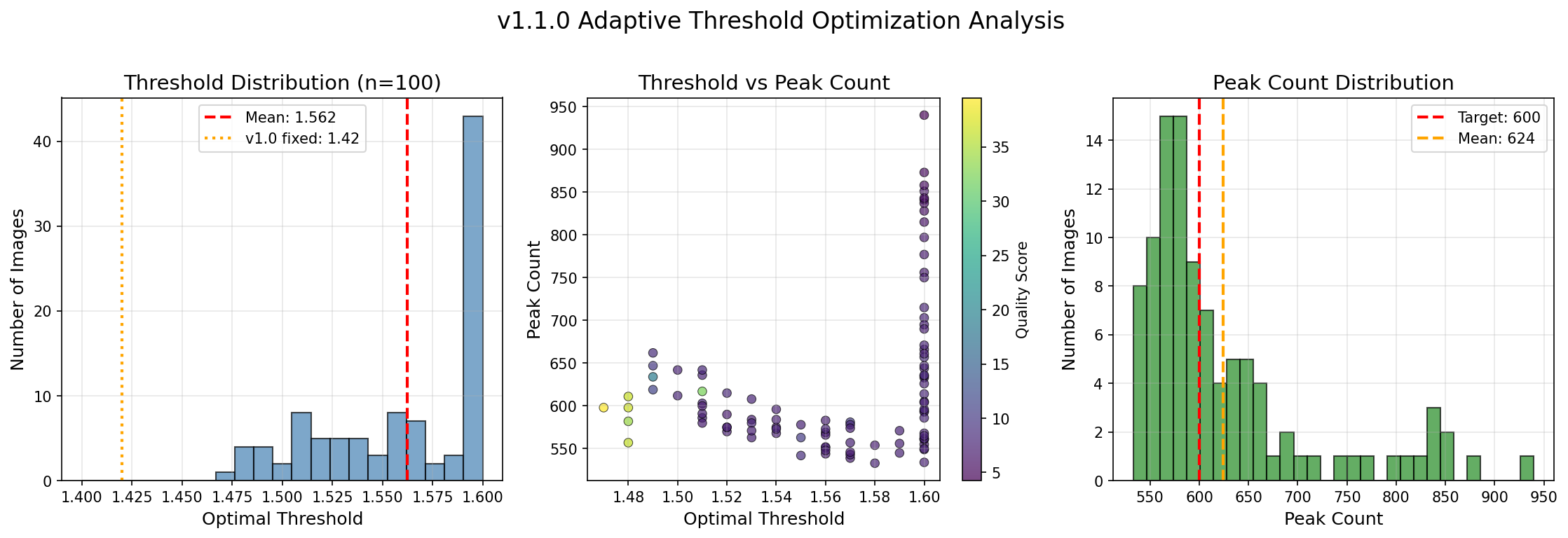
1. Adaptive Per-Image Threshold Optimization
Problem (v1.0.x): A fixed threshold (1.42) was used for all images, but optimal thresholds vary by image quality, ice thickness, and lattice order.
Solution (v1.1.0): Automatic per-image optimization using grid search:
- Tests 21 threshold values in range [1.40, 1.60] with 0.01 step
- Scores each using a quality function that balances:
- Peak count (target: ~600 peaks for good lattice coverage)
- Peak SNR (signal-to-noise of detected peaks)
- Peak distribution (uniform hexagonal spacing preferred)
- Coverage (adequate sampling across frequency space)
- Returns the threshold with highest quality score
Result: Each image gets its optimal threshold automatically.
2. GPU-Accelerated Background Subtraction (Kornia)
Problem (v1.0.x): Profiling revealed background subtraction (scipy median filter) consumed 94% of processing time — not FFT as expected.
Solution (v1.1.0): Replaced scipy's CPU median filter with Kornia's GPU implementation:
# Before (v1.0.x) - CPU, ~2.5s per image
from scipy.ndimage import median_filter
background = median_filter(log_power, size=51)

# After (v1.1.0) - GPU, ~0.05s per image
from kornia.filters import median_blur
background = median_blur(log_power_tensor, (51, 51))
Result: 48x speedup on background subtraction alone.
Performance Comparison
| Version | Threshold | Background Sub | Time/Image | Quality |
|---|---|---|---|---|
| v1.0.10 | Fixed (1.42) | scipy CPU | ~12s | Good |
| v1.1.0 | Fixed | Kornia GPU | ~1.0s | Good |
| v1.1.0 | Auto | Kornia GPU | ~2.6s | Optimal |
Net result: 5x faster with better results per image.
Correlation Validation
Kornia GPU vs scipy CPU background subtraction correlation: 0.9976 (nearly identical output).
Algorithm Details
Image → Pad → FFT → Detect Peaks → Create Mask → Inpaint → iFFT → Crop → Output
The algorithm:
- Pads the image to reduce edge artifacts
- Applies 2D FFT to get frequency domain
- Detects lattice peaks via thresholding on log-power spectrum
- Creates a mask protecting inner (low-freq) and outer (high-freq) regions
- Inpaints peaks with local average amplitude from 4 shifted neighbors
- Preserves original phase information
- Inverse FFT returns to real space
Full Parameter Reference
| Parameter | Default | Description |
|---|---|---|
pixel_ang |
required | Pixel size in Ångstroms |
threshold |
auto | Peak detection threshold - auto-optimized per image (range 1.40-1.60) |
inside_radius_ang |
90 | Inner resolution limit (Å) - protects structural info |
outside_radius_ang |
auto | Outer resolution limit (Å) - protects near Nyquist |
expand_pixel |
10 | Morphological expansion of peak mask (pixels) |
unit_cell_ang |
116 | Crystal unit cell for inpaint shift calculation (Å) |
backend |
auto | "auto", "numpy" (CPU), or "pytorch" (GPU) |
use_kornia |
true | Use Kornia for GPU-accelerated background subtraction (48x faster) |
Supported Hardware
- NVIDIA GPUs: RTX 20/30/40 series, A100, H100
- CUDA versions: 11.8, 12.1, 12.4, 12.6, 12.8
- CPU fallback: Works on any system (just slower)
Development Setup
git clone https://github.com/gsstephenson/cryoem-lattice-subtraction.git
cd cryoem-lattice-subtraction

conda create -n lattice_sub python=3.11 -y
conda activate lattice_sub

pip install -e ".[dev]"
pytest tests/ -v  # Run tests
Code Structure
src/lattice_subtraction/
├── __init__.py           # Package exports
├── cli.py                # Command-line interface
├── core.py               # LatticeSubtractor main class
├── batch.py              # Parallel batch processing
├── config.py             # Configuration dataclass
├── io.py                 # MRC file I/O
├── masks.py              # FFT mask generation
├── processing.py         # FFT helpers + GPU background subtraction
├── threshold_optimizer.py # Auto-threshold optimization (NEW in v1.1)
├── ui.py                 # Terminal UI
└── visualization.py      # Comparison figures
Migration from MATLAB
This is a modernized rewrite of legacy MATLAB code (LAsub.m, bg_push_by_rot.m, etc.) with:
- 10-100× faster processing via GPU
- Pip-installable package
- YAML config files instead of hardcoded values
- Command-line interface
- Automated testing
Convert a legacy PARAMETER file:
lattice-sub convert-config PARAMETER params.yaml
Release history Release notifications | RSS feed


Download files
Download the file for your platform. If you're not sure which to choose, learn more about installing packages.
Source Distribution
Built Distribution
Filter files by name, interpreter, ABI, and platform.
If you're not sure about the file name format, learn more about wheel file names.
Copy a direct link to the current filters
File details
Details for the file lattice_sub-1.3.0.tar.gz.
File metadata
- Download URL: lattice_sub-1.3.0.tar.gz
- Upload date:
- Size: 2.6 MB
- Tags: Source
- Uploaded using Trusted Publishing? No
- Uploaded via: twine/6.2.0 CPython/3.11.14
File hashes
| Algorithm | Hash digest | |
|---|---|---|
| SHA256 |
e5d292bc7b0a467ecb2c8c7ae2ae369e33df9a1a496b84bbe3ee8a06a9d66a07
|
|
| MD5 |
694db8ebe3ee792a7aa6bfbe2a40124a
|
|
| BLAKE2b-256 |
dd6b20980779209fa795cf7b374b4443a75b12becf9f42190f56427701ca5a1e
|
File details
Details for the file lattice_sub-1.3.0-py3-none-any.whl.
File metadata
- Download URL: lattice_sub-1.3.0-py3-none-any.whl
- Upload date:
- Size: 45.6 kB
- Tags: Python 3
- Uploaded using Trusted Publishing? No
- Uploaded via: twine/6.2.0 CPython/3.11.14
File hashes
| Algorithm | Hash digest | |
|---|---|---|
| SHA256 |
a2b6ebaf4892338006e8730273191f72f1b041793d128e9376a2bb1f5b4c96f0
|
|
| MD5 |
fda61ad6bbef342f5b7d04d441eb7af5
|
|
| BLAKE2b-256 |
aa65a7bbd2202a80f749e1e43fd6ac109879b2a276138d5e8ab842556eb0d643
|






