
LaVue - Live Image Viewer




Authors: Christoph Rosemann <christoph.rosemann at desy.de>, Jan Kotański <jan.kotanski at desy.de>, André Rothkirch <andre.rothkirch at desy.de>
Introduction
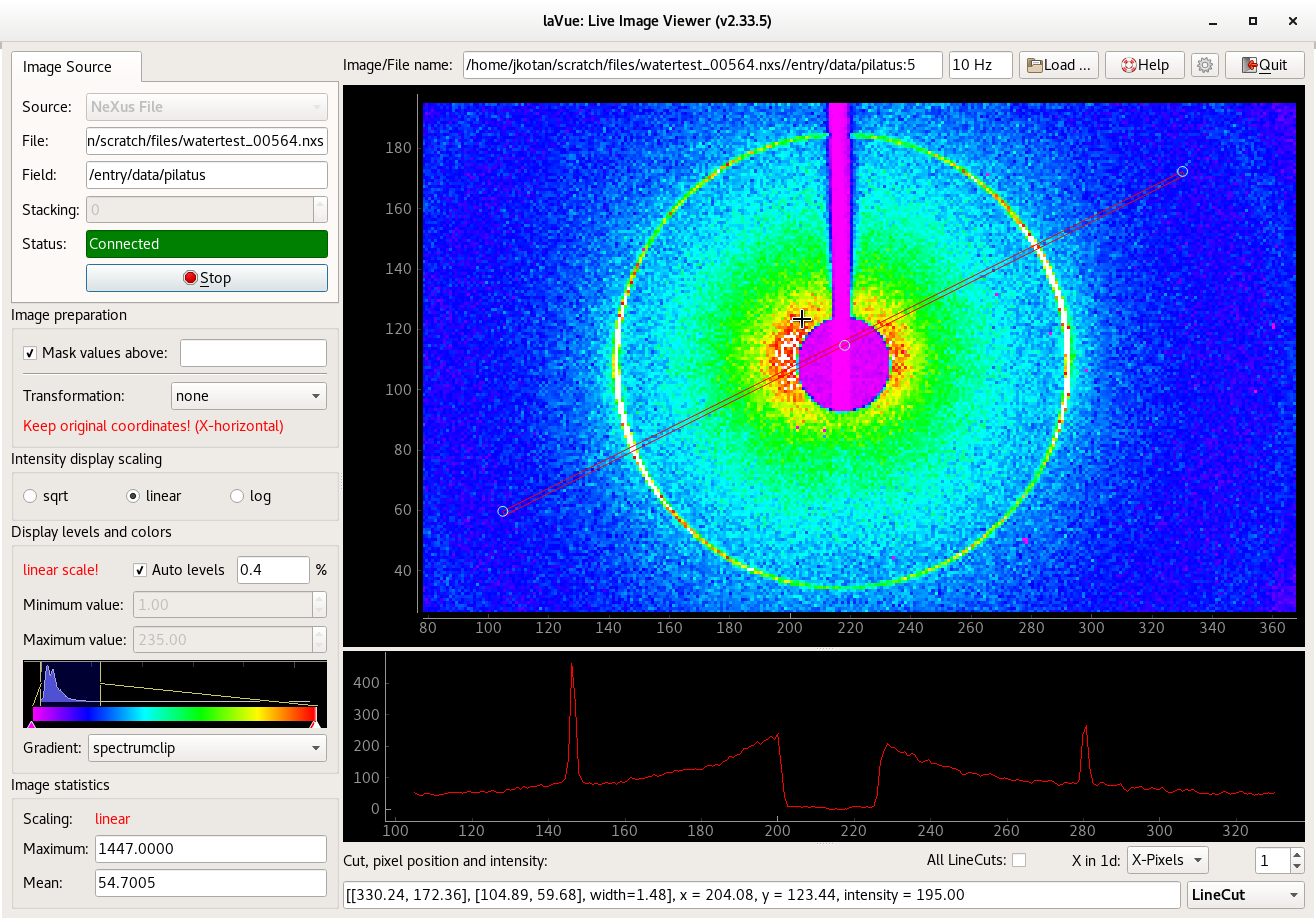
This is a simple implementation of a live viewer front end. It is supposed to show a live image view from xray-detectors at PETRA3 @ desy.de, e.g. Pilatus, Lambda, Eiger, PerkinElmer, PCO, LimaCCD, and others.
Installation
LaVue requires the following python packages: qt5/qt4 pyqtgraph numpy zmq scipy
It is also recommended to install: pytango hidra pil fabio requests h5py pni nxstools
From sources
Download the latest LaVue version from https://github.com/lavue-org/lavue
Extract sources and run
$ python -m pip install . -vv --no-deps --no-build-isolationThe setup.py script may need: setuptools sphinx numpy pytest python packages as well as qtbase5-dev-tools or libqt4-dev-bin.
Debian packages
Debian trixie, bookworm, bullseye, or Ubuntu questing, noble, jammy packages can be found in the HDRI repository.
To install the debian packages, add the PGP repository key
$ sudo su
$ curl -s https://repos.desy.de/pni-hdri/debian_repo.pub.gpg  | gpg --no-default-keyring --keyring gnupg-ring:/etc/apt/trusted.gpg.d/debian-hdri-repo.gpg --import
$ chmod 644 /etc/apt/trusted.gpg.d/debian-hdri-repo.gpg
and then download the corresponding source list, e.g.
$ cd /etc/apt/sources.list.dand
$ wget https://repos.desy.de/pni-hdri/trixie-pni-hdri.sourcesor
$ wget https://repos.desy.de/pni-hdri/bookworm-pni-hdri.listor
$ wget https://repos.desy.de/pni-hdri/noble-pni-hdri.listor
$ wget https://repos.desy.de/pni-hdri/jammy-pni-hdri.listrespectively.
Finally,
$ apt-get update
$ apt-get install python3-lavue
$ apt-get install lavue-controller
or
$ apt-get install lavue-controller3for python 3 version (for older debian/ubuntu releases).
From conda or pip
The code can be installed in your conda environment by
$ conda create -n myenv python=3.13
$ conda activate myenv
$ conda config --add channels conda-forge
$ conda config --set channel_priority strict

$ conda install lavue
To install it from pip you need to install pyqt5 in advance, e.g.
$ python3 -m venv myvenv
$ . myvenv/bin/activate

$ pip install PyQtWebKit
or
$ pip install pyqt5or
$ pip install PyQt5==5.14and then
$ pip install lavueMoreover it is also good to install the following python packages:
$ pip install fabio
$ pip install pillow
$ pip install pyFAI
$ pip install lavuefilters
$ pip install pytango
Start the Viewer
To start LaVue
$ lavueor
$ lavue3for python 3 version (for older debian/ubuntu releases).
Start the Viewer in the expert mode
Changing LaVue settings is available in the expert mode, i.e.
$ lavue -m expertunder an additional button: Configuration.
Launching options
To get all possible command-line parameters
$ lavue -hFurther reading
More information can be found at: LaVue
1 maintainer

Metadata
1 maintainer
Release files for lavue 3.16.1
For a detailed explanation of source distributions (sdists) and built distributions (wheels), please see the package formats documentation.
Source distribution (sdist)
| File | Size | Uploaded | Provenance | Actions |
|---|---|---|---|---|
| lavue-3.16.1.tar.gz | 38.7 MB | Without provenance | Details for lavue-3.16.1.tar.gz |
Built distribution (wheel)
| File | Interpreter | ABI | Platform | Actions Reset |
|---|---|---|---|---|
| lavue-3.16.1-py3-none-any.whl | Python 3 | none | any | Details for lavue-3.16.1-py3-none-any.whl |
Total release size: 52.2 MB
Release files / lavue-3.16.1.tar.gz
| Download URL | lavue-3.16.1.tar.gz |
|---|---|
| Size | 38.7 MB |
| Tags | Source |
|
SHA-256 checksum How to use checksums |
c37307ab19707551c023c269eee2e9866cb30b1759c49ab6993d1d533620730d
|
|
BLAKE2b-256 checksum How to use checksums |
6a67ef01982d0f0ec0f7fef162c72b0c243bfa0e886176ea556a643496ffc7b3
|
| Upload date | |
|
Uploaded using Trusted Publishing? What is trusted publishing? |
No |
| Uploaded via |
twine/4.0.2 CPython/3.11.2
|
Release files / lavue-3.16.1-py3-none-any.whl
| Download URL | lavue-3.16.1-py3-none-any.whl |
|---|---|
| Size | 13.5 MB |
| Tags | Python 3 |
|
SHA-256 checksum How to use checksums |
72584f6ead5a94c671666488363f41ca18621d04325a81d025b838d095645aa4
|
|
BLAKE2b-256 checksum How to use checksums |
7b08213a77e8373c592b5d46b4951472b6de416c752c4de30098d03342493224
|
| Upload date | |
|
Uploaded using Trusted Publishing? What is trusted publishing? |
No |
| Uploaded via |
twine/4.0.2 CPython/3.11.2
|
Security for lavue 3.16.1
Provenance
Provenance describes where a file came from. On PyPI, provenance is shared via attestations, which provide a verifiable record of the build or publishing details. View details, limitations and caveats.
No provenance found
None of the files in this release were uploaded with provenance metadata.
A note on package security
PyPI is a repository for distributing packages, not a service for auditing them. While third-party security researchers and our staff do their best to detect and remove malicious packages, PyPI cannot guarantee the quality, security or suitability of any given package.
To learn more about protecting yourself from malicious actors, visit our package security documentation.














