
laya-apple




Correctness-validated heterogeneous Laya runtime for Apple silicon: the MLX GPU and the Apple Neural Engine, at the same time.
Have a Mac? Try Switchyard.
uvx laya-apple switchyard
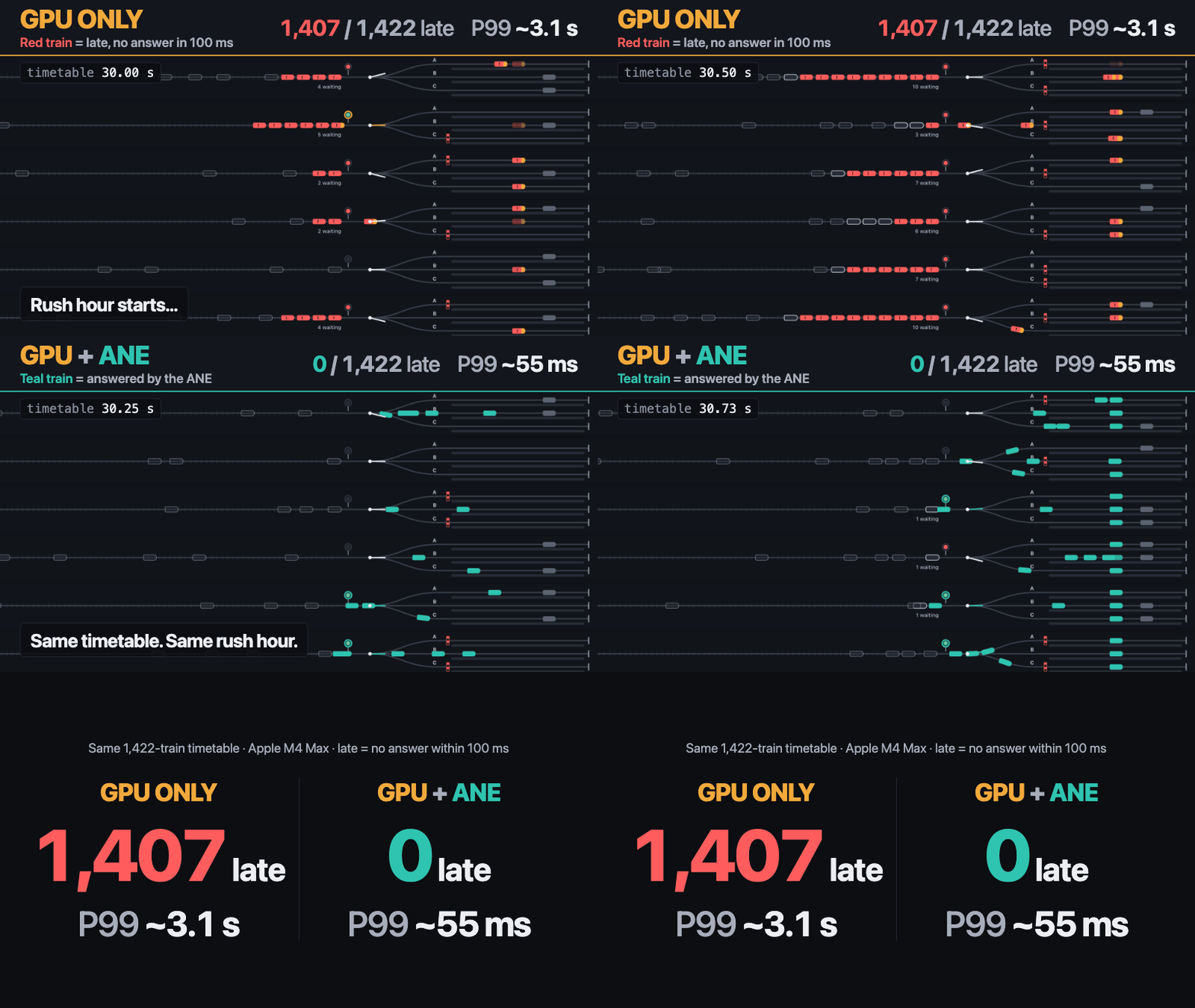
Every train is a real Laya decision.
- Train → one request: "which platform is clear?"
- Red signal → the train is waiting for the model's answer
- Junction → the decision: the switch throws to the platform the model picked
- Late → no answer within 100 ms
- Rush hour → bursty load, with long background requests on the GPU
The benchmark runs headless first. The browser then replays the recorded request traces; the animation is not part of the measurement.
Same timetable. Same model. Different runtime.
| MLX GPU only | MLX GPU + Neural Engine | |
|---|---|---|
| Late trains | 1,407–1,408 / 1,422 | 0 / 1,422 |
| P99 decision latency | 3,107.7–3,170.6 ms | 54.5–54.7 ms |
| P99 queue wait | 3,095.9–3,158.8 ms | 39.6–42.8 ms |
Three standard runs on one Apple M4 Max (macOS 26.6.2, laya-typed-decisions); other Macs
will differ. The gap is not mainly single-request Neural Engine speed: short decisions stop
waiting in the GPU queue while the long requests keep running on the GPU. Method and raw
data: benchmarks/switchyard/README.md.
Why this exists
Laya answers typed questions about a context (choice, score, noul) in one forward
pass. On a Mac there are two engines that can run it, with different strengths.
- Correct ANE execution. A fast Core ML export is not necessarily correct. On the
tested Mac, the ordinary Core ML export ran on the Neural Engine without any error and
changed up to 85 decisions against upstream PyTorch. laya-apple ships an ANE artifact
only after it passes a parity gate on the machine that uses it
(
docs/correctness.md). - Automatic routing. Short, validated single-question requests go to the ANE. Long or multi-question requests go to the MLX GPU. The router decides before a request runs and records why.
- Concurrent GPU + ANE serving. Both engines serve independent requests at the same time, so short requests stop queueing behind long ones.
Install
Apple silicon, Python 3.11–3.13:
pip install laya-apple
Optional extras:
pip install "laya-apple[ane]"       # + the Neural Engine runtime (coremltools 9.0)
pip install "laya-apple[convert]"   # + building ANE artifacts on this Mac (torch 2.7.0)
laya-apple artifacts build laya-typed-decisions   # optional: build + parity-validate ANE artifacts here (~5 min)
Without the ane extra, or without a built artifact, everything runs on the MLX GPU. To run from
source or develop laya-apple, see CONTRIBUTING.md.
Quickstart (30 seconds)
from laya_apple import Laya

model = Laya.from_pretrained(
    "convaiinnovations/laya-typed-decisions",
    device="auto",
)

result = model.predict(
    context="The customer was charged twice for the same invoice and is frustrated.",
    questions={
        "urgency": {
            "type": "choice",
            "instructions": "How urgent is this?",
            "criteria": ["low", "medium", "high"],
        }
    },
)
print(result.answers["urgency"]["choice"], result.answers["urgency"]["probabilities"])

rt = result.runtime
print(rt.backend, rt.device, rt.routing_reason, f"{rt.latency_ms:.1f} ms")
On the tested machine:
high {'low': 0.1713, 'medium': 0.3358, 'high': 0.4929}
coreml ane validated_short_single_question_path 11.2 ms
- The first call downloads the pinned checkpoint. After that it works offline
(
local_files_only=True). - Without ANE artifacts, the same request runs on MLX and
routing_reasonsays why. - More:
examples/(basic.py,auto_routing.py,heterogeneous_serving.py) and the user guide.
How auto routing works
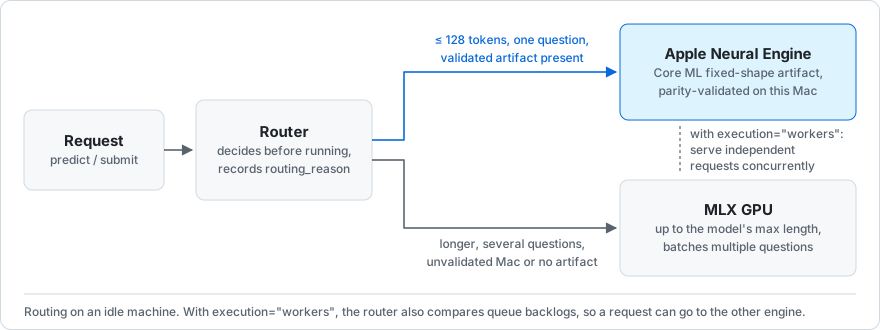
| Request | Goes to | Why (measured on the tested Mac) |
|---|---|---|
| One question, ≤ 128 tokens, validated artifact present | ANE | Faster: laya-typed-decisions L128 takes 9.9 ms on the ANE against 12.2 ms on MLX (forward P50) |
| Longer context | MLX GPU | MLX is faster there: 19.2 ms at L256 and 71.0 ms at L1024 |
| Several questions | MLX GPU | MLX batches the questions; the ANE runs them one at a time |
| Unvalidated Mac, missing artifact, or no Core ML | MLX GPU | Recorded as platform_not_validated, ane_artifact_unavailable or ane_runtime_unavailable |
The production threshold is more conservative than the measured crossover.
laya-multilingual is slightly faster on the ANE at exactly 256 tokens (8.3 ms against
8.6 ms), but that bucket stays explicit-only, because it does not beat MLX at the previous
bucket, 128 tokens. Every result carries routing_reason.
How the thresholds are derived: docs/support-matrix.md. How
the pieces fit together: docs/architecture.md.
Switchyard benchmark
laya-apple switchyard measures the frozen switchyard-v1 workload headless, then writes
result.json, trace.jsonl and a self-contained replay.html
(docs/switchyard.md).
- Workload. Seed 11, 60 s, bursty arrivals at 40 req/s nominal: 2,410 requests, of which 1,422 are single-question train decisions with a 100 ms deadline. The rest are medium, long and multi-question requests that load the GPU.
- Rounds.
gpu_only(device="gpu") and, when the Neural Engine is ready,hybrid(device="auto"), both throughLaya(execution="workers")on the identical timetable. - Measurement. Decision latency runs from each train's scheduled arrival to its answer, queueing included. Miss rates are reported at 25, 50, 100, 250 and 500 ms, so the result does not depend on the 100 ms game deadline.
- Checks. A hybrid round that did not actually use the Neural Engine is marked not comparable. In the M4 Max campaign both rounds gave the same answer for every train, and no train was misrouted.
- Time. The first run downloads the pinned checkpoint (about 800 MB); a standard run
then takes about 2–3 minutes. Without a built Neural Engine artifact it runs
gpu_onlyand prints the setup command,uvx --from "laya-apple[convert]" laya-apple switchyard --setup-ane.
Limitations. One machine (Apple M4 Max). Round order is fixed by the seed, so hybrid
ran first in all three runs (design.counterbalance is "none"). These numbers are not
comparable with the v1.0 open-loop table below: the rate, the measurement boundary and the
workload differ (docs/switchyard.md).
Results per run, cross-run spread and the reproduction command:
benchmarks/switchyard/README.md. Raw results:
benchmarks/switchyard/v1-m4-max/raw/.
GPU + ANE heterogeneous serving
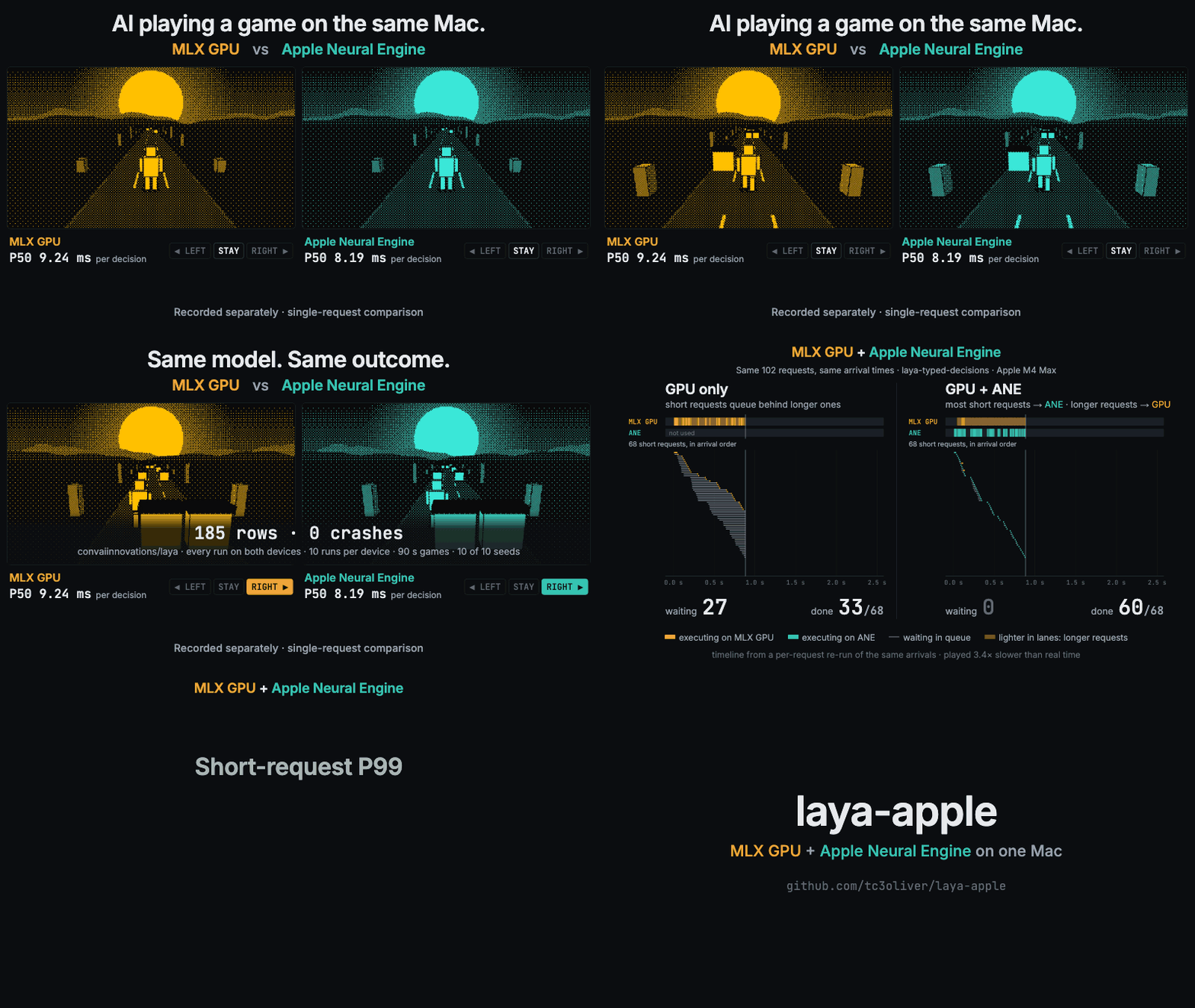
The v1.0 benchmark behind this section, animated. laya-apple sends short, single-question
requests with a validated artifact to the Apple Neural Engine while longer ones keep running
on the MLX GPU. The animation first replays a recorded
Lane Runner game on an M4 Max: the same
model on each device, recorded separately, one request at a time. It then replays one burst
of the laya-typed-decisions bursty workload, from a per-request trace of the benchmark's
arrival sequence. Its P99 values are the published v1.0 numbers in the table below; every number's
source is in docs/media/README.md.
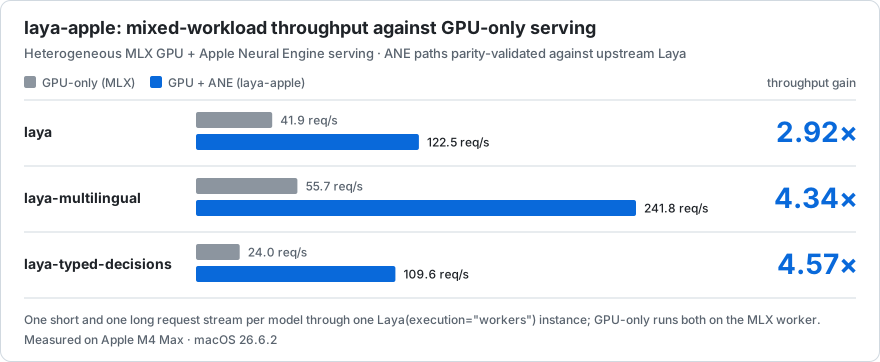
The gain comes from running both engines at once, not from raw ANE latency. This is the
v1.0 benchmark on one Apple M4 Max with macOS 26.6.2: one short and one long request stream
through one Laya(execution="workers") instance. Other Macs are not part of this benchmark;
their results go in the community matrix. The method and raw data are in
benchmarks/v1.0.md.
with Laya.from_pretrained("convaiinnovations/laya-typed-decisions", execution="workers") as model:
    futures = [model.submit(context=c, questions=q) for c, q in requests]   # thread-safe
- The GPU runs in a worker process, and the ANE on its own dispatcher.
- Each request runs on one device, chosen by the router.
- Under load, the router also compares queue backlogs.
To see why a request was slow, pass a callback. It receives one RequestTrace per
completed request: the queue snapshot the router decided on, the device and reason it chose,
and monotonic timestamps from submit through queue, service and response.
def on_trace(trace):
    print(trace.request_id, trace.target, trace.routing_reason, trace.queue_ms, trace.e2e_ms)

model = Laya.from_pretrained("convaiinnovations/laya-typed-decisions", execution="workers", trace=on_trace)
With the default trace=None nothing is recorded. The callback runs on the device's
dispatcher thread, so keep it cheap.
Short-request P99 under open-loop bursty arrivals, measured from arrival with queueing included (v1.0, same arrival sequence for both):
| Model | GPU-only | GPU + ANE |
|---|---|---|
| laya (46.2 req/s offered) | 1538.0 ms | 108.5 ms |
| laya-multilingual (83.8 req/s) | 2052.3 ms | 29.6 ms |
| laya-typed-decisions (35.8 req/s) | 1592.9 ms | 79.5 ms |
A single short request is not dramatically faster on the ANE (for example 9.9 against 12.2 ms). The gain comes from using both engines at once.
Community benchmarks
Every benchmark above covers only an M4 Max. The community matrix collects results from other Macs as separate runs, not mixed into the numbers above. It has external results for an M4 Pro, an M4 and an M2 Pro (MLX only). If you have another Mac, one command adds it. No code changes required.
- M1 / M2 → #1
- M3 Max → #2
- M5 or any other Mac → add your Mac
uv run python scripts/hardware_report.py --quick
The linked issues and guide have the full steps, from git clone to the pull request, in about 10 minutes.
Correctness
Parity against upstream Laya on PyTorch CPU FP32, over the shipped golden rows (v1.0). Each cell gives hard mismatches, then the max probability error.
| Implementation on the tested Mac | laya | laya-multilingual | laya-typed-decisions |
|---|---|---|---|
Ordinary Core ML export · CPU_AND_NE |
❌ 12, 0.56 | ❌ 85, 1.0 | ❌ 19, 0.42 |
Ordinary Core ML export · CPU_AND_GPU |
✅ 0, 0.0066 | ✅ 0, 0.0059 | ✅ 0, 0.0028 |
| laya-apple MLX FP16 | ✅ 0, 0.0037 | ✅ 0, 0.0045 | ✅ 0, 0.0017 |
| laya-apple ANE FP16 | ✅ 0 (1 near-tie), 0.012 | ✅ 0, 0.013 | ✅ 0, 0.0077 |
- The FP16 gate: probability error ≤ 0.02 and 0 hard mismatches.
- Near-tie flips (upstream's top-two margin < 0.04) are listed, not hidden.
- Explicit ANE requests never fall back. They run the validated artifact or raise, and
every loaded artifact is also timed against
CPU_ONLYto catch a silent CPU placement. - Definitions, every configuration tested, and the fallback audit are in
docs/correctness.mdanddocs/no-silent-fallback.md.
Supported models and platforms
| Model | max_len | MLX GPU | ANE buckets (explicit) | ANE buckets used by auto |
|---|---|---|---|---|
convaiinnovations/laya |
512 | FP16 / FP32, any length | 64, 96, 128 | 64, 96, 128 |
convaiinnovations/laya-multilingual |
1024 | FP16 / FP32, any length | 64, 96, 128, 256 | 64, 96, 128 |
convaiinnovations/laya-typed-decisions |
1024 | FP16 / FP32, any length | 64, 96, 128 | 64, 96, 128 |
Tested:
- Apple M4 Max, macOS 26.6.2, MLX 0.32.2, coremltools 9.0;
- Python 3.11–3.13.
Other Apple silicon:
- MLX is expected to work.
autostays on MLX until artifacts are built and calibrated on that machine (laya-apple calibrate).
See docs/compatibility.md and the community matrix in
docs/community-benchmarks.md.
Reproduction
Each headline number above traces to a report, raw data, a command and an environment in
docs/reproducibility.md. The full v1.0 suite, which compares
PyTorch CPU/MPS, the ordinary Core ML export, MLX and laya-apple, is in
benchmarks/v1.0.md. The quick check for your own Mac:
uv run python scripts/hardware_report.py --quick
Contributing
The most useful first contribution is a benchmark from a Mac other than an M4 Max: run
the command above and open a PR with hardware-results/
(how).
CONTRIBUTING.mdcovers setup, test tiers (which tests a change actually needs), parity checks and backend changes.- Open work is labelled
good first issue,help wantedandresearch. - Coding agents:
AGENTS.mdhas the repository rules.
Limitations
- One test machine. Every benchmark is from one Apple M4 Max on macOS 26.6.2. Routing thresholds are not assumed to hold on other Apple SoCs.
- Long contexts stay on MLX, which is faster there. The ANE path is batch 1 only.
- Isolation is partial. Under concurrency, each stream's P99 is above its solo value.
- Cold start on a fresh artifact location costs 3–5 minutes of Core ML compile per
model.
ane_startup="background"serves on MLX in the meantime. choicedecisions can depend on option order. This comes from upstream Laya, and laya-apple reproduces it exactly (research/option-order/).- Not measured yet: energy use, quantized artifacts and cross-SoC validation.
More
- User guide:
docs/guide.md. - Stable API:
docs/api.md. - Architecture:
docs/architecture.md. - Changes:
CHANGELOG.md. - Security:
SECURITY.md.
Apache-2.0; see LICENSE and NOTICE. Model weights are downloaded
from their pinned Hugging Face revisions and are not redistributed. This is an independent
project, not an official release of Convai Innovations, Apple or MLX.
1 maintainer

Release files for laya-apple 1.2.0
For a detailed explanation of source distributions (sdists) and built distributions (wheels), please see the package formats documentation.
Source distribution (sdist)
| File | Size | Uploaded | |
|---|---|---|---|
| laya_apple-1.2.0.tar.gz | 206.0 kB | Details |
Built distribution (wheel)
| File | Interpreter | ABI | Platform | Reset |
|---|---|---|---|---|
| laya_apple-1.2.0-py3-none-any.whl | Python 3 | none | any | Details |
Total release size: 427.9 kB
Release files / laya_apple-1.2.0.tar.gz
| Download URL | laya_apple-1.2.0.tar.gz |
|---|---|
| Size | 206.0 kB |
| Tags | Source |
|
SHA-256 checksum How to use checksums |
60e59f2ca586208228a0b92da4771ed6b232c568566c3b49e9dd22d47c8e07fc
|
|
BLAKE2b-256 checksum How to use checksums |
53415601cb6819dd0c7b797934ffcdc71d9d57415c90076d14cb3b77b295b154
|
| Upload date | |
|
Uploaded using Trusted Publishing? What is trusted publishing? |
Yes |
| Uploaded via |
twine/7.0.0 CPython/3.13.14
|
Provenance
Provenance describes where a file came from. On PyPI, provenance is shared via attestations, which provide a verifiable record of the build or publishing details. View details, limitations and caveats.


PyPI Publish Attestation
PyPI verified that this artifact, at this checksum, originated from the publisher listed below.
Signed by GitHub Actions, verified by PyPI on Sep 24, 2026.
Transparency logRelease files / laya_apple-1.2.0-py3-none-any.whl
| Download URL | laya_apple-1.2.0-py3-none-any.whl |
|---|---|
| Size | 222.0 kB |
| Tags | Python 3 |
|
SHA-256 checksum How to use checksums |
5efc8d0e6f70b1007b54e54a41a03fa3356176375b858511ba636e2f754db9d2
|
|
BLAKE2b-256 checksum How to use checksums |
e55f877743b39c9da8978e9f83f9e34d0d581b399bb666b5ba2cf7f2aac66390
|
| Upload date | |
|
Uploaded using Trusted Publishing? What is trusted publishing? |
Yes |
| Uploaded via |
twine/7.0.0 CPython/3.13.14
|
Provenance
Provenance describes where a file came from. On PyPI, provenance is shared via attestations, which provide a verifiable record of the build or publishing details. View details, limitations and caveats.
PyPI Publish Attestation
PyPI verified that this artifact, at this checksum, originated from the publisher listed below.
Signed by GitHub Actions, verified by PyPI on Sep 24, 2026.
Transparency log













