

Turn Laya, the open System One decision model, into a specialist for your own task.
Describe the decisions in a YAML file. Laya Finetune writes the training data with any LLM, filters it with a second one, trains with RLCD, calibrates the confidence and grows the context up to 32k tokens. You get a checkpoint that answers in a few milliseconds on your own GPU.





Quick start · How it works · Results · Docs · Contributing
What is Laya?
Most language models write text. System One models make decisions instead. They receive a state (a ticket, an email, a JSON document) and a set of typed questions, and they return typed answers with a probability for each option, in a single forward pass:
| Question type | Answers | Example |
|---|---|---|
choice |
one option out of several | Which team should handle this ticket? |
score |
a level on an ordered scale | How urgent is it? |
noul |
yes or no | Is the person blocked from working? |
Jev (TypeSafe) opened the category.
Laya is its open reproduction: Apache-2.0 weights, the same
/v1/systemone contract, and 322M parameters that run on a laptop GPU.
Out of the box, Laya is a generalist. It is fast, but it misses more often than Jev, its confidence is not calibrated and it reads only 1,024 tokens. Fine-tuning on a single task closes most of that gap, and Laya Finetune turns it into four commands.
| Jev 1.13 | Laya multilingual | Laya english | |
|---|---|---|---|
| Weights | closed, API | open, 322M (mmBERT-base) | open, 421M (ModernBERT-large) |
| Context | ~32k state + longest question, ~64k with all questions | 1,024 (8,192 positions) | 512 (8,192 positions) |
| Latency | 70–500 ms | ~10–30 ms on a desktop GPU | ~30 ms on a T4 |
| Cost | US$0.042 / M input tokens | your GPU | your GPU |
| Weak spots | — | zero-shot, >20 options, raw calibration, short context | English only |
How it works
flowchart LR
    Y["task.yaml<br/>questions and fields"] --> G["generate<br/>any LLM writes cases<br/>labelled by construction"]
    G --> V["verify<br/>a second LLM<br/>drops wrong labels"]
    V --> T["train<br/>RLCD + calibration<br/>1k to 32k context"]
    T --> E["val<br/>hand-written test set,<br/>never trained on"]
    E --> C["checkpoint<br/>loads with laya.load()"]
- Generate. The answers are chosen first, and an LLM writes a text that has them. Every case is labelled by construction, so no one has to annotate data by hand. It works with Ollama, OpenRouter, OpenAI or any OpenAI-compatible server.
- Verify. An LLM from another family answers every case blind. Only the cases where it agrees are kept.
- Train. Laya learns with RLCD (reinforcement learning for calibrated decisions), optionally guided by Jev as a teacher. One temperature per question type is then fitted, so a 90 % answer is right about 90 % of the time.
- Validate. The checkpoint is measured on a test set written by hand. Validation on generated data overestimates quality, so the test set is the number that counts.
The result is a regular Laya checkpoint: it loads with the official laya.load(path) and serves the same contract.
Results
Three tasks, each with a test set that was never trained on: Laya multilingual as shipped, and the same model fine-tuned with Laya Finetune.
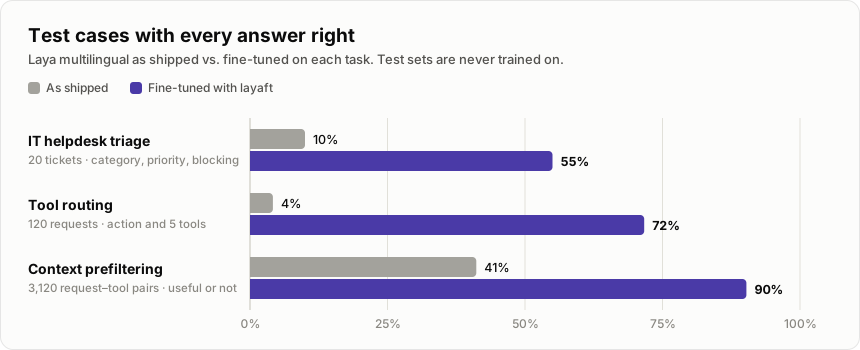
- IT helpdesk triage. Category, priority and whether the person is blocked, on 20 hand-written tickets. The category goes from 12 to 17 right out of 19. The blocking question goes from 15 to 19 out of 20, with a Brier score going from 0.178 to 0.042.
- Tool routing. Answer, ask or act, and which of five tools to call, on 120 hand-written requests. The action alone goes from 24 to 101 right out of 119.
- Context prefiltering. Whether a tool or skill is useful for a request, on 3,120 pairs built from a catalog kept out of training. Only 16 % of the pairs are useful, so always answering "no" would already score 84 %. The F1 score for "useful" says more: it goes from 0.27 to 0.66.
A fine-tuned Laya keeps the speed of the base model. On the helpdesk tickets it matches Jev on category and blocking, and it answers in about a tenth of the time:
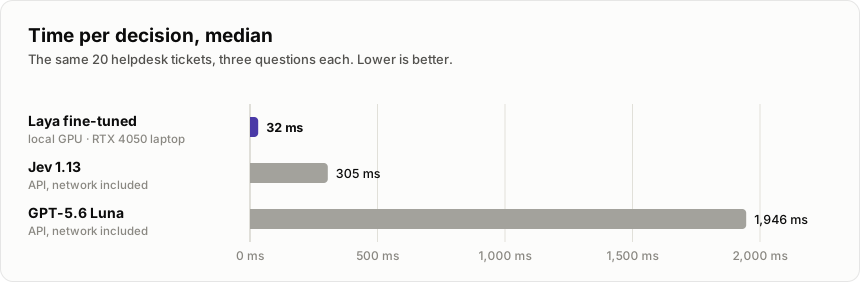
The runs, including the benchmark and the API comparison, are in System One Playground. The latency of the API models includes the network, and $0 of API spend on Laya does not include the cost of the hardware.
Quick start
Install
pip install laya-finetune --extra-index-url https://download.pytorch.org/whl/cu130 # CUDA 13, driver ≥ 580
The extra index picks the CUDA 13 build of torch; drop it to keep the torch you already have. To work on the code:
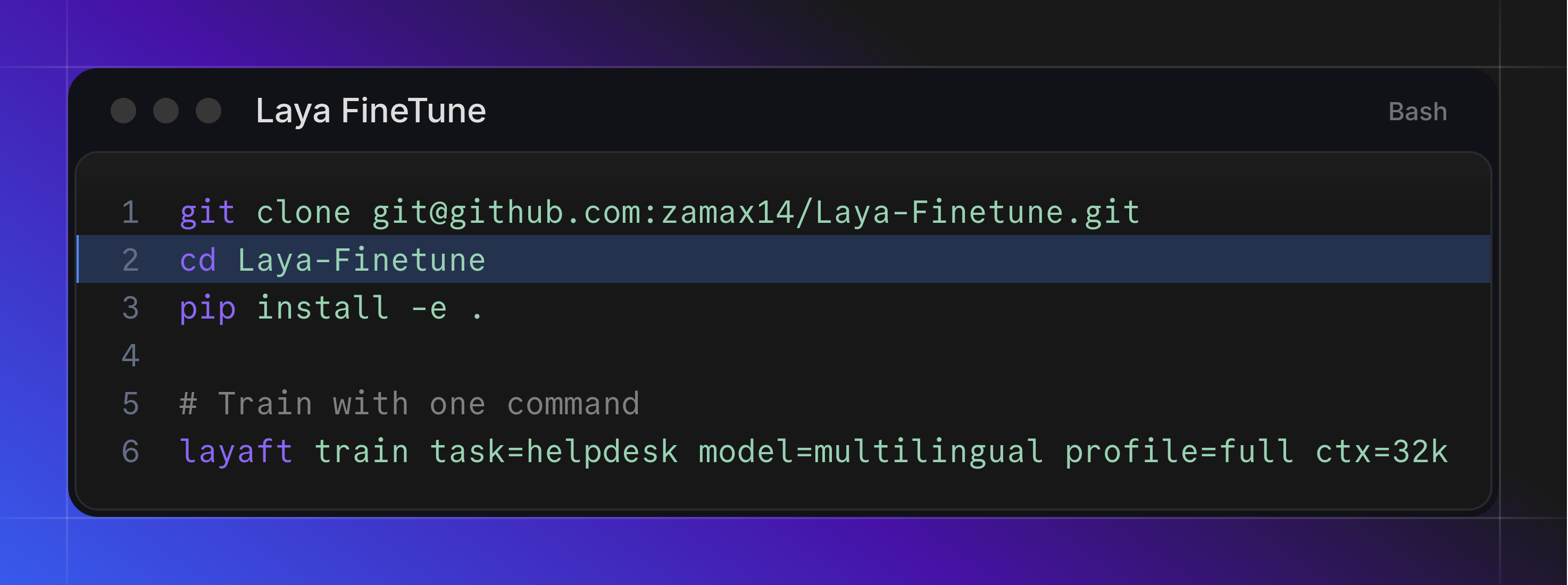
git clone https://github.com/zamax14/Laya-Finetune.git && cd Laya-Finetune
python3 -m venv .venv && source .venv/bin/activate
pip install -e . --extra-index-url https://download.pytorch.org/whl/cu130
Generating data needs no GPU. Training and evaluation need an NVIDIA GPU; the test profile fits in 3 GB.
Train your first task
Write a task (next section), then:
layaft generate task=invoices backend=ollama n=216 context=all     # cases labelled by construction
layaft verify task=invoices llm=gemma4:31b                         # a second LLM drops the mislabelled ones
layaft train task=invoices profile=full ctx=16k                    # RLCD + calibration → runs/invoices-16k
layaft val task=invoices model=runs/invoices-16k ctx=16k           # hand-written test set, by length
The same from Python:
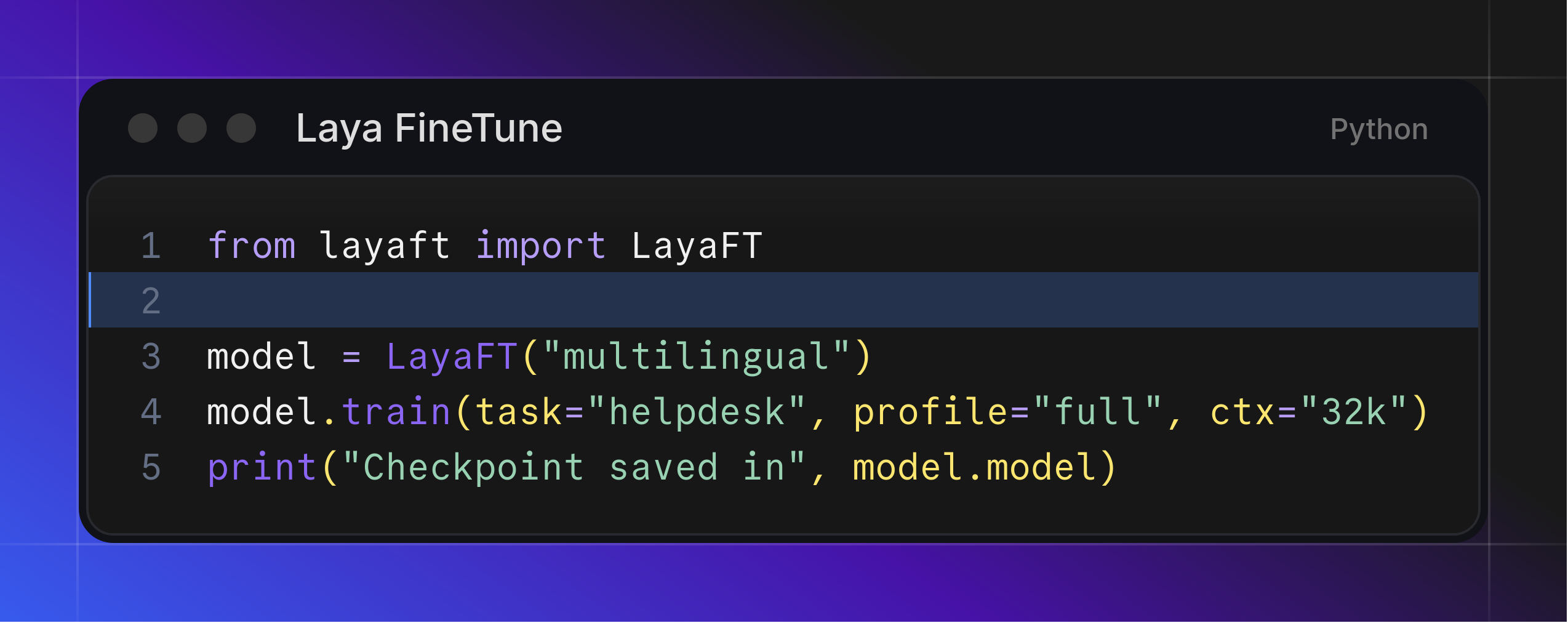
from layaft import LayaFT

m = LayaFT("multilingual")
m.generate(task="invoices", backend="ollama", n=216, context="all")
m.verify(task="invoices", llm="gemma4:31b")
m.train(task="invoices", profile="full", ctx="16k")     # m.model is now runs/invoices-16k
m.val(task="invoices", ctx="16k")
m.predict({"invoice": "Iberia: flight MAD-MEX on 12 May, seat 23C"}, task="invoices")
Start with profile=test (a few minutes, 3 GB of GPU memory) to check the whole loop before a full run.
A task is a YAML file
name: invoices
fields: {vendor: {}, body: {min_words: 40}}          # what the LLM writes ({required: false}: may be empty; {single_line: true})
state: {invoice: "{vendor}: {body}"}                  # what Laya reads
questions:
  expense_type:
    type: choice
    instructions: Which expense category is the `invoice`?
    options:
      travel: {criteria: "travel: flights, hotels, taxis", signals: "a booking, a route or a stay"}
      software: {criteria: "software: licences, SaaS, cloud", signals: "seats, a subscription period or an instance"}
      hardware: "hardware: laptops, screens, peripherals"
  urgency: {type: score, instructions: "How soon must it be paid?", levels: {low: "no date", high: "due this week"}}
  duplicate: {type: noul, instructions: "Does the `invoice` say it was already paid?"}
exclude: [{urgency: high, duplicate: true}]           # combinations that make no sense
generation: {text_field: body, default_context: supplier invoices of a mid-size company in Spain}
data: {test: invoices_test.jsonl}                     # hand-written cases, never trained on (format below)
Save it as tasks/invoices.yaml in your working directory and task=invoices finds it; any other path works too.
A complete task with most options is the one the tests run on, tests/fixtures/helpdesk.yaml.
Beyond the basics, a task can declare:
- the traffic light on confidence (
review), per-optionsignalsandleak_phrases; - a custom
promptin Spanish and a contexts file; weights, which follow the real mix of answers instead of one case per combination;vary, which draws a random hint per call (length, style, turns) so the texts do not all sound alike.
One question per candidate
To pick from a catalog that changes (tools, documents, products), ask one yes/no question per item and put the item
in the question: instructions may name fields, filled from each case (task.laya_for(case)).
fields: {request: {single_line: true}, name: {}, description: {}}
state: {request: "{request}"}
questions:
  needed: {type: noul, instructions: "Is «{name}» useful for this request? {description}"}
generation:
  pool: {file: catalog.jsonl, fields: [name, description]}  # each call draws an item; the LLM writes only the request
  id_fields: [request, name]                                 # the same request with another item is another case
generate writes requests that need the drawn item; pair adds the negatives: the most similar items by embedding
(to verify, since a neighbour may be needed too) and random ones.
Dataset format
One format for everything: generated cases, your own labelled data and the test set are JSON Lines, one case per line.
{"fields": {"vendor": "Iberia", "body": "Flight MAD-MEX on 12 May, seat 23C…"}, "answers": {"expense_type": "travel", "urgency": "low", "duplicate": false}}
fieldshas every field of the task;answershas every question with one of its keys (anoulistrue/false).idis optional (a hash of the text by default); any other key (context,model…) is kept and ignored.- In the test set an answer may be
null: an ambiguous case on purpose, not graded for that question.
The task's data: section says where the files are, relative to the YAML file, like YOLO's data.yaml:
data:
  train: ../data/invoices.jsonl         # default: data/<name>.jsonl in the working directory
  test: invoices_test.jsonl             # required
  filler: ../data/invoices_filler.jsonl # default: data/<name>_filler.jsonl; {"text": ...} per line, for long context
generate appends to train; with your own data, skip it and point train at your file. Every file is checked
line by line when it is read, and an error names the file, the line and the field.
Modes
Every mode is a CLI command and a method of LayaFT; model= picks the checkpoint (multilingual by default,
english, a Hub repo or a local folder).
Each mode has a runnable Python script in examples/ whose docstring shows the equivalent command.
| Mode | What it does | Main arguments |
|---|---|---|
generate |
Writes cases labelled by construction to data/<task>.jsonl; filler= also writes the neutral documents for long context |
backend, llm, n, context (all = the task's file), filler, api_key, base_url, parallel, only |
verify |
A second LLM answers every case blind: agreements to <data>_verified.jsonl, the rest to <data>_rejected.jsonl |
llm, backend, data, parallel |
train |
Teacher, split, RLCD, calibration, comparison, checkpoint in Laya's format under runs/ |
profile (test/full), ctx, epochs, teacher (jev/none), long, gpu_limit |
val |
Test-set metrics (per question, and every question right at once), table and chart in runs/val/<task>-<model>/; with ctx, also by length |
ctx |
predict |
Typed answers for one state | state, ctx |
pair |
For one-question-per-candidate tasks: pairs each positive case with similar and random items of the pool, labelled no | near, random, data, pool, embed |
extend |
Copies a checkpoint with room for ctx tokens (no training) |
ctx, out |
Data: any LLM
The answers are decided first, and an LLM writes a text that has them: one combination per call, spread by the
task's weights (evenly without them). Texts
that name the answer, use a leak_phrase or repeat a title (from the data or the test set) are dropped. The task's
fields become a Pydantic model whose JSON Schema constrains the LLM and validates every batch.
backend |
Where | Key |
|---|---|---|
ollama (default) |
local, llm=gemma3:12b, ollama_url= |
none |
openrouter |
llm=openai/gpt-5.6-luna; falls back to OpenAI when out of credit |
OPENROUTER_API_KEY or file openrouter |
openai |
llm=gpt-6-luna |
OPENAI_API_KEY or file OPENAI |
custom |
any OpenAI-compatible server (vLLM, LM Studio, Groq…): base_url=, llm= |
api_key= if it needs one |
api_key= always wins over the environment and the files, which are git-ignored. Generation never pulls models
into a shared Ollama server: if llm= is not there, it stops and lists the available ones.
Judge
A label by construction is only as good as the generator's obedience: asked for a message that needs the email, it
sometimes writes one that does not. verify gives every case to an LLM of another family, which reads only the state
Laya will read and answers the same questions. Cases where it agrees on every question go to <data>_verified.jsonl.
The rest go to <data>_rejected.jsonl with its answers, for auditing. Cases already judged are skipped, so it can run
after every generation round. Train with data=data/<task>_verified.jsonl.
A second judge can re-read the rejected file (data=data/<task>_rejected.jsonl). Cases whose label it confirms go to
_rejected_verified.jsonl. If it answers exactly like the first judge, and that answer is a valid combination, the
case is relabelled with that answer in _rejected_relabelled.jsonl. Two models that agree blind make a better label
than a generator that missed its brief, and these messages are the hard ones.
Teacher
Jev answers the same questions on every case; its distribution softens the target (70 % label, 30 % Jev), so Laya
learns how much doubt is reasonable, and the cases where it disagrees with a choice answer are dropped. The key is
TYPESAFE_API_KEY (TypeSafe's API) or OPENROUTER_API_KEY. Answers are cached in data/<task>_teacher.jsonl, so
only new cases are paid. With teacher=none the label is smoothed to 90 %.
Training
It follows the recipe of Laya's official notebook
on one GPU. RLCD draws 4 noisy versions of each distribution and rewards them with proper scoring rules (log,
spherical, and RPS for score), plus a soft cross-entropy term. Cases are split 80 / 10 / 10 into train, calibration
and validation (cases with the same group key, such as a case and its translation, stay on one side); the best
epoch on validation is kept; one temperature per question type is fitted on the calibration
cases. The checkpoint loads with the official laya.load(path).
| Profile | Cases | Epochs | Trains | GPU |
|---|---|---|---|---|
test (default) |
2 per combination | 1 | top 6 encoder layers + head (~45M) | hard cap of 3 GB |
full |
all | 4 | the whole model | ~6 GB at 1k context |
Context: from 1k to 64k
mmBERT and ModernBERT alternate one global-attention layer with two local ones (a 128-token window), with RoPE and positions up to 8,192. The framework grows the context in three steps:
- Up to 8k: the positions already exist, but Laya was only trained up to 1,024 tokens. A model tuned at 1k, handed an
8k state with the case at its start, kept some answers and lost half of others.
train ctx=8ktrains long states. - Beyond 8k:
extendapplies YaRN only to the global-attention layers; the local ones never see more than 128 positions. The encoder config is rewritten (rope_type: yarn,factor: ctx/8192), so the checkpoint still loads withlaya.load. YaRN alone shifts the short answers a little (untrained, one or two test answers in twenty change):train ctx=...teaches it. - Long states: writing thousands of 32k-token documents with an LLM does not scale.
LongStateBuilderwraps each short case, labelled by construction, in neutral filler (resolved threads, notifications, logs:generate filler=N) at the start, the middle or the end. The teacher (Jev reads ~32k) grades those copies too. The short cases stay in the mix, so short states are not forgotten. A tenth of the filler is held out for evaluation.
Above 8k the encoder switches from sdpa to flex_attention (or flash_attention_2 if installed): sdpa builds a
dense mask for the sliding-window layers and ran out of memory at 16k on a 6 GB GPU. flex_attention is compiled by
Triton, which needs the Python headers (Python.h, from Python's include directory or CPATH); without them it stays on
sdpa.
| Stage | How | Inference measured on an RTX 4050 Laptop (6 GB), 3 questions |
|---|---|---|
| 1k | the checkpoint as shipped | ~25 ms |
| 8k | train ctx=8k |
2.1 GB · 1.1 s |
| 16k | train ctx=16k (YaRN ×2) |
2.7 GB · 2.8 s |
| 32k | train ctx=32k (YaRN ×4) |
needs more than 6 GB |
| 64k | train ctx=64k (YaRN ×8), experimental |
Every long stage can start from the short fine-tuned checkpoint, because it trains on the short cases plus long copies
of every length up to ctx. So the stages run in parallel, one GPU each:
layaft train task=invoices model=runs/invoices-1k ctx=16k profile=full.
Tips
- Labels by construction need signals. Asked for a text "without naming the answer", an LLM often writes one with
no trace of it. Give each option
signals(the facts that point to it) and the generator puts them in the text. - The judges are mostly a filter. Dropping the cases a second model does not read as their label keeps texts that do not say what their label says out of training. The relabelled ones are the hard cases: keep them.
- More writing styles beat more cases of the same style. Several generators, contexts and
varyhints move the test set more than doubling the cases of one model. - Validation overestimates. Generated cases resemble each other more than a person's writing: validation near 100 % can be 85 % on the test set. Always measure on hand-written cases.
- Short, keyword-style criteria, rich states. Short criteria beat long ones with tie-break rules; the detail pays off in the state.
- Not every local LLM can generate. Some ignore the JSON Schema without reasoning, or reason for minutes and return
nothing. Try
generate n=2before a long run.
Structure
layaft/
  task.py  questions.py        the task (YAML) and the question types: choice, score, noul
  backends/  teachers.py       LLMs for the generator (Ollama, any OpenAI-compatible API) and the Jev teacher
  data/                        generation by construction, the judge (verify), negatives (pair), long states, JSONL
  model/                       checkpoint loading, context extension (YaRN)
  train/                       RLCD, calibration, the pipeline
  evaluate/                    metrics per question type and by length, table and chart
  cli.py  __init__.py          `layaft <mode> key=value` and the LayaFT facade
examples/    one Python script per mode, with its CLI equivalent
tests/       unit tests, on the task in tests/fixtures
python -m unittest discover -s tests -t . # no network, no GPU
Contributing
Issues and pull requests are welcome: new LLM backends, question types, tasks that break an assumption, or results on other GPUs. See CONTRIBUTING.md for the setup and the conventions.
Credits
- Laya by ConvAI Innovations, Apache-2.0, and its fine-tuning recipe.
- Jev by TypeSafe, GPT by OpenAI, through OpenRouter.
- Code under the MIT license.
1 maintainer

Metadata
1 maintainer
Release files for laya-finetune 0.1.2
For a detailed explanation of source distributions (sdists) and built distributions (wheels), please see the package formats documentation.
Source distribution (sdist)
| File | Size | Uploaded | |
|---|---|---|---|
| laya_finetune-0.1.2.tar.gz | 59.4 kB | Details |
Built distribution (wheel)
| File | Interpreter | ABI | Platform | Reset |
|---|---|---|---|---|
| laya_finetune-0.1.2-py3-none-any.whl | Python 3 | none | any | Details |
Total release size: 114.5 kB
Release files / laya_finetune-0.1.2.tar.gz
| Download URL | laya_finetune-0.1.2.tar.gz |
|---|---|
| Size | 59.4 kB |
| Tags | Source |
|
SHA-256 checksum How to use checksums |
2ec09fa7b231f46d9243a63571157f372a5b408df7b01e4dda519d357f421961
|
|
BLAKE2b-256 checksum How to use checksums |
543edc63ed566c057e207d17c768dca3c06c3048504720d4144da1229e614662
|
| Upload date | |
|
Uploaded using Trusted Publishing? What is trusted publishing? |
Yes |
| Uploaded via |
twine/7.0.0 CPython/3.13.14
|
Provenance
Provenance describes where a file came from. On PyPI, provenance is shared via attestations, which provide a verifiable record of the build or publishing details. View details, limitations and caveats.


PyPI Publish Attestation
PyPI verified that this artifact, at this checksum, originated from the publisher listed below.
Signed by GitHub Actions, verified by PyPI on Sep 29, 2026.
Transparency logRelease files / laya_finetune-0.1.2-py3-none-any.whl
| Download URL | laya_finetune-0.1.2-py3-none-any.whl |
|---|---|
| Size | 55.1 kB |
| Tags | Python 3 |
|
SHA-256 checksum How to use checksums |
2aad13542bf0358cd941b832e08e4e388b585a6c950b680dc06e4d9b19578ab2
|
|
BLAKE2b-256 checksum How to use checksums |
70fece81aae849e5732efd3ac82c6827baadca624edddc6cb5ada71cef26581b
|
| Upload date | |
|
Uploaded using Trusted Publishing? What is trusted publishing? |
Yes |
| Uploaded via |
twine/7.0.0 CPython/3.13.14
|
Provenance
Provenance describes where a file came from. On PyPI, provenance is shared via attestations, which provide a verifiable record of the build or publishing details. View details, limitations and caveats.
PyPI Publish Attestation
PyPI verified that this artifact, at this checksum, originated from the publisher listed below.
Signed by GitHub Actions, verified by PyPI on Sep 29, 2026.
Transparency log













