

layerpool
Pool your devices. Train bigger models for free.
One model, split by layers across all your machines. Their memory is pooled, and they train it as one.



| 💻 Laptop | 🖥️ Desktop | 🎮 Gaming PC | ☁️ Cloud GPU | ⚡ Your pool | |
|---|---|---|---|---|---|
| 16 GB | 24 GB | 12 GB | 16 GB | = | 68 GB |
Your code doesn't change
import layerpool.hf as lp
from transformers import Trainer

model = lp.AutoModelForCausalLM.from_pretrained("Qwen/Qwen3-14B")   # spread over all your devices
Trainer(model=model, args=args, train_dataset=data).train()          # everything else stays the same
How it works
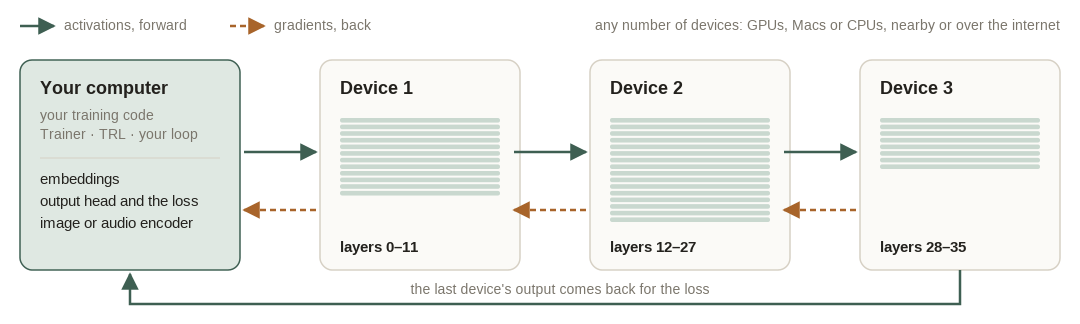
- Your computer runs your training code and keeps the parts of the model around its repeated blocks: the embeddings, the output head, and any image or audio encoder.
- The blocks are split across the devices in order. In each step, activations go from device to device and gradients come back.
- Every device downloads only the weights of its own blocks, and the split follows each device's memory and measured speed.
- Devices keep checkpoints of their part. If one drops out, the others take over its blocks and redo the lost steps from those checkpoints, so no training is lost.
Features
- Any hardware, mixed. NVIDIA GPUs, Apple Silicon (with MLX or PyTorch) and plain CPUs, on Linux, Windows and macOS, in one model.
- Full control of each device. Its memory cap, which of its GPUs to use, how many layers it takes, its place in the chain, and RAM for layers that do not fit its GPU. Or leave everything to layerpool.
- Over the internet. Devices on the same network talk directly; the rest join through a cloudflared tunnel, with a token on every connection. No port forwarding.
- Survives disconnects. If a device drops out, the others take over its layers and training goes on.
- Balances itself. Faster devices get more layers, the split adjusts while training runs, and a device that only slows the run down sits it out.
- Live dashboard. Devices, memory, temperature, speed and loss, with every setting in reach.
- Any model in transformers. Text, vision-language, speech, embedding, mixture-of-experts and Mamba models: Llama, Qwen, Gemma, Mistral, Phi, Mixtral, SmolVLM, Whisper, T5, BERT and others. Before the first run of an architecture, layerpool checks that its split computes the same as the whole model, and stops with a clear message if it does not.
- Every kind of training. LoRA, QLoRA, full fine-tuning, training from scratch, DPO, KTO and other preference methods, reinforcement learning, or your own loss.
Quickstart
1. Install and start the pool on your computer:
pip install layerpool
layerpool up
The dashboard opens, and your computer joins as the first device.
2. Add devices. Click Add device and run the command it gives you on each device:
pip install -U layerpool
layerpool join http://192.168.1.8:7341 --token inv_...
3. Train. Run your usual training script on your computer. It finds the pool by itself.
To check first whether a model fits the devices you have, and how it would be split: layerpool plan Qwen/Qwen3-14B.
For devices outside your network, start the pool with layerpool up --tunnel.
Requirements. Python 3.11 or newer on Linux, Windows or an Apple Silicon Mac, with NVIDIA or AMD (ROCm) GPUs, Apple Silicon or plain CPUs.
- NVIDIA GPU on Windows: install the CUDA build of PyTorch first.
- AMD GPU: install the ROCm build of PyTorch first.
- Linux machine without a GPU:
pip install torch --index-url https://download.pytorch.org/whl/cpufirst saves a 3 GB download.
Use it your way
Hugging Face Trainer and TRL
import layerpool.hf as lp
from trl import SFTTrainer, SFTConfig

model = lp.AutoModelForCausalLM.from_pretrained("Qwen/Qwen3-8B", lora_r=16)
trainer = SFTTrainer(model=model, args=SFTConfig(output_dir="out"), train_dataset=dataset)
trainer.train()
model.save_pretrained("my-adapter")
Works with transformers.Trainer and TRL's SFTTrainer, DPOTrainer and KTOTrainer, including gradient accumulation,
evaluation, checkpoints, resuming and load_best_model_at_end. Install the extras with pip install "layerpool[hf]".
Every AutoModel class works the same way:
vision = lp.AutoModelForImageTextToText.from_pretrained("HuggingFaceTB/SmolVLM-256M-Instruct")
speech = lp.AutoModelForSpeechSeq2Seq.from_pretrained("openai/whisper-small")
embedder = lp.AutoModel.from_pretrained("sentence-transformers/all-MiniLM-L6-v2")
Your own PyTorch loop
import torch
import layerpool.hf as lp

model = lp.AutoModelForCausalLM.from_pretrained("Qwen/Qwen3-8B", lora_r=16)
opt = torch.optim.AdamW(model.parameters(), lr=1e-4)

for batch in loader:
    loss = model(input_ids=batch["input_ids"], labels=batch["labels"]).loss
    loss.backward()
    torch.nn.utils.clip_grad_norm_(model.parameters(), 1.0)
    opt.step()
    opt.zero_grad()
Any loss you can write
Your loss gets the log-probability of every token:
import layerpool
from layerpool import losses

pool = layerpool.connect()
run = pool.run("Qwen/Qwen3-8B", rank=16, lr=1e-4)

def my_loss(logprobs, mask, data):
    return losses.cross_entropy(logprobs, mask)

for ids, labels in batches:
    run.forward_backward(ids, labels, loss=my_loss)
    run.optim_step(max_grad_norm=1.0)

run.save("my-adapter")
Built in: cross_entropy, dpo, ipo, simpo, orpo, policy_gradient.
No code at all
layerpool train --model Qwen/Qwen3-8B --data data.jsonl --method sft --epochs 1 --out my-adapter
--method also takes cpt, dpo, ipo, simpo and orpo. In Python the same loop is run.train("data.jsonl", method="sft").
What you can train
| Method | How |
|---|---|
| LoRA | lora_r=16 |
| QLoRA | load a checkpoint already quantized to 4 bits with bitsandbytes, such as unsloth's ...-bnb-4bit models. Macs train their layers on an MLX 4-bit copy: for unsloth's models they find the mlx-community one by themselves, for others add mlx_model=. The two 4-bit formats round the frozen weights a little differently |
| Full fine-tuning | full=True |
| From scratch | full=True, random_init=True |
| Continued pretraining | plain text, or method="cpt" |
| DPO, KTO, IPO, SimPO, ORPO | TRL DPOTrainer or KTOTrainer, or method="dpo", "ipo", "simpo", "orpo" |
| Reinforcement learning | losses.policy_gradient |
| Classification with a new head | lp.AutoModelForSequenceClassification.from_pretrained(model, num_labels=3) |
| Also train modules outside the blocks | modules_to_save=["embed_tokens"], as in PEFT |
| Resume | trainer.train(resume_from_checkpoint=...), or model.load_adapter(folder) |
Text, vision, speech and embedding models all work: anything in transformers built from a stack of repeated blocks.
Settings
Everything has a sensible default, and everything can be changed. Pass these to from_pretrained (or to pool.run):
| Setting | Default | What it does |
|---|---|---|
lora_r, lora_alpha |
16, 2 × lora_r |
LoRA rank and scale (rank, alpha in pool.run) |
target_modules |
every linear layer | the layers LoRA goes on, as in PEFT: ["q_proj", "v_proj"] |
full=True |
off | train every weight instead of LoRA (mode="full" in pool.run) |
modules_to_save |
none | modules around the blocks to train in full in a LoRA run, as in PEFT |
dtype |
"auto" |
how your computer holds its part (embeddings, output head, encoders): "auto" uses bfloat16 when nothing there is trained and a GPU is present, which halves its memory; or "float32", "bfloat16", "float16" |
codec |
"fp16" |
how activations travel between devices: "fp16", "int8" (half the size, for slow links, but less accurate, most of all on Gemma), or "fp32" (exact) |
micro / micro_batch_size |
8 / none |
how many pieces each batch is cut into, so all devices work at once; or the rows per piece |
seq |
512 |
the longest sequence you train on, for planning memory |
checkpointing |
True |
activation checkpointing: devices recompute activations instead of keeping them, for less memory at the cost of recomputing each block's forward pass |
ckpt_every |
4 |
steps between the recovery checkpoints devices keep, so a lost device costs at most this many steps |
peer_replicas |
"auto" |
each device also keeps a copy of a neighbour's checkpoint: "auto" (devices over the internet), "always", "never" |
rebalance |
True |
move layers to faster devices as training runs (it counts each device's compute and its network) |
check |
True |
before the first run of an architecture, split a small copy of it and compare with the whole copy, so a model layerpool cannot split correctly stops with a clear message instead of training wrong |
expected_steps |
from the Trainer | how long the run is, so rebalancing knows when a move pays off; the Trainer and the built-in loops tell it themselves |
streams |
3 |
parallel connections between neighbouring devices |
lr, schedule, warmup, weight_decay |
1e-4, "cosine", 0, 0 |
for pool.run: the built-in loops follow the schedule; in your own loop pass lr=run.schedule(step, total) to optim_step; with a Trainer, its own optimizer and scheduler set them |
Each device has its own settings too, in the dashboard, with layerpool set DEVICE, or when it joins (layerpool join URL ...):
| Setting | What it does |
|---|---|
--cap-gb 8 |
the most memory layerpool may use there: GPU memory on a machine with NVIDIA or AMD GPUs (all the GPUs it trains on together), the shared memory on a Mac, RAM on a computer that trains on its CPU. Default: what it can spare (about 92% of each GPU, 60% of a Mac's memory, half the RAM) |
--gpu-cap 0=6,1=10 |
on a machine with several GPUs, the most memory of each one, in GB |
--gpus 0,2 |
on a machine with several GPUs, the ones to train on (default: all) |
--ram-cap 12 |
on a machine with GPUs, GB of RAM it may also use for layers that do not fit its GPUs; its CPU runs those, more slowly, so layerpool gives it only as many as pay off (default: off) |
--layers 8 |
how many of the model's layers it takes: a count, a share (30%) or a range of counts (4-10: between 4 and 10 layers). Default: as many as suit its memory and measured speed |
--order 0 |
its place in the chain of devices, lower first. Default: layerpool picks |
--name laptop |
how it shows up |
pause / resume / remove |
stop using it, use it again, take it out |
When joining only: --backend torch or mlx on a Mac, --cpu to leave its GPU alone, and --allow-sleep to let the computer
sleep (by default a device stays awake while it is in a pool, since a sleeping one looks gone; closing a laptop's lid still
sleeps it). While a run trains, layerpool rebalance off keeps the split as it is, on lets layerpool move layers to faster
devices, and now splits again; a setting no split could meet is refused with the reason, and training goes on.
Free GPUs: Colab and Kaggle
Google Colab and Kaggle give free GPUs, and each can join your pool as a device. Start the pool with layerpool up --tunnel
so notebooks can reach it, click Add device, open the Notebook cell tab, and paste the cell into the notebook.
No code at hand? Run layerpool join URL without --token: the device shows a short code and waits, and you let it in from the
dashboard or with layerpool approve CODE.
Warning: read the terms of Colab, Kaggle or any other service before using it this way. Some services restrict this kind of use and may limit or suspend your account. You use them at your own risk.
Commands
Everything in the dashboard is also a command
| Pool | |
|---|---|
layerpool up |
start the pool and open the dashboard (--tunnel for devices outside your network, --no-work so this machine takes no layers, --advertise for its address) |
layerpool status -f |
follow training live (--json for scripts) |
layerpool end |
end the current run at once |
layerpool cache / cache clear |
show or free the disk space layerpool uses |
| Devices | |
|---|---|
layerpool invite |
create a join command for a new device |
layerpool join URL --token T |
lend this device to a pool (without --token it waits for approval) |
layerpool approve [CODE] / deny CODE |
let a waiting device in, or turn it away (no code: list them) |
layerpool devices |
list devices (--json for scripts) |
layerpool set DEVICE --layers 8 |
change a device's settings (see the table above; auto clears one) |
layerpool pause DEVICE / resume DEVICE / remove DEVICE |
stop using a device, use it again, or take it out |
| Training | |
|---|---|
layerpool plan MODEL |
check whether a model fits the devices, and how it would be split |
layerpool train --model M --data D |
train without writing code (--save-every, --resume) |
layerpool rebalance on / off / now |
while training: move layers to faster devices, keep the split, or split again |
| Environment | |
|---|---|
LAYERPOOL_URL, LAYERPOOL_TOKEN |
the pool layerpool.connect() uses, when it is not the one layerpool up started on this computer |
LAYERPOOL_NO_UPDATE_CHECK=1 |
layerpool up does not ask PyPI whether a newer version exists |
LAYERPOOL_ABANDON_S |
seconds without word from the training script before its run is ended (default 120) |
LAYERPOOL_PATIENCE_S |
seconds a device keeps trying to reach a pool that does not answer (default 1800) |
LAYERPOOL_REPLAY_GB |
GB of recent steps the pool keeps on disk to redo them after a device drops out; past it, devices save a new checkpoint (default 4) |
FAQ
Is the result as good as training on one big GPU?
Practically, yes. Every device runs the same math it would run inside one machine. By default the data passed between devices
is sent in 16-bit, which changes the loss by a fraction of a percent. With codec="fp32" the losses match a single-machine run.
One difference: the blocks on the devices run without dropout (most recent models are trained without it anyway); dropout in
the parts on your computer still applies. GPUs that train in float16 (a T4, for example) scale the loss to keep small gradients;
when a piece of a batch overflows there, that device runs it again with a smaller scale, so no step is lost.
Which models work?
Any model in transformers that is built from a stack of repeated blocks, which is nearly all of them. Your computer runs the
model's own code and keeps the parts around the stack (embeddings, output head, image or audio encoder); the devices hold the
blocks. On Apple Silicon, text models that mlx-lm supports run with MLX: before the first run of an architecture, layerpool
checks on a small copy that MLX computes its blocks as transformers does. The rest run there with PyTorch, and a 4-bit model
that MLX cannot run leaves the Mac out of that run. MLX numbers each row's tokens itself, so packed sequences need PyTorch.
Encoder-decoder models such as T5, BART and Whisper work too: the bigger stack is split and the other stays on your computer.
LayerDrop (wav2vec2, HuBERT) is turned off, since every block runs on every step. Not supported yet: image generation models, convolutional vision models, and a few models whose split was found not to match the whole model (layerpool says so instead of training them). Also not
supported: models that need trust_remote_code, repos without .safetensors weights, revisions other than the main branch, and
the outputs of each block (output_hidden_states, output_attentions, use_weighted_layer_sum).
How fast is it?
Devices pass activations to each other at every step, so the network often sets the pace: it is slower than one GPU that holds
the whole model, and the point is to train models that do not fit any one of your devices. For example, QLoRA on Qwen3-8B
(4-bit) split over an M5 Pro MacBook, a cloud T4 and a Kaggle notebook with two T4s, all over internet tunnels, trained at about
75 tokens per second (sequences of 256 tokens, batches of 8). Models with linear-attention blocks (Qwen3.5, Qwen3-Next) run them much faster on NVIDIA GPUs
with pip install flash-linear-attention causal-conv1d; the pool says which devices lack them.
The devices work at the same time only when a batch has several pieces to pass along: give the Trainer a bigger
per_device_train_batch_size and fewer gradient_accumulation_steps (the same rows per step), such as 8 and 1 rather than 2
and 4. Each batch is cut into micro pieces (8 by default) that follow each other through the devices.
Is it safe to add devices?
The dashboard is reachable only from your computer and needs a token. Devices join with invite codes that expire, and you can remove any device at any time. Each device runs part of the model, so add only devices you trust.
The other way round, join only pools you trust: a pool tells its devices which model to download (with their own Hugging Face
login) and gets the trained weights back. On your own network the traffic between devices is not encrypted; through a tunnel
it is HTTPS. --tunnel downloads Cloudflare's cloudflared (a fixed version, checked against its checksum) and routes that
traffic through Cloudflare's quick tunnels.
Private or gated models?
Every device downloads its own layers, so every device needs access: run hf auth login (or set HF_TOKEN) on each one. A model
in a local folder must be at the same path on every device; otherwise push it to the Hub and use its name.
Something went wrong. What now?
- A script that crashed or was killed frees the devices by itself within about two minutes;
layerpool enddoes it at once. A pool trains one run at a time: end a run withmodel.end()(orrun.end()) before starting another in the same notebook. - A device that runs out of memory gets fewer layers and training goes on; set its cap with
layerpool set DEVICE --cap-gb. - If the pool itself stops, start it again: devices on the same network come back by themselves (they keep trying for half an hour); devices that joined through a tunnel need the new join command, since the tunnel's address changes.
- If the address
layerpool upshows is not one other devices can reach (inside Docker, WSL or a VPN), give the right one with--advertise 192.168.1.20. layerpool cacheshows the disk space used, andlayerpool cache clearfrees it.
Weights & Biases, TensorBoard?
They work as usual with the Trainer: set report_to in TrainingArguments. In your own loop, log the loss as you always do.
License
MIT. If layerpool helps you, a ⭐ helps others find it and keeps the updates coming.
1 maintainer

Metadata
1 maintainer
Release files for layerpool 0.1.0
For a detailed explanation of source distributions (sdists) and built distributions (wheels), please see the package formats documentation.
Source distribution (sdist)
| File | Size | Uploaded | Provenance | Actions |
|---|---|---|---|---|
| layerpool-0.1.0.tar.gz | 155.1 kB | With provenance | Details for layerpool-0.1.0.tar.gz |
Built distribution (wheel)
| File | Interpreter | ABI | Platform | Actions Reset |
|---|---|---|---|---|
| layerpool-0.1.0-py3-none-any.whl | Python 3 | none | any | Details for layerpool-0.1.0-py3-none-any.whl |
Total release size: 324.4 kB
Release files / layerpool-0.1.0.tar.gz
| Download URL | layerpool-0.1.0.tar.gz |
|---|---|
| Size | 155.1 kB |
| Tags | Source |
|
SHA-256 checksum How to use checksums |
91775ad153efc4a1d44195351d1313286f94165d5f2022862d286077249178d5
|
|
BLAKE2b-256 checksum How to use checksums |
432b464a5ae314230d9a5c26ab9b3a81f2c58ba49c56b497729f2d6257bf1f23
|
| Upload date | |
|
Uploaded using Trusted Publishing? What is trusted publishing? |
Yes |
| Uploaded via |
twine/7.0.0 CPython/3.13.16
|
Provenance
Provenance describes where a file came from. On PyPI, provenance is shared via attestations, which provide a verifiable record of the build or publishing details. View details, limitations and caveats.


PyPI Publish Attestation
PyPI verified that this artifact, at this checksum, originated from the publisher listed below.
Signed by GitHub Actions, verified by PyPI on Nov 22, 2026.
Transparency logRelease files / layerpool-0.1.0-py3-none-any.whl
| Download URL | layerpool-0.1.0-py3-none-any.whl |
|---|---|
| Size | 169.3 kB |
| Tags | Python 3 |
|
SHA-256 checksum How to use checksums |
04287fcf595e67929f1eccd11cbd9b1e7f3dc8e49fad8f6c6dd0efad4c84c99c
|
|
BLAKE2b-256 checksum How to use checksums |
fa69a9a5ed36f55db3b20a9402c48994ae297570b555e9edbc3444ad6113d7de
|
| Upload date | |
|
Uploaded using Trusted Publishing? What is trusted publishing? |
Yes |
| Uploaded via |
twine/7.0.0 CPython/3.13.16
|
Provenance
Provenance describes where a file came from. On PyPI, provenance is shared via attestations, which provide a verifiable record of the build or publishing details. View details, limitations and caveats.
PyPI Publish Attestation
PyPI verified that this artifact, at this checksum, originated from the publisher listed below.
Signed by GitHub Actions, verified by PyPI on Nov 22, 2026.
Transparency logSecurity for layerpool 0.1.0
Provenance
Provenance describes where a file came from. On PyPI, provenance is shared via attestations, which provide a verifiable record of the build or publishing details. View details, limitations and caveats.
Full provenance
Both files in this release have been uploaded with provenance metadata.
Attestation for layerpool-0.1.0.tar.gz
PyPI Publish Attestation
PyPI verified that this artifact, at this checksum, originated from the publisher listed below.
Signed by GitHub Actions, verified by PyPI on Nov 22, 2026.
Transparency logA note on package security
PyPI is a repository for distributing packages, not a service for auditing them. While third-party security researchers and our staff do their best to detect and remove malicious packages, PyPI cannot guarantee the quality, security or suitability of any given package.
To learn more about protecting yourself from malicious actors, visit our package security documentation.














