
Keep Slack/Teams active by simulating key presses at regular intervals

Project description
lazy-b
Keep Slack, Microsoft Teams, or other similar applications from showing you as "away" or "inactive" by simulating key presses at regular intervals.
Installation
Install directly from PyPI using pip or uv:
# Using pip
pip install lazy-b

# Using uv
uv pip install lazy-b
Usage
Command Line
Run lazy-b from the command line:
# Basic usage (will press Shift key every 1 second)
lazy-b

# Customize the interval (e.g., every 30 seconds)
lazy-b --interval 30
Platform-specific behavior
- macOS: By default, runs in background mode with no dock icon. You can close the terminal window after starting it, and it will continue to run.
- Windows/Linux: The application runs in the terminal window. You need to keep the window open for the program to continue running.
To stop lazy-b, you can:
- Press Ctrl+C in the terminal window
- On macOS, if running in background, find and kill the process:
# Find the process
ps aux | grep lazy-b

# Kill it using the PID
kill <PID>
Python API
You can also use the Python API directly in your own scripts (works on all platforms):
from lazy_b import LazyB
import time

# Create an instance with a custom interval (in seconds)
lazy = LazyB(interval=5)  # Press Shift every 5 seconds

# Define a callback function to handle status messages (optional)
def status_callback(message):
    print(f"Status: {message}")

# Start the simulation
lazy.start(callback=status_callback)

try:
    # Keep your script running
    while True:
        time.sleep(1)
except KeyboardInterrupt:
    # Stop on Ctrl+C
    lazy.stop()
🎬 Adding Custom Animations
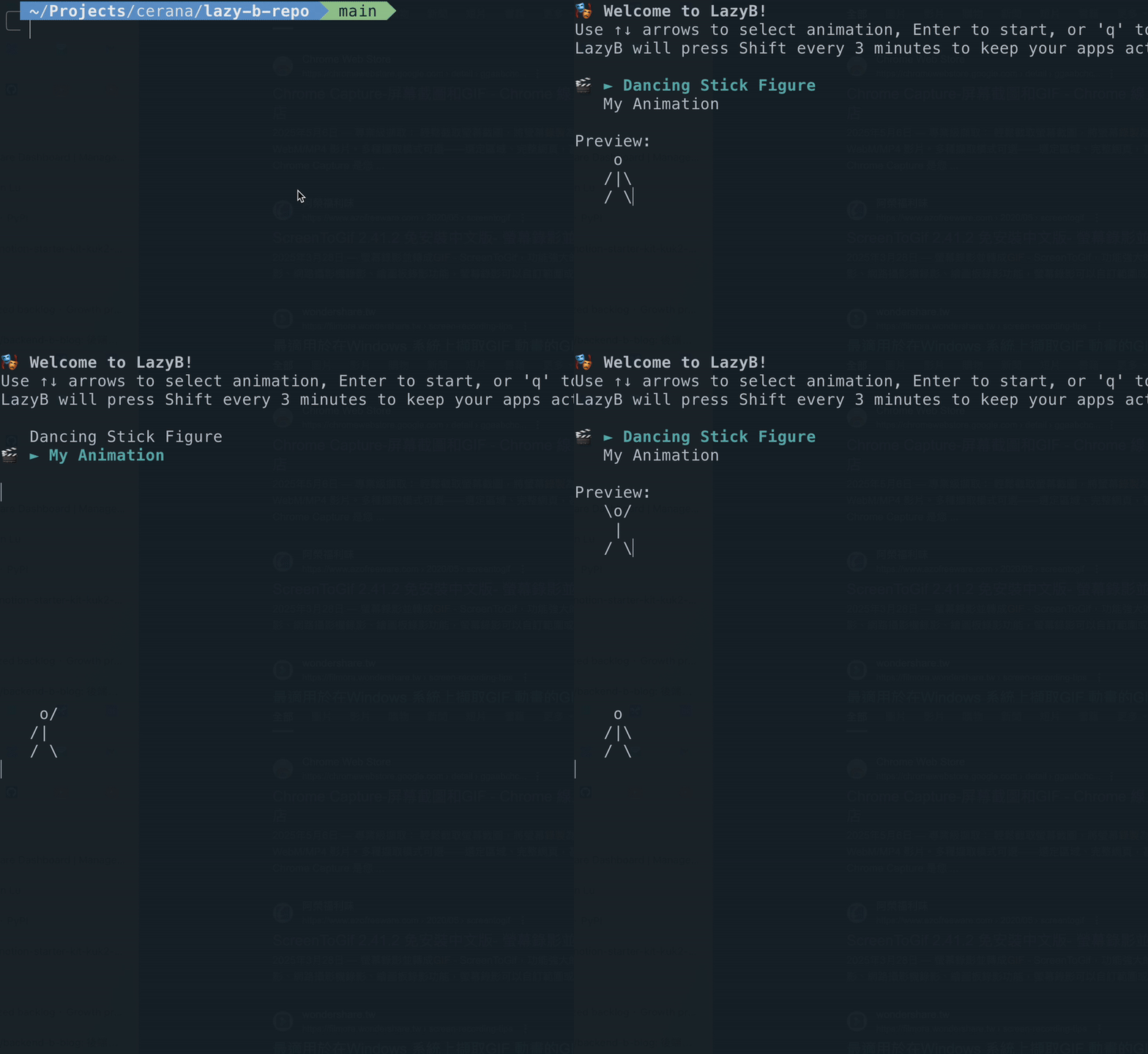
LazyB supports ASCII animations that play while keeping your status active. You can add your own custom animations to the system.
Animation File Structure
Animations are stored in the animations directory, with each animation in its own subdirectory. Each frame should be saved as a separate .txt file with a numbered sequence.
Supported naming formats:
frame_1.txt,frame_2.txt,frame_3.txt, ... (frame_NUMBER.txt)001_description.txt,002_description.txt,003_description.txt, ... (NUMBER_description.txt)
Example structure:
animations/
├── my_cool_animation/
│   ├── frame_1.txt
│   ├── frame_2.txt
│   └── frame_3.txt
└── another_animation/
    ├── 001_start.txt
    ├── 002_middle.txt
    └── 003_end.txt
Creating Animations from Videos
If you want to convert a video into ASCII animation, follow these steps:
Step 1: Convert Video to ASCII Frames
-
Clone the ASCII Animator tool:
git clone https://github.com/bradysheridan/ascii-animator.git
cd ascii-animator
-
Upload your video file to the ASCII Animator and process it through their system.
-
Export the output - you should get a
frames.jsfile containing an array of ASCII frames.
Step 2: Convert Frames to TXT Files
-
Place the
frames.jsfile in your LazyBanimationsdirectory. -
Run the conversion script (requires Node.js):
# Install Node.js if not already installed
# Visit https://nodejs.org/ or use package manager

cd animations
node convertFramesToTxt.js
-
Follow the prompts to name your animation directory (avoid spaces and special characters).
-
The script will create a new directory with all frames converted to individual
.txtfiles.
Step 3: Test Your Animation
-
Run LazyB and your new animation should appear in the selection menu:
lazy-b
-
Use arrow keys to navigate and select your animation.
Animation Guidelines
- File naming: Frames must be numbered sequentially starting from 1
- File format: Plain text (
.txt) files with UTF-8 encoding - Frame size: Recommended maximum 80 characters wide for terminal compatibility
- Frame rate: Default is 0.2 seconds per frame (5 FPS), configurable
- Directory naming: Use underscores instead of spaces, avoid special characters
Troubleshooting
- Animation not showing up? Check that frame files follow the naming convention
- Frames out of order? Ensure sequential numbering without gaps
- Display issues? Verify files are UTF-8 encoded and frames aren't too wide
Features
- Prevents "away" or "inactive" status in messaging applications
- 🎬 ASCII Animation Support: Display entertaining animations while keeping your status active
- Interactive animation selection menu with live preview
- Customizable interval between key presses (default: 3 minutes)
- Simple command-line interface
- Cross-platform: Works on macOS, Windows, and Linux
- Background mode on macOS (no dock icon)
- Python API for integration into your own scripts
- Minimal resource usage
Development
Setup Development Environment
# Clone the repository
git clone https://github.com/Lanznx/lazy-b.git
cd lazy-b

# Setup development environment
make dev-setup

# Install in development mode
make install
Releasing New Versions
To release a new version:
# Update version, create commit and tag
make release  # This will prompt for the new version

# Push changes and tag to GitHub
git push origin main
git push origin v<version>  # e.g., git push origin v0.2.0
Pushing a tag will automatically trigger the release workflow, which will:
- Build the package
- Create a GitHub release
- Publish to PyPI
Requirements
Runtime Requirements
- Python 3.8 or higher
- PyAutoGUI
- PyObjC-Core (for macOS dock icon hiding, optional)
Animation Development Requirements (Optional)
- Node.js (for running the frame conversion script)
- Access to ASCII Animator for video-to-ASCII conversion
License
MIT
Disclaimer
This tool is meant for legitimate use cases like preventing timeouts during presentations or when you're actively reading but not typing. Please use responsibly and in accordance with your organization's policies.
Release history Release notifications | RSS feed


Download files
Download the file for your platform. If you're not sure which to choose, learn more about installing packages.
Source Distribution
Built Distribution
Filter files by name, interpreter, ABI, and platform.
If you're not sure about the file name format, learn more about wheel file names.
Copy a direct link to the current filters
File details
Details for the file lazy_b-0.3.0.tar.gz.
File metadata
- Download URL: lazy_b-0.3.0.tar.gz
- Upload date:
- Size: 338.1 kB
- Tags: Source
- Uploaded using Trusted Publishing? No
- Uploaded via: twine/6.1.0 CPython/3.12.9
File hashes
| Algorithm | Hash digest | |
|---|---|---|
| SHA256 |
50cac11b811e0d43b7f16db8ccd1f7a806995ecda34c2ff5af96dc1a63c7f5a4
|
|
| MD5 |
06383098ee37d6661b9c5cbcf6e1d461
|
|
| BLAKE2b-256 |
d96221b567ee9eb4e016728efd9fdc44c3f961f1e233dbf845d000854a201a61
|
File details
Details for the file lazy_b-0.3.0-py3-none-any.whl.
File metadata
- Download URL: lazy_b-0.3.0-py3-none-any.whl
- Upload date:
- Size: 427.6 kB
- Tags: Python 3
- Uploaded using Trusted Publishing? No
- Uploaded via: twine/6.1.0 CPython/3.12.9
File hashes
| Algorithm | Hash digest | |
|---|---|---|
| SHA256 |
2e9c28b1132931dd3b664d0fcfbbffb0c2edbe2fc9d7a9a021ceb3fc2d1d0494
|
|
| MD5 |
8e0640affda71e1885240194a17c6e4f
|
|
| BLAKE2b-256 |
655f7694c80b24278a04d7e78ec5fa1c12ae7251e71b043611dbbd96f3711d35
|






