
Lazy finance (lbud for "lazy budget")

lbud aims to help building an easy, data-driven budget solution for personal use.
For examples of data, see example-data/.
Install
Install the published package with uv tool install lazy-budget.
To install the current checkout instead of the published release:
uv tool install .
Python 3.14 or newer is required.
Development
uv sync
uv run ruff format --check .
uv run ruff check .
uv run pytest
Use uv run lbud to run the checkout. Build release artifacts with uv build.
Full Budget web preview
The replacement application is being implemented in the separate full_budget
package while the existing lazy_budget CLI remains stable. The web application
currently supports accounts, ordinary transactions, dated budgets with explicit
account membership, live pacing statistics, named constraints, atomic currency
transfers, and recurring income or expense plans. Run it with:
cp .env.example .env
uv run uvicorn full_budget.web.app:app
Open http://127.0.0.1:8000. The accounting and implementation plans are in
specs/ACCOUNTING_PLAN.md and specs/WEB_APP_PLAN.md.
Workflow
lbud works in a very specific way: you declare
- the budgeting period (start and end date)
- how much money do you have (as of the first day of the budgeting period),
- how much do you wanna save (as of the last day of budgeting period),
- your financial operations.
Provided with the data described above, lbud allows you to see certain statistics over time, answers to these questions:
- How much more money can I actually spend today?
- How much money do I spend daily on average?
- When I spend too much money, for how many days should I limit my spendings to keep the money I set out to keep?
To start using lbud to manage your budget,
you will need to create and
maintain at least 2 text files.
Budget file
budget.yml is a YAML file that describes a single budgeting period. It is advised to keep the period short, but i am sure lbud can handle however long budgets. Example:
# total amount of money to use
total: 2000

# the part of the total
# that you aim to keep this month
keep: 1500

# budgeting period
start: 2021-04-25
end: 2021-05-10

# currency is optional
# USD is the default and
# the operations themselves can
# specify the currency (lbud add "-10 CAD" taxi), as well
# as the config file and CLI options
currency: USD
History file
history.csv is a CSV file that lists all of your financial operations. You may have one history file for all your budgets, history is filtered by budget period when performing calculations.
It has to have following columns:
money_value- operation value; may include a currency in multi-currency setups, format:-10.99 CAD;description- operation description; may include category, format:[category] description;dttm- operation date and time, ISO format.
Example:
-10,[food] snacks,2021-04-26T00:00:00
-1.95,[food] bubblegum,2021-04-27T17:20:31
-9.95,[food] hot dog,2021-04-27T00:00:00
-3.33,donation,2021-04-28T00:00:00
-30,[medicine] cardiologist,2021-04-29T00:00:00
Use of lbud on example files
$ lbud ls
           today : 2021-05-01
      total days : 16
       days left : 9
 available / day : $31.25
 CAN spend today : $163.52
     spent today : $0.00
 avg spent / day : $7.89
            kept : $1,663.52

$ lbud add -200 "club night"

$ cat history.csv  # added operation to history file
-10,[food] snacks,2021-04-26T00:00:00
-1.95,[food] bubblegum,2021-04-27T17:20:31
-9.95,[food] hot dog,2021-04-27T00:00:00
-3.33,donation,2021-04-28T00:00:00
-30,[medicine] cardiologist,2021-04-29T00:00:00
-200,club night,2021-05-01T00:00:00

$ lbud ls
                today : 2021-05-01
           total days : 16
            days left : 9
 days until can spend : 2
      available / day : $31.25
   CANNOT spend today : $36.48
          spent today : $200.00
      avg spent / day : $36.46
                 kept : $1,463.52

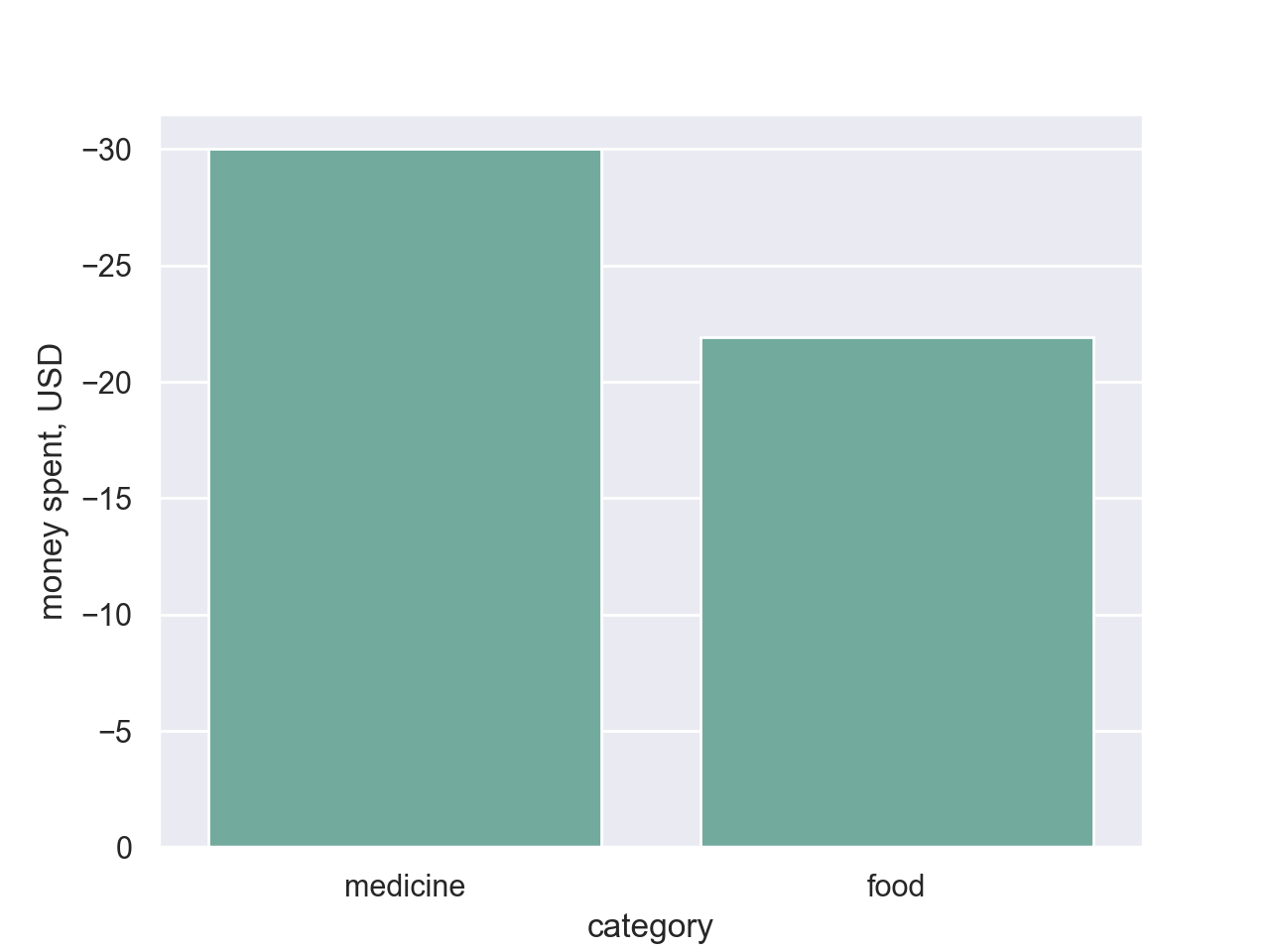
$ lbud cats
      medicine : -30,00 USD
          food : -21,90 USD
 <no category> : -3,33 USD
Charts
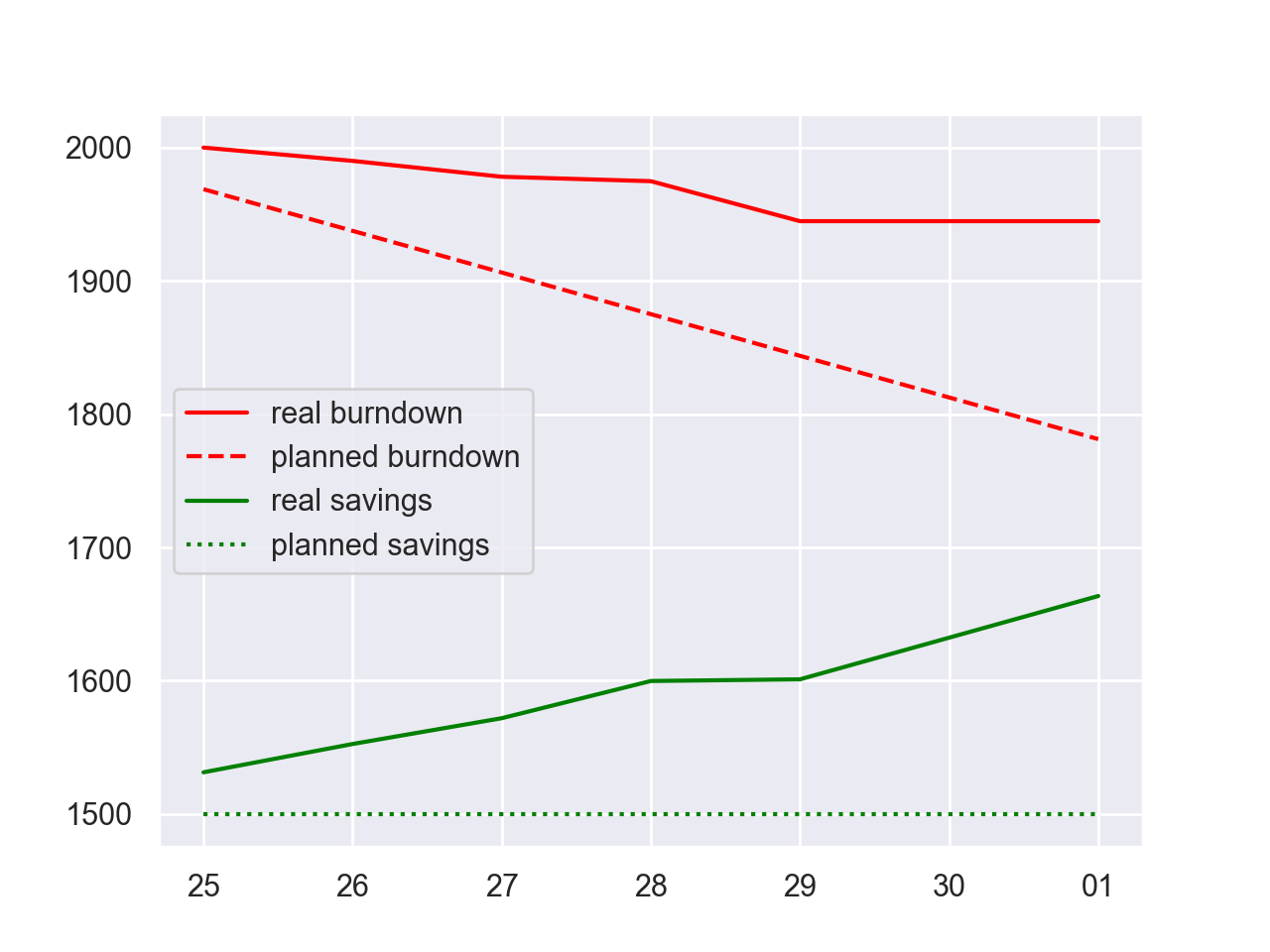
Burndown chart
Provides a bird's eye view of how things are going with the budget.
$ lbud bd
Category chart
Allows to determine how much money was spent/earned by which category.
$ lbud catc
CLI help
Note: all the defaults can be pulled from a config file at ~/.lbudrc.yml.
To override the location, specify LBUDRC environment variable.
lbud --help
Weird configuration stuff
There is a lot of configuration options to lbud
(CLI arguments, config file, the defaults)
and since it was tested and used
in a very specific way, it might not work for you.
Feel free to submit a ticket or a pull request (idk if it works, i'm new to this open source thing, please post a ticket about it too).
Posting the way it is actively being used for clarity:
- budget/history files at
~/finances/ - config file at
~/.lbudrc.yml:history_file: /Users/oleksandr/finances/history.csv budget_file: /Users/oleksandr/finances/budget.yml locale: pl_PL currency: PLN lbudanywhere
1 maintainer

Download files
Download the file for your platform. If you're not sure which to choose, learn more about installing packages.
Source Distribution
Built Distribution
Filter files by name, interpreter, ABI, and platform.
If you're not sure about the file name format, learn more about wheel file names.
Copy a direct link to the current filters
File details
Details for the file lazy_budget-1.0.0.tar.gz.
File metadata
- Download URL: lazy_budget-1.0.0.tar.gz
- Upload date:
- Size: 58.6 kB
- Tags: Source
- Uploaded using Trusted Publishing? No
- Uploaded via:
twine/7.0.0 CPython/3.14.6
File hashes
| Algorithm | Hash digest | |
|---|---|---|
| SHA256 |
085eb9867ee9992177c356530be39c93f86c6d785bdd47a954f6e891b778d4b2
|
|
| MD5 |
2164e728f48b979c31e3c4e0c0fe11a8
|
|
| BLAKE2b-256 |
910f67c548525d4b311ff3070d88ff0254086c098058cefc9c7ba8da1e3ef6c0
|
File details
Details for the file lazy_budget-1.0.0-py3-none-any.whl.
File metadata
- Download URL: lazy_budget-1.0.0-py3-none-any.whl
- Upload date:
- Size: 89.9 kB
- Tags: Python 3
- Uploaded using Trusted Publishing? No
- Uploaded via:
twine/7.0.0 CPython/3.14.6
File hashes
| Algorithm | Hash digest | |
|---|---|---|
| SHA256 |
601ba4591910701e5c009d3ac9d0cbbba47ba41db2ed444d903b3591f16cf631
|
|
| MD5 |
b58cf1ec0dfaaa7d36e99b959ea6e52f
|
|
| BLAKE2b-256 |
58fbbe07714c2ee7ad470f76fb6189d43109493549cf31d9fe093242f7570303
|







