
Automate type hint generation in a single line.

Project description
LazyTypeHint
Quickly generate accurate type hints for any Python data structure! LazyTypeHint supports a wide range of data types including dictionaries, callables, Pandas DataFrames, numpy arrays, and more.
pip install lazy-type-hint
Quick start
Here are some quick examples to get you started:
from lazy_type_hint import LazyTypeHint, LazyTypeHintLive

data = ({"name": "Peter", "age": 22},)
LazyTypeHint().from_data(data, class_name="MyClass").to_file("file.py")
LazyTypeHint().from_data(data, class_name="MyClass").to_string()
data_type_hinted = LazyTypeHintLive().from_data(data, class_name="MyClass")
Tools
lazy-type-hint comes with 2 tools (LazyTypeHint and LazyTypeHintLive) to generate
type hints for:
from_data: Any Python built-in data structure and more. This encompasses large or deeply nested structures, regular or multi-indexPandasDataFrames,numpyarrays, etc.from_yaml_file: The same functionality as from_data. If the YAML file contains comments, they're parsed as docstrings.
Each tool provides a variety of parameters that allow you to refine the type hint generation process or validate your data structures.
LazyTypeHintLive
Use LazyTypeHintLive to generate reusable type hints for any data structure. By doing
this, type hints will be immediately applied and preserved after the code is executed.
Note that the original data remains unaffected and the effect is limited to the type hint
level only.
from lazy_type_hint import LazyTypeHintLive

data = ({"name": "Peter", "age": 22},)
data_type_hinted = LazyTypeHintLive().from_data(data, class_name="Data")
# After executing this snippet, an interface `Data` is locally created and
# can be reused anywhere in any other file as long as `class_name="Data"`
#
# `LazyTypeHintLive.reset()` will erase all type hints created by this class.
Adding that extra line will allow you to:
| Perform static analysis to detect extra issues |  |
| Enjoy full autocompletion support from your IDE | 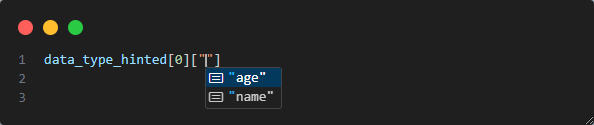 |
LazyTypeHint
LazyTypeHint also generates type hints for any input data. It differs from
LazyTypeHintLive in that you have the flexibility to manage the generated hints. With the
to_file() method, you can export an importable module that is used to provide type hints
and to keep the interface of your data structure updated whenever needed.
from lazy_type_hint import LazyTypeHint

data = {"name": "Peter", "age": 22}
LazyTypeHint().from_data(data, class_name="Data").to_string()
LazyTypeHint().from_data(data, class_name="Data").to_file("my_file.py")
When would this tool be useful?
As mentioned earlier, type hinting aids developers by providing additional IDE information
for code development and issue detection. Keeping type hints up to date for certain data
structures can often be tedious and error-prone. Whenever they are updated, the developer
must remember to revise the type hints as well. LazyTypeHint is designed to enjoy the
advantages of type hinted data structures without the burdensome maintenance.
What makes it a different tool?
There are tools like Cattrs and pydantic that aim to perform similar functions. However,
they require prior knowledge of the data structure, placing the responsibility of
declaration on the developer. These tools are primarily validation-focused. In contrast,
LazyTypeHint is geared towards generating improved type hints automatically and ensuring
access to structure is correct. Although other tools such as Stubgen automate .pyi file
generation, you may still need to adjust the environment to indicate the location of these
stub-based files.
How does it work?
Both LazyTypeHint tools parse the data structure to a tree-based data structure where each
node represents a different type or container (list, dict...). This tree structure
facilitates the detection and simplification of equal nodes from a type hinting
perspective, enables similarity-based merges, and offers full control of each type alias
generation.
Moreover, LazyTypeHintLive will locally update its own internal API and its pyi files
to include or remove new type hints generated. These features allow users to exploit the
benefits of their own type hints without managing anything related to the files.
Fine tuning type hint generation: All features
LazyTypeHint offers a range of strategies that can be passed to the initializer to
customize the tool's behavior and refine the generation of type hints:
Data structure validation
Use if_type_hint_exists to specify the strategy if type hints were already generated.
validate provides a string-based validation with respect to the previously generated type
hints for the same class_name
from lazy_type_hint import LazyTypeHintLive

data = [1,2,3]
data_type_hinted = LazyTypeHintLive(if_type_hint_exists="overwrite").from_data(data, class_name="MyClass")
data2 = [1,2,3, "a"]
data2_type_hinted = LazyTypeHintLive(if_type_hint_exists="validate").from_data(data2, class_name="MyClass")
Type hint YAML files
You can type hint the content of YAML files. This method will also parse all found comments.
LazyTypeHint().from_yaml_file(
    loader=my_yaml_loader,
    path="path_yo_yaml",
    class_name="Example",
    comments_are=("above", "side"),
).to_string()

# YAML content
"""
# This comment is above
name: Peter  # This comment is on the side.
"""

# Type hint generated (Note how both comments were parsed and included as docstrings)
'''
from typing import TypedDict

class Example:
  name: str
  """This comment is above. This comment is on the side."""
'''
Documenting type hints
Define a reserved keyword within your dictionaries to hold documentation. This is a common practice for file formats such as JSON where comments must be stored in this way.
from lazy_type_hint import LazyTypeHint, ParsingStrategies

data = {"name": "Peter", "doc": "Dictionary containing person data"}
lazy_type_hint = LazyTypeHint(strategies=ParsingStrategies(key_used_as_doc="doc"))
lazy_type_hint.from_data(data, class_name="Example").to_string()

# This will generate the following structure. Note the docstring under `Example`
'''
from typing import TypedDict


class Example(TypedDict):
    """Dictionary containing person data."""

    name: str
    doc: str
'''
Similarity based merge
If two data structures within a container are detected to be the same, only one type alias will be created. Moreover, by default, all dictionaries sharing 80% similarity will be merged. However, this parameter can be adjusted for different but similar mapping-based structures.
from lazy_type_hint import LazyTypeHint, ParsingStrategies

data = ({"name": "Peter", "age": 22}, {"name": "Keving", "age": 21, "married": True})
LazyTypeHint(ParsingStrategies(merge_different_typed_dicts_if_similarity_above=90)).from_data(data, class_name="MyClass").to_string()
"""
from typing import Tuple, TypedDict


class MyClassDict(TypedDict):
    name: str
    age: int


class MyClassDict2(TypedDict):
    name: str
    age: int
    married: bool

MyClass = tuple[MyClassDict, MyClassDict2]
"""

data = ({"name": "Peter", "age": 22}, {"name": "Keving", "age": 21, "married": True})
LazyTypeHint(ParsingStrategies(merge_different_typed_dicts_if_similarity_above=50)).from_data(data, class_name="MyClass").to_string()
"""
from typing import Tuple, TypedDict
from typing_extensions import NotRequired


class MyClassDict(TypedDict):
    name: str
    age: int
    married: NotRequired[bool]

MyClass = tuple[MyClassDict, MyClassDict]
"""
Type hinting dictionaries
Choose between Mapping, dict, or TypedDict (default) for type hinting dictionaries.
Additionally, TypedDict allows for read-only fields.
from lazy_type_hint import LazyTypeHint, ParsingStrategies

data = {"name": "Peter"}
LazyTypeHint(ParsingStrategies(dict_strategy="dict")).from_data(data, class_name="MyClass").to_string()
"""MyClass: TypeAlias = dict[str, str]"""
LazyTypeHint(ParsingStrategies(dict_strategy="Mapping")).from_data(data, class_name="MyClass").to_string()
"""MyClass: TypeAlias = Mapping[str, str]"""
LazyTypeHint(ParsingStrategies(dict_strategy="TypedDict")).from_data(data, class_name="MyClass").to_string()
"""
class MyClass(TypedDict):
   name: str
"""
LazyTypeHint(ParsingStrategies(dict_strategy="TypedDict", typed_dict_read_only_values=True)).from_data(data, class_name="MyClass").to_string()
"""
class MyClass(TypedDict):
    name: ReadOnly[str]
"""
Type hinting lists
Choose between list (default) and Sequence for type hinting lists.
from lazy_type_hint import LazyTypeHint, ParsingStrategies

data = [1,2,3]
LazyTypeHint(ParsingStrategies(list_strategy="list")).from_data(data, class_name="MyClass").to_string()
"""MyClass: TypeAlias = list[int]"""
LazyTypeHint(ParsingStrategies(list_strategy="Sequence")).from_data(data, class_name="MyClass").to_string()
"""MyClass: TypeAlias = Sequence[int]"""
Type hinting tuples
Choose between type hinting its size (default) or leaving it as an arbitrary size for tuples.
from lazy_type_hint import LazyTypeHint, ParsingStrategies

data = (1,2,3)
LazyTypeHint(ParsingStrategies(tuple_size_strategy="any size")).from_data(data, class_name="MyClass").to_string()
"""MyClass: TypeAlias = tuple[int, ...]"""
LazyTypeHint(ParsingStrategies(tuple_size_strategy="fixed")).from_data(data, class_name="MyClass").to_string()
"""MyClass: TypeAlias = tuple[int, int, int]"""
Type hinting Pandas based objects
Any Pandas dataframe, including those with simple and MultiIndex columns, can be type
hinted. When initializing any of the tools, ParsingStrategies(pandas_strategies=[...])
can be set. Available options are:
Do not type hint columnsType hint only for autocompleteThis one will only create the minimum amount of type hints to be used for IDE autocompletion.Full type hint(default): In addition to the previous one, this one will also raise static analysis errors if a wrong column is accessed.
import pandas as pd

from lazy_type_hint import LazyTypeHint

data = pd.DataFrame({"column1": [1, 2], "column2": [1, 2]})
LazyTypeHint().from_data(data, class_name="MyClass").to_string()
data = pd.DataFrame({("column1", "nested_column1"): [1, 2], ("column2", "nested_column2"): [1, 2]})
LazyTypeHint().from_data(data, class_name="MyClass").to_string()
Depth of the type aliases
To simplify the creation of type aliases, use min_height_to_define_type_alias. Higher
numbers will result in fewer type aliases being created.
from lazy_type_hint import LazyTypeHint, ParsingStrategies

data = (1,2,3, [1, 2])
LazyTypeHint(ParsingStrategies(min_height_to_define_type_alias=0)).from_data(data, class_name="MyClass").to_string()
"""MyClass: TypeAlias = tuple[int, int, int, list[int]]"""
LazyTypeHint(ParsingStrategies(min_height_to_define_type_alias=1)).from_data(data, class_name="MyClass").to_string()
"""
MyClassList: TypeAlias = list[int]
MyClass: TypeAlias = tuple[int, int, int, MyClassList]
"""
Structures supported
These include any combination of:
- Sequence-based:
list,tuple - Set-based:
set,frozenset - Mapping-based:
dict,MappingProxyType - Simple built-in types:
bool,int,float,range,slice,None,str - Callables:
lambda, functions,staticmethod,classmethod, built-in functions ModuleTypeIOBaseIterator- Custom objects: instances and classes
Pandasbased structures: IncludingDataFrame(withMultiIndexandIndex) andSeries.numpyarrays
Release history Release notifications | RSS feed


Download files
Download the file for your platform. If you're not sure which to choose, learn more about installing packages.
Source Distribution
Built Distribution
Filter files by name, interpreter, ABI, and platform.
If you're not sure about the file name format, learn more about wheel file names.
Copy a direct link to the current filters
File details
Details for the file lazy_type_hint-3.1.0.tar.gz.
File metadata
- Download URL: lazy_type_hint-3.1.0.tar.gz
- Upload date:
- Size: 38.6 kB
- Tags: Source
- Uploaded using Trusted Publishing? No
- Uploaded via: poetry/1.8.3 CPython/3.10.11 Windows/10
File hashes
| Algorithm | Hash digest | |
|---|---|---|
| SHA256 |
4d7504185bf76c704f5b948934910a3edbe80fd8b91a9dfd7b4b3fa587641d10
|
|
| MD5 |
a248e237b7cff78d5d415d720475f763
|
|
| BLAKE2b-256 |
f5f0c55e43207ad0105e460dfe8485fceab5cbd74c61846fe951f20005636579
|
File details
Details for the file lazy_type_hint-3.1.0-py3-none-any.whl.
File metadata
- Download URL: lazy_type_hint-3.1.0-py3-none-any.whl
- Upload date:
- Size: 55.7 kB
- Tags: Python 3
- Uploaded using Trusted Publishing? No
- Uploaded via: poetry/1.8.3 CPython/3.10.11 Windows/10
File hashes
| Algorithm | Hash digest | |
|---|---|---|
| SHA256 |
fe71a595378438ba72d9b3aef29801000389ff60c11bbe924bd270c7e26ad0c8
|
|
| MD5 |
d00cff046c9fc0dc9f2075ee765d1c16
|
|
| BLAKE2b-256 |
0f8f46ea2a2e8996ff2f2d4e5be40c2872e584516e98a8f4426ec2cbbd521489
|






