
A fast TUI lens over work knowledge
Verified details
These details have been verified by PyPIProject links
GitHub Statistics
Maintainers

Project description
lazylens

A fast terminal lens over work knowledge.
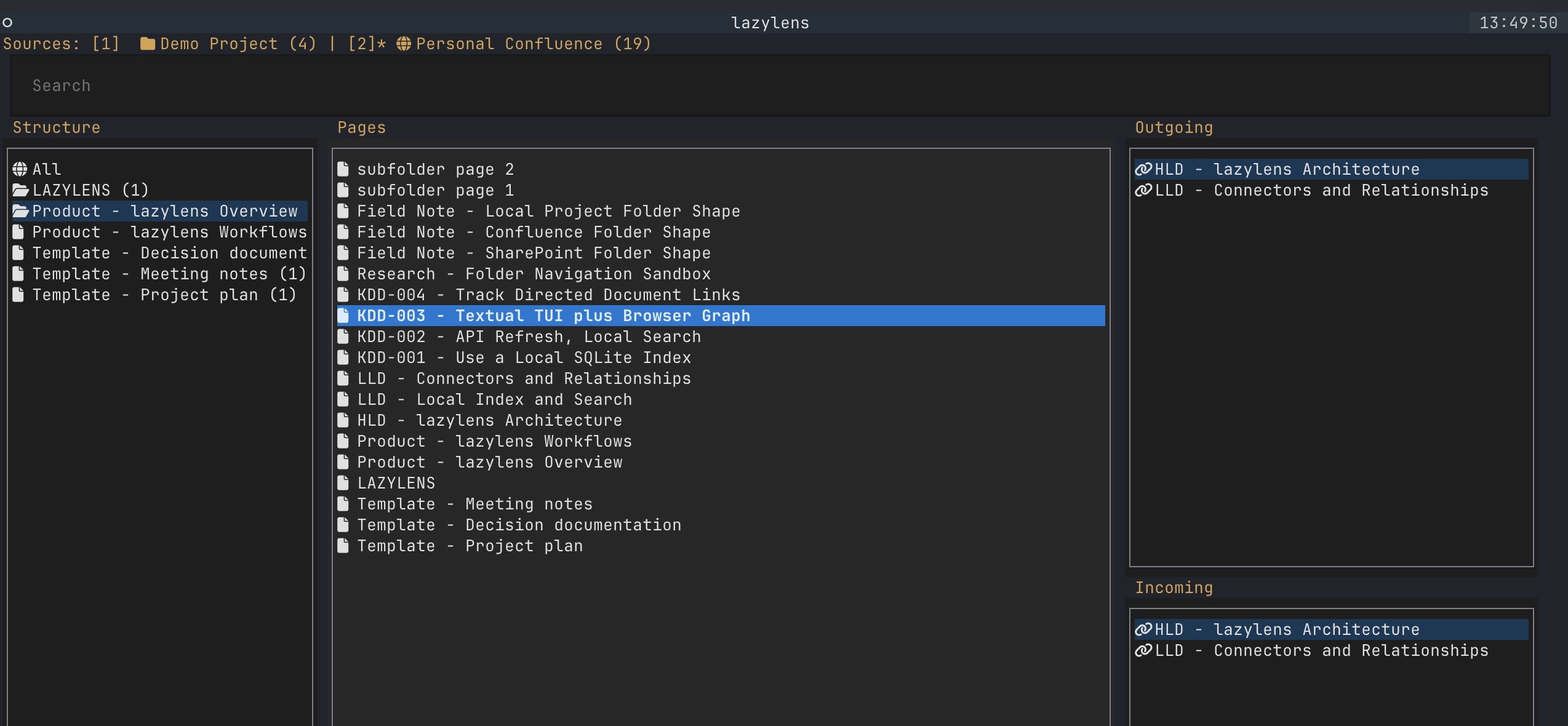
lazylens builds a local SQLite/FTS index over work knowledge, then gives you
a keyboard-first Textual TUI for search, source structure, previews, and
cross-linked document relationships.
The intended first use case is an Atlassian project: Confluence pages provide the design/document structure, Jira issues provide delivery detail, and relationships let you navigate between them without losing the source context. Local folders are also supported for notes, demos, and non-cloud documents. SharePoint is planned next.
Screenshot
Features
- Local SQLite index with FTS5 search.
- Confluence Cloud indexing with page hierarchy, folders, snippets, and links.
- Jira Cloud indexing with issues, hierarchy, snippets, and linked issues.
- Cross-source relationship navigation: Confluence pages can lead into Jira Epics/Stories/Bugs and Jira issues can lead back to Confluence LLDs/KDDs.
- Local folder indexing for Markdown, text, and other readable project files.
- TUI structure navigation: source, top-level pages, folders, and child pages.
- Browser/file opening from the selected page.
- Optional Nerd Font icon mode for richer terminal presentation.
Install
From PyPI:
pipx install lazylens
lazylens --help
From a checkout:
git clone https://github.com/richlee/lazylens.git
cd lazylens
python3 -m venv .venv
.venv/bin/python -m pip install -e ".[dev]"
.venv/bin/lazylens --help
On Windows PowerShell:
git clone https://github.com/richlee/lazylens.git
cd lazylens
py -m venv .venv
.\.venv\Scripts\python -m pip install -e ".[dev]"
.\.venv\Scripts\lazylens --help
Quick Start
For a real Atlassian project, configure Confluence and Jira as separate sources that share the same Atlassian env file:
lazylens init confluence \
  --base-url "https://example.atlassian.net" \
  --email "you@example.com" \
  --space-key ARCH

lazylens init jira \
  --base-url "https://example.atlassian.net" \
  --email "you@example.com" \
  --project-key ARCH
Edit the generated env file and paste your Atlassian API token:
${EDITOR:-vi} ~/.config/lazylens/atlassian.env
source ~/.config/lazylens/atlassian.env
lazylens doctor
lazylens index
lazylens
Inside the TUI, sources remain separate in the top row. The structure pane stays source-specific, while the outgoing/incoming relationship panes can cross between Confluence and Jira.
For a no-credentials demo:
lazylens demo
lazylens
Useful commands:
lazylens doctor
lazylens index
lazylens search architecture
lazylens
Atlassian Setup
lazylens uses Atlassian API-token basic auth for Confluence Cloud and Jira
Cloud. Remote APIs are used only to refresh the local SQLite index; TUI search
and navigation read from local data.
Credentials belong in:
~/.config/lazylens/atlassian.env
Source scope belongs in:
~/.config/lazylens/config.toml
Token values should stay out of config.toml and out of source control.
For personal or non-client testing, create a small Atlassian Cloud site, add a
Confluence space and Jira project, create an API token from your Atlassian
account security settings, then run lazylens doctor before indexing.
Confluence Source
Generate or append a Confluence source:
lazylens init confluence \
  --base-url "https://example.atlassian.net" \
  --email "you@example.com" \
  --space-key ARCH
Then:
source ~/.config/lazylens/atlassian.env
lazylens index personal-confluence
Jira Source
Generate or append a Jira source:
lazylens init jira \
  --base-url "https://example.atlassian.net" \
  --email "you@example.com" \
  --project-key LAZY
Then:
source ~/.config/lazylens/atlassian.env
lazylens index personal-jira
By default, Jira config uses project_keys to build a JQL query. You can use a
custom jql value in config.toml when you need a narrower scope.
Jira snippets and embedded links come from the first configured description
field that contains content. This supports projects that use custom fields such
as Description (DSP) instead of the standard Jira description field.
Local Folder Source
Local folders are useful for notes, exported documents, or demos:
lazylens init --root ~/Documents/notes --name Notes --key notes
lazylens index notes
Configuration
Default config path:
- macOS/Linux:
~/.config/lazylens/config.toml - Windows:
%APPDATA%\lazylens\config.toml
Default database path:
- macOS/Linux:
~/.local/share/lazylens/index.sqlite3 - Windows:
%LOCALAPPDATA%\lazylens\index.sqlite3
Example:
database = "~/.local/share/lazylens/index.sqlite3"

[ui]
icon_style = "ascii" # ascii, unicode, or nerd

[sources."notes"]
name = "Notes"
type = "local"
root = "~/Documents/notes"

[sources."personal-confluence"]
name = "Personal Confluence"
type = "confluence"
space_keys = ["ARCH"]
page_limit = 100
max_pages = 5

[sources."personal-jira"]
name = "Personal Jira"
type = "jira"
project_keys = ["LAZY"]
description_fields = ["description"]
issue_limit = 100
max_pages = 5
For Confluence, space_keys is usually the friendliest scope to configure. You
can also configure space_ids if you already know them. page_limit controls
API page size, and max_pages limits how many API result pages are fetched per
space.
For Jira, project_keys is the simplest scope. You can set jql instead when
you want to index a board, issue type, component, label, or other controlled
slice. description_fields is an ordered list of Jira field IDs or names to
use for snippets and embedded links. The first field with content wins, so a
project using a custom field can use:
description_fields = ["description", "Description (DSP)"]
If needed, base_url, email, or api_token_env can be set on Atlassian
sources. Token values should stay out of TOML. CONFLUENCE_BASE_URL may be
either the Atlassian site root or the /wiki URL; JIRA_BASE_URL should be the
Atlassian site root.
TUI Keys
1-9: switch source/: focus searchc: clear searchr: refresh configured sourcesEnter: select structure, open pages, or drill into foldersRight/Space: drill into page/folder children or follow selected linksLeft/Backspace: go back from a drilled viewq: quit
Icons
The TUI defaults to portable ASCII labels. For richer icons:
[ui]
icon_style = "nerd" # ascii, unicode, or nerd
nerd mode expects a Nerd Font in your terminal, for example FiraCode Nerd Font.
On macOS with Homebrew:
brew install --cask font-fira-code-nerd-font
Development
python3 -m venv .venv
.venv/bin/python -m pip install -e ".[dev]"
.venv/bin/python -m pytest
The project is intentionally local-first: remote APIs refresh the index, while interactive search/navigation reads from SQLite.
See docs/plan.md for the broader direction.
References
Project details
Verified details
These details have been verified by PyPIProject links
GitHub Statistics
Maintainers


Download files
Download the file for your platform. If you're not sure which to choose, learn more about installing packages.
Source Distribution
Built Distribution
Filter files by name, interpreter, ABI, and platform.
If you're not sure about the file name format, learn more about wheel file names.
Copy a direct link to the current filters
File details
Details for the file lazylens-0.3.0.tar.gz.
File metadata
- Download URL: lazylens-0.3.0.tar.gz
- Upload date:
- Size: 43.6 kB
- Tags: Source
- Uploaded using Trusted Publishing? Yes
- Uploaded via: twine/6.1.0 CPython/3.13.12
File hashes
| Algorithm | Hash digest | |
|---|---|---|
| SHA256 |
a09b89c014cdde29e603fe473763a1f8b5d06b1fc07f045d78901e61b66200b3
|
|
| MD5 |
0ef8f02424b862bf51a585b143852dcf
|
|
| BLAKE2b-256 |
12b8fc66e12b265cd4a43216001bd1aafd4f7de82a18b50ddd8c3b6713f44e29
|
Provenance
The following attestation bundles were made for lazylens-0.3.0.tar.gz:
Publisher:
publish.yml on richlee/lazylens
-
Statement:
-
Statement type:
https://in-toto.io/Statement/v1 -
Predicate type:
https://docs.pypi.org/attestations/publish/v1 -
Subject name:
lazylens-0.3.0.tar.gz -
Subject digest:
a09b89c014cdde29e603fe473763a1f8b5d06b1fc07f045d78901e61b66200b3 - Sigstore transparency entry: 2191326998
- Sigstore integration time:
-
Permalink:
richlee/lazylens@b0ab1b9dfc9fe2aa06d713c347f2f615e3c483e6 -
Branch / Tag:
refs/tags/v0.3.0 - Owner: https://github.com/richlee
-
Access:
public
-
Token Issuer:
https://token.actions.githubusercontent.com -
Runner Environment:
github-hosted -
Publication workflow:
publish.yml@b0ab1b9dfc9fe2aa06d713c347f2f615e3c483e6 -
Trigger Event:
release
-
Statement type:
File details
Details for the file lazylens-0.3.0-py3-none-any.whl.
File metadata
- Download URL: lazylens-0.3.0-py3-none-any.whl
- Upload date:
- Size: 35.1 kB
- Tags: Python 3
- Uploaded using Trusted Publishing? Yes
- Uploaded via: twine/6.1.0 CPython/3.13.12
File hashes
| Algorithm | Hash digest | |
|---|---|---|
| SHA256 |
98c501529f9d62a3b4b7b1968e909e515ec57f6c84891b709685455c4fbae21e
|
|
| MD5 |
194b63d53a0aabc86d0aa41c4248bd59
|
|
| BLAKE2b-256 |
b2d0699f7ad4c2aa60dbc7568c74b503d2fde82a7e1815e96f13f878013732a7
|
Provenance
The following attestation bundles were made for lazylens-0.3.0-py3-none-any.whl:
Publisher:
publish.yml on richlee/lazylens
-
Statement:
-
Statement type:
https://in-toto.io/Statement/v1 -
Predicate type:
https://docs.pypi.org/attestations/publish/v1 -
Subject name:
lazylens-0.3.0-py3-none-any.whl -
Subject digest:
98c501529f9d62a3b4b7b1968e909e515ec57f6c84891b709685455c4fbae21e - Sigstore transparency entry: 2191327024
- Sigstore integration time:
-
Permalink:
richlee/lazylens@b0ab1b9dfc9fe2aa06d713c347f2f615e3c483e6 -
Branch / Tag:
refs/tags/v0.3.0 - Owner: https://github.com/richlee
-
Access:
public
-
Token Issuer:
https://token.actions.githubusercontent.com -
Runner Environment:
github-hosted -
Publication workflow:
publish.yml@b0ab1b9dfc9fe2aa06d713c347f2f615e3c483e6 -
Trigger Event:
release
-
Statement type:






