
lazyllama
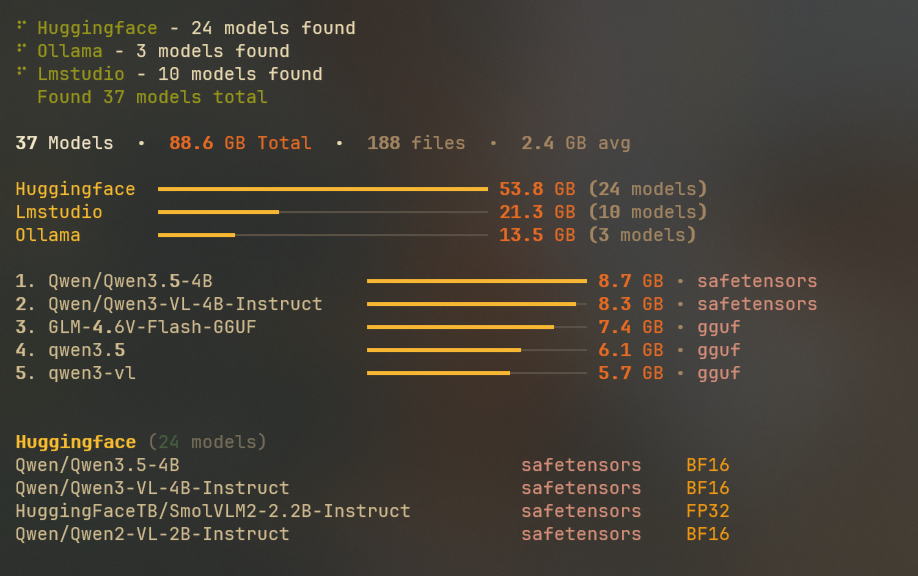
Local models management utility - discovers and lists models from HuggingFace, Ollama, and LM Studio.
Installation
pip install lazyllama
Usage
CLI Commands
Basic Usage
# Default simple overview
lazyllama

# Different display modes
lazyllama --mode simple     # Compact overview (default)
lazyllama --mode detailed   # Show filenames and comprehensive info
lazyllama --mode tree       # Hierarchical tree view

# Output only specific information
lazyllama --dirs            # Print model directories only
lazyllama --list            # Tab-separated list (name, source, size, path)
lazyllama --summary         # Show only summary statistics
lazyllama --json            # Output raw scanned data as JSON
lazyllama --raw             # Output raw scanned data in plain format
Custom Directories
# Include a custom scan directory for the current command
lazyllama --add-dir lmstudio /path/to/custom/models
lazyllama --add-dir huggingface /custom/hf/cache
Raw Data Output
# JSON format - structured data for programmatic use
lazyllama --json > models.json

# Plain text format - human-readable raw data
lazyllama --raw > models.txt
The --json flag outputs complete model information in structured JSON format including:
- Model metadata (name, source, size, file count, etc.)
- File details (path, size, format, type, quantization, etc.)
- Timestamps and cache information
- All discovered model attributes
The --raw flag outputs the same comprehensive data in a plain text format that's easier to read and parse manually.
Complete Command Reference
lazyllama [OPTIONS]

Options:
  -h, --help                Show help message
  -m, --mode MODE           Display mode: simple, detailed, tree (default: simple)
  --add-dir CACHE DIR       Add custom directory to model cache
  --dirs                    Print model directories only
  --list                    Tab-separated list output
  --summary                 Show only summary statistics
  --json                    Output raw scanned data as JSON
  --raw                     Output raw scanned data in plain format
  --debug                   Show debug info (cache dirs, scan timing)

Examples:
  lazyllama                              # Simple overview
  lazyllama --mode detailed              # Detailed view with filenames
  lazyllama --mode tree                  # Full hierarchical tree
  lazyllama --summary                    # Summary statistics only
  lazyllama --json                       # Raw data as JSON
  lazyllama --raw                        # Raw data in plain format
  lazyllama --debug                      # Debug info only
  lazyllama --debug --list               # Debug + parsable output
  lazyllama --add-dir lmstudio /my/path  # Add custom directory
1 maintainer

Release files for lazyllama 0.14.2
For a detailed explanation of source distributions (sdists) and built distributions (wheels), please see the package formats documentation.
Source distribution (sdist)
| File | Size | Uploaded | |
|---|---|---|---|
| lazyllama-0.14.2.tar.gz | 20.1 kB | Details |
Built distribution (wheel)
| File | Interpreter | ABI | Platform | Reset |
|---|---|---|---|---|
| lazyllama-0.14.2-py3-none-any.whl | Python 3 | none | any | Details |
Total release size: 48.4 kB
Release files / lazyllama-0.14.2.tar.gz
| Download URL | lazyllama-0.14.2.tar.gz |
|---|---|
| Size | 20.1 kB |
| Tags | Source |
|
SHA-256 checksum How to use checksums |
634f83c9e8286f835fbfb69e8ed2983859f1387dc56fc9c0131229438d66ea21
|
|
BLAKE2b-256 checksum How to use checksums |
af488411bb0892f9feeac51a195b0f7d35eb8d94554e15b0b1c9491312d6f7d4
|
| Upload date | |
|
Uploaded using Trusted Publishing? What is trusted publishing? |
No |
| Uploaded via |
uv/0.10.2 {"installer":{"name":"uv","version":"0.10.2","subcommand":["publish"]},"python":null,"implementation":{"name":null,"version":null},"distro":null,"system":{"name":null,"release":null},"cpu":null,"openssl_version":null,"setuptools_version":null,"rustc_version":null,"ci":null}
|
Release files / lazyllama-0.14.2-py3-none-any.whl
| Download URL | lazyllama-0.14.2-py3-none-any.whl |
|---|---|
| Size | 28.3 kB |
| Tags | Python 3 |
|
SHA-256 checksum How to use checksums |
0a3afb4cda3c367a45a9342598de09805a45ea7c60d073932748c7ff3be5b0ae
|
|
BLAKE2b-256 checksum How to use checksums |
e4242a88fbf285a1765b4ee3d124624521345e770c1d4914b63ded09ab97c3df
|
| Upload date | |
|
Uploaded using Trusted Publishing? What is trusted publishing? |
No |
| Uploaded via |
uv/0.10.2 {"installer":{"name":"uv","version":"0.10.2","subcommand":["publish"]},"python":null,"implementation":{"name":null,"version":null},"distro":null,"system":{"name":null,"release":null},"cpu":null,"openssl_version":null,"setuptools_version":null,"rustc_version":null,"ci":null}
|














