
LazySlide

Accessible and interoperable whole slide image analysis






Installation | Tutorials | Preprint | Nature Methods
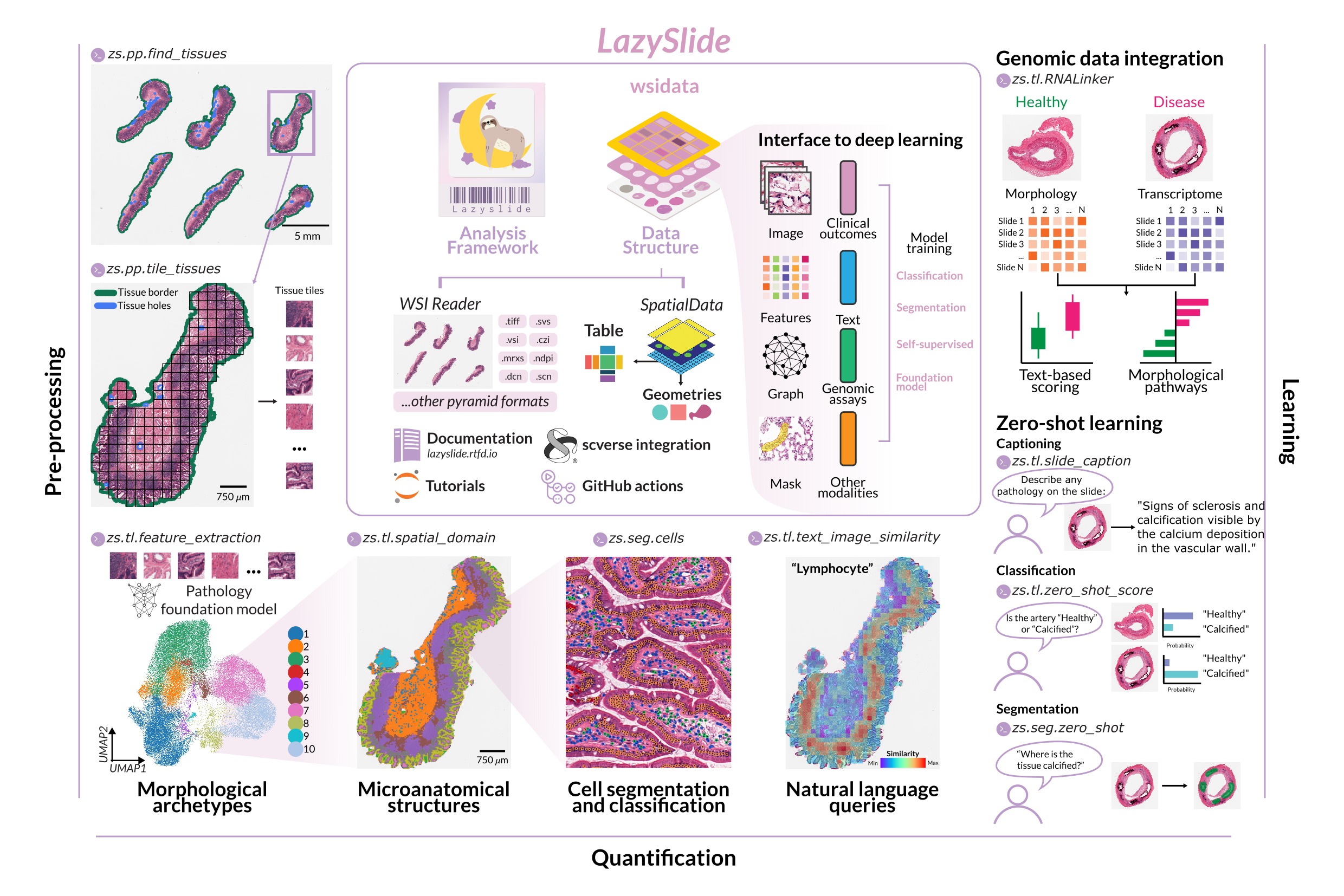
LazySlide is a Python framework for whole slide image (WSI) analysis in digital and computational pathology. From a raw slide to tissue masks, tiles, foundation-model features, cell segmentations and zero-shot predictions in a few lines of code. Everything is stored as SpatialData, so results go straight into scverse tools such as scanpy, anndata and squidpy.
Key features
- Preprocessing: tissue detection, tiling at any resolution, artifact QC
- Pathology foundation models: tile features from 30+ models (UNI, Virchow, Prov-GigaPath, H-optimus, …) or any timm model
- Segmentation: cells (InstanSeg, Cellpose, …), tissue and artifacts
- Vision-language models: zero-shot classification and segmentation, slide captioning, text search (CONCH, PLIP, TITAN, …)
- Spatial and multimodal analysis: spatial domains, tile graphs, linking morphology to gene expression
- Any slide format: SVS, NDPI, MRXS, DICOM, CZI, iSyntax and more via wsidata
- Deep learning ready: PyTorch datasets for training your own models
Installation
LazySlide supports Python 3.11–3.14 on Linux, macOS and Windows.
pip install lazyslide # or: uv add lazyslide
For extra slide readers (CZI, iSyntax, BioFormats) and gated models, see the installation guide and model zoo.
Quick start
Detect tissue, tile it and extract features from a sample slide in a few lines of code:
import lazyslide as zs

wsi = zs.datasets.sample()

# Pipeline
zs.pp.find_tissues(wsi)
zs.pp.tile_tissues(wsi, tile_px=256, mpp=0.5)
zs.tl.feature_extraction(wsi, model="resnet50")

# Access the features
features = wsi["resnet50_tiles"]

# Color tiles by feature dimensions 1 and 99
zs.pl.tiles(wsi, feature_key="resnet50", color=["1", "99"])
To open your own slide:
wsi = zs.open_wsi("path/to/slide.svs")
Documentation
New to digital pathology? Start with the getting started guide. The documentation also has tutorials, how-to guides, the API reference and the model zoo.
Citation
If you use LazySlide in your research, please cite:
Zheng Y, Abila E, Chrenková E, Buljan I, Winkler J, Rendeiro AF. LazySlide: accessible and interoperable whole-slide image analysis. Nature Methods 23, 728–731 (2026). https://doi.org/10.1038/s41592-026-03044-7
BibTeX
@article{zheng2026lazyslide,
  title   = {LazySlide: accessible and interoperable whole-slide image analysis},
  author  = {Zheng, Yimin and Abila, Ernesto and Chrenkov{\'a}, Eva and Buljan, Iva and Winkler, Juliane and Rendeiro, Andr{\'e} F.},
  journal = {Nature Methods},
  volume  = {23},
  number  = {4},
  pages   = {728--731},
  year    = {2026},
  doi     = {10.1038/s41592-026-03044-7}
}
Contributing
Contributions to documentation, tests and features are welcome, and so are suggestions. Open an issue or a pull request, and see the contributing guide.
Licence
LazySlide is released under the MIT License.
3 maintainers


Metadata
3 maintainers
Release files for lazyslide 0.13.0
For a detailed explanation of source distributions (sdists) and built distributions (wheels), please see the package formats documentation.
Source distribution (sdist)
| File | Size | Uploaded | |
|---|---|---|---|
| lazyslide-0.13.0.tar.gz | 112.7 kB | Details |
Built distribution (wheel)
| File | Interpreter | ABI | Platform | Reset |
|---|---|---|---|---|
| lazyslide-0.13.0-py3-none-any.whl | Python 3 | none | any | Details |
Total release size: 255.0 kB
Release files / lazyslide-0.13.0.tar.gz
| Download URL | lazyslide-0.13.0.tar.gz |
|---|---|
| Size | 112.7 kB |
| Tags | Source |
|
SHA-256 checksum How to use checksums |
3f6e1693412d0b18910525b9056eb650f4c16ff7a03c293d00527d1dd137e609
|
|
BLAKE2b-256 checksum How to use checksums |
ab7e5843a69fc48ac268926b223ba91e624180a2e95a1f5a3bcdcdd36ccc8939
|
| Upload date | |
|
Uploaded using Trusted Publishing? What is trusted publishing? |
Yes |
| Uploaded via |
uv/0.12.22 {"installer":{"name":"uv","version":"0.12.22","subcommand":["publish"]},"python":null,"implementation":{"name":null,"version":null},"distro":{"name":"Ubuntu","version":"24.04","id":"noble","libc":null},"system":{"name":null,"release":null},"cpu":null,"openssl_version":null,"setuptools_version":null,"rustc_version":null,"ci":true}
|
Release files / lazyslide-0.13.0-py3-none-any.whl
| Download URL | lazyslide-0.13.0-py3-none-any.whl |
|---|---|
| Size | 142.4 kB |
| Tags | Python 3 |
|
SHA-256 checksum How to use checksums |
eaeead6f2db81dddc17c81b96c99d99518e59c9950c659ffecf040e578fb196a
|
|
BLAKE2b-256 checksum How to use checksums |
0bdb19d9fbdf3d7d49f69d37b898530a6075a6edee7036ac3f81eb85745f1ad1
|
| Upload date | |
|
Uploaded using Trusted Publishing? What is trusted publishing? |
Yes |
| Uploaded via |
uv/0.12.22 {"installer":{"name":"uv","version":"0.12.22","subcommand":["publish"]},"python":null,"implementation":{"name":null,"version":null},"distro":{"name":"Ubuntu","version":"24.04","id":"noble","libc":null},"system":{"name":null,"release":null},"cpu":null,"openssl_version":null,"setuptools_version":null,"rustc_version":null,"ci":true}
|














