
lazyvenv




A TUI for managing Python virtual environments.
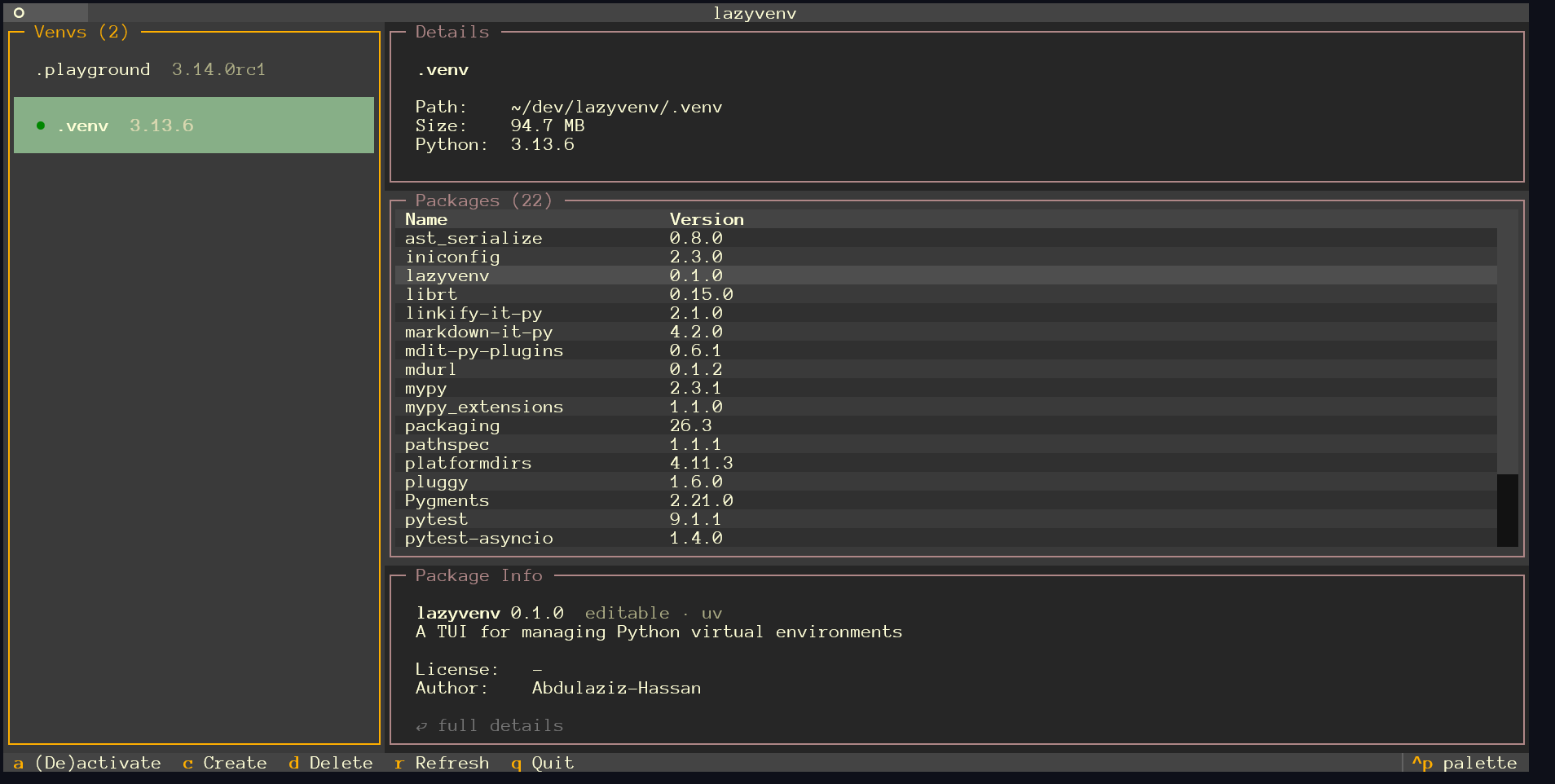
lazyvenv shows the virtual environments in the current directory, lets you inspect their installed packages (including origin, size, and metadata), and create, delete, activate, and deactivate environments — all from one keyboard- driven interface.
Requirements
- Python 3.13 or newer
- uv — used to list interpreters and create venvs
- zsh, bash, or sh (for the activation shell hook)
Install
uv tool install lazyvenv
This installs the lazyvenv command globally, outside any project venv —
which is required for activation to work reliably.
Any isolated installer works, e.g. pipx:
pipx install lazyvenv
Python 3.13 or newer is required, and uv is still needed on your PATH to create venvs.
Shell integration (for activation)
Pressing a inside the app marks a venv to be (de)activated, and the change
is applied when you quit. For that to work, add the wrapper function to your
shell config:
# ~/.zshrc or ~/.bashrc
eval "$(lazyvenv init zsh)"   # or: lazyvenv init bash
Restart your shell (or source the file). Without this hook the app still
works, but a will show a warning instead of activating.
Usage
Run lazyvenv inside any directory containing virtual environments (it scans
the directory itself and its immediate children for pyvenv.cfg files):
cd your-project
lazyvenv
Keys
| Key | Action |
|---|---|
j / k |
Move the cursor up/down (arrow keys work too) |
h / l |
Switch between the venv list and the packages table |
a |
Toggle (de)activation of the highlighted venv (applied on quit) |
c |
Create a new venv (pick any uv-managed interpreter) |
d |
Delete the highlighted venv (with confirmation) |
r |
Refresh the venv list |
/ |
Filter packages by name (Esc clears) |
⏎ |
Open the full details for the highlighted package |
q |
Quit (or go back, inside a screen/dialog) |
CLI
lazyvenv               Launch the TUI
lazyvenv init [shell]  Print the shell wrapper (zsh, bash, or sh)
lazyvenv --version     Print the version
lazyvenv --help        Show help
Development
git clone https://github.com/Abdulaziz-Hassan/lazyvenv
cd lazyvenv
uv sync
uv run pytest        # tests
uv run ruff check    # lint
uv run ruff format   # format
uv run mypy          # types (strict)
uv run lazyvenv      # run the app
For local development of the global command (e.g. to test the shell hook):
uv tool install --editable .
Changelog
See CHANGELOG.md.
License
1 maintainer

Download files
Download the file for your platform. If you're not sure which to choose, learn more about installing packages.
Source Distribution
Built Distribution
Filter files by name, interpreter, ABI, and platform.
If you're not sure about the file name format, learn more about wheel file names.
Copy a direct link to the current filters
File details
Details for the file lazyvenv-0.2.0.tar.gz.
File metadata
- Download URL: lazyvenv-0.2.0.tar.gz
- Upload date:
- Size: 13.6 kB
- Tags: Source
- Uploaded using Trusted Publishing? No
- Uploaded via:
uv/0.12.1 {"installer":{"name":"uv","version":"0.12.1","subcommand":["publish"]},"python":null,"implementation":{"name":null,"version":null},"distro":{"name":"Ubuntu","version":"20.04","id":"focal","libc":null},"system":{"name":null,"release":null},"cpu":null,"openssl_version":null,"setuptools_version":null,"rustc_version":null,"ci":null}
File hashes
| Algorithm | Hash digest | |
|---|---|---|
| SHA256 |
f26e67c473b2058a49e49bb4f658b796d4bb3e2eac541e58fabe8ca50cd4efa6
|
|
| MD5 |
726e1b7ac148cdb00116e051af95dfa5
|
|
| BLAKE2b-256 |
ff1e9b6e47437e8c08fa09e2e653729f97052194206599f9c38f2dec033e1c45
|
File details
Details for the file lazyvenv-0.2.0-py3-none-any.whl.
File metadata
- Download URL: lazyvenv-0.2.0-py3-none-any.whl
- Upload date:
- Size: 17.7 kB
- Tags: Python 3
- Uploaded using Trusted Publishing? No
- Uploaded via:
uv/0.12.1 {"installer":{"name":"uv","version":"0.12.1","subcommand":["publish"]},"python":null,"implementation":{"name":null,"version":null},"distro":{"name":"Ubuntu","version":"20.04","id":"focal","libc":null},"system":{"name":null,"release":null},"cpu":null,"openssl_version":null,"setuptools_version":null,"rustc_version":null,"ci":null}
File hashes
| Algorithm | Hash digest | |
|---|---|---|
| SHA256 |
972366a5e93a980054c63c56a168154040a3a39ab2ec6345716d2e90df7b198f
|
|
| MD5 |
f56fc07a74f4aca86047e42d9fb2101f
|
|
| BLAKE2b-256 |
aa5ce991b13ef9ae6bf718188ea5161e5c57001765e7a936c7ef2526a5df8fe0
|














