
Format and display content on HD44780 LCDs with scrolling, pagination, and frame-based management — no RPLCD dependency

Project description
LCD-Content-Formatter





Format and display content on HD44780 LCDs (1602 / 2004) with scrolling, automatic pagination, and fixed prefix/postfix labels — all without the RPLCD dependency.

Features
- Frame-based API — group rows into a
Frame; the library handles page breaks automatically - Horizontal scrolling — scroll in, scroll to blank, or scroll only when text overflows
- Prefix / postfix — keep static labels (e.g.
"Temp: "," °C") separate from the changing value - Zero RPLCD dependency — talks directly to the PCF8574 I2C expander via
smbus2 - Context-manager support —
with HD44780(...) as lcd:closes the I2C bus on exit - Backward-compatible — v1 method names (
scrollFrame,addWithGuid, …) still work
Requirements
| Requirement | Version |
|---|---|
| Python | ≥ 3.7 |
| smbus2 | ≥ 0.4.1 |
| Hardware | HD44780 LCD (1602 or 2004) + PCF8574 I2C expander |
| OS | Linux with I2C enabled (e.g. Raspberry Pi OS) |
Installation
pip install lcd-content-formatter
Enable I2C on Raspberry Pi
sudo raspi-config          # Interfacing Options → I2C → Enable
sudo reboot
i2cdetect -y 1             # confirm your display address (commonly 0x27 or 0x3F)
Quick start
from lcd_content_formatter import HD44780

with HD44780("PCF8574", 0x27, cols=20, rows=4) as lcd:
    frame = lcd.Frame()

    # Rows with static prefix and postfix
    row_temp = frame.add("temp",  "-",  prefix="Temp:  ", postfix=" °C")
    row_hum  = frame.add("hum",   "-",  prefix="Hum:   ", postfix=" %")
    row_time = frame.add("time",  "-",  prefix="Time:  ")
    row_date = frame.add("date",  "-",  prefix="Date:  ")

    import time
    from datetime import date, datetime

    while True:
        row_temp.text = "23.5"
        row_hum.text  = "61"
        row_time.text = datetime.now().strftime("%H:%M:%S")
        row_date.text = str(date.today())

        for row in (row_temp, row_hum, row_time, row_date):
            frame.update_row(row)

        lcd.scroll_frame(frame)
        time.sleep(1)
Concept
The following diagram illustrates how content is organised for a 20×4 display. The same model applies to 16×2 displays — only the physical dimensions change.
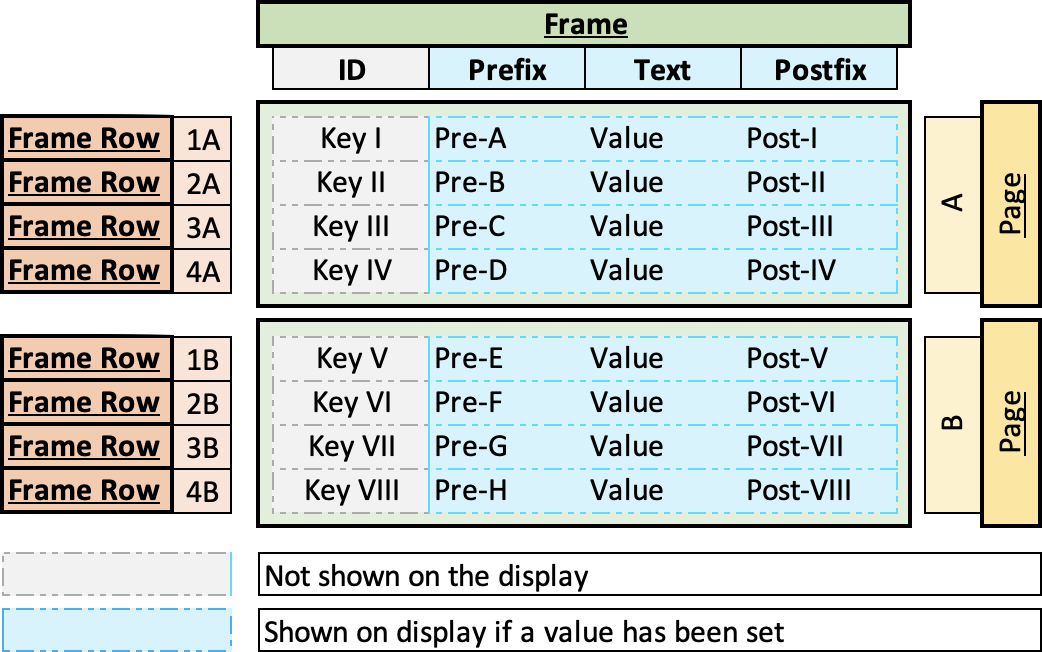
Frame
A Frame is a container that holds an ordered list of Frame Rows. When a Frame is passed to scroll_frame() or write_frame(), the library groups its rows into pages automatically — there is no manual page management.
Page
When the number of Frame Rows exceeds the physical display height (e.g. 8 rows on a 4-row display), the library splits them into Pages. scroll_frame() iterates through every page in sequence.
Frame Row
Each Frame Row maps to one line on the display and has four parts:
| Part | Required | Description |
|---|---|---|
id |
optional | Unique key used to retrieve and update the row later. Omit with add_with_guid() for static rows. |
prefix |
optional | Static label before the value — e.g. "Temp: ". Never scrolls. |
text |
yes | The dynamic value you update at runtime — e.g. "23.5". This is the part that scrolls when it overflows. |
postfix |
optional | Static label after the value — e.g. " °C". Included in the scrolling window. |
The display renders each row as: prefix + text + postfix, padded or truncated to the column width.
┌────────────────────┐
│ Temp:  23.5 °C     │  row 0 — prefix="Temp:  "  text="23.5"  postfix=" °C"
│ Hum:   61 %        │  row 1 — prefix="Hum:   "  text="61"    postfix=" %"
│ Time:  14:32:01    │  row 2 — prefix="Time:  "  text="14:32:01"
│ Date:  2024-06-01  │  row 3 — prefix="Date:  "  text="2024-06-01"
└────────────────────┘
         Page 1 of 2

┌────────────────────┐
│ IP eth0: 192.168.. │  row 4 — long text scrolls left automatically
│ IP wlan0: UNKNOWN  │  row 5
│ CPU temp: 52.3 °C  │  row 6
│                    │  row 7 — empty row pads the last page
└────────────────────┘
         Page 2 of 2
API reference
HD44780(i2c_expander, address, cols, rows, port=1, backlight=True)
Main class. Constructor parameters:
| Parameter | Type | Description |
|---|---|---|
i2c_expander |
str |
Expander type — "PCF8574" |
address |
int |
I2C address, e.g. 0x27 |
cols |
int |
Number of display columns (16 or 20) |
rows |
int |
Number of display rows (2 or 4) |
port |
int |
I2C bus number (default 1) |
backlight |
bool |
Backlight state at startup |
lcd.Frame()
Create a new, empty Frame object (also importable as from lcd_content_formatter import Frame).
frame.add(id, text="", prefix="", postfix="") → FrameRow
Add a row with an explicit string ID. Raises DuplicateFrameRowError if the ID already exists.
frame.add_with_guid(text="", prefix="", postfix="") → FrameRow
Add a row with an auto-generated UUID as the ID. Use this for static labels that are never updated by ID.
frame.get_row(id, create_if_missing=True) → FrameRow
Retrieve a row by ID. Creates an empty row when create_if_missing=True (default).
frame.update_row(row: FrameRow)
Replace the stored row whose id matches row.id with the updated object.
frame.remove(id)
Remove a row by ID. Raises FrameRowNotFoundError if not found.
frame.clear()
Remove all rows from the frame.
lcd.write_frame(frame, page=1)
Render a single page of frame to the display. No scrolling — use scroll_frame for animations.
lcd.scroll_frame(frame, scroll_in=False, scroll_to_blank=False, scroll_if_fit=False, delay=0.5, show_first_after_scroll=True)
Display frame with optional horizontal scrolling.
| Parameter | Default | Description |
|---|---|---|
scroll_in |
False |
Text enters from the right edge |
scroll_to_blank |
False |
Text scrolls fully off the left before the next page |
scroll_if_fit |
False |
Animate even rows that fit without scrolling |
delay |
0.5 |
Seconds between scroll steps (controls speed) |
show_first_after_scroll |
True |
Reset display to page 1 after all pages finish |
Scroll mode combinations:
scroll_in |
scroll_to_blank |
Effect |
|---|---|---|
False |
False |
Standard — scrolls left until end of text is visible, then pauses |
True |
False |
Text enters from the right, stops when fully visible |
False |
True |
Text scrolls left until completely off screen |
True |
True |
Text enters from the right and exits to the left |
lcd.close()
Release the I2C bus. Called automatically when used as a context manager.
FrameRow attributes
| Attribute | Type | Description |
|---|---|---|
id |
str |
Unique identifier |
text |
str |
Dynamic value (the part that changes) |
prefix |
str |
Static label shown before text |
postfix |
str |
Static label shown after text |
full_text |
str |
Read-only: prefix + text + postfix |
Exceptions
| Exception | Inherits | Raised when |
|---|---|---|
LCDError |
Exception |
Base class |
FrameRowNotFoundError |
LCDError, KeyError |
Row ID not found in frame |
DuplicateFrameRowError |
LCDError, ValueError |
Row ID already exists |
I2CError |
LCDError, OSError |
I2C bus communication failure |
Migration from v1
v2 removes the RPLCD dependency. The main changes are:
| v1 | v2 |
|---|---|
pip install RPLCD |
pip install smbus2 (done automatically) |
from HD44780 import HD44780 |
from lcd_content_formatter import HD44780 |
lcd.Frame() |
unchanged |
frame.addWithGuid(...) |
frame.add_with_guid(...) (old name still works) |
frame.getFrame(id) |
frame.get_row(id) (old name still works) |
lcd.scrollFrame(...) |
lcd.scroll_frame(...) (old name still works) |
Constructor: HD44780(expander, addr, cols, rows) |
same, positional order unchanged |
All v1 method names are kept as deprecated aliases so existing scripts continue to run.
Wiring
Connect the PCF8574 I2C expander to your Raspberry Pi as shown below:
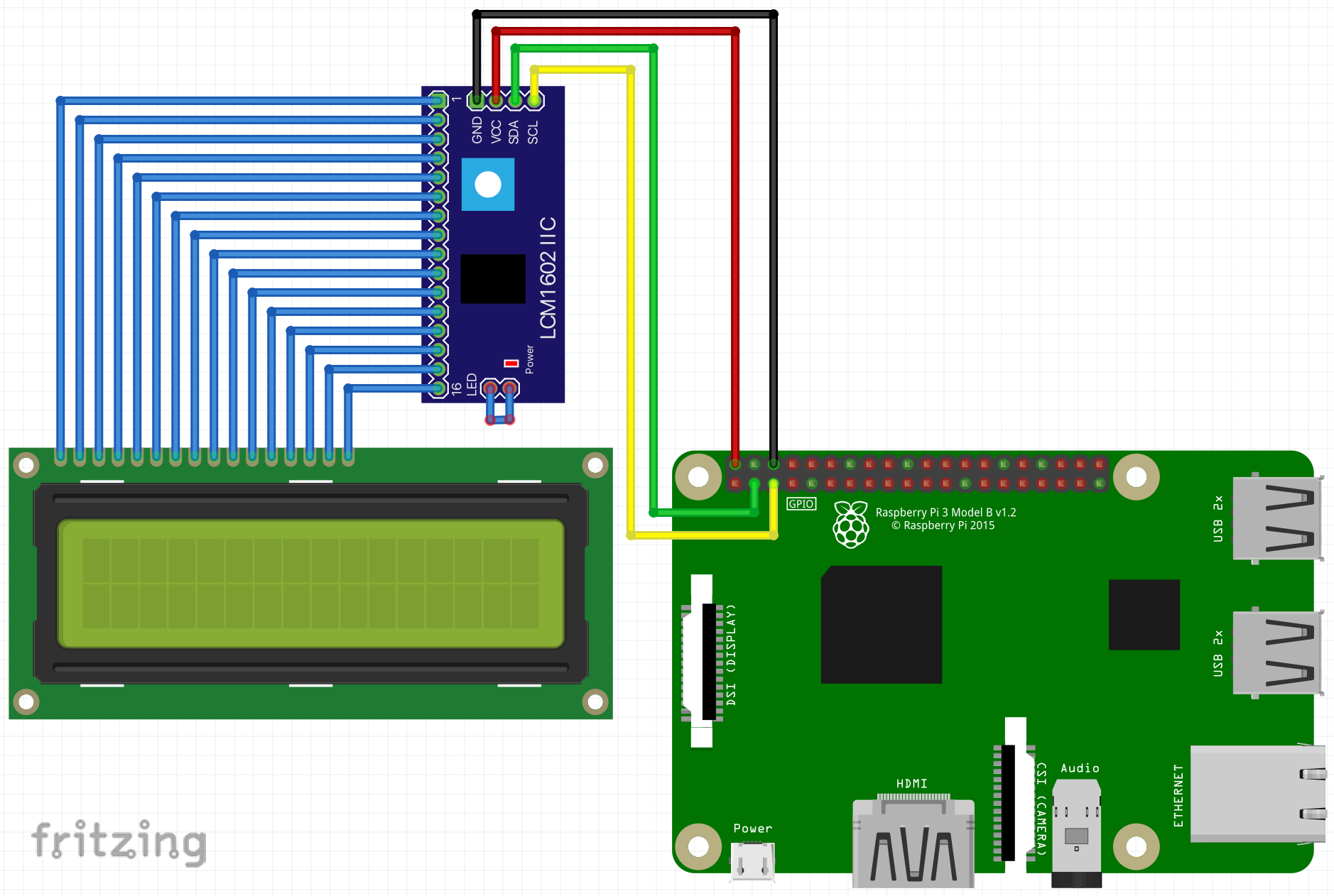
The default PCF8574 pin mapping assumed by this library:
| PCF8574 pin | HD44780 pin | Function |
|---|---|---|
| P0 | RS | Register Select |
| P1 | RW | Read/Write (always write) |
| P2 | EN | Enable |
| P3 | — | Backlight |
| P4–P7 | D4–D7 | 4-bit data bus |
Sample
A runnable demo is in the sample/ directory. It shows IP addresses, CPU temperature, a counter, date, time, and a long scrolling text across two pages on a 20×4 display.
Scroll animation examples:
- Standard scrolling text
- Text scrolling in (
scroll_in=True) - Text scrolling in and out (
scroll_in=True, scroll_to_blank=True)


1. Configure your hardware
Edit sample/config.py:
lcd_i2c_expander_type = "PCF8574"
lcd_i2c_address = 0x27   # use i2cdetect -y 1 to find your address
lcd_column_count = 20
lcd_row_count    = 4
2. Run
python sample/sample.py
3. Sample code
from lcd_content_formatter import HD44780
import config
import sample_functions
import time
from datetime import date, datetime

with HD44780(
    config.lcd_i2c_expander_type,
    config.lcd_i2c_address,
    cols=config.lcd_column_count,
    rows=config.lcd_row_count,
) as lcd:
    frame = lcd.Frame()

    # Rows with explicit IDs — updated in the loop by reference
    row_ip_eth0  = frame.add("ip_eth0",  "-", prefix="IP eth0:  ")
    row_ip_wlan0 = frame.add("ip_wlan0", "-", prefix="IP wlan0: ")
    row_temp     = frame.add("cpu_temp", "-", prefix="CPU temp: ", postfix=" °C")
    row_counter  = frame.add("counter",  "-", prefix="Count: ",   postfix=" iter.")

    # These rows push the frame beyond 4 rows → page 2 is created automatically
    row_date = frame.add_with_guid("-", prefix="Date: ")
    row_time = frame.add_with_guid("-", prefix="Time: ")
    row_long = frame.add_with_guid("Lorem ipsum dolor sit amet!", prefix="Text: ")

    while True:
        row_ip_eth0.text  = sample_functions.get_ip_address("eth0")
        row_ip_wlan0.text = sample_functions.get_ip_address("wlan0")
        row_temp.text     = str(sample_functions.get_cpu_temperature())
        row_counter.text  = str(config.sample_counter)
        row_date.text     = str(date.today())
        row_time.text     = datetime.now().strftime("%H:%M:%S")

        for row in (row_ip_eth0, row_ip_wlan0, row_temp, row_counter, row_date, row_time):
            frame.update_row(row)

        # Change scroll_in / scroll_to_blank / scroll_if_fit to try different animations
        lcd.scroll_frame(frame, scroll_in=False, scroll_to_blank=False)

        config.sample_counter += 1
Changelog
See CHANGELOG.md.
License
MIT © 2021-2026 Phoeluga
Release history Release notifications | RSS feed


Download files
Download the file for your platform. If you're not sure which to choose, learn more about installing packages.
Source Distribution
Built Distribution
Filter files by name, interpreter, ABI, and platform.
If you're not sure about the file name format, learn more about wheel file names.
Copy a direct link to the current filters
File details
Details for the file lcd_content_formatter-2.0.0.tar.gz.
File metadata
- Download URL: lcd_content_formatter-2.0.0.tar.gz
- Upload date:
- Size: 18.9 kB
- Tags: Source
- Uploaded using Trusted Publishing? Yes
- Uploaded via: twine/6.1.0 CPython/3.13.7
File hashes
| Algorithm | Hash digest | |
|---|---|---|
| SHA256 |
01c25fe2f91f0a69911aa60e78f097dcace6bb99ed0071e6197d3475ce8211c1
|
|
| MD5 |
91a587e4cc39e86771c8aa91f1d82257
|
|
| BLAKE2b-256 |
d903a6a5f5b44f503a9ccc1a45456d00a55369e19fcc1733f315caeff69edbb5
|
Provenance
The following attestation bundles were made for lcd_content_formatter-2.0.0.tar.gz:
Publisher:
release.yml on phoeluga/LCD-Content-Formatter
-
Statement:
-
Statement type:
https://in-toto.io/Statement/v1 -
Predicate type:
https://docs.pypi.org/attestations/publish/v1 -
Subject name:
lcd_content_formatter-2.0.0.tar.gz -
Subject digest:
01c25fe2f91f0a69911aa60e78f097dcace6bb99ed0071e6197d3475ce8211c1 - Sigstore transparency entry: 1244339712
- Sigstore integration time:
-
Permalink:
phoeluga/LCD-Content-Formatter@e3de5ae06dd730669b08fa1e4c4163439265b3a1 -
Branch / Tag:
refs/tags/v2.0.0 - Owner: https://github.com/phoeluga
-
Access:
public
-
Token Issuer:
https://token.actions.githubusercontent.com -
Runner Environment:
github-hosted -
Publication workflow:
release.yml@e3de5ae06dd730669b08fa1e4c4163439265b3a1 -
Trigger Event:
push
-
Statement type:
File details
Details for the file lcd_content_formatter-2.0.0-py3-none-any.whl.
File metadata
- Download URL: lcd_content_formatter-2.0.0-py3-none-any.whl
- Upload date:
- Size: 15.7 kB
- Tags: Python 3
- Uploaded using Trusted Publishing? Yes
- Uploaded via: twine/6.1.0 CPython/3.13.7
File hashes
| Algorithm | Hash digest | |
|---|---|---|
| SHA256 |
f32eb29ffede93b3cdc7bd9c1200a8a8b866e6db0b746b2af6353167b2fd9304
|
|
| MD5 |
22ea592180ead39fe86a7dead25e53c1
|
|
| BLAKE2b-256 |
72e78d1292f0d00d891db214058780cbeb1687ff3f244934c918322875c16d34
|
Provenance
The following attestation bundles were made for lcd_content_formatter-2.0.0-py3-none-any.whl:
Publisher:
release.yml on phoeluga/LCD-Content-Formatter
-
Statement:
-
Statement type:
https://in-toto.io/Statement/v1 -
Predicate type:
https://docs.pypi.org/attestations/publish/v1 -
Subject name:
lcd_content_formatter-2.0.0-py3-none-any.whl -
Subject digest:
f32eb29ffede93b3cdc7bd9c1200a8a8b866e6db0b746b2af6353167b2fd9304 - Sigstore transparency entry: 1244339720
- Sigstore integration time:
-
Permalink:
phoeluga/LCD-Content-Formatter@e3de5ae06dd730669b08fa1e4c4163439265b3a1 -
Branch / Tag:
refs/tags/v2.0.0 - Owner: https://github.com/phoeluga
-
Access:
public
-
Token Issuer:
https://token.actions.githubusercontent.com -
Runner Environment:
github-hosted -
Publication workflow:
release.yml@e3de5ae06dd730669b08fa1e4c4163439265b3a1 -
Trigger Event:
push
-
Statement type:






