
xhs-mcp
一个小红书的 MCP 服务器,支持通过对话的方式进行账号登陆、文案生成、以及自动发布。相比于已有的实现,优势在于登陆账号以及文案发布全部可以在对话过程中自动实现,并能支持多个账号批量发布文案。此外,在调用发表文章的接口时,该工具还支持自动根据文案内容生成小红书配图。
原理
使用浏览器模拟的方式,通过 Chrome 驱动启动浏览器,来自动进行账号登录(会发送验证码到手机上),以及发布文案。登录后,会将 Cookie 保存下来,之后发布文章就不再需要重新登录了。项目已集成 webdriver-manager,无需手动下载和配置 Chrome 驱动,只需下载并安装 Chrome 浏览器本体即可(下载地址:https://www.google.com/intl/zh-CN/chrome/)。
示例
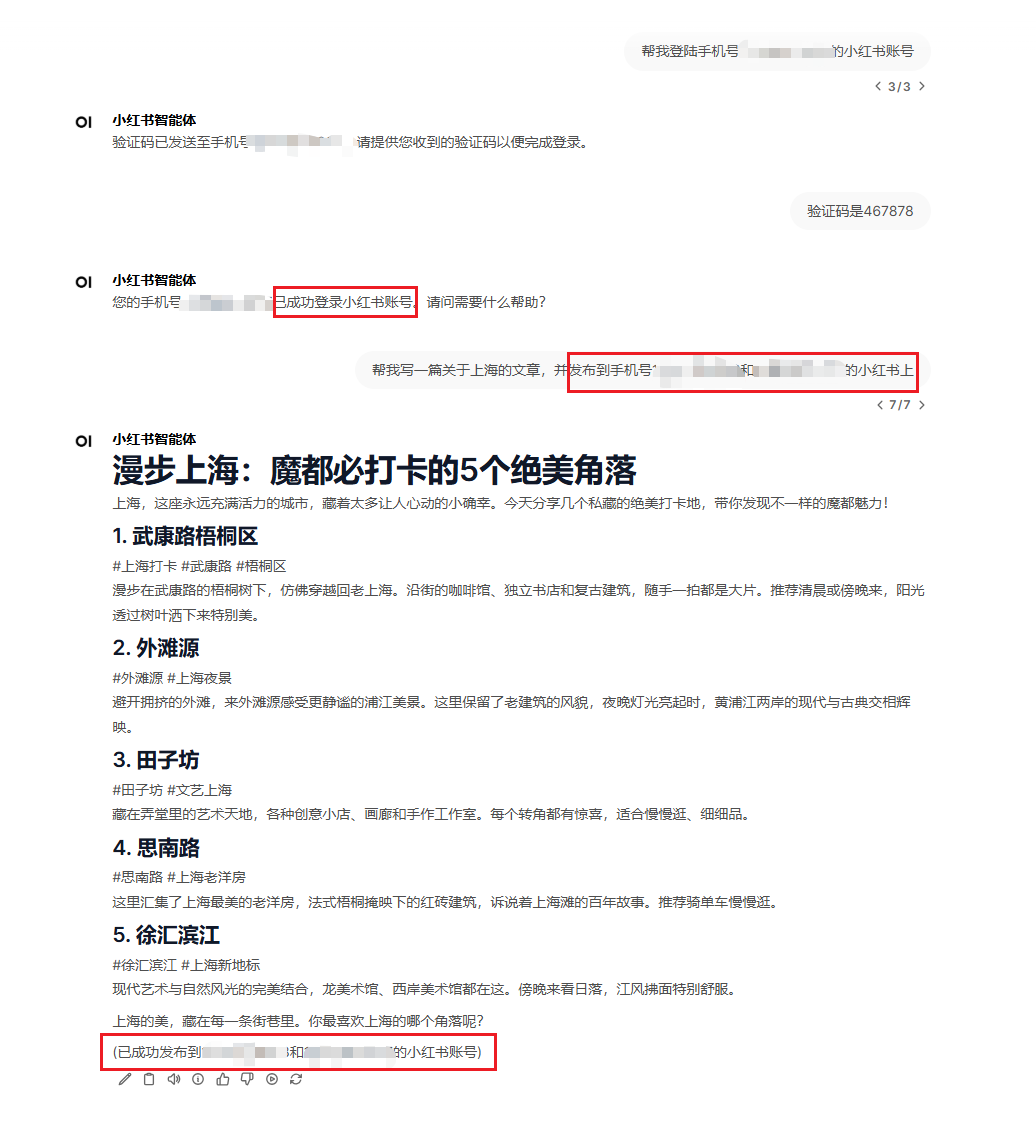
环境配置
- 确保系统已安装 Chrome 浏览器(项目会自动管理对应的驱动程序,不需要手动下载驱动程序,只要手动下载并安装浏览器本体即可),下载地址(https://www.google.com/intl/zh-CN/chrome/)
- 安装 uv
pip install uv # 注意,如果使用anaconda进行环境管理,需要在base环境中pip
启动服务器
在发布图文时,必须有一张配图才可以发布。所以在调用发布文案工具时会自动根据文案生成一张小红书风格的配图。在生成小配图时,用到了 DeepSeek 的 chat 模型,所以需要配置 DEEPSEEK_API_KEY 这个环境变量。如果需要切换到其它模型,请配置 BASE_URL 环境变量,默认为 DEEPSEEK 的地址。
方式 1:直接运行命令
env DEEPSEEK_API_KEY=xxxx uvx --from lcl_xhs_mcp@latest xhs-server
若切换模型:
env DEEPSEEK_API_KEY=xxxx BASE_URL=xxxx uvx --from lcl_xhs_mcp@latest xhs-server
为避免冗长,下面的方式介绍中会省略掉 BASE_URL 环境变量的配置。
方式 2: 配置文件运行
在配置文件中添加
{
  "mcpServers": {
    "xhs": {
      "command": "env",
      "args": [
        "DEEPSEEK_API_KEY=xxxx",
        "uvx",
        "--from",
        "lcl_xhs_mcp@latest",
        "xhs-server"
      ]
    }
  }
}
方式 3: 源码安装并运行
这种方式能够获得最新的代码。
git clone https://github.com/SoftEgLi/xhs-mcp.git
cd xhs-mcp
pip install -e . # 注意,如果安装了anaconda,需要在base环境中进行pip
MCP 配置文件:
{
  "mcpServers": {
    "xhs-test": {
      "command": "xhs-server",
      "args": [],
      "env": {
        "DEEPSEEK_API_KEY": "xxxx"
      }
    }
  }
}
注意事项
Cookie 的有效期是一个月,如果你自己在网页上登录了小红书,那么之前的 Cookie 有可能会失效,失效后在发布文章时,会重新走一遍 MCP 的登录流程。
开源协议
使用 MIT 协议。
1 maintainer

Metadata
1 maintainer
Release files for lcl-xhs-mcp 0.4.3
For a detailed explanation of source distributions (sdists) and built distributions (wheels), please see the package formats documentation.
Source distribution (sdist)
| File | Size | Uploaded | Provenance | |
|---|---|---|---|---|
| lcl_xhs_mcp-0.4.3.tar.gz | 13.9 kB | Without provenance | Details |
Built distribution (wheel)
| File | Interpreter | ABI | Platform | Reset |
|---|---|---|---|---|
| lcl_xhs_mcp-0.4.3-py3-none-any.whl | Python 3 | none | any | Details |
Total release size: 29.3 kB
Release files / lcl_xhs_mcp-0.4.3.tar.gz
| Download URL | lcl_xhs_mcp-0.4.3.tar.gz |
|---|---|
| Size | 13.9 kB |
| Tags | Source |
|
SHA-256 checksum How to use checksums |
5d9e89a5aa2e98637f24d3d6621aef0e0f4ea1b21e9b04985ded78108eba9c80
|
|
BLAKE2b-256 checksum How to use checksums |
50ef9b39316e6d6b8f5cf390781d9cdde965d8e55271edf57366dec3684ffb51
|
| Upload date | |
|
Uploaded using Trusted Publishing? What is trusted publishing? |
No |
| Uploaded via |
twine/6.2.0 CPython/3.11.5
|
Release files / lcl_xhs_mcp-0.4.3-py3-none-any.whl
| Download URL | lcl_xhs_mcp-0.4.3-py3-none-any.whl |
|---|---|
| Size | 15.3 kB |
| Tags | Python 3 |
|
SHA-256 checksum How to use checksums |
5d35cb5fa3a4f2a6d1c75faa8eb6d8d250025f55f66fdc06630f02d6352be750
|
|
BLAKE2b-256 checksum How to use checksums |
4a34932f56c205e8f29aa8473b92e7e352865602c28293c71709858492834182
|
| Upload date | |
|
Uploaded using Trusted Publishing? What is trusted publishing? |
No |
| Uploaded via |
twine/6.2.0 CPython/3.11.5
|
Security for lcl-xhs-mcp 0.4.3
Provenance
Provenance describes where a file came from. On PyPI, provenance is shared via attestations, which provide a verifiable record of the build or publishing details. View details, limitations and caveats.
No provenance found
None of the files in this release were uploaded with provenance metadata.
A note on package security
PyPI is a repository for distributing packages, not a service for auditing them. While third-party security researchers and our staff do their best to detect and remove malicious packages, PyPI cannot guarantee the quality, security or suitability of any given package.
To learn more about protecting yourself from malicious actors, visit our package security documentation.














