
LDAP administration for OpenLDAP. Dry-run everything before production blows up.
Verified details
These details have been verified by PyPIProject links
GitHub Statistics
Maintainers

Project description
ldap-manager

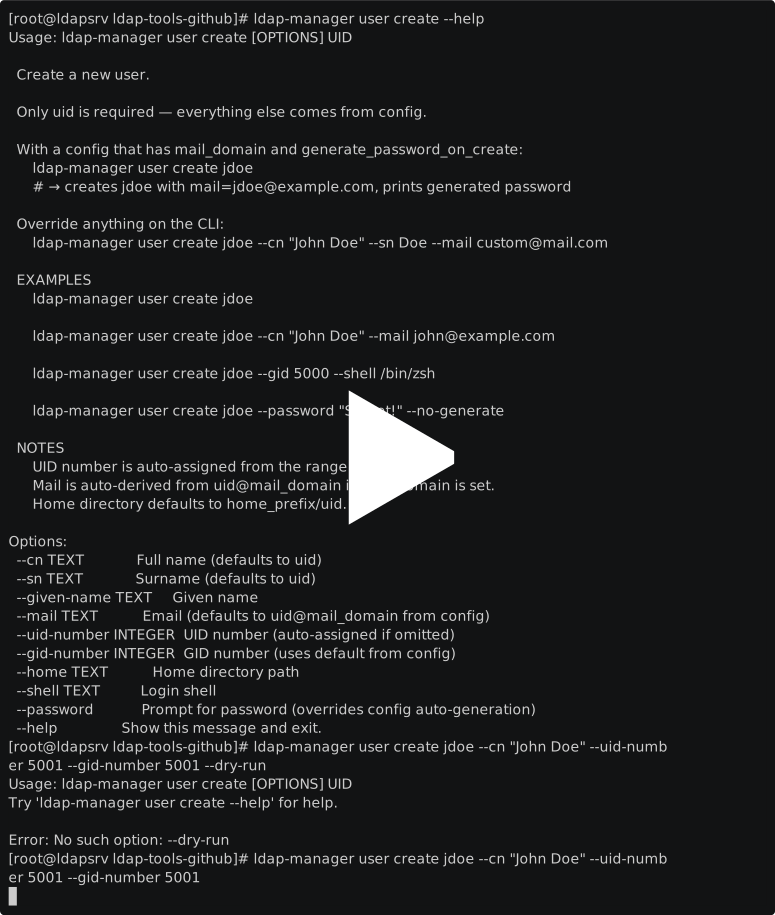
LDAP administration for OpenLDAP. Dry-run everything before production blows up. Fits into CI pipelines and cron jobs that web UIs can't reach.
Manage users, groups, backups, SSH keys, password policies, and server operations — all from one command. JSON output on every command, --dry-run on every destructive operation, and a JSON-lines audit log of everything that ran.
pip install ldap-manager
ldap-manager user list --enabled --json
Production use
ldap-manager runs on an OpenLDAP server managing 100+ users and 5 groups since mid-2025. It handles:
- Monthly
backup dumpvia cron with rotation - User management with per-user password policy (ppolicy) granularity
- Periodic
ppolicy check-allto flag expired or locked accounts - All operations logged via the JSON-lines audit trail
How it fits
ldap-manager is a CLI-first tool. It complements — not replaces — web UIs for different workflows.
| Tool | What it does well | Where it falls short for automation |
|---|---|---|
ldapmodify / ldapsearch |
Direct protocol access, universal | LDIF by hand for every operation, no dry-run, no structured output |
| phpLDAPadmin / Luminary | Visual browsing and editing | Browser-only, no scriptability, no CI integration |
| LDAP Account Manager (LAM) | Mature web UI (PHP, GPL), multi-backend | Designed for interactive use, not automation or pipelines |
| Shell scripts | Flexible, no dependencies | Fragile, no error handling, no dry-run, hard to maintain |
ldap-manager fills the gap: one tool, tab completion, JSON output, dry-run on destructive operations, audit logging, and actual tests.
Good fit
- GitOps-style LDAP provisioning from CI/CD pipelines
- Scheduled batch operations (onboarding, offboarding, password rotation)
- Nightly backups with cron or systemd timers
- Audit trails for compliance
Not a good fit
- End-user self-service password changes (use LAM or Luminary)
- Delegated helpdesk UI for non-technical staff
- Multi-backend environments (AD, 389-DS) — OpenLDAP only, for now
Features
| Category | What you get |
|---|---|
| Users | Create, update, delete, enable/disable, search with filters, dump as JSON |
| Groups | Create, delete, add/remove members, list, supports posixGroup and groupOfNames |
| Backup & Restore | Full slapcat/slapadd dumps with gzip, metadata, and config backup |
| Batch Operations | Bulk create/update/delete from JSON/CSV/TSV with --dry-run |
| Password Reset | Reset all users at once, CSV output with new passwords |
| SSH Keys | Add, remove, list ldapPublicKey attributes per user |
| Server Ops | Status, start/stop/restart, reindex with --auto |
| Password Policy | View policy config, check user expiry/lockout status |
| LDIF Export/Import | Standards-compliant RFC 2849 export and import with dry-run |
| Tree Management | List/create/delete OUs, visualize your DIT |
| Audit Logging | JSON-lines audit trail of all operations |
| JSON Output | --json flag on 12+ commands for scripting and pipelines |
Where ldap-manager runs
Some commands talk to LDAP over the network and work from any machine. Others shell out to host tools (slapcat, systemctl) and must run on the LDAP server itself.
| Runs from anywhere (network only) | Must run on the LDAP host |
|---|---|
user, group, batch, import, export |
backup dump / restore (requires slapcat/slapadd) |
ssh-key-*, tree, audit, passwd |
server status/start/stop/restart/reindex (requires systemctl + slapd) |
ppolicy status / check-all |
Set LDAP_URI=ldap://localhost:389 when running on the host, or the remote server URI when running as a client. Host-only commands will fail with a clear error if the required tools aren't found on PATH.
Quickstart
Install
# Rocky/RHEL 8+
dnf install epel-release -y
dnf install python3-ldap python3-pyyaml python3-click python3-passlib \
            openldap-clients openldap-servers -y

pip install ldap-manager
Configure
cp config.example.yaml /etc/ldap-manager/config.yaml
vim /etc/ldap-manager/config.yaml
Or use environment variables:
export LDAP_URI="ldap://localhost:389"
export LDAP_BIND_DN="cn=admin,dc=example,dc=com"
export LDAP_BIND_PASSWORD="secret"
export LDAP_BASE_DN="dc=example,dc=com"
Go
ldap-manager user list
Usage
Users
ldap-manager user list --enabled --json
ldap-manager user get jdoe
ldap-manager user create jdoe --cn "John Doe" --mail john@example.com
ldap-manager user update jdoe --set mail=new@example.com --set loginShell=/bin/zsh
ldap-manager user delete jdoe --yes
ldap-manager user disable jdoe
ldap-manager user enable jdoe
ldap-manager user passwd jdoe

# Search with filters
ldap-manager user search --uid "j*"
ldap-manager user search --mail "*@engineering.com" --enabled
ldap-manager user search --filter "(description=contractor*)" --json
Groups
ldap-manager group list
ldap-manager group create devops --gid 5000
ldap-manager group add-member devops jdoe
ldap-manager group remove-member devops jdoe
ldap-manager group members devops --json
ldap-manager group delete old_team --yes
Backup & Restore
ldap-manager backup dump --tag pre-migration
ldap-manager backup list
ldap-manager backup restore /var/backups/ldap/ldap_backup_20240101_120000
ldap-manager backup restore /path/to/backup --with-config --yes
Batch Operations
# Bulk create from CSV/JSON
ldap-manager batch create users.csv --dry-run
ldap-manager batch create users.json --yes

# Bulk delete
ldap-manager batch delete terminations.csv --dry-run
Bulk Password Reset
ldap-manager passwd-all --dry-run
ldap-manager passwd-all --output /secure/passwords.csv --length 24
SSH Keys
ldap-manager user ssh-key-list jdoe
ldap-manager user ssh-key-add jdoe ~/.ssh/id_ed25519.pub
ldap-manager user ssh-key-remove jdoe 1
Server Operations
ldap-manager server status
ldap-manager server start
ldap-manager server stop
ldap-manager server restart
ldap-manager server reindex --auto    # stops slapd, reindexes, restarts
Password Policy
ldap-manager ppolicy status jdoe      # expiry, lockout, grace logins
ldap-manager ppolicy policy           # view current policy config
ldap-manager ppolicy check-all        # find expired/locked accounts
LDIF Export & Import
ldap-manager user export --format ldif --scope all -o backup.ldif
ldap-manager user export --format json --enabled -o active_users.json
ldap-manager import users.ldif --dry-run
Tree Management
ldap-manager tree show                # visualize DIT
ldap-manager tree list-ous
ldap-manager tree create-ou "ou=Contractors,dc=example,dc=com"
ldap-manager tree delete-ou "ou=OldDept,dc=example,dc=com" --recursive
Audit Log
ldap-manager audit log --since 2024-01-01
ldap-manager audit log --action create --target jdoe
ldap-manager audit status
Global Options
ldap-manager -c /path/to/config.yaml user list    # custom config
ldap-manager -v user list                          # verbose logging
Configuration
Config is loaded from (in order, later overrides earlier):
/etc/ldap-manager/config.yaml(system)~/.ldap-manager.yaml(user)--configflag (explicit)- Environment variables (highest priority)
See config.example.yaml for all options.
Development
git clone https://github.com/israelhen153/ldap-manager.git
cd ldap-manager
make install    # creates venv, installs deps
make ci         # lint + typecheck + security + tests
Tests use mocked LDAP connections — no live server needed.
make lint         # ruff check + format
make typecheck    # mypy
make security     # bandit
make test         # pytest with coverage
make ci           # all of the above
Project Structure
ldap_manager/
├── __init__.py       # Package metadata
├── cli.py            # Click CLI — 40+ commands
├── config.py         # YAML + env config loading
├── connection.py     # LDAP connection context manager
├── users.py          # User CRUD, enable/disable, search
├── groups.py         # Group management (posixGroup + groupOfNames)
├── passwords.py      # Bulk password generation + reset
├── backup.py         # slapcat/slapadd dump + restore
├── batch.py          # Bulk operations from CSV/JSON/TSV
├── server.py         # Server status, start/stop, reindex
├── sshkeys.py        # SSH public key management
├── ppolicy.py        # Password policy status + checks
├── ldif_ops.py       # RFC 2849 LDIF export/import
├── tree.py           # OU/DIT management + visualization
└── audit.py          # JSON-lines audit logging
Design Decisions
slapcat/slapaddfor backup — protocol-level export (ldapsearch) is lossy. It missescn=config, overlays, ACLs, and operational attributes.slapcatcaptures everything.loginShellfor enable/disable — simpler and more portable thanshadowExpireornsAccountLock. No overlay needed.- SSHA passwords — most universally supported LDAP hash. Change
hash_schemein config if your server haspw-argon2. - Dry-run on destructive ops — batch, import, delete, and password reset all support
--dry-run. - JSON output everywhere —
--jsonon 12+ commands for piping tojq, scripts, and monitoring.
Requirements
- Python 3.10+
- OpenLDAP client libraries (
libldap2-dev/openldap-devel) - OpenLDAP server tools on the LDAP host (for backup/restore and server ops)
License
MIT
Project details
Verified details
These details have been verified by PyPIProject links
GitHub Statistics
Maintainers
Release history Release notifications | RSS feed


Download files
Download the file for your platform. If you're not sure which to choose, learn more about installing packages.
Source Distribution
Built Distribution
Filter files by name, interpreter, ABI, and platform.
If you're not sure about the file name format, learn more about wheel file names.
Copy a direct link to the current filters
File details
Details for the file ldap_manager-2.1.tar.gz.
File metadata
- Download URL: ldap_manager-2.1.tar.gz
- Upload date:
- Size: 101.6 kB
- Tags: Source
- Uploaded using Trusted Publishing? Yes
- Uploaded via: twine/6.1.0 CPython/3.13.12
File hashes
| Algorithm | Hash digest | |
|---|---|---|
| SHA256 |
fa43738997d3bfa14af18a3b20442a06f0e39b3d88254f435063e18bd45caac7
|
|
| MD5 |
be2bc888f3c32ccb98cd3b93598f2251
|
|
| BLAKE2b-256 |
e7f03c6f4098810fb66c7d6224c43abf88e8083251b65021942401eb9164d8f6
|
Provenance
The following attestation bundles were made for ldap_manager-2.1.tar.gz:
Publisher:
makefile.yml on israelhen153/ldap-manager
-
Statement:
-
Statement type:
https://in-toto.io/Statement/v1 -
Predicate type:
https://docs.pypi.org/attestations/publish/v1 -
Subject name:
ldap_manager-2.1.tar.gz -
Subject digest:
fa43738997d3bfa14af18a3b20442a06f0e39b3d88254f435063e18bd45caac7 - Sigstore transparency entry: 1492002648
- Sigstore integration time:
-
Permalink:
israelhen153/ldap-manager@e6a45f25588d96d4fad8c3c6b82bd1dc6f002a13 -
Branch / Tag:
refs/tags/v2.2 - Owner: https://github.com/israelhen153
-
Access:
public
-
Token Issuer:
https://token.actions.githubusercontent.com -
Runner Environment:
github-hosted -
Publication workflow:
makefile.yml@e6a45f25588d96d4fad8c3c6b82bd1dc6f002a13 -
Trigger Event:
push
-
Statement type:
File details
Details for the file ldap_manager-2.1-py3-none-any.whl.
File metadata
- Download URL: ldap_manager-2.1-py3-none-any.whl
- Upload date:
- Size: 82.0 kB
- Tags: Python 3
- Uploaded using Trusted Publishing? Yes
- Uploaded via: twine/6.1.0 CPython/3.13.12
File hashes
| Algorithm | Hash digest | |
|---|---|---|
| SHA256 |
7ab5b8692c61872c70076e0b6b6cfa29544293f9863a5b7946f4b6ed6a2c83b7
|
|
| MD5 |
de305add8b845933366e2794b0d5cfe0
|
|
| BLAKE2b-256 |
b3abd13551b172ff22c8e4e45964a60298fc25e4d75ea7dde81a6e8d99c6dfc3
|
Provenance
The following attestation bundles were made for ldap_manager-2.1-py3-none-any.whl:
Publisher:
makefile.yml on israelhen153/ldap-manager
-
Statement:
-
Statement type:
https://in-toto.io/Statement/v1 -
Predicate type:
https://docs.pypi.org/attestations/publish/v1 -
Subject name:
ldap_manager-2.1-py3-none-any.whl -
Subject digest:
7ab5b8692c61872c70076e0b6b6cfa29544293f9863a5b7946f4b6ed6a2c83b7 - Sigstore transparency entry: 1492003080
- Sigstore integration time:
-
Permalink:
israelhen153/ldap-manager@e6a45f25588d96d4fad8c3c6b82bd1dc6f002a13 -
Branch / Tag:
refs/tags/v2.2 - Owner: https://github.com/israelhen153
-
Access:
public
-
Token Issuer:
https://token.actions.githubusercontent.com -
Runner Environment:
github-hosted -
Publication workflow:
makefile.yml@e6a45f25588d96d4fad8c3c6b82bd1dc6f002a13 -
Trigger Event:
push
-
Statement type:






