
A fast and versatile LDAP editor

Project description
Fast and versatile LDAP editor
This is a minimal web interface for LDAP directories. Docker images for linux/amd64 and linux/arm64/v8 are available.
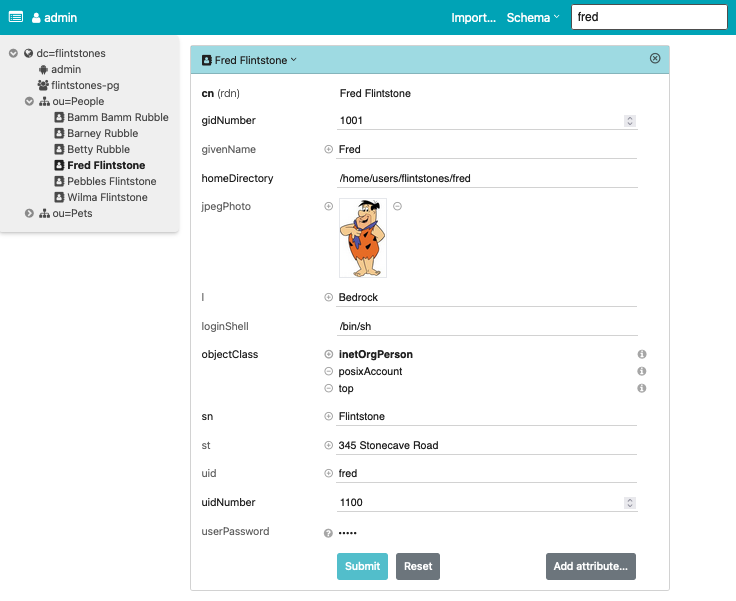
Features:
- Directory tree view
- Entry creation / modification / deletion
- LDIF import / export
- Image support for the
jpegPhotoandthumbnailPhotoattributes - Schema aware
- Simple search (configurable)
- Asynchronous LDAP backend with decent scalability
- Available as Docker image
The app always requires authentication, even if the directory permits anonymous access. User credentials are validated through a simple bind on the directory (SASL is not supported). What a particular user can see (and edit) is governed entirely by directory access rules. The app shows the directory contents, nothing less and nothing more.
Usage
Environment variables
LDAP access is controlled by the following optional environment variables, possibly from a .env file:
-
LDAP_URL: Connection URL, defaults toldap:///. -
BASE_DN: Search base, e.g.dc=example,dc=org. -
SCHEMA_DN: # DN to obtain the directory schema, e.g.cn=subSchema. -
LOGIN_ATTR: User name attribute, defaults touid. -
USE_TLS: Enable TLS, defaults to true forldapsconnections. Set it to a non-empty string to forceSTARTTLSonldapconnections. -
INSECURE_TLS: Do not require a valid server TLS certificate, defaults to false, impliesUSE_TLS.
if BASE_DN or SCHEMA_DN are not provided explicitly, auto-detection from the root DSE is attempted.
For this to work, the root DSE must be readable anonymously, e.g. with the following ACL line for OpenLDAP:
access to dn.base="" by * read
For finer-grained control, see settings.py.
Docker
For the impatient: Run it with
docker run -p 127.0.0.1:5000:5000 \
    -e LDAP_URL=ldap://your.openldap.server/
For the even more impatient: Start a demo with
docker compose up -d
and go to http://localhost:5000/. You are automatically logged in as Fred Flintstone.
Pip
Install the python-ldap dependency with your system's package manager.
Otherwise, Pip will try to compile it from source and this will likely fail because it lacks a development environment.
Then install ldap-ui in a virtual environment:
python3 -m venv --system-site-packages venv
. venv/bin/activate
pip3 install ldap-ui
Possibly after a shell rehash, it is available as ldap-ui:
Usage: ldap-ui [OPTIONS]

Options:
  -b, --base-dn TEXT              LDAP base DN. Required unless the BASE_DN
                                  environment variable is set.
  -h, --host TEXT                 Bind socket to this host.  [default:
                                  127.0.0.1]
  -p, --port INTEGER              Bind socket to this port. If 0, an available
                                  port will be picked.  [default: 5000]
  -l, --log-level [critical|error|warning|info|debug|trace]
                                  Log level. [default: info]
  --version                       Display the current version and exit.
  --help                          Show this message and exit.
Development
Prerequisites:
- GNU make
- node.js LTS version with NPM
- Python3 ≥ 3.7
- pip3
- python-ldap; To compile the Python module:
- Debian / Ubuntu:
apt-get install libsasl2-dev python-dev libldap2-dev libssl-dev - RedHat / CentOS:
yum install python-devel openldap-devel
- Debian / Ubuntu:
ldap-ui consists of a Vue frontend and a Python backend that roughly translates a subset of the LDAP protocol to a stateless ReST API.
For the frontend, npm run build assembles everything in backend/ldap_ui/statics.
Review the configuration in settings.py. It is short and mostly self-explaining.
Most settings can (and should) be overridden by environment variables or settings in a .env file; see env.demo or env.example.
The backend can be run locally with make, which will also install dependencies and build the frontend if needed.
Notes
Authentication methods
The UI always uses a simple bind operation to authenticate with the LDAP directory. How the bind DN is obtained from a given user name depends on a combination of OS environment variables, possibly from a .env file:
- Search by some attribute. By default, this is the
uid, which can be overridden by the environment variableLOGIN_ATTR, e.g.LOGIN_ATTR=cn. - If the environment variable
BIND_PATTERNis set, then no search is performed. Login with a full DN can be configured withBIND_PATTERN=%s, which for example allows to login as usercn=admin,dc=example,dc=org. If a partial DN likeBIND_PATTERN=%s,dc=example,dc=orgis configured, the corresponding login would becn=admin. If a specific pattern likeBIND_PATTERN=cn=%s,dc=example,dc=orgis configured, the login name is justadmin. - If security is no concern, then a fixed
BIND_DNandBIND_PASSWORDcan be set in the environment. This is for demo purposes only, and probably a very bad idea if access to the UI is not restricted by any other means.
Searching
Search uses a (configurable) set of criteria (cn, gn, sn, and uid) if the query does not contain =.
Wildcards are supported, e.g. f* will match all cn, gn, sn, and uid starting with f.
Additionally, arbitrary attributes can be searched with an LDAP filter specification, for example sn=F*.
Caveats
- The software works with OpenLdap using simple bind. Other directories have not been tested much, although 389 DS works to some extent.
- SASL authentication schemes are presently not supported.
- Passwords are transmitted as plain text. The LDAP server is expected to hash them (OpenLdap 2.4 does). I strongly recommend to expose the app through a TLS-enabled web server.
- HTTP Basic Authentication is triggered unless the
AUTHORIZATIONrequest variable is already set by some upstream HTTP server.
Q&A
- Q: Why are some fields not editable?
- A: The RDN of an entry is read-only. To change it, rename the entry with a different RDN, then change the old RDN and rename back. To change passwords, click on the question mark icon on the right side. Binary fields (as per schema) are read-only. You do not want to modify them accidentally.
- Q: Why did you write this?
- A: PHPLdapAdmin has not seen updates for ages. I needed a replacement, and wanted to try Vue.
Acknowledgements
The Python backend uses Starlette. The UI is built with Vue.js and Tailwind CSS. Kudos to the authors of these elegant frameworks!
Release history Release notifications | RSS feed


Download files
Download the file for your platform. If you're not sure which to choose, learn more about installing packages.
Source Distributions
Built Distribution
Filter files by name, interpreter, ABI, and platform.
If you're not sure about the file name format, learn more about wheel file names.
Copy a direct link to the current filters
File details
Details for the file ldap_ui-0.9.15-py3-none-any.whl.
File metadata
- Download URL: ldap_ui-0.9.15-py3-none-any.whl
- Upload date:
- Size: 640.9 kB
- Tags: Python 3
- Uploaded using Trusted Publishing? No
- Uploaded via: twine/6.1.0 CPython/3.9.6
File hashes
| Algorithm | Hash digest | |
|---|---|---|
| SHA256 |
f5e6ca30fa308d8c16fa1dd1b679139f448af5c48ef9ac4cc2f5505e444fd67f
|
|
| MD5 |
fc1f28898f7a3148b418a90e6fb7ea08
|
|
| BLAKE2b-256 |
dcfe0612adc21021c791ddcabd5e99fbb6561afee21bfa7ffbfc81b66e765d16
|






