







ldict
A lazy dict.
This project was succeeded by hdict.
Latest release | Current code | API documentation
See also
- laziness+identity+persistence (idict)
Overview
A ldict is a dict with str keys.
Simple usage example
from ldict import ldict

a = ldict(x=3)
print(a)
"""
{
    "x": 3
}
"""
b = ldict(y=5)
print(b)
"""
{
    "y": 5
}
"""
print(a >> b)
"""
{
    "x": 3,
    "y": 5
}
"""
We consider that every value is generated by a process, starting from an empty ldict. The process is a sequence of
transformation steps done through the operator >>, which symbolizes a data flow. There are two types of steps:
- value insertion - represented by dict-like objects
- function application - represented by ordinary python functions
A ldict is completely defined by its key-value pairs so that
it can be converted from/to a built-in dict.
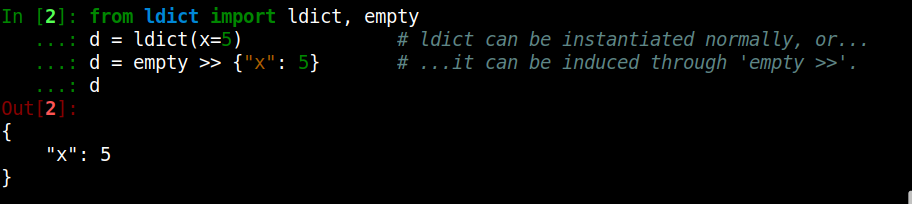
Creating a ldict is not different from creating an ordinary dict. Optionally it can be created through the >> operator
used after empty:
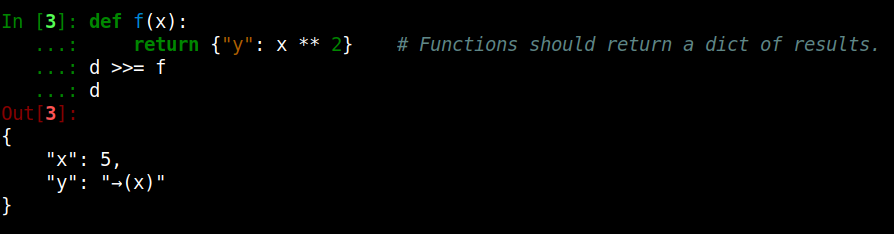
Function application is done in the same way. The parameter names define the input fields, while the keys in the
returned dict define the output fields:
Similarly, for anonymous functions:

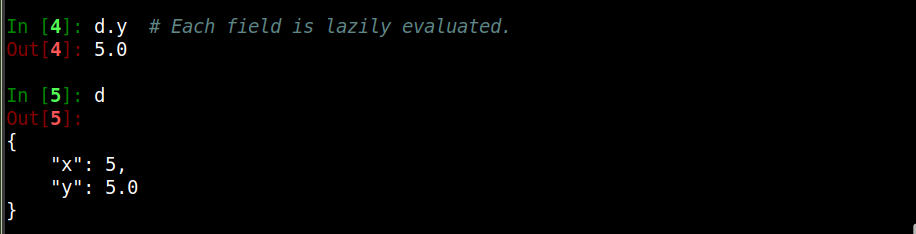
Finally, the result is only evaluated at request:
Installation
...as a standalone lib
# Set up a virtualenv.
python3 -m venv venv
source venv/bin/activate

# Install from PyPI...
pip install --upgrade pip
pip install -U ldict
pip install -U ldict[full]  # use this for extra functionality (recommended)

# ...or, install from updated source code.
pip install git+https://github.com/davips/ldict
...from source
git clone https://github.com/davips/ldict
cd ldict
poetry install
Examples
Merging two ldicts
from ldict import ldict

a = ldict(x=3)
print(a)
"""
{
    "x": 3
}
"""
b = ldict(y=5)
print(b)
"""
{
    "y": 5
}
"""
print(a >> b)
"""
{
    "x": 3,
    "y": 5
}
"""
Lazily applying functions to ldict
from ldict import ldict

a = ldict(x=3)
print(a)
"""
{
    "x": 3
}
"""
a = a >> ldict(y=5) >> {"z": 7} >> (lambda x, y, z: {"r": x ** y // z})
print(a)
"""
{
    "x": 3,
    "y": 5,
    "z": 7,
    "r": "→(x y z)"
}
"""
print(a.r)
"""
34
"""
print(a)
"""
{
    "x": 3,
    "y": 5,
    "z": 7,
    "r": 34
}
"""
Parameterized functions and sampling
from random import Random

from ldict import empty, let


# A function provide input fields and, optionally, parameters.
# For instance:
# 'a' is sampled from an arithmetic progression
# 'b' is sampled from a geometric progression
# Here, the syntax for default parameter values is borrowed with a new meaning.
def fun(x, y, a=[-100, -99, -98, ..., 100], b=[0.0001, 0.001, 0.01, ..., 100000000]):
    return {"z": a * x + b * y}


def simplefun(x, y):
    return {"z": x * y}


# Creating an empty ldict. Alternatively: d = ldict().
d = empty >> {}
print(d)
"""
{}
"""
# Putting some values. Alternatively: d = ldict(x=5, y=7).
d["x"] = 5
d["y"] = 7
print(d)
"""
{
    "x": 5,
    "y": 7
}
"""
# Parameter values are uniformly sampled.
d1 = d >> simplefun
print(d1)
print(d1.z)
"""
{
    "x": 5,
    "y": 7,
    "z": "→(x y)"
}
35
"""
d2 = d >> simplefun
print(d2)
print(d2.z)
"""
{
    "x": 5,
    "y": 7,
    "z": "→(x y)"
}
35
"""
# Parameter values can also be manually set.
e = d >> let(fun, a=5, b=10)
print(e.z)
"""
95
"""
# Not all parameters need to be set.
e = d >> Random() >> let(fun, a=5)
print("e =", e.z)
"""
e = 25.007
"""
# Each run will be a different sample for the missing parameters.
e = e >> Random() >> let(fun, a=5)
print("e =", e.z)
"""
e = 725.0
"""
# We can define the initial state of the random sampler.
# It will be in effect from its location place onwards in the expression.
e = d >> Random(0) >> let(fun, a=5)
print(e.z)
"""
725.0
"""
# All runs will yield the same result,
# if starting from the same random number generator seed.
e = e >> Random(0) >> let(fun, a=[555, 777])
print("Let 'a' be a list:", e.z)
"""
Let 'a' be a list: 700003885.0
"""
# Reproducible different runs are achievable by using a single random number generator.
e = e >> Random(0) >> let(fun, a=[5, 25, 125, ..., 10000])
print("Let 'a' be a geometric progression:", e.z)
"""
Let 'a' be a geometric progression: 700003125.0
"""
rnd = Random(0)
e = d >> rnd >> let(fun, a=5)
print(e.z)
e = d >> rnd >> let(fun, a=5)  # Alternative syntax.
print(e.z)
"""
725.0
700000025.0
"""
# Output fields can be defined dynamically through parameter values.
# Input fields can be defined dynamically through kwargs.
copy = lambda source=None, target=None, **kwargs: {target: kwargs[source]}
d = empty >> {"x": 5}
d >>= let(copy, source="x", target="y")
print(d)
d.evaluate()
print(d)

"""
{
    "x": 5,
    "y": "→(source target x)"
}
{
    "x": 5,
    "y": 5
}
"""
Composition of sets of functions
from random import Random

from ldict import empty


# A multistep process can be defined without applying its functions


def g(x, y, a=[1, 2, 3, ..., 10], b=[0.00001, 0.0001, 0.001, ..., 100000]):
    return {"z": a * x + b * y}


def h(z, c=[1, 2, 3]):
    return {"z": c * z}


# In the ldict framework 'data is function',
# so the alias ø represents the 'empty data object' and the 'reflexive function' at the same time.
# In other words: 'inserting nothing' has the same effect as 'doing nothing'.
fun = empty >> g >> h  # empty enable the cartesian product of the subsequent sets of functions within the expression.
print(fun)
"""
«λ{} × λ»
"""
# An unnapplied function has its free parameters unsampled.
# A compostition of functions results in an ordered set (Cartesian product of sets).
# It is a set because the parameter values of the functions are still undefined.
d = {"x": 5, "y": 7} >> (Random(0) >> fun)
print(d)
"""
{
    "x": 5,
    "y": 7,
    "z": "→(c z→(a b x y))"
}
"""
print(d.z)
"""
105.0
"""
d = {"x": 5, "y": 7} >> (Random(0) >> fun)
print(d.z)
"""
105.0
"""
# Reproducible different runs by passing a stateful random number generator.
rnd = Random(0)
e = d >> rnd >> fun
print(e.z)
"""
105.0
"""
e = d >> rnd >> fun
print(e.z)
"""
14050.0
"""
# Repeating the same results.
rnd = Random(0)
e = d >> rnd >> fun
print(e.z)
"""
105.0
"""
e = d >> rnd >> fun
print(e.z)
"""
14050.0
"""
Concept
A ldict is like a common Python dict, with extra functionality and lazy. It is a mapping between string keys, called fields, and any serializable (pickable protocol=5) object.
Grants
This work was partially supported by Fapesp under supervision of Prof. André C. P. L. F. de Carvalho at CEPID-CeMEAI (Grants 2013/07375-0 – 2019/01735-0).
1 maintainer

Metadata
1 maintainer
Release files for ldict 3.220128.4
For a detailed explanation of source distributions (sdists) and built distributions (wheels), please see the package formats documentation.
Source distribution (sdist)
| File | Size | Uploaded | |
|---|---|---|---|
| ldict-3.220128.4.tar.gz | 20.8 kB | Details |
Built distribution (wheel)
| File | Interpreter | ABI | Platform | Reset |
|---|---|---|---|---|
| ldict-3.220128.4-py3-none-any.whl | Python 3 | none | any | Details |
Total release size: 50.2 kB
Release files / ldict-3.220128.4.tar.gz
| Download URL | ldict-3.220128.4.tar.gz |
|---|---|
| Size | 20.8 kB |
| Tags | Source |
|
SHA-256 checksum How to use checksums |
cd10daa384593127296f3bcbba8d65330260643e532b6367302fbfe289c3b861
|
|
BLAKE2b-256 checksum How to use checksums |
bb7f5a4d35d79a185fbfce590099da07de1a8a394878fbee498d8a4dba5dc464
|
| Upload date | |
|
Uploaded using Trusted Publishing? What is trusted publishing? |
No |
| Uploaded via |
poetry/1.3.2 CPython/3.10.6 Linux/5.15.0-58-generic
|
Release files / ldict-3.220128.4-py3-none-any.whl
| Download URL | ldict-3.220128.4-py3-none-any.whl |
|---|---|
| Size | 29.3 kB |
| Tags | Python 3 |
|
SHA-256 checksum How to use checksums |
ddcc8d1fe5b77fc2d414de4ccb49c1cb3226d8ef3bd5971a452d3c98f43cc04b
|
|
BLAKE2b-256 checksum How to use checksums |
c8e6ba9886f9c181c21a70d681f4ba740646e2532f3b57428f9a293effc7aeb6
|
| Upload date | |
|
Uploaded using Trusted Publishing? What is trusted publishing? |
No |
| Uploaded via |
poetry/1.3.2 CPython/3.10.6 Linux/5.15.0-58-generic
|














