
CLI tool for creating Django projects with a predefined structure.

Project description
🐍 ldjango: Your Django Project Sidekick! 🚀


Tired of setting up Django projects manually? Meet ldjango - your magical wand for creating perfectly structured Django projects in a snap! 🪄✨
🎥 See ldjango in Action!
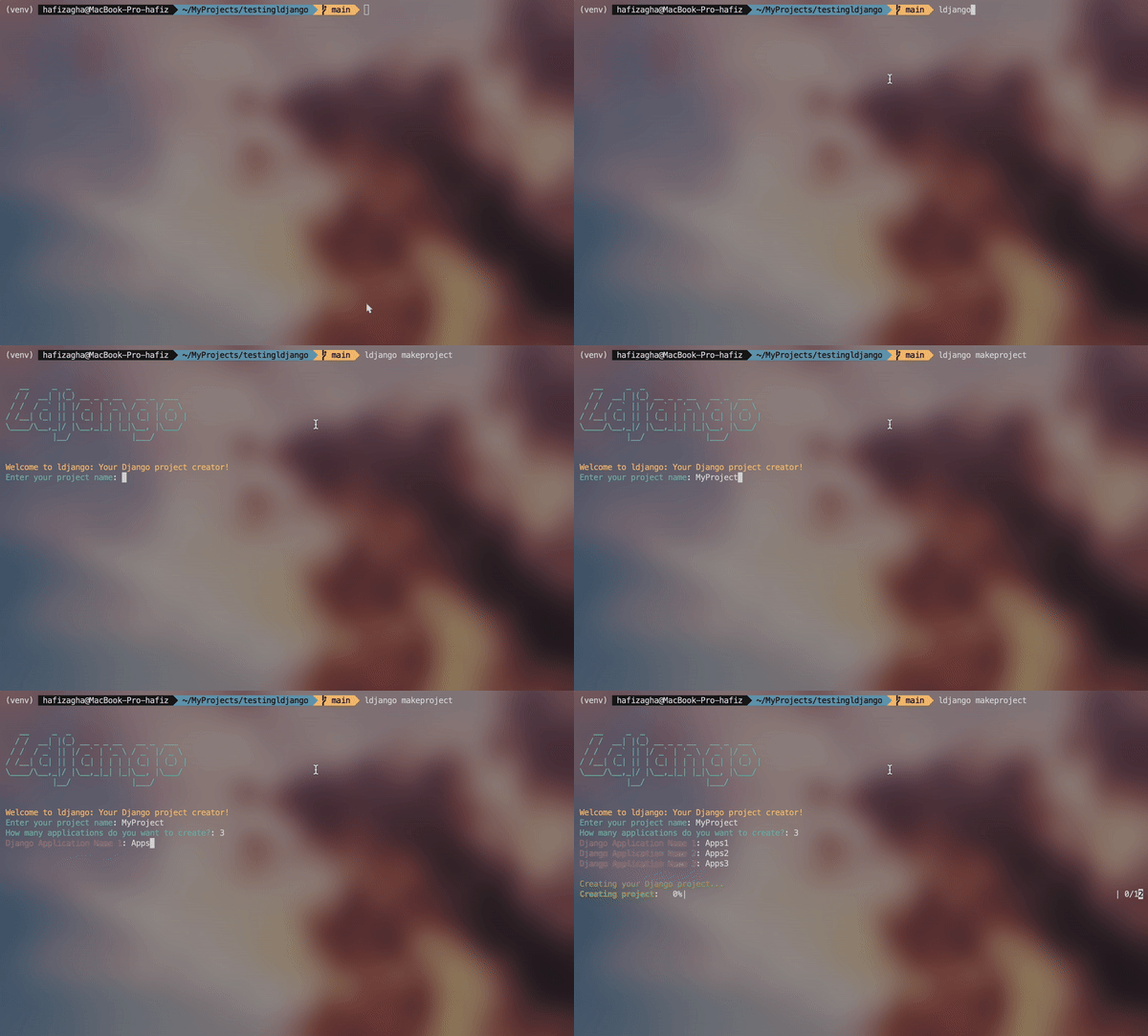
Watch how ldjango creates a Django project easily and quickly!
🌟 What's So Special?
- Lightning-Fast Setup: Create a fully structured Django project with just one command!
- Smart App Generation: Craft multiple Django apps automagically!
- Perfect Project Structure: Get an organized project layout that even Marie Kondo would approve!
- CLI Superpowers: Use intuitive command-line options to customize your project creation.
- Tailwind CSS Integration: Enjoy the power of Tailwind CSS right out of the box!
- Static Files: Static files are automatically compiled and ready for production.
- Media Files: Media files are stored in a dedicated folder for easy management.
- Git-Friendly: Comes with a
.gitignorefile. Because we care about your repo's cleanliness. - Dedicated Static Folder: Keep your static files organized and separate from your project.
- HTML Templates: Use a base template for your HTML to maintain consistency across your project.
- Django Settings: A well-organized settings file to manage your project configurations.
- URL Routing: A centralized URL routing system to manage all your app URLs.
- Database: Uses SQLite by default, but you can easily switch to your preferred database.
- JavaScript Support: Includes a
node_modulesfolder for managing JavaScript dependencies. - NPM Scripts: Use NPM scripts to compile your CSS and run other development tasks.
- Django Commands: Use Django commands to manage your project and apps.
- Version Control: Includes a
.gitignorefile to exclude unnecessary files from your repository. - Environment Variables: Uses a
.envfile to store environment variables for the project.
🛠️ Installation
To get started with ldjango, follow these steps:
-
Create a virtual environment:
python -m venv venv
-
Activate the virtual environment:
- For Windows:
venv\Scripts\activate
- For macOS and Linux:
source venv/bin/activate
- For Windows:
-
Install
ldjango:pip install ldjango
Now ldjango is ready to use in your virtual environment!
🚀 Quickstart
Launch your Django rocket with this simple command:
ldjango makeproject
Follow the prompts, and watch the magic happen! ✨
📚 Command Reference
ldjango makeproject: Start the interactive project creation wizardldjango -horldjango --help: Display help informationldjango --version: Show the version of ldjango you're usingldjango generate-secret-key: Generate a new secret key for Django
📁 The ldjango Special: Project Structure
Your shiny new Django project will look like this:
project_root/
│
├── apps/                       # Main folder containing all the applications in the Django project
│   ├── apps1/                   # First application (apps1) in the project
│   │   ├── migrations/          # Folder to store database migration files
│   │   ├── admin.py             # Configuration for Django's admin panel
│   │   ├── apps.py              # Configuration for the app in Django
│   │   ├── models.py            # Defines the database models for this app
│   │   ├── tests.py             # File to write unit tests
│   │   ├── views.py             # Logic for handling views in this app
│
│   ├── apps2/                   # Second application (apps2) in the project
│   │   ├── migrations/          # Folder to store database migration files
│   │   ├── admin.py             # Configuration for Django's admin panel
│   │   ├── apps.py              # Configuration for the app in Django
│   │   ├── models.py            # Defines the database models for this app
│   │   ├── tests.py             # File to write unit tests
│   │   ├── views.py             # Logic for handling views in this app
│
│   ├── More another apps/       # More apps in the project
│
│   ├── urls.py                  # URL routing for all the apps inside the `apps` folder
│
├── core/                        # Core folder containing overall project configuration
│   ├── asgi.py                  # ASGI configuration for running asynchronous servers
│   ├── settings.py              # Main configuration file for the Django project
│   ├── urls.py                  # Global URL routing for the entire project
│   ├── wsgi.py                  # WSGI configuration for running web servers
│
├── media/                       # Folder for storing user-uploaded files (images, documents, etc.)
│
├── node_modules/                # Folder containing JavaScript dependencies from npm (e.g., for Tailwind CSS)
│
├── static/                      # Folder for static files like CSS, JavaScript, and images
│   └── css/
│       ├── input.css            # Input CSS file (e.g., Tailwind CSS)
│       ├── output.css           # Output CSS file after processing
│
├── staticfiles/                 # Folder to store static files that are ready for production
│   ├── admin/                   # Static files for Django's admin panel
│   └── css/                     # Additional CSS files for the app
│
├── templates/                   # Folder for storing HTML templates
│   ├── base.html                # Base HTML template for the application
│
├── .gitignore                   # File to specify files/folders that Git should ignore
├── .env                         # Environment variables for the project
├── .env.example                 # Example environment variables for the project
├── db.sqlite3                   # SQLite database used by the project
├── manage.py                    # Command-line script to manage the Django project
├── package-lock.json            # File locking the versions of npm dependencies
├── package.json                 # Configuration file for npm dependencies
└── tailwind.config.js           # Configuration file for Tailwind CSS
🎭 Features That'll Make You Go "Wow!"
- App-tastic Organization: All your apps neatly tucked into the
appsfolder. No more app chaos! - URL Mastery: A pre-configured
urls.pyin theappsfolder to rule all your app URLs. - Ready, Set, Django:
corefolder with all the Django project essentials, ready to rock. - Static & Media: Dedicated folders for your static files and media. Marie Kondo would be proud!
- Git-Friendly: Comes with a
.gitignorefile. Because we care about your repo's cleanliness. - Tailwind CSS Integration: Enjoy the power of Tailwind CSS right out of the box!
- HTML Templates: Use a base template for your HTML to maintain consistency across your project.
- Django Settings: A well-organized settings file to manage your project configurations.
- Database: Uses SQLite by default, but you can easily switch to your preferred database.
- JavaScript Support: Includes a
node_modulesfolder for managing JavaScript dependencies. - NPM Scripts: Use NPM scripts to compile your CSS and run other development tasks.
- Django Commands: Use Django commands to manage your project and apps.
- Environment Variables: Uses a
.envfile to store environment variables for the project.
🤔 Why Choose ldjango?
- Time-Saver Supreme: Say goodbye to repetitive project setup tasks.
- Consistency Champion: Every project follows the same clean, logical structure.
- Beginner's Best Friend: Perfect for Django newbies to start on the right foot.
- Customization King: Flexible enough to adapt to your unique project needs.
- Tailwind CSS: Tailwind CSS is integrated into the project, so you can start styling your project right away.
- Static Files: Static files are automatically compiled and ready for production.
- Media Files: Media files are stored in a dedicated folder for easy management.
- Git-Friendly: Comes with a
.gitignorefile. Because we care about your repo's cleanliness. - Dedicated Static Folder: Keep your static files organized and separate from your project.
- HTML Templates: Use a base template for your HTML to maintain consistency across your project.
- Django Settings: A well-organized settings file to manage your project configurations.
- URL Routing: A centralized URL routing system to manage all your app URLs.
- Database: Uses SQLite by default, but you can easily switch to your preferred database.
- JavaScript Support: Includes a
node_modulesfolder for managing JavaScript dependencies. - NPM Scripts: Use NPM scripts to compile your CSS and run other development tasks.
- Django Commands: Use Django commands to manage your project and apps.
- Environment Variables: Uses a
.envfile to store environment variables for the project.
📜 License
Distributed under the MIT License. See LICENSE for more information.
📞 Let's Connect!
My Instagram - @lrnd.__
Project Link: ldjango
Ready to djangofy your development process? Give ldjango a spin and watch your productivity soar! 🚀🐍
Release history Release notifications | RSS feed


Download files
Download the file for your platform. If you're not sure which to choose, learn more about installing packages.
Source Distribution
Built Distribution
Filter files by name, interpreter, ABI, and platform.
If you're not sure about the file name format, learn more about wheel file names.
Copy a direct link to the current filters
File details
Details for the file ldjango-7.8.tar.gz.
File metadata
- Download URL: ldjango-7.8.tar.gz
- Upload date:
- Size: 16.0 kB
- Tags: Source
- Uploaded using Trusted Publishing? No
- Uploaded via: twine/5.1.1 CPython/3.12.4
File hashes
| Algorithm | Hash digest | |
|---|---|---|
| SHA256 |
18c123f011748df3a74577d31439f5af36a854b892cefcb7c6f34f9996ac1b51
|
|
| MD5 |
4aafe7f425c9b74f7cf8e55adcd18081
|
|
| BLAKE2b-256 |
38439c12661aad023bd9bade71f3555e71f888393ba100525b1d87e5af1ed60f
|
File details
Details for the file ldjango-7.8-py3-none-any.whl.
File metadata
- Download URL: ldjango-7.8-py3-none-any.whl
- Upload date:
- Size: 14.5 kB
- Tags: Python 3
- Uploaded using Trusted Publishing? No
- Uploaded via: twine/5.1.1 CPython/3.12.4
File hashes
| Algorithm | Hash digest | |
|---|---|---|
| SHA256 |
93ea5fdfce9f496345a360ea4817a172edfbf845324f6fa9360f200b2f216ab3
|
|
| MD5 |
8825304ae630cc99e02a034143941edd
|
|
| BLAKE2b-256 |
175f302b9e1590c6164041c7b04259c68e8feec7891062a375177c087332c5ec
|






