
League of Legends MCP Server 🎮
A Model Context Protocol server that provides LLMs comprehensive access to League of Legends game data through the Riot Games API. This server enables LLMs to retrieve player statistics, match history, champion information, tournament data, and much more. ⚡
📋 Note: This server requires a valid Riot Games API key. You can obtain one for free at developer.riotgames.com.
Available Tools 🛠️
Account API 👤
get_account_by_puuid- Get account information by PUUIDget_account_by_riot_id- Get account by Riot ID (gameName#tagLine)get_active_shard- Get the active shard for a playerget_active_region- Get the active region for a player
Summoner API 🧙♂️
get_summoner_by_puuid- Get summoner information by PUUIDget_summoner_by_account_id- Get summoner by account IDget_summoner_by_summoner_id- Get summoner by summoner IDget_summoner_by_rso_puuid- Get summoner by RSO PUUID
Match API ⚔️
get_match_history- Get match history IDs with filtering optionsget_match_details- Get detailed match information and player statisticsget_match_timeline- Get match timeline with events and frame-by-frame data
League API 🏆
get_challenger_league- Get challenger tier league informationget_grandmaster_league- Get grandmaster tier league informationget_master_league- Get master tier league informationget_league_entries_by_puuid- Get league entries for a playerget_league_entries_by_summoner- Get league entries by summoner IDget_league_by_id- Get league information by IDget_league_entries- Get league entries by tier and division
Champion API 🦸♀️
get_champion_rotations- Get current free-to-play champion rotation
Spectator API 👁️
get_active_game- Get active game information for a summonerget_featured_games- Get list of featured games
Clash API 🛡️
get_clash_player- Get Clash tournament registrations for a playerget_clash_team- Get Clash team informationget_clash_tournaments- Get list of Clash tournamentsget_clash_tournament_by_team- Get tournament information by team IDget_clash_tournament_by_id- Get tournament by ID
Challenges API 🎯
get_all_challenges- Get all challenge configuration dataget_challenge_config- Get specific challenge configuration detailsget_challenge_leaderboards- Get challenge leaderboards (Master/Grandmaster/Challenger)get_player_challenges- Get player challenge progress and achievementsget_challenge_percentiles- Get challenge percentile data
Tournament API 🏅
register_tournament_provider- Register as tournament provider (Production key required)create_tournament- Create tournaments for organized playcreate_tournament_code- Generate tournament codes for matchesget_tournament_code- Get tournament code details and participantsget_lobby_events- Monitor tournament lobby events
Status API 📊
get_platform_status- Get platform status and maintenance information
Resources 📚
Data Dragon Resources 🐉
ddragon://versions- All available Data Dragon versionsddragon://languages- Supported localization languagesddragon://champions- All champions summary dataddragon://champion/{id}- Detailed champion informationddragon://items- Complete items databaseddragon://summoner_spells- Summoner spells data
Game Constants 🎲
constants://queues- Queue types and IDs referenceconstants://routing- Platform/regional routing guide
Installation 📦
Using Docker 🐳
# Pull and run directly from Docker Hub
docker run -i -e RIOT_API_KEY=your_api_key_here kostadindev/league-mcp:latest

# For web integrations (SSE transport)
docker run -p 8000:8000 -e RIOT_API_KEY=your_api_key_here kostadindev/league-mcp:latest league-mcp --transport sse
Using pip 🐍
pip install league-mcp
After installation, you can run it as a script using:
league-mcp
Configuration ⚙️
Using Docker 🐳
{
  "mcpServers": {
    "league-mcp": {
      "command": "docker",
      "args": ["run", "-i", "--rm", "-e", "RIOT_API_KEY=your_riot_api_key_here", "kostadindev/league-mcp:latest"],
      "env": {}
    }
  }
}
Using pip installation 🐍
{
  "mcpServers": {
    "league-mcp": {
      "command": "league-mcp",
      "args": ["--transport", "stdio"],
      "env": {
        "RIOT_API_KEY": "your_riot_api_key_here"
      }
    }
  }
}
Using uvx ⚡
{
  "mcpServers": {
    "league-mcp": {
      "command": "uvx",
      "args": ["league-mcp", "--transport", "stdio"],
      "env": {
        "RIOT_API_KEY": "your_riot_api_key_here"
      }
    }
  }
}
Usage 🚀
Basic Usage
# Run with default stdio transport
league-mcp

# Run with SSE transport for remote integrations
league-mcp --transport sse

# Get help
league-mcp --help
Environment Variables 🔐
Set your Riot API key:
export RIOT_API_KEY=your_riot_api_key_here
Or create a .env file:
RIOT_API_KEY=your_riot_api_key_here
Debugging 🔍
You can use the MCP inspector to debug the server. Make sure to set your Riot API key first:
For Docker:
# Run the inspector with Docker
npx @modelcontextprotocol/inspector docker run -i --rm -e RIOT_API_KEY=your_api_key_here kostadindev/league-mcp:latest
For uvx installations:
# Set the environment variable and run the inspector
npx @modelcontextprotocol/inspector uvx league-mcp
Testing the Server 🧪
You can test the League MCP Server using:
Option 1: Provided MCP Client (Recommended) ✅
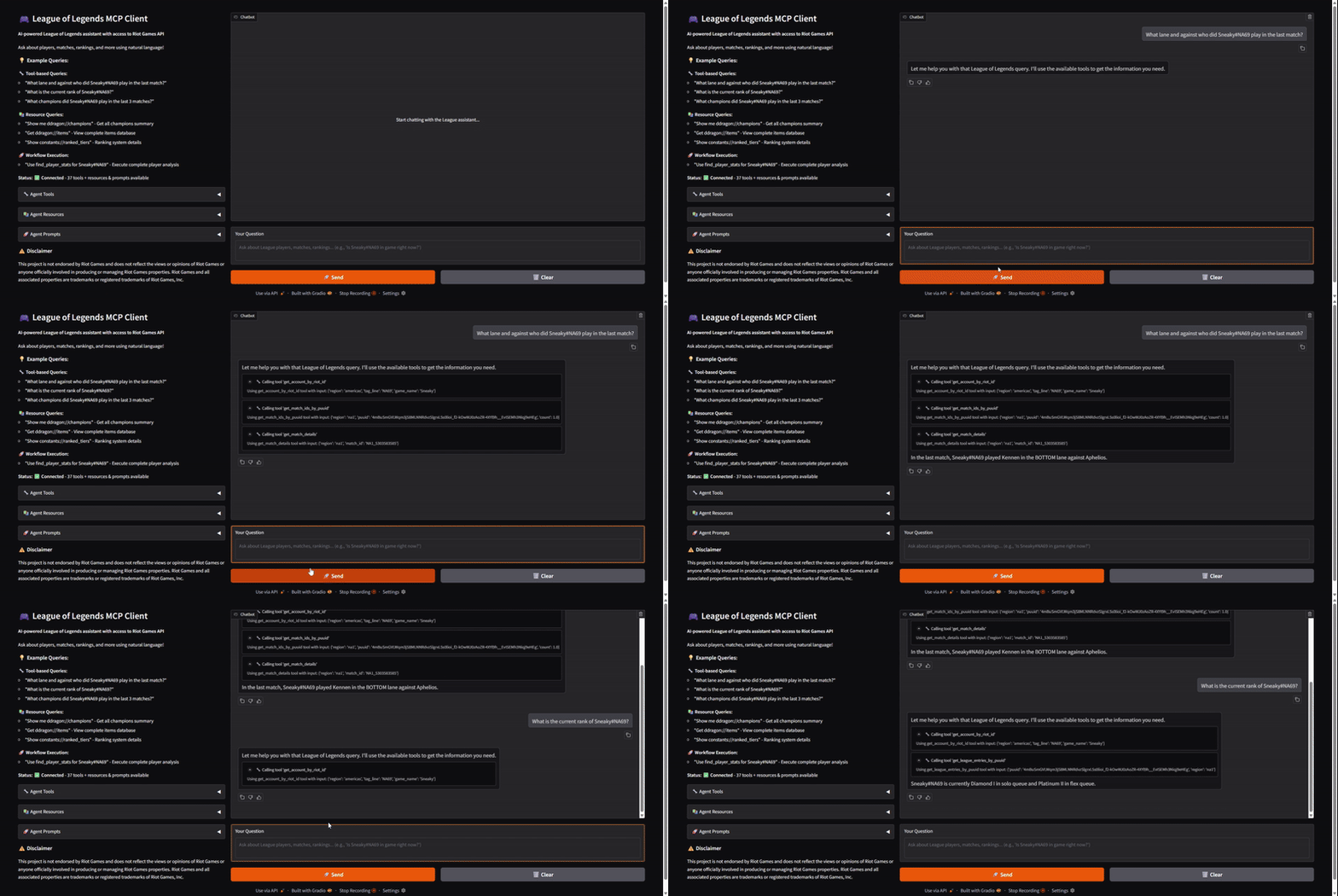
Use the included MCP client with a web UI for interactive testing
The MCP client is available at: https://github.com/kostadindev/League-of-Legends-MCP/tree/main/mcp-client
Option 2: Claude Desktop 🤖
Configure the server in Claude Desktop using the configuration examples above.
Customization 🎨
Transport Types 🚚
The server supports two transport types:
- stdio (default): Standard input/output transport for direct integration with MCP clients like Claude Desktop
- sse: Server-Sent Events transport for web-based integrations and HTTP connections
API Coverage 📈
This server provides comprehensive coverage of the Riot Games API:
- 10 API endpoints with 35+ tools 🔧
- Static game data via Data Dragon resources 🐉
- Game constants for queues, routing, and more 🎲
Contributing 🤝
We encourage contributions to help expand and improve league-mcp. Whether you want to add new tools, enhance existing functionality, or improve documentation, your input is valuable. 💝
For examples of other MCP servers and implementation patterns, see: https://github.com/modelcontextprotocol/servers
Pull requests are welcome! Feel free to contribute new ideas, bug fixes, or enhancements to make league-mcp even more powerful and useful. 🚀
License 📄
league-mcp is licensed under the MIT License. This means you are free to use, modify, and distribute the software, subject to the terms and conditions of the MIT License. For more details, please see the LICENSE file in the project repository.
Disclaimer ⚠️
This project is not endorsed by Riot Games and does not reflect the views or opinions of Riot Games or anyone officially involved in producing or managing Riot Games properties. Riot Games and all associated properties are trademarks or registered trademarks of Riot Games, Inc.
1 maintainer

Metadata
1 maintainer
Release files for league-mcp 1.0.0
For a detailed explanation of source distributions (sdists) and built distributions (wheels), please see the package formats documentation.
Source distribution (sdist)
| File | Size | Uploaded | Provenance | |
|---|---|---|---|---|
| league_mcp-1.0.0.tar.gz | 21.3 kB | Without provenance | Details |
Built distribution (wheel)
| File | Interpreter | ABI | Platform | Reset |
|---|---|---|---|---|
| league_mcp-1.0.0-py3-none-any.whl | Python 3 | none | any | Details |
Total release size: 55.8 kB
Release files / league_mcp-1.0.0.tar.gz
| Download URL | league_mcp-1.0.0.tar.gz |
|---|---|
| Size | 21.3 kB |
| Tags | Source |
|
SHA-256 checksum How to use checksums |
2313ab39724f220ac17a26a0791a60f03d0b73d1eb0930f88232154ac10805e8
|
|
BLAKE2b-256 checksum How to use checksums |
fe847a5de51c1cd7bac47ef6c11f890602096410e9837a7bfc173af6e3c31be6
|
| Upload date | |
|
Uploaded using Trusted Publishing? What is trusted publishing? |
No |
| Uploaded via |
twine/6.1.0 CPython/3.12.1
|
Release files / league_mcp-1.0.0-py3-none-any.whl
| Download URL | league_mcp-1.0.0-py3-none-any.whl |
|---|---|
| Size | 34.5 kB |
| Tags | Python 3 |
|
SHA-256 checksum How to use checksums |
42e75fe58ccbb40e04de1b7e4abcb71466daef0d7813c0342303700bf5635b72
|
|
BLAKE2b-256 checksum How to use checksums |
13791d4abb3458737922524191d0dfae362ce0cdd633b9345c4221ac21026ee6
|
| Upload date | |
|
Uploaded using Trusted Publishing? What is trusted publishing? |
No |
| Uploaded via |
twine/6.1.0 CPython/3.12.1
|
Security for league-mcp 1.0.0
Provenance
Provenance describes where a file came from. On PyPI, provenance is shared via attestations, which provide a verifiable record of the build or publishing details. View details, limitations and caveats.
No provenance found
None of the files in this release were uploaded with provenance metadata.
A note on package security
PyPI is a repository for distributing packages, not a service for auditing them. While third-party security researchers and our staff do their best to detect and remove malicious packages, PyPI cannot guarantee the quality, security or suitability of any given package.
To learn more about protecting yourself from malicious actors, visit our package security documentation.














