
This release is a pre-release and may not be stable for production use.
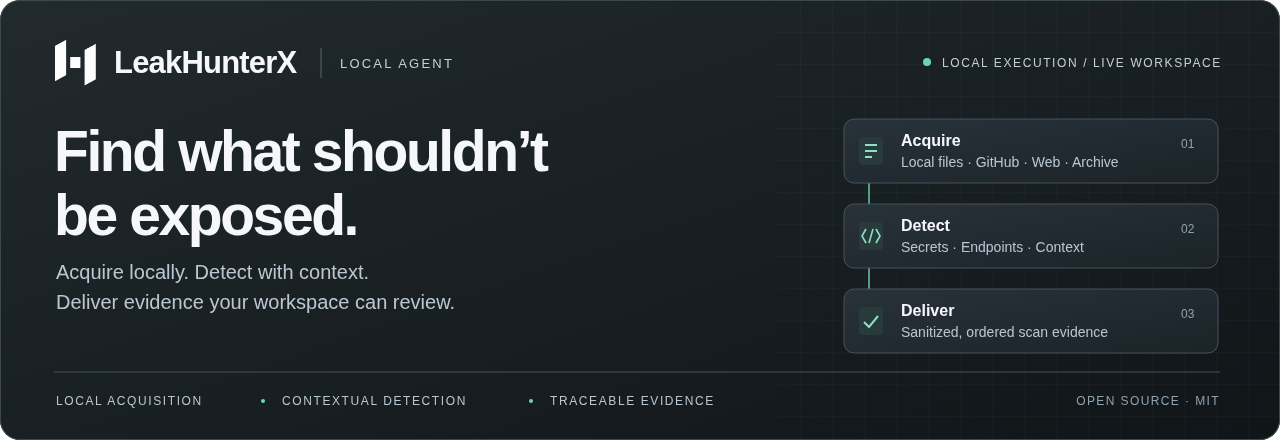
The local scanning runtime for the LeakHunterX security workspace.
Configure scans in the dashboard. Run acquisition and detection on your machine.
Review contextual findings, validation, Delta and reports in one workspace.
Quick start · Architecture · Commands · Documentation · Issues
Python 3.10+ / Linux · Windows · macOS / MIT / Source: 1.1.0rc2
One runtime. Multiple sources.
| Source | What runs on the agent |
|---|---|
| Local projects | Supported text files inside a registered root, respecting .lhxignore, filesystem boundaries and scan budgets. |
| GitHub repositories | Authorized repository acquisition at a pinned commit, using the same local detection pipeline. |
| Live websites | Scoped host and page discovery, served HTML/text, headless browser assets and literal JavaScript dependencies. |
| Historical exposure | Assigned archive snapshots, bounded source recovery and historical provenance kept distinct from current exposure. |
Secret candidates and endpoints retain context and source provenance. The agent journals sanitized evidence before delivery, retries interrupted transfers and keeps completion behind its pending evidence. The backend coordinates workspace access, validation, Delta, exposure review and reporting.
Quick start
1. Install the current source
git clone https://github.com/Omkar443/leakhunterx-agent.git
cd leakhunterx-agent
git switch main
python -m venv .venv
Activate the environment for your operating system:
# Linux / macOS
source .venv/bin/activate
# Windows PowerShell
.\.venv\Scripts\Activate.ps1
python -m pip install .
Install this release candidate with python -m pip install "leakhunterx-agent==1.1.0rc2".
Selecting the exact candidate avoids enabling prereleases for unrelated dependencies.
Connect using lhx auth, then run lhx agent.
For opt-in background operation on Linux, stop the foreground agent, then use
lhx service install and lhx service start. Inspect it with lhx service status
and lhx service logs; stop or remove it with lhx service stop / uninstall.
Run these as your registered non-root user, without sudo. Installation does not
start a service or copy credentials. See Python installation, Linux prerequisites
and PyPI publication for setup and release requirements.
Check their version: packages and downloaded binaries may precede the source on
main. This source is a release candidate; a main-branch push does not publish a
stable package or certify final release acceptance.
2. Connect your workspace
In your production workspace, open Agents, generate a connection token, then:
lhx auth
Paste the token at the hidden prompt. Successful registration starts the agent.
The default backend is https://backend-leakhunterx.onrender.com.
3. Start a scan
Keep the agent running. In the dashboard, choose New scan, configure an authorized target and select your connected agent. Progress and delivered evidence appear in the workspace. For subsequent starts:
lhx agent
Use lhx status for a read-only connection check; stop the runtime with Ctrl+C.
Local sources require explicit target registration.
GitHub sources require repository authorization.
Browser runtime, standalone builds and staging connections
HTTP crawling and headless rendering are enabled together by default. Python installations prepare the matching browser cache on first startup; this requires internet access and supported Chromium system libraries. Later starts reuse the cache. If rendering is unavailable, HTTP acquisition continues with a recorded coverage limitation. The browser sandbox is never disabled.
Standalone Linux x64 and Windows x64 builds are available when published on the releases page. They bundle the matching Chromium runtime and do not require Python. macOS uses the Python installation; a macOS standalone binary is not currently built.
Staging and production registrations are separate. Generate a production token
and run lhx auth again when moving from staging. Remove any staging
LHX_BACKEND_URL override before starting the production runtime. Updating the
code does not delete an existing credential file.
Architecture
Control in the workspace. Acquisition and detection on the agent.
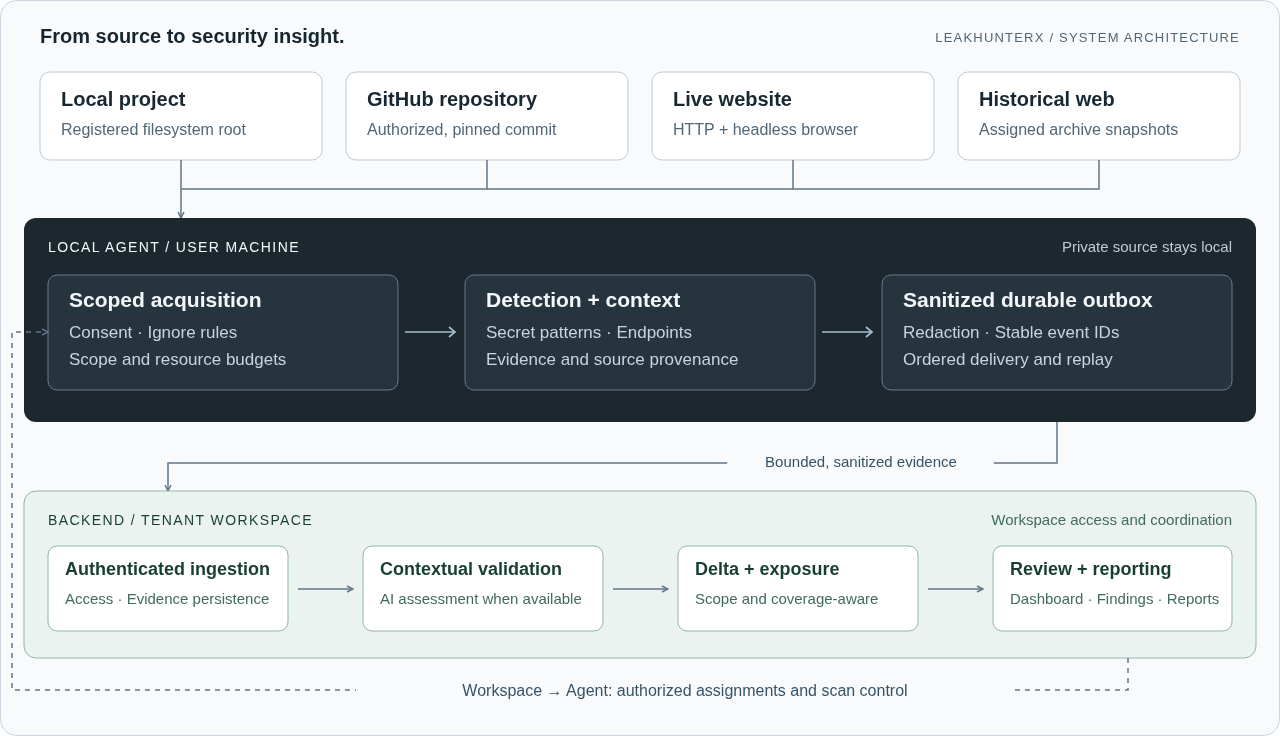
View the editable architecture diagram
flowchart TB
  UI["Security workspace<br/>Targets · Assignments · Live progress"]

  subgraph MACHINE["Local agent / user machine"]
    direction TB
    LOCAL["Local project<br/>Registered filesystem root"]
    GITHUB["GitHub repository<br/>Authorized, pinned commit"]
    WEB["Live website<br/>HTTP + headless browser"]
    ARCHIVE["Historical web<br/>Assigned archive snapshots"]
    ACQUIRE["Scoped acquisition<br/>Consent · Ignore rules · Resource budgets"]
    DETECT["Detection engine<br/>Secret patterns · Endpoints · Context"]
    OUTBOX["Sanitized evidence + durable outbox<br/>Redaction · Stable event IDs · Ordered replay"]
    LOCAL --> ACQUIRE
    GITHUB --> ACQUIRE
    WEB --> ACQUIRE
    ARCHIVE --> ACQUIRE
    ACQUIRE --> DETECT --> OUTBOX
  end

  subgraph CLOUD["Backend / tenant workspace"]
    INGEST["Authenticated ingestion<br/>Tenant access · Evidence persistence"]
    VALIDATE["Contextual validation<br/>AI assessment when available"]
    DELTA["Delta + exposure correlation<br/>Comparable scope · Coverage-aware changes"]
    RESULTS["Dashboard · Exposure review · Reports"]
    INGEST --> VALIDATE --> DELTA --> RESULTS
  end

  UI -->|"Authorized scan assignment"| ACQUIRE
  OUTBOX -->|"Bounded, sanitized evidence"| INGEST

  classDef source fill:#eef3f7,stroke:#657987,color:#15242f
  classDef agent fill:#1c292f,stroke:#78909c,color:#ffffff
  classDef cloud fill:#e9f6ef,stroke:#40846b,color:#143e31
  class LOCAL,GITHUB,WEB,ARCHIVE,UI source
  class ACQUIRE,DETECT,OUTBOX agent
  class INGEST,VALIDATE,DELTA,RESULTS cloud
| Boundary | Contract |
|---|---|
| Source → agent | Acquire only authorized assets. Private repository and local source remain on the machine. Repository code is not executed. |
| Agent → backend | Deliver bounded, sanitized findings and semantic observations. Public web evidence may include a redacted source excerpt. |
| Validation → results | Preserve assessment status and uncertainty. AI unavailability does not turn a detection into a confirmed finding or break a scan. |
| Scan → Delta | Compare compatible scans. Failed or cancelled scans do not publish partial detections into dashboard totals or reports. Incomplete coverage does not prove remediation. |
Detected raw secrets are redacted before delivery. Managed GitHub assignments use temporary, repository-scoped credentials held in agent memory. AI confidence is an assessment of the available evidence, not proof that a credential is active or exploitable. See evidence delivery for the protocol.
Commands
| Command | Purpose | Current options |
|---|---|---|
lhx auth |
Register and start the runtime | --backend https://…; token entered at the hidden prompt |
lhx agent |
Listen for dashboard assignments | --backend, --browser on|off, --log-level, --log-file |
lhx status |
Inspect connection status | --backend, --json |
lhx project |
Manage authorized local/repository targets | add, list, allow-dashboard, deny-dashboard, remove |
lhx scan <target> |
Run a scan from the terminal | Local/repository: --local-only, --profile quick|standard|deep, --json |
lhx resume <scan-id> |
Resume a supported interrupted scan | --json |
lhx ci |
Request a scan through an existing CI policy | --commit, --policy-id; optional --backend, --request-id, --timeout |
lhx status --json
lhx agent --log-level DEBUG --log-file agent.log
lhx scan ./project --local-only --profile deep --json
lhx ci --commit <default-branch-sha> --policy-id <policy-uuid>
Use lhx <command> --help for the complete syntax. lhx start aliases lhx agent;
lhx-agent remains a compatibility entry point. CI reads its credential from
LHX_CI_TOKEN, not command-line arguments, and defaults to the production backend.
lhx agent --browser off explicitly limits browser coverage while HTTP crawling
continues. Live website scans reject local-only, profile and JSON flags rather
than silently ignoring them.
Local targets and offline scans
Create a project in the workspace, then register and explicitly authorize its machine-local target:
lhx project add ./project --name Application --project-id <project-id>
lhx project list
lhx project allow-dashboard <target-id>
lhx agent
For an offline scan without cloud, AI, browser or provider requests:
lhx scan ./project --local-only
lhx scan ./project --local-only --json
lhx resume <scan-id> --json
Use .lhxignore for explicit local exclusions; start from the example.
Scan only assets you are authorized to assess. Resource budgets protect the host
and target; skipped assets remain visible in coverage.
Documentation
| Guide | What it covers |
|---|---|
| Local scanning | Target consent, profiles, exclusions and offline operation |
| GitHub scanning | Web UI setup, repository authorization and commit-pinned scans |
| Historical exposure | Archive provenance, source recovery and historical findings |
| Browser rendering | Runtime preparation, sandboxing and coverage |
| Evidence delivery | Redaction, durable delivery and recovery boundaries |
| Release readiness | Automated results and remaining acceptance checks |
Contributing and verification
python -m pip install -e . pytest
python -m pytest tests -q
python benchmarks/run.py --check --output benchmarks/results/local.json
python benchmarks/run.py --external --check --output benchmarks/results/external-local.json
Real browser integration tests require installed, sandboxed Chromium and
LHX_TEST_BROWSER=1. Benchmark scores apply to the labelled synthetic corpus,
not arbitrary production sites. The audit records measured
results and remaining hosted, soak and package acceptance checks.
Build standalone binaries and understand the release gate
Build binaries on their destination operating system:
python -m pip install . pyinstaller
python packaging/build.py
python packaging/browser_smoke.py dist/<binary-name>
The release workflow verifies tests and benchmarks before building artifacts.
Manual builds and candidate tags produce downloadable workflow artifacts.
Stable publication requires completed acceptance evidence and the main-branch
release guard. Pushing to main alone does not publish a release.
1 maintainer

Metadata
1 maintainer
Release files for leakhunterx-agent 1.1.0rc2
For a detailed explanation of source distributions (sdists) and built distributions (wheels), please see the package formats documentation.
Source distribution (sdist)
| File | Size | Uploaded | |
|---|---|---|---|
| leakhunterx_agent-1.1.0rc2.tar.gz | 281.2 kB | Details |
Built distribution (wheel)
| File | Interpreter | ABI | Platform | Reset |
|---|---|---|---|---|
| leakhunterx_agent-1.1.0rc2-py3-none-any.whl | Python 3 | none | any | Details |
Total release size: 533.0 kB
Release files / leakhunterx_agent-1.1.0rc2.tar.gz
| Download URL | leakhunterx_agent-1.1.0rc2.tar.gz |
|---|---|
| Size | 281.2 kB |
| Tags | Source |
|
SHA-256 checksum How to use checksums |
f9b9190070002417a082eca24e48749b9cea868428a839a38734d8931f4faf33
|
|
BLAKE2b-256 checksum How to use checksums |
073aea83e92ae286b556fb3c6dc3ee313b49550c6b9cad97e8a980ff47fb0234
|
| Upload date | |
|
Uploaded using Trusted Publishing? What is trusted publishing? |
Yes |
| Uploaded via |
twine/7.0.0 CPython/3.13.14
|
Provenance
Provenance describes where a file came from. On PyPI, provenance is shared via attestations, which provide a verifiable record of the build or publishing details. View details, limitations and caveats.


PyPI Publish Attestation
PyPI verified that this artifact, at this checksum, originated from the publisher listed below.
Signed by GitHub Actions, verified by PyPI on Oct 14, 2026.
Transparency logRelease files / leakhunterx_agent-1.1.0rc2-py3-none-any.whl
| Download URL | leakhunterx_agent-1.1.0rc2-py3-none-any.whl |
|---|---|
| Size | 251.8 kB |
| Tags | Python 3 |
|
SHA-256 checksum How to use checksums |
cc323efa40ea83638f96947a29c7c3f007f4c7ed80aa9f3002e6d177705169bc
|
|
BLAKE2b-256 checksum How to use checksums |
d9080b3d1ce942b39b8fd2ad4ffb6faded01a0e1aa15fbbbbc765b7631b63ba6
|
| Upload date | |
|
Uploaded using Trusted Publishing? What is trusted publishing? |
Yes |
| Uploaded via |
twine/7.0.0 CPython/3.13.14
|
Provenance
Provenance describes where a file came from. On PyPI, provenance is shared via attestations, which provide a verifiable record of the build or publishing details. View details, limitations and caveats.
PyPI Publish Attestation
PyPI verified that this artifact, at this checksum, originated from the publisher listed below.
Signed by GitHub Actions, verified by PyPI on Oct 14, 2026.
Transparency log













