
Welcome to LedFx ✨ Making music come alive!





What is LedFx?
LedFx makes your LEDs dance to audio! What LedFx offers is the ability to take audio input, and instantaneously processes the audio into realtime light show to multiple LED strips/matrix. No need to spend hours on end to program one song to program your LEDs, as LedFx will do this all for you!
LedFx real-time LED strip music visualization effect controller using is a network based devices (ESP8266/ESP32/Raspberry Pi 4) with support for advanced real-time audio effects! LedFx can control multiple devices and works great with cheap ESP8266/ESP32 nodes allowing for cost effective synchronized effects across your entire house!
Demos
Visit and join our Discord where community members show off their projects. Check out the #projects or #show-and-tell channels.
📑 Quick start guide and documentation📖
Head over to releases to get the latest releases for Windows and Mac. For linux, use pip.
Bleeding edge (Experimental)
If you want the absolute bleeding edge and are not afraid of using the terminal, take a look at the detailed installation instructions here: Installation documentation.
Documentation
Documentation for the latest release can be found here: Stable documentation
Documentation built against this repository can be found here: Latest documentation
😍 Show me how to make one!
The below image describes a basic setup - LedFx running on PC, communicating with a WLED Device controlling an LED strip.
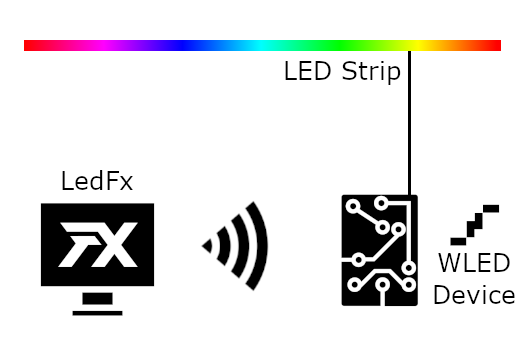
Component |
Example |
|---|---|
Computer running LedFx |
Windows 10, LedFx.exe |
Networked device controlling LED Strip |
ESP8266 NODEMCU v3 running WLED |
Addressable LED strip |
DC5V WS2812B 5 meters 60LED/m IP67 |
Power supply for LED Strip and ESP |
5V 10 amps LED Power Supply |
Something to connect the wires together! |
Soldering iron/solder |
- Build your networked LED Strip.
For most, this is the difficult step. Don’t worry! There’s guides here and online, and plenty of people able to help on WLED and LedFx Discord.
Follow the WLED guide to connect the LED strip and ESP together.
Ensure all WLED devices are powered on, and connected to your Wi-Fi.
Test you can access the WLED web interface from your PC. If so, then you’re good to go!
- Install LedFx.
For PC and Mac, see our releases, or see the installation documentation for more information.
For linux, you can use pip to install ledfx - however you may need to install some dependencies first. See the installation documentation for more information.
- Direct computer audio output to LedFx.
By default on Windows LedFx will attempt to listen to your system audio.
More information for Linux and macOS users here.
Play some music in the background.
- Start LedFx.
Your WLED devices should appear in LedFx, automagically configured and ready to go! 🎆🔥
If not, on the bottom click Home, -> Scan for WLED devices button, or click on the big plus sign and Add Device to add them manually.
If they’re still not showing up, make sure they’re powered on and properly connected to your WiFi.
- Start using effects!
Click on the device, select an effect eg scroll under Classic
Your lights should now be reacting realtime to your music! Enjoy the show 🌈
🧑💻 Join the LedFx Community
Join the Discord server to discuss everything about LedFx!
To join, click on the Discord button below:

Contributing
Pull requests are welcome. Once tested, contact LedFx developer community on Discord to discuss the next step. We expect and require all contributors to read, understand and follow our code of conduct.
Credits: Contributors-&-About
License
1 maintainer

Metadata
1 maintainer
Release files for LedFx 2.0.110
For a detailed explanation of source distributions (sdists) and built distributions (wheels), please see the package formats documentation.
Source distribution (sdist)
| File | Size | Uploaded | Provenance | Actions |
|---|---|---|---|---|
| ledfx-2.0.110.tar.gz | 29.3 MB | Without provenance | Details for ledfx-2.0.110.tar.gz |
Built distribution (wheel)
| File | Interpreter | ABI | Platform | Actions Reset |
|---|---|---|---|---|
| ledfx-2.0.110-py3-none-any.whl | Python 3 | none | any | Details for ledfx-2.0.110-py3-none-any.whl |
Total release size: 58.8 MB
Release files / ledfx-2.0.110.tar.gz
| Download URL | ledfx-2.0.110.tar.gz |
|---|---|
| Size | 29.3 MB |
| Tags | Source |
|
SHA-256 checksum How to use checksums |
bad629008b7d4e1815e7c878a77776abfa4b7c2536ce55f20a74cfda4aa40e38
|
|
BLAKE2b-256 checksum How to use checksums |
35de7f3840bfc0109e2bbe04b4dcc9e37ca2b395ae0133ddc14128198ab9e740
|
| Upload date | |
|
Uploaded using Trusted Publishing? What is trusted publishing? |
No |
| Uploaded via |
twine/6.1.0 CPython/3.12.9
|
Release files / ledfx-2.0.110-py3-none-any.whl
| Download URL | ledfx-2.0.110-py3-none-any.whl |
|---|---|
| Size | 29.5 MB |
| Tags | Python 3 |
|
SHA-256 checksum How to use checksums |
fbbe15c1666c689ec672242257df78233c8015f2986e8bfba9ce0b0162056390
|
|
BLAKE2b-256 checksum How to use checksums |
2907fac3ade1184b6322edbf9c33fbd4abbd0ec06780c33ed4b066366e11a7bd
|
| Upload date | |
|
Uploaded using Trusted Publishing? What is trusted publishing? |
No |
| Uploaded via |
twine/6.1.0 CPython/3.12.9
|
Security for LedFx 2.0.110
Provenance
Provenance describes where a file came from. On PyPI, provenance is shared via attestations, which provide a verifiable record of the build or publishing details. View details, limitations and caveats.
No provenance found
None of the files in this release were uploaded with provenance metadata.
A note on package security
PyPI is a repository for distributing packages, not a service for auditing them. While third-party security researchers and our staff do their best to detect and remove malicious packages, PyPI cannot guarantee the quality, security or suitability of any given package.
To learn more about protecting yourself from malicious actors, visit our package security documentation.














