
AI Search Workflow with Document Pipelines.

Project description



- AI Search Assistant with Local Knowledge Base
- Quick start
- Use Different LLM Endpoints
- Usage Examples
- Main Components
- Community
AI Search Assistant with Local Knowledge Base
LeetTools is an AI search assistant that can perform highly customizable search workflows and save the search results and generated outputs to local knowledge bases. With an automated document pipeline that handles data ingestion, indexing, and storage, we can easily run complext search workflows that query, extract and generate content from the web or local knowledge bases.
LeetTools can run with minimal resource requirements on the command line with a DuckDB-backend and configurable LLM settings. It can be easily integrated with other applications need AI search and knowledge base support.
Here is an illustration of the LeetTools digest flow where it can search the web (or local KB) and generate a digest article from the search results:

And here is an example output article generated by the digest flow for the query How does Ollama work?.
Currently LeetTools provides the following workflow:
- answer : Answer the query directly with source references (similar to Perplexity). 📖
- digest : Generate a multi-section digest article from search results (similar to Google Deep Research). 📖
- search : Search for top segements that match the query. 📖
- news : Generate a list of news items for the specified topic. 📖
- extract : Extract and store structured data for given schema. 📖
- opinions: Generate sentiment analysis and facts from the search results. 📖
Quick start
We can use any OpenAI-compatible LLM endpoint, such as local Ollama service or public provider such as Gemini or DeepSeek. We can switch the servce easily by defining environment variables or switching .env files.
Run with pip
% conda create -y -n leettools python=3.11
% conda activate leettools
% pip install leettools

# where we store all the data and logs
% export LEET_HOME=${HOME}/leettools
% mkdir -p ${LEET_HOME}

# set the endpoint and api key
% export EDS_DEFAULT_OPENAI_BASE_URL=https://api.openai.com/v1
% export EDS_OPENAI_API_KEY=<your_openai_api_key>

# now you can run the command line commands
# flow: the subcommand to run different flows, use --list to see all the available flows
# -t run this 'answer' flow, use --info option to see the function description
# -q the query
# -k save the scraped web page to the knowledge base
# -l log level, info shows the essential log messages
% leet flow -t answer -q "How does GraphRAG work?" -k graphrag -l info
Run with source code
% git clone https://github.com/leettools-dev/leettools.git
% cd leettools

% conda create -y -n leettools python=3.11
% conda activate leettools
% pip install -r requirements.txt
% pip install -e .

# where we store all the data and logs
% export LEET_HOME=${HOME}/leettools
% mkdir -p ${LEET_HOME}

# add the script path to the path
% export PATH=`pwd`/scripts:${PATH}

# set the OPENAI_API_KEY or put it in the .env file
# or any OpenAI-compatible LLM inference endpoint
# export EDS_DEFAULT_OPENAI_BASE_URL=https://api.openai.com/v1
% export EDS_OPENAI_API_KEY=<your_openai_api_key>
# or
% echo "EDS_OPENAI_API_KEY=<your_openai_api_key>" >> `pwd`/.env

# now you can run the command line commands
# flow: the subcommand to run different flows, use --list to see all the available flows
# -t run this 'answer' flow, use --info option to see the function description
# -q the query
# -k save the scraped web page to the knowledge base
# -l log level, info shows the essential log messages
% leet flow -t answer -q "How does GraphRAG work?" -k graphrag -l info
** Sample Output **
Here is an example output of the answer flow:
# How Does Graphrag Work?
GraphRAG operates by constructing a knowledge graph from a set of documents, which
involves several key steps. Initially, it ingests textual data and utilizes a large
language model (LLM) to extract entities (such as people, places, and concepts) and
their relationships, mapping these as nodes and edges in a graph structure[1].

The process begins with pre-processing and indexing, where the text is segmented into
manageable units, and entities and relationships are identified. These entities are
then organized into hierarchical "communities," which are clusters of related topics
that allow for a more structured understanding of the data[2][3].

When a query is made, GraphRAG employs two types of searches: Global Search, which
looks across the entire knowledge graph for broad connections, and Local Search, which
focuses on specific subgraphs for detailed information[3]. This dual approach enables
GraphRAG to provide comprehensive answers that consider both high-level themes and
specific details, allowing it to handle complex queries effectively[3][4].

In summary, GraphRAG enhances traditional retrieval-augmented generation (RAG) by
leveraging a structured knowledge graph, enabling it to provide nuanced responses that
reflect the interconnected nature of the information it processes[1][2].
## References
[1] [https://www.falkordb.com/blog/what-is-graphrag/](https://www.falkordb.com/blog/what-is-graphrag/)
[2] [https://medium.com/@zilliz_learn/graphrag-explained-enhancing-rag-with-knowledge-graphs-3312065f99e1](https://medium.com/@zilliz_learn/graphrag-explained-enhancing-rag-with-knowledge-graphs-3312065f99e1)
[3] [https://medium.com/data-science-in-your-pocket/how-graphrag-works-8d89503b480d](https://medium.com/data-science-in-your-pocket/how-graphrag-works-8d89503b480d)
[4] [https://github.com/microsoft/graphrag/discussions/511](https://github.com/microsoft/graphrag/discussions/511)
Use Different LLM Endpoints
We can run LeetTools with different env files to use different LLM endpoints and other related settings. For example, if you have a local Ollama serving instance, you can set to use it as follows:
% cat > .env.ollama <<EOF
# need tot change LEET_HOME to the correct path
LEET_HOME=/Users/myhome/leettools
EDS_DEFAULT_OPENAI_BASE_URL=http://localhost:11434/v1
EDS_OPENAI_API_KEY=dummy-key
EDS_DEFAULT_OPENAI_MODEL=llama3.2
# remove the following line if you have a separate embedder compatible with OpenAI API
# the following line specifies to use a local embedder
EDS_DEFAULT_DENSE_EMBEDDER=dense_embedder_local_mem
EOF

# Then run the command with the -e option to specify the .env file to use
% leet flow -e .env.ollama -t answer -q "How does GraphRAG work?" -k graphrag -l info
An example of using the DeepSeek API is described here.
Usage Examples
Generate news list from updates in KB
We can create a knowledge base with a list of URLs or a search query, and then generate a list of news items from the KB. Here is an example:
# create a KB with a google search
# -d 1 means to search for news from the last day
# -m 30 means to scrape the top 30 search results
% leet kb add-search -k genai -q "LLM GenAI Startups" -d 1 -m 30
# you can add single url to the KB
% leet kb add-url -k genai -r "https://www.techcrunch.com"
# you can also add a list of urls, example in [docs/sample_urls.txt](docs/sample_urls.txt)
% leet kb add-url-list -k genai -f <file_with_list_of_urls>

# generate a news list from the KB
% leet flow -t news -q "LLM GenAI Startups" -k genai -l info -o llm_genai_news.md

# Next time you want to refresh the KB and generate the news list
# this command will re-ingest all the docsources specified above
% leet kb ingest -k genai

# run the news flow again with parameter you need
% leet flow -t news --info
====================================================================================================
news: Generating a list of news items from the KB.

This flow generates a list of news items from the updated items in the KB:
1. check the KB for recently updated documents and find news items in them.
2. combine all the similar items into one.
3. remove items that have been reported before.
4. rank the items by the number of sources.
5. generate a list of news items with references.

====================================================================================================
Use -p name=value to specify options for news:

article_style       : The style of the output article such as analytical research reports, humorous
                      news articles, or technical blog posts. [default: analytical research reports]
                      [FLOW: news]
days_limit          : Number of days to limit the search results. 0 or empty means no limit. In
                      local KB, filters by the import time. [FLOW: news]
news_include_old    : Include all news items in the result, even if it has been reported
                      before.Default is False. [default: False] [FLOW: news]
news_source_min     : Number of sources a news item has to have to be included in the result.Default
                      is 2. Depends on the nature of the knowledge base. [default: 2] [FLOW: news]
output_language     : Output the result in the language. [FLOW: news]
word_count          : The number of words in the output section. Empty means automatics.
                      [FLOW: news]
Note: scheduler support and UI view are coming soon.
Main Components
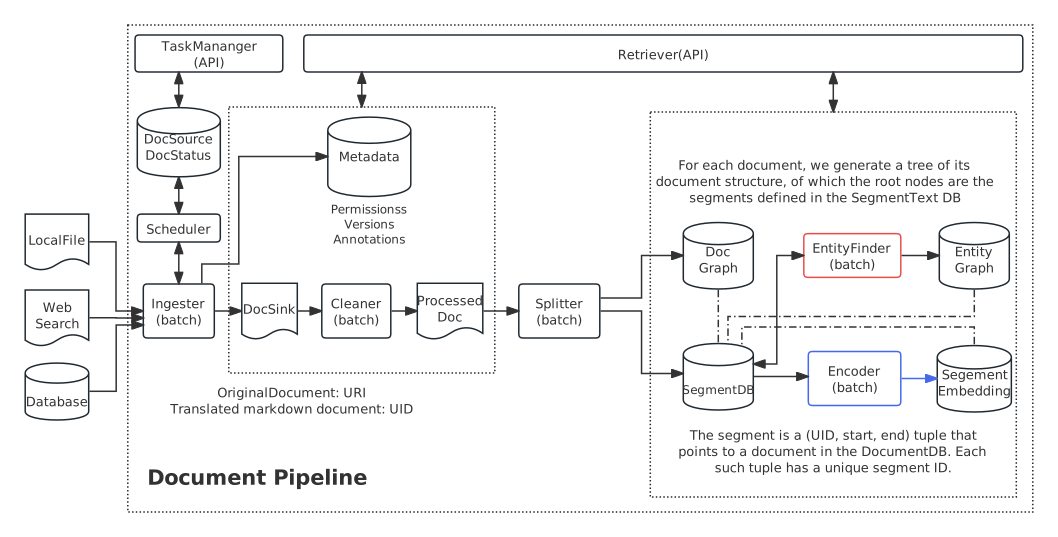
The main components of the backend include:
- 🚀 Automated document pipeline to ingest, convert, chunk, embed, and index documents.
- 🗂️ Knowledge base to manage and serve the indexed documents.
- 🔍 Search and retrieval library to fetch documents from the web or local KB.
- 🤖 Workflow engine to implement search-based AI workflows.
- ⚙ Configuration system to support dynamic configurations used for every component.
- 📝 Query history system to manage the history and the context of the queries.
- 💻 Scheduler for automatic execution of the pipeline tasks.
- 🧩 Accounting system to track the usage of the LLM APIs.
The architecture of the document pipeline is shown below:
See the Documentation for more details.
Community
Acknowledgements
Right now we are using the following open source libraries and tools (not limited to):
We plan to add more plugins for different components to support different workloads.
Get help and support
Please feel free to connect with us using the discussion section.
Contributing
Please read Contributing to LeetTools for details.
License
LeetTools is licensed under the Apache License, Version 2.0. See LICENSE for the full license text.
Release history Release notifications | RSS feed


Download files
Download the file for your platform. If you're not sure which to choose, learn more about installing packages.
Source Distributions
Built Distribution
Filter files by name, interpreter, ABI, and platform.
If you're not sure about the file name format, learn more about wheel file names.
Copy a direct link to the current filters
File details
Details for the file leettools-1.0.2-py3-none-any.whl.
File metadata
- Download URL: leettools-1.0.2-py3-none-any.whl
- Upload date:
- Size: 501.2 kB
- Tags: Python 3
- Uploaded using Trusted Publishing? No
- Uploaded via: twine/6.0.1 CPython/3.11.11
File hashes
| Algorithm | Hash digest | |
|---|---|---|
| SHA256 |
f11d1c64e0c9d6bc1ba74a944abc7450b1085f44dc24ef2f6dee341ecbb5ec0c
|
|
| MD5 |
14b04004f603131e2128ac1ed924e98c
|
|
| BLAKE2b-256 |
b207c1b379e807317b65739b716a3bfd4571711b73e942dd7a00c00b0eccaeef
|






