
Legato
Open-source computer-use harness for any OpenAI-compatible model: Qwen, DeepSeek, Claude, or your own vLLM server.
It drives a desktop with a computer tool, waits for the screen instead of sleeping, and bounds every model call.
Bring your own computer: your own screen (macOS, Windows, Linux), any sandbox you already run, or a cloud desktop.
Give your coding agent a computer
Claude Code, Codex, Cursor or any MCP client gets a desktop to look at and click: a container on your machine (needs only Docker), your own screen, or a cloud desktop (guide).
pip install "legatolabs[mcp]"
claude mcp add legato -- legato mcp --sandbox docker
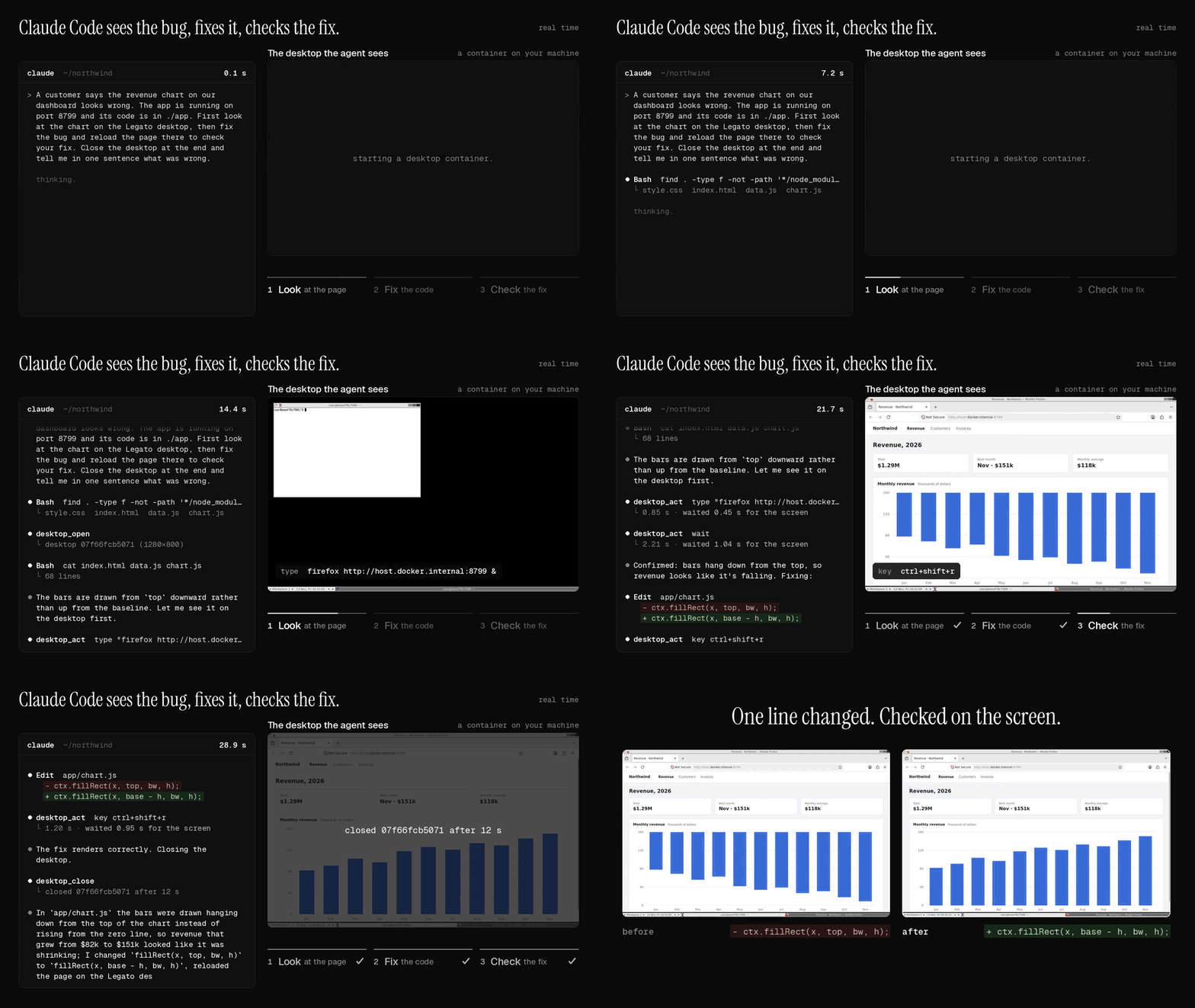
A real run in real time: told that a revenue chart looks wrong, Claude Code opens the dashboard in a desktop container, sees the bars hanging from the top, changes one line and reloads to check the fix. Each image is a screenshot the MCP server returned.
Or install the Claude Code plugin, which adds the server and a skill: /plugin install legato --marketplace legatolabs/legato. One click for other editors (these run the same server with uvx):



Build an agent in Python
pip install "legatolabs[e2b]" # PyPI name: legatolabs. Import name: legato.
import os, legato
from e2b_desktop import Sandbox                       # needs E2B_API_KEY

agent = legato.Harness(model="qwen/qwen3.8-27b", base_url="https://openrouter.ai/api/v1",
                       api_key=os.environ["OPENROUTER_API_KEY"])
desk = Sandbox.create()
result = agent.run("Open the terminal and print the date", legato.attach(desk))
print(result.report())                                # where the time went
desk.kill()
legato.local() drives your own screen instead, legato.providers.docker(w, h) a desktop container on your
machine, and legato.attach(shell=run) any Linux sandbox you can run a command in, such as a VM
(sandboxes). With a model on your own GPU, nothing leaves your machine:
pip install "legatolabs[local]"
legato run "Open the terminal and print the date" --sandbox local --model Qwen/Qwen3.5-9B --base-url http://localhost:8000/v1
Results
Same model, same desktops, 24 office tasks per run. Method and raw data.
| Model | Compared with | Time | Success |
|---|---|---|---|
| Claude Sonnet 5.5 | Anthropic's reference loop | 1.48x faster | 48/48 vs 48/48 |
| Qwen3.8-27B | OSWorld's Qwen agent | same | 71/96 vs 53/96 |
How
- Waits until the screen stops changing instead of a fixed 2 s sleep.
- Up to 3 actions per turn, one screenshot after them.
- Drops old screenshots in chunks so the prompt cache keeps hitting.
- A wall-clock timeout and a token budget on every model call.
More
- Guides: a computer for your coding agent · test a desktop app · local model · office apps · why agents are slow
- Models · Sandboxes · MCP server · RL rollouts · FAQ
- Compare: computer-use MCP servers · Playwright MCP · Anthropic's demo · OSWorld's Qwen agent · Agent S3 · UI-TARS-desktop
- Migrate: from cua-agent · from Bytebot
- For coding agents: llms.txt · AGENTS.md
Apache-2.0. Hosted desktops and models: legato.computer.
1 maintainer

Metadata
1 maintainer
Release files for legatolabs 0.1.8
For a detailed explanation of source distributions (sdists) and built distributions (wheels), please see the package formats documentation.
Source distribution (sdist)
| File | Size | Uploaded | Provenance | Actions |
|---|---|---|---|---|
| legatolabs-0.1.8.tar.gz | 85.2 kB | With provenance | Details for legatolabs-0.1.8.tar.gz |
Built distribution (wheel)
| File | Interpreter | ABI | Platform | Actions Reset |
|---|---|---|---|---|
| legatolabs-0.1.8-py3-none-any.whl | Python 3 | none | any | Details for legatolabs-0.1.8-py3-none-any.whl |
Total release size: 166.6 kB
Release files / legatolabs-0.1.8.tar.gz
| Download URL | legatolabs-0.1.8.tar.gz |
|---|---|
| Size | 85.2 kB |
| Tags | Source |
|
SHA-256 checksum How to use checksums |
e7b4e5c116cb8a2b87aa486f511cd7f099c041a3524d12101812bc97702bb933
|
|
BLAKE2b-256 checksum How to use checksums |
bc5d0c8b322c332a7b335f56a0d790e18a1e958fa1229a6003bf19c8ef43bccb
|
| Upload date | |
|
Uploaded using Trusted Publishing? What is trusted publishing? |
Yes |
| Uploaded via |
twine/7.0.0 CPython/3.13.16
|
Provenance
Provenance describes where a file came from. On PyPI, provenance is shared via attestations, which provide a verifiable record of the build or publishing details. View details, limitations and caveats.


PyPI Publish Attestation
PyPI verified that this artifact, at this checksum, originated from the publisher listed below.
Signed by GitHub Actions, verified by PyPI on Nov 13, 2026.
Transparency logRelease files / legatolabs-0.1.8-py3-none-any.whl
| Download URL | legatolabs-0.1.8-py3-none-any.whl |
|---|---|
| Size | 81.4 kB |
| Tags | Python 3 |
|
SHA-256 checksum How to use checksums |
d155f3c18c780dd1489fa63aa97498ca19f02cb516684ddb34a7a88fea52b98a
|
|
BLAKE2b-256 checksum How to use checksums |
b1164180bcde7a3337e5c6753a77ea080d7eed83168299aa0d4727e79cb14c8b
|
| Upload date | |
|
Uploaded using Trusted Publishing? What is trusted publishing? |
Yes |
| Uploaded via |
twine/7.0.0 CPython/3.13.16
|
Provenance
Provenance describes where a file came from. On PyPI, provenance is shared via attestations, which provide a verifiable record of the build or publishing details. View details, limitations and caveats.
PyPI Publish Attestation
PyPI verified that this artifact, at this checksum, originated from the publisher listed below.
Signed by GitHub Actions, verified by PyPI on Nov 13, 2026.
Transparency logSecurity for legatolabs 0.1.8
Provenance
Provenance describes where a file came from. On PyPI, provenance is shared via attestations, which provide a verifiable record of the build or publishing details. View details, limitations and caveats.
Full provenance
Both files in this release have been uploaded with provenance metadata.
Attestation for legatolabs-0.1.8.tar.gz
PyPI Publish Attestation
PyPI verified that this artifact, at this checksum, originated from the publisher listed below.
Signed by GitHub Actions, verified by PyPI on Nov 13, 2026.
Transparency logA note on package security
PyPI is a repository for distributing packages, not a service for auditing them. While third-party security researchers and our staff do their best to detect and remove malicious packages, PyPI cannot guarantee the quality, security or suitability of any given package.
To learn more about protecting yourself from malicious actors, visit our package security documentation.














