
Leitner system spaced repetition

Project description

Leitner Box


Installation
You can install the leitner-box python package from PyPI using pip:
pip install leitner-box
Quickstart
Import and initialize the Leitner scheduler
from leitner_box import Scheduler, Card, Rating, ReviewLog

scheduler = Scheduler()
Create a new Card object
card = Card()

print(f"Card is in box {card.box}")
 # => Card is in box 1
Choose a rating and review the card
"""
Rating.Fail # (==0) forgot the card
Rating.Pass # (==1) remembered the card
"""

rating = Rating.Pass

card, review_log = scheduler.review_card(card, rating)

print(f"Card in box {review_log.card.box} rated {review_log.rating} \
on {review_log.review_datetime}")
# => Card in box 1 rated 1 on 2024-10-21 20:58:29.758259
See when the card is due next
print(f"Card in box {card.box} due on {card.due}")
# => Card in box 2 due on 2024-10-22 00:00:00
Usage
The scheduler
The Scheduler has three parameters: 1) box_intervals, 2) start_datetime, and 3) on_fail.
box_intervals is a list of integers corresponding to the interval lengths of each box.
box_intervals = [1,2,7] # this also the default
scheduler = Scheduler(box_intervals=box_intervals)
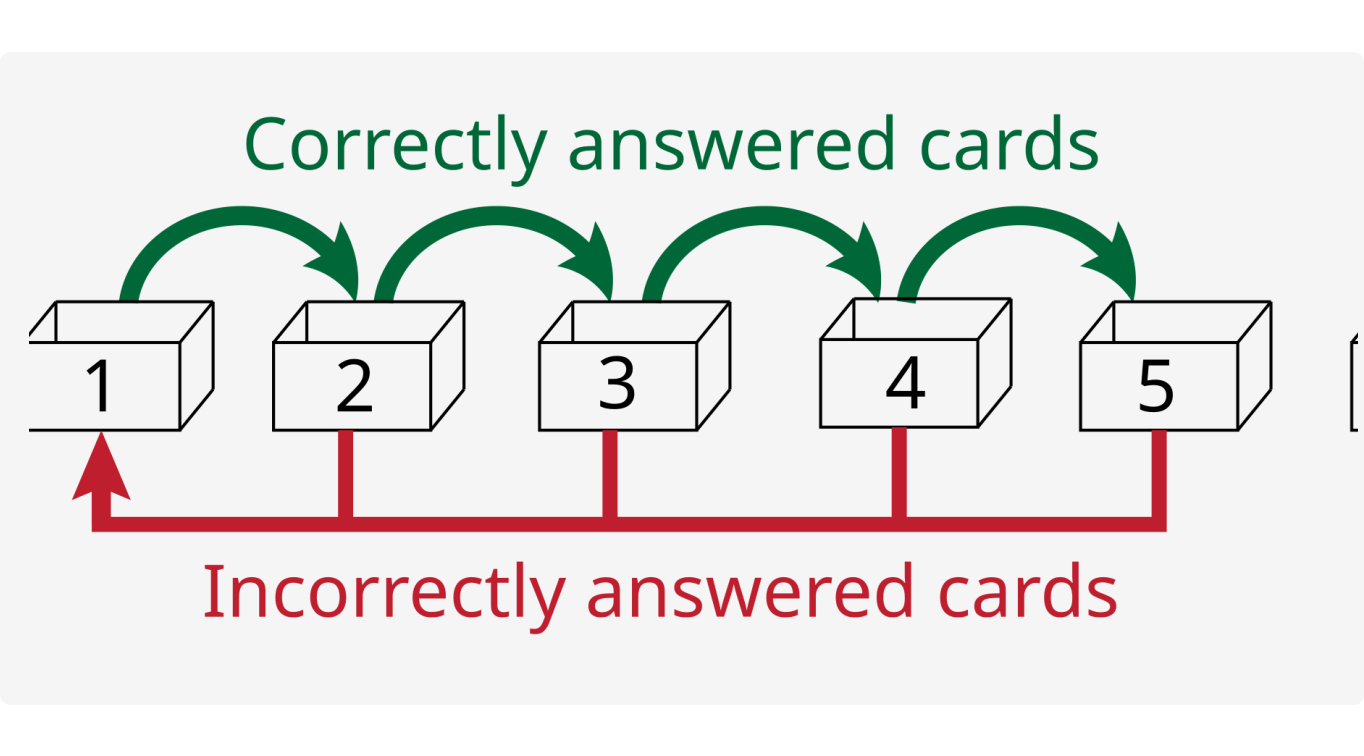
In this example, cards in box 1 are reviewed every day, cards in box 2 are reviewed every 2 days and cards in box 3 are reviewed every 7 days. There are only three boxes in this example.
Note: in the current version of this package, the interval for box 1 must always be set to 1 day. There may be more flexible options in future versions.
start_datetime is the datetime that you first created the Leitner System. It is an important parameter in determining when the cards in each box are reviewed. It should be noted that the important information lies in which day the Leitner System was created, not the exact hour, minute, etc. This is because the scheduler schedules cards to be due at the beginning of each day.
from datetime import datetime

start_datetime = datetime.now() # also default datetime if not specified

scheduler = Scheduler(start_datetime=start_datetime)

print(f"Scheduler created on {scheduler.start_datetime}")
# => Scheduler created on 2024-10-21 21:15:23.491825

card = Card()

rating = Rating.Pass
card, review_log = scheduler.review_card(card, rating)

print(f"Card is due on {card.due}")
# => Card is due on 2024-10-22 00:00:00
In the above example, even though the scheduler was created in the evening of 2024-10-21 (and the card was also reviewed late in the evening of 2024-10-21), the card becomes due first thing the next day - not a full 24 hours later.
on_fail has two possible values 1) first_box or 2) prev_box.
If on_fail='first_box', cards that are failed will be put back in box 1 and if on_fail='prev_box', failed cards will be put in the previous box. on_fail='first_box' is the default value.
Serialization
Scheduler, Card and ReviewLog objects are all json-serializable via their to_dict and from_dict methods for easy database storage:
# serialize before storage
scheduler_dict = scheduler.to_dict()
card_dict = card.to_dict()
review_log_dict = review_log.to_dict()

# deserialize from dict
scheduler = Scheduler(scheduler_dict)
card = Card.from_dict(card_dict)
review_log = ReviewLog.from_dict(review_log_dict)
Best practices
Re-use the same scheduler for the same cards
scheduler = Scheduler(box_intervals=[1,2,7])
card = Card()

rating = Rating.Pass
card, review_log = scheduler.review_card(card, rating)

# (...wait till next day)

different_scheduler = Scheduler(box_intervals=[1,2,3,4,5])

rating = Rating.Pass
#card, review_log = different_scheduler.review_card(card, rating) # wrong
card, review_log = scheduler.review_card(card, rating) # correct
In general, you should continue using the same scheduler that you first reviewed the card with. Doing otherwise could lead to scheduling issues.
Check if a card is due before attempting to review it
If you try to review a card that is not due, you will get an error:
print(f"Card is due on {card.due}")
# => Card is due on 2024-10-22 00:00:00

print(f"Current datetime: {datetime.now()}")
# => Current datetime: 2024-10-21 21:15:23.491825

rating = Rating.Pass
card, review_log = scheduler.review_card(card, rating)
# RuntimeError: Card is not due for review until 2024-10-22 00:00:00.
Be explicit about datetimes and use a local timezone
While this package operates using timezone-naive datetime objects, it's still recommended to provide timezone-aware datetime objects localized to where the user currently is when initializing the scheduler or reviewing cards.
from leitner_box import Scheduler, Card, Rating, ReviewLog
from datetime import datetime, timezone
from zoneinfo import ZoneInfo

# e.g., if you're in Los Angeles
start_datetime = datetime.now(ZoneInfo('America/Los_Angeles'))
scheduler = Scheduler(start_datetime=start_datetime)

card = Card()

rating = Rating.Pass
review_datetime = datetime.now(ZoneInfo('America/Los_Angeles'))
card, review_log = scheduler.review_card(card, rating, review_datetime)
Under the hood, these datetimes are coerced to become timezone-naive, but you still have the option of specifying timezone-aware datetime objects.
To re-iterate, cards in each box are made due at the beginning of each day, regardless of the timezone. As a consequence of this, when determining whether a user should review cards in a given box, you should know what day it is where they are.
Versioning
This python package is currently unstable and adheres to the following versioning scheme:
- Minor version will increase when a backward-incompatible change is introduced.
- Patch version will increase when a bug is fixed, a new feature is added or when anything else backward compatible warrants a new release.
Once this package is considered stable, the Major version will be bumped to 1.0.0 and will follow semver.
Contribute
Checkout CONTRIBUTING to help improve leitner-box!
Project details


Download files
Download the file for your platform. If you're not sure which to choose, learn more about installing packages.
Source Distribution
Built Distribution
Filter files by name, interpreter, ABI, and platform.
If you're not sure about the file name format, learn more about wheel file names.
Copy a direct link to the current filters
File details
Details for the file leitner_box-0.3.0.tar.gz.
File metadata
- Download URL: leitner_box-0.3.0.tar.gz
- Upload date:
- Size: 11.2 kB
- Tags: Source
- Uploaded using Trusted Publishing? No
- Uploaded via: twine/6.0.1 CPython/3.9.21
File hashes
| Algorithm | Hash digest | |
|---|---|---|
| SHA256 |
f3aa2d342797dc5147ba9dcedff9ae0997c56025babede1744128a5ebe9654d2
|
|
| MD5 |
fe30edfce5982f8f09ac94dfc0b5ad24
|
|
| BLAKE2b-256 |
790b54adced7c6c81762becb5c5b8ac6105a6e8c7700518d06d5baa27f6da24e
|
File details
Details for the file leitner_box-0.3.0-py3-none-any.whl.
File metadata
- Download URL: leitner_box-0.3.0-py3-none-any.whl
- Upload date:
- Size: 8.0 kB
- Tags: Python 3
- Uploaded using Trusted Publishing? No
- Uploaded via: twine/6.0.1 CPython/3.9.21
File hashes
| Algorithm | Hash digest | |
|---|---|---|
| SHA256 |
19770b58bb16ffb24087d8981f2497e7a68a6fe44c0b6304faa8dfb5966a25f9
|
|
| MD5 |
b3adea911ec43100e76a26bb1371aa1a
|
|
| BLAKE2b-256 |
7c82ff6975d14cd969a04359970c3764cd2a8c83a490643276ec5e1d1ca4bee3
|






