
🧠 leo-prompt-optimizer



leo-prompt-optimizer is a production-grade library and CLI tool that transforms raw prompt drafts into structured, high-performance instructions using a 9-step engineering framework.
Stop "vibes-based" prompting. Use a data-driven approach to optimize, evaluate, and benchmark your prompts across OpenAI, Groq, Anthropic, Gemini, and Mistral.
🌟 Key Features
- ⚡ Lightning Fast: Optimized for high-throughput providers like Groq for near-instant iteration.
- 📊 LLM-as-a-Judge: Built-in G-Eval metrics, hallucination detection, and schema adherence checks.
- 🖥️ Rich CLI: Beautiful terminal reports with side-by-side diffs and performance tables.
- 🧩 XML-Structured Output: Automatically reformats prompts into
<role>,<task>, and<instructions>blocks for better LLM steerability.
📦 Installation
pip install leo-prompt-optimizer
🖥️ CLI: The "Pro" Workflow
Optimize a prompt and immediately benchmark it against test cases to see if it actually performs better.
leo-prompt --prompt-file draft.txt \
           --provider-name groq \
           --tests tests.json \
           --model your-model-id
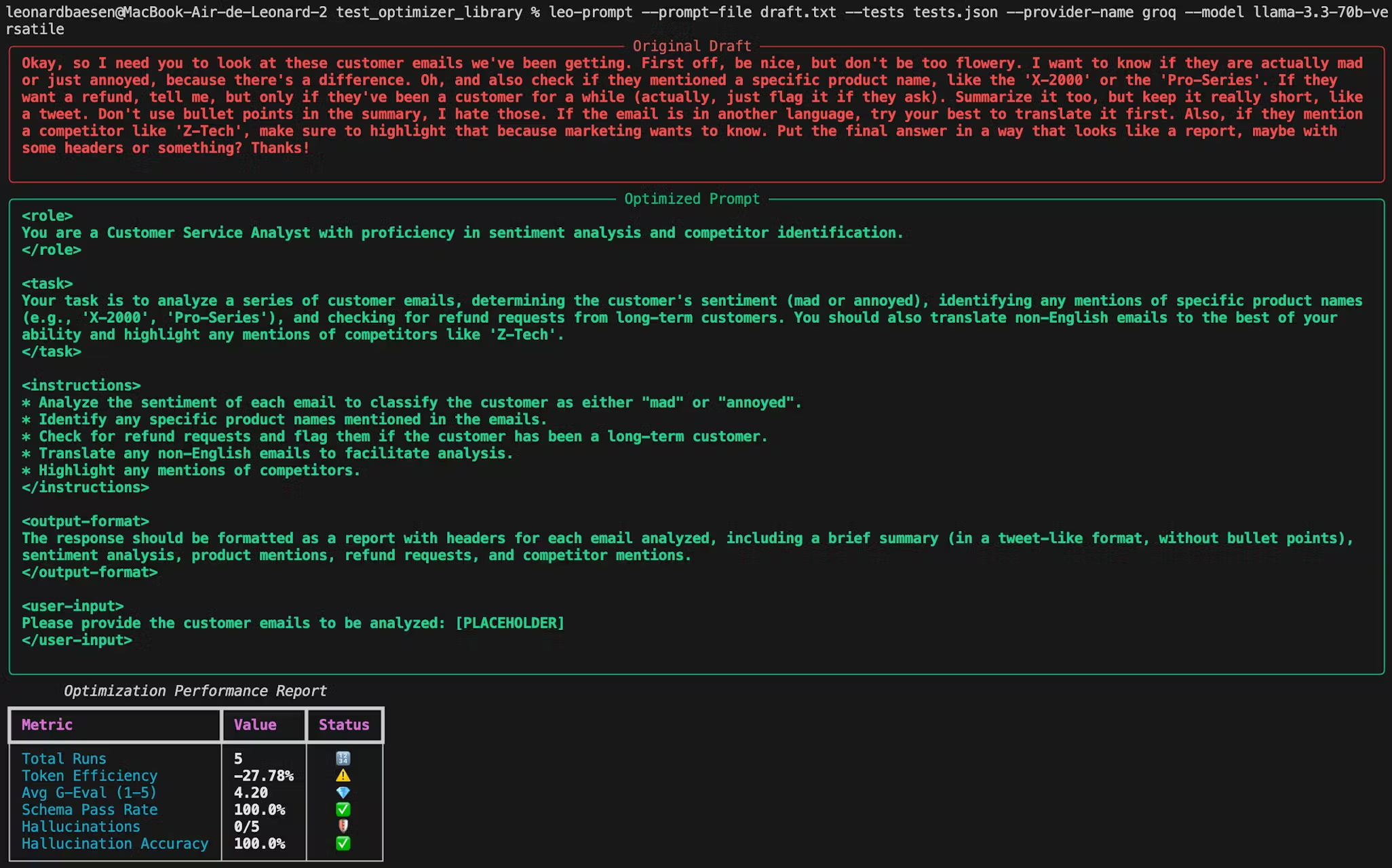
What happens under the hood?
- Optimization: Your draft is expanded into a structured "System Prompt."
- Execution: Both the Original and Optimized prompts run against your
tests.json. - Evaluation: A "Judge" model compares the outputs and generates a performance report.
🤖 Supported Providers
| Provider | Environment Variable |
|---|---|
| Groq | GROQ_API_KEY |
| OpenAI | OPENAI_API_KEY |
| Anthropic | ANTHROPIC_API_KEY |
| Gemini | GOOGLE_API_KEY |
| Mistral | MISTRAL_API_KEY |
🔧 Python API Usage
Perfect for integrating prompt optimization into your CI/CD pipelines or internal tools.
1. Initialize Provider
from leo_prompt_optimizer import GeminiProvider, AnthropicProvider, OpenAIProvider, MistralProvider, GroqProvider, LeoOptimizer, PromptEvaluator, BatchEvaluator

# Automatically loads API keys from .env (GROQ_API_KEY, OPENAI_API_KEY, etc.)
provider = GroqProvider() # or another provider, you can specify your base_url for OpenAI is you have one as an argument
optimizer = LeoOptimizer(
    provider,
    default_model="your-optimizer-model-id"
)
2. Optimize a Prompt
draft = "Write a code review for this python function."

# Optimize your prompt draft
optimized = optimizer.optimize(
    draft, # Required - the prompt you want to optimize
    user_input_example, # Optional - user input example
    llm_output_example, # Optional - output wanted example
    top_instruction, # Optional - high level instructions if more specific guidance is needed
    model, # Optional - specify the model you want to use
)
print(optimized)
3. Evaluate on a Single Test Input
from rich.console import Console

console = Console()

# Evaluate the optimized prompt on one input compared to the draft prompt
evaluator = PromptEvaluator(provider, optimizer.env, judge_model="your-judge-model-id")
result = evaluator.evaluate(
    original_prompt=draft,
    optimized_prompt=optimized,
    test_input="def add(a, b): return a + b"
)

# Print the evaluation results in a clean and clear table
console.print(result.to_rich_table())

4. Evaluate on a Batch of Test Inputs
test_cases = [
    "def fib(n): return n if n <= 1 else fib(n-1) + fib(n-2)",
    "def fib(n): a, b = 0, 1\n for _ in range(n): a, b = b, a + b\n return a"
]

batch_evaluator = BatchEvaluator(provider, optimizer.env, judge_model="your-judge-model-id")

batch_result = batch_evaluator.run_batch(
    original_prompt=draft,
    optimized_prompt=optimized,
    test_cases=test_cases
)

# Print the batch evaluation results in a clean and clear table
console.print(batch_result.to_rich_table())
Example tests.json format for the CLI:
[
  "def fib(n): return n if n <= 1 else fib(n-1) + fib(n-2)",
  "def fib(n): a, b = 0, 1\n for _ in range(n): a, b = b, a + b\n return a"
]
🧪 The Evaluation Framework
The library provides objective scores to replace subjective testing:
| Metric | Description |
|---|---|
| G-Eval (1-5) | A multi-dimensional score for coherence and instruction following. |
| Token Efficiency | Percentage of tokens saved (or added) for the structural improvement. |
| Schema Adherence | Pass/Fail check for structured outputs (JSON/Markdown). |
| Hallucination Risk | Detects if the model is fabricating facts not present in the input. |
| Hallucination Accuracy | Percentage of runs that were hallucination-free (e.g. 99.0% for 1 incident in 100 runs). |
| Total Runs | Number of test cases evaluated, giving context to all other metrics. |
📘 Optimized Format Example
Your raw drafts are transformed into high-signal instructions:
<role>You are a Senior Python Security Auditor...</role>
<task>Analyze the provided function for SQL injection vulnerabilities...</task>
<instructions>
1. Identify all string-formatting operations.
2. Check for missing parameterized queries...
</instructions>
<output-format>Return a JSON object with 'severity' and 'fix'.</output-format>
1 maintainer

Metadata
1 maintainer
Release files for leo-prompt-optimizer 1.0.9
For a detailed explanation of source distributions (sdists) and built distributions (wheels), please see the package formats documentation.
Source distribution (sdist)
| File | Size | Uploaded | Provenance | |
|---|---|---|---|---|
| leo_prompt_optimizer-1.0.9.tar.gz | 18.9 kB | Without provenance | Details |
Built distribution (wheel)
| File | Interpreter | ABI | Platform | Reset |
|---|---|---|---|---|
| leo_prompt_optimizer-1.0.9-py3-none-any.whl | Python 3 | none | any | Details |
Total release size: 39.7 kB
Release files / leo_prompt_optimizer-1.0.9.tar.gz
| Download URL | leo_prompt_optimizer-1.0.9.tar.gz |
|---|---|
| Size | 18.9 kB |
| Tags | Source |
|
SHA-256 checksum How to use checksums |
9718d4957d8048b16da6a4e844bf36006fcf8e7b37b723bb058b831c94818a1a
|
|
BLAKE2b-256 checksum How to use checksums |
b204a1bfbc516a517cd8f47440ec49d25702ed7be5c6d21b61c8bdefbfadb9cb
|
| Upload date | |
|
Uploaded using Trusted Publishing? What is trusted publishing? |
No |
| Uploaded via |
twine/6.2.0 CPython/3.12.3
|
Release files / leo_prompt_optimizer-1.0.9-py3-none-any.whl
| Download URL | leo_prompt_optimizer-1.0.9-py3-none-any.whl |
|---|---|
| Size | 20.8 kB |
| Tags | Python 3 |
|
SHA-256 checksum How to use checksums |
ae9a8bd0d002a026d07a99c4da3b359b4ba9c747004757a71d175e29fce8d376
|
|
BLAKE2b-256 checksum How to use checksums |
9c06f0764e75e9e36088895888b0c20211ca7b9805ad0ce0194de9170df96c5b
|
| Upload date | |
|
Uploaded using Trusted Publishing? What is trusted publishing? |
No |
| Uploaded via |
twine/6.2.0 CPython/3.12.3
|
Security for leo-prompt-optimizer 1.0.9
Provenance
Provenance describes where a file came from. On PyPI, provenance is shared via attestations, which provide a verifiable record of the build or publishing details. View details, limitations and caveats.
No provenance found
None of the files in this release were uploaded with provenance metadata.
A note on package security
PyPI is a repository for distributing packages, not a service for auditing them. While third-party security researchers and our staff do their best to detect and remove malicious packages, PyPI cannot guarantee the quality, security or suitability of any given package.
To learn more about protecting yourself from malicious actors, visit our package security documentation.














