
Letta Evals
Letta Evals is a framework for evaluating Letta and Letta Code agents. It lets you define an evaluation suite with a dataset, target, extractors, graders, and a reward contract, then run that suite against one or more model configurations.
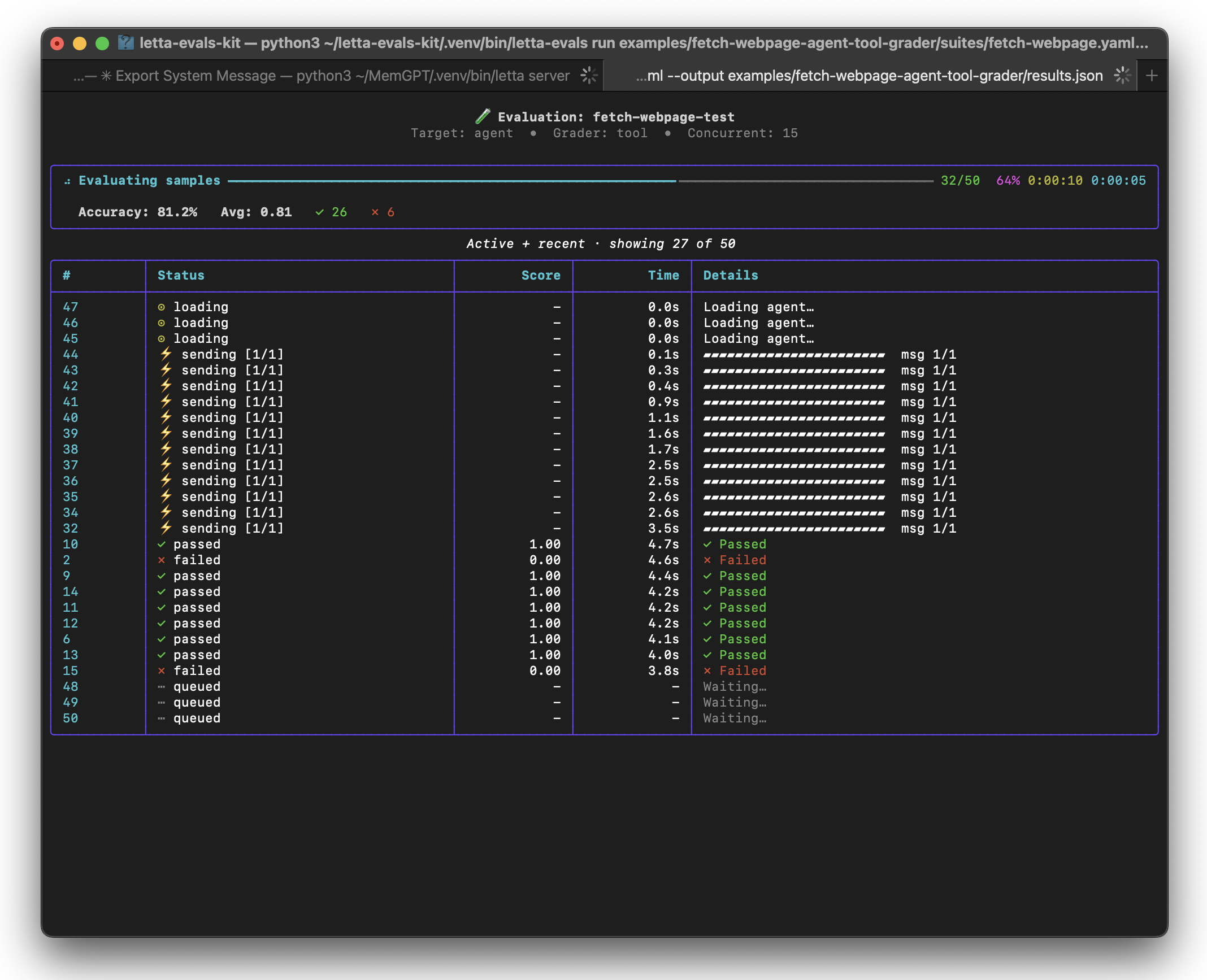
If you are building agentic systems, high-quality evals are one of the fastest ways to understand how model versions, prompts, tools, or agent configuration changes affect your product.
Requirements
- Python 3.11+
- A running Letta server, either:
- Self-hosted: follow the Letta installation guide, or
- Letta Cloud: create an account at app.letta.com and set:
export LETTA_API_KEY=your-api-key
export LETTA_PROJECT_ID=your-project-id
Then usebase_url: https://api.letta.com/in your suite YAML, or pass--base-url https://api.letta.com/on the CLI.
- Provider API keys for the models you use, such as
OPENAI_API_KEY,ANTHROPIC_API_KEY, orGOOGLE_API_KEY.
Installation
For local development or custom eval authoring, clone this repository and install with dev dependencies:
uv sync --extra dev
To run existing evals without editing the repo:
pip install letta-evals
Quick start
- Create a dataset (
dataset.jsonl):
{"input": "What's the capital of France?", "ground_truth": "Paris"}
{"input": "Calculate 2+2", "ground_truth": "4"}
- Create a suite (
suite.yaml):
name: my-eval-suite
dataset: dataset.jsonl

target:
  kind: letta_code
  model_handles:
    - openai/gpt-4.1-mini
  base_url: http://localhost:8283

graders:
  correctness:
    kind: tool
    function: contains
    extractor: last_assistant

reward:
  kind: metric
  metric_key: correctness
- Validate and run:
letta-evals validate suite.yaml
letta-evals run suite.yaml
Running evals
The core flow is:
Dataset → Target → Extractor → Grader → Reward → Result
Common commands:
# Run an evaluation suite with progress output
letta-evals run suite.yaml

# Save suite.json, summary.json, and per-model JSONL results
letta-evals run suite.yaml --output results/

# Run multiple times for aggregate statistics
letta-evals run suite.yaml --num-runs 5 --output results/

# Re-grade saved trajectories without re-running the target
letta-evals run suite.yaml --cached results/openai-gpt-4.1-mini.jsonl

# Validate suite configuration and list built-ins
letta-evals validate suite.yaml
letta-evals list-extractors
letta-evals list-graders
You can also set run defaults in suite.yaml:
max_concurrent: 5
max_samples: 20
num_runs: 3
output: results/
cleanup: true
Relative paths in suite YAML are resolved from the suite file's directory. CLI flags such as --max-concurrent, --output, --api-key, --base-url, --project-id, and --num-runs override suite or environment defaults when provided.
Writing suites
Datasets
Datasets can be JSONL or CSV. Each row should provide the user input and, for most graders, a ground_truth value:
{"input": "Draw a cat in ASCII", "ground_truth": "cat"}
For multi-turn evals, set input to a list of user messages. If ground_truth is also a list of the same length, supported graders can score each turn independently and average the per-turn scores.
Dataset rows may also include fields such as:
extra_varsfor custom gradersagent_argsfor programmatic agent factoriesrubricorrubric_pathfor per-sample model-judge rubric overrides
Instead of a local path, dataset: may point at a dataset hosted on the HuggingFace Hub. The single manifest file is fetched and cached on the host, then loaded exactly like a local file:
# pin a revision (tag / branch / commit SHA) for reproducible runs
dataset: https://huggingface.co/datasets/letta-ai/swe-chat-tagged/resolve/<revision>/train.jsonl
Private repos work with a standard HF_TOKEN / HUGGING_FACE_HUB_TOKEN in the environment. Fetching happens host-side, so nothing is downloaded inside the Modal sandbox. An unpinned revision (a bare repo URL, or .../resolve/main/...) warns and surfaces the resolved commit so the run stays reproducible from its logs; the resolved commit SHA is also recorded in suite.json under config.dataset_provenance. A bare repo URL is accepted only when the repo holds exactly one .jsonl/.csv manifest. Relative rubric_path values still resolve against the suite directory, not the HF cache.
Targets
The supported target is letta_code, which runs the Letta Code CLI against a Letta server. Important target fields include:
base_url: Letta server URL; defaults tohttp://localhost:8283model_handles: one or more model handles to evaluateagent_script: optionalfile.py:function_nameagent factoryflags: additional Letta Code CLI flags (including tool restrictions, e.g.--allowed-tools Bash Read)permission_mode: optional Letta Code permission mode, such asunrestricted,standard, oracceptEditsmemory_workspace: configureMEMORY_DIR/LETTA_MEMORY_DIRand run the Letta Code subprocess from a memory workspace without passing the removed--permission-mode memoryCLI modememory_dir: optional explicit memory workspace root; relative paths are resolved from the suite filetimeoutandmax_retries: target execution controls
Do not use permission_mode: memory: recent Letta Code releases removed that CLI mode. Use memory_workspace: true for memory workspace env/cwd setup, and Modal or another external sandbox if you need strict filesystem confinement.
Graders and extractors
Suites can use deterministic tool graders or model-judge graders:
graders:
  exact:
    kind: tool
    function: exact_match
    extractor: last_assistant
  quality:
    kind: model_judge
    prompt_path: rubric.txt
    model: gpt-5-mini
    provider: openai
    extractor: last_assistant
Use letta-evals list-graders and letta-evals list-extractors for built-ins. You can register custom Python graders, extractors, setup hooks, and agent factories with decorators; see examples/custom-tool-grader-and-extractor/ and examples/programmatic-agent-creation/.
Rewards
A reward turns grader outputs into the canonical per-sample scalar stored on SampleResult.reward. The framework owns the contract and persistence; suite authors own any custom composition logic.
For simple suites, use one grader directly:
reward:
  kind: metric
  metric_key: correctness
For suite-specific composition, point at a Python reward composer:
reward:
  kind: custom
  function: rewards.py:compose_reward
from letta_evals import RewardOutput, reward_composer


@reward_composer
def compose_reward(ctx):
    quality = ctx.grades["quality"].score
    valid = ctx.grades["validity_check"].score
    if valid < 1.0:
        return RewardOutput(score=0.0, metadata={"reason": "validity_check_failed"})
    return RewardOutput(score=quality)
grades remain the source of truth for raw grader outputs. Reward metadata should only contain derived composer decisions that are not already recoverable from grades, submissions, or the sample.
See examples/reward-composition/ for complete custom reward examples.
Setup scripts and agent factories
Use setup_script: file.py:function_name for one-time setup before a suite runs. Setup functions may have one of these signatures:
() -> None(client: AsyncLetta) -> None(client: AsyncLetta, model_handle: str) -> None
Use target.agent_script: file.py:function_name to create or customize an agent per sample. Agent factories receive the Letta client and current Sample, and return the agent ID.
Examples
The examples/ directory contains working suites:
examples/custom-tool-grader-and-extractor/— custom Python extractor and grader for structured JSON outputexamples/letta-code-simple-edit/— Letta Code fixes buggy Python files, with a subprocess graderdocs/modal-sandbox.md— per-sample Modal sandbox executionexamples/reward-composition/— custom reward composers across multiple gradersexamples/multi-model-simple-rubric-grader/— compare multiple model handles in one suiteexamples/multiturn-per-turn-grading/— score each turn of a multi-turn conversationexamples/per-sample-rubric/— override model-judge rubrics per dataset rowexamples/programmatic-agent-creation/— create customized agents from Python before each sample
Modal sandbox execution
Add a suite-level sandbox block to run every sample inside a fresh Modal sandbox:
sandbox:
  kind: modal
  letta_evals_version: "0.25.0"
  letta_code_version: "0.30.5"
  cpu: 2
  memory_mb: 4096
  timeout_sec: 1800
The bundled runtime requires exact letta_evals_version and letta_code_version pins; mutable tags and version ranges are rejected. The host runner still owns the sample loop, concurrency, JSONL output, and reward aggregation. Each sample is uploaded to a sandbox along with the suite directory; the target, extractors, graders, and reward composer run in the sandbox; and the final SampleResult is returned to the host.
See docs/modal-sandbox.md for setup details, networking notes, and common failure modes.
FAQ
Can I write evals without Python code?
Yes. Many suites only need YAML plus JSONL/CSV data and built-in graders such as contains, exact_match, regex_match, or model-judge grading.
Can I test multiple models?
Yes. Set target.model_handles to a list. Letta Evals runs every sample for every model and writes per-model results. To run the complete suite against one model without editing its YAML, pass --model-handle, for example:
letta-evals run suite.yaml --model-handle baseten/dream-1@letta-research
Can I run evaluations repeatedly?
Yes. Use --num-runs N or num_runs: N to compute aggregate statistics across repeated suite runs.
Can I reuse trajectories while iterating on graders?
Yes. Save results with --output, then pass a saved JSONL file back with --cached to re-grade without re-running the target. --num-runs > 1 is not supported with cached results because the trajectories would be identical.
Can I use this in CI/CD?
Yes. Letta Evals is designed for CI. See .github/workflows/e2e-tests.yml for an example of running suites in GitHub Actions.
Contributing
Contributions are welcome. See CONTRIBUTING.md for local setup, linting, testing, and PR guidelines.
License
This project is licensed under the Apache License 2.0. By contributing to this repository, you agree that your contributions are licensed under the repository's license. You must have adequate rights to upload any data used in an eval. Letta reserves the right to use this data in future service improvements to our product.
1 maintainer

Metadata
1 maintainer
Release files for letta-evals 0.26.0
For a detailed explanation of source distributions (sdists) and built distributions (wheels), please see the package formats documentation.
Source distribution (sdist)
| File | Size | Uploaded | |
|---|---|---|---|
| letta_evals-0.26.0.tar.gz | 93.0 kB | Details |
Built distribution (wheel)
| File | Interpreter | ABI | Platform | Reset |
|---|---|---|---|---|
| letta_evals-0.26.0-py3-none-any.whl | Python 3 | none | any | Details |
Total release size: 208.2 kB
Release files / letta_evals-0.26.0.tar.gz
| Download URL | letta_evals-0.26.0.tar.gz |
|---|---|
| Size | 93.0 kB |
| Tags | Source |
|
SHA-256 checksum How to use checksums |
d2a4bd70d54380c7325fe0ac4372d847fe7bee6eecd02701e6c5c40f0f3ab3c5
|
|
BLAKE2b-256 checksum How to use checksums |
455a118aa4985a8a0db6c43954fc7cc6dc5034810278a11600bfd7764428fd5c
|
| Upload date | |
|
Uploaded using Trusted Publishing? What is trusted publishing? |
Yes |
| Uploaded via |
twine/7.0.0 CPython/3.13.14
|
Provenance
Provenance describes where a file came from. On PyPI, provenance is shared via attestations, which provide a verifiable record of the build or publishing details. View details, limitations and caveats.


PyPI Publish Attestation
PyPI verified that this artifact, at this checksum, originated from the publisher listed below.
Signed by GitHub Actions, verified by PyPI on Aug 27, 2026.
Transparency logRelease files / letta_evals-0.26.0-py3-none-any.whl
| Download URL | letta_evals-0.26.0-py3-none-any.whl |
|---|---|
| Size | 115.2 kB |
| Tags | Python 3 |
|
SHA-256 checksum How to use checksums |
4ac55c46cdca4574c0b4ca586682b75b01255e5e0e4cf13d119c9d494739875b
|
|
BLAKE2b-256 checksum How to use checksums |
f6d1739590e1a2f43f652ee34c28174047ca7e70bf3d46ccd89780c3a876e440
|
| Upload date | |
|
Uploaded using Trusted Publishing? What is trusted publishing? |
Yes |
| Uploaded via |
twine/7.0.0 CPython/3.13.14
|
Provenance
Provenance describes where a file came from. On PyPI, provenance is shared via attestations, which provide a verifiable record of the build or publishing details. View details, limitations and caveats.
PyPI Publish Attestation
PyPI verified that this artifact, at this checksum, originated from the publisher listed below.
Signed by GitHub Actions, verified by PyPI on Aug 27, 2026.
Transparency log













