
Levain
A portable cognitive-partnership memory + methodology kit. You ship the seed that grows a practice, not the practice.
pip install levain
Levain gives your AI partner a memory that persists across sessions, and keeps that memory yours. It lives on your machine, in a store you own and can read, inspect, and edit from outside any session. Nothing reaches long-term memory except through a path you govern. Every governed change is recorded, and a failed read shows up as unknown instead of a false all-clear. It's a memory you can trust because you can see what's in it and how it got there.
Apache 2.0 · Python 3.12+ · Claude Code, Codex CLI, and OpenHands.
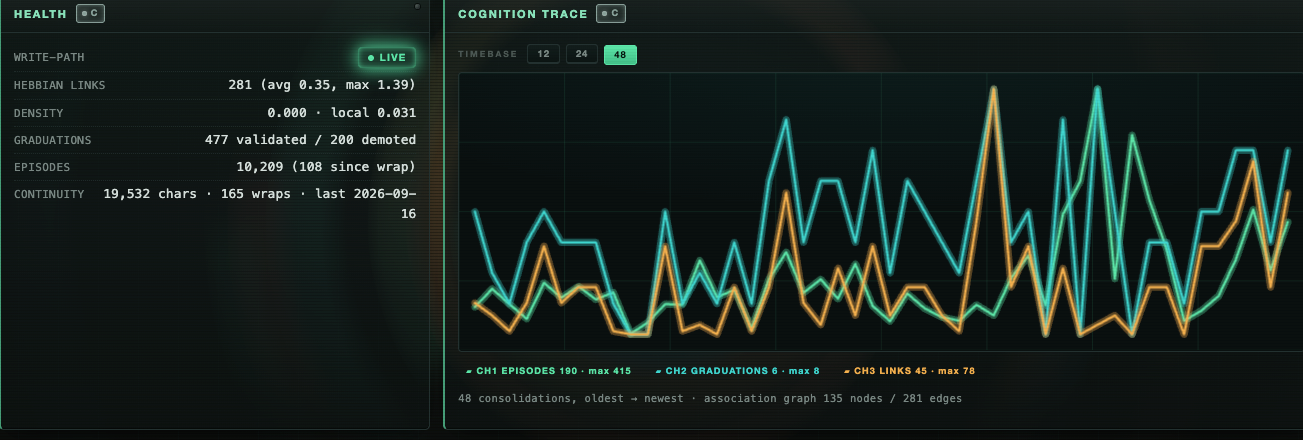
levain serve — memory health and a live consolidation trace, from the author's own long-running memory store. You don't have to trust the pitch above; this is what "you can see what's in it" actually looks like.
What this is
If you've worked with an AI partner long enough to feel the session-amnesia problem — every conversation starts cold, every insight gets re-explained, the quality of the partnership keeps resetting — Levain is the kit you'd otherwise build for yourself.
It packages four things that work together:
-
A memory substrate you own. Episodes from every session, a rolling summary your partner reads to orient each new conversation, a record of which memories you cite together (links form at each wrap and are there to inspect; recall follows the evidence a pattern cites), and an affect layer that tracks what mattered. All in a local SQLite file. Two more stores sit on top: proven patterns graduate into a crystallized tier, kept out of the always-loaded context and recalled only when what you're doing calls for it; open loops surface the moment your prompt touches them and resolve out of your field of view once your partner marks them done.
-
A methodology-core seed. A small, dense set of files defining who your partner is, how the partnership works, how memory accrues, and who you are to it. Written so your partner lives inside the method instead of pointing at it.
-
An activation layer. Instructions that prime your session at open, sharpen each prompt turn, and shape how sessions close. Wired through your harness's hooks, so it happens on its own, not when you remember to ask.
-
A scripted onboarding.
levain initwalks you through filling the seed so your partner is uniquely yours from session one. Terminal, a browser form with--web, or a JSON answer file with--answerswhen nobody is at the keyboard.
Three ways to run it
Levain isn't a tool you adopt in one place. It's a governed substrate you can apply wherever you already work, in any combination.
Inside the harness you're already using. Claude Code and Codex CLI both wire in via hooks — your partner stops starting cold, and its proven patterns and open loops fire on their own, per turn, without you asking.
As its own sovereign partner. levain init --adapter openhands scaffolds an entity that isn't wired into anything — its own identity, its own memory store, its own hands on your real repos, running on an open model you choose rather than a frontier vendor's hosted assistant (point it at a local Ollama model to also keep the compute itself on your machine). It talks to you as a REPL (levain run) or takes one task and exits (levain run --task), and it consolidates its own memory with its own mind (levain wrap).
On a schedule, unattended. levain daemon install-seat runs that same sovereign entity on a cadence — every hour, every day, whatever you set — while you're away. It's not autonomous in the sense that should worry you: every action the entity takes that reaches outside itself halts and reports back to you before it lands, because with nobody watching there's nobody to ask. See Hand it a schedule below for exactly what that means.
All three modes share one store discipline and one governance model. You're not choosing between three products.
Why a seed, not a finished methodology
The claim under the name levain, the sourdough starter you feed:
A grown cognitive-partnership methodology can't be shipped as a methodology. Hand someone the finished artifact and they get a fossil. Text describing practices that never take root in their substrate. Practice-encoded knowledge transfers through use, not specification.
So Levain ships the engine that grows a methodology: the substrate, a graduation mechanism, a discipline for how sessions close, a reflection loop, a minimal starting posture. Your own methodology accretes from your own sessions. Which is why it sticks, and why it's yours. Run Levain and you will not end up with this operator's memory. Different texture, different graduated patterns, different shape.
The proof
See examples/accrual/growth_timeline.md — one continuity file rendered at four points across five calendar months. It started at 96 lines and 6 sections, hit one architectural cliff between week 4 and week 12, locked into a 9-section shape, and has held that shape since while density grew inside it (96 → 549 lines, +3 sections total).
Your week 1 will look like the first snapshot. That's the right starting place, not the last snapshot, which is what this partnership grew into. The trajectory is the proof; the endpoint is not the target.
What fires on its own
This is why Levain exists instead of just installing a memory library. Raw memory libraries quietly rot, because episodes pile up but you only recall what you happen to remember to query. A library can't fix that without hooking your session, and hooking every prompt would cost it the neutrality that lets it run under any harness. So that's the harness's job, and it's what Levain wires:
- Open loops surface on collision. A relevant open loop drops into context the moment your prompt touches it.
- Crystallized patterns recall per turn. Your proven, stable wisdom is held out of the always-loaded context and surfaced when what you're doing calls for it. Useful without clogging the window.
The store is universal; the firing is the harness's job. (Under Codex there's a platform caveat on whether hooks fire at all — see Boundaries, kept honest. levain verify-hooks proves your wiring is correct regardless.)
Set it up
pip install levain
levain init --path ./my-partner
This creates ./my-partner, runs the interview, lays down the seed, registers the adapter you choose, initializes the store at .levain/memory.db, and records the exact version set it composed. Then open that directory with Claude Code or Codex and start working.
levain init                          # install into the current directory (must be empty)
levain init --force                  # install into an existing workspace (backs up anything it touches)
levain init --adapter claude-code    # or --adapter codex, or --adapter openhands; prompts if omitted
levain init --web                    # fill the same interview in a browser form, localhost only
One adapter per install. To run both Claude Code and Codex, make two installs.
With Claude Code, Levain also mirrors Claude Code's own auto-memory into the entity's store: each native memory note written for the install becomes an anneal episode (an edit supersedes it, a deletion retracts it), one way, for notes written after it is enabled. It is on by default; turn it off with "automemory_mirror": false in .levain/config.json or LEVAIN_AUTOMEMORY_MIRROR=off.
Installing without a terminal in front of you
The interview can be answered from a file instead of typed — which is how you provision more than one install, or any install that has to come up unattended.
levain init --answers-template > answers.json   # every question, blank, ready to fill
levain init --adapter openhands --answers answers.json --path ./seat-1
The answer file is a JSON object keyed by slot name, never an ordered list, so you never have to know or match the order the interview happens to ask in:
{ "OPERATOR_NAME": "Chris", "ENTITY_NAME": "Ada", "LOCATION": "Riverton" }
--answers-template writes the blank file to stdout and a guide to what each
question is asking to stderr — so the redirect above gives you valid JSON and you
still get to read the questions. Every slot must be present; "" is a real answer
meaning "skip this," exactly as pressing enter does in the terminal — except for
your name and your partner's, which an entity is not allowed to be missing.
--answers requires --adapter, and it never prompts for anything. If a field is
missing, unknown, or has plainly landed in the wrong slot, it says so and installs
nothing — rather than writing a half-captured partner and reporting success.
Composing a domain — AgentPacks
The base seed gives your partner a general methodology. A pack layers a domain on top of that at install time: your own doctrine, your own process library, your own vocabulary — composed over the same governed substrate rather than swapped in for it.
levain init --pack ./my-domain-pack --pack ./my-role-pack
A pack is just a directory: a pack.toml declaring a name and an order, plus a seed/ folder of Markdown files. A new file in a pack adds to what the base install carries; a file with the same name as a base file overrides it, with the higher-order pack winning on a collision. Files that need the interview to fill them in are declared in render; everything else is copied byte-for-byte. --pack is repeatable, so a domain layer and a role layer can stack — the domain pack carries the doctrine and process, the role layer carries who's driving it and how they talk. Every file a pack adds gets wired into your partner's activation the same way the base seed does; nothing you compose in sits on disk unread. Pack chapters you ship alongside the seed also show up in levain docs (below), composed with the base operator manual instead of living in a separate doc nobody opens.
A domain pack's doctrine can also state where your partner should act on its own and where it has to stop and hand a decision to you. Judgment that is about places in a codebase ("never rename write_batch in settlement.py, a nightly job calls it by name") can be written as rules in the pack's judgment.toml; with levain team (next section) every engineer's Claude Code is shown the rule, and stopped once, at the edit it governs. Judgment that is not path-shaped ("ask before deleting dead code") stays prose your partner reads and is expected to follow, not something the harness enforces. The efferent gate Levain does enforce (below) — on a scheduled seat, on run --task, and on any REPL run you pin to gated — classifies by tool kind, bash vs. a file-editor read vs. write, not by your domain's judgment about what's safe to automate.
There's no packs marketplace here and no bundled example pack — packs are something you author for your own domain, the same way you'd author the interview answers that make an install yours. The mechanism is the product; what you put in it is yours to write.
Share a project's decisions across a team — levain team
Everything above is one engineer's partner. On a team, the decisions that matter — the client said no, the module everyone must leave alone, the reason the rounding is per line — live in one person's head or one person's memory, and the next engineer's agent "simplifies" them away. A shared CLAUDE.md in git is the usual answer, and it rots: hand-edited, loaded whole, owned by nobody, with no record of who decided what or why, and nothing puts it in front of the agent at the moment it matters.
levain team keeps git as the wire and fixes the rest:
levain team init --owner ana --member ana=ana@shop.com --member ben=ben@shop.com \
                 --client-owner Dana --pack ./client-pack        # first engineer
levain team join                                                  # everyone else, in their clone
levain team record decision --kind ruling --owner client:Dana --paths billing.py \
                 --words "Per-line rounding stays: the bank's validator rejects totals that don't sum." \
                 --reason "partner bank validator"
levain team consolidate                                           # the owner, on a clock
- The ledger. An orphan
levain-ledgerbranch in the project's own repository holdsteam.toml(members, the canon owner, client owners), one append-only, hash-chained JSON-lines file per engineer per clone, andPROJECT.md. Code branches never touch it, and the client keeps it when the engagement ends. Each entry carries who recorded it, the owner of the call, the decider's own words verbatim, ruling (binds) or practice (habit), the paths it governs, and what it supersedes. Secrets are refused at write time. - At the edit. A Claude Code
PreToolUsehook on Edit/Write/MultiEdit/NotebookEdit matches the file against every decision in force. Someone else's ruling denies the first edit in a session with the record as the reason, so the agent reads the words and the owner before it changes anything; a retry is allowed and recorded as an acknowledgement. Per-rulingblockmode denies until the owner changes the call; a recordedtensionon a path always stops the edit ("ask the owners"); practices are shown, never denied. At session start the agent sees the rulings in force (LEVAIN_TEAM_SESSIONSTART_RULINGS=offleaves enforcement to the edit-time hook alone). - One owner, one canon. Only the
team.tomlowner regeneratesPROJECT.md, and only the owner (or an entry's own author) can supersede or retire someone else's entry: a teammate's retire of a client ruling is reported and ignored. The ledger is read from git history as every line ever added, each attributed to the commit that added it, so deleting or rewriting a line changes nothing, and a line added to another engineer's file is not enforced; both are reported. Every line of the canon carries its entry id, owner and date;levain team verifywalks every chain and reports anything that does not add up, including ateam.tomlorPROJECT.mdchange not made by the owner. - Packs feed it.
levain team pack-sync <pack>seeds a pack'sjudgment.tomlrules into the ledger as entries authored by the pack; a pack upgrade supersedes what changed and retires what it dropped, and a rule the team retired is not brought back by re-syncing the same text.
levain team view serves a read-only localhost page over the ledger, four panes: what waits on you, where agents were stopped, what is held by nobody, and what is in force. A loopback cockpit shows a Team control that links to a team view running on the same machine. levain team status --path <file> shows exactly what an agent would see there; levain team doctor checks identity, sync, the wired hooks and their interpreter. The hooks are wired into .claude/settings.local.json of every working tree of the clone (that file names your own interpreter, so it is git-excluded, never committed); after a new git worktree add, or a git clean -fdx that removed it, run levain team install again.
Limits, stated plainly. Identity is the author email git records on each commit, mapped through team.toml. Anyone can set that email, so levain detects and shows what does not add up; it does not authenticate anyone. Stopping a teammate from writing as someone else is the git host's job (branch protection, required signed commits). Edits made through Bash (sed -i, heredocs) are not intercepted. Contradictions between two rulings are not detected; every ruling on a path is shown together, and a tension entry is how a team marks a disagreement. Freshness is a git fetch on session start and at most every fetch_interval (default five minutes) from the hook, not real time. git push --all or --mirror to another remote carries the ledger branch with it. Claude Code started with --bare loads no settings hooks, so the team layer is absent there. POSIX only.
Run a sovereign entity
levain init --adapter openhands scaffolds something different from the hook-wired adapters above: an entity that is its own partner, not a layer inside a harness you're already running. Its own identity, its own memory store, never a hook into your Claude Code or Codex session, never a reach into ~/.anneal-memory or any other store on your machine — that isolation is checked and enforced, not assumed.
pip install 'levain[openhands]'
levain init --adapter openhands --path ./ada
levain run ./ada                    # talk to it as a REPL, on an open model by default
levain run ./ada --task "..."       # or hand it one task, non-interactively, and read the exit code
levain wrap ./ada                   # consolidate what it learned into its own lasting memory
It runs against Ollama by default, through --model/--base-url — or any OpenAI-compatible or Anthropic-style endpoint you point it at instead. The out-of-the-box default, glm-5.2:cloud, is served through Ollama Cloud, so by default the episode content does leave your machine; point --model at a plain Ollama model name (no :cloud) to keep the whole conversation local. Either way it's an open model you chose, never a frontier vendor's hosted assistant. Give it hands and, on macOS or Linux, it works your real repos through a file editor and a sandboxed shell (sandbox-exec on macOS, bwrap on Linux, where bash has no IP network by default), both fenced to the same crown-jewels floor described below — ~/.anneal-memory, sibling stores, and your SSH key material stay off-limits no matter what it's asked to do. Where there is no sandbox, or the host refuses one, it gets the file editor only, never an unconfined shell — see Boundaries. --no-tools runs it as a pure conversational partner with no hands at all. levain wrap is what makes the entity's identity compound instead of just accumulating transcripts: it metabolizes its own raw episodes into its own six-section memory, composed on its own model by default, so the entity that answers you tomorrow has actually learned from today.
Running the entity's bash as its own user
On macOS, any program can read the command line and environment of every other program running as the same user. That includes tokens passed in an environment variable. No sandbox rule changes that: independent tests on current macOS found no rule that does, and our own test confirmed it. So an entity whose bash runs as you can read the secrets your other programs were started with.
sudo levain setup-isolation --path <entity> closes that. It creates a dedicated user for the entity, and from then on, on macOS and Linux, headless chat turns, --task runs and scheduled seats execute bash as that user, and the file editor reads and writes as it, inside the entity's workspace only:
- the kernel refuses to give that user the environment of your processes;
- files only you can read are out of its reach, and so is your home directory;
- the sandbox floor still applies on top, unchanged.
The interactive levain run REPL still runs bash as you, because you drive it and read each turn before the next. On Linux the entity's bash, run as that user, sees only an allowlisted view of the machine: /usr, /etc and /opt read-only, its own workspace and home, and fresh empty /tmp, /var/tmp and /run. Your home, /srv, /mnt, /var/lib, other disks and every daemon socket under /run are not there at all, and it shares no IPC objects or session keyring with you. That makes Linux stricter than macOS, where the entity's bash still sees the rest of the machine its user may read: on Linux, a tree outside that list is out of reach even when its permissions would let the entity's user read it. Before each command levain checks, as the entity's user, that nothing in /usr, /etc or /opt gives it a way out (a socket it may write, a FIFO it may read or write, a directory it may search but not list), and refuses, naming the path, if something does. What it cannot see is something created there while a command runs, or a mount added under those trees mid-command: that is root acting on the host during the entity's work, which stays yours to hold, as an administrator of the machine. It needs python3 (and zsh for the file editor). levain run and levain doctor say which user bash runs as.
The workspace. The entity works in a directory outside your home, /Users/Shared/levain/<user>/workspace on macOS or /var/lib/levain/<user>/workspace on Linux.
You change the workspace through the entity. Everything in it belongs to the entity's user. You can read all of it, but you don't write there yourself, and I think that's the right way to work anyway: you're the operator, so you tell the entity what to change, it changes it, and you review what it did. When you need to hand something over directly, there's a door for it. levain ws-put copies a file in. levain ws-adopt brings one of your repositories in as a copy the entity owns, with every branch, and leaves yours where it is. levain ws-git runs git on the entity's repositories as the entity's user, so you can look at its work and drive it. And there's the remote, where the entity pushes a branch with its own key and you review and merge it like any other contributor's.
It closes a real hole, too. Git refuses to read the settings of, or run the hooks of, a repository you don't own, so your git refuses every repository in there, and nothing the entity writes into one can run as you. But for a bare repository git only checks who owns that one folder. If any folder in the workspace were yours and the entity could write to it, the entity could build a repository there that your git would trust. Nothing in the workspace is yours, so there's no folder like that. levain doctor fails if one ever shows up, and warns you to set safe.bareRepository = explicit and to drop any safe.directory = *.
One session at a time, and nothing left running. Only one session of the entity runs bash as its user at a time; a second is refused until the first ends. When a session ends, levain stops every process of the entity's user, including anything a command started in its own session. If something can't be stopped, the session says so, and ws-git and ws-adopt wait until levain exits. Before a session starts, levain stops anything of that user an earlier run left behind (a levain that was killed, say), and refuses to start if it can't.
The entity's ssh key. The ssh agent refuses a different user, so the entity cannot use your keys, and levain does not pass your agent to it. Setup prints the entity's public key; add it as a deploy key on each repository the entity should push to.
Its network, on Linux. Setup also puts the entity's user behind a network boundary of its own: an nftables rule on its user id that refuses every IP connection it opens, except to the loopback ports you name with --egress-port (where its model proxy listens) and the network git that levain ws-git starts (push, fetch, pull and ls-remote, which run with a group nothing else of the entity's gets). The rule loads at boot and again whenever nftables.service starts, restarts or reloads, and levain doctor checks it by trying a connection as the entity's user. An administrator who rewrites the firewall (nft flush ruleset, firewalld, ufw) lifts it until it is loaded again; sudo levain setup-isolation --path <entity> puts it back. On Linux you push the entity's work with levain ws-git push: the entity cannot reach a remote by itself. Setup refuses, by name, on a Linux host without nftables, where the kernel refuses nftables, or without systemd running as init.
What setup creates, all undone by --undo:
- the user, with no password and no login shell, and its own group (undo keeps it, disabled, so its id is never reused;
--reenablebrings it back); - one sudoers rule that lets your account start commands as that user, and nothing else;
- the entity's ssh key;
- the workspace and its permissions (removed only if empty);
- a refusal of remote login for that user (
DenyUsers), and an entry in your cron and at deny lists where those exist; - on Linux, the network boundary: its ruleset in
/etc/levain/egress/, the systemd unit that loads it, and the group network git runs with (undo keeps that group's id retired, like the user's).
When it undoes, everything the entity created stays owned by its retired user id, readable by your group: never yours and never root's, so no git, yours or one run with sudo, trusts anything it wrote. Clone its repositories to keep the work.
What a separate user does not hide. The settings of your LaunchAgents are visible to every local user through launchctl print gui/<your uid>/<label>, including any environment variables written in a LaunchAgent's plist. Do not put secrets in a LaunchAgent plist on a machine an entity runs on. Other programs' command lines are visible through pgrep -fl (the environment is not); do not pass secrets on a command line on a machine an entity runs on.
What carries between commands. Each command runs in a fresh bash. The working directory, cd - and exported variables carry to the next command; functions, aliases, set options, traps and unexported variables do not, as in a new terminal. levain learns that a command finished, and its exit status, from the operating system, never from anything the shell prints.
Hand it a schedule — the governed seat
levain daemon install-seat takes the sovereign entity above and runs it unattended, on a cadence, while you're away.
levain daemon install-seat --path ./ada --task "check the queue and report" --interval 3600
This is the part that separates a governed seat from the always-on personal-agent runtimes that make headlines for the wrong reasons. We never ask the model whether what it's about to do is safe. The gate that halts an action reads the tool, not the model's opinion of itself — because a gate the entity can talk its way through is not a gate. By default, every action the seat takes that reaches outside itself — a shell command, a file write, anything efferent — halts before it executes: exit code 4 in the seat's log, the activity that led up to it right there for you to read. It's not a permission prompt, because an unattended seat has nobody to ask, and there's no queue holding the action for you to approve later — the halt ends that run, and the next scheduled turn starts fresh (and will halt again at the same point if the task still needs that action). Because bash is classified as efferent by kind, not by what the command actually does, a seat task that needs the shell at all will halt on it every run, even for something as harmless as ls — plan seat tasks around the file-editor hand where you can, or expect to be reading a lot of exit-4 logs. This default can be turned off per entity (efferent_gate: "ungated" in .levain/confinement.json), which is a real escape hatch and not a decision to make lightly for something that runs unattended.
The seat is wall-clock bounded (--max-seconds), so a stalled model endpoint can't silently strand it running forever behind a schedule that looks healthy; a bound this hits exits 5, distinctly from a genuine failure, so a supervisor watching the exit code knows the difference between "the environment stalled" and "something is actually broken." And it consolidates its own memory — after each scheduled turn it checks the backlog and consolidates once enough new episodes have accumulated (--consolidate-every N is an episode count, not a cadence; default: the wrap-nudge threshold) — but a consolidate run unattended may only metabolize, never crystallize: it can compose its working memory, but promoting anything into the crystallized, always-loaded tier is refused structurally unless a human runs the wrap themselves. An agent nobody is watching does not get to rewrite its own bedrock.
Keep it in sync — doctor and update
What changed between releases — and anything that changes an existing deployment's behaviour — is in CHANGELOG.md. Read it before upgrading across a minor version.
Levain composes a stack across two version lines that pip alone can't keep aligned: the anneal-memory library (versioned separately on PyPI) and your methodology seed (versioned inside Levain). pip keeps the library compatible, but it's blind to methodology drift. A new memory feature can land as a contradiction with your older, hand-tuned instructions instead of a clean addition. That drift is what breaks a long-running install.
Levain ships a known-good version set and two commands to hold it:
levain doctor          # loud, in-environment health check
levain update          # reconcile the whole set in one fail-safe pass
levain doctor checks the things a silently-dead install hides: the interpreter resolves, anneal-memory is reachable, the store opens, the memory server init set up is still wired to your store, the hooks point at this install. It also reports whether your version set has drifted from the tested known-good — library version, store schema, unreviewed memory-migration proposals. It exits nonzero on failure, so it drops into a shell pipeline: 1 when something is wrong, 6 when every failure is a post-upgrade step you have not applied yet (the output names the command). A read that fails is reported as a failure, never quietly passed.
levain update brings the stack back to known-good in one ordered, reversible pass: bring anneal-memory to the tested version (the env-mutating step asks first; --yes to auto-confirm, --no-pip to skip it and print the exact command for your own package manager), re-run the partnership schema if the store drifted, surface the library's migration proposals for you to apply under review (it never edits your instruction files for you), and record the reconciled set. After you upgrade Levain it also refreshes the hooks, posture.md, recency_directives.md and the CLAUDE.md / AGENTS.md carrier, file by file: a file you edited is kept, and if the new release changed it too, the new version goes to .levain/pending/ for you to merge. --dry-run shows the plan and changes nothing.
Look at — and operate — your own memory
Your partner's memory normally only exists inside a session. These look at it from outside, and optionally let you steer it. All on your machine, no vendor host, no account.
levain dashboard          # a one-shot terminal glance (add --json for the raw view)
levain serve              # a live local view in your browser
levain tui                # a full-screen interactive terminal view
levain docs               # the operator manual, composed with any pack's own chapters
levain serve runs a tiny localhost web app (default http://127.0.0.1:7420) and opens your browser to a live view of your substrate: memory health, the association graph, crystallized patterns, open loops, and your State / Active-Threads narrative. It binds loopback only, refuses non-loopback hosts, and serves its own UI from the package (no CDN, renders offline). Read-only by default. Pass --write to edit your memory from the browser: your State, the lifecycle of your open loops, your inbox and reference notes. Every change goes through a governed path that records it, so the writable view doubles as an audit log of what you did. It stays loopback-only by construction: your seed and config are private, so there's no off-box write surface.
Chat with a sovereign entity from the cockpit
levain init --adapter openhands --path ./ada     # a clean OpenHands entity (see *Run a sovereign entity*)
levain serve --path ./ada --chat ./ada            # the cockpit on ada's memory, plus a chat tab for ada
levain serve --chat <entity dir> adds a chat tab to the cockpit. It talks only to a clean OpenHands entity, the sovereign kind. A Claude Code or Codex install has no chat tab: --chat refuses to start on one, and a plain levain serve has no chat routes at all (/chat.json answers 404). It also refuses an entity whose shell is allowed to reach localhost (allow_localhost_outbound, the Linux bash fix below) or the container sockets (allow_container_sockets), because that shell could call the chat routes and approve its own held actions; use levain run for that entity. The entity runs on glm-5.2:cloud through local Ollama unless you pass --model, --base-url or --api-key, the same default as levain run; as there, the :cloud default means the conversation leaves your machine, and a plain Ollama model name keeps it local. --max-iterations and --turn-seconds bound a turn; one that runs out of time is not captured, and its session is ended. --chat repeats, one per entity, and the server stays loopback-only.
- It is that entity, not your partner. The chat entity boots from its own
seed/(origin, world, partnership, memory), its own consolidated memory and its own crystallized-pattern recall. Each completed turn is captured to that entity's store. Nothing consolidates it until someone runslevain wrapon it. - Actions wait for you, under the default gate. Chat turns run headless: with the entity's default gate, a proposed efferent action halts the turn and the panel shows the held call for you to Approve or Reject. A
--taskrun and a scheduled seat halt at the same point and exit instead; chat is the only headless driver that waits for your answer. Thelevain runREPL waits only if you pin it togated. By default it never stops to ask about an action, the same as an entity set toungatedunder any driver (the confinement floor still applies to both). Each launch oflevain serve --chatmints a token, printed at startup; on macOS the browser opens unlocked with it, elsewhere open the printed link. - Chat, like a scheduled seat, cannot read your standard credential stores unless you allow them. Those are
~/.config/gh,~/.aws/credentials,~/.netrc,~/.git-credentials,~/.config/git/credentials,~/.pypirc,~/.npmrc,~/.docker/config.json,~/.kube/config, the cloud CLIs' token caches (~/.aws/sso/cache,~/.aws/cli/cache,~/.aws/login/cache,~/.aws/boto/cache,~/.config/gcloud,~/.azure), and on macOS the Keychain. Reading a file is not an action, so the gate would never ask; the floor denies the read instead, in every drive but thelevain runREPL, where you read each turn's activity before typing the next. An entity that needsghorawsin chat or in a--taskrun sets"deny_standard_creds": falsein its.levain/confinement.json. - Conversations live in server memory. A restart of
levain serveends every one. --pathand--chatare independent.--pathpicks whose memory the cockpit shows;--chatpicks which entity the chat talks to. Nothing checks that they match, so the page can show one entity's memory while the chat talks to another.--pathdefaults to the current directory, so startlevain serve --chat ./adafrom your own install and the page shows your memory beside ada's chat. Point both at the same directory when you want them to agree.
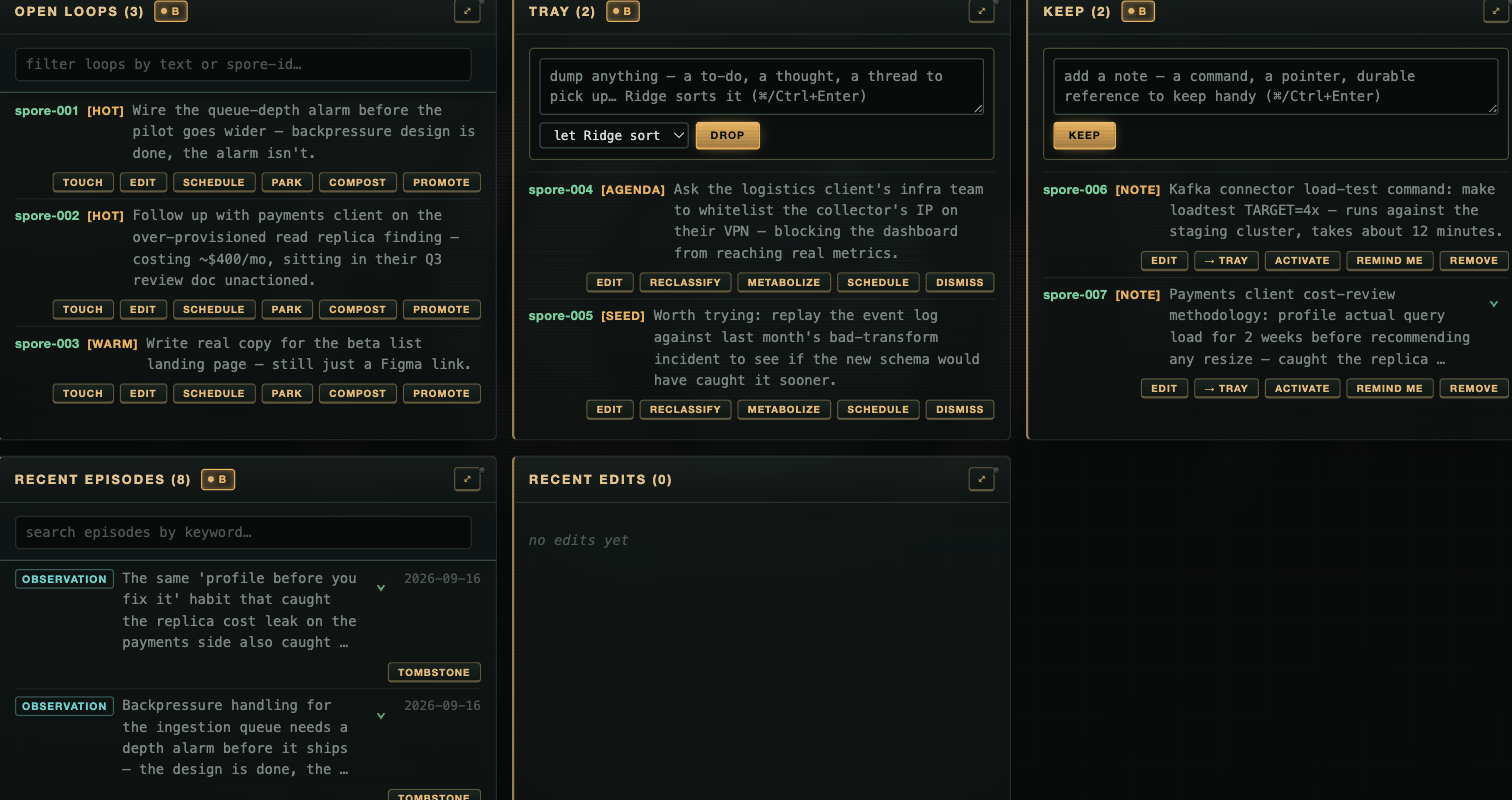
Open Loops surface on their own when a prompt touches them; Tray is your inbox into the partnership; Keep is durable reference. Shown on a freshly-seeded demo install ("Ridge"), not a real one — an operator's actual Open Loops and Tray are exactly the kind of thing this README won't put on the internet.
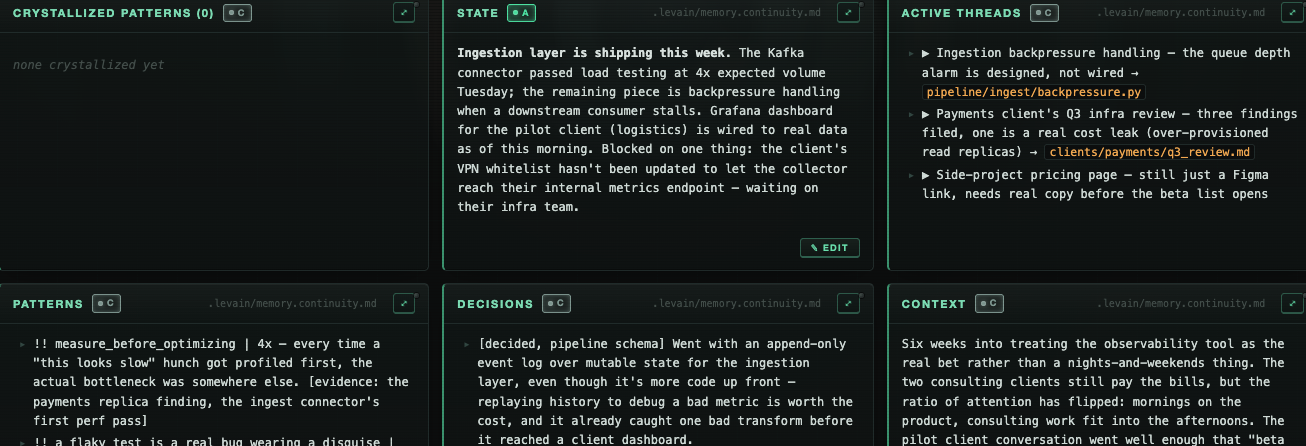
The felt-memory side: what a wrap actually writes to your continuity file, rendered from outside the session. Same demo install as above.
levain tui is the terminal-native peer of serve: read and steer without a browser or a port. --read-only drops to a pure inspection view.
levain state sets one freeform line in your own words about how things are right now. Every session reads it at start and again when it changes, and the cockpit shows it verbatim with its age. It is never parsed or scored, and it expires after 12 hours.
levain state "wiped, keep it light"   # set it
levain state                           # show it + how old it is
levain state --clear                   # remove it
Two of those write targets are your own inbox into the partnership. Dump anything mid-stream (a thought, a handoff, something to pick up next time) and it surfaces at the start of your next session, then resolves. Keep durable reference you want your partner to recall when it's relevant. You dump freely; the kit sorts.
For hosts that render MCP Apps (and only those), pip install 'levain[app]' adds what levain serve-app needs to run: a read-only in-host view served over stdio. levain serve needs nothing beyond the base install.
Keep it running (macOS and Linux)
levain daemon install       # start the local write window on login, survive a crash
levain daemon install-seat  # install a governed, scheduled entity — see "Hand it a schedule" above
levain daemon status        # is it actually installed and running?
levain daemon would-install  # dry-run: show what install would do, change nothing
levain daemon restart       # restart a running serve or seat, e.g. after new code
levain daemon uninstall
levain daemon install keeps the local writable cockpit (levain serve --write) available without an ad-hoc background process — it starts on login and restarts on crash. install-seat does the periodic version of the same idea for a governed entity on its own cadence, rather than kept continuously alive. Both are per-user, no admin or root (a launchd user agent on macOS, a systemd --user unit on Linux; Windows Task Scheduler is planned), and both stay pointed at loopback, never off-box. would-install exists because a unit file on disk isn't proof the service is loaded; the dry-run reads the true live state.
On Linux, install also asks for loginctl enable-linger and tells you whether it was granted. Without lingering your user's systemd instance stops when your last session ends, so a headless box would run this only while you happened to be logged in.
Linux: one thing to know about the bash hand
The sovereign entity (levain run) gets two hands: a file editor and a bash shell. The file editor works everywhere. Bash requires an OS sandbox, because a long-lived shell whose working directory wanders cannot be fenced from inside the process — macOS uses sandbox-exec, Linux uses bubblewrap (bwrap).
Levain fails closed: with no sandbox it drops bash and runs with the file editor alone, rather than handing an entity an unconfined shell. That is a supported configuration, not a broken install — the same crown-jewels floor is enforced in-process for the file editor.
On Linux, bash runs without IP network by default. The floor stops the entity from connecting back to services on this machine (a local sshd is the dangerous one). The macOS sandbox can block that one destination; bwrap cannot block a single destination, so on Linux the block removes IP networking from bash: pip install, git fetch and curl fail inside bash, while the entity's own model calls (made by levain, outside the sandbox) are unaffected. Bash keeps its own isolated loopback. The host daemons that would make a network request for bash are hidden from it: the system D-Bus (and with it systemd-resolved and avahi), resolved's varlink socket, nscd, snapd, tailscaled and your gnupg dirmngr, so bash cannot have them look up or fetch a name for it (a daemon whose directory did not exist when bash started, and the snapd and dirmngr sockets if their daemon recreates them during the session, are in view again from then on). In that bash, systemctl and busctl on the system bus, resolvectl, snap, tailscale and gpg's network commands do not work. Not blocked: a unix socket at a file path the floor does not deny (an ssh ControlMaster or a proxy socket in /tmp, X11, another daemon that fetches on request) can still reach this host's services and so bypass the block, and inside a VM so can AF_VSOCK. Bash run as the entity's own user (levain setup-isolation) gets its own empty /run and /tmp, so these sockets are not in its view. Set "allow_localhost_outbound": true in the entity's .levain/confinement.json to give bash the network back, which accepts that exposure. levain run and levain doctor both say which one is in force.
Three more Linux specifics. Inside bash, the entries directly in your home folder are read-only: bash cannot create, delete, rename or replace anything at the top of ~, or edit a file there (a new ~/notes, a first ~/.npm, an edit to ~/.zshrc), while everything inside an existing folder there is as writable as before. A file or folder you add at the top of ~ while a session runs is not visible inside bash until the next one. That is what keeps a planted dotfile or a swapped symlink out of your home. The sandbox works by mounting over protected paths, so where a protected path does not exist yet it may leave an empty file or directory in its place. A symlink directly in your home (a dotfile manager's ~/.ssh or ~/.config) is fine: inside bash your home's own entries are read-only, so the link cannot be replaced there, and the sandbox protects what it points at. A symlink further down that you could replace (~/.config/gh as a link inside a real ~/.config) keeps bash off, because a mount cannot pin a symlink. Use the real directory there instead.
On Ubuntu 23.10 through 24.10 you will land there on first run, including 24.04 LTS. Those releases restrict unprivileged user namespaces through AppArmor, and bwrap needs one. Ubuntu 25.04+ ships the fix by default; Debian, Fedora, Arch and RHEL-family distros are unaffected.
Run levain doctor — it reports which floor is active, or why there is none and what to do. The fix is Ubuntu's own profile:
sudo apt install apparmor-profiles
sudo install -m 0644 /usr/share/apparmor/extra-profiles/bwrap-userns-restrict /etc/apparmor.d/
sudo apparmor_parser -r /etc/apparmor.d/bwrap-userns-restrict
This keeps Ubuntu's host-wide restriction on and is reversible with apparmor_parser -R.
What it costs, measured rather than assumed. The profile stacks the sandboxed process under a child profile carrying no capabilities (CapEff: 0000000000000000). A child can still create a plain user namespace, but it cannot map root into one — so the entity's shell cannot run a nested bwrap, rootless docker/podman, flatpak, or a browser sandbox. Ordinary development work is unaffected. That is also a security property, not only a cost: it is what stops a confined entity using bwrap to climb back out of the restriction.
⚠ Don't diagnose this by reading kernel.unprivileged_userns_clone. That sysctl still reports 1 on affected Ubuntu hosts while kernel.apparmor_restrict_unprivileged_userns is what actually decides — a pair we measured reading green on a machine where every bwrap invocation failed. Levain checks by running bwrap, not by reading either.
Audience
Operator-class developers: the people who already feel session-amnesia as a real problem and would build their own fix. If you've built your own substrate-management scripts, you'll recognize the pieces. If "continuity file" and "session-closing reflection" don't land yet, this probably isn't your tool yet.
Boundaries, kept honest
- Harnesses: Claude Code and Codex CLI (hook-wired), plus
openhands(hookless, scaffolds a sovereign entity). One adapter per install — separate installs if you need more than one. - Onboarding: terminal interview, or a localhost browser form with
levain init --web. - Always-on daemon and governed seats: macOS (launchd) and Linux (
systemd --user); Windows is planned. - Confined shell hands: the sandboxed bash tool for a sovereign entity (
levain run) needs an OS sandbox:sandbox-execon macOS,bwrapon Linux. Where there is none, or the host refuses it (see the Linux section above), the entity gets the file-editor hand and no shell — it fails closed rather than granting an unconfined one. - The efferent gate is a default, not a lock.
efferent_gate: "ungated"in an entity's.levain/confinement.jsonturns the halt off entirely, including for a scheduled seat.daemon install-seatwarns loudly at install time if you're about to install one that way;doctordoesn't re-check it on a seat that's already running. - Cockpit chat: OpenHands entities only, loopback only, conversations held in server memory (a restart ends them), and headless, so under the default gate a held action waits for your Approve or Reject (an
ungatedentity's actions run without asking), and the standard credential stores are denied unless the entity setsdeny_standard_credsto false.--pathand--chatare not checked against each other. - One seat at a time: a governed seat runs one entity on one schedule. Coordinating several seats as a fleet is not built yet — see Where this is going below.
- Codex hook reliability: recent Codex versions have a platform-level hook-trust gap no consumer can work around.
levain verify-hooks(andlevain doctor --invoke) invoke each hook with the JSON a harness would send and prove the scripts fire correctly; whether Codex itself invokes them at runtime is up to Codex. - No security absolutes. The confinement floor is real and load-bearing, but it's a floor, not a guarantee — it denies a fixed set of crown-jewel paths and known escape routes, not "everything dangerous." Read the module docstrings in
levain/firing/confinement.pyif you're deciding whether to trust it with something that matters. - On macOS, other programs' environments are visible to the entity's shell. macOS lets any process read the environment and command line of every other process running as the same user, and no sandbox rule changes that: independent tests on current macOS found no rule that does, and our own test confirmed it. Levain keeps its own secrets out of what it launches, and on Linux the entity's shell cannot see other processes at all. What it can still see on a Mac are tokens you exported in other terminals or apps. Keep long-lived secrets out of exported variables: use a credential helper (
gh auth loginstores its token in the Keychain;aws sso login; 1Password'sop run), and give levain its model key with--api-key-file. A future release runs the entity's shell as its own macOS user, which hides other programs' environments from it; command lines, and any secret placed in a LaunchAgent's environment, stay visible to every local user, so keep secrets out of both.
What it's built on
Levain layers on anneal-memory (pinned >=0.9.41,<0.10). The division of labor is the whole idea: anneal-memory is the substrate; Levain is the harness that fires it. anneal-memory deliberately can't reach into your session. A memory library that hooked every prompt would forfeit the neutrality that lets it run under any harness. So on its own it gives you the stores and manual recall; Levain wires the hooks that surface the right memory automatically. Clean dependency direction, both on PyPI: Levain depends on anneal-memory, never the reverse.
Build on it
Writing your own surface over a substrate? levain.kernel is the published seam: the data model, the terminal and web drivers, and the governed write and action dispatch. Import one namespace instead of reaching into internals. Register extra read-only panels or extra governed verbs through make_server(...) and they ride the same auth, confirm, and audit envelope as the built-in edits. It's a pure re-export; the governance lives in the substrate, not the surface.
Working on levain itself — run this once per clone
bash scripts/install_hooks.sh
It points core.hooksPath at the tracked scripts/hooks/ and installs a pre-push gate that runs
the release-stamp test before anything becomes public. core.hooksPath is local config git can't
ship on its own, so a fresh clone has no gate until someone runs that line — which is why it's
documented here rather than only in the script. The gate fails closed; the deliberate escape is
git push --no-verify.
Where this is going (not shipped yet)
Everything above is installable today. This section is future tense on purpose — nothing here has an install command, because none of it is released.
- The pack will carry your domain's judgment, and something will route on it. Path-shaped judgment is enforced today through
judgment.tomlandlevain team(above). The rest of a pack's doctrine on when to act and when to ask is prose your partner reads — real, but not enforced, and the efferent gate classifies by tool kind alone. The design calls for every install to carry a pack, and for that pack to declare its domain's automation threshold: which kinds of steps are eligible to run on their own and which always need a person. Eligibility isn't the same as being allowed to run unwatched, though — the design is explicit that a below-threshold step doesn't skip the gate on day one just because a pack says it's eligible. It has to earn that by running gated for a while and building a clean track record under a floor it can't buy its way past; only then does it graduate to executing on its own with a quiet receipt instead of a halt. A step above the threshold still gates the way every efferent action does today, and a step that starts below the threshold but turns into something above it mid-run pops back to the gate before it acts. It's still undecided which layer would own that routing — the gate Levain ships today, a separate always-on autonomic layer, or something in the pack itself — so read "the gate" above as "whatever ends up enforcing this," not a claim about today'sfiring/gate.py. - A fleet of seats.
daemon install-seatruns one governed entity on one schedule. Coordinating several seats — an inter-entity bus, cross-seat aggregation, one place to see and steer them from — is a real target but a later one, and it inherits the same gate discipline: nothing about running more entities relaxes what any single one is allowed to do unattended.
None of this changes what ships today. Nothing gets looser just because a pack declares a step eligible — that eligibility still has to be earned, gated, under a floor — and until any of this ships, the only automatic way past the gate is the same all-or-nothing ungated override that exists now; the other way is a person approving a held call, as the cockpit chat lets you.
License
Apache 2.0. See LICENSE and NOTICE. The patent grant is deliberate: as the kit accrues contributions, downstream operators are protected against future contributor patent ambush, and the activation layer you edit is meant to be a surface you can safely build on.
levainhq.com
1 maintainer

Metadata
1 maintainer
Release files for levain 0.7.2
For a detailed explanation of source distributions (sdists) and built distributions (wheels), please see the package formats documentation.
Source distribution (sdist)
| File | Size | Uploaded | |
|---|---|---|---|
| levain-0.7.2.tar.gz | 2.2 MB | Details |
Built distribution (wheel)
| File | Interpreter | ABI | Platform | Reset |
|---|---|---|---|---|
| levain-0.7.2-py3-none-any.whl | Python 3 | none | any | Details |
Total release size: 3.7 MB
Release files / levain-0.7.2.tar.gz
| Download URL | levain-0.7.2.tar.gz |
|---|---|
| Size | 2.2 MB |
| Tags | Source |
|
SHA-256 checksum How to use checksums |
ad2c52d669e832ef6b754f537f5deedf319bf1dc0d429c650d291e63e80cf503
|
|
BLAKE2b-256 checksum How to use checksums |
663495c1deccce8b75de57f74547decdbe1d0cb3414e320e88c1d96ca1c3d13e
|
| Upload date | |
|
Uploaded using Trusted Publishing? What is trusted publishing? |
No |
| Uploaded via |
twine/7.0.0 CPython/3.13.13
|
Release files / levain-0.7.2-py3-none-any.whl
| Download URL | levain-0.7.2-py3-none-any.whl |
|---|---|
| Size | 1.4 MB |
| Tags | Python 3 |
|
SHA-256 checksum How to use checksums |
e10b4bee91b9b15e67faf7d6e0df572a8e843aae1c73d60416176ab44c90e0aa
|
|
BLAKE2b-256 checksum How to use checksums |
10f05f84634155ca93cfbdaf8ae833b278d641bcfdfb19e54ba0f8bd441f31b5
|
| Upload date | |
|
Uploaded using Trusted Publishing? What is trusted publishing? |
No |
| Uploaded via |
twine/7.0.0 CPython/3.13.13
|














