
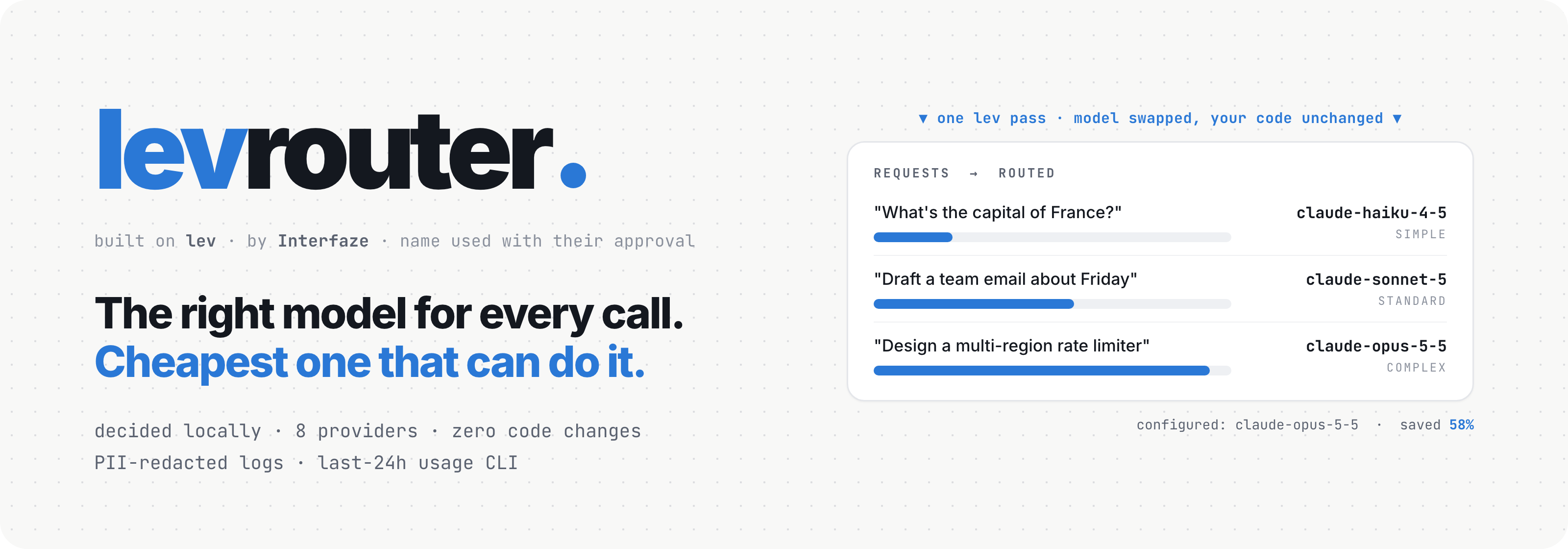
levrouter
(Open-Source LLM Cost Router)
Powered by LEV, a System 1 decision model from Interfaze (InterfazeAI). levrouter is an independent project built on top of lev, and its name is used with the Interfaze team's approval. Special thanks to Abhinav and the whole Interfaze team. See Acknowledgements.




🧪 Beta: still under active testing. Settings, defaults and APIs may change between commits, and some parts are incomplete (see Known limitations). Try it in development or with evaluation mode before relying on it in production, and please report issues.
levrouter leverages LEV—a fast, System 1 decision engine—to evaluate prompt complexity and predict the cheapest suitable model in milliseconds without the latency of generative text models. You keep writing ChatAnthropic(model="claude-opus-5-5"). levrouter checks each request, and a greeting goes to Haiku while a hard reasoning task stays on Opus. Your code doesn't change and nothing is proxied: the decision happens inside your process, and the call still goes straight to your provider with your own API key.
Key features
- One line to adopt:
levrouter.load_config()routes LangChain chat models and direct Anthropic SDK / OpenAI SDK calls. - Same provider, your keys: routing only moves between tiers of the provider you already use (cross-vendor is opt-in via OpenRouter). Security details.
- Conversation-aware: keeps each conversation on one model so prompt caching keeps working, and moves it to a better model when the user keeps re-asking the same question. Details.
- Guardrails: never picks a model that can't fit the request's context, attachments or tool use, and never touches fine-tuned models. Rules.
- Current model data:
levrouter models refreshupdates prices and capabilities and checks your tier models against what your API key can use. Details. - Safe in production: if routing itself fails, your call goes to the model in your code; one variable (
LEVROUTER_ENABLED=false) turns routing off without a redeploy. Deployment guide. - Visible costs: every decision is logged with its cost and savings;
levrouter usageand evaluation mode show the totals and the quality. Logs and usage, evaluation.
How it works
levrouter intercepts outgoing chat model requests before they hit an external API.
Instead of using a full generative LLM to classify user requests, levrouter offloads routing decisions to LEV (a 4B System 1 classifier). LEV computes probabilities over decision tiers in a single forward pass with zero token-generation overhead.
- You call a LangChain chat model as usual.
- levrouter builds a short summary of the request: the last user message, the system prompt, tools and attachments.
- A classifier rates the request as
simple,standardorcomplex. - levrouter calls a copy of your chat model, switched to that tier's model from the same provider. Your API key and endpoint are unchanged, and your original object is never modified.
| Tier | Anthropic (default) | OpenAI (default) |
|---|---|---|
| simple | claude-haiku-4-5 |
gpt-6-luna |
| standard | claude-sonnet-5 |
gpt-6-sol |
| complex | claude-opus-5-5 |
gpt-6-astra |
Tiers are configurable per provider (see Configuration). Before using a cheaper model, levrouter checks that it fits the request's context size, attachments and tool use; the rules are in docs/security.md.
Choosing a classifier backend
heuristic |
lev-local |
lev-http |
|
|---|---|---|---|
| Decides with | keyword and length rules | lev, inside your app | lev on a server you run (lev serve) |
| Time per decision | ~1 ms | tens of ms on a GPU (lev reports 69 ms on an H100); seconds on a CPU | network round trip plus the server's time. Measured on Modal from a laptop (22 requests, no errors): 0.74–1.01 s per call once the server is warm (median 0.81 s, none over 1.5 s), and 30–34 s for the first call after it was idle (lev reports 414–654 ms to an H100 in the cloud) |
| Download and disk | none | ~9.5 GB on first run, cached in ~/.cache/huggingface |
none on the app's machine |
| Memory | none | ~10 GB free RAM, or a GPU | none on the app's machine |
| Works offline | ✅ | ✅ after the first download | ✅ on a private network (needs the server) |
| Scaling | every instance, free | every instance loads its own copy | many instances share one server |
| Falls back to the heuristic on error or timeout | n/a | ✅ | ✅ |
| Best for | development, or when lev isn't available | a machine with a GPU or plenty of RAM | small machines, containers, many app instances |
In a 22-request check against a Modal-hosted server, the top tier matched what we expected for 6 of 6 trivial prompts (simple), 5 of 6 routine ones (standard; "five name ideas for a note-taking app" came back simple at 0.58), and 6 of 6 hard ones (complex, 0.88–0.96). Four prompts containing an email, phone number or SSN were decided with low confidence (top tier 0.34–0.50, spread across tiers), so don't rely on lev for prompts that are mostly personal data. That is a small, hand-labelled sample, not a benchmark. lev's authors report 68.9% on their S1Bench decision benchmark; levrouter has no published routing-accuracy figure yet. To measure routing quality on your own prompts, use evaluation mode.
Whatever the backend, if a decision fails or takes longer than timeout_s, that call falls back to the heuristic, so your app never waits longer than timeout_s for a decision.
lev-local needs memory. lev is a 0.2 GB adapter on a 9.3 GB base model (Qwen3.5-4B, bf16). On a laptop with 8 GB of RAM, the model spills to swap and each decision takes minutes, so every call times out to the heuristic. On a machine like that, use
lev-httppointed at a bigger machine.
How levrouter compares
Other tools in this space fall into three groups:
- Model selectors, such as RouteLLM (open source) and Not Diamond (a hosted API). They recommend a model for each prompt; you (or a gateway) then make the call.
- Hosted routers or proxies, such as OpenRouter's Auto Router. Your requests go through their service, which picks the model and bills you.
- Gateways, such as LiteLLM's router. They balance load, retry and fall back across deployments by cost or latency, rather than by what the request is asking.
| Solution | Picks the model per request | Existing calls unchanged | No proxy or extra service | Your own provider keys and billing | Switches between providers |
|---|---|---|---|---|---|
| Hand-written rules | ❌ | ❌ | ✅ | ✅ | ✅ |
| RouteLLM | ✅ | ❌ | ⚠️ | ✅ | ✅ |
| Not Diamond | ✅ | ❌ | ❌ | ✅ | ✅ |
| OpenRouter Auto Router | ✅ | ❌ | ❌ | ⚠️ | ✅ |
| LiteLLM Router | ❌ | ❌ | ⚠️ | ✅ | ✅ |
| levrouter | ✅ | ✅ | ✅ | ✅ | ⚠️ |
✅ yes · ❌ no · ⚠️ partly. levrouter switches vendors only through OpenRouter's opt-in ladder mode; with a direct provider key (e.g. ChatAnthropic to api.anthropic.com) it stays on that provider. RouteLLM and LiteLLM can run in your process or as a server you host. OpenRouter bills through your OpenRouter account unless you bring your own provider keys. "Picks the model per request" means choosing by what the request asks; LiteLLM's router chooses by load, cost and latency.
Where levrouter helps:
- Drop-in for existing LangChain apps. It patches the chat model classes you already use, so chains, tools and structured output keep working, and no call site changes.
- No proxy and no extra vendor. Nothing new sits in the request path; calls go straight to your provider with your key.
- Same provider, same behaviour. Routing only moves between tiers of the provider you configured, so API keys, data agreements and response formats stay the same. Guardrails keep a request on a model that fits its context size, attachments and tool use, and never touch fine-tuned models.
- Easy to check. Every decision is logged with its cost and savings,
levrouter usagegives 24-hour totals, and evaluation mode compares routed answers against your configured model.
Where others fit better:
- Choosing across providers with direct keys. levrouter only switches vendors when you call models through OpenRouter (ladder mode). If you call each provider directly with its own key and want the cheapest model from any of them, use a hosted router or selector.
- Load balancing and failover. For load balancing, rate limits and failover across many deployments, use a gateway; it can sit alongside levrouter.
- Machines without much memory. lev-local needs a GPU or plenty of RAM; without one, use
lev-httpor the heuristic.
Installation
Requirements: Python 3.12+, git, and a LangChain provider package (for example langchain-anthropic). levrouter and lev are installed from GitHub; neither is on PyPI.
With uv (recommended)
Run these inside your project:
# 1. lev (only needed for backend lev-local, or to run `lev serve`)
uv add "lev[serve] @ git+https://github.com/InterfazeAI/lev.git#subdirectory=packages/lev"

# 2. levrouter
uv add "git+https://github.com/sathyalog/levrouter.git"

# 3. install everything and check that lev and torch import
uv sync
uv run python -c 'import lev, torch, transformers; print(torch.__version__)'
To pick up a newer levrouter from GitHub later:
uv sync --upgrade-package levrouter
With pip
pip install "lev[serve] @ git+https://github.com/InterfazeAI/lev#subdirectory=packages/lev"   # lev-local only
pip install "git+https://github.com/sathyalog/levrouter.git"
Provider packages can come with levrouter as extras, e.g. pip install "levrouter[anthropic] @ git+https://github.com/sathyalog/levrouter.git". The available extras are anthropic, openai, gemini, groq, deepseek, mistral, xai, huggingface, openrouter, providers (all of them), http (for lev-http), otel and all.
Working on levrouter itself
To make your app use a local checkout (so edits apply immediately), install it in editable mode into the app's environment:
uv pip install -e /path/to/levrouter
A plain uv add git+... installs a copy of the version on GitHub, so local edits to levrouter are not seen until they are pushed and upgraded.
Check the setup
levrouter check
This reports Python, lev and torch (and whether a CUDA GPU is present), which provider packages are installed, and where usage files are kept. It also prints the config file it found and the settings it produces, so you can see what your levrouter.yaml does.
Quick start
1. Create levrouter.yaml in your project root, either with the wizard (below) or by hand.
The setup wizard: levrouter setup
Run it from your project root:
source .venv/bin/activate
levrouter setup
It asks a few questions, shows you the resulting config, and writes levrouter.yaml in the current directory (asking first if the file already exists). It makes no API calls and downloads nothing.
- Which backend?
1. lev-local,2. lev-httpor3. heuristic.- lev-local: choose it if your machine has the disk space (~10 GB) and enough RAM or a GPU. It gives the most accurate decisions, with no network hop.
- lev-http: choose it if lev runs on another machine (
lev serve). - heuristic: choose it for instant rule-based decisions with nothing to install.
- lev check (lev-local only). If lev isn't installed, the wizard shows how to install it and stops. Install lev, then run
levrouter setupagain. - Which provider?
anthropic,openai,gemini,groq,deepseek,mistral,xai,huggingfaceoropenrouter. For OpenRouter it then asks which vendor's models to use (e.g.anthropic,openai,google), and whether to turn on ladder mode (default no). If you say yes, it asks which vendors ladder mode may use; the default is all of them. - lev server URL (lev-http only). The default is
http://localhost:8000. If you enter an address outside your private network, the wizard also setsallow_remote_lev: true, and https is then required. - Customise model tiers? Answer
nto use the provider's defaults. Answeryto be shown the default model forsimple,standardandcomplex; press Enter to keep each one, or type another model id. - Enable usage tracking? (default yes) Keeps token and cost totals for
levrouter usage. - Enable detailed logging? (default no) Sets
log_level: DEBUG, which shows the reason for each decision. - Advanced settings? (optional, default no) Which frameworks to route (
langchain,anthropic,openai; defaultlangchain), and the conversation settings:sticky_threads,escalate_after_repeatsandthread_ttl_s. Only values that differ from the defaults are written. - Save this configuration? The wizard prints the YAML; answer
yto writelevrouter.yaml.
For example, choosing lev-local with Anthropic and the defaults produces this (the lists are written out one per line in the real file):
enabled: true
router:
  backend: lev-local
  timeout_s: 2.0
  block_on_load: true
  usage_file: true
  usage_live: true
  log_level: INFO
models:
  simple:   {providers: [anthropic/claude-haiku-4-5]}
  standard: {providers: [anthropic/claude-sonnet-5]}
  complex:  {providers: [anthropic/claude-opus-5-5]}
Skip the advanced step and frameworks stays at LangChain only, with the conversation settings on at their defaults. You can edit the file afterwards (see Configuration); it's read each time your app starts.
Or write it by hand
See Configuration for every option. A minimal file:
router:
  backend: lev-local
  timeout_s: 2.0
  block_on_load: true
2. Call load_config() once at startup, before your first LLM call:
import levrouter
levrouter.load_config()   # reads levrouter.yaml, prepares lev, enables routing

from langchain_anthropic import ChatAnthropic
llm = ChatAnthropic(model="claude-sonnet-5")
llm.invoke("What is 2+2?")   # routed, e.g. to claude-haiku-4-5
Calling the Anthropic or OpenAI SDK directly? Add the framework in levrouter.yaml and keep your code as it is:
frameworks: [langchain, anthropic, openai]
client = anthropic.Anthropic()
client.messages.create(model="claude-opus-5-5", max_tokens=500, messages=[...])   # routed the same way
3. Run your app.
python main.py
With backend: lev-local, load_config() first makes sure lev is on disk. On the first run it downloads the adapter and base model, blocks until the download finishes, and shows progress:
🔎 levrouter: checking the local Hugging Face cache for interfaze-ai/lev and its base model...
📥 base model (Qwen/Qwen3.5-4B) is not cached: downloading 9.32 GB in 4 file(s).
   Nothing else runs until this finishes.
   base model:  37.4%  3.48 GB / 9.32 GB  54 MB/s  ETA 108s
On later runs it finds the files in ~/.cache/huggingface/hub/ and goes straight to loading:
   ✅ lev adapter (interfaze-ai/lev): already in the local cache
   ✅ base model (Qwen/Qwen3.5-4B): already in the local cache
🔄 levrouter: loading LEV into memory from the local cache...
✅ levrouter: Routing enabled for anthropic, ...
Each routed call is then logged:
levrouter INFO  route [7a46e0] "What is 2+2?" -> claude-haiku-4-5 (simple; configured claude-sonnet-5) via lev-local 41ms
levrouter INFO  done  [7a46e0] claude-haiku-4-5 in=10 out=5 0.62s $0.0000 (saved $0.0001 vs claude-sonnet-5)
If lev can't be installed, downloaded or loaded, load_config() says why and routes with the heuristic instead of failing.
Configuration
levrouter.yaml is found in the current folder and up to four parent folders (levrouter.yml, levrouter.toml, .levrouter, or [tool.levrouter] in pyproject.toml also work), or at the path in LEVROUTER_CONFIG. Every setting is listed in docs/configuration.md; TOML setups are in docs/config_setup.md; environments and environment variables are in docs/deployment.md.
enabled: true                 # false: load_config() does nothing (no routing)

router:
  backend: lev-local          # lev-local | lev-http | heuristic
  timeout_s: 2.0              # max seconds per decision before falling back to the heuristic
  block_on_load: true         # lev-local: load lev at startup instead of on the first call
  min_tier: null              # e.g. standard: never route below this tier
  allow_upgrade: true         # false: never pick a model pricier than the one you configured
  log_level: INFO             # DEBUG shows the reason for each decision
  usage_file: true            # keep ~/.levrouter/usage (last 24h)
  usage_live: true            # answer `levrouter usage --live` while the app runs
  sticky_threads: true        # keep each conversation on one model (see below)
  thread_ttl_s: 300           # idle seconds before a conversation may change model again
  escalate_after_repeats: 2   # a question asked again twice more moves up a tier; 0 = off

models:                       # override tier models; unlisted tiers keep the defaults
  simple:
    providers: [anthropic/claude-haiku-4-5]
  complex:
    providers: [anthropic/claude-opus-5-5, openai/gpt-6-astra]

frameworks: [langchain, anthropic, openai]   # what to patch (default: langchain)
providers: [anthropic]        # only route these providers (default: all installed)
- Model entries are
provider/model(anthropic,openai,gemini,groq,deepseek,mistral,xai,huggingface), oropenrouter/<vendor>/<model>for OpenRouter, e.g.openrouter/anthropic/claude-haiku-4.5. - Unknown keys are reported with a warning and ignored; the rest of the file still applies.
- Other
router:keys: anything inRouterConfigcan go underrouter:. See docs/configuration.md. - Environment variables: only a few remain: secrets, the data folder (
LEVROUTER_HOME), the config path (LEVROUTER_CONFIG), the kill switch (LEVROUTER_ENABLED), and three quick overrides (LEVROUTER_LOG_LEVEL,_BACKEND,_MODE) that beat the file. Everything else is set in the YAML. See Running in production. - Upgrading an existing file: it keeps working, with differences.
models:is now applied (it used to be ignored); conversations stay on one model and move up when a question is re-asked (sticky_threads,escalate_after_repeats; setsticky_threads: falseandescalate_after_repeats: 0for the old behaviour); the Anthropic and OpenAI SDKs are routed only if you list them underframeworks;enable(),levrouter run,check,usageandevalnow read the YAML too; and environment variables that used to set other settings (LEVROUTER_MIN_TIERand so on) are ignored with a warning naming them.
Configuring in code instead of YAML:
import levrouter
from levrouter import RouterConfig

levrouter.enable(RouterConfig(backend="heuristic", tiers={"anthropic": {"simple": "claude-haiku-4-5"}}))
llm = levrouter.route(ChatAnthropic(model="claude-opus-5-5"))   # or opt in single instances
Running lev on another machine (lev-http)
On a machine with a GPU or enough memory, where lev is installed:
lev serve --checkpoint interfaze-ai/lev --host 0.0.0.0 --port 8000
Pass --checkpoint interfaze-ai/lev: without it, lev serve serves the untrained base model.
Then point your app at it:
router:
  backend: lev-http
  lev_url: http://10.0.0.5:8000   # a local or private-network address
  timeout_s: 2.0
- Remote servers. For a server outside your private network, set
allow_remote_lev: true; levrouter then requires anhttps://URL, because request text is sent to it. Docker and Kubernetes service names (http://lev:8000,http://lev-service:8000) count as private, so they need neither. - Authentication.
lev servehas no authentication of its own, so put it behind something that checks credentials (a reverse proxy, an API gateway, Modal proxy auth, a private Hugging Face Space). levrouter can send them two ways, alone or together:-
LEVROUTER_LEV_API_KEYis sent asAuthorization: Bearer <key>. This covers most reverse proxies and a private Hugging Face Space (the HF token is the key). -
lev_headerssends any other headers. It maps each header name to the name of an environment variable, so the config file holds no secret and the values are read from the environment at startup. A header whose variable is not set is skipped with a warning that names the variable. An entry namedAuthorizationreplaces the Bearer header.router: backend: lev-http lev_url: https://your-workspace--lev-server-serve.modal.run allow_remote_lev: true lev_headers: # Modal proxy auth tokens; any host that wants headers works the same way Modal-Key: MODAL_KEY # export MODAL_KEY=wk-... Modal-Secret: MODAL_SECRET # export MODAL_SECRET=ws-...
Environment variables belong to a shell session, not to a folder: export them in the terminal, container or process manager that runs your app, or put the
exportlines in your shell profile so every new terminal has them. Cloudflare Access (CF-Access-Client-Id/CF-Access-Client-Secret) and custom gateways work the same way.
-
- Redaction. Personal data is redacted from the text sent to a lev-http server by default (
redact_classifier_input: true). - Cold start. A serverless server that has scaled to zero took 30–34 s on its first call (measured on Modal, two runs). Warm calls took 0.74–1.01 s, so the default
timeout_sof 1.5 held for all 21 warm calls; use 2.0 if your network is slower than a laptop on home broadband. The cold first call falls back to the heuristic, which is the intended behaviour; later calls use lev. To start the server ahead of time, setwarm_on_load: true:load_config()then sends one background request (billable, off by default) and never waits for it. Or keep a container warm (for examplemin_containers=1on Modal).
The full endpoint rules and what leaves your process: docs/security.md.
One model per conversation (sticky_threads)
Switching models mid-conversation throws away the provider's prompt cache (cached input costs about 10% of the normal price), so levrouter keeps each conversation on one model. A conversation can move up a tier, never down.
- Thread id: LangGraph's
thread_idis used automatically. Otherwise passconfig={"metadata": {"levrouter_thread": conversation_id}}. Calls without one are routed one by one. - Re-asked questions move up: the 3rd time the same question is asked (rephrased, or "that's wrong, try again"), the conversation moves up a tier, and again on each further repeat. "thanks" or "ok" never count. Works with or without a thread id.
- Switch by hand: for one call,
metadata={"levrouter_tier": "complex"}sets the tier andmetadata={"levrouter_disable": True}uses your own model.levrouter.reset_thread(conversation_id)starts over. - Settings:
sticky_threads(default on),thread_ttl_s(default 300 s, Anthropic's default cache lifetime; use 3600 with the 1-hour cache),escalate_after_repeats(default 2; 0 turns it off).
Cost example and detection rules: docs/conversations.md.
Keeping models up to date
levrouter models refresh
- Prices and capabilities: downloads current data for ~200 models (OpenRouter's public catalogue). New models, e.g. a new
claude-opus-4-8, then get prices and guardrail checks, and dated ids likeclaude-sonnet-4-5-20250929match their undated name. - Models your key can use: for each provider whose API key is set in your shell (the command doesn't read
.env: runset -a; source .env; set +afirst), saves the list of available models.load_config()then warns when a tier model isn't available and suggests the newest of its family, e.g.'claude-sonnet-5' … (newest similar: 'claude-sonnet-5-5'). Startup makes no network calls. - You stay in control: tier models never change on their own; set them under
models:.
Run it weekly or in CI. More: docs/models.md.
Switching vendors with OpenRouter (ladder mode)
By default levrouter stays with the vendor in your code: an Anthropic model on OpenRouter is only routed between Anthropic models. Turn on ladder mode to let it pick, for each request, the cheapest model among the vendors you allow that fits the request's context size, attachments and tool use:
router:
  openrouter_mode: ladder
  openrouter_vendors: [anthropic, openai, google]   # omit to allow every known vendor
With that config, a simple request sent to anthropic/claude-opus-5.5 can be answered by openai/gpt-6-luna; the log shows the reason, e.g. ladder: anthropic -> openai.
- When it applies: only when your chat model calls OpenRouter:
ChatOpenRouter, orChatOpenAI/ChatAnthropicwith OpenRouter's base URL (https://openrouter.ai/api/v1). Calls made with a provider's own key and endpoint never switch vendor. - What you need: one
OPENROUTER_API_KEY, and the OpenRouter package:pip install "levrouter[openrouter] @ git+https://github.com/sathyalog/levrouter.git"(orlangchain-openrouter). - Keep in mind:
- Your prompt may go to a different company than the one in your code, so list only vendors you're allowed to use.
- Answers can differ in style between vendors. Try it with evaluation mode first.
- Other settings: vendor tier models can be changed under
models:withopenrouter/<vendor>/<model>entries, orlevrouter setupcan set up ladder mode for you. All OpenRouter settings: docs/configuration.md.
Running in production
Settings live in levrouter.yaml. The environment holds only secrets, locations, a kill switch and three quick overrides:
| Variable | Purpose |
|---|---|
LEVROUTER_CONFIG |
Path to the config file: per-environment files, a mounted Kubernetes ConfigMap. Not needed otherwise, because levrouter.yaml is found automatically |
LEVROUTER_HOME |
The data folder (default ~/.levrouter): usage files, live-view sockets, model data, eval output |
LEVROUTER_ENABLED |
Kill switch: set it to false and routing is off, with no file change |
LEVROUTER_LOG_LEVEL, _BACKEND, _MODE |
Quick overrides: debug logging, fall back to heuristic, evaluation mode |
LEVROUTER_LEV_API_KEY, provider API keys |
Secrets, environment only (lev_api_key in a file is ignored with a warning) |
The override variables beat the YAML, and the YAML beats the defaults. Old per-setting variables such as LEVROUTER_MIN_TIER are ignored with a warning naming them; put those settings in the YAML.
| Environment | Backend |
|---|---|
| Laptop with less than ~16 GB of RAM | heuristic, or lev-http to a bigger machine |
| CI and tests | heuristic, or LEVROUTER_ENABLED=false |
| One server with a GPU or 16 GB+ RAM | lev-local |
| Containers and serverless | heuristic or lev-http (not lev-local) |
| Kubernetes with many replicas | lev-http to one shared lev server |
When something fails, your calls keep working: a slow or failed lev decision uses the heuristic, a bug inside routing sends the call to the model in your code, and an unwritable data folder only turns off usage files and the live view.
The full guide, with every variable, Docker and Kubernetes examples, serverless, several workers, corporate gateways, air-gapped setups and a checklist: docs/deployment.md.
Monitoring usage and cost
levrouter usage                    # last 24h from ~/.levrouter/usage, grouped by model
levrouter usage --by tier          # or: provider, task, user
levrouter usage --since 6h --recent 10
levrouter usage --live             # in-memory numbers from running apps
levrouter usage --json
In code: levrouter.stats(), levrouter.usage(), levrouter.usage_report(). Log lines, OpenTelemetry, how the 24-hour files and live view work, and running under Docker or Kubernetes: docs/observability.md.
To check routing quality before trusting it, evaluation mode also runs the configured model on a sample of calls and has a judge compare the answers. See docs/evaluation.md and levrouter eval --help.
Verify it works
1. See what your levrouter.yaml produces. levrouter check prints the file it found and the main settings. To print any setting, run this in your app's folder:
python - <<'EOF'
import levrouter
cfg, frameworks, providers = levrouter.load_config(auto_enable=False)
print(cfg.backend, cfg.timeout_s, cfg.sticky_threads, cfg.thread_ttl_s, cfg.escalate_after_repeats, frameworks)
print(cfg.tiers["anthropic"])   # the tier models, with your `models:` applied
EOF
With backend: lev-local and block_on_load: true this also loads lev (~10 GB of memory); try it with backend: heuristic on a small machine. A warning here means a key in the file is not a setting.
2. Watch the decisions. With log_level: DEBUG, each call logs why that model was picked. Look for:
| Log reason | Meaning |
|---|---|
sticky thread: kept complex |
the conversation stayed on its higher model |
asked 3 times: moved up to standard |
a re-asked question moved the conversation up |
ladder: anthropic -> openai |
OpenRouter ladder mode switched vendor |
fallback after lev-local timeout |
lev was too slow, so the heuristic decided |
3. Try routing without any API key or lev: python examples/demo.py --backend heuristic.
4. Check model data and cost: levrouter models refresh, then levrouter usage --by tier --recent 10.
5. Contributors: install with pip install -e ".[dev]" and run pytest -q.
Framework support
| Framework | Status |
|---|---|
LangChain chat models (ChatAnthropic, ChatOpenAI, ChatGoogleGenerativeAI, ChatGroq, ChatDeepSeek, ChatMistralAI, ChatXAI, ChatHuggingFace, ChatOpenRouter) |
✅ Routed: invoke, stream, async, bind_tools, with_structured_output, chains |
Anthropic SDK (frameworks: [anthropic]) |
✅ Routed: client.messages.create, .stream, .parse, sync and async, including clients created before load_config(). Streamed calls are counted in usage when the stream ends or is closed |
OpenAI SDK (frameworks: [openai]) |
✅ Routed: client.chat.completions.create, .stream, .parse, sync and async. Also for OpenAI-compatible endpoints the client points at (OpenRouter, Groq, DeepSeek, xAI, Mistral, Gemini), always within that provider's models. Streamed calls are counted in usage when the stream ends or is closed |
| Llama Index | Routed through the Anthropic and OpenAI SDK integrations above (not tested with Llama Index itself) |
With both LangChain and an SDK framework enabled, a LangChain call is routed once, at the LangChain layer; the SDK call it makes underneath isn't routed again. Using Llama Index? See docs/llama_index.md.
Never routed: embeddings, fine-tuned or custom models (ft:* and others in never_route), and OpenRouter's own routers or :free models.
Known limitations
-
load_config()blocks startup with lev-local. The first run waits for the ~9.5 GB download, and every run waits for lev to load. Plan for this in containers and serverless functions. -
Conversation memory is per process. With several workers or replicas, a conversation whose calls reach different ones loses its sticky model; use session affinity at your load balancer (see docs/deployment.md).
-
Default tier models are built in (see How it works). If a provider retires one of those ids, calls to that tier fail.
levrouter models refreshmakesload_config()warn about this; fix it undermodels:.
Troubleshooting
Getting a 401 "API key is invalid" error? See docs/troubleshooting-401-auth.md.
lev-local classifier failed (timeout)
lev took longer than timeout_s, so that call used the heuristic. On a CPU a decision can take seconds; with too little memory it can take minutes (see the lev-local memory note above). Run on a GPU or a machine with more RAM, use lev-http, or raise timeout_s if your decisions are only slightly slow.
lev-local classifier failed (LevNotReady)
lev was still loading when the call came in. Set block_on_load: true to load it during load_config().
ignoring config keys that are not RouterConfig settings: ...
A key in levrouter.yaml isn't a known setting (check the spelling); the rest of the file is still used.
Routing never happens / changes to levrouter have no effect
Check that levrouter.load_config() runs before the first LLM call. Then check which copy is imported: python -c "import levrouter; print(levrouter.__file__)". If it points into site-packages but you are editing a local checkout, install it with uv pip install -e /path/to/levrouter.
ignoring environment variables that are no longer used: ...
Those variables used to set individual settings. Put the setting in levrouter.yaml instead; docs/deployment.md maps each old variable to its YAML key.
Routing stopped everywhere
Check that LEVROUTER_ENABLED isn't set to false in the environment, and that enabled: false isn't in the file.
The download is slow or stopped
Re-running resumes where it stopped. To keep the ~9.5 GB elsewhere, set HF_HOME (e.g. export HF_HOME=/Volumes/Drive/huggingface) before running. Setting HF_TOKEN avoids anonymous Hugging Face rate limits.
A big "LEV PREREQUISITE NOT FOUND" message
It appears only when the lev-local backend is built and lev isn't installed (not on import, and never for lev-http or heuristic). Install lev (see Installation), or use backend: lev-http or heuristic; routing still works either way.
Documentation
| Topic | Link |
|---|---|
| All settings and per-call control | docs/configuration.md |
| Conversations: sticky models, re-asked questions | docs/conversations.md |
| Keeping model data current | docs/models.md |
| Logging, OpenTelemetry, usage store | docs/observability.md |
| Security, PII redaction, guardrails, lev-http rules | docs/security.md |
| Evaluation mode | docs/evaluation.md |
| Environment variables and deployment: Docker, Kubernetes, serverless, several workers | docs/deployment.md |
| Config file formats and loading | docs/config_setup.md |
| Llama Index | docs/llama_index.md |
| 401 authentication errors | docs/troubleshooting-401-auth.md |
To try routing decisions without API keys: python examples/demo.py --backend heuristic (or --backend lev-local).
Acknowledgements
levrouter exists because of lev, the System 1 decision model created by Interfaze (GitHub: InterfazeAI/lev). Every routing decision made by the lev-local and lev-http backends comes from their model, and this project is built entirely on top of it.
- Special thanks to Abhinav and the entire Interfaze team, both for building lev and for approving the name levrouter for this project.
- levrouter is an independent, community project. It is not developed, endorsed or supported by Interfaze, and lev remains the work and property of its creators under its own licence. Please direct questions about lev itself to the lev repository.
- "Interfaze" and "lev" are names of their respective owners and are used here only to credit and describe the model levrouter builds on.
License and credits
Apache License 2.0: read the license · NOTICE.
Powered by lev, Interfaze's decision model.
1 maintainer

Metadata
1 maintainer
Release files for levrouter 0.1.0
For a detailed explanation of source distributions (sdists) and built distributions (wheels), please see the package formats documentation.
Source distribution (sdist)
| File | Size | Uploaded | Provenance | Actions |
|---|---|---|---|---|
| levrouter-0.1.0.tar.gz | 344.4 kB | Without provenance | Details for levrouter-0.1.0.tar.gz |
Built distribution (wheel)
| File | Interpreter | ABI | Platform | Actions Reset |
|---|---|---|---|---|
| levrouter-0.1.0-py3-none-any.whl | Python 3 | none | any | Details for levrouter-0.1.0-py3-none-any.whl |
Total release size: 458.6 kB
Release files / levrouter-0.1.0.tar.gz
| Download URL | levrouter-0.1.0.tar.gz |
|---|---|
| Size | 344.4 kB |
| Tags | Source |
|
SHA-256 checksum How to use checksums |
a7f2088d6bdfb6753c9c223f5bbbf73d7c440b8472143931e520afd8906fc67d
|
|
BLAKE2b-256 checksum How to use checksums |
e5f84a5dae13fad885ac57c90270a4b23e3d16100248124e5fead165be51a0fa
|
| Upload date | |
|
Uploaded using Trusted Publishing? What is trusted publishing? |
No |
| Uploaded via |
uv/0.11.21 {"installer":{"name":"uv","version":"0.11.21","subcommand":["publish"]},"python":null,"implementation":{"name":null,"version":null},"distro":{"name":"macOS","version":null,"id":null,"libc":null},"system":{"name":null,"release":null},"cpu":null,"openssl_version":null,"setuptools_version":null,"rustc_version":null,"ci":null}
|
Release files / levrouter-0.1.0-py3-none-any.whl
| Download URL | levrouter-0.1.0-py3-none-any.whl |
|---|---|
| Size | 114.2 kB |
| Tags | Python 3 |
|
SHA-256 checksum How to use checksums |
11f0e47461d234d176ae907b12269f0161babf2e8c7bd1471358a3efb5bddd2f
|
|
BLAKE2b-256 checksum How to use checksums |
16c212c065fda2e153647337cf1f2f26b00b20f9f429efd2bfcd1eac633309a0
|
| Upload date | |
|
Uploaded using Trusted Publishing? What is trusted publishing? |
No |
| Uploaded via |
uv/0.11.21 {"installer":{"name":"uv","version":"0.11.21","subcommand":["publish"]},"python":null,"implementation":{"name":null,"version":null},"distro":{"name":"macOS","version":null,"id":null,"libc":null},"system":{"name":null,"release":null},"cpu":null,"openssl_version":null,"setuptools_version":null,"rustc_version":null,"ci":null}
|
Security for levrouter 0.1.0
Provenance
Provenance describes where a file came from. On PyPI, provenance is shared via attestations, which provide a verifiable record of the build or publishing details. View details, limitations and caveats.
No provenance found
None of the files in this release were uploaded with provenance metadata.
A note on package security
PyPI is a repository for distributing packages, not a service for auditing them. While third-party security researchers and our staff do their best to detect and remove malicious packages, PyPI cannot guarantee the quality, security or suitability of any given package.
To learn more about protecting yourself from malicious actors, visit our package security documentation.














