
Graphical log file viewer

Project description
levv - Log File Event Viewer
A graphical log viewer that plots events on an interactive timeline,
with color-coded severity levels and live auto-scrolling.
Runs as a terminal UI or in your browser with -w.
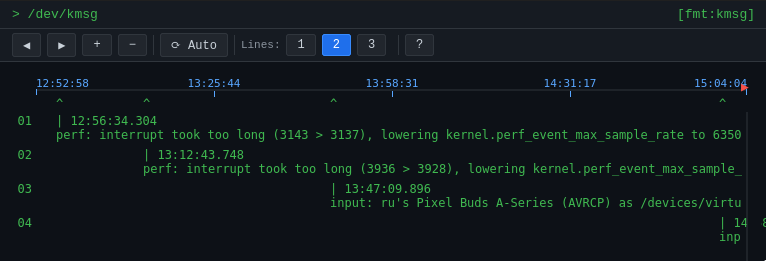
Table of contents
- Features
- Install
- Quick Start
- Examples
- Keyboard
- Web Interface
- Input Formats
- Auto-Detection
- Regex Templates
- Command Line
- Extending
- Testing
- Building and publishing
- References
Features
- Timeline view — events are plotted along a horizontal time axis, so you can see bursts, gaps, and patterns at a glance
- Color-coded severity — errors appear red, warnings yellow, and normal events green, making problems stand out immediately
- Live tailing — follows log files and stdin in real time, refreshing automatically on a configurable interval
- Zoom and scroll — navigate backward/forward in time and zoom the visible window from milliseconds to months
- Auto-detection — samples the first lines of a file and selects the best matching format automatically; the active format is shown in the top-right corner
- Many built-in formats — syslog, journald, Docker, JSON Lines, logfmt, nginx error logs, Python logging, Log4j/Logback, kernel messages, Apache/nginx access logs, PM2, and plain text
- Multiple files — monitor several log files simultaneously on one timeline; messages are labelled by source and individual files can be isolated with a keypress
- Web interface — add
-wto open a browser-based viewer with the same functionality and a dark theme; no extra dependencies required - Automatic permission elevation — prompts to re-run under
sudowhen a file cannot be read due to permissions - Custom regex templates — describe any log format with a named-capture regex so levv can extract time, severity, and message fields
- Filtering — include only lines that match a regex, or exclude lines that match
Install
pip3 install levv
Quick Start
With no arguments, levv opens /var/log/syslog (if it exists):
levv
Point it at any log file:
levv /path/to/app.log
levv -i /path/to/app.log
Monitor multiple files at once:
levv /var/log/syslog /var/log/auth.log
levv -i /var/log/syslog,/var/log/auth.log
Pipe data directly into levv:
tail -f /path/to/app.log | levv -i -
List all supported input formats:
levv --listformats
Examples
Kernel messages
levv -i /dev/kmsg -I kmsg
Syslog
levv -i /var/log/syslog
Apache or nginx access logs
levv -i /var/log/apache2/access.log -I www
levv -i /var/log/nginx/access.log   -I www
nginx error log
levv -i /var/log/nginx/error.log -I nginx-error
systemd journal
journalctl -f | levv -i -
journalctl --output=short-iso -f | levv -i - -I journald
Docker container logs
docker logs -f mycontainer | levv -i -
JSON Lines / structured logs
levv -i /var/log/myapp/app.log -I json
Go logfmt (Prometheus, Loki, etc.)
levv -i /var/log/myapp/app.log -I logfmt
Python application logs
levv -i /var/log/myapp/app.log -I python
Java / Log4j / Logback
levv -i /var/log/myapp/app.log -I log4j
Pipe from stdin
echo "Hello World!" | levv -i -
tail -f /path/to/some/file.log | levv -i -
Show only errors in the last 30 minutes
levv -i app.log -f 'error|ERROR' -r 1800
Hide noisy health-check lines
levv -i /var/log/nginx/access.log -I www -x 'GET /health'
Parse a custom log format with a regex template
levv -i app.log -T '(?P<time>[^ ]+) (?P<sev>\w+) (?P<msg>.*)'
Monitor multiple files together
levv /var/log/syslog /var/log/auth.log /var/log/kern.log
levv -i /var/log/syslog,/var/log/auth.log
Multiple files with per-file formats
levv -i app.log,access.log -I json,www
Write a normalised copy of the log to a file
levv -i app.log -o normalised.log
Open in a browser instead of the terminal
levv /var/log/syslog -w
levv /dev/kmsg -w 9000
Keyboard
| Key | Action |
|---|---|
LEFT |
Scroll backward in time |
RIGHT |
Scroll forward in time |
UP |
Zoom in (shrink the visible time window) |
DOWN |
Zoom out (expand the visible time window) |
PgUp |
Scroll event rows up |
PgDn |
Scroll event rows down |
s |
Resume auto-scroll (tracks current time) |
1–9 |
Single file: set auto-scroll anchor (10 %–90 % of screen width) |
1–9 |
Multiple files: show only messages from that file; press again to show all |
0 |
Multiple files: show all files (clear file filter) |
l |
Cycle lines per event: 1 → 2 → 3 → 1 |
q / Esc |
Quit |
Web Interface
Add -w (or --web) to any command to start an HTTP server and open a
browser-based viewer instead of the terminal UI. Press Ctrl+C in the
terminal to stop the server.
levv /var/log/syslog -w            # default port 8000
levv /dev/kmsg -w 9000             # custom port
levv app.log access.log -w         # multiple files
The browser interface mirrors the terminal UI: same timeline, same color coding, same zoom/scroll controls.
| Control | Action |
|---|---|
◀ / ▶ buttons |
Scroll backward / forward in time |
+ / − buttons |
Zoom in / out |
⟳ Auto button |
Toggle auto-scroll to current time |
Lines 1 / 2 / 3 buttons |
Lines per event |
| File buttons | Filter by source file (multi-file only) |
| Mouse wheel | Zoom in / out |
| Click & drag | Scroll timeline |
| Scrollbar (right edge) | Scroll event rows up / down |
PgUp / PgDn |
Scroll event rows up / down |
s |
Resume auto-scroll |
l |
Cycle lines per event |
h |
Toggle help overlay |
Input Formats
Pass a format name with -I / --inputformat, or let levv detect it automatically.
The active format is always shown in the top-right corner of the screen as [fmt:name].
When monitoring multiple files with different formats, the label shows [fmt:multi]
unless a single file is selected with a digit key, in which case it shows that file's format.
When using multiple files, -I and -T accept comma-separated values — one per file
in the same order as -i, or a single value applied to all files:
levv -i app.log,access.log -I json,www
levv -i app.log,access.log -I auto        # auto-detect each file independently
Run levv --listformats to see the full list with descriptions.
| Format | Description |
|---|---|
auto |
(default) Auto-detects per line: Unix timestamp → human-readable date → current time |
text |
Plain text — stamps every line with the current time |
date |
Human-readable date/time prefix |
kmsg |
Linux kernel messages from /dev/kmsg |
www |
Apache / nginx Combined Log Format (access logs) |
syslog |
Syslog — RFC 3164 and RFC 5424, including /var/log/syslog |
journald |
systemd journal (journalctl --output=short-iso) |
docker |
Docker log driver output (ISO timestamp + stream + message) |
json |
JSON Lines / NDJSON (zerolog, zap, structlog, pino, GCP, …) |
logfmt |
key=value pairs (Prometheus, Loki, Go services) |
nginx-error |
nginx error log (YYYY/MM/DD HH:MM:SS [level] …) |
python |
Python logging module (basicConfig and common formatters) |
log4j |
Log4j / Logback / Log4net (Java logging frameworks) |
pm2 |
PM2 process manager log format |
time: |
Simple <timestamp>: <message> format |
Auto-Detection
When -I is not specified (or is set to auto), levv samples the first 20 lines
of the file and scores each format using a probe function before reading any events.
The detection strategy is:
- JSON Lines — checked first because it is unambiguous (lines that are valid JSON objects).
- Probe scoring — each non-fallback format returns a confidence value (0–1) for each sampled line. The format with the highest average score wins, provided it matches at least 50 % of the sample.
- Filename hint — the file's extension or basename (e.g.
syslog,access.log,*.json) is used as a tiebreaker when two formats score closely.
The detected (or user-specified) format name is always visible in the top-right corner of the screen so you know what levv is using.
Regex Templates
For log formats not covered by the built-in parsers, supply a named-capture regex
with -T / --inputtemplate. levv looks for three named groups:
| Group name | Description |
|---|---|
time |
Timestamp string or Unix epoch (float). Parsed automatically. |
sev |
Severity — a number (lower = more severe) or a word like error / warn. |
msg |
The message text to display. |
Optional sub-second groups can be added alongside time:
| Group name | Description |
|---|---|
msecs |
Milliseconds to add to time |
usecs |
Microseconds to add to time |
nsecs |
Nanoseconds to add to time |
Unnamed groups 1, 2, 3 are treated as msg, time, sev respectively
if the named groups are absent.
Example — a log that looks like 2024-01-15T10:23:45 ERROR connection refused:
levv -i app.log -T '(?P<time>\S+)\s+(?P<sev>\S+)\s+(?P<msg>.*)'
Built-in templates can also be referenced by name with -I:
| Name | Pattern |
|---|---|
time: |
(?P<time>.*?): (?P<msg>.*) |
pm2 |
(?P<sev>.*?)|.*?|(?P<time>.*?): (?P<msg>.*) |
Command Line
usage: levv [-h] [-i INPUTFILE] [-I INPUTFORMAT] [-s SEPARATOR]
            [-T INPUTTEMPLATE] [-f FILTER] [-x EXCLUDE]
            [-o OUTPUTFILE] [-O OUTPUTFORMAT]
            [-r TIMERANGE] [-t TIME] [-R REFRESH]
            [-a AUTOSCROLL] [-l LINES]
            [-w [PORT]]
            [-m MAXMSGBUF] [-M MAXFILEREAD]
            [-k] [-D] [--listformats]
            [FILE ...]

Event monitor.

options:
  -h, --help                        show this help message and exit
  --listformats                     list all supported input formats and exit

Input:
  FILE                              One or more log files (space-separated positional arguments)
  -i, --inputfile INPUTFILE         Log file(s), comma-separated; use - for stdin
                                    (default: /var/log/syslog)
  -I, --inputformat INPUTFORMAT     Format(s), comma-separated — one per file or one for all
                                    (default: auto); see --listformats
  -s, --separator SEPARATOR         Record separator; default is CR/LF
  -T, --inputtemplate INPUTTEMPLATE Regex template(s), comma-separated — one per file or one for all
  -f, --filter FILTER               Show only lines matching this regex
  -x, --exclude EXCLUDE             Hide lines matching this regex

Output:
  -o, --outputfile OUTPUTFILE       Append normalised logs to this file
  -O, --outputformat OUTPUTFORMAT   Output data format

Display:
  -r, --timerange TIMERANGE         Visible time window in seconds (default: 600)
  -t, --time TIME                   Starting time
  -R, --refresh REFRESH             File refresh interval in seconds; 0 = no refresh (default: 3)
  -a, --autoscroll AUTOSCROLL       Auto-scroll anchor: 1–100 % of screen width; 0 = disabled (default: 75)
  -l, --lines LINES                 Lines per event: 1, 2, or 3 (default: 2)
  -w, --web [PORT]                  Open browser-based viewer instead of terminal UI;
                                    optional PORT (default: 8000); press Ctrl+C to stop

Advanced:
  -m, --maxmsgbuf MAXMSGBUF         Maximum events to keep in memory (default: 5000)
  -M, --maxfileread MAXFILEREAD     Maximum bytes to read from file; 0 = all (default: 10000)
  -k, --keyboard                    Force keyboard processing even when reading from stdin
  -D, --debug                       Show debug information
Extending
Each input format lives in its own module under levv/formats/. Adding a new
format requires only two steps:
1. Create levv/formats/myformat.py and export these five names:
NAME        = 'myformat'          # used with -I flag
DESCRIPTION = 'My log format'     # shown by --listformats
EXTENSIONS  = ['myformat.log']    # filename hints for auto-detection

def probe(line: str) -> float:
    """Return confidence 0.0–1.0 that *line* belongs to this format."""
    ...

def parse(line: str) -> dict:
    """Return {'time': float, 'sev': int, 'msg': str} or {} on failure."""
    ...
2. Register it in levv/formats/__init__.py:
from . import myformat          # add this import
...
_FORMAT_MODULES = [
    ...
    myformat,                   # add to the list
]
The format is then available via -I myformat, included in --listformats output,
and automatically considered during format detection.
Shared utilities (findDate, calcPriority, parse_time_str) are available in
levv.formats.utils.
Testing
Install pytest if you don't have it already:
pip3 install pytest
Run the full test suite from the project root:
pytest test/
Run a specific test file:
pytest test/test_levv.py    # levv/main.py  — filterLine, calcPriority, getLogTemplate
pytest test/test_bin.py     # bin/levv      — utility functions and parse_line dispatch
pytest test/test_formats.py # levv/formats/ — all format parsers and auto-detection
Run only tests whose name matches a keyword:
pytest test/ -k "json"
pytest test/ -k "probe or detect"
Add -v for verbose output or --tb=short for shorter failure tracebacks:
pytest test/ -v --tb=short
Building and publishing
1. Install the build tools (once):
pip3 install build twine
2. Bump the version in levv/PROJECT.txt — PyPI rejects uploads for a version that already exists.
3. Build the package:
python3 -m build
This creates a dist/ folder containing a .tar.gz (source distribution) and a .whl (wheel).
4. Upload to PyPI:
twine upload dist/*
Twine will prompt for your PyPI username and password. The recommended approach is to use an API token: enter __token__ as the username and your token as the password.
Optional — test the upload first using TestPyPI before publishing publicly:
twine upload --repository testpypi dist/*
Optional — save credentials to avoid being prompted each time by creating ~/.pypirc:
[pypi]
username = __token__
password = pypi-your-token-here
References
Release history Release notifications | RSS feed


Download files
Download the file for your platform. If you're not sure which to choose, learn more about installing packages.
Source Distribution
Built Distribution
Filter files by name, interpreter, ABI, and platform.
If you're not sure about the file name format, learn more about wheel file names.
Copy a direct link to the current filters
File details
Details for the file levv-1.0.0.tar.gz.
File metadata
- Download URL: levv-1.0.0.tar.gz
- Upload date:
- Size: 34.3 kB
- Tags: Source
- Uploaded using Trusted Publishing? No
- Uploaded via: twine/6.1.0 CPython/3.13.11
File hashes
| Algorithm | Hash digest | |
|---|---|---|
| SHA256 |
69d57c536f5d0ff8deac41f36505dbb09d79e10177ac5a985bc13f438fa8485b
|
|
| MD5 |
30177b481371eb2537ebe86f5536484a
|
|
| BLAKE2b-256 |
7ef8afcc5bd8d5c5180d979127196f02323a126ac3407cc0f85742214c3a8955
|
File details
Details for the file levv-1.0.0-py3-none-any.whl.
File metadata
- Download URL: levv-1.0.0-py3-none-any.whl
- Upload date:
- Size: 22.1 kB
- Tags: Python 3
- Uploaded using Trusted Publishing? No
- Uploaded via: twine/6.1.0 CPython/3.13.11
File hashes
| Algorithm | Hash digest | |
|---|---|---|
| SHA256 |
14f4a208fc90309e7f6bfd05ba9071d726bfe0f683a6a984f275d3f41c594c52
|
|
| MD5 |
78167c12b5f9e4acb8206d8eb7a23b86
|
|
| BLAKE2b-256 |
47a4a3927f3dc761d57a67f84125837322ab8c5599d500ad0a51909e4847641a
|






