
Lexmark MX710 (and compatible models) EWS security auditor & hardening automation (Basic Security + disable HTTP) via Playwright.

Project description
Lexmark Security Auditor (EWS)



Enterprise-grade security auditing and hardening tool for Lexmark MX710 (and compatible models) via Embedded Web Server (EWS).
Built with Playwright + Python, this tool enables controlled, automated security enforcement at scale.
Overview
The Lexmark Security Auditor was developed to:
-
Audit administrative exposure on Lexmark printers
-
Enforce Basic Security (username/password protection)
-
Disable insecure services (e.g., TCP 80 – HTTP)
-
Operate at scale across multiple devices
-
Provide CSV/JSON reporting for governance & compliance
Designed with a modular architecture, the tool separates:
-
Authentication logic
-
Port configuration logic
-
Security workflows
-
Runner orchestration
-
CLI interface
Key Features
Security Audit
-
Detects if admin/security pages are:
-
OPEN
-
AUTH required
-
UNKNOWN
-
-
Identifies exposure via:
-
/auth/manageusers.html
-
login redirects
-
HTTP status codes
-
Basic Security Enforcement
Automates:
- Navigate to:
/cgi-bin/dynamic/config/config.html
- Access
Configurações → Segurança → Configuração de segurança
-
Configure:
-
Authentication Type:
UsernamePassword -
Admin ID
-
Password
-
-
Apply configuration
HTTP Hardening (TCP 80 Disable)
-
Authenticates via form-based login
-
Navigates to:
/cgi-bin/dynamic/config/secure/ports.html
- Unchecks
TCP 80 (HTTP)
-
Submits configuration
-
Verifies idempotently
-
Performs logout
✔ Idempotent (safe to run multiple times)
✔ Safe retry logic
✔ Session-aware
Architecture
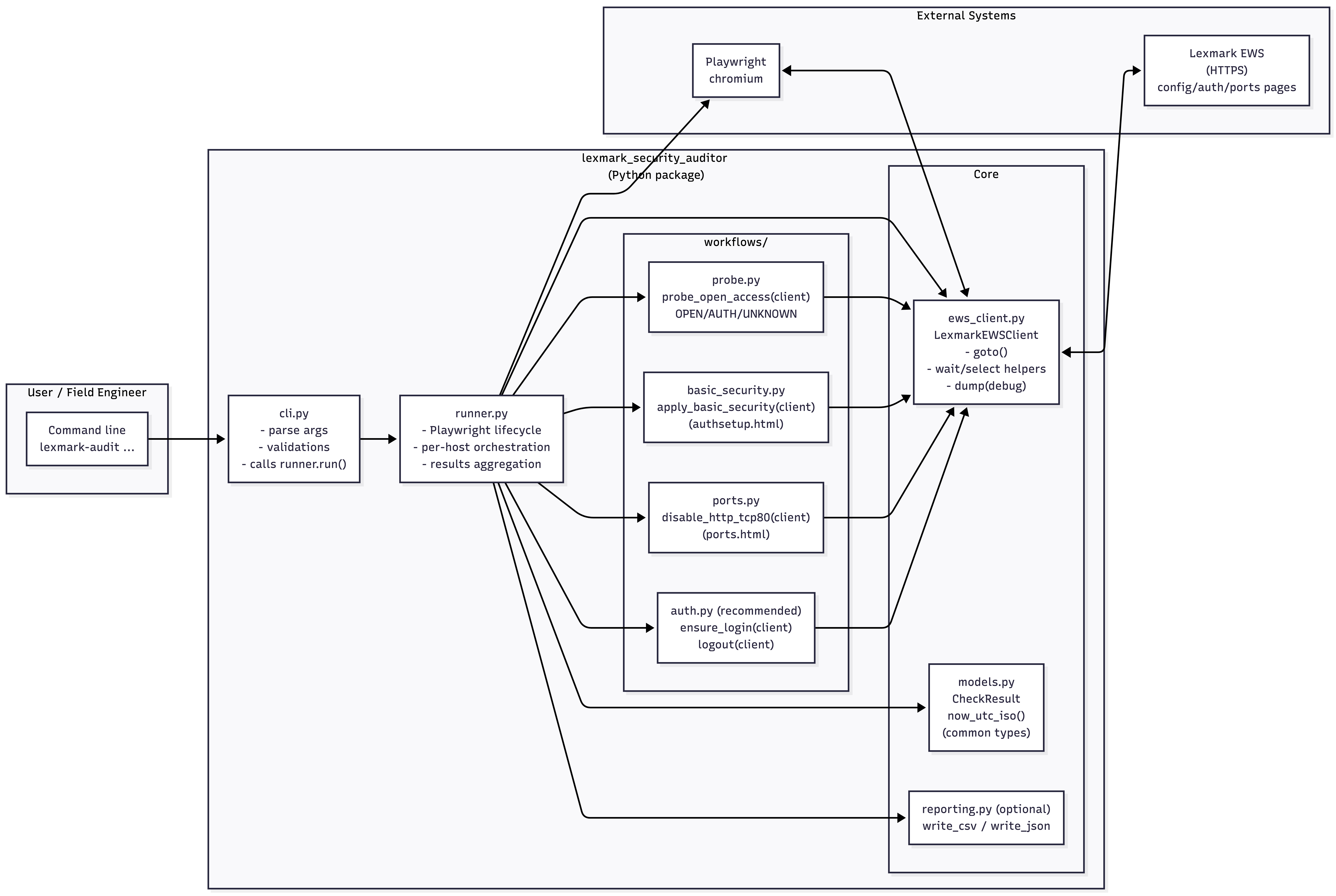
lexmark_security_auditor/
│
├── cli.py
├── runner.py
│
├── models.py
├── ews_client.py
│
└── workflows/
    ├── auth.py
    ├── basic_security.py
    ├── probe.py
    └── ports.py
| Module | Responsibility |
|---|---|
runner.py |
Orchestration & decision logic |
auth.py |
Session handling & login |
ports.py |
TCP 80 disable logic |
basic_security.py |
Admin security enforcement |
probe.py |
Exposure detection |
ews_client.py |
EWS navigation abstraction |
Architecture Diagram
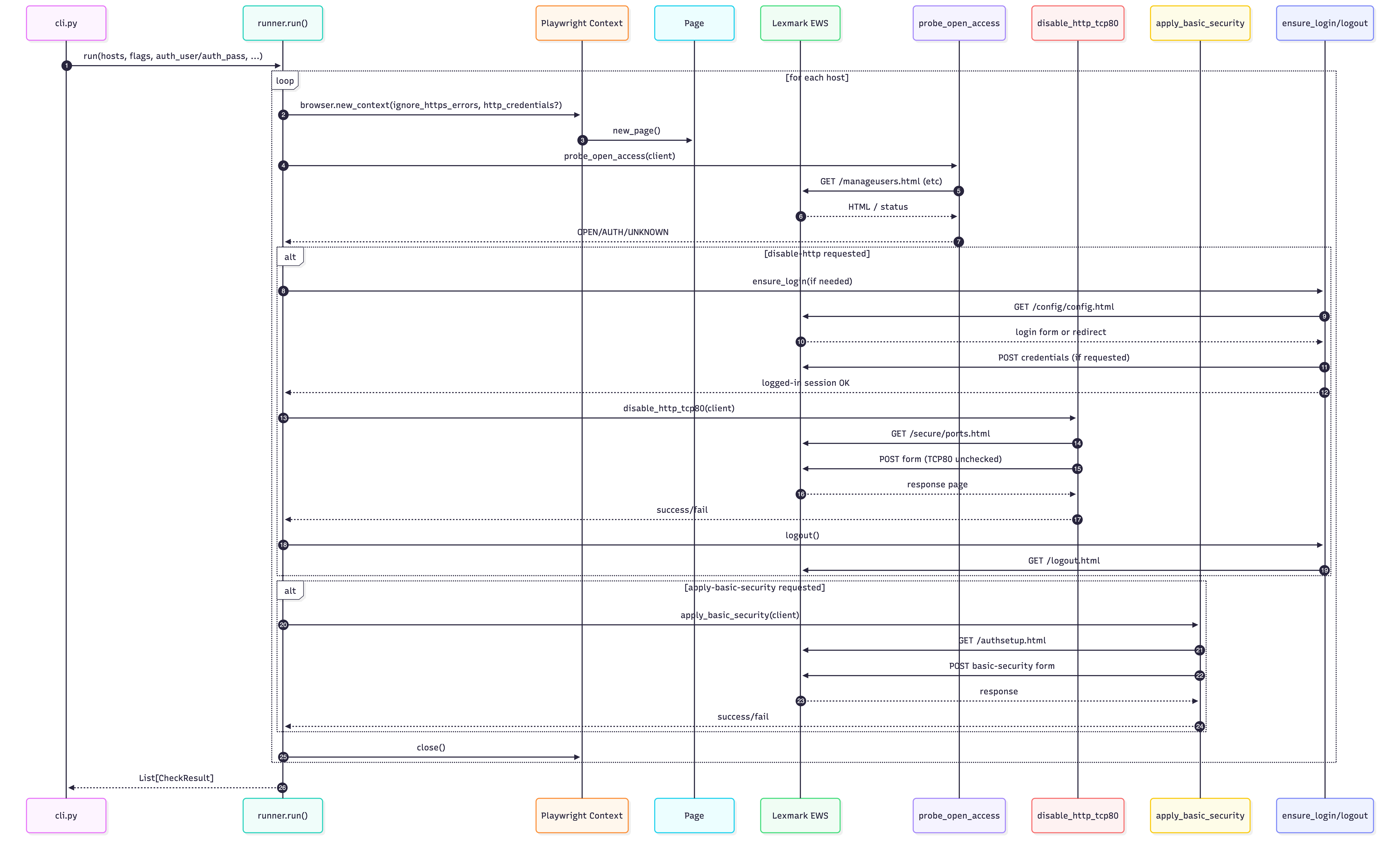
Execution Flow (w/ login + disable)
Installation (Development Mode)
From project root:
pip install -e .
This enables:
lexmark-audit ...
Or:
python -m lexmark_security_auditor.cli ...
Usage Examples
Note: If you're on Powershell replace the \ by `
Audit Only
lexmark-audit \
  --hosts printers.txt \
  --https
Apply Basic Security
lexmark-audit \
  --hosts printers.txt \
  --https \
  --apply-basic-security \
  --new-admin-user <ID do usuário> \
  --new-admin-pass "Senha"
Disable HTTP (Authenticated)
lexmark-audit \
  --hosts printers.txt \
  --https \
  --disable-http \
  --auth-user <ID do usuário> \
  --auth-pass "Senha"
With Reporting
lexmark-audit \
  --hosts printers.txt \
  --https \
  --disable-http \
  --auth-user <ID do usuário> \
  --auth-pass "Senha" \
  --report-csv report.csv
Output Fields (CSV/JSON)
| Field | Description |
|---|---|
| host | Printer IP |
| probe_result | OPEN / AUTH / UNKNOWN |
| evidence | Detection details |
| basic_security_applied | Boolean |
| http_disabled | Boolean |
| status | ok / timeout / error |
| error | Error message |
Security Considerations
-
Credentials are passed via CLI (consider secure vault integration)
-
HTTPS recommended
-
Designed for internal network use
-
Session cookies handled via Playwright context
-
Idempotent operations to avoid configuration drift
Design Principles
-
Modular
-
Idempotent
-
Stateless between hosts
-
Session-aware
-
Explicit authentication
-
Clear separation of concerns
-
Enterprise reporting ready
Requirements
-
Python 3.9+
-
Playwright
-
Chromium (installed via playwright install)
Roadmap (Future Enhancements)
-
Vault integration (HashiCorp)
-
SNMP configuration hardening
-
Parallel host execution
-
Compliance summary dashboard
-
Unit test coverage
-
Docker container image
Disclaimer
This tool is provided "as is", without warranty of any kind, express or implied.
lexmark-security-auditor performs automated configuration changes on network-connected devices (e.g., enabling Basic Security, modifying TCP/IP port access settings). Improper use may result in:
-
Loss of remote access to devices
-
Service disruption
-
Configuration lockout
-
Network communication impact
The author assumes no liability for any damage, data loss, service interruption, or operational impact resulting from the use of this software.
Intended Use
This tool is intended for:
-
Authorized administrators
-
Controlled environments
-
Lab validation prior to production rollout
-
Security hardening under change-management processes
You are solely responsible for:
-
Ensuring proper authorization before accessing devices
-
Validating configuration changes in a test environment
-
Backing up device configurations prior to execution
-
Following your organization's change control policies
Security Responsibility
Disabling TCP 80 (HTTP) and enforcing authentication may restrict access methods. Ensure that:
-
HTTPS (TCP 443) remains enabled
-
Valid administrative credentials are known
-
Recovery procedures are documented
No Vendor Affiliation
This project is not affiliated with, endorsed by, or supported by Lexmark International, Inc.
License
This project is licensed under the MIT License.
See LICENSE for details.
Contributions
Pull requests, issues, and feature requests are welcome!
Author
Bruno Teixeira Network & Security Automation — Angola


Download files
Download the file for your platform. If you're not sure which to choose, learn more about installing packages.
Source Distribution
Built Distribution
Filter files by name, interpreter, ABI, and platform.
If you're not sure about the file name format, learn more about wheel file names.
Copy a direct link to the current filters
File details
Details for the file lexmark_security_auditor-0.1.4.tar.gz.
File metadata
- Download URL: lexmark_security_auditor-0.1.4.tar.gz
- Upload date:
- Size: 14.6 kB
- Tags: Source
- Uploaded using Trusted Publishing? No
- Uploaded via: twine/6.2.0 CPython/3.13.4
File hashes
| Algorithm | Hash digest | |
|---|---|---|
| SHA256 |
8b2edda10c56ade5abcfe2f629aba78506f1227109fb21733da116325eb1fc7e
|
|
| MD5 |
e64b182636e5f1babbddb1f8d7b07234
|
|
| BLAKE2b-256 |
e5e077b2d6f9dc2c62bffca62349317a03eb3dea496949126207c89b3db9e395
|
File details
Details for the file lexmark_security_auditor-0.1.4-py3-none-any.whl.
File metadata
- Download URL: lexmark_security_auditor-0.1.4-py3-none-any.whl
- Upload date:
- Size: 15.7 kB
- Tags: Python 3
- Uploaded using Trusted Publishing? No
- Uploaded via: twine/6.2.0 CPython/3.13.4
File hashes
| Algorithm | Hash digest | |
|---|---|---|
| SHA256 |
64ba5e328e8c9b65cf68dde90dbaa6315d524278a27e0f4a62d4810bfc56b2b5
|
|
| MD5 |
3c065ad0a1645d90d90e288639fd39cb
|
|
| BLAKE2b-256 |
fbdb297a6f8367a92a260cbab76d90edd1dcbc84c9c7c924a808f8ced996c416
|






