
Leya
AI coding assistant which can directly be ported into the terminal and be used to query complex Git repositories
Overview
The Git Coding Assistant is a versatile tool designed to allow you to query and find solutions to code within your git repository. Leveraging the power of Git and OpenAI, it offers functionalities such as cloning repositories, selecting repositories for focused queries, and extracting relevant code snippets and providing you solutions to your queries.
Features
- Repository Cloning: Easily clone GitHub repositories directly from the command line.
- Repository Selection: Select repositories to work with, enabling focused queries and interactions.
- Code Querying: Query repositories for specific code issues or information using natural language queries.
- Function-based Queries: Narrow down queries by specifying function names to focus on.
- Intelligent Answer Generation: Utilize AI to extract and provide intelligent answers to code-related queries.
Usage
Before using Leya, you need to set up your environment variables for the OpenAI API key and Pinecone API key:
Option 1: Export Environment Variables (Linux and macOS)
Open your terminal and export the environment variables using the following commands:
    $ export OPENAI_API_KEY=<your_openai_api_key>
    $ export PINECONE_KEY=<your_pinecone_api_key>
Option 2: Export Environment Variables (Windows)
For Windows users, you can set the environment variables using the following commands in PowerShell
bash
 $ $env:OPENAI_API_KEY="<your_openai_api_key>"
 $ $env:PINECONE_KEY="<your_pinecone_api_key>"
Option 3: Add Environment Variables (Manual)
Alternatively, you can manually add the environment variables through your system settings:
OpenAI API Key: Add a new environment variable named OPENAI_API_KEY with your OpenAI API key as the value. Pinecone API Key: Add a new environment variable named PINECONE_KEY with your Pinecone API key as the value. After setting up the environment variables, Leya will be able to access your API keys for authentication
After Environment Variable setup
- Downloading the package:
$ pip install leya
- Cloning Repositories and uploading repo chunks to pinecone:
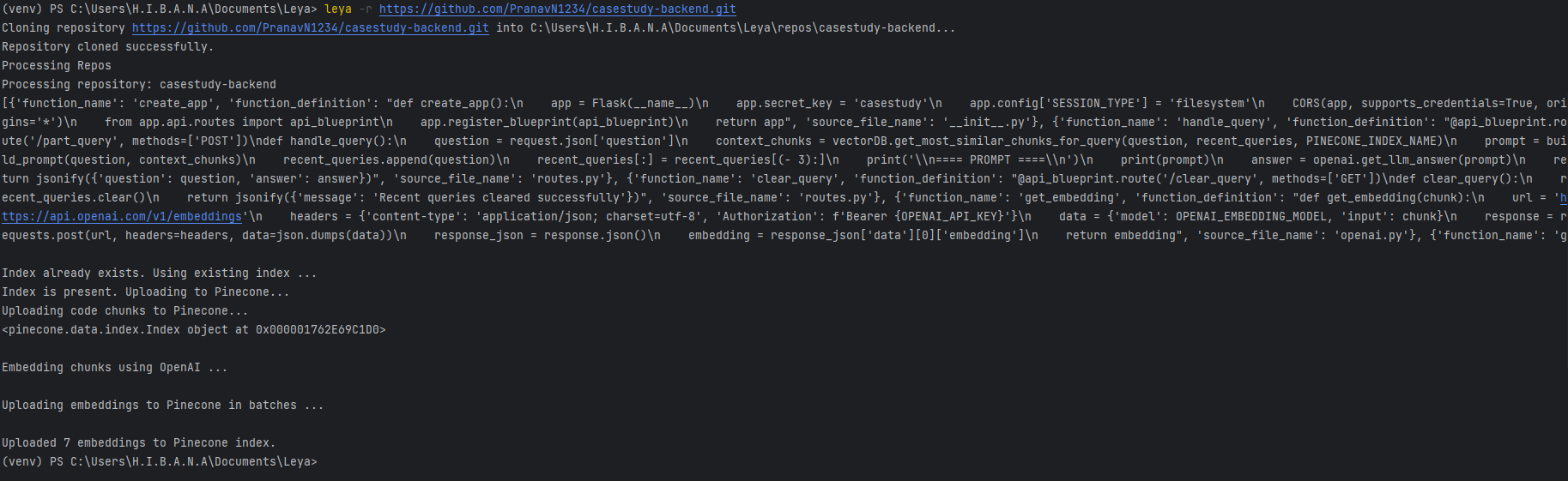
$ leya -r <repository_url>
- Selecting Repositories:
$ leya -s
- Querying Repositories:
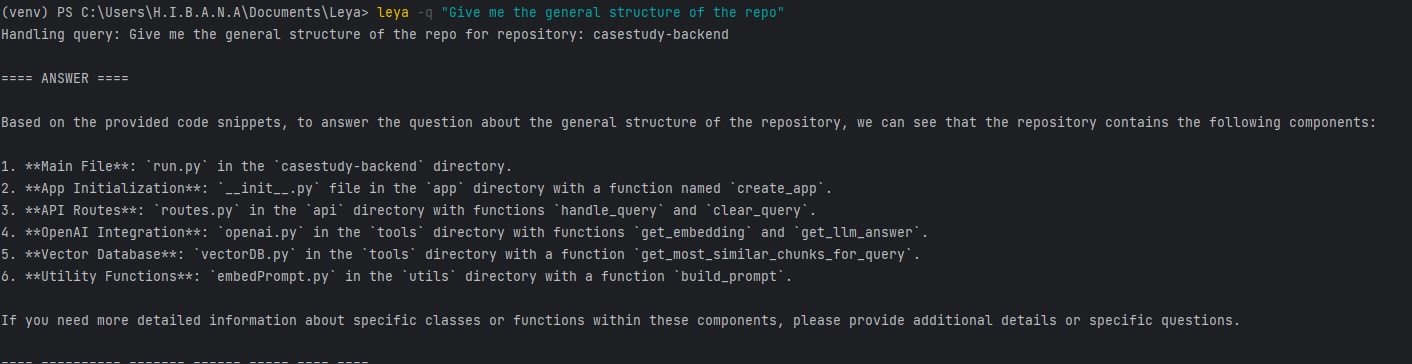
$ leya -q "<query>"
- Optional addition of Function-based Queries:
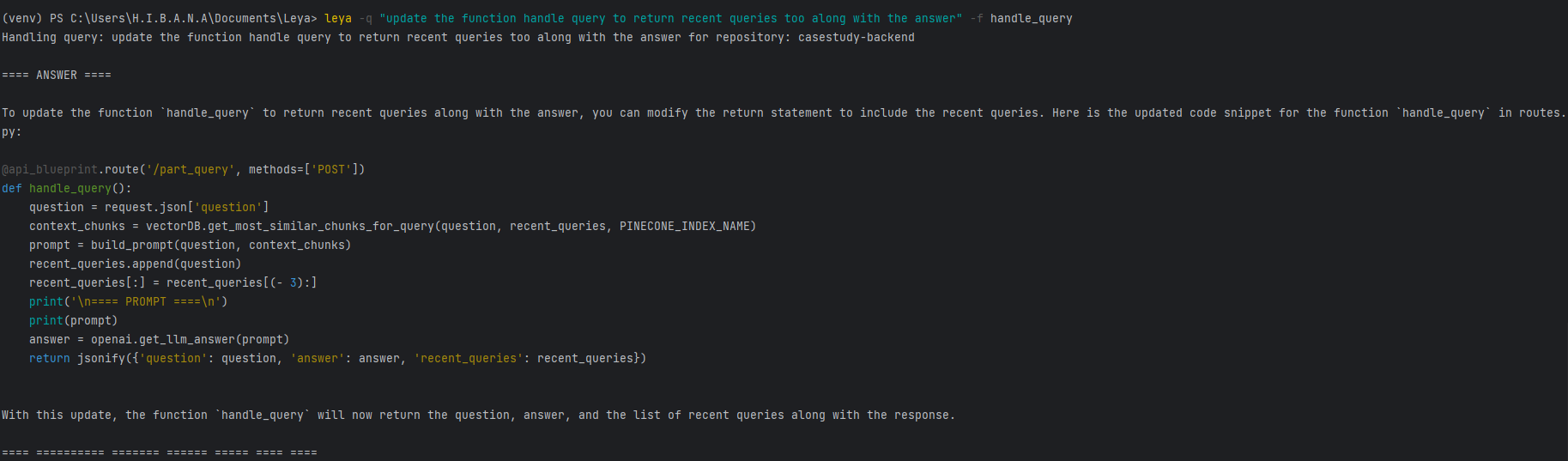
$ leya -q "<query>" -f <function_name_1> <function_name_2> ...
Contributing
Fork the repository. Create a new branch (git checkout -b feature-branch). Make your changes. Commit your changes (git commit -am 'Add new feature'). Push to the branch (git push origin feature-branch). Create a new Pull Request.
Credits
Developed by: PranavN1234
Working
Store repositories
Swap between stored repositories

Sample queries
** Query without functional parameters **
** Query with functions appended to narrow scope of search **
1 maintainer

Metadata
1 maintainer
Release files for leya 0.1.5
For a detailed explanation of source distributions (sdists) and built distributions (wheels), please see the package formats documentation.
Source distribution (sdist)
| File | Size | Uploaded | |
|---|---|---|---|
| leya-0.1.5.tar.gz | 12.2 kB | Details |
Built distribution (wheel)
| File | Interpreter | ABI | Platform | Reset |
|---|---|---|---|---|
| leya-0.1.5-py3-none-any.whl | Python 3 | none | any | Details |
Total release size: 25.8 kB
Release files / leya-0.1.5.tar.gz
| Download URL | leya-0.1.5.tar.gz |
|---|---|
| Size | 12.2 kB |
| Tags | Source |
|
SHA-256 checksum How to use checksums |
49c7ac053ba879f721cbf6ca9afebff372ff9c9d50c69a2930cca432b5abcc97
|
|
BLAKE2b-256 checksum How to use checksums |
b3a0fb2ce900abc31922b506edeefed7999c4427a2767f5283612f9949a36ca1
|
| Upload date | |
|
Uploaded using Trusted Publishing? What is trusted publishing? |
No |
| Uploaded via |
twine/5.0.0 CPython/3.10.10
|
Release files / leya-0.1.5-py3-none-any.whl
| Download URL | leya-0.1.5-py3-none-any.whl |
|---|---|
| Size | 13.6 kB |
| Tags | Python 3 |
|
SHA-256 checksum How to use checksums |
38f55ee83c9354a55721d80b215ba738f1b4622e0cae5565ff28754e75937c2b
|
|
BLAKE2b-256 checksum How to use checksums |
ad522d27dc71e4675d3782eec43beface02f3dfe901b7876fb4a1c3ed14cdb7c
|
| Upload date | |
|
Uploaded using Trusted Publishing? What is trusted publishing? |
No |
| Uploaded via |
twine/5.0.0 CPython/3.10.10
|














